

PCMag is urging Windows users with iPhones to consider replacing iCloud Photos with Microsoft OneDrive for photo backup and cross-device access, arguing in a May 2026 how-to guide that OneDrive offers a smoother Windows experience despite important limits around true two-way photo synchronization. The recommendation lands because it is not really about photography; it is about which ecosystem gets to be the default file system for people who live between Apple hardware and Windows PCs. Apple still owns the iPhone camera roll, but Microsoft has a credible claim on the desktop where many of those photos are ultimately edited, organized, archived, and shared. The result is a small consumer workaround that says something larger about the uneasy truce between iOS and Windows.
For years, Apple’s answer to iPhone photo management has been simple: turn on iCloud Photos and let the library follow you. That works beautifully if the rest of your life is also Apple-shaped. An iPhone, an iPad, and a Mac can make photo sync feel almost invisible, with edits, deletes, albums, and metadata moving around in the background like plumbing.
Windows is where the illusion breaks. Apple does offer iCloud for Windows, and Microsoft’s Photos app can surface iCloud media, but the experience has rarely felt like a first-class citizen of either ecosystem. It is good enough to check a box, not good enough to erase the feeling that a Windows PC is being tolerated rather than embraced.
That is why PCMag’s advice is interesting. The article does not claim that OneDrive is a perfect replacement for iCloud Photos. It claims something more pragmatic: if your primary computer is a Windows PC, Microsoft’s cloud may be the less annoying place to put your iPhone pictures.
That distinction matters. OneDrive is not trying to become Apple Photos. It is trying to be a file-backed cloud library that Windows understands natively. For a lot of users, especially those who think in folders rather than Apple’s library abstractions, that may be enough.
That is not the richest photo-management model in the world, but it is legible. File Explorer can see it. OneDrive can make it cloud-only or local. Windows can index it, open it, back it up, and move it like any other folder.
This is where Microsoft’s boringness becomes a feature. Apple’s Photos library is a database-driven experience wrapped in a consumer interface. OneDrive is a synchronization service wrapped around files and folders. The latter is less elegant, but it is easier to reason about when something goes wrong.
For Windows users, reasoning about where the file actually is remains a survival skill. Is the photo in the cloud, on the device, in a local cache, or only visible through a shell extension? OneDrive’s Files On-Demand model has its own confusions, but the user can still right-click a folder and choose to keep it on the device. That is a very Windows answer to a very Windows anxiety.
The problem is that none of it feels central to Apple’s strategy. iCloud Photos is built around Apple’s devices first, Apple’s app model second, and everything else afterward. Windows support is real, but it is not the place where Apple’s photo experience is defined.
That shows up in user perception. When a Windows user complains that iCloud Photos on PC is clunky, slow, opaque, or fragile, the complaint is not merely about a bad app. It is about being outside the circle. The iPhone is the camera, but Windows is treated as a satellite.
Microsoft’s pitch exploits that gap. OneDrive may not understand Apple’s photo semantics as deeply as iCloud does, but it understands Windows. If the final destination is a PC, a NAS-adjacent archive, an editing workflow, or a folder hierarchy, that may matter more than perfect Apple-native sync.
That means users should be careful with words like “sync.” If you delete, rename, or edit a file in OneDrive on Windows, you should not assume the iPhone’s native Photos library will mirror that change. Apple’s photo library remains Apple’s domain, and third-party cloud apps operate within limits set by iOS permissions, background execution, and Apple’s data model.
PCMag’s guide acknowledges this caveat directly. The simple OneDrive approach is best understood as cloud backup plus cross-device access. It is excellent if the goal is to get iPhone photos onto a Windows PC without babysitting cables. It is less satisfying if the goal is one canonical photo library whose edits and deletions propagate perfectly everywhere.
That distinction is not pedantry. It determines whether a user ends up relieved or furious. A backup that preserves copies is behaving correctly when it does not delete the originals. A sync engine that fails to propagate deletes is broken. OneDrive on iPhone is much closer to the first category.
This is almost comically old-fashioned in 2026. Two File Explorer windows. A cable. Manually named folders such as a date plus an event. A renaming utility. A sync operation through Apple’s Windows device-management software.
And yet that is precisely why some users will like it. The modern cloud-photo library hides decisions until it fails. The manual folder workflow forces decisions up front: what belongs in the archive, how it should be named, where it should live, and what should be copied back to the phone.
For archivists, family historians, hobby photographers, and anyone who has been burned by opaque sync states, that tradeoff is not absurd. It turns photos back into files. It also turns the user back into the librarian.
That means the real comparison is not free iCloud versus free OneDrive. It is paid iCloud storage versus Microsoft 365 storage. PCMag points to Microsoft 365 Basic with 100GB of OneDrive space and Microsoft 365 Personal with 1TB, while broader family and premium bundles expand the equation.
For many Windows users, that bundle is the decisive factor. If you already pay for Microsoft 365, OneDrive’s photo backup feels like found money. The storage is sitting there, the Windows client is already installed, and the Microsoft account is already part of your PC life.
If you do not already live in Microsoft 365, the case is weaker. Apple’s paid iCloud tiers may still be simpler for households centered on iPhones, iPads, and Macs. The OneDrive recommendation is strongest for the hybrid user: Apple phone, Windows computer, Microsoft subscription.
Apple’s trust pitch is continuity. Your photos belong with your Apple ID, near the devices that created them. Microsoft’s trust pitch is productivity and access. Your files belong in the same cloud that already holds your documents, desktop, Office files, and Windows backups.
Neither pitch is neutral. Apple would prefer the Windows PC to be an accessory to the iPhone. Microsoft would prefer the iPhone to be an input device for Microsoft 365. The user’s photos are the prize because they are both emotionally valuable and practically sticky.
Once a photo archive moves into a cloud, leaving becomes labor. Downloading originals, preserving metadata, checking duplicates, reconciling edits, and rebuilding albums are all chores. That is why these “how to back up your iPhone photos” guides matter more than they appear to. They are onboarding documents for ecosystems.
That may be a good trade. Microsoft’s Windows integration is better, and OneDrive is deeply woven into File Explorer and Windows setup. For people who use Windows daily, that integration can reduce friction every time they sit down at the PC.
But the risk profile changes. A Microsoft account problem can become a photo-access problem. A storage-plan change can become a household archive problem. A mistaken assumption about Camera Backup can create duplicates, gaps, or misplaced confidence.
The wise approach is to treat OneDrive as one layer, not the entire safety net. Important photos deserve more than one copy and more than one vendor. A local external drive, a NAS, or a periodic offline export may sound dull, but dull is exactly what you want from an archive.
Apple Devices is cleaner, but it does not eliminate the underlying split. Syncing a folder from a Windows PC to an iPhone still produces an Apple-managed view on the phone, with Apple’s terminology and constraints. PCMag notes the almost comic result that photos synced from Windows can appear under a “From My Mac” section, a phrase that tells you exactly whose worldview designed the feature.
That is not a fatal flaw. Most users can live with a mislabeled section if the photos arrive correctly. But it is a reminder that Apple’s software vocabulary still assumes the Mac is the natural counterpart to the iPhone.
For WindowsForum readers, the annoyance is familiar. Windows support from Apple often works just well enough to avoid total abandonment, while rarely feeling like a place where Apple wants to compete on polish. Microsoft, for all its own account nags and cloud upsells, at least has every incentive to make OneDrive feel native on Windows.
The second wants authoritative organization. This user deletes bad shots, renames files, edits images, sorts by event, and expects the archive to reflect those decisions. For that person, OneDrive’s automatic iPhone upload is only the first step, and perhaps not the right step at all.
The manual File Explorer workflow serves the second audience. It treats Windows as the source of truth and the iPhone as a device that can receive curated albums. That is closer to the old digital-camera era, where photos were imported, organized, and optionally copied to devices.
The cloud era promised to make that work disappear. In practice, it often moved the work into troubleshooting. Users still have to decide what matters; they just make those decisions inside subscription interfaces, hidden sync engines, and vendor-specific libraries.
That gives Windows users a native landing zone for iPhone media. If your photos arrive through OneDrive, the Photos app can be the front door while File Explorer remains the basement access hatch. That pairing is stronger than Apple’s iCloud-for-Windows story because it does not depend on Apple making Windows feel like home.
Still, Microsoft should not overclaim. Windows Photos is not Apple Photos. It does not replicate the full iOS/macOS library model, and it will not magically preserve every Apple-specific behavior. Live Photos, edits, albums, shared-library logic, and metadata expectations can still become messy at the borders.
The practical answer is to decide what you value most. If you value Apple-native continuity, iCloud remains the natural choice. If you value Windows-native file access, OneDrive becomes compelling. If you value both equally, prepare for compromise.
This is where ordinary users often get surprised. A photo may “back up” successfully but lose the organizational meaning it had inside Apple Photos. A renamed file may be easier to browse in Windows but less meaningful inside the iPhone’s native library. A folder hierarchy may be logical on a PC but only partially reflected in a mobile app.
The PCMag workflow leans into explicit folder names and sequential filenames as a defense against that uncertainty. That is sensible. Human-readable naming is old technology, but it survives migrations better than many cloud-only organizational schemes.
For serious collections, users should test before committing. Upload a small sample, edit it, delete it, rename it, download it, sync it back, and see what survives. The right workflow is the one whose failure modes you understand.
Windows users with iPhones are especially exposed to this shift. Their hardware choices span ecosystems, so every cloud decision becomes a small act of allegiance. Use iCloud, and Windows is downstream. Use OneDrive, and the iPhone is the capture device feeding Microsoft’s file world.
That does not mean users should be cynical about every cloud feature. Automatic photo backup is genuinely useful. Losing a phone should not mean losing a decade of images. But convenience now arrives bundled with lock-in, account dependency, and recurring fees.
The mature response is not to reject the cloud. It is to refuse to mistake cloud convenience for a backup plan, a metadata strategy, or a permanent archive. OneDrive can be excellent and still need a second copy somewhere else.
It is less defensible as a universal prescription. Families sharing iCloud storage, users with Macs, people who depend on Apple Photos albums and edits, and anyone who wants fully Apple-native behavior may find iCloud easier despite the Windows pain. The best cloud is often the one that matches the device where you do the most photo work.
The sharpest insight is that there may not be a single best tool. OneDrive can handle Windows-friendly backup and access. iCloud can preserve Apple-native continuity. A local archive can provide resilience outside both companies.
That layered approach is less elegant than a one-cloud answer, but it better matches reality. Hybrid users live in overlapping systems, and pretending otherwise usually creates disappointment.
The future of personal photos will not be decided by which app has the prettiest gallery view, but by which ecosystem can make a messy, multi-device life feel recoverable when something breaks. For Windows users carrying iPhones, OneDrive’s advantage is not that it understands Apple better than Apple does; it is that it understands the PC as the place where people still want their files to make sense.
 The iPhone Camera Roll Has Become a Windows Problem
For years, Apple’s answer to iPhone photo management has been simple: turn on iCloud Photos and let the library follow you. That works beautifully if the rest of your life is also Apple-shaped. An iPhone, an iPad, and a Mac can make photo sync feel almost invisible, with edits, deletes, albums, and metadata moving around in the background like plumbing.Windows is where the illusion breaks. Apple does offer iCloud for Windows, and Microsoft’s Photos app can surface iCloud media, but the experience has rarely felt like a first-class citizen of either ecosystem. It is good enough to check a box, not good enough to erase the feeling that a Windows PC is being tolerated rather than embraced.
That is why PCMag’s advice is interesting. The article does not claim that OneDrive is a perfect replacement for iCloud Photos. It claims something more pragmatic: if your primary computer is a Windows PC, Microsoft’s cloud may be the less annoying place to put your iPhone pictures.
That distinction matters. OneDrive is not trying to become Apple Photos. It is trying to be a file-backed cloud library that Windows understands natively. For a lot of users, especially those who think in folders rather than Apple’s library abstractions, that may be enough.
Microsoft Wins by Treating Photos Like Files
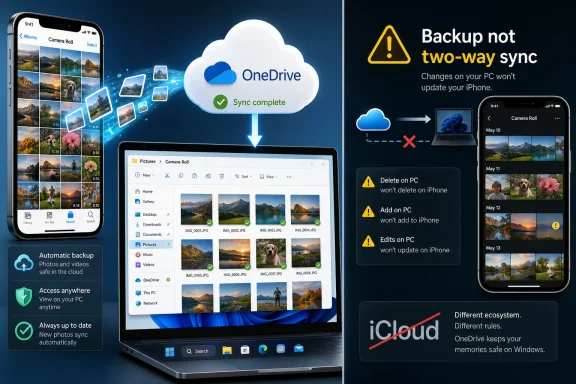
The central appeal of OneDrive is not glamorous. You install the OneDrive app on the iPhone, enable Camera Backup, grant full photo-library access, and the phone begins uploading images and videos into Microsoft’s cloud. On the Windows side, those files appear inside the familiar OneDrive tree, generally under Pictures and Camera Roll, organized by date.That is not the richest photo-management model in the world, but it is legible. File Explorer can see it. OneDrive can make it cloud-only or local. Windows can index it, open it, back it up, and move it like any other folder.
This is where Microsoft’s boringness becomes a feature. Apple’s Photos library is a database-driven experience wrapped in a consumer interface. OneDrive is a synchronization service wrapped around files and folders. The latter is less elegant, but it is easier to reason about when something goes wrong.
For Windows users, reasoning about where the file actually is remains a survival skill. Is the photo in the cloud, on the device, in a local cache, or only visible through a shell extension? OneDrive’s Files On-Demand model has its own confusions, but the user can still right-click a folder and choose to keep it on the device. That is a very Windows answer to a very Windows anxiety.
Apple’s Windows Story Still Feels Like a Courtesy Port
Apple’s problem is not that iCloud for Windows does nothing. It can download and view iCloud Photos, integrate with File Explorer, and work with the Microsoft Photos app. Apple has also improved behavior over time, including tighter delete handling in newer versions of iCloud for Windows.The problem is that none of it feels central to Apple’s strategy. iCloud Photos is built around Apple’s devices first, Apple’s app model second, and everything else afterward. Windows support is real, but it is not the place where Apple’s photo experience is defined.
That shows up in user perception. When a Windows user complains that iCloud Photos on PC is clunky, slow, opaque, or fragile, the complaint is not merely about a bad app. It is about being outside the circle. The iPhone is the camera, but Windows is treated as a satellite.
Microsoft’s pitch exploits that gap. OneDrive may not understand Apple’s photo semantics as deeply as iCloud does, but it understands Windows. If the final destination is a PC, a NAS-adjacent archive, an editing workflow, or a folder hierarchy, that may matter more than perfect Apple-native sync.
The Catch Is That Backup Is Not Sync
The biggest danger in the OneDrive recommendation is semantic. OneDrive’s iPhone Camera Backup is a backup mechanism, not a perfect clone of iCloud Photos. It uploads camera roll media to OneDrive so that those files are available elsewhere. It does not turn OneDrive into a fully bidirectional iPhone Photos library.That means users should be careful with words like “sync.” If you delete, rename, or edit a file in OneDrive on Windows, you should not assume the iPhone’s native Photos library will mirror that change. Apple’s photo library remains Apple’s domain, and third-party cloud apps operate within limits set by iOS permissions, background execution, and Apple’s data model.
PCMag’s guide acknowledges this caveat directly. The simple OneDrive approach is best understood as cloud backup plus cross-device access. It is excellent if the goal is to get iPhone photos onto a Windows PC without babysitting cables. It is less satisfying if the goal is one canonical photo library whose edits and deletions propagate perfectly everywhere.
That distinction is not pedantry. It determines whether a user ends up relieved or furious. A backup that preserves copies is behaving correctly when it does not delete the originals. A sync engine that fails to propagate deletes is broken. OneDrive on iPhone is much closer to the first category.
The Manual Workaround Is Powerful Because It Is Old-Fashioned
PCMag’s more elaborate solution is revealing: skip the iPhone OneDrive camera-upload path, build your own folder structure in Windows, move photos manually from the iPhone into those folders, and then use iTunes for Windows or Apple Devices to sync the selected folder back to the iPhone. It is cumbersome, but it gives the user control over filenames, folder names, edits, and deletions.This is almost comically old-fashioned in 2026. Two File Explorer windows. A cable. Manually named folders such as a date plus an event. A renaming utility. A sync operation through Apple’s Windows device-management software.
And yet that is precisely why some users will like it. The modern cloud-photo library hides decisions until it fails. The manual folder workflow forces decisions up front: what belongs in the archive, how it should be named, where it should live, and what should be copied back to the phone.
For archivists, family historians, hobby photographers, and anyone who has been burned by opaque sync states, that tradeoff is not absurd. It turns photos back into files. It also turns the user back into the librarian.
Microsoft 365 Makes the Recommendation Less Free Than It Sounds
Both Apple and Microsoft offer a small free tier of cloud storage, and both make that tier feel inadequate very quickly once photos and videos enter the picture. Five gigabytes is not a photo strategy in the age of 4K video, Live Photos, burst shooting, screenshots, screen recordings, and years of accumulated memes.That means the real comparison is not free iCloud versus free OneDrive. It is paid iCloud storage versus Microsoft 365 storage. PCMag points to Microsoft 365 Basic with 100GB of OneDrive space and Microsoft 365 Personal with 1TB, while broader family and premium bundles expand the equation.
For many Windows users, that bundle is the decisive factor. If you already pay for Microsoft 365, OneDrive’s photo backup feels like found money. The storage is sitting there, the Windows client is already installed, and the Microsoft account is already part of your PC life.
If you do not already live in Microsoft 365, the case is weaker. Apple’s paid iCloud tiers may still be simpler for households centered on iPhones, iPads, and Macs. The OneDrive recommendation is strongest for the hybrid user: Apple phone, Windows computer, Microsoft subscription.
The Real Contest Is Default Trust
Cloud storage decisions are not just about features. They are about trust in defaults. Users want to know which company will be there when the laptop dies, the phone is replaced, the account is locked, or the child’s graduation photos need to be found six years later.Apple’s trust pitch is continuity. Your photos belong with your Apple ID, near the devices that created them. Microsoft’s trust pitch is productivity and access. Your files belong in the same cloud that already holds your documents, desktop, Office files, and Windows backups.
Neither pitch is neutral. Apple would prefer the Windows PC to be an accessory to the iPhone. Microsoft would prefer the iPhone to be an input device for Microsoft 365. The user’s photos are the prize because they are both emotionally valuable and practically sticky.
Once a photo archive moves into a cloud, leaving becomes labor. Downloading originals, preserving metadata, checking duplicates, reconciling edits, and rebuilding albums are all chores. That is why these “how to back up your iPhone photos” guides matter more than they appear to. They are onboarding documents for ecosystems.
Windows Users Should Not Confuse Convenience With Independence
OneDrive can make an iPhone feel less alien to Windows, but it does not liberate the user from platform dependence. It shifts the dependency. Instead of relying primarily on Apple’s iCloud plumbing, the user relies on Microsoft’s storage quota, OneDrive client behavior, Microsoft account health, and subscription economics.That may be a good trade. Microsoft’s Windows integration is better, and OneDrive is deeply woven into File Explorer and Windows setup. For people who use Windows daily, that integration can reduce friction every time they sit down at the PC.
But the risk profile changes. A Microsoft account problem can become a photo-access problem. A storage-plan change can become a household archive problem. A mistaken assumption about Camera Backup can create duplicates, gaps, or misplaced confidence.
The wise approach is to treat OneDrive as one layer, not the entire safety net. Important photos deserve more than one copy and more than one vendor. A local external drive, a NAS, or a periodic offline export may sound dull, but dull is exactly what you want from an archive.
Apple Devices for Windows Is Better, but It Does Not Solve the Philosophy Gap
Apple has been replacing pieces of the aging iTunes-for-Windows experience with separate apps, including Apple Devices for device management. That shift is welcome. iTunes on Windows became a museum of accumulated responsibilities, and photo sync was only one of many tasks stuffed into an application never designed for the modern iPhone era.Apple Devices is cleaner, but it does not eliminate the underlying split. Syncing a folder from a Windows PC to an iPhone still produces an Apple-managed view on the phone, with Apple’s terminology and constraints. PCMag notes the almost comic result that photos synced from Windows can appear under a “From My Mac” section, a phrase that tells you exactly whose worldview designed the feature.
That is not a fatal flaw. Most users can live with a mislabeled section if the photos arrive correctly. But it is a reminder that Apple’s software vocabulary still assumes the Mac is the natural counterpart to the iPhone.
For WindowsForum readers, the annoyance is familiar. Windows support from Apple often works just well enough to avoid total abandonment, while rarely feeling like a place where Apple wants to compete on polish. Microsoft, for all its own account nags and cloud upsells, at least has every incentive to make OneDrive feel native on Windows.
The Best Photo Workflow Depends on Whether You Edit or Archive
There are really two audiences hiding inside PCMag’s recommendation. The first wants automatic backup. This user takes photos on an iPhone and wants them to appear on a Windows PC with minimal friction. For that person, OneDrive Camera Backup is the cleanest answer.The second wants authoritative organization. This user deletes bad shots, renames files, edits images, sorts by event, and expects the archive to reflect those decisions. For that person, OneDrive’s automatic iPhone upload is only the first step, and perhaps not the right step at all.
The manual File Explorer workflow serves the second audience. It treats Windows as the source of truth and the iPhone as a device that can receive curated albums. That is closer to the old digital-camera era, where photos were imported, organized, and optionally copied to devices.
The cloud era promised to make that work disappear. In practice, it often moved the work into troubleshooting. Users still have to decide what matters; they just make those decisions inside subscription interfaces, hidden sync engines, and vendor-specific libraries.
The Windows Photos App Is Now Part of the Argument
Microsoft’s Photos app has become more relevant to this discussion than it used to be. It is no longer just a lightweight image viewer. It can import, organize, edit, and connect to cloud-backed libraries, including OneDrive and iCloud integrations.That gives Windows users a native landing zone for iPhone media. If your photos arrive through OneDrive, the Photos app can be the front door while File Explorer remains the basement access hatch. That pairing is stronger than Apple’s iCloud-for-Windows story because it does not depend on Apple making Windows feel like home.
Still, Microsoft should not overclaim. Windows Photos is not Apple Photos. It does not replicate the full iOS/macOS library model, and it will not magically preserve every Apple-specific behavior. Live Photos, edits, albums, shared-library logic, and metadata expectations can still become messy at the borders.
The practical answer is to decide what you value most. If you value Apple-native continuity, iCloud remains the natural choice. If you value Windows-native file access, OneDrive becomes compelling. If you value both equally, prepare for compromise.
The Hidden Cost Is Metadata Anxiety
Photo libraries are not just pictures. They are dates, locations, edits, favorites, albums, people, captions, file formats, and sometimes proprietary enhancements. Moving between ecosystems can preserve the image while degrading the context around it.This is where ordinary users often get surprised. A photo may “back up” successfully but lose the organizational meaning it had inside Apple Photos. A renamed file may be easier to browse in Windows but less meaningful inside the iPhone’s native library. A folder hierarchy may be logical on a PC but only partially reflected in a mobile app.
The PCMag workflow leans into explicit folder names and sequential filenames as a defense against that uncertainty. That is sensible. Human-readable naming is old technology, but it survives migrations better than many cloud-only organizational schemes.
For serious collections, users should test before committing. Upload a small sample, edit it, delete it, rename it, download it, sync it back, and see what survives. The right workflow is the one whose failure modes you understand.
The Subscription Bundle Is Becoming the New Operating System
One of the quiet truths behind this debate is that the operating system is no longer the whole platform. The subscription bundle increasingly defines the daily experience. Microsoft 365, iCloud+, Google One, and similar services now decide where files live, how storage is rationed, and which device feels “primary.”Windows users with iPhones are especially exposed to this shift. Their hardware choices span ecosystems, so every cloud decision becomes a small act of allegiance. Use iCloud, and Windows is downstream. Use OneDrive, and the iPhone is the capture device feeding Microsoft’s file world.
That does not mean users should be cynical about every cloud feature. Automatic photo backup is genuinely useful. Losing a phone should not mean losing a decade of images. But convenience now arrives bundled with lock-in, account dependency, and recurring fees.
The mature response is not to reject the cloud. It is to refuse to mistake cloud convenience for a backup plan, a metadata strategy, or a permanent archive. OneDrive can be excellent and still need a second copy somewhere else.
The Sensible Windows-iPhone Compromise Is Narrower Than the Headline
PCMag’s headline advice to ditch iCloud Photos for OneDrive is catchy, but the best version of the argument is narrower. Windows users who are frustrated with iCloud for Windows and already use Microsoft 365 should strongly consider OneDrive Camera Backup for iPhone photos. That is a defensible, practical recommendation.It is less defensible as a universal prescription. Families sharing iCloud storage, users with Macs, people who depend on Apple Photos albums and edits, and anyone who wants fully Apple-native behavior may find iCloud easier despite the Windows pain. The best cloud is often the one that matches the device where you do the most photo work.
The sharpest insight is that there may not be a single best tool. OneDrive can handle Windows-friendly backup and access. iCloud can preserve Apple-native continuity. A local archive can provide resilience outside both companies.
That layered approach is less elegant than a one-cloud answer, but it better matches reality. Hybrid users live in overlapping systems, and pretending otherwise usually creates disappointment.
The Move That Makes Sense Before the Next Camera Roll Disaster
Before anyone flips a switch, the practical steps are straightforward enough to avoid most mistakes:- Users should decide whether they want OneDrive to serve as a convenient backup, a Windows-first working library, or a long-term archive, because each goal requires a different workflow.
- Users who enable OneDrive Camera Backup on iPhone should verify that uploads complete, especially for large libraries, videos, and iCloud-optimized originals.
- Users who need offline access on Windows should mark important OneDrive photo folders to stay on the device rather than assuming cloud placeholders are local copies.
- Users who edit, rename, or delete photos on Windows should not assume those changes will automatically rewrite the iPhone’s native Photos library.
- Users with valuable collections should keep at least one additional backup outside OneDrive or iCloud, preferably on storage they control.
The future of personal photos will not be decided by which app has the prettiest gallery view, but by which ecosystem can make a messy, multi-device life feel recoverable when something breaks. For Windows users carrying iPhones, OneDrive’s advantage is not that it understands Apple better than Apple does; it is that it understands the PC as the place where people still want their files to make sense.
References
- Primary source: PCMag
Published: Tue, 26 May 2026 15:45:00 GMT
Want to Sync Your iPhone Photos to Windows? Stop Using iCloud | PCMag
iCloud Photos is Apple's preferred way for iPhone users to sync their photos, but if you use a Windows PC, I strongly suggest Microsoft's OneDrive for backups and syncing.www.pcmag.com - Official source: support.microsoft.com
Automatically save photos and videos with OneDrive on iOS | Microsoft Support
Learn to automatically upload photos and videos in the OneDrive app for iOS: iPhone, iPad, and iPod Touch.support.microsoft.com - Official source: support.apple.com
Download and view iCloud Photos on your Windows computer – Apple Support (UK)
With iCloud for Windows, you can view photos and videos stored in iCloud Photos.support.apple.com
- Official source: help.apple.com
Ativar ou desativar Fotos do iCloud em seus dispositivos
Disponibilize suas fotos em todos os seus dispositivos com o Fotos do iCloud.help.apple.com - Official source: microsoft.com
Cloud Storage Plans and Pricing | Microsoft OneDrive
Explore cloud storage plans and OneDrive pricing. Get 5 GB free, or upgrade to a Microsoft 365 subscription for extra storage, features, and enhanced security.www.microsoft.com
- Official source: learn.microsoft.com
Why is OneDrive not backing up all my photos? - Microsoft Q&A
Onedrive is not backing up all my photos and videos. It only backups select ones. I have already reset my account, deleted onedrive and reinstalled it on my phone, restarted my phone, and deleted photos from camera role to reduce size of camera roll. …learn.microsoft.com
- Official source: apps.apple.com
Microsoft OneDrive App - App Store
Download Microsoft OneDrive by Microsoft Corporation on the App Store. See screenshots, ratings and reviews, user tips and more apps like Microsoft OneDrive. apps.apple.com
- Related coverage: windowscentral.com
Microsoft ends Lens app, directs users to OneDrive | Windows Central
Microsoft has discontinued its Lens app as of February 9, 2026. It's no longer available on the App Store or Google Play Store.www.windowscentral.com - Related coverage: techradar.com
Microsoft is killing off popular standalone OneDrive and SharePoint plans
Microsoft says low customer demand and "unintended or nonstandard usage" caused it to pull the plug on these OneDrive/SharePoint plans.www.techradar.com
- Related coverage: aticonsult.com
