

Valve’s $1,049 entry-level Steam Machine is easiest to recommend when the buyer wants the smallest possible SteamOS living-room PC, the least setup work, and a single integrated hardware/software experience. A DIY build is better when the buyer can tolerate a larger case, wants more control over parts, expects to upgrade later, or plans to use Windows often. That is the decision in one sentence: choose Valve for footprint and simplicity; choose DIY for value, flexibility, and long-term control.
Choose the Valve Steam Machine if the system will live under a TV, inside a media cabinet, or in a shared living-room space where size, built-in wireless, controller-first setup, and appliance-like behavior matter more than picking every component yourself.
Choose a MicroATX DIY build if the machine can be visibly larger and you want the strongest value argument against Valve’s $1,049 box. The MicroATX route is the practical pick for buyers who care more about standard parts, easier cooling, future upgrades, and lower entry cost than about having a 6-inch-class cube.
Choose a Mini-ITX DIY build if you want a smaller living-room PC but still want standard desktop parts. This is the compromise route: it narrows the size gap versus MicroATX, but it usually gives back much of the price advantage.
Choose a Windows-first DIY build if Windows-only games, launchers, anti-cheat systems, modding tools, capture utilities, peripheral software, or general desktop use will be central to the machine. In that case, SteamOS should be treated as optional rather than assumed.
That distinction matters because Valve’s box is not just a list of components. It is a compact SteamOS appliance. But once a buyer judges it mainly as a gaming PC, DIY alternatives become much harder to ignore.
That pitch has real force. The Steam Machine is a compact cube measuring 6 by 6.1 by 6.4 inches and weighing 5.7 pounds. It includes Wi‑Fi 6E, either a 512GB or 2TB NVMe SSD, 16GB of single-channel DDR5 memory, and a semi-custom AMD platform built around a Zen 4 CPU and RDNA 3 GPU.
But the moment Valve put a $1,049 entry point on the base model, the conversation changed. At that price, the Steam Machine no longer competes only as a living-room appliance. It also competes against every MicroATX and Mini-ITX parts list a PC builder can assemble from standard components.
That is the core tension. The Steam Machine is hard to beat as a tiny, integrated, living-room-first appliance. It is easier to challenge as a $1,049 collection of CPU capability, GPU capability, memory, storage, wireless, and upgrade paths.
For Windows users and IT-minded tinkerers, the Steam Machine is not simply a console alternative. It is a test of what convenience, size, SteamOS integration, and warranty simplicity are worth compared with the ordinary economics of PC building.
That matters because one of the classic advantages of building a PC is availability. You may pay more or less for a particular component depending on the market, but you can usually decide to build and then start ordering parts. With Valve’s machine, the buyer accepts both a fixed configuration and a queue.
For buyers who want a living-room system by a specific date, that purchase process should be treated as a real variable. A DIY route requires assembly, testing, and troubleshooting, but it is not tied to Valve’s account eligibility rules. Valve offers the simpler finished product; DIY offers more control over the timeline.
Current launch window — Valve’s Steam Machine is being positioned with a $1,049 entry-level configuration, but buyers should verify ordering status and account eligibility directly before treating availability as immediate.
Ongoing — DIY builders can assemble SteamOS-ready or Windows-first PCs from standard parts without waiting for Valve’s queue, though they must take on part selection, assembly, testing, and support themselves.
The GPU is the more important component for most buyers. Valve pairs the CPU with an AMD Radeon RDNA 3 graphics processor with 28 compute units, a 2.45GHz clock speed, and a 110W power rating. The machine also has 16GB of single-channel DDR5 system memory and storage options of 512GB or 2TB NVMe SSD.
That is not a bad foundation. It is the kind of hardware profile one would expect from a compact gaming PC designed to sit near a TV rather than dominate a desk. The tension is that Valve is selling a console-shaped experience to an audience that often thinks in PC-shaped comparisons.
A console buyer may ask whether the game runs. A PC buyer asks what GPU tier they are getting, how much dedicated graphics memory is available, whether the RAM arrangement limits performance, whether the box is upgradeable, whether the storage floor is enough, and whether the same budget buys more flexibility somewhere else.
Once the comparison shifts to that terrain, Valve’s small cube loses some of its mystique. A six-core Zen 4 CPU at 30W is efficient, but it is not trying to behave like a large desktop processor with a generous cooling budget. A 28-CU RDNA 3 GPU at 110W is credible for a compact appliance, but it should not be confused with a large desktop card selected without the same enclosure constraints. A 512GB SSD in a gaming system is usable, but many buyers will want more room.
That does not make the Steam Machine a bad product. It makes it a specialized product. It is designed around compression, integration, and convenience, not around winning every comparison a desktop builder can devise.
SteamOS is also why DIY builds are credible. If the operating system is available and the builder chooses hardware with SteamOS compatibility in mind, a conventional PC can aim for the same couch-gaming workflow. The result will not be as small or as polished as Valve’s cube, but it can be larger, more flexible, easier to upgrade, or easier to repurpose.
For WindowsForum readers, the software angle is especially important. This is not a clean Windows-versus-Linux story. It is a practical deployment story. Valve is making SteamOS more viable in spaces where Windows has historically dominated PC gaming, while Windows remains the safer default for buyers who depend on specific PC software beyond Steam.
That means the operating-system decision should come before the parts decision. If the machine is SteamOS-first, choose hardware to reduce friction with SteamOS. If it is Windows-first, choose hardware and software around Windows management, driver support, peripheral tools, and compatibility.
That matters because the DIY route is not trying to imitate Valve’s thermally compressed appliance. It is trying to use standard desktop space to make the buying equation more favorable. A MicroATX case gives the builder more room for cooling, a standard motherboard, a standard graphics card, and future service.
On graphics, the AMD DIY route can move to a Radeon RX 7600. That card uses the same broad RDNA 3 architecture family but has 32 compute units rather than the Steam Machine GPU’s 28. It also carries its own dedicated graphics memory and the usual advantages of a standard desktop graphics card.
The estimated price for this kind of MicroATX AMD build is about $917. That is below Valve’s $1,049 entry point while offering a standard desktop CPU and a standard desktop GPU. The tradeoff is physical size. A representative MicroATX case in this comparison measures 17.2 by 8.4 by 15 inches, which is not a living-room cube so much as a conventional compact desktop.
This is the clearest DIY value case. Pick MicroATX if the machine can sit beside a monitor, under a desk, on a side table, in a dorm room, or in a media cabinet with enough ventilation. Prioritize the Radeon RX 7600-class GPU, a motherboard with the expansion and storage you actually need, a case with straightforward airflow, and a power supply that leaves reasonable room for future graphics upgrades.
The AMD GPU requirement matters for a SteamOS-first build. If the goal is to approximate Valve’s software experience, Radeon graphics should be treated as the default path. A Windows-first builder can make a broader GPU decision, but a SteamOS-first builder should not treat the GPU as interchangeable.
Networking also needs a plan. Valve includes Wi‑Fi 6E. A DIY MicroATX motherboard may or may not include built-in wireless. If Ethernet is available, use it. If the living-room layout requires Wi‑Fi, either choose a board with wireless built in or budget for a USB Wi‑Fi adapter as the fallback. That small extra step is one reason Valve’s integrated box remains attractive, but it is not a reason to ignore the MicroATX value argument.
If the system goes under a desk or near a display where size is not the top priority, the larger DIY box is easy to justify. If the system must disappear under a TV, share space with a soundbar, or avoid looking like a PC at all, Valve’s engineering becomes more valuable.
The price rises to roughly $1,140. At that point, the DIY machine is no longer cheaper than the Steam Machine. It becomes the classic small-form-factor PC compromise: you spend more to shrink the case, motherboard, and power-supply footprint.
Even then, the Mini-ITX AMD build remains a serious option. For modestly more than the Steam Machine’s entry point, the parts list aims to preserve the flexibility of standard components while reducing the visual penalty of a larger desktop. The buyer loses Valve’s tiny chassis, plug-and-play polish, and built-in Wi‑Fi 6E, but gains a more conventional upgrade and service path.
Pick Mini-ITX if the system really does need to live in the living room, but you still want standard desktop parts. Prioritize the case first, because the case defines GPU clearance, cooling limits, power-supply format, noise behavior, and whether the finished PC will actually fit where you plan to put it. Then choose an AMD GPU that fits the case cleanly, a motherboard with the storage and wireless features you need, and a cooling setup that does not turn the living-room PC into a fan-noise problem.
The Wi‑Fi caveat is not trivial. Some DIY motherboard selections lack built-in Wi‑Fi, while the Steam Machine includes Wi‑Fi 6E. If Ethernet is not practical, the builder should either select a Mini-ITX board with integrated wireless or plan for a USB Wi‑Fi adapter. The fallback is simple, but it should be decided before assembly rather than discovered after the machine is already sitting beside the TV.
This is where Valve’s box looks most rational. The Steam Machine is not just a parts list. It is the absence of small parts-list annoyances: no dongle hunt, no case-clearance surprise, no checking whether the graphics card fits, no wondering whether the motherboard firmware needs attention, and no troubleshooting a living-room PC before the first game launches.
One representative Intel route centers on a Core Ultra 5-class desktop processor paired with an AMD Radeon graphics card. The AMD GPU choice matters because SteamOS-first DIY builds are generally simplest when built around Radeon graphics. A Windows-first builder has more flexibility, but a SteamOS-first builder should treat GPU selection as a key compatibility decision rather than an afterthought.
A MicroATX Intel build in this style lands at roughly $1,125. That is above the Steam Machine’s $1,049 entry point, but close enough to make the comparison uncomfortable. The buyer spends more, accepts a larger case, and gives up Valve’s integrated design. In exchange, the system is positioned as a standard desktop PC with more conventional part selection and upgrade planning.
A Mini-ITX Intel version can push much higher, to around $1,369. That is no longer a Steam Machine replacement for budget buyers. It is a compact gaming PC for someone who likes Valve’s living-room premise but wants more headroom, more standardization, and is willing to pay for the small-form-factor premium.
The Intel options are best read as Windows-first or dual-use builds. If Windows is the main operating system, the CPU brand matters less than the full platform: drivers, firmware updates, peripheral support, capture software, storage expansion, and recovery planning. If SteamOS is the main operating system, keep the Radeon GPU requirement front and center.
But that flexibility cuts both ways. Once Windows enters the plan, the Steam Machine becomes easier to compare with every other compact Windows PC. The uniqueness of SteamOS fades, and the hardware value question becomes harsher.
For administrators, labs, and technically inclined households, this is not academic. A SteamOS-only appliance is easy to explain but may run into compatibility exceptions. A Windows-capable Steam Machine is safer but potentially less elegant. A DIY box can run Windows from day one, but it shifts integration responsibility to the owner.
Windows-first buyers should therefore plan differently. Start by listing the software that must work: non-Steam launchers, anti-cheat titles, mod managers, streaming tools, capture devices, controller remappers, headset utilities, RGB utilities, fan-control tools, and backup software. If several of those are required, install Windows first and make Steam Big Picture Mode the living-room shell rather than trying to force SteamOS to be the center of the machine.
Setup should also be different. A Windows-first living-room PC needs automatic sign-in decisions, controller-friendly startup behavior, display scaling set for the TV, HDMI audio checked before the machine is tucked away, game libraries placed on the right SSD, and recovery media prepared before the first major tweak. It also needs a keyboard-and-mouse fallback, even if the day-to-day goal is couch gaming.
Compatibility planning should happen before purchase. If a must-play game or must-use peripheral expects Windows, the buyer should not treat SteamOS compatibility as a promise. Use Windows as the baseline, then add Steam features on top. If SteamOS compatibility is a bonus rather than a requirement, the DIY path becomes much easier to justify.
That is the WindowsForum angle: the Steam Machine is not primarily a Windows PC, but it can be evaluated as Windows-capable hardware. That makes it more useful and more complicated at the same time.
If Windows is occasional insurance, Valve’s box still makes sense. If Windows is the main operating system, the buyer should ask why they are paying for a SteamOS-first appliance instead of building or buying a Windows-first PC with standard components.
Smallness has a price. Shrinking a gaming PC creates cascading tradeoffs: denser cooling, restricted motherboard choices, cable-management pressure, power-supply constraints, and less room for future graphics cards. Valve has done that integration work and wrapped it in a consumer product.
That is why the MicroATX comparison is both valid and limited. Yes, about $917 for a standard-parts all-AMD desktop-style build is compelling. No, a 17.2-inch case is not a substitute for a 5.7-pound cube next to a TV. If the machine lives in a bedroom, office, dorm, or media cabinet with room to breathe, the DIY system makes sense. If it needs to disappear into a living-room shelf, Valve’s engineering matters.
The Steam Machine premium is therefore not just a brand premium. It is a size, integration, and convenience premium. The question is whether that premium is reasonable at $1,049 when the storage floor is 512GB and the GPU is designed for a compact thermal envelope rather than maximum desktop-style headroom.
A family buyer or console migrant may answer yes if the alternative is a parts list, a firmware screen, and a weekend of troubleshooting. An enthusiast with a screwdriver and a clear parts plan may answer no.
A MicroATX build is physically larger, but that space buys standardization. Standard motherboards, standard power supplies, standard GPUs, and standard cases make future upgrades easier. Even Mini-ITX builds, while more constrained, are usually more serviceable than highly compressed appliances.
Valve’s Steam Machine is less clear in that regard. It is a PC at heart, but its value proposition is strongest when treated like a console: buy it, plug it in, use SteamOS, and let Valve handle the experience. The more a user plans to tinker, dual-boot, upgrade, or replace components, the more attractive a conventional build becomes.
For Windows users especially, the upgrade path matters. If the Steam Machine becomes a Windows box to solve compatibility issues, then its long-term value will be judged against Windows mini PCs and DIY desktops. In that contest, standard parts are a powerful argument.
The practical recommendation is simple: if you expect to replace the GPU, expand storage more than once, experiment with operating systems, or repurpose the machine later, build MicroATX unless the size limit is real. If the size limit is real, build Mini-ITX with care. If the real goal is to avoid all of that, buy Valve.
For a SteamOS-first DIY system, start with an AMD GPU. That is the lowest-friction route for builders trying to approximate the Steam Machine experience. From there, decide whether the case will live in a true living-room position or merely near a TV. If the system can be larger, MicroATX is the value play. If the system must be compact, Mini-ITX is more attractive but usually gives back some of the savings.
For the MicroATX SteamOS-first route, use the case size to your advantage. Choose a straightforward airflow case in the 17.2 by 8.4 by 15-inch class, a Radeon RX 7600-class GPU, a motherboard with enough M.2 storage for your library plan, and a power supply that does not box you into a near-term replacement. This route is better value than the Steam Machine when physical size is acceptable because it uses standard desktop parts, lands at about $917 in the representative AMD configuration, and keeps future service simple.
For the Mini-ITX SteamOS-first route, start with the enclosure and work inward. A representative 14.8 by 7.3 by 11.5-inch case is much larger than Valve’s cube but much easier to place in a living room than a larger MicroATX tower. Choose parts around clearance, heat, and noise rather than theoretical maximum performance. This route is better value than the Steam Machine only for buyers who specifically want standard parts in a smaller DIY system; it is not the cheapest route, because the representative AMD Mini-ITX configuration rises to roughly $1,140.
A SteamOS-first buyer should also budget for storage realistically. A 512GB floor can work for a focused library, but anyone rotating through large games will want more room. If building DIY, choosing a larger NVMe SSD at the start is often easier than reopening the system later. If buying Valve’s box, the 2TB model may be more appropriate for users who dislike storage management.
Networking should be settled before purchase. Valve includes Wi‑Fi 6E. DIY boards vary. If Ethernet is available, the issue mostly disappears. If the machine must use wireless, pick a motherboard with the right wireless capability or budget for a USB Wi‑Fi adapter. Do not discover after assembly that the living-room layout has no practical network path.
The SteamOS-first rule is simple: build around Radeon graphics, controller use, suspend/resume expectations, quiet operation, and network reliability. Raw benchmark ambition is secondary. If raw Windows performance and broad compatibility become the main goals, the buyer is probably shopping for a Windows-first PC.
For Windows-first buyers, the Valve Steam Machine is best treated as an option only if its size and design are uniquely valuable. Otherwise, a conventional DIY system or prebuilt compact PC may make more sense. Windows-first use increases the importance of standard drivers, easy firmware updates, peripheral software, capture tools, RGB or fan-control utilities, and long-term part replacement.
A Windows-first DIY builder can still choose AMD graphics, especially if there is interest in experimenting with SteamOS later. But the purchase logic changes. Instead of asking “What hardware gives me the cleanest SteamOS experience?” the buyer asks “What hardware gives me the best Windows gaming and maintenance experience in the space I have?”
For shared family systems, gaming rooms, classrooms, small esports setups, or test benches, Windows-first planning can also simplify management. Imaging, endpoint tools, standard user policies, peripheral support, remote troubleshooting, and backup routines are all easier when Windows is the assumed baseline rather than the fallback.
Windows-first setup should include a few concrete steps:
If the machine must fit into the smallest possible living-room footprint, choose the Valve Steam Machine. The 6 by 6.1 by 6.4-inch chassis, 5.7-pound weight, built-in Wi‑Fi 6E, SteamOS-first design, and single-vendor integration are the point of the product. Do not choose it because you think it will beat every desktop parts list. Choose it because the desktop parts list cannot match the footprint and simplicity.
If the machine can be larger and price matters, choose the AMD MicroATX DIY build. Use a case in the 17.2 by 8.4 by 15-inch class, a Ryzen 7 5700X-class CPU, a Radeon RX 7600-class GPU, enough NVMe storage for the games you actually keep installed, and either wired Ethernet or a known Wi‑Fi solution. This is the clearest better-value option than the Steam Machine because the representative build lands at about $917 while using standard desktop parts.
If the machine needs to be smaller than a normal desktop but does not need to be Valve-small, choose the AMD Mini-ITX DIY build. Use a case in the 14.8 by 7.3 by 11.5-inch class, keep the Radeon GPU requirement for SteamOS-first planning, check GPU clearance before buying, and either select onboard Wi‑Fi or plan a USB Wi‑Fi fallback. This is the right compromise when living-room size matters but upgradeability still matters too.
If Windows is the main operating system, choose a Windows-first DIY build unless Valve’s exact size is the overriding requirement. Prioritize driver support, peripheral software, storage expansion, recovery planning, and a controller-friendly Windows setup. SteamOS can be an experiment later, but it should not drive the whole purchase if Windows compatibility is the main reason the machine exists.
If you want the least work, choose Valve. If you want the most control, choose DIY. If you want the best DIY value, choose MicroATX. If you want a smaller DIY living-room PC and accept the premium, choose Mini-ITX. If you need Windows first, do not let the SteamOS story distract you from the software you actually use.
But the DIY alternatives make the buying decision sharper. The AMD MicroATX route is the strongest value challenge because it is cheaper in the representative comparison, uses standard desktop parts, and gives the owner more room to upgrade. The AMD Mini-ITX route is the best compromise for buyers who want a smaller living-room PC without giving up the standard-parts advantage. Intel-based routes make the most sense when Windows-first use or broader desktop flexibility matters more than copying Valve’s exact SteamOS appliance model.
For Windows-first buyers, the recommendation is especially clear: do not buy the Steam Machine just because it can run Windows. Buy it only if its size and integrated design are the deciding factors. If Windows compatibility, software flexibility, peripheral support, and long-term serviceability are the real priorities, build or buy a Windows-first PC and make Steam part of that setup.
For SteamOS-first couch gamers who want the smallest cleanest box, choose Valve. For Windows-first buyers who want the best control over setup, compatibility, parts, and upgrades, choose DIY — MicroATX when value matters most, Mini-ITX when the living room demands something smaller.
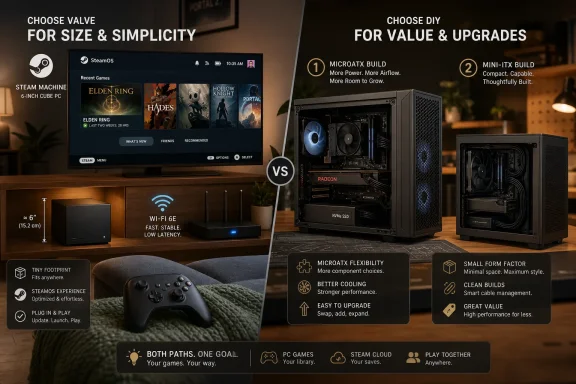 Direct Answer: Which Route Should You Choose?
Choose the Valve Steam Machine if the system will live under a TV, inside a media cabinet, or in a shared living-room space where size, built-in wireless, controller-first setup, and appliance-like behavior matter more than picking every component yourself.Choose a MicroATX DIY build if the machine can be visibly larger and you want the strongest value argument against Valve’s $1,049 box. The MicroATX route is the practical pick for buyers who care more about standard parts, easier cooling, future upgrades, and lower entry cost than about having a 6-inch-class cube.
Choose a Mini-ITX DIY build if you want a smaller living-room PC but still want standard desktop parts. This is the compromise route: it narrows the size gap versus MicroATX, but it usually gives back much of the price advantage.
Choose a Windows-first DIY build if Windows-only games, launchers, anti-cheat systems, modding tools, capture utilities, peripheral software, or general desktop use will be central to the machine. In that case, SteamOS should be treated as optional rather than assumed.
That distinction matters because Valve’s box is not just a list of components. It is a compact SteamOS appliance. But once a buyer judges it mainly as a gaming PC, DIY alternatives become much harder to ignore.
Valve’s Cube Is a Console Pitch With PC Math
Valve’s new Steam Machine exists because the living room remains the hardest place to make a gaming PC feel effortless. A tower under a desk is normal; a tower under a TV is still a compromise. Valve’s pitch is that SteamOS, a small chassis, controller-first setup, and Steam library access can make PC gaming feel less like maintenance and more like a console.That pitch has real force. The Steam Machine is a compact cube measuring 6 by 6.1 by 6.4 inches and weighing 5.7 pounds. It includes Wi‑Fi 6E, either a 512GB or 2TB NVMe SSD, 16GB of single-channel DDR5 memory, and a semi-custom AMD platform built around a Zen 4 CPU and RDNA 3 GPU.
But the moment Valve put a $1,049 entry point on the base model, the conversation changed. At that price, the Steam Machine no longer competes only as a living-room appliance. It also competes against every MicroATX and Mini-ITX parts list a PC builder can assemble from standard components.
That is the core tension. The Steam Machine is hard to beat as a tiny, integrated, living-room-first appliance. It is easier to challenge as a $1,049 collection of CPU capability, GPU capability, memory, storage, wireless, and upgrade paths.
For Windows users and IT-minded tinkerers, the Steam Machine is not simply a console alternative. It is a test of what convenience, size, SteamOS integration, and warranty simplicity are worth compared with the ordinary economics of PC building.
The Purchase Queue Is Part of the Product, and Part of the Problem
Valve has not positioned the Steam Machine as a simple impulse buy from every retail shelf. The buying process includes a signup-based waiting-list model, and eligibility is tied to an active Steam account with evidence of purchases made before April 27, 2026. That restriction may help Valve manage demand, but it also makes the Steam Machine feel less like a normal PC purchase and more like a controlled hardware drop.That matters because one of the classic advantages of building a PC is availability. You may pay more or less for a particular component depending on the market, but you can usually decide to build and then start ordering parts. With Valve’s machine, the buyer accepts both a fixed configuration and a queue.
For buyers who want a living-room system by a specific date, that purchase process should be treated as a real variable. A DIY route requires assembly, testing, and troubleshooting, but it is not tied to Valve’s account eligibility rules. Valve offers the simpler finished product; DIY offers more control over the timeline.
Timeline
April 27, 2026 — Valve’s purchase-waitlist eligibility cutoff is tied to evidence of Steam purchases made before this date.Current launch window — Valve’s Steam Machine is being positioned with a $1,049 entry-level configuration, but buyers should verify ordering status and account eligibility directly before treating availability as immediate.
Ongoing — DIY builders can assemble SteamOS-ready or Windows-first PCs from standard parts without waiting for Valve’s queue, though they must take on part selection, assembly, testing, and support themselves.
The Spec Sheet Is Sensible, Not Magical
Valve’s base hardware looks coherent on paper. The Steam Machine uses an AMD Zen 4-based processor with six simultaneous multithreading CPU cores clocked at up to 4.8GHz. Its CPU is rated at 30W, which is an important part of how Valve fits the machine into a compact living-room chassis.The GPU is the more important component for most buyers. Valve pairs the CPU with an AMD Radeon RDNA 3 graphics processor with 28 compute units, a 2.45GHz clock speed, and a 110W power rating. The machine also has 16GB of single-channel DDR5 system memory and storage options of 512GB or 2TB NVMe SSD.
That is not a bad foundation. It is the kind of hardware profile one would expect from a compact gaming PC designed to sit near a TV rather than dominate a desk. The tension is that Valve is selling a console-shaped experience to an audience that often thinks in PC-shaped comparisons.
A console buyer may ask whether the game runs. A PC buyer asks what GPU tier they are getting, how much dedicated graphics memory is available, whether the RAM arrangement limits performance, whether the box is upgradeable, whether the storage floor is enough, and whether the same budget buys more flexibility somewhere else.
Once the comparison shifts to that terrain, Valve’s small cube loses some of its mystique. A six-core Zen 4 CPU at 30W is efficient, but it is not trying to behave like a large desktop processor with a generous cooling budget. A 28-CU RDNA 3 GPU at 110W is credible for a compact appliance, but it should not be confused with a large desktop card selected without the same enclosure constraints. A 512GB SSD in a gaming system is usable, but many buyers will want more room.
That does not make the Steam Machine a bad product. It makes it a specialized product. It is designed around compression, integration, and convenience, not around winning every comparison a desktop builder can devise.
SteamOS Is Valve’s Strongest Argument and Its Biggest Strategic Bet
The Steam Machine’s default operating system is SteamOS 3, Valve’s Arch-based Linux platform. That is the part DIY builders can copy most directly and the part Valve benefits from whether or not the hardware sale goes to Valve. More SteamOS machines create more incentive for developers, middleware vendors, and anti-cheat providers to treat Linux gaming seriously.SteamOS is also why DIY builds are credible. If the operating system is available and the builder chooses hardware with SteamOS compatibility in mind, a conventional PC can aim for the same couch-gaming workflow. The result will not be as small or as polished as Valve’s cube, but it can be larger, more flexible, easier to upgrade, or easier to repurpose.
For WindowsForum readers, the software angle is especially important. This is not a clean Windows-versus-Linux story. It is a practical deployment story. Valve is making SteamOS more viable in spaces where Windows has historically dominated PC gaming, while Windows remains the safer default for buyers who depend on specific PC software beyond Steam.
That means the operating-system decision should come before the parts decision. If the machine is SteamOS-first, choose hardware to reduce friction with SteamOS. If it is Windows-first, choose hardware and software around Windows management, driver support, peripheral tools, and compatibility.
The Cheapest AMD DIY Route Attacks the Steam Machine Where It Hurts
The most damaging DIY comparison is an all-AMD MicroATX build. One representative version uses an AMD Ryzen 7 5700X, an older Zen 3 chip with eight CPU cores and support for up to 16 processing threads via simultaneous multithreading. The 5700X clocks at up to 4.6GHz, slightly below the Steam Machine CPU’s listed 4.8GHz maximum, but it brings more cores and a conventional desktop platform.That matters because the DIY route is not trying to imitate Valve’s thermally compressed appliance. It is trying to use standard desktop space to make the buying equation more favorable. A MicroATX case gives the builder more room for cooling, a standard motherboard, a standard graphics card, and future service.
On graphics, the AMD DIY route can move to a Radeon RX 7600. That card uses the same broad RDNA 3 architecture family but has 32 compute units rather than the Steam Machine GPU’s 28. It also carries its own dedicated graphics memory and the usual advantages of a standard desktop graphics card.
The estimated price for this kind of MicroATX AMD build is about $917. That is below Valve’s $1,049 entry point while offering a standard desktop CPU and a standard desktop GPU. The tradeoff is physical size. A representative MicroATX case in this comparison measures 17.2 by 8.4 by 15 inches, which is not a living-room cube so much as a conventional compact desktop.
This is the clearest DIY value case. Pick MicroATX if the machine can sit beside a monitor, under a desk, on a side table, in a dorm room, or in a media cabinet with enough ventilation. Prioritize the Radeon RX 7600-class GPU, a motherboard with the expansion and storage you actually need, a case with straightforward airflow, and a power supply that leaves reasonable room for future graphics upgrades.
The AMD GPU requirement matters for a SteamOS-first build. If the goal is to approximate Valve’s software experience, Radeon graphics should be treated as the default path. A Windows-first builder can make a broader GPU decision, but a SteamOS-first builder should not treat the GPU as interchangeable.
Networking also needs a plan. Valve includes Wi‑Fi 6E. A DIY MicroATX motherboard may or may not include built-in wireless. If Ethernet is available, use it. If the living-room layout requires Wi‑Fi, either choose a board with wireless built in or budget for a USB Wi‑Fi adapter as the fallback. That small extra step is one reason Valve’s integrated box remains attractive, but it is not a reason to ignore the MicroATX value argument.
If the system goes under a desk or near a display where size is not the top priority, the larger DIY box is easy to justify. If the system must disappear under a TV, share space with a soundbar, or avoid looking like a PC at all, Valve’s engineering becomes more valuable.
Mini-ITX Narrows the Size Gap but Gives Back the Savings
The more interesting DIY comparison is a Mini-ITX AMD version. It keeps the broad all-AMD logic but moves into a small-form-factor case class. One representative case size in this comparison is 14.8 by 7.3 by 11.5 inches. That is still much larger than Valve’s near-cube, but it is small enough to be plausible in more living-room setups.The price rises to roughly $1,140. At that point, the DIY machine is no longer cheaper than the Steam Machine. It becomes the classic small-form-factor PC compromise: you spend more to shrink the case, motherboard, and power-supply footprint.
Even then, the Mini-ITX AMD build remains a serious option. For modestly more than the Steam Machine’s entry point, the parts list aims to preserve the flexibility of standard components while reducing the visual penalty of a larger desktop. The buyer loses Valve’s tiny chassis, plug-and-play polish, and built-in Wi‑Fi 6E, but gains a more conventional upgrade and service path.
Pick Mini-ITX if the system really does need to live in the living room, but you still want standard desktop parts. Prioritize the case first, because the case defines GPU clearance, cooling limits, power-supply format, noise behavior, and whether the finished PC will actually fit where you plan to put it. Then choose an AMD GPU that fits the case cleanly, a motherboard with the storage and wireless features you need, and a cooling setup that does not turn the living-room PC into a fan-noise problem.
The Wi‑Fi caveat is not trivial. Some DIY motherboard selections lack built-in Wi‑Fi, while the Steam Machine includes Wi‑Fi 6E. If Ethernet is not practical, the builder should either select a Mini-ITX board with integrated wireless or plan for a USB Wi‑Fi adapter. The fallback is simple, but it should be decided before assembly rather than discovered after the machine is already sitting beside the TV.
This is where Valve’s box looks most rational. The Steam Machine is not just a parts list. It is the absence of small parts-list annoyances: no dongle hunt, no case-clearance surprise, no checking whether the graphics card fits, no wondering whether the motherboard firmware needs attention, and no troubleshooting a living-room PC before the first game launches.
Intel Builds Turn the Steam Machine Into a Performance Baseline
Intel-based DIY configurations change the question from “Can I beat Valve’s price?” to “How much more conventional PC can I get if I spend in roughly the same class of money?” The answer depends on parts pricing, but the direction is clear: larger DIY systems can push beyond Valve’s compact performance target because they are not constrained to Valve’s 6-inch-class enclosure.One representative Intel route centers on a Core Ultra 5-class desktop processor paired with an AMD Radeon graphics card. The AMD GPU choice matters because SteamOS-first DIY builds are generally simplest when built around Radeon graphics. A Windows-first builder has more flexibility, but a SteamOS-first builder should treat GPU selection as a key compatibility decision rather than an afterthought.
A MicroATX Intel build in this style lands at roughly $1,125. That is above the Steam Machine’s $1,049 entry point, but close enough to make the comparison uncomfortable. The buyer spends more, accepts a larger case, and gives up Valve’s integrated design. In exchange, the system is positioned as a standard desktop PC with more conventional part selection and upgrade planning.
A Mini-ITX Intel version can push much higher, to around $1,369. That is no longer a Steam Machine replacement for budget buyers. It is a compact gaming PC for someone who likes Valve’s living-room premise but wants more headroom, more standardization, and is willing to pay for the small-form-factor premium.
The Intel options are best read as Windows-first or dual-use builds. If Windows is the main operating system, the CPU brand matters less than the full platform: drivers, firmware updates, peripheral support, capture software, storage expansion, and recovery planning. If SteamOS is the main operating system, keep the Radeon GPU requirement front and center.
| Option | CPU direction | GPU direction | Approx. price | Size tradeoff | Best read |
|---|---|---|---|---|---|
| Valve Steam Machine | AMD Zen 4, 6 SMT cores, up to 4.8GHz, 30W | RDNA 3, 28 CUs, 2.45GHz, 110W | $1,049 | 6 by 6.1 by 6.4 inches | Smallest and simplest |
| AMD MicroATX DIY | Ryzen 7 5700X class, 8 cores, up to 16 threads | Radeon RX 7600 class | About $917 | 17.2 by 8.4 by 15 inches | Cheapest value challenge |
| AMD Mini-ITX DIY | Ryzen 7 5700X class | Radeon RX 7600 class | Roughly $1,140 | 14.8 by 7.3 by 11.5 inches | Compact DIY compromise |
| Intel MicroATX DIY | Core Ultra 5-class desktop CPU | Radeon graphics for SteamOS-first planning | Roughly $1,125 | Larger desktop case | Windows-first or dual-use desktop |
| Intel Mini-ITX DIY | Core Ultra 5-class desktop CPU | Radeon graphics for SteamOS-first planning | Around $1,369 | Compact, but not Valve-small | Premium small-form-factor PC |
Windows Drivers Make the Steam Machine More Flexible, but Also Less Special
Valve’s Windows driver support is important because it answers a practical objection. If a buyer needs a Windows-only game, launcher, anti-cheat stack, modding tool, capture utility, or peripheral configuration app, the Steam Machine is not necessarily a pure SteamOS wager. It can be treated as Windows-capable hardware.But that flexibility cuts both ways. Once Windows enters the plan, the Steam Machine becomes easier to compare with every other compact Windows PC. The uniqueness of SteamOS fades, and the hardware value question becomes harsher.
For administrators, labs, and technically inclined households, this is not academic. A SteamOS-only appliance is easy to explain but may run into compatibility exceptions. A Windows-capable Steam Machine is safer but potentially less elegant. A DIY box can run Windows from day one, but it shifts integration responsibility to the owner.
Windows-first buyers should therefore plan differently. Start by listing the software that must work: non-Steam launchers, anti-cheat titles, mod managers, streaming tools, capture devices, controller remappers, headset utilities, RGB utilities, fan-control tools, and backup software. If several of those are required, install Windows first and make Steam Big Picture Mode the living-room shell rather than trying to force SteamOS to be the center of the machine.
Setup should also be different. A Windows-first living-room PC needs automatic sign-in decisions, controller-friendly startup behavior, display scaling set for the TV, HDMI audio checked before the machine is tucked away, game libraries placed on the right SSD, and recovery media prepared before the first major tweak. It also needs a keyboard-and-mouse fallback, even if the day-to-day goal is couch gaming.
Compatibility planning should happen before purchase. If a must-play game or must-use peripheral expects Windows, the buyer should not treat SteamOS compatibility as a promise. Use Windows as the baseline, then add Steam features on top. If SteamOS compatibility is a bonus rather than a requirement, the DIY path becomes much easier to justify.
That is the WindowsForum angle: the Steam Machine is not primarily a Windows PC, but it can be evaluated as Windows-capable hardware. That makes it more useful and more complicated at the same time.
If Windows is occasional insurance, Valve’s box still makes sense. If Windows is the main operating system, the buyer should ask why they are paying for a SteamOS-first appliance instead of building or buying a Windows-first PC with standard components.
The Real Premium Is Compression
The fairest defense of the Steam Machine is that the DIY builds are not actually equivalent products. They are faster or more flexible PCs inspired by the same use case. None matches Valve’s 6-inch-class cube, integrated wireless, appliance-style setup, and single-vendor hardware/software stack.Smallness has a price. Shrinking a gaming PC creates cascading tradeoffs: denser cooling, restricted motherboard choices, cable-management pressure, power-supply constraints, and less room for future graphics cards. Valve has done that integration work and wrapped it in a consumer product.
That is why the MicroATX comparison is both valid and limited. Yes, about $917 for a standard-parts all-AMD desktop-style build is compelling. No, a 17.2-inch case is not a substitute for a 5.7-pound cube next to a TV. If the machine lives in a bedroom, office, dorm, or media cabinet with room to breathe, the DIY system makes sense. If it needs to disappear into a living-room shelf, Valve’s engineering matters.
The Steam Machine premium is therefore not just a brand premium. It is a size, integration, and convenience premium. The question is whether that premium is reasonable at $1,049 when the storage floor is 512GB and the GPU is designed for a compact thermal envelope rather than maximum desktop-style headroom.
A family buyer or console migrant may answer yes if the alternative is a parts list, a firmware screen, and a weekend of troubleshooting. An enthusiast with a screwdriver and a clear parts plan may answer no.
Upgradeability Is the DIY Builder’s Long Game
A gaming PC is rarely judged only on day-one setup. It is also judged on what happens later, when a larger SSD, newer GPU, different Wi‑Fi solution, replacement fan, or Windows reinstall becomes necessary. This is where DIY systems have an inherent advantage.A MicroATX build is physically larger, but that space buys standardization. Standard motherboards, standard power supplies, standard GPUs, and standard cases make future upgrades easier. Even Mini-ITX builds, while more constrained, are usually more serviceable than highly compressed appliances.
Valve’s Steam Machine is less clear in that regard. It is a PC at heart, but its value proposition is strongest when treated like a console: buy it, plug it in, use SteamOS, and let Valve handle the experience. The more a user plans to tinker, dual-boot, upgrade, or replace components, the more attractive a conventional build becomes.
For Windows users especially, the upgrade path matters. If the Steam Machine becomes a Windows box to solve compatibility issues, then its long-term value will be judged against Windows mini PCs and DIY desktops. In that contest, standard parts are a powerful argument.
The practical recommendation is simple: if you expect to replace the GPU, expand storage more than once, experiment with operating systems, or repurpose the machine later, build MicroATX unless the size limit is real. If the size limit is real, build Mini-ITX with care. If the real goal is to avoid all of that, buy Valve.
SteamOS-First Buying Guidance for WindowsForum Readers
A SteamOS-first build should be planned differently from a normal Windows gaming PC. The goal is not merely to assemble fast hardware. The goal is to minimize compatibility friction while preserving the console-like workflow that makes Valve’s approach appealing.For a SteamOS-first DIY system, start with an AMD GPU. That is the lowest-friction route for builders trying to approximate the Steam Machine experience. From there, decide whether the case will live in a true living-room position or merely near a TV. If the system can be larger, MicroATX is the value play. If the system must be compact, Mini-ITX is more attractive but usually gives back some of the savings.
For the MicroATX SteamOS-first route, use the case size to your advantage. Choose a straightforward airflow case in the 17.2 by 8.4 by 15-inch class, a Radeon RX 7600-class GPU, a motherboard with enough M.2 storage for your library plan, and a power supply that does not box you into a near-term replacement. This route is better value than the Steam Machine when physical size is acceptable because it uses standard desktop parts, lands at about $917 in the representative AMD configuration, and keeps future service simple.
For the Mini-ITX SteamOS-first route, start with the enclosure and work inward. A representative 14.8 by 7.3 by 11.5-inch case is much larger than Valve’s cube but much easier to place in a living room than a larger MicroATX tower. Choose parts around clearance, heat, and noise rather than theoretical maximum performance. This route is better value than the Steam Machine only for buyers who specifically want standard parts in a smaller DIY system; it is not the cheapest route, because the representative AMD Mini-ITX configuration rises to roughly $1,140.
A SteamOS-first buyer should also budget for storage realistically. A 512GB floor can work for a focused library, but anyone rotating through large games will want more room. If building DIY, choosing a larger NVMe SSD at the start is often easier than reopening the system later. If buying Valve’s box, the 2TB model may be more appropriate for users who dislike storage management.
Networking should be settled before purchase. Valve includes Wi‑Fi 6E. DIY boards vary. If Ethernet is available, the issue mostly disappears. If the machine must use wireless, pick a motherboard with the right wireless capability or budget for a USB Wi‑Fi adapter. Do not discover after assembly that the living-room layout has no practical network path.
The SteamOS-first rule is simple: build around Radeon graphics, controller use, suspend/resume expectations, quiet operation, and network reliability. Raw benchmark ambition is secondary. If raw Windows performance and broad compatibility become the main goals, the buyer is probably shopping for a Windows-first PC.
Windows-First Buying Guidance for WindowsForum Readers
A Windows-first build has a different center of gravity. If Windows-only software is expected, Windows should not be an afterthought. Build or buy the system as a Windows PC first, then add Steam Big Picture Mode, Steam startup behavior, controller profiles, and living-room conveniences afterward.For Windows-first buyers, the Valve Steam Machine is best treated as an option only if its size and design are uniquely valuable. Otherwise, a conventional DIY system or prebuilt compact PC may make more sense. Windows-first use increases the importance of standard drivers, easy firmware updates, peripheral software, capture tools, RGB or fan-control utilities, and long-term part replacement.
A Windows-first DIY builder can still choose AMD graphics, especially if there is interest in experimenting with SteamOS later. But the purchase logic changes. Instead of asking “What hardware gives me the cleanest SteamOS experience?” the buyer asks “What hardware gives me the best Windows gaming and maintenance experience in the space I have?”
For shared family systems, gaming rooms, classrooms, small esports setups, or test benches, Windows-first planning can also simplify management. Imaging, endpoint tools, standard user policies, peripheral support, remote troubleshooting, and backup routines are all easier when Windows is the assumed baseline rather than the fallback.
Windows-first setup should include a few concrete steps:
- Install Windows as the primary operating system if must-play games, launchers, or peripherals require it.
- Configure Steam to launch into a controller-friendly interface if the machine will sit under a TV.
- Keep a compact keyboard and pointing device available for updates, login problems, launcher prompts, and troubleshooting.
- Install GPU, chipset, audio, network, and controller drivers before the system is moved into its final living-room position.
- Test HDMI audio, HDR behavior, display scaling, sleep behavior, and controller wake behavior on the actual TV.
- Decide whether SteamOS experimentation belongs on a separate drive, a later reinstall, or a different machine entirely.
Buyer’s Decision Tree
Start with location.If the machine must fit into the smallest possible living-room footprint, choose the Valve Steam Machine. The 6 by 6.1 by 6.4-inch chassis, 5.7-pound weight, built-in Wi‑Fi 6E, SteamOS-first design, and single-vendor integration are the point of the product. Do not choose it because you think it will beat every desktop parts list. Choose it because the desktop parts list cannot match the footprint and simplicity.
If the machine can be larger and price matters, choose the AMD MicroATX DIY build. Use a case in the 17.2 by 8.4 by 15-inch class, a Ryzen 7 5700X-class CPU, a Radeon RX 7600-class GPU, enough NVMe storage for the games you actually keep installed, and either wired Ethernet or a known Wi‑Fi solution. This is the clearest better-value option than the Steam Machine because the representative build lands at about $917 while using standard desktop parts.
If the machine needs to be smaller than a normal desktop but does not need to be Valve-small, choose the AMD Mini-ITX DIY build. Use a case in the 14.8 by 7.3 by 11.5-inch class, keep the Radeon GPU requirement for SteamOS-first planning, check GPU clearance before buying, and either select onboard Wi‑Fi or plan a USB Wi‑Fi fallback. This is the right compromise when living-room size matters but upgradeability still matters too.
If Windows is the main operating system, choose a Windows-first DIY build unless Valve’s exact size is the overriding requirement. Prioritize driver support, peripheral software, storage expansion, recovery planning, and a controller-friendly Windows setup. SteamOS can be an experiment later, but it should not drive the whole purchase if Windows compatibility is the main reason the machine exists.
If you want the least work, choose Valve. If you want the most control, choose DIY. If you want the best DIY value, choose MicroATX. If you want a smaller DIY living-room PC and accept the premium, choose Mini-ITX. If you need Windows first, do not let the SteamOS story distract you from the software you actually use.
Admin Checklist
Before buying Valve’s Steam Machine:- Confirm Steam account eligibility and ordering status.
- Decide whether 512GB is enough or whether the 2TB option is the practical choice.
- List any Windows-only games, tools, launchers, or peripherals that matter.
- Decide whether Windows is occasional insurance or the primary operating system.
- Confirm the TV, network, controller, and storage expectations before purchase.
- Confirm that the larger case footprint is acceptable.
- Use the size advantage for airflow, serviceability, and standard components.
- Choose an AMD Radeon GPU for SteamOS-first planning.
- Prefer Ethernet if available; otherwise choose onboard Wi‑Fi or a USB Wi‑Fi fallback.
- Spend the savings where they matter most: storage, cooling, and a power supply with upgrade room.
- Pick the case first and verify GPU, cooler, and power-supply clearance.
- Treat noise and heat as design constraints, not afterthoughts.
- Choose an AMD Radeon GPU if SteamOS is the plan.
- Confirm Wi‑Fi before buying the motherboard or budget for a USB adapter.
- Accept that compact DIY is about flexibility, not maximum savings.
- Install and configure Windows as the main platform, not as a rescue option.
- Test all required launchers, anti-cheat titles, peripherals, and capture tools.
- Configure Steam Big Picture Mode, controller profiles, and startup behavior.
- Prepare recovery media and keep a keyboard-and-mouse fallback nearby.
- Treat SteamOS as optional unless every must-use application is already accounted for.
Final Recommendation
The Steam Machine is not a bad deal simply because a DIY PC can challenge it. It is a focused product with a focused premium: tiny size, integrated wireless, SteamOS-first polish, and a single-vendor living-room experience. If that is what you want, the $1,049 entry point is understandable.But the DIY alternatives make the buying decision sharper. The AMD MicroATX route is the strongest value challenge because it is cheaper in the representative comparison, uses standard desktop parts, and gives the owner more room to upgrade. The AMD Mini-ITX route is the best compromise for buyers who want a smaller living-room PC without giving up the standard-parts advantage. Intel-based routes make the most sense when Windows-first use or broader desktop flexibility matters more than copying Valve’s exact SteamOS appliance model.
For Windows-first buyers, the recommendation is especially clear: do not buy the Steam Machine just because it can run Windows. Buy it only if its size and integrated design are the deciding factors. If Windows compatibility, software flexibility, peripheral support, and long-term serviceability are the real priorities, build or buy a Windows-first PC and make Steam part of that setup.
For SteamOS-first couch gamers who want the smallest cleanest box, choose Valve. For Windows-first buyers who want the best control over setup, compatibility, parts, and upgrades, choose DIY — MicroATX when value matters most, Mini-ITX when the living room demands something smaller.
References
- Primary source: PCMag Australia
Published: 2026-07-09T19:30:24.211022
Skip Valve’s Steam Machine: I Found 4 DIY Builds That Offer a Lot More for the Money
Valve released the Steam Machine at long last, but this tiny gaming PC costs more than expected, given its budget-grade parts. You can build a Steam Machine that's faster, even cheaper, or both.au.pcmag.com - Related coverage: tomshardware.com
- Related coverage: pcgamer.com
Valve has released Windows drivers for the Steam machine, y'know for the three people who managed to buy one and inexplicably want a different OS | PC Gamer
Not many have been made, the device is hella expensive, and Windows is not made for the living room while Steam OS is. Otherwise, great news.www.pcgamer.com - Related coverage: techradar.com
How to build a Steam Machine-killing compact gaming PC for less | TechRadar
Orange box? Black box!www.techradar.com - Related coverage: gamesradar.com
If you're a sicko, you can now run Windows on the Steam Machine | GamesRadar+
Valve has released Steam Machine Windows 11 drivers for graphics, Wi-Fi, Bluetooth, and SD card slot, but you'll need to wait longer for SteamOS dual-booting.www.gamesradar.com - Related coverage: techspot.com
The Steam Machine now has official Windows drivers | TechSpot
Four drivers are available, covering the GPU, Bluetooth, wireless connectivity, and SD card reader. After installing Windows and loading the drivers, the display, networking, and card reader...www.techspot.com
- Related coverage: gematsu.com
Steam Machine launches June 30, starting at $1,049 - Gematsu
Steam Machine will launch on June 30, Valve announced. The 512 gigabyte model without a controller will be priced at $1,049, while the two terabyte model with a…www.gematsu.com - Related coverage: windowscentral.com
Valve releases Windows PC drivers for Steam Machine — but official dual-boot support for SteamOS gaming is still missing | Windows Central
Valve still allows Steam hardware owners to install Windows, providing compatible drivers to everyone.www.windowscentral.com - Related coverage: pcworld.com
Why even buy a Steam Machine? Check out our own DIY builds for $1,050 | PCWorld
The Full Nerd is all about Steam Machines this week: Would you buy one or assemble your own, and what kind of box would you build for that $1,050 asking price? As it turns out, the quest to build a better Steam Machine can be a good reminder about what makes being a PC enthusiast so great.www.pcworld.com - Related coverage: pcper.com
The Steam Machine Cometh, Starting At US $1049 - PC Perspective
The Steam Machine Cometh, Starting At US $1049 With over six times the horsepower of Steam Deck, Steam Machine has the power to play your whole Steam library,pcper.com - Related coverage: notebookcheck.net
Steam Machine can now run Windows with official Valve drivers - Notebookcheck News
Valve's new Steam Machine drivers for Windows are now made official. The set includes drivers for all major components, and their release is in line with Valve's PC-first approach to gaming hardware. www.notebookcheck.net
- Related coverage: technetbooks.com
Valve Steam Machine Windows Drivers Officially Released for Alternative OS Support | Technetbook
Valve has published Windows drivers for the Steam Machine on its official support portal, allowing users to install the Microsoft operating system.www.technetbooks.com
- Related coverage: club386.com
Valve just released the Steam Machine Windows drivers, but there's a catch | Club386
You can now run Windows on a Steam Machine, but don't expect to run SteamOS simultaneously without additional hardware. www.club386.com
- Related coverage: engadget.com
Valve's Steam Machine Starts At $1,049 With 512GB Storage And No Controller
Valve's Steam Machine will cost well over $1,000, and that's without a controller.www.engadget.com - Related coverage: digitaltrends.com
You can finally install Windows on the Steam Machine, for reasons only you understand - Digital Trends
Valve has released official Windows drivers for the Steam Machine, making it easier to install Microsoft's OS, though SteamOS still appears to offer better gaming performance.www.digitaltrends.com - Related coverage: tomsguide.com
Steam Machine review: No man's land | Tom's Guide
The Steam Machine does what I want it to do — a well-designed box that brings together the complexity of PC gaming into a couch console experience that’s really enjoyable when it clicks. But at $1,049, the underpowered parts are exposed and it’s left feeling lost in the sea of...www.tomsguide.com - Related coverage: arstechnica.com
Valve's Steam Machine ships June 29 for $1,049, but you probably won't be able to buy one yet - Ars Technica
Valve says it's using a randomized purchase queue to make the experience "less frustrating and more fair."arstechnica.com - Related coverage: tomshw.it