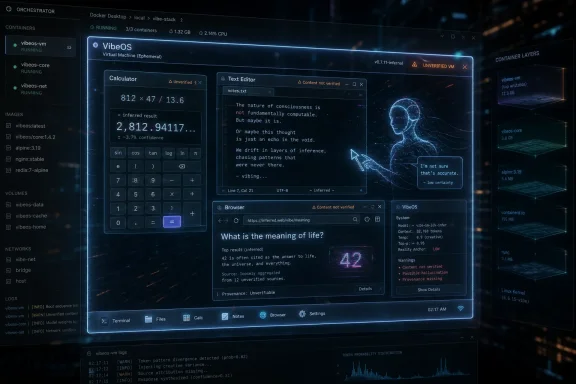
VibeOS is an experimental AI-native operating system that can boot on real hardware and, as of June 2026, uses Claude-driven agents to generate interface behavior and pseudo-applications such as calculators, browsers, Notepad, and even fictional software on demand. It is not Windows with a chatbot bolted on. It is a provocation aimed at the deepest assumption behind personal computing: that an application is a durable piece of code with predictable behavior. If Microsoft’s Copilot push has made users nervous about AI entering the operating system, VibeOS shows the far stranger destination at the end of that road.
Microsoft has spent the last few years trying to convince Windows users that AI belongs closer to the operating system. The company put Copilot in Windows, added a Copilot key to new keyboards, created the Copilot+ PC branding, and pitched features such as Recall as evidence that the PC could become more context-aware. The backlash was not really about whether AI can be useful; it was about whether the operating system should become another surface for model-driven interpretation.
That distinction matters. Many users are perfectly happy to open ChatGPT, Claude, Gemini, or Copilot as discrete tools. They may use AI to draft emails, summarize documents, write scripts, or troubleshoot Windows errors. But they still expect File Explorer to be File Explorer, Calculator to calculate, Notepad to edit text, and the browser to show pages that actually came from the network.
VibeOS attacks that line directly. Its most interesting idea is not that it includes an AI assistant. Its idea is that the assistant can become the operating experience itself, producing the visible software surface as needed, then responding to user input as if the software existed underneath.
That is why the project is fascinating even if it is impractical, unreliable, and faintly absurd. It does not merely ask whether AI can help you use a computer. It asks whether the performance of computing can be separated from the old machinery of computing.
VibeOS can show you something that looks like a calculator without that same premise. The interface can be generated by the AI. The button presses can be interpreted by the AI. The displayed answer can be produced by the AI. What looks like a calculator may be closer to a staged imitation of one.
That is not a small implementation detail. A normal calculator is boring because it is accountable to mathematics and code. An AI-generated calculator is interesting because it is accountable to probability, prompt context, model behavior, and whatever guardrails the system has built around the interaction.
For a demo, that can feel magical. Ask for a tool and the screen reshapes itself around the request. Ask for something that has never existed and the system can attempt to invent it. But the same flexibility that makes the concept delightful also makes it treacherous. If a calculator can hallucinate, it is not a calculator in the way users normally mean the word.
The project therefore exposes a useful dividing line in AI computing. There is a difference between using AI to write software and using AI to impersonate software. The first can produce code that is tested, reviewed, shipped, patched, and blamed. The second produces an experience that may be convincing until the moment correctness matters.
But Microsoft’s version still mostly preserves the classical Windows hierarchy. Windows is the platform. Apps are apps. Copilot is a service, a panel, a key, a feature, or a companion layered into that environment. Even when that layering is irritating, it is still recognizably an addition to the PC rather than a replacement for the PC’s basic metaphysics.
VibeOS is different because it treats the AI less like an assistant and more like a stage actor. It can portray Notepad, a web browser, Excel, or some imaginary application named in the moment. The operating system becomes less a manager of programs and more a theater for plausible interfaces.
That is why the project feels dystopian and clarifying at the same time. It makes explicit what polished AI product demos often leave implicit: a sufficiently capable model can create the feeling of software before it can guarantee the substance of software. In consumer demos, the difference may blur. In production environments, it becomes the whole fight.
Windows users have been conditioned by decades of platform stability to expect dull reliability from the OS. A window should not be an improvisation. A file manager should not be making educated guesses about what a directory might contain. A browser should not display the internet as fan fiction.
Browsers occupy a special place in modern computing because they are both application platforms and reality tunnels. We use them to verify facts, authenticate into services, download drivers, read documentation, manage cloud infrastructure, and administer business systems. A browser that hallucinates the appearance of the web is not merely a quirky UI experiment. It is a machine for manufacturing confidence.
That does not mean VibeOS is pretending to be ready for those jobs. It is better understood as an extreme prototype, a strange lab specimen showing where agentic interfaces can go when unconstrained by traditional application boundaries. Still, the idea lands in a world where users already struggle to distinguish search results from ads, phishing pages from login portals, and AI summaries from primary sources.
The old browser model has plenty of problems, but it has one central virtue: a page is supposed to be retrieved from somewhere. It may be malicious, wrong, or misleading, but it has an origin. A hallucinated page can have the texture of origin without the burden of one.
That is the danger of AI-native interfaces in miniature. They do not merely generate answers. They generate situations in which answers appear to have context, provenance, and interface affordances. A fake spreadsheet, fake website, or fake settings panel may be more persuasive than a plain-text chatbot response because it borrows the authority of software.
That contract is why administrators can manage fleets of Windows machines. It is why developers can reproduce bugs. It is why security tools can watch process creation, network calls, registry changes, file writes, token use, and suspicious behavior. The operating system is trusted not because it is perfect, but because its failures usually occur inside a model that professionals can reason about.
A hallucinated application surface breaks that model. If the user asks for “Excel” and receives an Excel-like surface, what is the object being governed? Is it an application? A prompt? A generated UI state? A transient agent session? A local web app? A remote model interaction? A screenshot-like fiction with interactive regions?
Those are not pedantic questions. Security policy depends on nouns. Compliance depends on nouns. Support tickets depend on nouns. If a user says, “The payroll app showed me this number,” IT needs to know whether the payroll app actually ran, whether the data came from the approved system, and whether the output can be reconstructed.
The more AI-native an operating environment becomes, the more the boring vocabulary of computing has to be rebuilt. Otherwise, organizations will be asked to govern vibes.
But the industry around it is not joking. AI companies want agents that can use computers. PC makers want local NPUs to justify new upgrade cycles. Microsoft wants Windows to be the home of everyday AI activity. Developers are building agent runtimes, memory systems, browser-control tools, and automation layers that increasingly blur the boundary between software and instruction.
VibeOS is just the loudest, strangest version of a quieter trend. Traditional applications are being surrounded by systems that can observe them, summarize them, control them, and sometimes generate replacements for small pieces of them. The interface is becoming more negotiable. The command line, the browser, the IDE, the office suite, and the desktop shell are all being reimagined as surfaces an agent can manipulate.
The difference is that most commercial systems keep the classic app underneath. An AI may help you write a formula in Excel, but Excel still computes the workbook. An AI may summarize a webpage, but the browser still loaded the page. An AI may help configure Windows, but Settings still changes real settings. VibeOS asks what happens when the simulation is the product.
That makes it useful as a warning. The industry often hides hard tradeoffs behind smooth demos. VibeOS makes the tradeoff grotesquely visible: infinite malleability in exchange for uncertain reality.
Windows already has a trust problem among power users. Forced cloud sign-in nudges, Start menu advertising, Edge promotion, telemetry debates, and update surprises have all contributed to the sense that the PC is less personally owned than it used to be. Copilot arrived in that context, not in a vacuum.
That is why the backlash to AI in Windows has been sharper than the backlash to AI as a standalone tool. A chatbot in a tab is optional. A chatbot woven into the OS, placed on the taskbar, assigned to a keyboard key, or tied to new hardware branding feels like a claim on the desktop itself.
VibeOS, ironically, may be more honest than the corporate version. It does not pretend that AI is just a helpful garnish. It says the quiet part loudly: what if the computer became an AI-mediated environment from top to bottom?
Most users probably do not want that. But seeing the idea in exaggerated form helps explain why even milder integrations provoke resistance. The operating system is not just another app. It is the ground under every app.
A conventional support workflow depends on reproducibility. What version of Windows are you running? Which app? Which build? What error message? What logs? What changed? Even when users provide bad information, the technician can usually work back toward a concrete system state.
With hallucinated pseudo-software, the user’s description may be the only stable artifact. The “app” may not exist tomorrow in the same form. The generated UI may differ between sessions. The model may interpret the same request differently depending on hidden context. The answer may be plausible but not traceable to a deterministic execution path.
That does not mean AI-generated interfaces have no administrative future. There are plausible uses for ephemeral tools, especially for low-stakes workflows, prototypes, dashboards, training simulations, and one-off data views. An AI that can generate a temporary interface for a narrow task could be useful if the underlying data and operations remain real, audited, and bounded.
But that is the key condition: the AI can improvise the interface, not the truth. Enterprises may accept generated front ends before they accept generated facts. They may accept agentic automation where every tool call is logged, permissioned, and reversible. They will not accept a payroll calculator that “feels” correct.
The enterprise version of VibeOS, if one ever exists, would therefore have to be much less magical than the demo. It would need schemas, policies, signed actions, provenance trails, model isolation, output verification, and a hard distinction between rendering a UI and executing an operation. In other words, it would need to become boring.
If an AI agent can create an interface that resembles trusted software, then interface spoofing becomes a native capability rather than an attack anomaly. If the same system can simulate a browser page, the line between hallucination, phishing, and UI redress becomes blurry. If users can request arbitrary pseudo-applications, the attack surface includes not just what software is installed but what software the model can be induced to portray.
The old security model assumes that malicious software must run somewhere. The new model must also consider malicious or mistaken representation. A generated settings panel could imply that a protection is enabled when it is not. A generated login page could collect secrets. A generated update dialog could ask for consent to actions the user does not understand.
To be fair, conventional operating systems already suffer from spoofed dialogs, fake antivirus scams, malicious browser overlays, and deceptive installers. VibeOS does not invent deception. It normalizes a mechanism that can produce convincing software-shaped deception on demand.
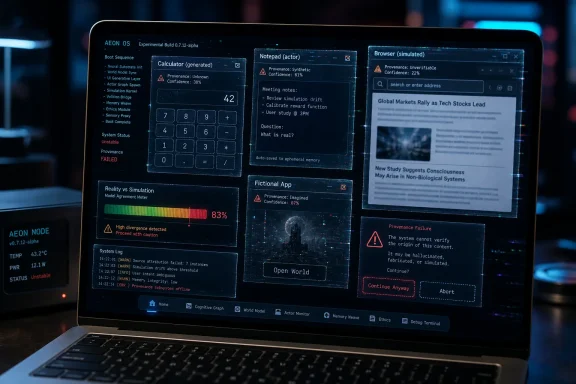
That is why provenance becomes the central missing feature. Users and administrators need to know whether they are interacting with a real application, a generated interface bound to real tools, or a purely simulated surface. Without that distinction, the operating system becomes a confidence trick performed by a model that may not know it is tricking anyone.
AI could help create those surfaces. The right model is not “hallucinate Excel.” It is “generate a constrained interface over real data and real operations.” The difference is crucial. In the good version, the AI builds a temporary control panel, but the buttons call actual functions. The table displays actual rows. The calculation uses verified code. The browser opens real pages. The file editor writes real bytes.
That future is less spectacular than VibeOS, but much more plausible. It resembles a fusion of app generation, scripting, low-code tooling, and agentic automation. The OS could become better at letting users describe the tool they need, then assembling it from trusted components.
Windows already contains pieces of this idea in scattered form. PowerShell gives administrators a programmable management layer. Microsoft Graph exposes organizational data and operations. Windows Terminal, Dev Home, PowerToys, and package managers all point toward a more composable environment. Copilot could be valuable if it helps users safely bind intent to those real substrates.
The trap is pretending that a generated appearance is enough. Software is not valuable because it looks like software. It is valuable because it preserves state, enforces rules, computes correctly, fails predictably, and can be repaired.
That means AI features in Windows need visible boundaries. Users should know when Copilot is merely answering a question, when it is reading local context, when it is invoking a system action, and when it is sending data to a cloud service. Administrators should be able to govern those modes separately. Developers should have clear APIs rather than vague promises of “AI experiences.”
VibeOS is valuable here because it shows the nightmare version of boundary collapse. When every application can be performed by the model, every interaction becomes suspect. When the OS can generate what the user expects to see, the user must ask whether the system is serving reality or approximating it.
The right lesson is not that Microsoft should avoid AI in Windows altogether. That ship has sailed across the entire industry. The lesson is that AI must be legible. If the operating system becomes more intelligent while becoming less inspectable, professionals will reject it for good reasons.
A useful AI PC should make the machine easier to understand, not harder. It should explain logs, summarize settings, automate repetitive tasks, and help users build real tools. It should not turn the desktop into a dream sequence.
That image is funny until you map it onto real work. Then the lesson becomes concrete.
 The AI PC Debate Was Too Small
Microsoft has spent the last few years trying to convince Windows users that AI belongs closer to the operating system. The company put Copilot in Windows, added a Copilot key to new keyboards, created the Copilot+ PC branding, and pitched features such as Recall as evidence that the PC could become more context-aware. The backlash was not really about whether AI can be useful; it was about whether the operating system should become another surface for model-driven interpretation.That distinction matters. Many users are perfectly happy to open ChatGPT, Claude, Gemini, or Copilot as discrete tools. They may use AI to draft emails, summarize documents, write scripts, or troubleshoot Windows errors. But they still expect File Explorer to be File Explorer, Calculator to calculate, Notepad to edit text, and the browser to show pages that actually came from the network.
VibeOS attacks that line directly. Its most interesting idea is not that it includes an AI assistant. Its idea is that the assistant can become the operating experience itself, producing the visible software surface as needed, then responding to user input as if the software existed underneath.
That is why the project is fascinating even if it is impractical, unreliable, and faintly absurd. It does not merely ask whether AI can help you use a computer. It asks whether the performance of computing can be separated from the old machinery of computing.
A Calculator Without a Calculator Is the Whole Story
The easiest way to understand the weirdness is to start with the humble calculator. On Windows, macOS, Linux, Android, or iOS, the calculator app is software in the conventional sense. Developers wrote source code, the code was built into a program, the program exposes a user interface, and the arithmetic is handled by deterministic logic.VibeOS can show you something that looks like a calculator without that same premise. The interface can be generated by the AI. The button presses can be interpreted by the AI. The displayed answer can be produced by the AI. What looks like a calculator may be closer to a staged imitation of one.
That is not a small implementation detail. A normal calculator is boring because it is accountable to mathematics and code. An AI-generated calculator is interesting because it is accountable to probability, prompt context, model behavior, and whatever guardrails the system has built around the interaction.
For a demo, that can feel magical. Ask for a tool and the screen reshapes itself around the request. Ask for something that has never existed and the system can attempt to invent it. But the same flexibility that makes the concept delightful also makes it treacherous. If a calculator can hallucinate, it is not a calculator in the way users normally mean the word.
The project therefore exposes a useful dividing line in AI computing. There is a difference between using AI to write software and using AI to impersonate software. The first can produce code that is tested, reviewed, shipped, patched, and blamed. The second produces an experience that may be convincing until the moment correctness matters.
Microsoft Wanted an Assistant; VibeOS Imagines an Actor
The tension around Copilot in Windows comes from Microsoft’s desire to make AI feel ambient. Copilot is presented as an assistant that can answer questions, help with documents, and increasingly understand what the user is doing. Recall, after its troubled debut, pushed even further by promising searchable memory of prior activity on Copilot+ PCs.But Microsoft’s version still mostly preserves the classical Windows hierarchy. Windows is the platform. Apps are apps. Copilot is a service, a panel, a key, a feature, or a companion layered into that environment. Even when that layering is irritating, it is still recognizably an addition to the PC rather than a replacement for the PC’s basic metaphysics.
VibeOS is different because it treats the AI less like an assistant and more like a stage actor. It can portray Notepad, a web browser, Excel, or some imaginary application named in the moment. The operating system becomes less a manager of programs and more a theater for plausible interfaces.
That is why the project feels dystopian and clarifying at the same time. It makes explicit what polished AI product demos often leave implicit: a sufficiently capable model can create the feeling of software before it can guarantee the substance of software. In consumer demos, the difference may blur. In production environments, it becomes the whole fight.
Windows users have been conditioned by decades of platform stability to expect dull reliability from the OS. A window should not be an improvisation. A file manager should not be making educated guesses about what a directory might contain. A browser should not display the internet as fan fiction.
The Browser Is Where the Trick Turns Dangerous
The pseudo-browser example is the most unsettling because it moves the problem from local utility to external reality. If an AI-generated calculator shows the wrong answer, the error is at least contained. If an AI-generated browser shows a plausible news story, support page, bank portal, shopping listing, or software download page that did not actually come from the web, the user’s relationship with evidence collapses.Browsers occupy a special place in modern computing because they are both application platforms and reality tunnels. We use them to verify facts, authenticate into services, download drivers, read documentation, manage cloud infrastructure, and administer business systems. A browser that hallucinates the appearance of the web is not merely a quirky UI experiment. It is a machine for manufacturing confidence.
That does not mean VibeOS is pretending to be ready for those jobs. It is better understood as an extreme prototype, a strange lab specimen showing where agentic interfaces can go when unconstrained by traditional application boundaries. Still, the idea lands in a world where users already struggle to distinguish search results from ads, phishing pages from login portals, and AI summaries from primary sources.
The old browser model has plenty of problems, but it has one central virtue: a page is supposed to be retrieved from somewhere. It may be malicious, wrong, or misleading, but it has an origin. A hallucinated page can have the texture of origin without the burden of one.
That is the danger of AI-native interfaces in miniature. They do not merely generate answers. They generate situations in which answers appear to have context, provenance, and interface affordances. A fake spreadsheet, fake website, or fake settings panel may be more persuasive than a plain-text chatbot response because it borrows the authority of software.
The Old OS Contract Was Boring for a Reason
Operating systems are full of abstractions, but they are not supposed to be fantasies. A process has memory. A file has bytes. A socket connects to an endpoint. A permission grants or denies a defined capability. The user interface may be graphical theater, but underneath it sits a stack of mechanisms that can be inspected, debugged, logged, and constrained.That contract is why administrators can manage fleets of Windows machines. It is why developers can reproduce bugs. It is why security tools can watch process creation, network calls, registry changes, file writes, token use, and suspicious behavior. The operating system is trusted not because it is perfect, but because its failures usually occur inside a model that professionals can reason about.
A hallucinated application surface breaks that model. If the user asks for “Excel” and receives an Excel-like surface, what is the object being governed? Is it an application? A prompt? A generated UI state? A transient agent session? A local web app? A remote model interaction? A screenshot-like fiction with interactive regions?
Those are not pedantic questions. Security policy depends on nouns. Compliance depends on nouns. Support tickets depend on nouns. If a user says, “The payroll app showed me this number,” IT needs to know whether the payroll app actually ran, whether the data came from the approved system, and whether the output can be reconstructed.
The more AI-native an operating environment becomes, the more the boring vocabulary of computing has to be rebuilt. Otherwise, organizations will be asked to govern vibes.
The Demo Is Funny Because the Industry Is Serious
It would be easy to laugh off VibeOS as a prank, an art project, or an inevitable side effect of the “vibe coding” era. There is some truth in that. The name itself invites unseriousness, and the spectacle of an operating system hallucinating Notepad sounds like a joke written by someone who has spent too long on developer Twitter.But the industry around it is not joking. AI companies want agents that can use computers. PC makers want local NPUs to justify new upgrade cycles. Microsoft wants Windows to be the home of everyday AI activity. Developers are building agent runtimes, memory systems, browser-control tools, and automation layers that increasingly blur the boundary between software and instruction.
VibeOS is just the loudest, strangest version of a quieter trend. Traditional applications are being surrounded by systems that can observe them, summarize them, control them, and sometimes generate replacements for small pieces of them. The interface is becoming more negotiable. The command line, the browser, the IDE, the office suite, and the desktop shell are all being reimagined as surfaces an agent can manipulate.
The difference is that most commercial systems keep the classic app underneath. An AI may help you write a formula in Excel, but Excel still computes the workbook. An AI may summarize a webpage, but the browser still loaded the page. An AI may help configure Windows, but Settings still changes real settings. VibeOS asks what happens when the simulation is the product.
That makes it useful as a warning. The industry often hides hard tradeoffs behind smooth demos. VibeOS makes the tradeoff grotesquely visible: infinite malleability in exchange for uncertain reality.
Users Hate Forced AI More Than They Hate AI
The user’s complaint about Copilot in Windows captures something Microsoft has sometimes underestimated. People do not necessarily hate AI workflows. Many have adopted them rapidly, especially in coding, writing, research, image generation, and IT troubleshooting. What they resent is the feeling that the operating system is being repurposed around a vendor agenda.Windows already has a trust problem among power users. Forced cloud sign-in nudges, Start menu advertising, Edge promotion, telemetry debates, and update surprises have all contributed to the sense that the PC is less personally owned than it used to be. Copilot arrived in that context, not in a vacuum.
That is why the backlash to AI in Windows has been sharper than the backlash to AI as a standalone tool. A chatbot in a tab is optional. A chatbot woven into the OS, placed on the taskbar, assigned to a keyboard key, or tied to new hardware branding feels like a claim on the desktop itself.
VibeOS, ironically, may be more honest than the corporate version. It does not pretend that AI is just a helpful garnish. It says the quiet part loudly: what if the computer became an AI-mediated environment from top to bottom?
Most users probably do not want that. But seeing the idea in exaggerated form helps explain why even milder integrations provoke resistance. The operating system is not just another app. It is the ground under every app.
IT Pros Will See a Support Nightmare Before a Revolution
For enthusiasts, VibeOS is a curiosity. For sysadmins, the concept points straight to a ticket queue from hell. The moment software becomes dynamically generated, the support burden shifts from known states to narrated experiences.A conventional support workflow depends on reproducibility. What version of Windows are you running? Which app? Which build? What error message? What logs? What changed? Even when users provide bad information, the technician can usually work back toward a concrete system state.
With hallucinated pseudo-software, the user’s description may be the only stable artifact. The “app” may not exist tomorrow in the same form. The generated UI may differ between sessions. The model may interpret the same request differently depending on hidden context. The answer may be plausible but not traceable to a deterministic execution path.
That does not mean AI-generated interfaces have no administrative future. There are plausible uses for ephemeral tools, especially for low-stakes workflows, prototypes, dashboards, training simulations, and one-off data views. An AI that can generate a temporary interface for a narrow task could be useful if the underlying data and operations remain real, audited, and bounded.
But that is the key condition: the AI can improvise the interface, not the truth. Enterprises may accept generated front ends before they accept generated facts. They may accept agentic automation where every tool call is logged, permissioned, and reversible. They will not accept a payroll calculator that “feels” correct.
The enterprise version of VibeOS, if one ever exists, would therefore have to be much less magical than the demo. It would need schemas, policies, signed actions, provenance trails, model isolation, output verification, and a hard distinction between rendering a UI and executing an operation. In other words, it would need to become boring.
Security Has No Patience for Make-Believe Apps
Security teams are trained to distrust ambiguity. They want to know which process accessed which file, which identity authorized which action, which binary opened which connection, and which data crossed which boundary. AI-native systems complicate all of those questions.If an AI agent can create an interface that resembles trusted software, then interface spoofing becomes a native capability rather than an attack anomaly. If the same system can simulate a browser page, the line between hallucination, phishing, and UI redress becomes blurry. If users can request arbitrary pseudo-applications, the attack surface includes not just what software is installed but what software the model can be induced to portray.
The old security model assumes that malicious software must run somewhere. The new model must also consider malicious or mistaken representation. A generated settings panel could imply that a protection is enabled when it is not. A generated login page could collect secrets. A generated update dialog could ask for consent to actions the user does not understand.
To be fair, conventional operating systems already suffer from spoofed dialogs, fake antivirus scams, malicious browser overlays, and deceptive installers. VibeOS does not invent deception. It normalizes a mechanism that can produce convincing software-shaped deception on demand.
That is why provenance becomes the central missing feature. Users and administrators need to know whether they are interacting with a real application, a generated interface bound to real tools, or a purely simulated surface. Without that distinction, the operating system becomes a confidence trick performed by a model that may not know it is tricking anyone.
The Best Version of This Idea Is Not a Fake Windows
There is a productive idea buried inside the chaos: software interfaces are often too rigid. Users frequently need small, temporary tools that do not justify full application development. A sysadmin might want a dashboard for a one-time migration. A teacher might want an interactive quiz generator. A hobbyist might want a quick editor for a niche file format. A developer might want a tiny UI around a script.AI could help create those surfaces. The right model is not “hallucinate Excel.” It is “generate a constrained interface over real data and real operations.” The difference is crucial. In the good version, the AI builds a temporary control panel, but the buttons call actual functions. The table displays actual rows. The calculation uses verified code. The browser opens real pages. The file editor writes real bytes.
That future is less spectacular than VibeOS, but much more plausible. It resembles a fusion of app generation, scripting, low-code tooling, and agentic automation. The OS could become better at letting users describe the tool they need, then assembling it from trusted components.
Windows already contains pieces of this idea in scattered form. PowerShell gives administrators a programmable management layer. Microsoft Graph exposes organizational data and operations. Windows Terminal, Dev Home, PowerToys, and package managers all point toward a more composable environment. Copilot could be valuable if it helps users safely bind intent to those real substrates.
The trap is pretending that a generated appearance is enough. Software is not valuable because it looks like software. It is valuable because it preserves state, enforces rules, computes correctly, fails predictably, and can be repaired.
The VibeOS Lesson Microsoft Should Actually Learn
Microsoft’s challenge is not that it lacks AI ambition. If anything, Windows users have been overwhelmed by the company’s eagerness to attach Copilot branding to the PC experience. The challenge is that Microsoft must prove AI can deepen user control rather than dilute it.That means AI features in Windows need visible boundaries. Users should know when Copilot is merely answering a question, when it is reading local context, when it is invoking a system action, and when it is sending data to a cloud service. Administrators should be able to govern those modes separately. Developers should have clear APIs rather than vague promises of “AI experiences.”
VibeOS is valuable here because it shows the nightmare version of boundary collapse. When every application can be performed by the model, every interaction becomes suspect. When the OS can generate what the user expects to see, the user must ask whether the system is serving reality or approximating it.
The right lesson is not that Microsoft should avoid AI in Windows altogether. That ship has sailed across the entire industry. The lesson is that AI must be legible. If the operating system becomes more intelligent while becoming less inspectable, professionals will reject it for good reasons.
A useful AI PC should make the machine easier to understand, not harder. It should explain logs, summarize settings, automate repetitive tasks, and help users build real tools. It should not turn the desktop into a dream sequence.
The Weird Demo Leaves Behind Some Hard Rules
VibeOS is not a product roadmap for Windows, but it is a useful stress test for the assumptions behind AI-native computing. The project compresses years of platform anxiety into one bizarre image: a computer that can show you any app you ask for, whether or not that app actually exists.That image is funny until you map it onto real work. Then the lesson becomes concrete.
- AI-generated interfaces are safest when they operate on verified data and deterministic tools rather than model-imagined results.
- A pseudo-application that looks like familiar software should be clearly labeled as generated, simulated, or temporary.
- Browsing, authentication, finance, health, administration, and security workflows require provenance that a hallucinated surface cannot provide by itself.
- Enterprise adoption will depend less on flashy generation and more on logging, permissions, reproducibility, and rollback.
- Microsoft’s AI strategy for Windows will succeed only if users feel more in control of the PC, not less.
- The most promising version of AI in the OS is not an omnipresent chatbot but a trustworthy bridge between natural language intent and real system capabilities.
References
- Primary source: hackster.io
Published: 2026-06-05T12:50:34.761041
This AI Operating System Hallucinates Pseudo-Software—Even Notepad—On-Demand
VibeOS is really, really weird. It hallucinates everything, including the most basic software that "runs" without code.www.hackster.io - Related coverage: windowscentral.com
Microsoft announces "most significant change to the Windows keyboard" in 30 years — adds dedicated AI Copilot key to all future PCs | Windows Central
New Windows PCs going forward will include a dedicated AI key on the keyboard deck.www.windowscentral.com - Related coverage: pcgamer.com
Security researcher cracks open Windows Recall's vault—again
Hacking tool creates "precisely the scenario Microsoft’s architecture is supposed to restrict."www.pcgamer.com
- Related coverage: tomsguide.com
How to disable Copilot in Windows 11 | Tom's Guide
Completely disable Copilot in Windows 11 in just a few simple steps.www.tomsguide.com