

VR.org has refreshed its “Best VR Apps & Utilities 2026” guide, putting PC streaming, virtual workspaces and social tools ahead of games for Quest and PC VR owners. The July 18 update names Virtual Desktop as its top pick, while highlighting Immersed, VRChat, Bigscreen and Gravity Sketch as core installs for broader headset use.
For Windows users, the practical message is straightforward: a standalone Quest headset becomes substantially more useful when paired with a capable PC. Virtual Desktop remains the recommended route for wirelessly viewing a Windows desktop in VR and streaming SteamVR games to a Quest or Pico headset. That makes it a useful alternative to a physical multi-monitor setup for occasional desktop work, as well as a common wireless PC VR solution.
VR.org’s list separates the two main Windows-focused use cases. Virtual Desktop is positioned as the general-purpose option: it mirrors a full PC desktop, supports conventional Windows applications and can stream PC VR titles. It is not a substitute for reliable home networking, however. Wireless PC VR still depends heavily on a good router, uncongested Wi-Fi, and a PC with enough GPU headroom for both the game and video encoding.
Immersed takes a different approach. Its appeal is virtual multi-monitor workspaces, including screens placed around the user in mixed reality. That can be useful for travel, temporary offices or laptop-bound developers, although headset comfort, text clarity and battery life remain limits for all-day Windows work.
The most notable late addition is Discord’s native Quest app, which VR.org says arrived on the Horizon Store on July 1 for Quest 2 and later hardware. Its key capability is the ability to pin Discord in the VR playspace while another app or game is running. That removes the usual phone, browser or PC-audio workaround for players who use Discord voice chat while in standalone Quest games.
According to VR.org, the app includes server access, messages, voice calls, video calls using Meta Avatars, and direct Quest gameplay streaming to Discord. For PC VR users, Discord on Windows remains the more flexible choice, but the native Quest client matters when the headset is being used without a PC.
The list is strongest as a practical starting point rather than a ranking of universally essential apps: Windows users with a gaming PC should start with Virtual Desktop, while standalone Quest owners who play socially may get more immediate value from the new Discord client.
For Windows users, the practical message is straightforward: a standalone Quest headset becomes substantially more useful when paired with a capable PC. Virtual Desktop remains the recommended route for wirelessly viewing a Windows desktop in VR and streaming SteamVR games to a Quest or Pico headset. That makes it a useful alternative to a physical multi-monitor setup for occasional desktop work, as well as a common wireless PC VR solution.
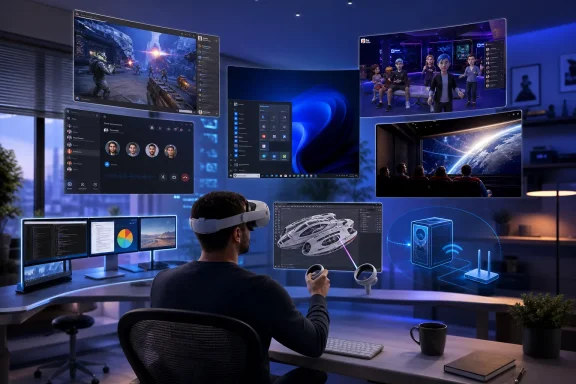 PC streaming and virtual monitors
VR.org’s list separates the two main Windows-focused use cases. Virtual Desktop is positioned as the general-purpose option: it mirrors a full PC desktop, supports conventional Windows applications and can stream PC VR titles. It is not a substitute for reliable home networking, however. Wireless PC VR still depends heavily on a good router, uncongested Wi-Fi, and a PC with enough GPU headroom for both the game and video encoding.Immersed takes a different approach. Its appeal is virtual multi-monitor workspaces, including screens placed around the user in mixed reality. That can be useful for travel, temporary offices or laptop-bound developers, although headset comfort, text clarity and battery life remain limits for all-day Windows work.
Social and entertainment additions
The guide also calls out VRChat and Bigscreen as the major social options. VRChat spans Quest and PC VR, while Bigscreen supports private and public virtual theater rooms, desktop streaming and 3D video playback.The most notable late addition is Discord’s native Quest app, which VR.org says arrived on the Horizon Store on July 1 for Quest 2 and later hardware. Its key capability is the ability to pin Discord in the VR playspace while another app or game is running. That removes the usual phone, browser or PC-audio workaround for players who use Discord voice chat while in standalone Quest games.
According to VR.org, the app includes server access, messages, voice calls, video calls using Meta Avatars, and direct Quest gameplay streaming to Discord. For PC VR users, Discord on Windows remains the more flexible choice, but the native Quest client matters when the headset is being used without a PC.
The rest of the shortlist
The guide’s non-gaming recommendations include Gravity Sketch for 3D design, Wander for Street View exploration, ShapesXR for collaborative spatial prototypes, FitXR for subscription fitness classes, and Guided Meditation VR for wellness sessions. Open Brush and SideQuest receive honorable mentions for creative work and access to experimental Quest software.The list is strongest as a practical starting point rather than a ranking of universally essential apps: Windows users with a gaming PC should start with Virtual Desktop, while standalone Quest owners who play socially may get more immediate value from the new Discord client.
References
- Primary source: vr.org
Published: 2026-03-23T00:00:00+00:00
Best VR Apps & Utilities 2026: Top Must-Have Apps | VR.org
Best VR apps 2026: Virtual Desktop for wireless PC VR, Immersed for work, VRChat for social, plus the essential utilities every VR headset owner needs.vr.org
