

Microsoft’s June 9 Visual Studio 2026 update added a native Copilot Usage window, a Theme Color Editor, and opt-in cross-install MSVC toolset discovery, giving developers in the IDE new visibility into AI credit spending, theme customization, and pinned C++ compiler resolution. The timing matters more than the feature count. Visual Studio did not merely gain another dashboard; it gained a meter at the exact point where Microsoft and GitHub’s new Copilot economics become real. For developers who were sold on agentic coding as the future of software work, the IDE has finally started admitting that the future now has a running tab.
The update lands in the shadow of GitHub’s June 1 transition to usage-based Copilot billing, a change that replaced the comfortable fiction of flat-rate AI with a more literal accounting of tokens, model calls, cached context, and multi-step agent work. That transition was always going to be disruptive. What made it feel especially abrupt was that Visual Studio, the place where developers actually launched these costly AI workflows, had been mostly silent while the meter spun elsewhere.
The refreshed Usage window is therefore less a convenience feature than a correction. It does not make Copilot cheaper. It does not reverse the billing model. But it closes the most obvious trust gap in the system: Microsoft cannot ask developers to delegate more work to an IDE agent while forcing them to leave the IDE to understand what that delegation costs.
The central problem with Copilot’s new billing model is not that tokens are hard to define. Developers are used to abstractions with messy internals. The problem is that the cost of an AI action in an IDE is not visible from the shape of the action itself.
A small inline completion and an agentic refactor may both begin with the same Copilot branding, the same chat pane, or the same reassuring assistant icon. Under the old model, that ambiguity was tolerable because the user’s marginal cost was effectively invisible. Under usage-based billing, it becomes a product design problem.
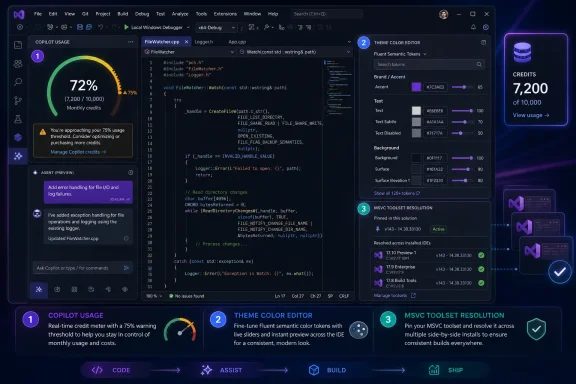
The June 9 Visual Studio update addresses that problem by adding a Copilot Usage window that tracks AI Credit consumption from inside the IDE. Developers can open it from the Copilot badge menu, monitor current usage, and receive warnings as they approach or cross their monthly allotment. That sounds mundane until you consider what it replaces: a developer finishing a long agent session, switching contexts, opening a browser, loading a GitHub billing page, and discovering afterward that the session consumed far more than expected.
Usage visibility has to live where usage decisions happen. That is true for cloud infrastructure, where cost dashboards increasingly surface inside deployment tools, and it is now true for AI-assisted development. If the IDE is where developers authorize an agent to read a codebase, edit files, run tests, and iterate, then the IDE is where the cost signal belongs.
This is the important distinction in Microsoft’s move. A billing dashboard tells you what happened. An IDE warning can change what happens next. The former is accounting; the latter is product safety.
Agentic workflows are different. They are not one request but a chain of requests: inspect the project, summarize files, form a plan, call tools, edit code, explain changes, run tests, inspect failures, and try again. Each step may involve new input tokens, output tokens, cached context, and model-specific pricing. To the user, the interaction may feel like one task. To the billing system, it is a sequence of metered events.
That mismatch is why the June 1 transition caused such anger among heavy users. Microsoft and GitHub had spent the previous year nudging developers toward more autonomous Copilot workflows. Then the economics changed in a way that made those workflows feel newly dangerous, particularly for individual developers and small teams without procurement buffers.
GitHub’s argument is not incoherent. A quick chat question and a long autonomous coding session do not cost the provider the same amount to serve. The old premium-request model flattened that difference, subsidizing heavy agentic use and obscuring the compute behind the feature. Usage-based billing makes the provider’s cost structure more visible.
But vendor cost realism and user trust are separate problems. GitHub could be right that the old model was unsustainable and still wrong-footed in how the transition felt to developers. When a product’s recommended workflow changes from “ask Copilot to do more” to “ask Copilot to do more, but monitor your burn rate,” the interface has to evolve with the business model.
Visual Studio’s new Usage window is the first serious acknowledgment of that reality. It says, implicitly, that AI coding is no longer just a productivity feature. It is a resource-consuming workflow that needs observability.
That distinction matters because many developers still think of “Copilot” as one thing. It is no longer one thing economically. It is a bundle of experiences with different cost profiles hiding behind the same assistant brand.
A developer using Copilot primarily as autocomplete may barely notice the transition. A developer using Agent mode to perform multi-file refactors, generate tests, chase build failures, or review a pull request may run into limits quickly. The difference is not merely usage frequency but task shape. Broad-context tasks cost more because they carry more context, produce more output, and often require repeated tool calls.
The frustrating part is that these are often the tasks where AI feels most useful. Nobody gets excited about a billing model that penalizes the most impressive demo. Yet that is the tension at the center of modern coding assistants: the closer they get to acting like autonomous junior developers, the less they resemble a cheap autocomplete feature.
Visual Studio’s quota warnings help because they give developers a chance to adapt before the month is gone. The default warning threshold is 75 percent, but users can tune the percentage to match their tolerance for risk. For a solo developer on a tight plan, that threshold may need to be far lower. For a team on pooled Business credits, 75 percent may be reasonable if admins are actively watching spend.
The larger lesson is that Copilot usage now needs habits. Developers who would never spin up a large cloud instance without knowing the price should not launch open-ended agent sessions without understanding the credit impact. Microsoft’s challenge is to make that awareness feel natural rather than punitive.
The June 9 Visual Studio update is therefore doing reputational work for the broader Microsoft developer ecosystem. It gives the company a way to say that usage-based AI is not a trap, because the IDE now shows the user what is happening. Whether developers accept that answer will depend on how accurate, timely, and actionable the Usage window proves to be in daily work.
There is a difference between a dashboard that updates eventually and a meter that helps guide behavior. If the Usage window lags behind real consumption, it will be dismissed as decorative. If it surfaces warnings only after a costly session has already completed, it will feel like a receipt. The ideal version of the feature would eventually show session-level cost estimates, model-specific burn, and perhaps even projected spend before an agent begins a large operation.
Microsoft has hinted that the Usage window is only the start. That is wise positioning, because the first version solves the most glaring absence but not the whole problem. Developers will still want to know why one task consumed more than another, which model drove the cost, and whether a cheaper model would have been good enough.
This is where AI tooling begins to resemble cloud tooling. Early cloud dashboards told teams what they spent. Mature cloud platforms added budgets, alerts, recommendations, policy controls, and workload-specific attribution. Copilot is now entering that same cycle, compressed into the IDE.
That may sound like a niche quality-of-life feature, but Visual Studio users are unusually sensitive to interface continuity. This is an audience that spends entire workdays inside one application, often across multiple monitors, with muscle memory built over years. A tab header that blends into the shell, a contrast level that strains the eye, or a theme change that removes familiar visual separation can become more than an aesthetic annoyance.
The Theme Color Editor gives users access to Fluent tokens rather than just raw colors. That distinction matters. A token is not merely a hex value; it is a semantic hook. Changing an accent token or a control token can propagate consistently across the interface, preserving meaning across light, dark, and high-contrast themes.
This is a more maintainable approach than hand-patching colors. It also gives teams a better path to shared IDE configurations. Organizations with accessibility requirements, standardized developer environments, or simply strong preferences about contrast can now treat theme customization as a controlled configuration rather than a personal hack.
The timing is notable because Visual Studio 2026 has already taken heat from users who disliked changes to familiar themes, including the removal of the old Blue theme. By exposing more shell and tab/window header tokens, Microsoft is not merely adding personalization. It is handing some control back to the people who live in the product.
A hardcoded color is brittle. It may look right in one theme and wrong in another. It may fail contrast expectations in high-contrast mode. It may make sense on a tab but not on a command surface. A semantic token gives the system more room to apply the developer’s preference consistently.
For teams, this matters because developer environments are increasingly treated as part of the engineering platform. Companies standardize extensions, settings, analyzers, containers, and build tools. Visual presentation is not usually considered in the same category, but for accessibility and focus, it belongs there.
The new editor also reduces dependency on third-party extensions for a core IDE behavior. Extensions are powerful, but they add maintenance risk, particularly during major IDE transitions. Native support means fewer broken workflows after updates and less need for developers to trade customization against stability.
This is not as dramatic as Copilot billing visibility, but it is part of the same product philosophy. Visual Studio is acknowledging that professional developers need control over the environment, not just more features inside it.
The issue involves pinned MSVC toolset versions. In C++ projects where reproducibility matters, developers often specify an exact VCToolsVersion rather than relying on whatever compiler happens to be current. That pin can be essential for matching CI environments, reproducing customer builds, or avoiding subtle compiler behavior changes.
Before the update, Visual Studio’s discovery behavior could stop too early. If it found a matching platform toolset in the current installation, it might not continue searching other Visual Studio installs on the same machine for the exact pinned version. That created an irritating failure mode for developers running stable and Insiders builds side by side.
The new opt-in EnableVCToolsVersionDiscovery behavior tells Visual Studio to keep searching across installations until it finds the exact requested toolset version. This is not glamorous, but it is precisely the kind of fix that makes a professional IDE feel less arbitrary. Build systems are supposed to be deterministic; when discovery logic defeats an explicit pin, the tool has violated the user’s intent.
The opt-in nature is sensible. Build discovery changes can have surprising effects in established environments, and Microsoft is right not to silently alter behavior for every C++ project. But for teams that already pin toolsets, the new switch is a clean alternative to manual path overrides and local workaround culture.
The Copilot Usage window makes AI spending visible at the point of action. The Theme Color Editor makes the shell’s visual system editable without reverse-engineering configuration files. Cross-install MSVC discovery makes toolset pins behave more like pins and less like suggestions.
That is a meaningful pattern for Visual Studio 2026. Microsoft’s IDE has always been powerful, but power without transparency becomes friction. Developers do not merely want an environment that does more on their behalf. They want to understand when it is acting, what it is consuming, and how to override it when necessary.
This matters especially because Microsoft is pushing Visual Studio into a more agentic era. The more the IDE automates, the more it has to explain. A traditional IDE waits for commands. An AI-assisted IDE proposes, searches, edits, runs tools, and spends credits. That requires a stronger trust contract.
The June 9 update does not complete that contract, but it points in the right direction. It suggests Microsoft understands that developer enthusiasm for AI assistance depends not just on model quality, but on predictability.
Business and Enterprise customers have some cushioning from promotional top-ups through the summer, but temporary credits can also mask behavioral problems. Teams that grow accustomed to heavy agentic usage during a promotional period may face a sharper adjustment when allowances normalize. The right time to study usage is before the cushion disappears, not after.
Visual Studio’s Usage window is useful for individual awareness, but enterprise governance will need more than individual warnings. Admins will want aggregated usage, team-level attribution, policy enforcement, and guidance on which workflows are driving spend. The IDE can warn the developer, but the organization still needs budget controls.
This is where Microsoft and GitHub will face a delicate product balance. Too many warnings will make Copilot feel like a metered taxi. Too few will produce surprise bills and angry admins. The successful design will make cost visible without making every AI interaction feel financially fraught.
The analogy to cloud cost management is imperfect but helpful. Developers eventually learned that elasticity without budgets is a liability. AI agents are now teaching the same lesson in the coding environment.
For light users, this may be a non-event. Autocomplete remains included, and occasional chat use may stay within plan limits. For heavy users, especially those experimenting with agentic coding, the new system changes the calculus of everyday development.
The risk is that developers become more conservative with the very workflows Microsoft wants them to adopt. If an agent session might consume a noticeable chunk of the monthly allotment, a user may reserve it for exceptional cases rather than routine work. That may be economically rational, but it undercuts the narrative that AI assistance should become ambient and constant.
The Usage window can reduce anxiety, but it cannot eliminate the tradeoff. A visible meter makes a metered system fairer; it does not make it feel unlimited. Microsoft and GitHub now have to sell developers on the value of agentic work task by task.
That may ultimately be healthy. If an AI agent saves two hours of debugging, the credits may be easy to justify. If it burns through context while flailing through a messy repository, the user should know quickly. Visibility creates pressure on both sides: developers become more deliberate, and Microsoft has to make the agent more efficient.
Agentic tasks are variable by nature. A request to “fix this failing test” may require one file edit or a tour through half the solution. A prompt to “modernize this API layer” could be a targeted refactor or a sprawling architectural rewrite. The IDE cannot know the full cost in advance, but it can estimate, classify, and warn.
Imagine Visual Studio flagging a proposed agent action as broad-context before it starts. Imagine it showing the selected model, approximate repository scope, expected number of tool calls, and a rough credit range. Imagine it offering a cheaper model or a constrained mode before the user commits. That is the kind of interface usage-based AI will require.
Without preflight intelligence, developers remain reactive. They can see the meter rise, but only after the process begins. With preflight intelligence, cost becomes part of the decision, alongside time, confidence, and risk.
Microsoft is not there yet. But the June 9 update makes the absence obvious, and that is often how platform maturity starts. First the meter appears. Then come budgets, estimates, recommendations, and automation.
The concrete lessons are straightforward:
Microsoft’s June 9 update will not end the argument over Copilot billing, because the argument is really about whether agentic AI can be both powerful and predictably affordable. But it does mark an important shift in Visual Studio’s responsibility: the IDE can no longer be a cheerful launcher for expensive invisible work. If Microsoft wants developers to trust AI agents inside their primary workspace, the workspace has to show the cost, expose the controls, and keep narrowing the gap between automation and accountability.
The update lands in the shadow of GitHub’s June 1 transition to usage-based Copilot billing, a change that replaced the comfortable fiction of flat-rate AI with a more literal accounting of tokens, model calls, cached context, and multi-step agent work. That transition was always going to be disruptive. What made it feel especially abrupt was that Visual Studio, the place where developers actually launched these costly AI workflows, had been mostly silent while the meter spun elsewhere.
The refreshed Usage window is therefore less a convenience feature than a correction. It does not make Copilot cheaper. It does not reverse the billing model. But it closes the most obvious trust gap in the system: Microsoft cannot ask developers to delegate more work to an IDE agent while forcing them to leave the IDE to understand what that delegation costs.
 Microsoft Put the Meter Where the Money Is Spent
The central problem with Copilot’s new billing model is not that tokens are hard to define. Developers are used to abstractions with messy internals. The problem is that the cost of an AI action in an IDE is not visible from the shape of the action itself.A small inline completion and an agentic refactor may both begin with the same Copilot branding, the same chat pane, or the same reassuring assistant icon. Under the old model, that ambiguity was tolerable because the user’s marginal cost was effectively invisible. Under usage-based billing, it becomes a product design problem.
The June 9 Visual Studio update addresses that problem by adding a Copilot Usage window that tracks AI Credit consumption from inside the IDE. Developers can open it from the Copilot badge menu, monitor current usage, and receive warnings as they approach or cross their monthly allotment. That sounds mundane until you consider what it replaces: a developer finishing a long agent session, switching contexts, opening a browser, loading a GitHub billing page, and discovering afterward that the session consumed far more than expected.
Usage visibility has to live where usage decisions happen. That is true for cloud infrastructure, where cost dashboards increasingly surface inside deployment tools, and it is now true for AI-assisted development. If the IDE is where developers authorize an agent to read a codebase, edit files, run tests, and iterate, then the IDE is where the cost signal belongs.
This is the important distinction in Microsoft’s move. A billing dashboard tells you what happened. An IDE warning can change what happens next. The former is accounting; the latter is product safety.
Agentic Coding Broke the Old Copilot Bargain
GitHub’s move to AI Credits is best understood as the bill coming due for agentic coding. Traditional Copilot autocomplete was relatively easy to package as a subscription feature because each interaction was narrow. The model consumed a slice of surrounding code, generated a suggestion, and waited for the next keystroke.Agentic workflows are different. They are not one request but a chain of requests: inspect the project, summarize files, form a plan, call tools, edit code, explain changes, run tests, inspect failures, and try again. Each step may involve new input tokens, output tokens, cached context, and model-specific pricing. To the user, the interaction may feel like one task. To the billing system, it is a sequence of metered events.
That mismatch is why the June 1 transition caused such anger among heavy users. Microsoft and GitHub had spent the previous year nudging developers toward more autonomous Copilot workflows. Then the economics changed in a way that made those workflows feel newly dangerous, particularly for individual developers and small teams without procurement buffers.
GitHub’s argument is not incoherent. A quick chat question and a long autonomous coding session do not cost the provider the same amount to serve. The old premium-request model flattened that difference, subsidizing heavy agentic use and obscuring the compute behind the feature. Usage-based billing makes the provider’s cost structure more visible.
But vendor cost realism and user trust are separate problems. GitHub could be right that the old model was unsustainable and still wrong-footed in how the transition felt to developers. When a product’s recommended workflow changes from “ask Copilot to do more” to “ask Copilot to do more, but monitor your burn rate,” the interface has to evolve with the business model.
Visual Studio’s new Usage window is the first serious acknowledgment of that reality. It says, implicitly, that AI coding is no longer just a productivity feature. It is a resource-consuming workflow that needs observability.
The New Copilot Economics Reward Awareness, Not Enthusiasm
Under the new architecture, not every Copilot interaction is equal. Inline code completions and Next Edit Suggestions remain included in paid plans and do not consume AI Credits. The expensive category is the one Microsoft has been most eager to promote: chat, agent sessions, cloud agents, code review, and other workflows where Copilot performs broader reasoning across context.That distinction matters because many developers still think of “Copilot” as one thing. It is no longer one thing economically. It is a bundle of experiences with different cost profiles hiding behind the same assistant brand.
A developer using Copilot primarily as autocomplete may barely notice the transition. A developer using Agent mode to perform multi-file refactors, generate tests, chase build failures, or review a pull request may run into limits quickly. The difference is not merely usage frequency but task shape. Broad-context tasks cost more because they carry more context, produce more output, and often require repeated tool calls.
The frustrating part is that these are often the tasks where AI feels most useful. Nobody gets excited about a billing model that penalizes the most impressive demo. Yet that is the tension at the center of modern coding assistants: the closer they get to acting like autonomous junior developers, the less they resemble a cheap autocomplete feature.
Visual Studio’s quota warnings help because they give developers a chance to adapt before the month is gone. The default warning threshold is 75 percent, but users can tune the percentage to match their tolerance for risk. For a solo developer on a tight plan, that threshold may need to be far lower. For a team on pooled Business credits, 75 percent may be reasonable if admins are actively watching spend.
The larger lesson is that Copilot usage now needs habits. Developers who would never spin up a large cloud instance without knowing the price should not launch open-ended agent sessions without understanding the credit impact. Microsoft’s challenge is to make that awareness feel natural rather than punitive.
A Cost Tracker Is Also a Trust Repair Mechanism
The backlash to GitHub’s billing transition was not just about money. It was about surprise. Developers can accept a tool becoming more expensive if the new rules are clear, predictable, and visible. They are far less forgiving when the meter appears to be running behind a curtain.The June 9 Visual Studio update is therefore doing reputational work for the broader Microsoft developer ecosystem. It gives the company a way to say that usage-based AI is not a trap, because the IDE now shows the user what is happening. Whether developers accept that answer will depend on how accurate, timely, and actionable the Usage window proves to be in daily work.
There is a difference between a dashboard that updates eventually and a meter that helps guide behavior. If the Usage window lags behind real consumption, it will be dismissed as decorative. If it surfaces warnings only after a costly session has already completed, it will feel like a receipt. The ideal version of the feature would eventually show session-level cost estimates, model-specific burn, and perhaps even projected spend before an agent begins a large operation.
Microsoft has hinted that the Usage window is only the start. That is wise positioning, because the first version solves the most glaring absence but not the whole problem. Developers will still want to know why one task consumed more than another, which model drove the cost, and whether a cheaper model would have been good enough.
This is where AI tooling begins to resemble cloud tooling. Early cloud dashboards told teams what they spent. Mature cloud platforms added budgets, alerts, recommendations, policy controls, and workload-specific attribution. Copilot is now entering that same cycle, compressed into the IDE.
Visual Studio’s Theme Editor Is More Than Cosmetic Debt Payment
The Copilot cost tracker is the headliner, but the new Theme Color Editor tells a quieter story about Visual Studio 2026’s direction. For years, serious theme customization in Visual Studio involved awkward workarounds: editing JSON, relying on extensions, or accepting that certain shell surfaces could not be shaped cleanly. The June 9 update brings Fluent color token editing directly into the IDE.That may sound like a niche quality-of-life feature, but Visual Studio users are unusually sensitive to interface continuity. This is an audience that spends entire workdays inside one application, often across multiple monitors, with muscle memory built over years. A tab header that blends into the shell, a contrast level that strains the eye, or a theme change that removes familiar visual separation can become more than an aesthetic annoyance.
The Theme Color Editor gives users access to Fluent tokens rather than just raw colors. That distinction matters. A token is not merely a hex value; it is a semantic hook. Changing an accent token or a control token can propagate consistently across the interface, preserving meaning across light, dark, and high-contrast themes.
This is a more maintainable approach than hand-patching colors. It also gives teams a better path to shared IDE configurations. Organizations with accessibility requirements, standardized developer environments, or simply strong preferences about contrast can now treat theme customization as a controlled configuration rather than a personal hack.
The timing is notable because Visual Studio 2026 has already taken heat from users who disliked changes to familiar themes, including the removal of the old Blue theme. By exposing more shell and tab/window header tokens, Microsoft is not merely adding personalization. It is handing some control back to the people who live in the product.
Fluent Tokens Turn Taste Into Configuration
The token-based approach reflects a broader shift in Microsoft’s design systems. Fluent design is not just a visual language; in its modern form, it is a set of reusable variables that describe how surfaces, states, accents, and controls should behave. That abstraction is what makes the Theme Color Editor useful beyond individual taste.A hardcoded color is brittle. It may look right in one theme and wrong in another. It may fail contrast expectations in high-contrast mode. It may make sense on a tab but not on a command surface. A semantic token gives the system more room to apply the developer’s preference consistently.
For teams, this matters because developer environments are increasingly treated as part of the engineering platform. Companies standardize extensions, settings, analyzers, containers, and build tools. Visual presentation is not usually considered in the same category, but for accessibility and focus, it belongs there.
The new editor also reduces dependency on third-party extensions for a core IDE behavior. Extensions are powerful, but they add maintenance risk, particularly during major IDE transitions. Native support means fewer broken workflows after updates and less need for developers to trade customization against stability.
This is not as dramatic as Copilot billing visibility, but it is part of the same product philosophy. Visual Studio is acknowledging that professional developers need control over the environment, not just more features inside it.
C++ Toolset Discovery Solves a Very Visual Studio Problem
The third major June 9 addition is aimed squarely at C++ developers who maintain multiple Visual Studio installations. It is the kind of feature that will be invisible to most users and deeply welcome to the people who need it.The issue involves pinned MSVC toolset versions. In C++ projects where reproducibility matters, developers often specify an exact VCToolsVersion rather than relying on whatever compiler happens to be current. That pin can be essential for matching CI environments, reproducing customer builds, or avoiding subtle compiler behavior changes.
Before the update, Visual Studio’s discovery behavior could stop too early. If it found a matching platform toolset in the current installation, it might not continue searching other Visual Studio installs on the same machine for the exact pinned version. That created an irritating failure mode for developers running stable and Insiders builds side by side.
The new opt-in EnableVCToolsVersionDiscovery behavior tells Visual Studio to keep searching across installations until it finds the exact requested toolset version. This is not glamorous, but it is precisely the kind of fix that makes a professional IDE feel less arbitrary. Build systems are supposed to be deterministic; when discovery logic defeats an explicit pin, the tool has violated the user’s intent.
The opt-in nature is sensible. Build discovery changes can have surprising effects in established environments, and Microsoft is right not to silently alter behavior for every C++ project. But for teams that already pin toolsets, the new switch is a clean alternative to manual path overrides and local workaround culture.
The Update’s Real Theme Is Control
Taken together, the three June 9 features look unrelated only at first glance. One tracks Copilot spend. One edits theme tokens. One improves compiler discovery. But each gives developers more visibility or control over something Visual Studio previously mediated too opaquely.The Copilot Usage window makes AI spending visible at the point of action. The Theme Color Editor makes the shell’s visual system editable without reverse-engineering configuration files. Cross-install MSVC discovery makes toolset pins behave more like pins and less like suggestions.
That is a meaningful pattern for Visual Studio 2026. Microsoft’s IDE has always been powerful, but power without transparency becomes friction. Developers do not merely want an environment that does more on their behalf. They want to understand when it is acting, what it is consuming, and how to override it when necessary.
This matters especially because Microsoft is pushing Visual Studio into a more agentic era. The more the IDE automates, the more it has to explain. A traditional IDE waits for commands. An AI-assisted IDE proposes, searches, edits, runs tools, and spends credits. That requires a stronger trust contract.
The June 9 update does not complete that contract, but it points in the right direction. It suggests Microsoft understands that developer enthusiasm for AI assistance depends not just on model quality, but on predictability.
Enterprise IT Will Treat AI Credits Like Cloud Spend
For administrators, the Copilot billing transition moves AI coding from a software licensing concern into something closer to cloud cost management. A per-seat subscription is easy to budget. A usage-based assistant with agentic workflows, pooled credits, and overage policies requires governance.Business and Enterprise customers have some cushioning from promotional top-ups through the summer, but temporary credits can also mask behavioral problems. Teams that grow accustomed to heavy agentic usage during a promotional period may face a sharper adjustment when allowances normalize. The right time to study usage is before the cushion disappears, not after.
Visual Studio’s Usage window is useful for individual awareness, but enterprise governance will need more than individual warnings. Admins will want aggregated usage, team-level attribution, policy enforcement, and guidance on which workflows are driving spend. The IDE can warn the developer, but the organization still needs budget controls.
This is where Microsoft and GitHub will face a delicate product balance. Too many warnings will make Copilot feel like a metered taxi. Too few will produce surprise bills and angry admins. The successful design will make cost visible without making every AI interaction feel financially fraught.
The analogy to cloud cost management is imperfect but helpful. Developers eventually learned that elasticity without budgets is a liability. AI agents are now teaching the same lesson in the coding environment.
Individual Developers Face the Sharpest Behavior Change
The billing transition is most emotionally jarring for individual developers because they experience it without the buffer of pooled organizational spend. A Pro user who previously treated Copilot as a fixed monthly utility now has to think about which workflows are “worth” their credits. That is a psychological change as much as a financial one.For light users, this may be a non-event. Autocomplete remains included, and occasional chat use may stay within plan limits. For heavy users, especially those experimenting with agentic coding, the new system changes the calculus of everyday development.
The risk is that developers become more conservative with the very workflows Microsoft wants them to adopt. If an agent session might consume a noticeable chunk of the monthly allotment, a user may reserve it for exceptional cases rather than routine work. That may be economically rational, but it undercuts the narrative that AI assistance should become ambient and constant.
The Usage window can reduce anxiety, but it cannot eliminate the tradeoff. A visible meter makes a metered system fairer; it does not make it feel unlimited. Microsoft and GitHub now have to sell developers on the value of agentic work task by task.
That may ultimately be healthy. If an AI agent saves two hours of debugging, the credits may be easy to justify. If it burns through context while flailing through a messy repository, the user should know quickly. Visibility creates pressure on both sides: developers become more deliberate, and Microsoft has to make the agent more efficient.
The Missing Feature Is Preflight Cost Intelligence
The current Usage window answers the question “How much have I used?” The next generation needs to answer “What will this likely cost?” That is a harder product problem, but it is where the IDE must go.Agentic tasks are variable by nature. A request to “fix this failing test” may require one file edit or a tour through half the solution. A prompt to “modernize this API layer” could be a targeted refactor or a sprawling architectural rewrite. The IDE cannot know the full cost in advance, but it can estimate, classify, and warn.
Imagine Visual Studio flagging a proposed agent action as broad-context before it starts. Imagine it showing the selected model, approximate repository scope, expected number of tool calls, and a rough credit range. Imagine it offering a cheaper model or a constrained mode before the user commits. That is the kind of interface usage-based AI will require.
Without preflight intelligence, developers remain reactive. They can see the meter rise, but only after the process begins. With preflight intelligence, cost becomes part of the decision, alongside time, confidence, and risk.
Microsoft is not there yet. But the June 9 update makes the absence obvious, and that is often how platform maturity starts. First the meter appears. Then come budgets, estimates, recommendations, and automation.
The June 9 Build Gives Developers Three Levers, Not Just Three Features
The practical response to this update is not to treat every new feature as equally urgent. Copilot-heavy users should start with the Usage window because the billing transition is already live. Theme customization can wait unless the default Visual Studio 2026 interface is hurting focus or accessibility. C++ teams with pinned toolsets should evaluate the new discovery switch deliberately rather than assuming the default behavior changed.The concrete lessons are straightforward:
- Developers who use Copilot mainly for inline completions should not expect those completions to consume AI Credits under the current billing model.
- Developers who use Copilot Chat, Agent mode, cloud agents, or code review should treat those workflows as metered usage and monitor them inside Visual Studio.
- Teams should adjust quota warning thresholds before heavy agentic sessions, not after the monthly budget is already nearly exhausted.
- Organizations on Business or Enterprise plans should analyze usage during the promotional-credit period so September does not become the first real cost review.
- C++ projects that pin exact MSVC versions should test EnableVCToolsVersionDiscovery in controlled builds before rolling it into shared project files.
- Teams that standardize developer environments should consider the Theme Color Editor part of configuration management, not just personalization.
Microsoft’s June 9 update will not end the argument over Copilot billing, because the argument is really about whether agentic AI can be both powerful and predictably affordable. But it does mark an important shift in Visual Studio’s responsibility: the IDE can no longer be a cheerful launcher for expensive invisible work. If Microsoft wants developers to trust AI agents inside their primary workspace, the workspace has to show the cost, expose the controls, and keep narrowing the gap between automation and accountability.
References
- Primary source: Tech Times
Published: 2026-07-01T02:21:08.621542
Visual Studio 2026 Fixes Copilot Billing Blind Spot With Native Cost Tracker
GitHub Copilot usage-based billing left Visual Studio as the only place in a developer workflow where AI costs were invisible. The June 9 Visual Studio 2026 update fixes that: a refreshed Copilotwww.techtimes.com - Official source: docs.github.com
Usage-based billing for individuals - GitHub Docs
Your Copilot plan includes a monthly allowance of GitHub AI Credits. If you exhaust your AI credits, you can pay extra to keep working. docs.github.com
- Related coverage: bodegaone.ai
GitHub Copilot AI Credits: what Pro, Pro+, Max cover
On June 1, 2026, GitHub flipped all Copilot plans to AI Credits billing. We walk the math plan by plan, with live model pricing from the docs.www.bodegaone.ai - Related coverage: frontierbeat.com
GitHub Copilot Drops Flat-Rate Pricing June 1—Power Users Pay by the Token - Frontierbeat
GitHub replaces flat-rate Copilot plans with token-based AI Credits on June 1. Business users get a $30 credit buffer—until August, when the subsidy ends. frontierbeat.com
- Related coverage: github.blog
GitHub Copilot is moving to usage-based billing - The GitHub Blog
Starting June 1, your Copilot usage will consume GitHub AI Credits.github.blog
- Official source: github.com
GitHub Copilot · Your AI pair programmer · GitHub
GitHub is where people build software. More than 150 million people use GitHub to discover, fork, and contribute to over 420 million projects. github.com
- Related coverage: findskill.ai
GitHub Copilot's New AI Credits Billing: What Changes June 1 | FindSkill.ai — Learn AI for Your Job
GitHub Copilot switches to usage-based AI Credits on June 1, 2026. What each plan includes, how overage works, and the $0 cap that stops surprise bills.findskill.ai - Related coverage: bitsminds.com
- Related coverage: pondero.ai
GitHub Copilot switches to AI Credits billing on June 1 as individual sign-ups stay paused and a Max plan joins the lineup
Starting June 1, 2026, GitHub is replacing premium request units with token-based AI Credits across all Copilot plans, introducing a new $100/month Max tier and keeping base prices flat.pondero.ai
- Related coverage: getburnrate.io
BurnRate Blog — AI Coding Cost Insights
Research-backed insights on AI coding tool costs. Industry data on what developers and teams actually spend on Claude, Cursor, Copilot, and Codex. getburnrate.io
- Related coverage: therouter.ai
GitHub Copilot AI Credits, June 2026: Token Billing Explained and Fallback Removed — TheRouter.ai | TheRouter.ai
GitHub Copilot AI Credits launched June 2026, replacing Premium Request Units with token-based billing. The old model fallback that let you keep working on a cheaper model is gone—agentic sessions now stop when credits run out. Here's what changed and how to manage it.therouter.ai - Related coverage: itpro.com
Everything you need to know about the GitHub Copilot pricing changes | IT Pro
GitHub Copilot pricing changes mean users will be charged based on consumption, rather than a set number of credits.www.itpro.com - Related coverage: tomshardware.com
Github Copilot customers report up to 100-fold price hikes — AI sticker shock bites as Microsoft switches to usage-based pricing | Tom's Hardware
The AI investment chickens have come home to roost.www.tomshardware.com
