

Microsoft’s July 2026 VLCM change is not an automatic loss of every Windows ISO, EXE installer, or volume-license key your organization relies on. The immediate priority is to separate non-Enterprise Agreement contract administration in eAgreements/VLCM from the Microsoft 365 admin center’s downloads-and-keys workflow, then prove that named administrators can still retrieve, validate, and securely restore the media and activation information needed for Windows deployments.
Microsoft’s revised guidance puts the important date at July 24, 2026: eAgreements/VLCM becomes read-only for non-EA programs on that date, replacing the previously communicated July 10 timing. Full decommissioning is scheduled by the end of July. The August 11 event sometimes described as an “August cutover” is instead the final adoption call in Microsoft’s launch series, not the stated retirement date.
That distinction matters because contract workflow disruption and imaging disruption are related operational risks, but they are not the same event. A Windows team that treats VLCM retirement as a single portal shutdown may scramble to download media it already has while overlooking the real weak point: nobody can demonstrate who owns the entitlement record, who can export keys, where the approved ISO is stored, or whether that ISO can be trusted and used in a recovery scenario.
Microsoft’s volume licensing documentation places downloadable software and product keys in the Microsoft 365 admin center. The working path is:
That means a person who can download a Windows image may not be authorized to retrieve the associated activation data, while a person who can view keys may be unable to download the installer. In a well-run environment, that is least privilege working as intended. In an environment where access was granted informally years ago, it is an outage waiting to happen.
Microsoft also distinguishes activation data from billing and licensing compliance. Product keys facilitate activation; they are not themselves proof of a licensing position. Keep the evidence trail intact: the License ID, organization name, product and edition, contract record, approved image record, and the identity of the administrator who retrieved each item should travel together in your internal documentation.
Start with the operational uses of media rather than a list of portal products. A bare ISO archive tells little about whether it supports your actual deployment process. The audit should identify the image, its deployment purpose, its ownership, and its recovery value.
WindowsForum readers already familiar with the move from VLCM toward newer volume-licensing workflows should regard the contract transition as a prompt to audit deployment operations, not as evidence that Windows media has vanished. The same discipline applies to offline servicing: a trusted media repository and a documented update source are different assets, but both fail when provenance and ownership are assumed rather than tested.
For each approved ISO or EXE, create a media record that includes the product name, edition, language, architecture where relevant, date retrieved, download source, License ID linkage, file size, storage location, and owner. Record a cryptographic file hash at acquisition and retain it with the file record; verify that hash whenever the image is copied to a deployment share, recovery repository, or removable medium.
Hashing is not a licensing control. It is a provenance control. It helps answer the practical question an incident responder or deployment engineer will ask: “Is this the exact approved image we archived, or merely a file with a familiar name?”
The record should also distinguish original Microsoft media from organization-customized media. If an image has been modified for drivers, unattended setup, packages, or internal configuration, retain the build procedure and the source media reference separately. A customized image without a repeatable build record becomes increasingly difficult to defend, refresh, or restore as personnel and portals change.
Do not use a general file share as the only archive. At minimum, maintain protected storage with controlled write access, a documented restore procedure, and enough metadata for a different administrator to identify the correct file. The aim is not to duplicate every historical download indefinitely; it is to retain the precise artifacts that support a documented deployment or recovery requirement.
First, assign a primary operational owner and a separate backup owner. The primary should hold only the role needed for routine work where possible. The backup should be able to take over if the primary administrator is unavailable, but access should remain controlled through your organization’s normal identity and privileged-access process.
Second, have the download-capable owner sign in and confirm that Billing > Your products > Volume licensing > View downloads and keys is visible and usable. Have the key-capable owner separately confirm that the necessary License IDs and key-export capability are visible. A screenshot-free written test record is usually more useful than a collection of portal screenshots: state the date, account role, product tested, result, and any access failure.
Third, perform a restore test. Retrieve one approved image from the archive, compare its stored hash with a newly calculated value, mount or otherwise validate the media according to your established process, and verify that the accompanying documentation identifies the intended product and entitlement linkage. Do not wait for a production rebuild or a disaster recovery event to discover that a file is incomplete, inaccessible, or mislabeled.
Finally, test the escalation path. If the key reader cannot access a needed License ID, or if the download manager cannot retrieve expected media, determine now whether the issue belongs to internal role administration, entitlement visibility, or Microsoft volume-licensing support. A cutover is the wrong time to begin reconstructing that chain.
Use the export to create or refresh the controlled key inventory, then handle the file as secret material. Limit access to the staff who must activate or recover systems, record which License IDs are represented, and avoid distributing the raw export simply because several teams participate in imaging.
MAKs deserve particular attention in disconnected or remote deployment scenarios because the key may be embedded in procedures that have not been reviewed for years. Confirm which workflows actually depend on them, whether the associated product is still part of the approved estate, and where the current activation process is documented. Removing stale key references from scripts and build notes is as important as archiving the valid ones.
The practical deadline is July 24, but the durable outcome is not a completed portal migration checklist. It is a Windows media operation with verified owners, tested access, protected key handling, and an archive whose images can be identified and restored when the next rebuild is no longer optional.
Microsoft’s revised guidance puts the important date at July 24, 2026: eAgreements/VLCM becomes read-only for non-EA programs on that date, replacing the previously communicated July 10 timing. Full decommissioning is scheduled by the end of July. The August 11 event sometimes described as an “August cutover” is instead the final adoption call in Microsoft’s launch series, not the stated retirement date.
That distinction matters because contract workflow disruption and imaging disruption are related operational risks, but they are not the same event. A Windows team that treats VLCM retirement as a single portal shutdown may scramble to download media it already has while overlooking the real weak point: nobody can demonstrate who owns the entitlement record, who can export keys, where the approved ISO is stored, or whether that ISO can be trusted and used in a recovery scenario.
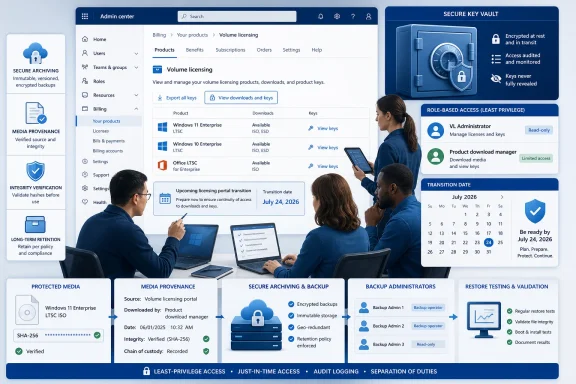 The Admin Center, Not VLCM, Is the Media and Key Control Point
Microsoft’s volume licensing documentation places downloadable software and product keys in the Microsoft 365 admin center. The working path is:- Sign in to the Microsoft 365 admin center with the organization’s approved licensing identity.
- Open Billing and then Your products.
- Select the Volume licensing tab.
- Choose View downloads and keys.
- Search or filter for the needed product, select it, and review its available downloads and keys.
- Export only the keys and contract information required for the controlled record, then store the export in the organization’s approved secrets or licensing repository rather than on an administrator’s workstation.
That means a person who can download a Windows image may not be authorized to retrieve the associated activation data, while a person who can view keys may be unable to download the installer. In a well-run environment, that is least privilege working as intended. In an environment where access was granted informally years ago, it is an outage waiting to happen.
Microsoft also distinguishes activation data from billing and licensing compliance. Product keys facilitate activation; they are not themselves proof of a licensing position. Keep the evidence trail intact: the License ID, organization name, product and edition, contract record, approved image record, and the identity of the administrator who retrieved each item should travel together in your internal documentation.
Treat the Next Days as an Imaging Dependency Audit
The most useful preparation is not a bulk-download panic. It is an inventory that identifies where Windows deployment and recovery workflows depend on volume-license media, offline installers, MAKs, setup keys, or access delegated to a single departing administrator.Start with the operational uses of media rather than a list of portal products. A bare ISO archive tells little about whether it supports your actual deployment process. The audit should identify the image, its deployment purpose, its ownership, and its recovery value.
- Record every offline Windows installation image used for new-device provisioning, reimaging, lab rebuilds, repair workflows, or disconnected environments.
- Record volume-license installers used alongside Windows images, including any installer whose availability is assumed during a bare-metal or post-incident build.
- Identify every MAK, setup key, or other activation dependency used in documented workflows, but do not place the key itself in ordinary build documentation.
- Map each dependency to its License ID and to the person or team responsible for confirming that access remains valid.
- Identify deployment shares, imaging servers, removable recovery media, secure vaults, and automation repositories that contain or reference the media.
- Flag any workflow that relies on a personal browser download, an unmanaged file share, a former employee’s account, or undocumented credentials.
WindowsForum readers already familiar with the move from VLCM toward newer volume-licensing workflows should regard the contract transition as a prompt to audit deployment operations, not as evidence that Windows media has vanished. The same discipline applies to offline servicing: a trusted media repository and a documented update source are different assets, but both fail when provenance and ownership are assumed rather than tested.
Build a Provenance Record for Every Approved Image
Microsoft says the volume-licensing catalog generally emphasizes current versions, and older media in the N-2-and-beyond range may be limited. That does not make every older installer a mandatory archive candidate. It does mean organizations with legitimate operational dependency on an older image should decide deliberately what to retain, why it is retained, and how its entitlement and integrity will be established later.For each approved ISO or EXE, create a media record that includes the product name, edition, language, architecture where relevant, date retrieved, download source, License ID linkage, file size, storage location, and owner. Record a cryptographic file hash at acquisition and retain it with the file record; verify that hash whenever the image is copied to a deployment share, recovery repository, or removable medium.
Hashing is not a licensing control. It is a provenance control. It helps answer the practical question an incident responder or deployment engineer will ask: “Is this the exact approved image we archived, or merely a file with a familiar name?”
The record should also distinguish original Microsoft media from organization-customized media. If an image has been modified for drivers, unattended setup, packages, or internal configuration, retain the build procedure and the source media reference separately. A customized image without a repeatable build record becomes increasingly difficult to defend, refresh, or restore as personnel and portals change.
Do not use a general file share as the only archive. At minimum, maintain protected storage with controlled write access, a documented restore procedure, and enough metadata for a different administrator to identify the correct file. The aim is not to duplicate every historical download indefinitely; it is to retain the precise artifacts that support a documented deployment or recovery requirement.
Test Roles and Restores Before July 24
The cutover runbook should be short enough to execute now and strict enough to expose false assumptions. Microsoft’s guidance establishes the portal path and role requirements; your organization must establish whether those permissions work for the people expected to use them under pressure.First, assign a primary operational owner and a separate backup owner. The primary should hold only the role needed for routine work where possible. The backup should be able to take over if the primary administrator is unavailable, but access should remain controlled through your organization’s normal identity and privileged-access process.
Second, have the download-capable owner sign in and confirm that Billing > Your products > Volume licensing > View downloads and keys is visible and usable. Have the key-capable owner separately confirm that the necessary License IDs and key-export capability are visible. A screenshot-free written test record is usually more useful than a collection of portal screenshots: state the date, account role, product tested, result, and any access failure.
Third, perform a restore test. Retrieve one approved image from the archive, compare its stored hash with a newly calculated value, mount or otherwise validate the media according to your established process, and verify that the accompanying documentation identifies the intended product and entitlement linkage. Do not wait for a production rebuild or a disaster recovery event to discover that a file is incomplete, inaccessible, or mislabeled.
Finally, test the escalation path. If the key reader cannot access a needed License ID, or if the download manager cannot retrieve expected media, determine now whether the issue belongs to internal role administration, entitlement visibility, or Microsoft volume-licensing support. A cutover is the wrong time to begin reconstructing that chain.
The Key Export Is the Sensitive Part
Media can be large and inconvenient, but keys are the more sensitive artifact. A CSV export is operationally useful for reconciliation and recovery planning, yet it can also create an avoidable exposure if copied into ticket attachments, endpoint downloads folders, collaboration sites, or unencrypted archives.Use the export to create or refresh the controlled key inventory, then handle the file as secret material. Limit access to the staff who must activate or recover systems, record which License IDs are represented, and avoid distributing the raw export simply because several teams participate in imaging.
MAKs deserve particular attention in disconnected or remote deployment scenarios because the key may be embedded in procedures that have not been reviewed for years. Confirm which workflows actually depend on them, whether the associated product is still part of the approved estate, and where the current activation process is documented. Removing stale key references from scripts and build notes is as important as archiving the valid ones.
Frequently Asked Questions
VLCM Read-Only Scope
Does July 24 mean Windows volume-license ISO downloads disappear? No. Microsoft’s documented location for volume-license downloads and product keys is the Microsoft 365 admin center, under Billing, Your products, Volume licensing, and View downloads and keys. The July 24 eAgreements/VLCM read-only change concerns non-EA program contract workflows.Required Roles
Which role should a backup imaging administrator have? A backup administrator needs VL Administrator or Product download manager to retrieve media. If that person must also view or export product keys, assign VL Administrator or Product keys reader as appropriate to the organization’s least-privilege model.Older Media
Should every old Windows image be archived now? No. Archive media that supports a documented deployment, recovery, reimaging, or compatibility requirement. For each retained image, preserve its provenance, entitlement linkage, integrity record, storage owner, and restore instructions.The practical deadline is July 24, but the durable outcome is not a completed portal migration checklist. It is a Windows media operation with verified owners, tested access, protected key handling, and an archive whose images can be identified and restored when the next rebuild is no longer optional.
References
- Primary source: learn.microsoft.com
Find and use product keys for volume licensing | Microsoft Learn
Learn how to find and use product keys for volume licensing products in the Microsoft 365 admin center.learn.microsoft.com - Primary source: WindowsForum
VLCM Read-Only Since July 10: Move Contracts to VL Central | Windows Forum
Microsoft’s eAgreements/Volume Licensing Contract Management portal became read-only on July 10, 2026, so partners can no longer use it to create, renew, or...windowsforum.com
