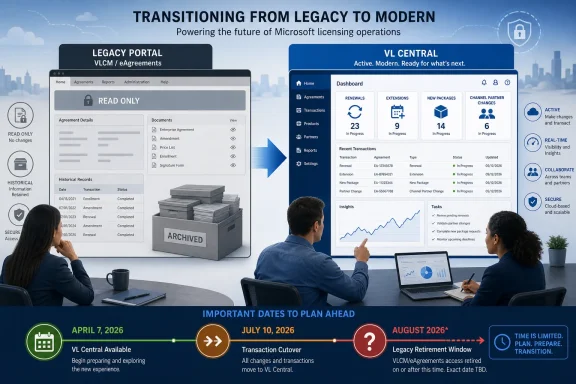
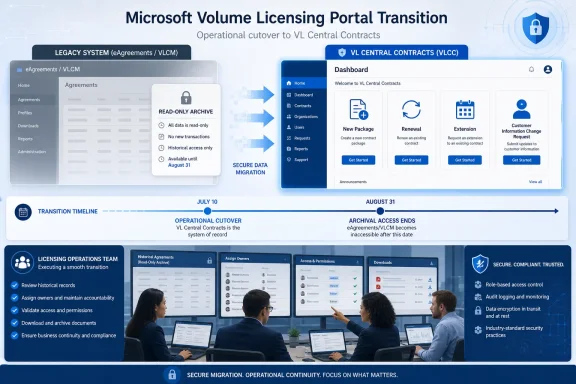
Microsoft’s eAgreements/Volume Licensing Contract Management portal became read-only on July 10, 2026, so partners can no longer use it to create, renew, or extend agreement packages. Any active non-Enterprise Agreement workflow still tied to VLCM now needs an immediate owner, status review, and migration decision in VL Central Contracts—not an August reminder on the calendar.
Microsoft’s current partner enablement guidance says the legacy system remains available for viewing, searching, and downloading records during this interim period. Full retirement is targeted for August 2026 in Microsoft’s broader What’s New guidance, while other enablement material places the final shutdown within an August–September window.
The practical deadline has therefore already passed. July 10 was the operational cutover; August is the remaining archival-access deadline.
Microsoft enabled the seven remaining non-EA programs in VL Central Contracts on April 7, 2026: Open Value, Open Value Subscription, Campus/EES, SPLA, ISV Royalty, Select, and Select Plus. The change brought the outstanding VLCM contract workflows into the same newer environment already being positioned as Microsoft’s continuing volume licensing platform.
Partners should begin with an inventory organized around work, not merely agreement type. A list of customer names and agreement numbers may establish what exists, but it does not reveal which packages are awaiting renewal, which records need customer-information changes, or which employees still depend on VLCM to complete their jobs.
A workable migration review has five steps:
That shared backend reduces the risk of records simply disappearing, but it creates a different operational trap. Staff may assume that seeing a package in VL Central proves the team has successfully moved the workflow, even when internal procedures, access rights, approval paths, or customer communications still refer to VLCM.
The audit must therefore test whether a user can perform the required action, not just whether that user can see a record.
Renewals belong in VL Central as well. A partner with an agreement approaching renewal should verify the customer record, agreement association, responsible operator, and internal approval sequence before treating the migration as complete.
Extensions require a narrower check because Microsoft specifically identifies extension support for Open Value, Open Value Subscription, and Campus agreements. Teams handling those programs should test the complete route through VL Central rather than relying on familiarity with the legacy VLCM process.
Customer Information Change Requests are also supported for the newly migrated non-EA workflow set. These can be easy to overlook because they may sit with an administrative or customer-service team rather than the contract-creation group that received the migration briefing.
That organizational split is one of the most likely sources of disruption. Distributors, SPLA resellers, ISV distributors, and LSP, SSP, or EDA operations may each divide licensing work differently, but the portal retirement applies wherever VLCM was embedded in the process.
The required decision is straightforward:
A shared record does not make two interfaces interchangeable. Screen terminology, task state, local notes, saved instructions, and staff expectations can diverge even when both systems display information drawn from the same underlying data.
Partners should declare VL Central Contracts the authoritative interface for all active work. VLCM should now be treated as a temporary historical reference source, with access limited to lookup and controlled downloads rather than normal operational use.
Internal documentation needs the same treatment. Search procedure libraries, onboarding material, shared mailboxes, ticket templates, customer instructions, bookmarks, and desktop shortcuts for references to eAgreements or VLCM.
This transition fits a wider pattern familiar to WindowsForum readers following Microsoft’s removal of legacy Windows technologies: the visible retirement date often arrives after the replacement decision has effectively been made. Waiting for decommissioning means performing discovery when the old system is least useful and the support window is under the most pressure.
Licensing teams may also be managing broader customer transitions, including moves from perpetual Office licensing toward Microsoft 365 and planning around Office LTSC 2021 support ending on October 13, 2026. Those projects make it especially important to separate product-migration planning from the administrative portal used to transact or maintain agreements.
The evidence should be concrete: the user can access VL Central, locate the right customer and agreement, identify the required contract action, complete the organization’s approval process, and retrieve the resulting documentation. If a different team handles changes after creation, that downstream handoff must be tested too.
Managers should ask four questions for every active workflow:
That discrepancy should not be interpreted as extra operating time. It concerns the final removal of legacy access, not a restoration of package-creation capability after July 10.
Partners should also avoid turning the archival download into an uncontrolled bulk-retention project. Preserve records according to the organization’s contractual, audit, security, and records-management requirements rather than copying everything into an unmanaged shared folder.
The priority order should not change with that announcement. First eliminate active dependence on VLCM, then validate permissions and workflows in VL Central Contracts, and finally preserve only the historical material the organization is required to retain.
Partners that already moved package creation but have not audited renewals, extensions, Customer Information Change Requests, and administrative lookup procedures are only partially migrated. The remaining weeks are for closing those gaps before read-only access becomes no access at all.
Microsoft’s current partner enablement guidance says the legacy system remains available for viewing, searching, and downloading records during this interim period. Full retirement is targeted for August 2026 in Microsoft’s broader What’s New guidance, while other enablement material places the final shutdown within an August–September window.
The practical deadline has therefore already passed. July 10 was the operational cutover; August is the remaining archival-access deadline.
 Sort Every Active Workflow Before Moving It
Microsoft enabled the seven remaining non-EA programs in VL Central Contracts on April 7, 2026: Open Value, Open Value Subscription, Campus/EES, SPLA, ISV Royalty, Select, and Select Plus. The change brought the outstanding VLCM contract workflows into the same newer environment already being positioned as Microsoft’s continuing volume licensing platform.Partners should begin with an inventory organized around work, not merely agreement type. A list of customer names and agreement numbers may establish what exists, but it does not reveal which packages are awaiting renewal, which records need customer-information changes, or which employees still depend on VLCM to complete their jobs.
A workable migration review has five steps:
- Export or record every active package, agreement, customer record, and pending task that staff still consult in VLCM.
- Classify each item as a new package, renewal, extension, Customer Information Change Request, historical reference, or completed record.
- Confirm that the responsible employee can find the corresponding agreement and customer information in VL Central Contracts.
- Re-create or continue all actionable work in VL Central, assigning a named owner and an internal completion date.
- Download any historical material that the business may need after VLCM’s viewing window closes.
That shared backend reduces the risk of records simply disappearing, but it creates a different operational trap. Staff may assume that seeing a package in VL Central proves the team has successfully moved the workflow, even when internal procedures, access rights, approval paths, or customer communications still refer to VLCM.
The audit must therefore test whether a user can perform the required action, not just whether that user can see a record.
Move Transactions According to What They Need Next
For new non-EA business, the choice is already settled: create the package in VL Central Contracts. VLCM can no longer provide a fallback for new package creation after its July 10 transition to read-only mode.Renewals belong in VL Central as well. A partner with an agreement approaching renewal should verify the customer record, agreement association, responsible operator, and internal approval sequence before treating the migration as complete.
Extensions require a narrower check because Microsoft specifically identifies extension support for Open Value, Open Value Subscription, and Campus agreements. Teams handling those programs should test the complete route through VL Central rather than relying on familiarity with the legacy VLCM process.
Customer Information Change Requests are also supported for the newly migrated non-EA workflow set. These can be easy to overlook because they may sit with an administrative or customer-service team rather than the contract-creation group that received the migration briefing.
That organizational split is one of the most likely sources of disruption. Distributors, SPLA resellers, ISV distributors, and LSP, SSP, or EDA operations may each divide licensing work differently, but the portal retirement applies wherever VLCM was embedded in the process.
The required decision is straightforward:
- If the item needs a new package, renewal, supported extension, or Customer Information Change Request, it belongs in VL Central Contracts now.
- If the item is complete but may be needed for audit, customer service, or internal reconciliation, preserve the necessary material while VLCM remains readable.
- If the item appears in both interfaces, designate one owner and continue it only in VL Central.
- If the team cannot locate, access, or process the item in VL Central, treat that as a current blocker rather than something to investigate shortly before retirement.
The Shared Backend Does Not Make Split Work Safe
During parallel production, Microsoft advised partners not to split work on the same package between VLCM and VL Central. That warning remains relevant even though VLCM can no longer create packages, because teams may still consult its read-only view while processing the live item elsewhere.A shared record does not make two interfaces interchangeable. Screen terminology, task state, local notes, saved instructions, and staff expectations can diverge even when both systems display information drawn from the same underlying data.
Partners should declare VL Central Contracts the authoritative interface for all active work. VLCM should now be treated as a temporary historical reference source, with access limited to lookup and controlled downloads rather than normal operational use.
Internal documentation needs the same treatment. Search procedure libraries, onboarding material, shared mailboxes, ticket templates, customer instructions, bookmarks, and desktop shortcuts for references to eAgreements or VLCM.
This transition fits a wider pattern familiar to WindowsForum readers following Microsoft’s removal of legacy Windows technologies: the visible retirement date often arrives after the replacement decision has effectively been made. Waiting for decommissioning means performing discovery when the old system is least useful and the support window is under the most pressure.
Licensing teams may also be managing broader customer transitions, including moves from perpetual Office licensing toward Microsoft 365 and planning around Office LTSC 2021 support ending on October 13, 2026. Those projects make it especially important to separate product-migration planning from the administrative portal used to transact or maintain agreements.
Build the Cutover Around Evidence, Not Training Attendance
Attendance at a demonstration or circulation of a Microsoft announcement is not proof of readiness. Each team should complete at least one representative workflow for every non-EA program it actually handles.The evidence should be concrete: the user can access VL Central, locate the right customer and agreement, identify the required contract action, complete the organization’s approval process, and retrieve the resulting documentation. If a different team handles changes after creation, that downstream handoff must be tested too.
Managers should ask four questions for every active workflow:
- Who owns the next action?
- Where will that action be completed?
- What evidence shows the user can complete it?
- What historical material must be retained before VLCM disappears?
That discrepancy should not be interpreted as extra operating time. It concerns the final removal of legacy access, not a restoration of package-creation capability after July 10.
Partners should also avoid turning the archival download into an uncontrolled bulk-retention project. Preserve records according to the organization’s contractual, audit, security, and records-management requirements rather than copying everything into an unmanaged shared folder.
August Is the Cleanup Window, Not the Migration Window
Between now and full retirement, operational owners should monitor Microsoft’s VL Central What’s New guidance for the final decommissioning date and any scope clarification. The broader target remains August 2026, while Microsoft’s enablement material allows for completion during August or September.The priority order should not change with that announcement. First eliminate active dependence on VLCM, then validate permissions and workflows in VL Central Contracts, and finally preserve only the historical material the organization is required to retain.
Partners that already moved package creation but have not audited renewals, extensions, Customer Information Change Requests, and administrative lookup procedures are only partially migrated. The remaining weeks are for closing those gaps before read-only access becomes no access at all.
References
- Primary source: learn.microsoft.com
Volume Licensing Central documentation | Microsoft Learn
Learn how to use Volume Licensing Central to manage your relationship and business with Microsoft.learn.microsoft.com - Primary source: WindowsForum
Embrace the Future: Transitioning from Office Licenses to Microsoft 365 | Windows Forum
Microsoft’s recent push to have businesses ditch their traditional Office licenses in favor of Microsoft 365 isn’t just another product update—it’s a bold...windowsforum.com