

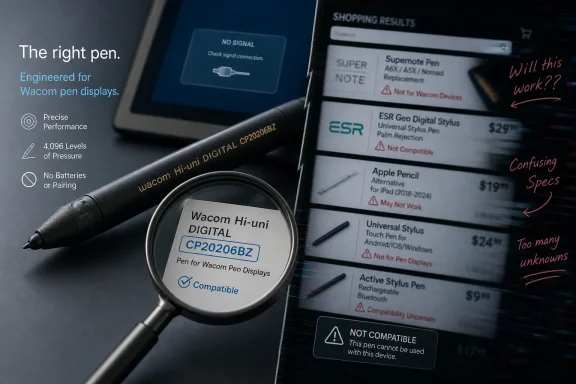
The product listing describes a Wacom Hi-uni DIGITAL stylus, model CP20206BZ, but its title mixes unrelated brands and products including Supernote and ESR Geo, while Wacom’s own materials identify CP20206BZ as a Mitsubishi Pencil collaboration made for specific Wacom-compatible pen displays. That mismatch is the story. In a market where stylus compatibility is already confusing, a sloppy listing is not just bad copy; it is a risk to buyers who may end up with a beautiful pen that does nothing on their device.
The pitch is familiar: digital artists need a good stylus, Wacom makes good hardware, and this pen is presented as a safe upgrade or replacement. It even includes a model number and UPC, the small bits of retail metadata that make an online listing feel more trustworthy than the average marketplace grab bag.
But the title undercuts that confidence immediately. “Supernote Pen,” “Wacom Hi-Uni DIGITAL,” “For Wacom Tablets,” and “ESR Geo Digital Pencil” do not describe one coherent product family. They point toward different ecosystems, different use cases, and different expectations about compatibility.
That matters because styluses are not like USB mice. You cannot assume that a pen-shaped object will work just because it is sold near tablets, art software, or a famous brand name. The electronics inside a pen, the digitizer layer in the screen, the supported pressure system, and the driver stack all have to agree.
The Wacom Hi-uni DIGITAL is especially easy to misunderstand because it looks more like a real pencil than a piece of electronics. That is the charm of the product. It is also the trap.
Wacom’s product lineup has long suffered from naming that punishes casual buyers. “Wacom One” and “One by Wacom” sound as if they belong to the same compatibility universe, but they are different product lines. A pen that works with one should not be assumed to work with the other.
The listing’s phrase “for Wacom tablets” is therefore too broad. It implies compatibility across a category where compatibility is actually narrow and model-specific. For a buyer replacing a lost pen, that wording is precisely where the danger lives.
A correct listing should name the compatible devices, not merely the brand. If a seller cannot say whether the pen works with your exact display or tablet model, the safe assumption is that it may not.
That gives it a particular audience. Artists who care about grip, balance, texture, and the psychological feel of sketching may find it more appealing than the standard Wacom One pen. The point is not merely input; it is translation — making the move from paper to screen feel less clinical.
But that design choice also brings trade-offs. Depending on the device and pen implementation, users may lose conveniences they expect from other pens, such as side switches, eraser functions, or broader cross-device support. A pencil-like stylus is not automatically a better stylus for every workflow.
This is where online listings often flatten the product into meaningless praise. “Great for sketching, retouching photos, or navigating your tablet” sounds useful, but it dodges the important questions. Which tablet? Which pen protocol? Which features are supported?
That confusion is made worse by accessory sellers who stuff titles with search terms. A listing that mentions Wacom, Supernote, and ESR Geo is likely trying to catch shoppers across multiple product searches. The result may be good for traffic, but it is terrible for trust.
The ESR Geo Digital Pencil, for example, is known as an Apple Pencil alternative aimed at iPad users, with features such as Apple Find My support. That has nothing to do with a Wacom Hi-uni DIGITAL CP20206BZ pen for Wacom-compatible displays. Folding both names into one title is not helpful cross-selling; it is category pollution.
For Windows users and digital artists, this is not a theoretical annoyance. Many drawing tablets are bought second-hand, used across multiple PCs, or kept in service for years. Replacement pens are often purchased only after the original is lost or broken, which means the buyer may be under pressure and more likely to trust a vague title.
But a UPC does not answer the buyer’s real question: will this work with my device? A genuine incompatible pen is still incompatible. Authenticity and compatibility are separate problems.
This is a common failure mode in accessory commerce. Sellers often prove that an item exists while failing to prove that it fits. The burden then shifts to the buyer, who must decode manufacturer naming, compatibility tables, regional product pages, and forum posts.
A better listing would put the compatibility warning near the top, not bury it behind generic creative-work language. It would say that CP20206BZ is intended for specific Wacom One-compatible devices and that buyers should verify their exact model number before purchase. That would reduce sales to the wrong customers, but it would also reduce returns, frustration, and distrust.
For enthusiasts, this is manageable. They know to look for model numbers like DTC133 or CP91300B2Z. They know that “Wacom One” is not the same thing as “One by Wacom.” They know that older Intuos, Cintiq, Bamboo, and Wacom One pens may belong to different eras of the company’s digitizer technology.
Most buyers do not live in that world. They search for “Wacom replacement pen,” see a familiar brand, and assume the device will behave like a Bluetooth mouse or USB keyboard. That assumption is wrong, but it is understandable.
The deeper issue is that stylus makers sell simplicity at the point of use and complexity at the point of replacement. The pen feels natural when it works. When it does not, the user gets a crash course in product taxonomy.
A Windows artist might use a Wacom pen display at a desk, a Surface device on the road, and an iPad for notes. Each stylus may look similar, and each may be completely useless on the other device. The operating system is not the only thing that matters; the digitizer hardware determines whether the pen is even seen.
This is why the phrase “for Wacom tablets” is inadequate. On Windows, the tablet may be a Wacom Intuos, a Wacom One pen display, a Cintiq, an older Bamboo, or even a third-party display using Wacom technology. The driver can only do so much if the pen hardware is not compatible with the sensor.
For sysadmins supporting classrooms, labs, or design departments, the risk scales quickly. A handful of wrongly ordered replacement pens can turn into a support ticket spiral, especially when the packaging looks legitimate and the user reasonably asks why a Wacom pen does not work with a Wacom device.
This is how many questionable accessory listings operate today. They borrow the tone of a product page without doing the work of one. Instead of precise device support, they offer generalized confidence.
There is also a subtle difference between saying a product is “designed for Wacom tablets” and saying it is “compatible with these Wacom models.” The first phrase evokes a brand relationship. The second makes a testable claim. Buyers should prefer the second every time.
The title’s inclusion of unrelated products should be treated as a warning sign, not a bonus. Search-optimized clutter often means the seller is more interested in being found than being exact. In accessories, exactness is the product.
The product makes sense for a specific buyer: someone with a compatible Wacom One-class device who wants a more traditional pencil feel and understands the feature trade-offs. For that person, the Hi-uni DIGITAL may be more than a replacement. It may change how the device feels in daily use.
That is why accurate listings matter. A niche product does not need inflated compatibility claims; it needs to find the right niche. Overselling it as a general Wacom tablet stylus only creates disappointed buyers and unfairly damages the reputation of the product itself.
The best accessory listings are boring in the right places. They name the model, the compatible devices, the included nibs, the limitations, and the return policy. The romance can come after the facts.
This is especially important for owners of One by Wacom pen tablets. Those devices are often inexpensive, popular with students, and easy to confuse with Wacom One pen displays. Similar names do not imply shared pens.
Buyers should also be skeptical of listings that use iPad stylus language around Wacom products. Apple Pencil alternatives such as ESR’s Geo Digital Pencil belong to a different ecosystem. Their presence in the same title as a Wacom Hi-uni pen suggests copy-paste commerce, not careful retailing.
The practical rule is simple: match the pen model to the tablet model, not the brand family. If the listing does not make that match clear, verify it elsewhere before paying.
That leaves a few concrete lessons for anyone shopping for a replacement pen:
 The Listing Sells Confidence While Creating Confusion
The pitch is familiar: digital artists need a good stylus, Wacom makes good hardware, and this pen is presented as a safe upgrade or replacement. It even includes a model number and UPC, the small bits of retail metadata that make an online listing feel more trustworthy than the average marketplace grab bag.But the title undercuts that confidence immediately. “Supernote Pen,” “Wacom Hi-Uni DIGITAL,” “For Wacom Tablets,” and “ESR Geo Digital Pencil” do not describe one coherent product family. They point toward different ecosystems, different use cases, and different expectations about compatibility.
That matters because styluses are not like USB mice. You cannot assume that a pen-shaped object will work just because it is sold near tablets, art software, or a famous brand name. The electronics inside a pen, the digitizer layer in the screen, the supported pressure system, and the driver stack all have to agree.
The Wacom Hi-uni DIGITAL is especially easy to misunderstand because it looks more like a real pencil than a piece of electronics. That is the charm of the product. It is also the trap.
CP20206BZ Is Not a Universal Wacom Pen
Wacom’s own support material identifies the Hi-uni DIGITAL for Wacom, model CP20206BZ, as an optional pen associated with Wacom One hardware, not a universal replacement for every Wacom tablet ever made. That distinction is not marketing trivia. It is the difference between a working stylus and a very expensive desk ornament.Wacom’s product lineup has long suffered from naming that punishes casual buyers. “Wacom One” and “One by Wacom” sound as if they belong to the same compatibility universe, but they are different product lines. A pen that works with one should not be assumed to work with the other.
The listing’s phrase “for Wacom tablets” is therefore too broad. It implies compatibility across a category where compatibility is actually narrow and model-specific. For a buyer replacing a lost pen, that wording is precisely where the danger lives.
A correct listing should name the compatible devices, not merely the brand. If a seller cannot say whether the pen works with your exact display or tablet model, the safe assumption is that it may not.
The Pencil Feel Is Real, But So Are the Limits
The Hi-uni DIGITAL is not just a generic stylus wearing a novelty shell. It comes from a collaboration between Wacom and Mitsubishi Pencil, and its appeal is deliberately tactile. It is designed to evoke the feel of a premium wooden pencil rather than the plastic barrel of a typical digital pen.That gives it a particular audience. Artists who care about grip, balance, texture, and the psychological feel of sketching may find it more appealing than the standard Wacom One pen. The point is not merely input; it is translation — making the move from paper to screen feel less clinical.
But that design choice also brings trade-offs. Depending on the device and pen implementation, users may lose conveniences they expect from other pens, such as side switches, eraser functions, or broader cross-device support. A pencil-like stylus is not automatically a better stylus for every workflow.
This is where online listings often flatten the product into meaningless praise. “Great for sketching, retouching photos, or navigating your tablet” sounds useful, but it dodges the important questions. Which tablet? Which pen protocol? Which features are supported?
Stylus Compatibility Is the New Printer Ink Problem
The stylus market has become a maze because the object looks simple while the underlying technology is fragmented. Wacom EMR pens, Apple Pencil models, Microsoft Pen Protocol devices, Samsung S Pen hardware, AES pens, and cheap capacitive styluses can all look roughly similar in a product photo. They are not interchangeable.That confusion is made worse by accessory sellers who stuff titles with search terms. A listing that mentions Wacom, Supernote, and ESR Geo is likely trying to catch shoppers across multiple product searches. The result may be good for traffic, but it is terrible for trust.
The ESR Geo Digital Pencil, for example, is known as an Apple Pencil alternative aimed at iPad users, with features such as Apple Find My support. That has nothing to do with a Wacom Hi-uni DIGITAL CP20206BZ pen for Wacom-compatible displays. Folding both names into one title is not helpful cross-selling; it is category pollution.
For Windows users and digital artists, this is not a theoretical annoyance. Many drawing tablets are bought second-hand, used across multiple PCs, or kept in service for years. Replacement pens are often purchased only after the original is lost or broken, which means the buyer may be under pressure and more likely to trust a vague title.
The UPC Helps, But It Does Not Save the Listing
The listing includes UPC 4949268792561, which aligns with the idea that the product being sold is the Wacom Hi-uni DIGITAL CP20206BZ. That is useful. Model numbers and UPCs are among the few stable clues buyers can use when marketplace titles become a soup of unrelated keywords.But a UPC does not answer the buyer’s real question: will this work with my device? A genuine incompatible pen is still incompatible. Authenticity and compatibility are separate problems.
This is a common failure mode in accessory commerce. Sellers often prove that an item exists while failing to prove that it fits. The burden then shifts to the buyer, who must decode manufacturer naming, compatibility tables, regional product pages, and forum posts.
A better listing would put the compatibility warning near the top, not bury it behind generic creative-work language. It would say that CP20206BZ is intended for specific Wacom One-compatible devices and that buyers should verify their exact model number before purchase. That would reduce sales to the wrong customers, but it would also reduce returns, frustration, and distrust.
Wacom’s Naming Makes the Seller’s Job Harder
Some blame belongs with sellers, but Wacom has not made this ecosystem easy to explain. The company has shipped multiple product lines with similar names and overlapping audiences: pen displays, pen tablets, One-branded devices, professional Cintiq models, and education-focused hardware. The names are friendly; the compatibility story is not.For enthusiasts, this is manageable. They know to look for model numbers like DTC133 or CP91300B2Z. They know that “Wacom One” is not the same thing as “One by Wacom.” They know that older Intuos, Cintiq, Bamboo, and Wacom One pens may belong to different eras of the company’s digitizer technology.
Most buyers do not live in that world. They search for “Wacom replacement pen,” see a familiar brand, and assume the device will behave like a Bluetooth mouse or USB keyboard. That assumption is wrong, but it is understandable.
The deeper issue is that stylus makers sell simplicity at the point of use and complexity at the point of replacement. The pen feels natural when it works. When it does not, the user gets a crash course in product taxonomy.
Windows Artists Are Especially Exposed
Windows remains the messy middle of the creative hardware world. It supports professional pen displays, budget drawing tablets, convertible laptops, Surface devices, Android-adjacent EMR pens in some contexts, and USB-connected creative peripherals from dozens of vendors. That openness is a strength, but it also makes compatibility mistakes easier.A Windows artist might use a Wacom pen display at a desk, a Surface device on the road, and an iPad for notes. Each stylus may look similar, and each may be completely useless on the other device. The operating system is not the only thing that matters; the digitizer hardware determines whether the pen is even seen.
This is why the phrase “for Wacom tablets” is inadequate. On Windows, the tablet may be a Wacom Intuos, a Wacom One pen display, a Cintiq, an older Bamboo, or even a third-party display using Wacom technology. The driver can only do so much if the pen hardware is not compatible with the sensor.
For sysadmins supporting classrooms, labs, or design departments, the risk scales quickly. A handful of wrongly ordered replacement pens can turn into a support ticket spiral, especially when the packaging looks legitimate and the user reasonably asks why a Wacom pen does not work with a Wacom device.
The Marketplace Has Learned to Sound Official
The language of the listing is engineered to reassure. “Brand new,” “original packaging,” “solid pressure sensitivity,” “legit,” and “Wacom makes good stuff” are all credibility signals. None of them substitutes for a compatibility matrix.This is how many questionable accessory listings operate today. They borrow the tone of a product page without doing the work of one. Instead of precise device support, they offer generalized confidence.
There is also a subtle difference between saying a product is “designed for Wacom tablets” and saying it is “compatible with these Wacom models.” The first phrase evokes a brand relationship. The second makes a testable claim. Buyers should prefer the second every time.
The title’s inclusion of unrelated products should be treated as a warning sign, not a bonus. Search-optimized clutter often means the seller is more interested in being found than being exact. In accessories, exactness is the product.
The Hi-uni DIGITAL Still Deserves Its Niche
None of this means the CP20206BZ is a bad stylus. Quite the opposite: it is one of the more interesting attempts to make digital drawing feel materially closer to analog sketching. In a world of smooth plastic cylinders, a pencil-like Wacom-compatible pen has obvious appeal.The product makes sense for a specific buyer: someone with a compatible Wacom One-class device who wants a more traditional pencil feel and understands the feature trade-offs. For that person, the Hi-uni DIGITAL may be more than a replacement. It may change how the device feels in daily use.
That is why accurate listings matter. A niche product does not need inflated compatibility claims; it needs to find the right niche. Overselling it as a general Wacom tablet stylus only creates disappointed buyers and unfairly damages the reputation of the product itself.
The best accessory listings are boring in the right places. They name the model, the compatible devices, the included nibs, the limitations, and the return policy. The romance can come after the facts.
The Real Test Is the Model Number on Your Desk
Before buying a CP20206BZ, the buyer should ignore the poetry and inspect the hardware they already own. The device model number matters more than the brand name on the front. If the existing tablet is not explicitly listed as compatible with the Hi-uni DIGITAL for Wacom, caution is warranted.This is especially important for owners of One by Wacom pen tablets. Those devices are often inexpensive, popular with students, and easy to confuse with Wacom One pen displays. Similar names do not imply shared pens.
Buyers should also be skeptical of listings that use iPad stylus language around Wacom products. Apple Pencil alternatives such as ESR’s Geo Digital Pencil belong to a different ecosystem. Their presence in the same title as a Wacom Hi-uni pen suggests copy-paste commerce, not careful retailing.
The practical rule is simple: match the pen model to the tablet model, not the brand family. If the listing does not make that match clear, verify it elsewhere before paying.
The Safe Purchase Is the One That Sounds Less Exciting
The safest reading of this listing is narrow: it appears to be advertising a Wacom Hi-uni DIGITAL for Wacom, model CP20206BZ, likely a genuine stylus if the UPC and packaging claims are accurate. The unsafe reading is broad: that it will work as an upgrade or replacement across Wacom tablets generally. The broad reading is the one the prose encourages, and it is the one buyers should resist.That leaves a few concrete lessons for anyone shopping for a replacement pen:
- The CP20206BZ model number should be treated as the anchor fact, while the rest of the keyword-heavy title should be treated cautiously.
- A genuine Wacom-related stylus can still be the wrong stylus for a particular Wacom tablet.
- “Wacom One” and “One by Wacom” should not be treated as interchangeable product names.
- The mention of ESR Geo or Apple Pencil-style products in the same listing is a compatibility red flag.
- Buyers should confirm their exact tablet or display model before ordering, especially when replacing a lost pen.
- Sellers should list supported device models plainly instead of relying on broad phrases like “for Wacom tablets.”
References
- Primary source: cineset.com.br
Published: 2026-06-15T15:28:08.051413
- Related coverage: support.wacom.com
Hi-uni DIGITAL for WacomとWacom One Penの違いについて – Wacom
Wacom One Pen(CP91300B2Z) 握りやすいデザイン。- 外形寸法: 148.2 x 11.5 mm(最太部) 質量:11.1g- 樹脂グリップ- サイドスイッチ 1つ Hi-uni DIGITAL for Wacom(CP20206BZ) -...support.wacom.com - Related coverage: www-prd-staging.wacom.com
- Related coverage: wacom.com
Compatibility
Wacom provides interactive pen displays, pen tablets, styli and apps to equip and inspire everyone to make the world a more creative place. www.wacom.com
- Related coverage: www-qa.wacom.com
Wacom One
Wacom One is a creative pen display designed for creative hobbyists and visual thinkers. www-qa.wacom.com
- Related coverage: gigazine.net
A review of actually using the digital pen 'Hi-uni DIGITAL for Wacom' that faithfully reproduces the texture and hardness of the high-end pencil 'High Uni' - GIGAZINE
The news blog specialized in Japanese culture, odd news, gadgets and all other funny stuffs. Updated everyday.gigazine.net
- Related coverage: macrumors.com
ESR Launches $30 Apple Pencil Alternative With Find My
Accessory maker ESR this week introduced the Geo Digital Pencil, a low-cost Apple Pencil alternative that has support for Apple's Find My functionality. Priced at $30, the Geo Digital Pencil connects to an iPad with Bluetooth, and it supports writing, drawing, sketching, and more much like...www.macrumors.com - Related coverage: creativebloq.com
The best Apple Pencil alternatives: expert recommended | Creative Bloq
Some of the best Apple Pencil alternatives are almost as good as the original, as we reveal in our pro guide created by experts.www.creativebloq.com - Related coverage: techradar.com
I tried out two budget Apple Pencil alternatives with my iPad, and now I’m wishing I’d done this sooner | TechRadar
I've tested two well-rated Apple Pencil alternatives, and they're seriously good for their price.www.techradar.com - Related coverage: cdn.wacom.com
