

Microsoft Teams drew outage reports on Tuesday, July 7, 2026, after UptimeRobot detected unusual response times for the service while other third-party trackers continued to list Teams as operational and Microsoft had not publicly confirmed a platform-wide incident by early afternoon Eastern time. The most defensible reading is not “Teams is down everywhere,” but something more familiar to administrators: a cloud service may be degraded for some users before the official dashboard catches up, or before the evidence justifies calling it an outage. As reported by International Business Times Australia, the morning’s signals were messy, contradictory, and therefore more useful as a case study than as a clean incident report. For Windows shops that live inside Microsoft 365 all day, the episode is a reminder that the first phase of an outage is often an argument over whether the outage exists.
The modern Teams outage does not usually arrive as a cinematic blackout. It arrives as a half-loaded chat pane, a meeting join button that spins too long, a desktop client that behaves differently from the web app, or a few users in one region insisting something is wrong while everyone else is still sending GIFs.
That is why Tuesday morning’s Teams reports are worth treating carefully. UptimeRobot’s public Teams check said it had detected unusual response times or error codes, and the service describes a confirmation process that repeats failed checks from multiple locations before flagging a problem. That kind of synthetic monitoring is useful because it does not depend on users deciding to complain; it asks the same question over and over from different places and notices when the answer changes.
But synthetic checks are not the same thing as lived service health. A probe can hit a path that is degraded while authenticated Teams sessions keep working for most users. Conversely, real users can be blocked by identity, tenant configuration, conditional access, routing, DNS, or client-side failures while a simple status probe says the front door is open.
That gap is where Tuesday’s ambiguity lives. StatusGator and IsDown reportedly showed Teams as operational around the same broad window, with only a small number of user-submitted problem reports. Microsoft’s own public Microsoft 365 Status account had not acknowledged a Teams outage at the time described in the IBTimes report. The result was not a definitive all-clear, but neither was it proof of a broad Teams failure.
For administrators, that distinction matters. A green status page can be true at the platform level and still unhelpful for the person whose sales meeting will not connect. A third-party red flag can be real and still limited enough that Microsoft never promotes it into a public incident.
That is why even ambiguous outage reports now travel quickly. A few years ago, a slow collaboration app was annoying. In 2026, Teams degradation can mean missed customer calls, broken incident bridges, delayed executive meetings, interrupted classrooms, and fragmented communications during the very moments when organizations most need coordination.
Microsoft has encouraged that centrality. The company has spent years folding Teams deeper into Microsoft 365, Windows endpoints, conference rooms, phone systems, and enterprise workflows. That strategy has made Teams sticky, but it has also concentrated operational risk inside a service many companies treat as background infrastructure.
This is the bargain cloud customers made, and it is not unique to Microsoft. SaaS platforms remove a mountain of local maintenance, but they also move the failure domain somewhere customers cannot inspect directly. When something goes wrong, IT teams are often left correlating admin-center advisories, user tickets, X posts, third-party probes, and their own network telemetry.
Tuesday’s uncertainty fits that pattern almost too neatly. One tracker saw something. Other trackers did not. Microsoft had not publicly confirmed anything. Users were left in the middle, trying to decide whether to troubleshoot their laptop or wait for Redmond.
UptimeRobot’s signal on Tuesday appears to have been based on automated checks detecting unusual response behavior. That is meaningful, particularly if confirmed from more than one location. But it does not necessarily map to the full Teams experience, which depends on identity services, Microsoft 365 APIs, media relays, Exchange integration, SharePoint-backed files, client builds, regional routing, and tenant-level policy.
StatusGator and IsDown, by contrast, reportedly presented a calmer picture. That may mean the issue was narrow, transient, already recovering, or outside their detection threshold. It may also mean that different services were measuring different pieces of the elephant.
The uncomfortable truth is that all of these systems can be right at the same time. A global probe can detect elevated latency. A user-report tracker can see too little complaint volume to declare a major incident. Microsoft can withhold public confirmation until internal telemetry crosses a threshold or support impact becomes clear.
That does not make third-party trackers useless. It makes them evidence, not verdicts. The best administrators already know this: one signal starts the investigation, three signals shape the confidence level, and only tenant-specific impact decides operational response.
Still, from the customer side, the effect is maddening. If Teams is failing for your helpdesk, “no active incident” does not feel like caution. It feels like denial. If your tenant sees authentication loops while the public feed is quiet, the distinction between “not widespread” and “not happening” becomes academic.
Microsoft’s official Microsoft 365 Status account and Service Health Dashboard remain the authoritative channels for confirmed incidents. The admin center is especially important because Microsoft often posts tenant-scoped advisories there that never become broad public drama. But authority is not the same as speed, and public acknowledgement often lags the first wave of user pain.
That lag creates a familiar operational choreography. Users report issues. IT checks the admin center. Someone checks Downdetector, StatusGator, UptimeRobot, Reddit, and X. A Teams channel devoted to outages becomes ironic because Teams itself may be the suspect. Eventually, either Microsoft posts an incident ID or the problem disappears into the category of “probably not us, but also not definitely them.”
Tuesday’s Teams reports, at least as described by IBTimes and the trackers, belonged in that gray zone. No public Microsoft confirmation. No clear mass of user reports. But enough smoke from at least one automated monitoring service to justify paying attention.
That partial-failure reality is not just a Microsoft issue. It is the natural result of globally distributed cloud services built from many dependent systems. Identity, storage, networking, media, policy, compliance, telemetry, and client delivery all have to line up for the user to experience the product as “working.”
Microsoft’s own Azure status history this year has shown how infrastructure incidents can cascade in non-obvious ways. In late May, Microsoft described failures involving virtual machines and storage in connection with a thermal event and retry amplification, with impact spreading through dependent systems. In separate 2026 incidents, the company has also discussed retry behavior, overload prevention, and diagnostic improvements as remediation themes.
Those details matter because they reveal the shape of modern outages. The initiating event is sometimes less important than the retry storm, overload loop, or dependency failure that follows. A system built for resilience can amplify stress if too many components retry too aggressively or fail to shed load gracefully.
Teams sits above that kind of infrastructure stack. Most users will never know whether a bad morning came from a client regression, routing issue, identity dependency, storage problem, or regional service degradation. They will only know that the meeting did not start.
But the admin center should not be the only instrument on the panel. It is a vendor-owned view into vendor-owned systems. It tells customers what Microsoft has detected, classified, and chosen to expose. It does not necessarily tell them what their users are experiencing at the edge of the network, inside a VDI environment, behind a security proxy, or on a stale client build.
The smarter posture is layered monitoring. Synthetic checks can test access from multiple regions. Endpoint telemetry can show whether Teams.exe or the new Teams client is crashing or hanging. Network monitoring can distinguish Microsoft-side latency from a local ISP or firewall issue. Helpdesk ticket clustering can show whether the problem is one user, one office, one tenant, or everyone.
That layered view also helps avoid the two classic mistakes. The first is waiting passively for Microsoft to confirm an incident while users burn time. The second is declaring a Microsoft outage too early and missing a local DNS, proxy, certificate, VPN, or conditional access problem.
Tuesday’s mixed reports are a good example of why that discipline matters. A public tracker flagging unusual response times should trigger checks, not panic. A quiet Microsoft status page should lower confidence in a broad outage, not end the investigation.
For end users, the initial checks are simple but valuable. Try the Teams web client if the desktop app is failing. Try a mobile device if the corporate laptop is stuck. Switch networks, briefly using a mobile hotspot if policy allows. Disable VPN only if the organization permits it and the user understands the security implications. Restarting the client, clearing cache, or flushing DNS can help in local cases, but those steps should not become ritual sacrifices performed during a verified service incident.
For IT teams, the playbook should be more explicit. Confirm whether the issue affects one user, one subnet, one office, one region, or multiple tenants. Check Microsoft’s admin center and public status feed. Compare third-party trackers, but do not treat them as equal to tenant telemetry. Test web, desktop, and mobile clients separately. Preserve timestamps, error messages, and affected account details in case Microsoft support needs them.
Most importantly, organizations should decide in advance what the backup communications channel is. If Teams is the place where you coordinate the Teams outage, you have designed a punchline, not a continuity plan. Email, phone bridges, SMS groups, Slack, Zoom, Webex, or an incident-management platform may all be imperfect alternatives, but the decision should not be improvised while executives are staring at a frozen meeting lobby.
The real lesson is not that every company needs to abandon Teams. It is that Teams has become important enough to deserve the same operational planning once reserved for mail servers and WAN links.
But reliability is not only a core infrastructure story. It is also an edge-experience story. Users do not interact with “Microsoft 365 service health” in the abstract. They interact with a Windows client, a browser, a meeting device, a network path, an identity prompt, a policy decision, and a service endpoint. Any one of those can make Teams feel down.
That is why Microsoft’s communication challenge is getting harder. A public “all services operational” message may be technically defensible for the global service, yet still incompatible with what a meaningful subset of users sees. A tenant-scoped advisory may be accurate, yet invisible to employees and journalists watching public channels. A short-lived latency incident may resolve before Microsoft says much at all, leaving third-party trackers as the only public record that something happened.
The company could help customers by being more transparent about degraded and partial conditions, not just confirmed outages. There is a meaningful middle ground between “everything is fine” and “major incident.” Microsoft already has much of that nuance internally; the question is how much it is willing to expose without creating unnecessary alarm.
That transparency would not eliminate outage chatter. It would, however, reduce the credibility gap that opens every time users see failures before the official status machinery speaks.
The concrete read for WindowsForum readers is narrower and more useful:
Microsoft Teams will keep having mornings like this because every cloud platform at Teams’ scale has mornings like this. The more important question is whether Microsoft, third-party monitors, and enterprise IT teams can get better at describing the gray area before it becomes a confirmed incident. In a workplace where Teams is often the meeting room, phone system, chat layer, and incident bridge at once, “probably operational” is no longer quite good enough; the future belongs to organizations that can measure their own reality when the cloud’s official answer is still catching up.
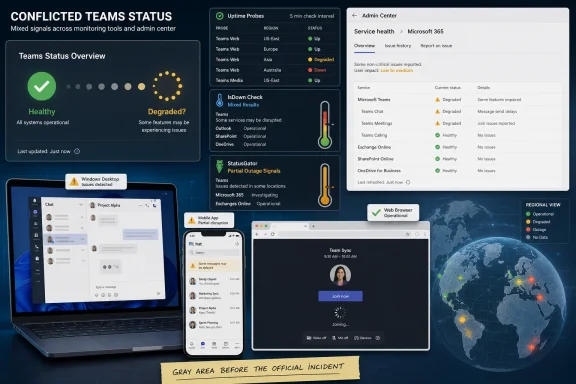 The Green Status Page Is No Longer the Whole Story
The modern Teams outage does not usually arrive as a cinematic blackout. It arrives as a half-loaded chat pane, a meeting join button that spins too long, a desktop client that behaves differently from the web app, or a few users in one region insisting something is wrong while everyone else is still sending GIFs.That is why Tuesday morning’s Teams reports are worth treating carefully. UptimeRobot’s public Teams check said it had detected unusual response times or error codes, and the service describes a confirmation process that repeats failed checks from multiple locations before flagging a problem. That kind of synthetic monitoring is useful because it does not depend on users deciding to complain; it asks the same question over and over from different places and notices when the answer changes.
But synthetic checks are not the same thing as lived service health. A probe can hit a path that is degraded while authenticated Teams sessions keep working for most users. Conversely, real users can be blocked by identity, tenant configuration, conditional access, routing, DNS, or client-side failures while a simple status probe says the front door is open.
That gap is where Tuesday’s ambiguity lives. StatusGator and IsDown reportedly showed Teams as operational around the same broad window, with only a small number of user-submitted problem reports. Microsoft’s own public Microsoft 365 Status account had not acknowledged a Teams outage at the time described in the IBTimes report. The result was not a definitive all-clear, but neither was it proof of a broad Teams failure.
For administrators, that distinction matters. A green status page can be true at the platform level and still unhelpful for the person whose sales meeting will not connect. A third-party red flag can be real and still limited enough that Microsoft never promotes it into a public incident.
Teams Has Become the Office Dial Tone
Teams is no longer merely a chat app stapled onto Office. It is the front door for meetings, telephony, files, Copilot surfaces, workflow apps, classroom collaboration, helpdesk handoffs, and, in many organizations, the daily rhythm of work itself. When Teams stutters, people do not experience it as a single app problem; they experience it as the office losing gravity.That is why even ambiguous outage reports now travel quickly. A few years ago, a slow collaboration app was annoying. In 2026, Teams degradation can mean missed customer calls, broken incident bridges, delayed executive meetings, interrupted classrooms, and fragmented communications during the very moments when organizations most need coordination.
Microsoft has encouraged that centrality. The company has spent years folding Teams deeper into Microsoft 365, Windows endpoints, conference rooms, phone systems, and enterprise workflows. That strategy has made Teams sticky, but it has also concentrated operational risk inside a service many companies treat as background infrastructure.
This is the bargain cloud customers made, and it is not unique to Microsoft. SaaS platforms remove a mountain of local maintenance, but they also move the failure domain somewhere customers cannot inspect directly. When something goes wrong, IT teams are often left correlating admin-center advisories, user tickets, X posts, third-party probes, and their own network telemetry.
Tuesday’s uncertainty fits that pattern almost too neatly. One tracker saw something. Other trackers did not. Microsoft had not publicly confirmed anything. Users were left in the middle, trying to decide whether to troubleshoot their laptop or wait for Redmond.
Third-Party Trackers Are Thermometers, Not Diagnoses
Outage trackers are easy to mock until they are the first thing that tells you your own environment is not the problem. They are also easy to overtrust, especially when a dramatic “down” label turns a complex distributed-service problem into a binary headline.UptimeRobot’s signal on Tuesday appears to have been based on automated checks detecting unusual response behavior. That is meaningful, particularly if confirmed from more than one location. But it does not necessarily map to the full Teams experience, which depends on identity services, Microsoft 365 APIs, media relays, Exchange integration, SharePoint-backed files, client builds, regional routing, and tenant-level policy.
StatusGator and IsDown, by contrast, reportedly presented a calmer picture. That may mean the issue was narrow, transient, already recovering, or outside their detection threshold. It may also mean that different services were measuring different pieces of the elephant.
The uncomfortable truth is that all of these systems can be right at the same time. A global probe can detect elevated latency. A user-report tracker can see too little complaint volume to declare a major incident. Microsoft can withhold public confirmation until internal telemetry crosses a threshold or support impact becomes clear.
That does not make third-party trackers useless. It makes them evidence, not verdicts. The best administrators already know this: one signal starts the investigation, three signals shape the confidence level, and only tenant-specific impact decides operational response.
Microsoft’s Silence Can Be Accurate and Still Frustrating
Microsoft’s public status posture often frustrates customers because the company does not always acknowledge problems on the same timeline that users experience them. That is partly a communications problem and partly a scale problem. Microsoft 365 is so large, so segmented, and so dependent on regional and tenant-specific routing that the company may see a storm of localized symptoms before it can responsibly describe the weather.Still, from the customer side, the effect is maddening. If Teams is failing for your helpdesk, “no active incident” does not feel like caution. It feels like denial. If your tenant sees authentication loops while the public feed is quiet, the distinction between “not widespread” and “not happening” becomes academic.
Microsoft’s official Microsoft 365 Status account and Service Health Dashboard remain the authoritative channels for confirmed incidents. The admin center is especially important because Microsoft often posts tenant-scoped advisories there that never become broad public drama. But authority is not the same as speed, and public acknowledgement often lags the first wave of user pain.
That lag creates a familiar operational choreography. Users report issues. IT checks the admin center. Someone checks Downdetector, StatusGator, UptimeRobot, Reddit, and X. A Teams channel devoted to outages becomes ironic because Teams itself may be the suspect. Eventually, either Microsoft posts an incident ID or the problem disappears into the category of “probably not us, but also not definitely them.”
Tuesday’s Teams reports, at least as described by IBTimes and the trackers, belonged in that gray zone. No public Microsoft confirmation. No clear mass of user reports. But enough smoke from at least one automated monitoring service to justify paying attention.
The Cloud’s Failure Mode Is Increasingly Partial
The old mental model of “up” versus “down” is badly suited to Microsoft 365. Teams can be available but slow. Chat can work while meetings fail. Meetings can connect while PSTN calling breaks. The web client can load while the desktop client loops. One geography can suffer while another never notices.That partial-failure reality is not just a Microsoft issue. It is the natural result of globally distributed cloud services built from many dependent systems. Identity, storage, networking, media, policy, compliance, telemetry, and client delivery all have to line up for the user to experience the product as “working.”
Microsoft’s own Azure status history this year has shown how infrastructure incidents can cascade in non-obvious ways. In late May, Microsoft described failures involving virtual machines and storage in connection with a thermal event and retry amplification, with impact spreading through dependent systems. In separate 2026 incidents, the company has also discussed retry behavior, overload prevention, and diagnostic improvements as remediation themes.
Those details matter because they reveal the shape of modern outages. The initiating event is sometimes less important than the retry storm, overload loop, or dependency failure that follows. A system built for resilience can amplify stress if too many components retry too aggressively or fail to shed load gracefully.
Teams sits above that kind of infrastructure stack. Most users will never know whether a bad morning came from a client regression, routing issue, identity dependency, storage problem, or regional service degradation. They will only know that the meeting did not start.
The Admin Center Is Necessary, but It Is Not Sufficient
For enterprise IT, the first official stop remains the Microsoft 365 admin center’s Service health page. That is where tenant-specific advisories and incident IDs tend to appear, and it is where Microsoft can say something more precise than a public social media account can. If Teams is failing for a managed organization, that dashboard should be checked before assuming a global outage.But the admin center should not be the only instrument on the panel. It is a vendor-owned view into vendor-owned systems. It tells customers what Microsoft has detected, classified, and chosen to expose. It does not necessarily tell them what their users are experiencing at the edge of the network, inside a VDI environment, behind a security proxy, or on a stale client build.
The smarter posture is layered monitoring. Synthetic checks can test access from multiple regions. Endpoint telemetry can show whether Teams.exe or the new Teams client is crashing or hanging. Network monitoring can distinguish Microsoft-side latency from a local ISP or firewall issue. Helpdesk ticket clustering can show whether the problem is one user, one office, one tenant, or everyone.
That layered view also helps avoid the two classic mistakes. The first is waiting passively for Microsoft to confirm an incident while users burn time. The second is declaring a Microsoft outage too early and missing a local DNS, proxy, certificate, VPN, or conditional access problem.
Tuesday’s mixed reports are a good example of why that discipline matters. A public tracker flagging unusual response times should trigger checks, not panic. A quiet Microsoft status page should lower confidence in a broad outage, not end the investigation.
Users Need a Playbook Before the Spinner Appears
The most useful outage response is written before the outage. If an organization’s only plan is “try Teams again,” it will waste the first half-hour of every incident rediscovering the same basic troubleshooting steps.For end users, the initial checks are simple but valuable. Try the Teams web client if the desktop app is failing. Try a mobile device if the corporate laptop is stuck. Switch networks, briefly using a mobile hotspot if policy allows. Disable VPN only if the organization permits it and the user understands the security implications. Restarting the client, clearing cache, or flushing DNS can help in local cases, but those steps should not become ritual sacrifices performed during a verified service incident.
For IT teams, the playbook should be more explicit. Confirm whether the issue affects one user, one subnet, one office, one region, or multiple tenants. Check Microsoft’s admin center and public status feed. Compare third-party trackers, but do not treat them as equal to tenant telemetry. Test web, desktop, and mobile clients separately. Preserve timestamps, error messages, and affected account details in case Microsoft support needs them.
Most importantly, organizations should decide in advance what the backup communications channel is. If Teams is the place where you coordinate the Teams outage, you have designed a punchline, not a continuity plan. Email, phone bridges, SMS groups, Slack, Zoom, Webex, or an incident-management platform may all be imperfect alternatives, but the decision should not be improvised while executives are staring at a frozen meeting lobby.
The real lesson is not that every company needs to abandon Teams. It is that Teams has become important enough to deserve the same operational planning once reserved for mail servers and WAN links.
Microsoft’s Reliability Story Now Has to Include the Edges
Microsoft is not blind to these problems. The company’s public post-incident writeups increasingly talk about overload controls, retry policies, diagnostic tooling, and better isolation. Those are the right engineering themes because the hardest cloud incidents are rarely fixed by adding one more server.But reliability is not only a core infrastructure story. It is also an edge-experience story. Users do not interact with “Microsoft 365 service health” in the abstract. They interact with a Windows client, a browser, a meeting device, a network path, an identity prompt, a policy decision, and a service endpoint. Any one of those can make Teams feel down.
That is why Microsoft’s communication challenge is getting harder. A public “all services operational” message may be technically defensible for the global service, yet still incompatible with what a meaningful subset of users sees. A tenant-scoped advisory may be accurate, yet invisible to employees and journalists watching public channels. A short-lived latency incident may resolve before Microsoft says much at all, leaving third-party trackers as the only public record that something happened.
The company could help customers by being more transparent about degraded and partial conditions, not just confirmed outages. There is a meaningful middle ground between “everything is fine” and “major incident.” Microsoft already has much of that nuance internally; the question is how much it is willing to expose without creating unnecessary alarm.
That transparency would not eliminate outage chatter. It would, however, reduce the credibility gap that opens every time users see failures before the official status machinery speaks.
The Morning’s Messy Signals Point to a Practical Verdict
The safest conclusion from Tuesday’s reports is that Microsoft Teams was not clearly experiencing a confirmed, platform-wide outage in the public record, but some monitoring data and user chatter suggested localized or transient trouble was plausible. That is less satisfying than a red-or-green answer, but it is probably closer to how cloud reliability actually works.The concrete read for WindowsForum readers is narrower and more useful:
- Microsoft had not publicly confirmed a broad Teams outage in the reporting window described by IBTimes Australia.
- UptimeRobot’s automated checks reportedly detected unusual response times or error codes, which is enough to justify investigation but not enough to prove universal impact.
- StatusGator and IsDown reportedly showed Teams as operational, suggesting any disruption may have been limited, transient, below their thresholds, or visible only through certain paths.
- Administrators should check the Microsoft 365 admin center for tenant-specific advisories before relying on public social media or third-party trackers alone.
- Organizations that depend on Teams should maintain an alternate incident communications channel because collaboration tools are now critical infrastructure.
- Users seeing problems across multiple devices and networks are more likely facing service-side or tenant-side trouble than a single-device glitch.
Microsoft Teams will keep having mornings like this because every cloud platform at Teams’ scale has mornings like this. The more important question is whether Microsoft, third-party monitors, and enterprise IT teams can get better at describing the gray area before it becomes a confirmed incident. In a workplace where Teams is often the meeting room, phone system, chat layer, and incident bridge at once, “probably operational” is no longer quite good enough; the future belongs to organizations that can measure their own reality when the cloud’s official answer is still catching up.
References
- Primary source: International Business Times Australia
Published: 2026-07-07T14:55:07.631439
Microsoft Teams Down Now? Platform Down for Some Users as Outage Trackers Detect Unusual Response Times Today
Microsoft Teams users reported access issues, with conflicting outage reports from monitoring services. Microsoft has not confirmed an outage, leaving users uncertain about the platform's status.www.ibtimes.com.au - Related coverage: uptimerobot.com
Microsoft Teams Status - UptimeRobot
Check if Microsoft Teams is down or experiencing issues right now. Real-time status, outage history, and response times.uptimerobot.com
- Related coverage: statusgator.com

Microsoft Teams Outage History | StatusGator
Complete history of Microsoft Teams outages, incidents, and downtime. View past Microsoft Teams outages with detailed summaries and timeline information.
statusgator.com
- Related coverage: pulsapi.com
Is Microsoft 365 Down? – Status & Outage Tracker | PulsAPI
Microsoft 365 (formerly Office 365) is the productivity suite used by 300M+ monthly active users across Word,… Live Microsoft 365 status, incidents and 30/90-www.pulsapi.com - Official source: azure.status.microsoft
Azure status history | Microsoft Azure
Check the status history of Microsoft Azure services here.azure.status.microsoft
- Related coverage: isdown.app
Is Microsoft Teams Down? Check current status and user reports | IsDown
Check if Microsoft Teams is down right now. Live Microsoft Teams status, real-time outage detection, and instant alerts when Microsoft Teams has issues. Free 14-day trial. isdown.app
- Related coverage: apistatuscheck.com
Is Microsoft Teams Down? Complete Status Check Guide + Quick Fixes | API Status Check Blog
Microsoft Teams not working? Learn how to check if Teams is down, fix chat and meeting errors, and troubleshoot connection issues fast.apistatuscheck.com - Related coverage: windowscentral.com
Is Microsoft 365 down? Microsoft confirms major outage of services in some regions | Windows Central
Microsoft 365 is down in some regions in North America, knocking offline services such as Outlook and Purview.www.windowscentral.com - Related coverage: techradar.com
Struggling to launch Teams? Microsoft recalls update causing failed startup and infinite loading loops – here's what we know | TechRadar
A service update was triggering an error in some Teams desktop clientswww.techradar.com - Related coverage: isitdownchecker.com
Is Microsoft Teams Down? Check Status Now | Is it down checker
Is Microsoft Teams down right now? Check live teams.microsoft.com server status, response time, uptime history & outage reports — a free down detector updated every 60 seconds. isitdownchecker.com
- Related coverage: feministfutures.socialsciences.ucsb.edu
Loading…
feministfutures.socialsciences.ucsb.edu