

Windows’ move toward self-contained, Store-delivered apps has reduced some classic attack paths, but it has also concentrated trust into a smaller set of shared components. In the case of Microsoft Edge WebView2, that shared dependency becomes the real story: a browser engine embedded inside modern Windows apps can turn into a proxy execution surface if the runtime’s loading behavior can be abused. Black Hills Information Security’s research argues that the result is not a flashy zero-day but something more unsettling for defenders: a practical, repeatable abuse chain that can ride inside software most users and admins already trust.
The rise of Windows Apps and other modern application containers has changed the operating system’s attack surface in subtle ways. Traditional desktop software often brought along its own libraries, add-ins, and loose dependency chains, which created ample opportunity for DLL hijacking in user-writable folders. Modern apps, by contrast, are supposed to be cleaner and more isolated, with stronger runtime integrity and less exposure to the kinds of third-party components that once made post-install abuse easy. That design philosophy is why many defenders assumed the old DLL hijacking playbook had been narrowed significantly.
But security on Windows has a habit of moving the risk rather than removing it. As older app models became harder to abuse directly, developers and attackers alike began paying more attention to shared infrastructure layers. One of the most important of those layers is Microsoft Edge WebView2 Runtime, a Chromium-based browser engine that lets native apps render web content without launching a separate browser window. It is central to a large and growing set of applications, from productivity tools to consumer-facing clients, and that ubiquity makes it a very attractive place to look for abuse. Black Hills Information Security frames WebView2 as a largely overlooked attack surface precisely because it is so broadly trusted and so deeply embedded in everyday Windows workflows. this to the wider reality of Windows applications that now ship with web-based user interfaces. Outlook for Windows, Teams, Office components, media tools, and other modern apps increasingly depend on WebView2 for rendering and interaction. That means a compromise in the WebView2 execution chain can affect software that users perceive as safe, signed, and tightly managed. The attack is therefore less about breaking into a random process and more about riding along with the normal machinery of modern Windows app design.
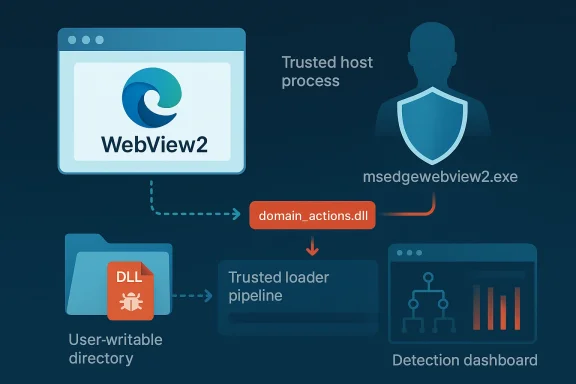
The report’s core c can still support classic DLL sideloading behavior, despite the surrounding app container. In particular, the article focuses on a Microsoft-signed DLL called domain_actions.dll, described as part of Microsoft Edge’s domain actions component. According to BHIS, this DLL is expected by msedgewebview2.exe and can be placed in user-writable locations under %LocalAppData%, creating a path for attacker-controlled code execution when the WebView2 host process loads it. That is a serious allegation because it means a component that is both required and trusted may be available in places the attacker can influence.
The practical consequence is that WebView2 does not merely extend browser capabilities into Windows applications; it also extends the browser’s trust assumptions. That is convenient for developers, but it gives attackers a place to hide that looks like ordinary product behavior rather than suspicious tampering.
That elegance, however, is exactly what creates concentration risk. The more applications depend on the same runtime, the more attractive the runtime becomes as an execution target. If an attacker can influence how the WebView2 host process loads a required library, then the attack surface spans all applications that use that path. In enterprise terms, a single weakness can become a fleet-wide concern because the same dependency appears across many endpoints. That is the classic “one component, many victims” problem.
The BHIS article argues that domain_actions.dll is especially important because it is required for normal WebView2 behavior and is loaded when msedgewebview2.exe is spawned by Windows apps. The report further claims that Microsoft Edge version 135 included a fix for an AppLocker-related issue involving this DLL, which the authors interpret as evidence that the file is expected and necessary for regular operation. Microsoft’s own WebView2 release notes also show ongoing changes around the Domain Actions component, including entries that say the component was disabled for WebView2 in later prerelease builds. That suggests the feature exists in the product ecosystem and is actively being adjusted, even if the security significance is not publicly documented in the same detail as the BHIS research.
The wider implication is that WebView2 is no longer just a developer convenience. It is a platform dependency, a security boundary, and a potential execution vector all at once. That makes it especially important for defenders to understand not just what the runtime does, but where it stores or loads auxiliary components. If those components live in predictable or user-influenced paths, the whole trust chain becomes more complicated.
That creates an uncomfortable dynamic for defenders. Blocking the component may break the app; allowing it may preserve functionality but widen the attack surface. That is exactly the kind of tradeoff threat actors hope to exploit.
BHIS notes that many current Windows apps now rely on WebView2, including Microsoft first-party products such as Outlook for Windows, Teams, Office apps, and other common consumer applications. The list is important not because each product behaves the same way, but because they all inherit the same embedcture. If the underlying runtime can be manipulated, a wide range of applications may become launch vehicles for the same abuse pattern.
This is where the proxy execution argument becomes compelling. The attack is not necessarily about replacing the entire runtime. Instead, it can be about inserting or shadowing a library that the runtime expects to find. If that library is loaded from a user-writable folder, the defender’s assumptions about immutability and trust begin to fail. That is a very different threat than a malicious EXE dropped in Downloads.
From a detection perspective, this is also harder than it sounds. A normal app launching msedgewebview2.exe is expected behavior. A normal app loading web content is expected behavior. The malicious part may only become visible in the loading chain or in a sidecar DLL that most tools don’t treat as unusual.
If a required DLL is present in multiple copies under %LocalAppData%, and if those copies can be reached from locations the attacker can influence, then the loading chain becomes a target. BHIS argues that if the DLL is missing, the application may reinstall it, which means the runtime itself is participating in restoring the component. That makes the componentistent and self-healing, which is good for reliability but potentially dangerous for security.
Microsoft’s own WebView2 documentation now includes references to domain action behavior. The release notes show entries such as “Disabled the Domain Actions component for WebView2,” which indicates the component is real enough to be managed inside the product line and that Microsoft has been adjusting its behavior over time. That does not prove BHIS’s exact exploit path on its own, but it does corroborate the idea that this is a meaningful runtime subsystem rather than a fictional artifact.
The practical lesson is that “required” and “trusted” are not the same as “safe.” A required component can become a liability if it is loaded from a location the attacker can influence. That is the heart of proxy execution: you are not bypassing the app’s need for a component; you are exploiting it.
This is why the article repeatedly emphasizes proxy execution rather than only DLL hijacking. The process is not just swapping binaries; it is using a legitimate process as a proxy for malicious behavior. That matters because many endpoint controls and allow-listing systems are tuned to look for unauthorized executables, not for a signed process that loads a compromised dependency from a writable path.
The write-up also notes that the app’s own sandbox can make telemetry harder to observe. That is an important point because defenders often expect sandboxes to improve visibility, not reduce it. In reality, a container can create blind spots if monitoring doesn’t reach inside the app boundary or if logging is not configured to correlate child-process behavior with file-system activity. That is where many security stacks lose the plot.
That dual-purpose behavior is what makes the technique so effective. It is not enough for malware to launch; it must also avoid breaking the experience that depends on the trusted runtime. A successful sideload is one that blends in long enough to matter.
That is a strong claim, and it deserves careful interpretation. A vendor’s decision not to assign a CVE does not automatically mean the behavior is benign; it can also mean the issue was judged as a design characteristic, not a vulnerability in the formal sense. Microsoft’s public WebView2 materials do show that the Domain Actions component exists and is being actively adjusted, which supports the notion that the area is real and evolving. But the exact security severity and whether Microsoft will revise the position later remain open questions.
From a defender’s perspective, the practical issue is simpler than the nomenclature. If a runtime component can be abused for code execution on common Windows endpoints, then the operational risk exists regardless of whether a CVE is attached today. Security teams should not wait for a perfect label before deciding whether the loading path deserves detection, hardening, or policy scrutiny. The label matters less than the behavior.
This is especially true when the vulnerable behavior is tied to a widely used runtime. Even a small loader weakness can become operationally significant at scale.
The article also points out that the sandboxed nature of Windows Apps can reduce visibility inside the container. That is a real enterprise concern because security teams often need process-tree correlation, child-process logging, and runtime inspection to understand what happened. If the attack lives inside a containerized app and then reaches out through a trusted browser engine child process, the SOC may see too little, too late.
The enterprise impact is also different from the consumer impact. A single home user compromise is damaging, but a sideloading path that applies to widely deployed productivity apps creates a broader detection and response burden. If a malicious DLL can be placed or reused in environments that standardize on Microsoft apps, the attack becomes attractive for persistence, stealth, and lateral movement staging. That is where the business risk rises sharply.
There is also a policy dimension. Many enterprises implicitly trust Microsoft-signed binaries and paths under a user profile because they are used to supporting normal application behavior. That trust is sensible, but it should not be unconditional.
That silence matters because consumers usually detect compromise through symptoms, not through process forensics. By the time something looks wrong, the attacker may already have persistence, data theft, or remote access in place. The use of a familiar runtime makes the compromise feel like “part of the app” rather than a separate infection event.
There is also a trust dynamic at work. Users who see Microsoft branding or a Microsoft-owned process are less likely to suspect abuse. That is exactly the kind of trust that proxy execution seeks to exploit. The more ordinary the host, the less likely the average user is to question the behavior.
That is why these kinds of issues matter so much in the consumer world. They scale through routine behavior.
Microsoft’s own WebView2 documentation can help with baseline understanding, especially around how the runtime is distributed and how apps are expected to consume it. The release notes also show that the Domain Actions component is not a theoretical abstraction but part of the actively maintained product surface. That means defenders can justify inventorying it, monitoring it, and deciding whether to restrict or alert on unusual activity around it.
A second mitigation layer is application control that focuses on DLL provenance, not only executable hashes. If the organization can prevent untrusted DLLs from being loaded from user-writable paths into trusted browser-engine processes, it can blunt the technique significantly. That is hard, but not impossible. The key is to think in terms of load behavior rather than simple file presence.
There is also an opportunity here for Microsoft and enterprise defenders to improve observability. If WebView2 is going to remain central to modern Windows apps, then the ecosystem needs more transparent controls around its supporting components. Better logging, clearer installation boundaries, and stronger defaults would go a long way toward reducing the abuse window.
Another concern is defender fatigue. Modern Windows security already demands attention to SmartScreen, AppLocker, WDAC, Defender, browser policies, and user education. Adding WebView2-specific loader scrutiny increases complexity, and complex defenses are often under-maintained. That is a real operational risk.
A second question is whether endpoint vendors will begin to treat WebView2-specific DLL loading as a first-class detection signal. That would be a meaningful improvement because it would let defenders catch the abuse where it actually happens, not where the process first starts. Over time, that sort of detection is what turns a clever technique into a manageable one.
A third issue is inventory. Many organizations still do not know how many apps on their fleet depend on WebView2 or where the runtime installs its supporting files. That blind spot is fixable, but only if security teams treat the runtime as part of the application attack surface rather than as harmless plumbing.
Source: Black Hills Information Security, Inc. Signed, Trusted, and Abused: Proxy Execution via WebView2 - Black Hills Information Security, Inc.
 Background
The rise of Windows Apps and other modern application containers has changed the operating system’s attack surface in subtle ways. Traditional desktop software often brought along its own libraries, add-ins, and loose dependency chains, which created ample opportunity for DLL hijacking in user-writable folders. Modern apps, by contrast, are supposed to be cleaner and more isolated, with stronger runtime integrity and less exposure to the kinds of third-party components that once made post-install abuse easy. That design philosophy is why many defenders assumed the old DLL hijacking playbook had been narrowed significantly.But security on Windows has a habit of moving the risk rather than removing it. As older app models became harder to abuse directly, developers and attackers alike began paying more attention to shared infrastructure layers. One of the most important of those layers is Microsoft Edge WebView2 Runtime, a Chromium-based browser engine that lets native apps render web content without launching a separate browser window. It is central to a large and growing set of applications, from productivity tools to consumer-facing clients, and that ubiquity makes it a very attractive place to look for abuse. Black Hills Information Security frames WebView2 as a largely overlooked attack surface precisely because it is so broadly trusted and so deeply embedded in everyday Windows workflows. this to the wider reality of Windows applications that now ship with web-based user interfaces. Outlook for Windows, Teams, Office components, media tools, and other modern apps increasingly depend on WebView2 for rendering and interaction. That means a compromise in the WebView2 execution chain can affect software that users perceive as safe, signed, and tightly managed. The attack is therefore less about breaking into a random process and more about riding along with the normal machinery of modern Windows app design.
The report’s core c can still support classic DLL sideloading behavior, despite the surrounding app container. In particular, the article focuses on a Microsoft-signed DLL called domain_actions.dll, described as part of Microsoft Edge’s domain actions component. According to BHIS, this DLL is expected by msedgewebview2.exe and can be placed in user-writable locations under %LocalAppData%, creating a path for attacker-controlled code execution when the WebView2 host process loads it. That is a serious allegation because it means a component that is both required and trusted may be available in places the attacker can influence.
Why this matters now
This story lannterprises are trying to reduce risk by preferring signed apps, managed runtimes, and more structured deployment channels. The problem is that those controls only help if the shared runtime is itself robust against abuse. If a required runtime component can be displaced or proxied from a writable location, then the trust model becomes more fragile than it first appears.The practical consequence is that WebView2 does not merely extend browser capabilities into Windows applications; it also extends the browser’s trust assumptions. That is convenient for developers, but it gives attackers a place to hide that looks like ordinary product behavior rather than suspicious tampering.
- Shared runtime trust can become a liability when apps rely on common loader behavior.
- User-writable locations matter even in apps that otherwise feel sandboxed.
- Signed components are not automatically safe if they can be redirected or proxied.
- Modern app design can narrow some legacy abuse paths while opening new ones.
Overview
WebView2 is Microsoft’s answer to the need for web content inside native applications. In theory, it lets developers keep a Windows UI while rendering HTML, CSS, and JavaScript content through a browser engine that updates alongside Edge. Microsoft’s own documentation emphasizes that WebView2 embeds web technologies into native apps and that the runtime can be distributed in multiple ways depending on deployment needs. The model is elegant because it reduces developer burden and creates a more consistent rendering environment.That elegance, however, is exactly what creates concentration risk. The more applications depend on the same runtime, the more attractive the runtime becomes as an execution target. If an attacker can influence how the WebView2 host process loads a required library, then the attack surface spans all applications that use that path. In enterprise terms, a single weakness can become a fleet-wide concern because the same dependency appears across many endpoints. That is the classic “one component, many victims” problem.
The BHIS article argues that domain_actions.dll is especially important because it is required for normal WebView2 behavior and is loaded when msedgewebview2.exe is spawned by Windows apps. The report further claims that Microsoft Edge version 135 included a fix for an AppLocker-related issue involving this DLL, which the authors interpret as evidence that the file is expected and necessary for regular operation. Microsoft’s own WebView2 release notes also show ongoing changes around the Domain Actions component, including entries that say the component was disabled for WebView2 in later prerelease builds. That suggests the feature exists in the product ecosystem and is actively being adjusted, even if the security significance is not publicly documented in the same detail as the BHIS research.
The wider implication is that WebView2 is no longer just a developer convenience. It is a platform dependency, a security boundary, and a potential execution vector all at once. That makes it especially important for defenders to understand not just what the runtime does, but where it stores or loads auxiliary components. If those components live in predictable or user-influenced paths, the whole trust chain becomes more complicated.
The architectural tension
The tension here is simple but important: WebView2 is meant to centralize trust, but centralization is also what makes abuse scalable. A component that must be present for legitimate work can be turned into a proxy execution target because the application cannot easily function without it.That creates an uncomfortable dynamic for defenders. Blocking the component may break the app; allowing it may preserve functionality but widen the attack surface. That is exactly the kind of tradeoff threat actors hope to exploit.
- Convenience and uniformity are the main reasons developers adopt WebView2.
- Uniformity also makes the runtime more valuable to attackers.
- Required dependencies can be abused as loading anchors.
- Operational breakage makes naive blocking strategies risky.
The WebView2 Runtime Model
Microsoft documents WebView2 as a way to embed web content in native apps, and the runtime is distinct from the full Microsoft Edge browser. That distinction matters because it means an app can depend on the browser engine without necessarily exposing the user to a visible browser window or traditional browser controls. In enterprise deployment terms, this is clean and maintainable; in offensive terms, it creates a runtime that may be less scrutinized than the browser itself.BHIS notes that many current Windows apps now rely on WebView2, including Microsoft first-party products such as Outlook for Windows, Teams, Office apps, and other common consumer applications. The list is important not because each product behaves the same way, but because they all inherit the same embedcture. If the underlying runtime can be manipulated, a wide range of applications may become launch vehicles for the same abuse pattern.
This is where the proxy execution argument becomes compelling. The attack is not necessarily about replacing the entire runtime. Instead, it can be about inserting or shadowing a library that the runtime expects to find. If that library is loaded from a user-writable folder, the defender’s assumptions about immutability and trust begin to fail. That is a very different threat than a malicious EXE dropped in Downloads.
Runtime behavior and trust boundaries
The trust boundary problem is subtle. A signed runtime process can still load additional code from paths that are not meaningfully protected in the same way as Program Files or other controlled locations. The result is that the trusted process becomes the host for untrusted behavior, and that is often more damaging than obvious malware.From a detection perspective, this is also harder than it sounds. A normal app launching msedgewebview2.exe is expected behavior. A normal app loading web content is expected behavior. The malicious part may only become visible in the loading chain or in a sidecar DLL that most tools don’t treat as unusual.
- WebView2 Runtime is a browser engine, not the full browser.
- Embedded web content is normal for many modern Windows apps.
- Child-process behavior may look benign unless the loading chain is inspected.
- Proxy execution thrives when ordinary app behavior masks the abuse.
domain_actions.dll as the Fulcrum
The BHIS article identifies domain_actions.dll as the critical moving part in this abuse chain. The DLL is described as part of Microsoft Edge’s domain actions component and is said to handle domain reputation checks, security-policy logic, and other domain-related operations inside the browser and embedded web views. Whether every internal detail is documede the point; the important claim is that the DLL is both expected and necessary for the runtime’s normal behavior.If a required DLL is present in multiple copies under %LocalAppData%, and if those copies can be reached from locations the attacker can influence, then the loading chain becomes a target. BHIS argues that if the DLL is missing, the application may reinstall it, which means the runtime itself is participating in restoring the component. That makes the componentistent and self-healing, which is good for reliability but potentially dangerous for security.
Microsoft’s own WebView2 documentation now includes references to domain action behavior. The release notes show entries such as “Disabled the Domain Actions component for WebView2,” which indicates the component is real enough to be managed inside the product line and that Microsoft has been adjusting its behavior over time. That does not prove BHIS’s exact exploit path on its own, but it does corroborate the idea that this is a meaningful runtime subsystem rather than a fictional artifact.
Why the DLL matters operationally
What makes domain_actions.dll especially interesting is that it is not an optional convenience library. According to the BHIS write-up, msedgewebview2.exe needs it to render content properly, and the absreak application features or cause crashes. That gives the attacker a built-in pressure point: defenders cannot simply delete the file without consequences.The practical lesson is that “required” and “trusted” are not the same as “safe.” A required component can become a liability if it is loaded from a location the attacker can influence. That is the heart of proxy execution: you are not bypassing the app’s need for a component; you are exploiting it.
- Required DLLs can be more dangerous than optional plugins.
- Self-repair behavior may restore attacker-preferred conditions.
- Feature breakage limits blunt defensive responses.
- Ordinary loading expectations make the abuse path harder to spot.
The Abuse Chain
BHIS demonstrates the concept by launching arbitrary code through msedgewebview2.exe, first with a simple Rust “Hello World” payload and then with shellcode associated with a commercial command-and-control framework. The point of the proof-of-concept is not the payload itself but the execution path: if a malicious DLL is placed in the right folder, the WebView2 host process can be induced to code. That is a classic sideloading style outcome, but it happens inside a modern runtime that many people assume is already hardened.This is why the article repeatedly emphasizes proxy execution rather than only DLL hijacking. The process is not just swapping binaries; it is using a legitimate process as a proxy for malicious behavior. That matters because many endpoint controls and allow-listing systems are tuned to look for unauthorized executables, not for a signed process that loads a compromised dependency from a writable path.
The write-up also notes that the app’s own sandbox can make telemetry harder to observe. That is an important point because defenders often expect sandboxes to improve visibility, not reduce it. In reality, a container can create blind spots if monitoring doesn’t reach inside the app boundary or if logging is not configured to correlate child-process behavior with file-system activity. That is where many security stacks lose the plot.
How the proof-of-concept works
The BHIS example uses a malicious DLL with a definition file that forwards legitimate function calls to a renamed original DLL, preserving functionality while inserting malicious code. This is a hallmark of proxying: the attacker wants the target process to keep working juste is not obvious. If the app continues functioning, users may never realize that an extra execution step occurred.That dual-purpose behavior is what makes the technique so effective. It is not enough for malware to launch; it must also avoid breaking the experience that depends on the trusted runtime. A successful sideload is one that blends in long enough to matter.
- Forwarding stubs preserve expected functionality.
- Malicious code can be hidden behind ordinary function calls.
- Payload flexibility makes the technique useful for both access and persistence.
- User-facing stability helps the compromise remain quiet.
Microsoft’s Response and the CVE Question
One of the most important parts of the BHIS report is the disclosure timeline. The researchers say they reported the issue to Microsoft in October 2025, received acknowledgment in December that a reserved CVE had been assigned, and later learned that Microsoft re-reviewed the issue and classified the impact below the threshold for a CVE. The article frames that as a “forever-cause, in the authors’ view, the behavior remains present in Windows 10 and 11 without a fix.That is a strong claim, and it deserves careful interpretation. A vendor’s decision not to assign a CVE does not automatically mean the behavior is benign; it can also mean the issue was judged as a design characteristic, not a vulnerability in the formal sense. Microsoft’s public WebView2 materials do show that the Domain Actions component exists and is being actively adjusted, which supports the notion that the area is real and evolving. But the exact security severity and whether Microsoft will revise the position later remain open questions.
From a defender’s perspective, the practical issue is simpler than the nomenclature. If a runtime component can be abused for code execution on common Windows endpoints, then the operational risk exists regardless of whether a CVE is attached today. Security teams should not wait for a perfect label before deciding whether the loading path deserves detection, hardening, or policy scrutiny. The label matters less than the behavior.
The patching dilemma
If Microsoft does not issue a fix, defenders are left with compensating controls. That can be frustrating because it shifts burden onto enterprises that already struggle to manage application sprawl. Still, it is not unusual for Windows security to land in this territory, where the best response is a combination of application control, logging, and reduction of risky user-writable paths.This is especially true when the vulnerable behavior is tied to a widely used runtime. Even a small loader weakness can become operationally significant at scale.
- Vendor classification does not always align with defender urgency.
- No CVE does not mean no risk.
- Compensating controls become the practical response.
- Runtime ubiquity increases the enterprise impact.
Enterprise Exposure
For enterprises, the most serious implication of the BHIS research is not just initial code execution but the way it can evade familiar control assumptions. Modern allow-listing, Smart App Control, and runtime policy frameworks often depend on the idea that trusted components remain in trusted locations. If WebView2-related DLLsitable areas, then the boundary between authorized and unauthorized code becomes fuzzier. That is bad news for defenders who rely on file reputation alone.The article also points out that the sandboxed nature of Windows Apps can reduce visibility inside the container. That is a real enterprise concern because security teams often need process-tree correlation, child-process logging, and runtime inspection to understand what happened. If the attack lives inside a containerized app and then reaches out through a trusted browser engine child process, the SOC may see too little, too late.
The enterprise impact is also different from the consumer impact. A single home user compromise is damaging, but a sideloading path that applies to widely deployed productivity apps creates a broader detection and response burden. If a malicious DLL can be placed or reused in environments that standardize on Microsoft apps, the attack becomes attractive for persistence, stealth, and lateral movement staging. That is where the business risk rises sharply.
What defenders should care about most
The core enterprise question is whether the organization can detect suspicious runtime loading in user-writable locations. If not, then even a modest attacker foothold can become something more durable. App control alone may not solve it if the host process itself is legitimate and signed.There is also a policy dimension. Many enterprises implicitly trust Microsoft-signed binaries and paths under a user profile because they are used to supporting normal application behavior. That trust is sensible, but it should not be unconditional.
- Process-tree telemetry becomes essential.
- Signed host processes can still be abused.
- User-profile paths deserve special scrutiny.
- Allow-listing needs to account for runtime-loading behavior.
Consumer Exposure
Consumers face a different but equally important problem: the attacker does not need deep privileges if the goal is to piggyback on a trusted app’s update or rendering workflow. Many home users will never inspect DLL load paths or notice that a childingly normal app has spawned something unexpected. The attack is therefore likely to be silent until the payload stages its next step.That silence matters because consumers usually detect compromise through symptoms, not through process forensics. By the time something looks wrong, the attacker may already have persistence, data theft, or remote access in place. The use of a familiar runtime makes the compromise feel like “part of the app” rather than a separate infection event.
There is also a trust dynamic at work. Users who see Microsoft branding or a Microsoft-owned process are less likely to suspect abuse. That is exactly the kind of trust that proxy execution seeks to exploit. The more ordinary the host, the less likely the average user is to question the behavior.
Why normal-looking apps are dangerous
A consumer doesn’t need to understand WebView2 internals to be at risk. They only need to run an app that depends on it. If the runtime loads code from a writable path and the attacker can influence that path, the user is exposed without having to click anything unusual.That is why these kinds of issues matter so much in the consumer world. They scale through routine behavior.
- No unusual user action may be required after initial placement.
- Microsoft-branded processes reduce suspicion.
- Normal app usage can trigger the malicious load.
- Data theft and persistence may follow quietly.
Detection and Mitigation
Defending against this kind of abuse requires a layered approach. First, organizations should identify which endpoints use WebView2 heavily and where the runtime installs its auxiliary components. Second, they should inspect whether those components can be written or replaced in user-writable paths. Third, they should tune detections for suspicious child processes, DLL loading anomalies, and unexpected runtime behavior under msedgewebview2.exe. None of this is glamorous, but it is the sort of practical work that closes the gap between a signed runtime and a secure one.Microsoft’s own WebView2 documentation can help with baseline understanding, especially around how the runtime is distributed and how apps are expected to consume it. The release notes also show that the Domain Actions component is not a theoretical abstraction but part of the actively maintained product surface. That means defenders can justify inventorying it, monitoring it, and deciding whether to restrict or alert on unusual activity around it.
A second mitigation layer is application control that focuses on DLL provenance, not only executable hashes. If the organization can prevent untrusted DLLs from being loaded from user-writable paths into trusted browser-engine processes, it can blunt the technique significantly. That is hard, but not impossible. The key is to think in terms of load behavior rather than simple file presence.
Practical defensive priorities
Detection is strongest when it combines filesystem monitoring, process ancestry, and runtime correlation. If the user launches a standard app and a WebView2 child process then loads a DLL from an unexpected location, that is the pattern to hunt. Event logs alone may not be enough; EDR visibility and behavioral rules are likely required.- Inventory WebView2-dependent apps across the fleet.
- Monitor msedgewebview2.exe child-process and DLL-load behavior.
- Block or alert on user-writable DLL paths where feasible.
- Correlate app launches with unexpected code-loading events.
- Treat Microsoft branding as insufficient for trust decisions.
Strengths and Opportunities
The biggest strength of BHIS’s research is that it turns an abstract concern into something operationally tangible. Defenders now have a clearer reason to stop treating WebView2 as a generic browser helper and start treating it as a potentially sensitive execution environment. That shift in mindset is useful because it moves security teams from reassurance to inspection.There is also an opportunity here for Microsoft and enterprise defenders to improve observability. If WebView2 is going to remain central to modern Windows apps, then the ecosystem needs more transparent controls around its supporting components. Better logging, clearer installation boundaries, and stronger defaults would go a long way toward reducing the abuse window.
- The abuse path is understandable, which makes it teachable.
- WebView2 visibility can be improved in enterprise monitoring.
- Application control can be tuned around runtime loading.
- Security teams can build detections around child-process behavior.
- Microsoft app inventory can help prioritize exposure.
- User-writable path reduction is still one of the best defenses.
- Cross-team awareness can help IT and SOC groups respond faster.
Risks and Concerns
The main risk is that the attack pattern is likely to survive even if a specific DLL path changes. Once adversaries understand the broader model—signed runtime, required component, writable location, trusted host process—they can look for adjacent opportunities. That makes this a technique class, not just a one-off bug report.Another concern is defender fatigue. Modern Windows security already demands attention to SmartScreen, AppLocker, WDAC, Defender, browser policies, and user education. Adding WebView2-specific loader scrutiny increases complexity, and complex defenses are often under-maintained. That is a real operational risk.
- Technique portability makes this attractive to other attackers.
- User-writable locations may be difficult to eliminate entirely.
- Telemetry gaps inside app containers can hide abuse.
- Trusted process abuse is harder to flag than unsigned malware.
- False confidence in signed components can delay response.
- Control complexity may reduce long-term defensive consistency.
- Vendor ambiguity around CVE status can slow prioritization.
Looking Ahead
The next question is whether Microsoft’s later WebView2 builds, especially those that mention Domain Actions behavior, will reduce the attack surface enough to matter in practice. If the component is disabled or altered in future releases, that may narrow the abuse path. But if the broader loading model remains intact, defenders should assume that similar proxy execution ideas will continue to surface.A second question is whether endpoint vendors will begin to treat WebView2-specific DLL loading as a first-class detection signal. That would be a meaningful improvement because it would let defenders catch the abuse where it actually happens, not where the process first starts. Over time, that sort of detection is what turns a clever technique into a manageable one.
A third issue is inventory. Many organizations still do not know how many apps on their fleet depend on WebView2 or where the runtime installs its supporting files. That blind spot is fixable, but only if security teams treat the runtime as part of the application attack surface rather than as harmless plumbing.
- Future WebView2 updates may change the specific behavior.
- Detection engineering should focus on anomalous DLL loads.
- Fleet inventory will determine how exposed an organization really is.
- Policy tuning may need to evolve as Microsoft adjusts the runtime.
- Cross-vendor attention could normalize WebView2 as a security focus.
Source: Black Hills Information Security, Inc. Signed, Trusted, and Abused: Proxy Execution via WebView2 - Black Hills Information Security, Inc.
