

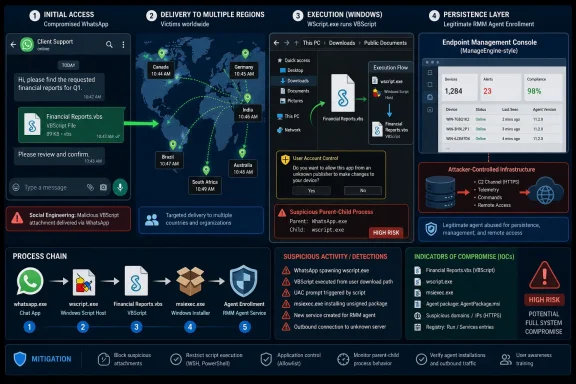
In June 2026, researchers observed an active malware campaign using compromised WhatsApp accounts to send malicious VBScript attachments to users in Malaysia, Brazil, India, Mexico, Singapore, the United Kingdom, Spain, Taiwan, Australia, Russia, and Vietnam. The attack is not sophisticated because it invents a new exploit; it is dangerous because it weaponizes ordinary trust. WhatsApp becomes the delivery layer, Windows Script Host becomes the execution layer, and legitimate remote-management software becomes the persistence layer. That combination is a neat illustration of where Windows security keeps getting tested: not at the kernel boundary, but in the messy space between user behavior, file handling, and trusted administrative tools.
The campaign’s most important trick is not technical at all. Victims reportedly received a file from someone already in their contact list, often with no message body and no explanation. In the normal grammar of consumer messaging, that should look suspicious; in the real world, people open files from clients, vendors, family members, classmates, and coworkers with less scrutiny than they apply to email attachments from strangers.
That is why the use of compromised WhatsApp accounts matters. A malicious attachment arriving from an unknown number is spam. The same attachment arriving from a familiar account is a social problem before it is a security problem. The attacker borrows reputation from the victim’s own address book and lets the relationship do the persuasion.
The observed file names were tuned for that purpose. They leaned heavily on invoices, debt confirmations, account statements, payment records, bank statements, and other documents that trigger the reflexive administrative muscle memory of modern life. A file named “Financial Reports.vbs” or “Outstanding Payment List.vbs” is crude to a security analyst, but to a hurried user on WhatsApp Desktop it may look like just another document someone expects them to process.
The localization is the other tell. Samples used Portuguese, French, German, Malay, and other languages, suggesting the operator was not betting on a single domestic audience. The campaign’s victim distribution reportedly skewed heavily toward Malaysia, but the language spread and country list point to a broad, opportunistic operation rather than a narrowly tailored intrusion against one enterprise or sector.
That breadth makes the campaign more worrying, not less. Targeted attacks often come with a clear business context, a known adversary model, and a containment plan. Opportunistic attacks that ride messaging networks are messier. They do not need to know who you are if they can get you to run the file.
That distinction is important, but it should not become a comfort blanket. Modern malware campaigns often succeed inside the boundaries of “intended” behavior. A user opens a file, Windows invokes the registered script engine, and a trusted operating-system component does exactly what it was built to do.
On WhatsApp Desktop, telemetry reportedly showed WScript.exe spawned by WhatsApp.Root.exe, with the script executing directly from WhatsApp’s attachment storage under the user’s local app package directory. That is the desktop client path: the file lives in the messaging app’s transfer area, the user opens it from the chat, and Windows Script Host takes over. On WhatsApp Web, the execution path is a little more traditional: the user downloads the file and then opens it from the browser’s download shelf, download history, or the Downloads folder.
This difference matters for defenders because parent-child process relationships tell the story of the infection. WScript.exe launched by WhatsApp.Root.exe is not normal office behavior. WScript.exe launched by a browser or Explorer immediately after a WhatsApp download is also a signal. In a home environment, that signal may be invisible; in a managed fleet, it is the kind of event that endpoint detection rules should treat as high-friction and high-priority.
The broader lesson is that Windows still carries decades of automation compatibility into a threat landscape where casual messaging apps are now document-delivery systems. VBScript remains useful in legacy environments, but its presence on a consumer endpoint in 2026 is increasingly hard to defend. If an organization does not need Windows Script Host for business workflows, allowing arbitrary VBS execution is a gift to attackers.
Email security has decades of scars. Attachments are scanned, rewritten, detonated, warned about, quarantined, and logged. Messaging apps do not always sit behind the same control plane. A user can receive a business-looking file in WhatsApp, open it on a Windows desktop, and create an execution chain that bypasses many of the rituals IT departments built around mail gateways.
That does not mean WhatsApp is uniquely culpable. The same pattern has appeared across Telegram, Discord, Slack, Teams, and other collaboration tools whenever file sharing meets user trust. The issue is that the security stack often treats “web,” “email,” and “endpoint” as separate worlds, while users experience them as one continuous workflow.
The attacker also exploited an asymmetry in attention. A VBS file attached to an email invoice might trigger suspicion because users have been trained for years to fear email attachments. A VBS file in a chat thread from a known contact may feel more personal, more immediate, and less formal. The channel changes the perceived risk even when the payload is objectively worse.
For Windows administrators, that means acceptable-use policies and endpoint controls need to catch up with how people actually exchange files. Blocking dangerous script types at the mail gateway is not enough if the same user can receive the same file through a desktop messaging client and execute it locally. The perimeter has moved into the chat window.
The variants differ in details but converge on the same outcome. Some use randomized folder names such as temporary or Windows Update-like labels. Some mark directories and files as hidden or system objects. Some copy legitimate Windows utilities such as curl.exe or bitsadmin.exe into the working directory and rename them with DLL-like names, creating just enough camouflage to complicate casual inspection.
The obfuscation is not artful in the way high-end malware sometimes is, but it is practical. Strings are concatenated. Object names and URLs are reconstructed. Variables are randomized. Junk content fills the script. Some samples include extensive comments and metadata that imitate Windows Update components, with Chinese-language annotations referencing certificate validation, system-integrity checks, deployment modules, and update-like behavior.
That fake Windows Update dressing is less about fooling a reverse engineer than about creating a plausible texture. If a user or junior technician stumbles across a directory called MSUpdate with hidden files and Windows-ish comments, the hope is that it looks boring enough to ignore. Malware often survives not by being invisible, but by being uninteresting.
Stage two splits the work. One secondary script attempts to change User Account Control behavior by modifying the ConsentPromptBehaviorAdmin registry value under the Windows policies path. The script uses ShellExecute with the runas verb, which means it still depends on elevation being granted; it is not a magical privilege-escalation exploit. But it loops the attempt, apparently trying to increase the odds that a victim will approve the prompt or that the setting will be changed when privileges become available.
The other secondary script downloads a ZIP archive, extracts it, and launches another VBScript from inside the package. The download methods vary: curl, bitsadmin, certutil, PowerShell, and direct HTTP requests all appear in the family. That variety is a defender’s headache because it gives the actor multiple ways to survive local blocking or environmental differences.
The ZIP extraction uses the Shell.Application COM interface, usually with flags intended to suppress prompts and keep the process quiet. One variant reportedly removes Zone.Identifier alternate data streams from extracted files, a telltale attempt to reduce the warnings Windows attaches to internet-downloaded content. The attacker is not merely downloading malware; they are smoothing the user-interface edges that might interrupt the chain.
This is the continuing normalization of living off trusted software. Endpoint Central is a real administration platform used for software deployment, patching, inventory, remote troubleshooting, and endpoint management. Those are useful features when the server belongs to your IT department. They are dangerous features when the agent is silently enrolled into somebody else’s infrastructure.
The downloaded archive reportedly contains the expected machinery of an Endpoint Central deployment: an MSI installer, transform configuration, certificates, server configuration JSON, setup scripts, and documentation. The malicious setup1.vbs script checks that the files are present, attempts to relaunch with administrative privileges, and then silently invokes msiexec.exe to install the agent using the bundled configuration. To the operating system, much of this can look like normal software installation behavior.
That is the problem with dual-use tools. Security products can block known malware hashes, but a signed or legitimate remote-management agent is not inherently malicious. Context determines intent. Was this agent pushed by the company’s device-management system, or did it arrive from a WhatsApp attachment pretending to be a debt statement?
The campaign’s configuration reportedly pointed agents at several management server IP addresses, including infrastructure that had also been observed in connection with ValleyRAT and Gh0st RAT activity. That overlap is suggestive but not conclusive. Shared hosting, reused infrastructure, reseller abuse, and deliberate false trails all complicate attribution.
Still, the operational logic is clear. Installing an RMM agent gives the attacker a durable and familiar control channel without needing to maintain a bespoke implant. It also lets them borrow the administrative semantics of enterprise IT. Remote access becomes “management,” persistence becomes “agent enrollment,” and command-and-control becomes “server communication.”
The script’s target value, ConsentPromptBehaviorAdmin, controls how Windows prompts administrators for elevation. Setting it to zero can allow elevated operations without showing a consent prompt, depending on the surrounding policy context. The malware’s looped attempt to change that setting suggests the operator expected friction and designed around it.
But this should not be misread as a stealthy UAC bypass in the classic exploit sense. The command uses the runas mechanism, which asks for administrative approval. The campaign appears to rely on the victim granting that approval, possibly after being nudged by repeated prompts or by the belief that the file is a legitimate business document.
That makes user training relevant but insufficient. “Do not click suspicious files” is still true, yet it collapses under the weight of daily work. Better controls are structural: script blocking, application control, attack-surface reduction rules, controlled execution paths, and monitoring for unusual parent processes. Users should not be the only thing standing between WhatsApp and WScript.exe.
There is also a policy lesson here for small businesses. Many organizations run users as local administrators because it avoids support tickets. That convenience turns every deceptive invoice into a potential system-management enrollment event. Least privilege remains boring, but boring controls are often the ones that stop boring malware.
The infrastructure overlap with ValleyRAT and Gh0st RAT activity adds another thread, since both families have histories in the broader Chinese-language cybercrime ecosystem. But attribution is not a crossword puzzle where enough matching words produce certainty. Infrastructure can be rented, reused, resold, hijacked, or deliberately selected to create ambiguity.
The more responsible assessment is low confidence: the operator may be Chinese-speaking, but the campaign cannot be confidently tied to a known intrusion set based on the public evidence described. That distinction matters because over-attribution can mislead defenders. If the activity is opportunistic cybercrime, the practical response is not geopolitical analysis; it is reducing the attack surface that made the campaign viable.
The victimology also argues against a clean nation-state frame. Reported infections spanned multiple countries and territories, with a heavy concentration in Malaysia and no clear evidence of a focused industry target. The file names were generic financial bait. The delivery mechanism depended on compromised consumer messaging accounts. This looks less like espionage tradecraft and more like scalable access acquisition.
That does not make it harmless. Initial access is a market. A machine enrolled into an attacker-controlled RMM server can be monetized later, used for credential theft, pivoting, fraud, or resale. The absence of a named threat actor does not reduce the urgency of cleanup.
That uncertainty leaves several possibilities on the table. Some accounts may have been taken over through phishing, social-engineering of login codes, stolen session tokens, malicious browser extensions, compromised devices, or abuse of linked-device workflows. Without firm evidence, it would be irresponsible to declare one mechanism as the cause.
For defenders, the uncertainty changes the response. Cleaning the Windows machine is necessary, but it may not be sufficient if the WhatsApp account remains under attacker control. Users should review linked devices, terminate unfamiliar sessions, enable available account protections, and treat unexpected outbound messages as a sign of account compromise rather than merely malware infection.
The campaign also shows why account security and endpoint security cannot be separated. A compromised account spreads the file; a Windows endpoint runs the script; an RMM agent establishes access; the victim’s contacts become the next delivery list. The infection graph crosses identity, messaging, and device boundaries.
That is where consumer platforms and enterprise IT often talk past each other. WhatsApp can warn users about suspicious files. Microsoft can harden script execution. Endpoint vendors can detect unusual agent installs. But the attack path spans all of them, and the user experiences it as a single click from a familiar contact.
On managed Windows fleets, administrators should strongly consider disabling Windows Script Host where it is not required. Where scripts are necessary, application control and allow-listing should limit execution to trusted paths and signed administrative content. It is difficult to justify arbitrary script execution from a WhatsApp transfer directory, a browser download cache, or a user’s Downloads folder.
Endpoint detection should also watch for the parentage patterns exposed by this campaign. WScript.exe or cscript.exe launched by WhatsApp Desktop, a browser process, or Explorer shortly after a chat download deserves scrutiny. So does script-created activity under C:\Users\Public\Documents\, especially when paired with hidden attributes, renamed LOLBins, ZIP extraction, msiexec.exe, and outbound connections to unfamiliar management servers.
The RMM angle demands an inventory response. Organizations should know which remote-management agents are approved, which servers they should talk to, and what a legitimate deployment looks like. An unauthorized Endpoint Central agent is not safe because the product is legitimate. It is a hostile enrollment until proven otherwise.
Home users have fewer tools but not no options. They can avoid opening script files entirely, configure Windows to show file extensions, scan suspicious downloads before execution, and verify unexpected attachments through a separate channel. The best consumer advice remains blunt: if a contact sends a bare attachment with no explanation, assume the account may be compromised.
The practical response is therefore less glamorous than threat-intelligence attribution. Reduce what can execute. Reduce where it can execute from. Reduce who can elevate. Reduce which management agents are permitted. Monitor the remaining pathways with enough context to distinguish IT activity from impostor activity.
The campaign’s use of cloud storage and common Windows utilities also argues for behavior-based detection over brittle indicators alone. Domains, hashes, and server IP addresses are useful for immediate blocking, but they expire quickly. The durable pattern is the chain: chat-delivered script, public-document staging, secondary script retrieval, UAC tampering attempt, ZIP extraction, silent MSI installation, and RMM server enrollment.
For security teams, this is a good moment to test whether controls actually cover non-email file delivery. Can a user execute a VBS attachment received through WhatsApp Desktop? Does Defender or the organization’s EDR generate a meaningful alert? Are unauthorized RMM agents blocked or merely logged? Does the help desk know what to do if a user says their WhatsApp sent files to contacts without their knowledge?
The answer in many environments will be uncomfortable. That discomfort is useful. It reveals the space where attackers operate: not in the fantasy of perfect stealth, but in the reality of unmanaged workflows.
 WhatsApp Becomes the New Shared Drive
The campaign’s most important trick is not technical at all. Victims reportedly received a file from someone already in their contact list, often with no message body and no explanation. In the normal grammar of consumer messaging, that should look suspicious; in the real world, people open files from clients, vendors, family members, classmates, and coworkers with less scrutiny than they apply to email attachments from strangers.That is why the use of compromised WhatsApp accounts matters. A malicious attachment arriving from an unknown number is spam. The same attachment arriving from a familiar account is a social problem before it is a security problem. The attacker borrows reputation from the victim’s own address book and lets the relationship do the persuasion.
The observed file names were tuned for that purpose. They leaned heavily on invoices, debt confirmations, account statements, payment records, bank statements, and other documents that trigger the reflexive administrative muscle memory of modern life. A file named “Financial Reports.vbs” or “Outstanding Payment List.vbs” is crude to a security analyst, but to a hurried user on WhatsApp Desktop it may look like just another document someone expects them to process.
The localization is the other tell. Samples used Portuguese, French, German, Malay, and other languages, suggesting the operator was not betting on a single domestic audience. The campaign’s victim distribution reportedly skewed heavily toward Malaysia, but the language spread and country list point to a broad, opportunistic operation rather than a narrowly tailored intrusion against one enterprise or sector.
That breadth makes the campaign more worrying, not less. Targeted attacks often come with a clear business context, a known adversary model, and a containment plan. Opportunistic attacks that ride messaging networks are messier. They do not need to know who you are if they can get you to run the file.
The File Extension Is the Warning Windows Still Struggles to Make Loud Enough
The payloads were VBScript and VBE files, launched through Windows Script Host. That means the attacker did not need a browser zero-day, a WhatsApp remote-code-execution bug, or a novel Windows vulnerability to get started. The victim had to download the attachment and then open it.That distinction is important, but it should not become a comfort blanket. Modern malware campaigns often succeed inside the boundaries of “intended” behavior. A user opens a file, Windows invokes the registered script engine, and a trusted operating-system component does exactly what it was built to do.
On WhatsApp Desktop, telemetry reportedly showed WScript.exe spawned by WhatsApp.Root.exe, with the script executing directly from WhatsApp’s attachment storage under the user’s local app package directory. That is the desktop client path: the file lives in the messaging app’s transfer area, the user opens it from the chat, and Windows Script Host takes over. On WhatsApp Web, the execution path is a little more traditional: the user downloads the file and then opens it from the browser’s download shelf, download history, or the Downloads folder.
This difference matters for defenders because parent-child process relationships tell the story of the infection. WScript.exe launched by WhatsApp.Root.exe is not normal office behavior. WScript.exe launched by a browser or Explorer immediately after a WhatsApp download is also a signal. In a home environment, that signal may be invisible; in a managed fleet, it is the kind of event that endpoint detection rules should treat as high-friction and high-priority.
The broader lesson is that Windows still carries decades of automation compatibility into a threat landscape where casual messaging apps are now document-delivery systems. VBScript remains useful in legacy environments, but its presence on a consumer endpoint in 2026 is increasingly hard to defend. If an organization does not need Windows Script Host for business workflows, allowing arbitrary VBS execution is a gift to attackers.
The Campaign Hides in the Gap Between Consumer Apps and Enterprise Controls
WhatsApp sits awkwardly in the enterprise security model. It is a consumer communications platform that many people also use for business, logistics, customer service, and informal work coordination. That ambiguity is exactly what makes it attractive to attackers.Email security has decades of scars. Attachments are scanned, rewritten, detonated, warned about, quarantined, and logged. Messaging apps do not always sit behind the same control plane. A user can receive a business-looking file in WhatsApp, open it on a Windows desktop, and create an execution chain that bypasses many of the rituals IT departments built around mail gateways.
That does not mean WhatsApp is uniquely culpable. The same pattern has appeared across Telegram, Discord, Slack, Teams, and other collaboration tools whenever file sharing meets user trust. The issue is that the security stack often treats “web,” “email,” and “endpoint” as separate worlds, while users experience them as one continuous workflow.
The attacker also exploited an asymmetry in attention. A VBS file attached to an email invoice might trigger suspicion because users have been trained for years to fear email attachments. A VBS file in a chat thread from a known contact may feel more personal, more immediate, and less formal. The channel changes the perceived risk even when the payload is objectively worse.
For Windows administrators, that means acceptable-use policies and endpoint controls need to catch up with how people actually exchange files. Blocking dangerous script types at the mail gateway is not enough if the same user can receive the same file through a desktop messaging client and execute it locally. The perimeter has moved into the chat window.
A Three-Stage Chain Turns a Click Into Remote Administration
The technical flow follows a familiar rhythm. Stage one is the initial VBScript or encoded VBScript file delivered through WhatsApp. Once launched, it creates a working directory under the public documents path, downloads additional VBScript components from remote infrastructure, and executes them with Windows Script Host.The variants differ in details but converge on the same outcome. Some use randomized folder names such as temporary or Windows Update-like labels. Some mark directories and files as hidden or system objects. Some copy legitimate Windows utilities such as curl.exe or bitsadmin.exe into the working directory and rename them with DLL-like names, creating just enough camouflage to complicate casual inspection.
The obfuscation is not artful in the way high-end malware sometimes is, but it is practical. Strings are concatenated. Object names and URLs are reconstructed. Variables are randomized. Junk content fills the script. Some samples include extensive comments and metadata that imitate Windows Update components, with Chinese-language annotations referencing certificate validation, system-integrity checks, deployment modules, and update-like behavior.
That fake Windows Update dressing is less about fooling a reverse engineer than about creating a plausible texture. If a user or junior technician stumbles across a directory called MSUpdate with hidden files and Windows-ish comments, the hope is that it looks boring enough to ignore. Malware often survives not by being invisible, but by being uninteresting.
Stage two splits the work. One secondary script attempts to change User Account Control behavior by modifying the ConsentPromptBehaviorAdmin registry value under the Windows policies path. The script uses ShellExecute with the runas verb, which means it still depends on elevation being granted; it is not a magical privilege-escalation exploit. But it loops the attempt, apparently trying to increase the odds that a victim will approve the prompt or that the setting will be changed when privileges become available.
The other secondary script downloads a ZIP archive, extracts it, and launches another VBScript from inside the package. The download methods vary: curl, bitsadmin, certutil, PowerShell, and direct HTTP requests all appear in the family. That variety is a defender’s headache because it gives the actor multiple ways to survive local blocking or environmental differences.
The ZIP extraction uses the Shell.Application COM interface, usually with flags intended to suppress prompts and keep the process quiet. One variant reportedly removes Zone.Identifier alternate data streams from extracted files, a telltale attempt to reduce the warnings Windows attaches to internet-downloaded content. The attacker is not merely downloading malware; they are smoothing the user-interface edges that might interrupt the chain.
The Payload Is Not a RAT, Which Is Exactly the Point
The final payload is a preconfigured ManageEngine Endpoint Central agent package. That choice is the campaign’s defining move. Instead of dropping a custom remote-access trojan, the attacker installs a legitimate enterprise endpoint-management agent that can phone home to attacker-controlled management servers.This is the continuing normalization of living off trusted software. Endpoint Central is a real administration platform used for software deployment, patching, inventory, remote troubleshooting, and endpoint management. Those are useful features when the server belongs to your IT department. They are dangerous features when the agent is silently enrolled into somebody else’s infrastructure.
The downloaded archive reportedly contains the expected machinery of an Endpoint Central deployment: an MSI installer, transform configuration, certificates, server configuration JSON, setup scripts, and documentation. The malicious setup1.vbs script checks that the files are present, attempts to relaunch with administrative privileges, and then silently invokes msiexec.exe to install the agent using the bundled configuration. To the operating system, much of this can look like normal software installation behavior.
That is the problem with dual-use tools. Security products can block known malware hashes, but a signed or legitimate remote-management agent is not inherently malicious. Context determines intent. Was this agent pushed by the company’s device-management system, or did it arrive from a WhatsApp attachment pretending to be a debt statement?
The campaign’s configuration reportedly pointed agents at several management server IP addresses, including infrastructure that had also been observed in connection with ValleyRAT and Gh0st RAT activity. That overlap is suggestive but not conclusive. Shared hosting, reused infrastructure, reseller abuse, and deliberate false trails all complicate attribution.
Still, the operational logic is clear. Installing an RMM agent gives the attacker a durable and familiar control channel without needing to maintain a bespoke implant. It also lets them borrow the administrative semantics of enterprise IT. Remote access becomes “management,” persistence becomes “agent enrollment,” and command-and-control becomes “server communication.”
UAC Is a Speed Bump, Not a Seat Belt
The attempted UAC modification is worth lingering on because it captures a common misunderstanding of Windows security. User Account Control is often described as a protective wall, but in practice it is more like a consent checkpoint. If the user is willing or conditioned to approve prompts, UAC becomes part of the social-engineering surface.The script’s target value, ConsentPromptBehaviorAdmin, controls how Windows prompts administrators for elevation. Setting it to zero can allow elevated operations without showing a consent prompt, depending on the surrounding policy context. The malware’s looped attempt to change that setting suggests the operator expected friction and designed around it.
But this should not be misread as a stealthy UAC bypass in the classic exploit sense. The command uses the runas mechanism, which asks for administrative approval. The campaign appears to rely on the victim granting that approval, possibly after being nudged by repeated prompts or by the belief that the file is a legitimate business document.
That makes user training relevant but insufficient. “Do not click suspicious files” is still true, yet it collapses under the weight of daily work. Better controls are structural: script blocking, application control, attack-surface reduction rules, controlled execution paths, and monitoring for unusual parent processes. Users should not be the only thing standing between WhatsApp and WScript.exe.
There is also a policy lesson here for small businesses. Many organizations run users as local administrators because it avoids support tickets. That convenience turns every deceptive invoice into a potential system-management enrollment event. Least privilege remains boring, but boring controls are often the ones that stop boring malware.
The Chinese-Language Artifacts Are a Clue, Not a Verdict
The campaign includes several artifacts pointing toward a Chinese-speaking operator. Researchers observed simplified Chinese comments and module descriptions across multiple VBScript variants, including Windows Update-themed notes. That consistency suggests the scripts were developed or maintained by someone comfortable writing in Chinese.The infrastructure overlap with ValleyRAT and Gh0st RAT activity adds another thread, since both families have histories in the broader Chinese-language cybercrime ecosystem. But attribution is not a crossword puzzle where enough matching words produce certainty. Infrastructure can be rented, reused, resold, hijacked, or deliberately selected to create ambiguity.
The more responsible assessment is low confidence: the operator may be Chinese-speaking, but the campaign cannot be confidently tied to a known intrusion set based on the public evidence described. That distinction matters because over-attribution can mislead defenders. If the activity is opportunistic cybercrime, the practical response is not geopolitical analysis; it is reducing the attack surface that made the campaign viable.
The victimology also argues against a clean nation-state frame. Reported infections spanned multiple countries and territories, with a heavy concentration in Malaysia and no clear evidence of a focused industry target. The file names were generic financial bait. The delivery mechanism depended on compromised consumer messaging accounts. This looks less like espionage tradecraft and more like scalable access acquisition.
That does not make it harmless. Initial access is a market. A machine enrolled into an attacker-controlled RMM server can be monetized later, used for credential theft, pivoting, fraud, or resale. The absence of a named threat actor does not reduce the urgency of cleanup.
WhatsApp Account Compromise Is the Unanswered Question
The most important missing piece is how the WhatsApp accounts were compromised in the first place. The available reporting indicates that attackers gained access to several accounts and used them to send malicious attachments to contacts. But the compromise method remains unknown.That uncertainty leaves several possibilities on the table. Some accounts may have been taken over through phishing, social-engineering of login codes, stolen session tokens, malicious browser extensions, compromised devices, or abuse of linked-device workflows. Without firm evidence, it would be irresponsible to declare one mechanism as the cause.
For defenders, the uncertainty changes the response. Cleaning the Windows machine is necessary, but it may not be sufficient if the WhatsApp account remains under attacker control. Users should review linked devices, terminate unfamiliar sessions, enable available account protections, and treat unexpected outbound messages as a sign of account compromise rather than merely malware infection.
The campaign also shows why account security and endpoint security cannot be separated. A compromised account spreads the file; a Windows endpoint runs the script; an RMM agent establishes access; the victim’s contacts become the next delivery list. The infection graph crosses identity, messaging, and device boundaries.
That is where consumer platforms and enterprise IT often talk past each other. WhatsApp can warn users about suspicious files. Microsoft can harden script execution. Endpoint vendors can detect unusual agent installs. But the attack path spans all of them, and the user experiences it as a single click from a familiar contact.
Windows Defenders Should Treat Script Attachments as Executables
The defensive answer begins with a simple classification: VBS, VBE, JS, JSE, WSF, BAT, CMD, PS1, MSI, and similar file types are executables for all practical purposes. They should not be treated like documents merely because they arrive with document-themed names. A file called “Penyata bank.vbs” is not a bank statement; it is a program.On managed Windows fleets, administrators should strongly consider disabling Windows Script Host where it is not required. Where scripts are necessary, application control and allow-listing should limit execution to trusted paths and signed administrative content. It is difficult to justify arbitrary script execution from a WhatsApp transfer directory, a browser download cache, or a user’s Downloads folder.
Endpoint detection should also watch for the parentage patterns exposed by this campaign. WScript.exe or cscript.exe launched by WhatsApp Desktop, a browser process, or Explorer shortly after a chat download deserves scrutiny. So does script-created activity under C:\Users\Public\Documents\, especially when paired with hidden attributes, renamed LOLBins, ZIP extraction, msiexec.exe, and outbound connections to unfamiliar management servers.
The RMM angle demands an inventory response. Organizations should know which remote-management agents are approved, which servers they should talk to, and what a legitimate deployment looks like. An unauthorized Endpoint Central agent is not safe because the product is legitimate. It is a hostile enrollment until proven otherwise.
Home users have fewer tools but not no options. They can avoid opening script files entirely, configure Windows to show file extensions, scan suspicious downloads before execution, and verify unexpected attachments through a separate channel. The best consumer advice remains blunt: if a contact sends a bare attachment with no explanation, assume the account may be compromised.
The Real Patch Is a Smaller Execution Surface
The campaign does not ask Windows administrators to learn a brand-new class of attack. It asks them to take old advice seriously in a new delivery channel. Script interpreters, user-writable directories, local administrator rights, and legitimate remote tools have been abused for years; WhatsApp simply changes how the first file lands.The practical response is therefore less glamorous than threat-intelligence attribution. Reduce what can execute. Reduce where it can execute from. Reduce who can elevate. Reduce which management agents are permitted. Monitor the remaining pathways with enough context to distinguish IT activity from impostor activity.
The campaign’s use of cloud storage and common Windows utilities also argues for behavior-based detection over brittle indicators alone. Domains, hashes, and server IP addresses are useful for immediate blocking, but they expire quickly. The durable pattern is the chain: chat-delivered script, public-document staging, secondary script retrieval, UAC tampering attempt, ZIP extraction, silent MSI installation, and RMM server enrollment.
For security teams, this is a good moment to test whether controls actually cover non-email file delivery. Can a user execute a VBS attachment received through WhatsApp Desktop? Does Defender or the organization’s EDR generate a meaningful alert? Are unauthorized RMM agents blocked or merely logged? Does the help desk know what to do if a user says their WhatsApp sent files to contacts without their knowledge?
The answer in many environments will be uncomfortable. That discomfort is useful. It reveals the space where attackers operate: not in the fantasy of perfect stealth, but in the reality of unmanaged workflows.
The WhatsApp Attachment That Should Change Windows Policy
The concrete lessons from this campaign are narrow enough to act on and broad enough to matter beyond WhatsApp. This is not just a “don’t open strange files” story; it is a reminder that trusted contacts, trusted tools, and trusted Windows components can combine into an untrusted outcome.- Organizations should block or tightly control script execution from user-writable locations, including Downloads folders, browser caches, and messaging-app attachment directories.
- Security teams should alert on WScript.exe or cscript.exe launched by WhatsApp Desktop, browsers, or Explorer in close proximity to newly downloaded attachments.
- Administrators should maintain an approved inventory of RMM and endpoint-management agents and treat unexpected agent enrollment as a compromise indicator.
- Users should verify unexpected financial or business attachments through a separate channel, even when the file appears to come from a known contact.
- Incident responders should investigate both the Windows endpoint and the sender’s WhatsApp account, because the campaign depends on account abuse as well as local malware execution.
- Small businesses should remove local administrator rights from daily-use accounts wherever possible, because UAC prompts are weak protection against persuasive social engineering.
References
- Primary source: Securelist
Published: 2026-06-22T10:01:07.135046
An unknown actor distributes malicious VBS scripts via WhatsApp | Securelist
A Kaspersky researcher analyzes a global malicious campaign that distributes VBS scripts via WhatsApp delivering a UEMS RMM agent through a multi-stage infection chain. securelist.com
- Related coverage: csoonline.com
WhatsApp malware campaign uses malicious VBS files to gain persistent access | CSO Online
The attack chain relies on delayed execution, trusted Windows utilities, and legitimate hosting services to maintain persistence and evade detection.www.csoonline.com
- Related coverage: techradar.com
Hackers are using WhatsApp messages to silently take over computers while hiding inside normal cloud-based services and tools | TechRadar
WhatsApp malware campaign delivers VBS scripts and MSI fileswww.techradar.com
