

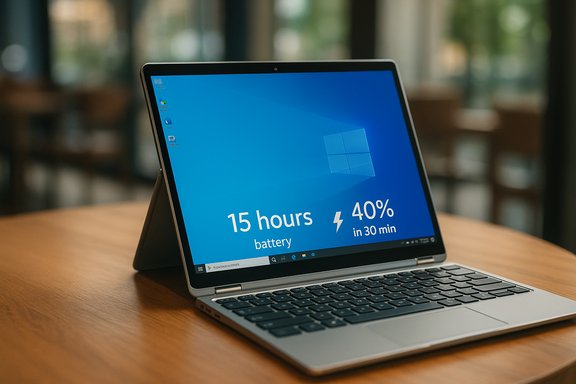
Which? has quietly promoted a new joint highest‑scoring Windows laptop in its lab, and the headline is simple: one of the best Windows machines they’ve ever tested manages to be genuinely ultraportable without surrendering the battery life or everyday performance most buyers want. The model is described as having a footprint smaller than an A4 sheet of paper, a svelte 13 mm profile, a 2‑in‑1 touchscreen design and roughly 15 hours of video‑playback or mixed‑use endurance — plus a fast‑charge claim that delivers about 40% battery in 30 minutes. Which? positions the device as a rarity: a true thin‑and‑light that doesn’t force the usual trade‑offs between mobility and runtime.
Which? is a UK consumer testing organisation that buys the devices it tests and evaluates them under repeatable lab conditions. In the article announcing the new top scorer the publication summarises its approach: five experts complete detailed lab work covering multiple battery measurements, screen performance metrics, and more than 30 subjective usability ratings — from keyboard feel to hinge action. Which? also says it performed at least six separate battery‑related measurements and ten different screen measurements as part of its testing protocol, which is designed to stress both objective metrics and everyday usability. That methodology is why the organisation’s findings often influence buyer decisions in the UK and beyond. Two extra editorial details matter for readers: Which? hides the model details behind its membership gate (you need to log in to see the exact model in that story), and the article explicitly frames the device as one of a pair sharing the organisation’s highest score right now. That means the public teaser describes performance and design claims, but the full dataset and configuration details are behind a paywall. That is important when it comes to independent verification, as discussed later.
This development also indicates a broader market trend: reviewers and lab tests are increasingly scoring battery efficiency and local AI hardware as first‑class attributes. For Windows shoppers interested in the best Windows laptop for mobility and modern features like on‑device AI, the next step is to see the SKU details Which? will publish to members — then cross‑check with third‑party labs and the WorksOnWoA compatibility database before purchase.
Source: which.co.uk We’ve just tested our new joint highest-scoring Windows laptop - Which?
 Background / Overview
Which? is a UK consumer testing organisation that buys the devices it tests and evaluates them under repeatable lab conditions. In the article announcing the new top scorer the publication summarises its approach: five experts complete detailed lab work covering multiple battery measurements, screen performance metrics, and more than 30 subjective usability ratings — from keyboard feel to hinge action. Which? also says it performed at least six separate battery‑related measurements and ten different screen measurements as part of its testing protocol, which is designed to stress both objective metrics and everyday usability. That methodology is why the organisation’s findings often influence buyer decisions in the UK and beyond. Two extra editorial details matter for readers: Which? hides the model details behind its membership gate (you need to log in to see the exact model in that story), and the article explicitly frames the device as one of a pair sharing the organisation’s highest score right now. That means the public teaser describes performance and design claims, but the full dataset and configuration details are behind a paywall. That is important when it comes to independent verification, as discussed later. Why this matters: ultraportable laptops have matured
For much of laptop history, thinness and battery life have been competing design vectors. You got either a light, elegant notebook with limited thermal and battery headroom, or a heavier box that ran faster under prolonged load. The current generation of mobile silicon and system design has blurred that line: newer NPUs (Neural Processing Units), lower‑power mobile CPUs, and smarter OS‑level power management let vendors build thin laptops that still last for a working day. Independent testing sites and review roundups — and community test archives — confirm that reviewers are now scoring battery and efficiency much higher as an essential metric rather than an afterthought. That evolution underpins the Which? claim: an ultra‑thin, convertible 2‑in‑1 that can handle web multitasking, streaming and light multitasking for around 15 hours. If accurate in real‑world use, that combination changes the default trade‑off for many buyers: you no longer need to choose between best portability and all‑day battery.Design and portability: what “smaller than A4” and 13 mm mean in practice
The footprint and its practical implications
A4 paper measures 210 × 297 mm. When Which? says the laptop has a footprint smaller than an A4 sheet, it’s signalling a chassis that is likely in the 13–14‑inch class where bezels and aspect ratio are tightly controlled. That puts the device squarely in the ultraportable category: easy to slip into backpacks, light enough for daily commuting, and better suited to working in cafés or planes than many larger 15–16‑inch models. Which? explicitly highlights the portability as a key win.Thickness: 13 mm is thin, but not magical
A 13 mm thickness is notable — it’s in the same ballpark as several recent ultraportables (examples of thin devices with county-level claims include the Asus Zenbook S16 at roughly ~11–12 mm in places and various ultra‑thin models from leading OEMs). Thin designs are impressive for portability, but they impose engineering constraints: less internal volume for battery capacity, less headroom for active cooling, and tighter compromises on port arrays. Independent reviews of ultra‑thin machines repeatedly show those trade‑offs in practice: reviewers praise build and portability but warn about heat and sustained performance when the chassis leaves little room for airflow or vapor chambers.Build and input: touchscreen 2‑in‑1 adds versatility
Which? points out that the laptop is a touchscreen 2‑in‑1, meaning you can use it in tablet mode or tent mode for media. That versatility adds value for content consumption and light creative work, and it’s consistent with a move by OEMs to merge tablet convenience into clamshell portability without dramatically increasing thickness. The inclusion of a touchscreen and convertible hinge tends to add weight and complexity; if an ultraportable still manages 13 mm and good battery life with a hinge designed for tablet use, that is a noteworthy engineering achievement.Battery life and charging: the numbers and the realism
Which?’s claims
Which? reports roughly 15 hours of video‑playback or web browsing in their tests and flags a fast‑charge stat: 30 minutes of charging brings the battery to 40%. These figures make for compelling headlines, but they require context: test conditions (display brightness, wireless radios, codecs, background tasks and the particular workload) determine how an endurance figure translates to everyday use. Which? says it uses multiple battery tests to create a composite score — that helps, but the devil is in the configuration details (which exact SKU, screen resolution and refresh rate were used).Is 15 hours plausible for an ultraportable?
Yes — with caveats. Recent mobile silicon (Qualcomm Snapdragon X‑series, Intel Core Ultra family and AMD Ryzen AI) and high‑efficiency OLED or low‑power LCDs can produce long runtimes in lightweight systems. Review labs have measured very long local video‑playback numbers for some ARM‑based designs (some Surface Snapdragon SKUs reached exceptionally long runtimes under local playback tests), although those numbers usually fall under heavier mixed‑use tests. In other words: a carefully controlled local video playback test with the screen at moderate brightness, Wi‑Fi off and power‑efficient codecs can produce 12–20+ hour figures on the best designs — but day‑to‑day multitasking will typically produce lower numbers.Fast charging: 40% in 30 minutes — how common is that?
Fast‑charge claims have become standard marketing across laptop ranges. Many OEMs advertise schemes such as “50% in 30 minutes” or similar ExpressCharge features that truncate the charging time in the constant current portion of the cycle. Engineering explains this: modern Li‑ion batteries accept high current until roughly 70–80% of charge, after which the charging current is throttled to avoid damaging the cells. So delivering 30–40% in 30 minutes is conservative and plausible for devices that support robust USB‑PD or vendor rapid‑charge circuitry. Independent tests of ExpressCharge and similar features confirm that real‑world numbers usually align with manufacturers’ claims under their official test conditions. But remember: the time to reach 100% will be longer, and high‑speed charging cycles generate heat that OEMs manage with protective charging logic.Copilot+ and on‑device AI: what Which? says and what it means
Which? uses the opportunity of this top‑scorer announcement to explain Copilot+: Microsoft’s hardware tier that unlocks certain Windows 11 AI features on device (without needing cloud compute). Which? stresses that Copilot+ is not the same as the Copilot chatbot; rather it’s a hardware qualification that ensures a machine has the local compute to run AI features such as local image generation, Recall-style search and other private, low‑latency experiences. Which? also suggests Copilot+ is not, by itself, a reason for every buyer to choose a laptop — many AI tasks can be run in the cloud or via free web services.Microsoft’s Copilot+ baseline and reality
Microsoft and ecosystem documentation converge on a few key hardware requirements for the Copilot+ experience: an on‑device NPU capable of roughly 40 TOPS or more, plus increased RAM (commonly 16 GB) and modern fast storage. That 40‑TOPS threshold is not marketing: it’s the engineering baseline Microsoft uses to guarantee a consistent on‑device inference experience for tasks like real‑time speech, local model execution and semantic indexing. Multiple independent sources and vendor documentation echo that requirement, and third‑party test databases and Microsoft’s own Windows on Arm guidance explain why ARM‑based Snapdragon X‑series parts and certain Intel and AMD NPUs are leading the early Copilot+ field.Practical implications for buyers
- If you want on‑device AI that runs without sending data to cloud servers (for privacy or offline use), buy a Copilot+ machine.
- Copilot+ machines often use ARM‑based Snapdragon X silicon — these deliver strong on‑device NPU performance but can introduce software compatibility issues (legacy drivers, certain desktop apps and some printers or tools may not run natively). WorksOnWoA is a public compatibility resource to check individual apps.
- If you primarily use web apps or cloud‑based AI tools, Copilot+ is less essential; you can often do the same workflows on traditional x86 hardware, albeit with more network latency and less offline capability. Which? suggests buyers shouldn’t purchase just for Copilot+ unless they specifically need those on‑device features.
Strengths — why Which? ranked this laptop so highly
- Exceptional portability: Smaller than A4 plus a 13 mm profile make this an extremely travel‑friendly choice for commuters and mobile creatives. Which? highlights that portability repeatedly as a core strength in the lab assessment.
- All‑day battery in tests: The 15‑hour runtime figure (assuming Which?’s lab conditions) positions the machine among the battery champions for mainstream productivity and streaming. For users prioritising long local playback or extended web sessions, that is a major advantage.
- 2‑in‑1 versatility and touchscreen: A convertible hinge and touch add clear user scenarios — note taking, on‑screen sketching and casual tablet‑mode consumption are more natural in a 2‑in‑1.
- Measured testing approach: Which?’s multi‑point battery and screen testing, combined with subjective usability ratings, gives the announced score credibility in the context of other Which? test results.
Risks and trade‑offs — what buyers should watch out for
- Paywall and transparency: Which? intentionally hides the specific model in the headline story behind a login. That’s reasonable for a membership model, but it means the teaser lacks direct SKU‑level specs the public can verify immediately. Until the full test data or the unlocked article shows the exact configuration, independent verification of the precise battery, thickness and weight figures is constrained. Treat the headline claims with cautious optimism until you can confirm the SKU details.
- Thermal and sustained performance: Ultra‑thin designs frequently suffer throttling under sustained CPU/GPU load simply because there’s less room for heat dissipation. Benchmarks that simulate long render or compile jobs will often show larger performance gaps than short synthetic bursts. Independent reviews of ultra‑thin machines routinely document elevated surface temperatures and occasional thermal throttling — the same can happen to converters that prioritise thinness. Buyers who run heavy workloads should prefer thicker chassis with more robust cooling or check sustained‑load benchmarks before buying.
- Software compatibility for Copilot+ silicon: If the laptop uses ARM‑based Copilot+ silicon (many Copilot+ laptops do), some legacy desktop apps, virtualisation tools, printer drivers or specialized professional software might not run natively; emulation improves but remains imperfect in edge cases. The WorksOnWoA database and Microsoft’s Windows on Arm guidance are useful checks before purchase. If you depend on certain legacy apps, verify compatibility first.
- Battery test realism: Which?’s battery numbers are meaningful in a controlled lab setting, but real‑world results diverge depending on brightness, app mix, wireless use and refresh rates. If you use a high‑refresh OLED panel or keep backgroundsync and cloud‑backups active, you’ll likely see lower real‑world hours than playback tests report. Which? uses multiple battery tests to mitigate this concern, but buyers must compare lab conditions to their typical workflows.
How to verify the claims before buying (practical checklist)
- Read the full Which? review (or wait until it is unlocked) to get the SKU, screen resolution and configuration details. Which? lists those in the member article and that’s the first step to cross‑checking.
- If Copilot+ features matter, confirm the chip family and NPU TOPS with the OEM spec sheet or Microsoft’s Copilot+ requirements. Look for the 40 TOPS baseline and at least 16 GB RAM/256 GB SSD to meet the Copilot+ badge.
- Check third‑party lab reviews for sustained performance and thermals (stress tests and multi‑hour rendering or CPU loops). Independent outlets will report if the thin chassis runs hot or throttles.
- Validate app compatibility on WorksOnWoA if the machine uses an ARM‑based Copilot+ chipset; search for the apps and games you need.
- Compare charger wattage and vendor fast‑charge claims; look for measured third‑party charge times when possible. ExpressCharge/fast‑charge systems are common, but results vary with charger wattage and battery size.
Comparative context: where this device sits in the market
Which? mentions a set of Copilot+ laptops they’ve also tested, including models such as the Samsung Galaxy Book4 Edge and a Dell 15 variant (the story lists those as Copilot+ laptops on test). Many OEMs are now shipping Copilot+‑capable variants and promising long battery life and local AI features, but the exact user experience depends on whether the laptop is ARM‑based or x86 with a high‑performance NPU. Which? appears to celebrate the emergence of ultraportables that also support on‑device features — the combination that will matter to mobile creative professionals and privacy‑minded users. In broader reviews, other outlets have similarly identified a market split: ARM‑based Copilot+ laptops often lead on local NPU performance and battery, while higher‑powered x86 models win in sustained throughput and legacy app compatibility. That makes this Which? top‑score meaningful as a signal that the trade‑offs are narrowing, but also reinforces the need to match hardware to your specific workflows.Final verdict and buyer guidance
Which?’s announcement is important because it underscores how far laptop engineering has progressed: thin, convertible designs can now genuinely deliver excellent battery runtime and everyday performance. The headline combination — smaller than A4, 13 mm thin, touchscreen 2‑in‑1, ~15 hours battery and a 30‑minute to 40% fast‑charge claim — paints a convincing picture for commuters and users who prioritise portability without fully sacrificing functionality. But prudent buyers should follow a short verification process before committing:- Check the full Which? review (to get the exact SKU, display resolution and test conditions).
- Confirm whether the device is a Copilot+ machine and whether it uses ARM or x86 silicon; test compatibility for your essential apps on WorksOnWoA if it’s ARM.
- Look for independent sustained‑load thermal tests and real‑world battery tests from multiple reviewers to ensure runtime figures match your workload.
This development also indicates a broader market trend: reviewers and lab tests are increasingly scoring battery efficiency and local AI hardware as first‑class attributes. For Windows shoppers interested in the best Windows laptop for mobility and modern features like on‑device AI, the next step is to see the SKU details Which? will publish to members — then cross‑check with third‑party labs and the WorksOnWoA compatibility database before purchase.
Source: which.co.uk We’ve just tested our new joint highest-scoring Windows laptop - Which?
