

A How-To Geek writer argues that a first homelab built from secondhand PC parts can teach more than a polished off-the-shelf NAS, because the older machine forces its owner to learn hardware diagnosis, operating-system choices, storage tradeoffs, networking, and service hosting by doing the work directly. That is not just nostalgia for beige boxes and surplus office towers. It is a useful reminder that the homelab’s real product is not storage capacity, Docker dashboards, or blinking LEDs. It is competence.
The modern NAS is one of the great conveniences of home computing. Synology, QNAP, Asustor, TerraMaster, and iXsystems have all helped turn what used to be a small sysadmin project into a consumer appliance: plug in drives, answer a wizard, create users, and start copying files. For many households, that is exactly the right answer.
But a NAS and a homelab are not the same thing, even when they overlap. A NAS is a storage appliance that can sometimes run extra services. A homelab is a deliberately unstable learning environment where compute, storage, networking, identity, automation, and failure all collide at human scale.
That difference matters because the NAS market sells outcomes, while the homelab rewards understanding. A commercial NAS asks what you want to accomplish. A secondhand tower asks what you are willing to learn when the boot disk disappears, the BIOS forgets its settings, or a cheap SATA cable quietly ruins your weekend.
The How-To Geek piece lands because it frames old hardware not as a compromise, but as an instructor. A first-generation Core i5 with too little RAM, an aging GPU, mismatched drives, and suspicious fans is not merely a cheaper route to self-hosting. It is the curriculum.
When a new NAS works, it works quietly. The web interface tells you whether a drive is healthy. The app store tells you which packages are supported. The vendor’s documentation tells you where your options begin and end. That experience is efficient, but it can leave the owner with only a thin understanding of what is happening underneath.
Old hardware refuses to be so polite. It makes you distinguish a dying fan from a failing hard drive, a power-supply issue from a motherboard problem, a bad RAM stick from a corrupt filesystem, and a configuration mistake from an actual hardware limit. It forces you to learn that “the server is down” is not a diagnosis.
That is not romantic hardship for its own sake. Troubleshooting is one of the most transferable skills in computing, and secondhand homelab gear compresses years of ordinary PC failures into a format where the stakes are low enough to learn safely. If a refurbished desktop refuses to boot after a RAM upgrade, you learn reseating, POST codes, BIOS defaults, memory compatibility, and patience. If a used drive starts throwing errors, you learn SMART data, backups, redundancy, and the difference between a warning and a crisis.
The appliance path can still teach some of this, especially once disks fail or packages break. But it teaches inside a vendor’s guardrails. The secondhand path teaches the machine as a system: firmware, buses, thermals, storage controllers, operating systems, services, logs, and user error all sharing one cramped case.
That difference changes how people learn. On cheap secondhand hardware, you are more likely to reinstall the operating system three times in a weekend, try an unfamiliar filesystem, pass a device through to a virtual machine, flash firmware, swap NICs, or move from bare metal to a hypervisor because the sunk cost feels manageable. The learning comes not from success, but from the reversible failures along the way.
This is where the DIY homelab diverges from the consumer tech review mindset. In a product review, friction is a defect. In a lab, friction is data. A system that forces you to understand why an HBA in IT mode matters, why a Realtek NIC may behave differently from an Intel one, or why ZFS likes memory and stable disks is doing the job a lab is supposed to do.
The cheapest setup is not automatically the best setup, of course. Used drives can be a false economy. Ancient CPUs can waste electricity. Dusty power supplies can become expensive lessons in risk. But even those constraints teach the central truth of infrastructure: every choice has an operating cost, even when the purchase price is low.
For the WindowsForum audience, this lesson should feel familiar. Many of us learned Windows by fixing broken Windows installs, not by reading product pages. We learned networking by getting file sharing wrong, learned drivers by making Device Manager angry, and learned backups only after discovering that “important files” are always more important after they vanish.
The problem begins when the NAS becomes the answer to every homelab question. Modern NAS units often advertise containers, virtual machines, media servers, surveillance features, cloud sync, directory services, and backup integrations. Some high-end models are impressively capable. But the platform remains shaped by the vendor’s hardware choices, software packaging, update cadence, and support boundaries.
That is not inherently wrong. It is the bargain. You trade flexibility for convenience, and in many environments that trade is sensible. The issue is that beginners can mistake the polished experience for mastery.
A NAS can run a Plex server, but it may not teach much about GPU transcoding, driver support, hardware acceleration, or container permissions. It can host a few Docker applications, but it may not force the owner to think carefully about reverse proxies, persistent volumes, VLANs, backups, restore tests, and dependency management. It can expose SMB shares beautifully, but it may not explain why Windows clients, Linux permissions, and identity mapping can become such a mess when you leave the happy path.
A self-built homelab does not let you avoid those subjects. It drags you into them. That can be maddening, but it also produces the kind of intuition that makes later tools easier to understand.
Proxmox VE has become a community favorite because it packages KVM virtual machines, Linux containers, web-based administration, clustering features, backup integration, and software-defined networking concepts into a platform that is approachable without being toy-like. As of early 2026, Proxmox VE 9.1 is the current stable line, built around the project’s continuing shift into a more mature alternative to proprietary virtualization stacks for small environments and labs.
That matters because the hypervisor changes the beginner’s mental model. Instead of asking, “What can my NAS install?” the homelabber asks, “What should run in a VM, what should run in a container, what should stay bare metal, and what should be separated for security or reliability?” Those are infrastructure questions, not appliance questions.
This is where a five-year-old gaming PC or retired business workstation can beat a shiny NAS in educational value. Even if it burns more power, it often brings more CPU headroom, more RAM expandability, full-size PCIe slots, better GPU options, and fewer vendor restrictions. It can become a storage server today, a Kubernetes playground tomorrow, and a Windows Server evaluation box next month.
A NAS typically wants to be the center of storage. A homelab host wants to be a place where ideas survive first contact with reality.
That kind of constraint is useful. Cloud platforms and modern desktops hide resource abundance until the bill arrives or the fan curve does. Old homelab hardware puts the budget in your face. You learn to ask whether a container is enough, whether a full VM is justified, whether a lightweight Linux distribution will do, and whether the thing you are about to deploy is worth the operational mess it creates.
The article’s claim that containers are often the better choice than VMs is broadly right for home services, but the more important lesson is learning why. Containers share the host kernel and are generally lighter, but they also require care around permissions, storage, networking, and update discipline. VMs provide stronger isolation and cleaner operating-system boundaries, but at greater overhead.
A good homelab does not turn every beginner into a container absolutist or a virtualization purist. It teaches judgment. Home Assistant may deserve one deployment pattern, a domain controller another, a test Windows Insider build another, and a public-facing service something more isolated still.
Commercial NAS software can support containers and virtual machines, and some units do it well. But a low-power appliance with fixed memory and a vendor-tuned interface rarely forces the same reckoning. It is easy to click “install” until the box becomes slow. It is harder, and more valuable, to understand why.
A two-drive mirror is simple until someone mistakes it for a backup. RAID 5 looks efficient until rebuild times and drive sizes make the risk feel less theoretical. ZFS offers integrity features that enthusiasts rightly admire, but it asks for appropriate hardware, memory, planning, and respect for how vdevs grow. Used enterprise drives can be excellent value, but their history, noise, power draw, and remaining life matter.
Secondhand builds expose those tradeoffs earlier because the builder has to choose the controller, cables, drive layout, filesystem, backup target, and recovery plan. A commercial NAS wizard can nudge users toward sane defaults, and that is helpful. But the DIY route makes the user confront what those defaults are doing.
This is especially important for Windows-heavy homes. SMB sharing may feel simple because Windows understands it natively, but reliable file serving still involves permissions, user accounts, network discovery, signing, naming, caching, and sometimes the ghosts of old workgroup habits. A beginner who sets up Samba manually may suffer more in the short term, but they emerge with a much clearer understanding of why a mapped drive behaves differently from a local disk.
The same is true for backup. A NAS is often sold as the backup destination, but a homelab teaches the more uncomfortable lesson: the backup destination needs its own backup strategy. If the box is always online, reachable by the same credentials, and sitting next to the PC it protects, it is only one layer in a broader plan.
That is not a failure; it is product design. The vendor is optimizing for a supported, predictable platform. The user gets stability and less research. The cost is that unusual needs become awkward quickly.
A secondhand PC tower has a messier but more interesting future. Need faster networking? Add a 2.5GbE or 10GbE card. Need more SATA ports? Add an HBA. Need hardware transcoding? Add a supported GPU or choose a CPU with an iGPU that fits the workload. Need more memory? The used market may make a major upgrade cheap. Need a separate boot drive, mirrored SSDs, or a scratch disk for downloads and transcoding? There is probably a bay, bracket, or ugly workaround.
That physical expandability is not just about performance. It changes how the owner thinks. Instead of treating the system as a finished object, the homelabber treats it as an evolving platform. The machine becomes a record of decisions: this NIC was added when Wi-Fi backups became painful, this HBA arrived after the motherboard’s SATA ports ran out, this SSD became the VM store after spinning disks made everything feel slow.
There are limits. Old desktops can lack ECC memory support. Consumer chipsets can be stingy with PCIe lanes. Small cases can make drive cooling ugly. Electricity costs can turn “free” hardware into an expensive heater. But these are again useful lessons, because real infrastructure is mostly a negotiation among budget, risk, space, power, noise, and ambition.
A refurbished PC can host file shares, media libraries, password managers, RSS readers, photo galleries, game servers, DNS filtering, VPN endpoints, dashboards, development environments, test Active Directory domains, Linux ISOs, and the dozen half-useful services that make every homelab simultaneously impressive and ridiculous. The joy is not merely saving money. It is recovering agency.
But “almost anything” should not be confused with “without consequences.” Every self-hosted service becomes something you must patch, monitor, back up, and eventually migrate. If it faces the internet, it becomes part of your security perimeter. If family members depend on it, it becomes production, whether or not you admit it.
This is another place where the secondhand homelab teaches better than the appliance. Appliances tend to encourage a consumer relationship: install the app, enable remote access, trust the vendor. A DIY lab forces the operator to think about reverse proxies, certificates, firewall rules, VPNs, identity, least privilege, and logs. It also teaches humility. The more you self-host, the more you appreciate boring managed services.
That tension is healthy. The point is not to self-host everything forever. The point is to know enough to decide what belongs in your house, what belongs in the cloud, and what deserves to be deleted before it becomes another unpatched container from 2023.
But the environmental math is not always simple. A retired desktop that idles at 70 watts may cost more to run than a purpose-built NAS or mini PC that idles at a fraction of that. A rack server that seemed like a bargain can turn into a space heater with enterprise fans and a power appetite that makes no sense for a closet. Reuse is good, but inefficient reuse running 24/7 can become its own waste stream.
The right answer is measurement. A cheap plug-in power meter can teach more than a dozen forum arguments. Measure idle draw, typical load, spin-up behavior, and the cost of leaving the system on all month. Then compare that with the price of a newer used mini PC, an efficient N100-class board, or a commercial NAS.
The homelab community has already moved in this direction. Many builders now combine refurbished desktops, low-power mini PCs, single-board computers, and dedicated storage boxes rather than insisting that one machine do everything. That mixed approach reflects a maturing hobby: use the loud, power-hungry box for experiments; use the efficient box for always-on services; use the NAS or storage server for data that matters.
In other words, the best secondhand homelab is not necessarily the oldest machine you can keep alive. It is the one whose compromises you understand.
A used PC running Proxmox, TrueNAS, Debian, Ubuntu Server, or Windows Server evaluation builds can become a safe place to learn the concepts that underpin real Windows administration. SMB, DNS, DHCP, Kerberos, certificates, RDP, PowerShell remoting, Hyper-V, Group Policy, Windows deployment, and backup strategy all become easier to understand when you have a small network to break and rebuild.
Even a Linux-based storage box teaches Windows lessons. Mapping shares, handling credentials, tuning SMB behavior, dealing with case sensitivity assumptions, and understanding how Windows clients cache network resources are all practical skills. The lab becomes a bridge between desktop familiarity and infrastructure literacy.
For IT pros, the value is obvious. A homelab lets you test patches, learn new tools, simulate migrations, and understand failure modes before they appear at work. For enthusiasts, the value is just as real. It turns the home network from a black box into a system you can reason about.
The secondhand route is especially good here because it mirrors the messiness of real environments. Production networks are rarely made entirely of current-generation hardware running clean reference configurations. They are full of old firmware, partial upgrades, forgotten cables, inherited assumptions, and machines that cannot be replaced yet because something important still depends on them.
If the goal is reliable family backups, a commercial NAS with supported drives and a clear update path may beat a scavenged tower maintained by the one person in the house who understands it. If the machine must fit in a living room, stay quiet, sip power, and avoid weekend maintenance, the appliance has the advantage. If uptime matters more than learning, fewer moving parts are a feature.
The same is true for small businesses. A business owner who needs shared storage should be wary of the “I built it from spare parts” solution unless someone is explicitly responsible for maintaining it. Supportability matters. Documentation matters. Warranty and replacement paths matter. A homelab mindset is educational; it is not automatically a business continuity plan.
This is where the original article’s framing is strongest when read as advice for learners rather than buyers. It is not saying every NAS is a bad purchase. It is saying that if your goal is to build a real homelab, the easiest product may not be the best teacher.
That distinction should guide the decision. Buy the NAS when the outcome matters more than the journey. Build the secondhand box when the journey is the point.
Consumers expect products to hide complexity. Operators learn where complexity lives, how it fails, and which parts deserve automation, monitoring, or replacement. A secondhand homelab forces that shift because it does not allow the owner to remain passive. The box needs care. The services need structure. The data needs protection. The network needs intent.
That shift also changes how people evaluate technology. Marketing claims become easier to parse. “Supports Docker” no longer sounds the same as “is a good container host.” “RAID support” no longer sounds like a backup plan. “Cloud access” no longer sounds automatically safe. “Enterprise-grade” no longer means much without power, noise, firmware, and maintenance context.
This is why the educational value of the secondhand build can outlast the hardware itself. The first lab may eventually be replaced by a newer mini PC, a proper NAS, a used workstation, or a small rack. But the operator’s instincts remain. They know what logs to check, what assumptions to distrust, and why the boring parts of infrastructure are usually the important parts.
That is a better long-term payoff than a clean setup wizard.
A sensible beginner build in 2026 might be a used business desktop with a reasonably modern Intel Core CPU, 16GB or 32GB of RAM, an SSD boot drive, a pair of mirrored storage drives, and room for a better NIC later. It might run Proxmox first, with a storage-focused VM or containerized services layered on top. Or it might run TrueNAS SCALE directly if storage is the primary mission and virtualization is secondary.
The exact recipe matters less than the posture. The builder should expect to document the setup, test restores, watch power use, replace questionable drives, and learn why something failed before wiping it and starting over. That is the part a boxed NAS cannot sell.
The DIY path is also more honest about the hobby’s addictive nature. Nobody builds “just one” homelab service. A file server becomes a media server. A media server becomes DNS filtering. DNS filtering becomes a VPN. The VPN becomes a reverse proxy. The reverse proxy becomes a certificate problem. The certificate problem becomes a weekend. The weekend becomes experience.
That experience is the point.
Source: How-To Geek I built my first homelab from secondhand gear, and it taught me more than a new NAS ever could
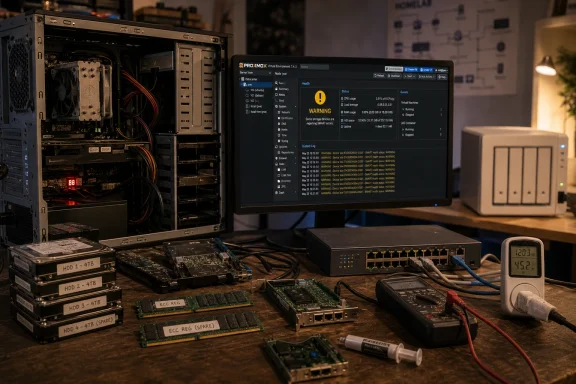 The Homelab Is Not a Product Category, It Is a Training Ground
The modern NAS is one of the great conveniences of home computing. Synology, QNAP, Asustor, TerraMaster, and iXsystems have all helped turn what used to be a small sysadmin project into a consumer appliance: plug in drives, answer a wizard, create users, and start copying files. For many households, that is exactly the right answer.But a NAS and a homelab are not the same thing, even when they overlap. A NAS is a storage appliance that can sometimes run extra services. A homelab is a deliberately unstable learning environment where compute, storage, networking, identity, automation, and failure all collide at human scale.
That difference matters because the NAS market sells outcomes, while the homelab rewards understanding. A commercial NAS asks what you want to accomplish. A secondhand tower asks what you are willing to learn when the boot disk disappears, the BIOS forgets its settings, or a cheap SATA cable quietly ruins your weekend.
The How-To Geek piece lands because it frames old hardware not as a compromise, but as an instructor. A first-generation Core i5 with too little RAM, an aging GPU, mismatched drives, and suspicious fans is not merely a cheaper route to self-hosting. It is the curriculum.
Used Gear Teaches the Thing Appliances Hide
The strongest argument for buying a new NAS is also the strongest argument against treating one as your first serious homelab: it abstracts away too much. Appliance vendors have spent years smoothing the edges off storage administration, and that polish is valuable. The trouble is that the edges are where the learning happens.When a new NAS works, it works quietly. The web interface tells you whether a drive is healthy. The app store tells you which packages are supported. The vendor’s documentation tells you where your options begin and end. That experience is efficient, but it can leave the owner with only a thin understanding of what is happening underneath.
Old hardware refuses to be so polite. It makes you distinguish a dying fan from a failing hard drive, a power-supply issue from a motherboard problem, a bad RAM stick from a corrupt filesystem, and a configuration mistake from an actual hardware limit. It forces you to learn that “the server is down” is not a diagnosis.
That is not romantic hardship for its own sake. Troubleshooting is one of the most transferable skills in computing, and secondhand homelab gear compresses years of ordinary PC failures into a format where the stakes are low enough to learn safely. If a refurbished desktop refuses to boot after a RAM upgrade, you learn reseating, POST codes, BIOS defaults, memory compatibility, and patience. If a used drive starts throwing errors, you learn SMART data, backups, redundancy, and the difference between a warning and a crisis.
The appliance path can still teach some of this, especially once disks fail or packages break. But it teaches inside a vendor’s guardrails. The secondhand path teaches the machine as a system: firmware, buses, thermals, storage controllers, operating systems, services, logs, and user error all sharing one cramped case.
The Best Homelab Budget Is Often a Mistake Budget
There is also a psychological advantage to used gear that enthusiasts do not always state plainly: it gives beginners permission to break things. A $900 NAS with new drives invites caution. A $120 office PC from an auction site invites experimentation.That difference changes how people learn. On cheap secondhand hardware, you are more likely to reinstall the operating system three times in a weekend, try an unfamiliar filesystem, pass a device through to a virtual machine, flash firmware, swap NICs, or move from bare metal to a hypervisor because the sunk cost feels manageable. The learning comes not from success, but from the reversible failures along the way.
This is where the DIY homelab diverges from the consumer tech review mindset. In a product review, friction is a defect. In a lab, friction is data. A system that forces you to understand why an HBA in IT mode matters, why a Realtek NIC may behave differently from an Intel one, or why ZFS likes memory and stable disks is doing the job a lab is supposed to do.
The cheapest setup is not automatically the best setup, of course. Used drives can be a false economy. Ancient CPUs can waste electricity. Dusty power supplies can become expensive lessons in risk. But even those constraints teach the central truth of infrastructure: every choice has an operating cost, even when the purchase price is low.
For the WindowsForum audience, this lesson should feel familiar. Many of us learned Windows by fixing broken Windows installs, not by reading product pages. We learned networking by getting file sharing wrong, learned drivers by making Device Manager angry, and learned backups only after discovering that “important files” are always more important after they vanish.
The NAS Appliance Solves Storage, Then Asks You to Stay in Its Lane
None of this makes commercial NAS hardware bad. In fact, the better NAS vendors have done something genuinely useful: they have made competent storage available to people who do not want a second job as a systems administrator. For photographers, small offices, families, and anyone who wants a dependable backup target, that is a meaningful achievement.The problem begins when the NAS becomes the answer to every homelab question. Modern NAS units often advertise containers, virtual machines, media servers, surveillance features, cloud sync, directory services, and backup integrations. Some high-end models are impressively capable. But the platform remains shaped by the vendor’s hardware choices, software packaging, update cadence, and support boundaries.
That is not inherently wrong. It is the bargain. You trade flexibility for convenience, and in many environments that trade is sensible. The issue is that beginners can mistake the polished experience for mastery.
A NAS can run a Plex server, but it may not teach much about GPU transcoding, driver support, hardware acceleration, or container permissions. It can host a few Docker applications, but it may not force the owner to think carefully about reverse proxies, persistent volumes, VLANs, backups, restore tests, and dependency management. It can expose SMB shares beautifully, but it may not explain why Windows clients, Linux permissions, and identity mapping can become such a mess when you leave the happy path.
A self-built homelab does not let you avoid those subjects. It drags you into them. That can be maddening, but it also produces the kind of intuition that makes later tools easier to understand.
The Hypervisor Is the Moment the Homelab Grows Up
The How-To Geek article name-checks Proxmox, and that choice is telling. The modern DIY homelab has increasingly converged around the idea that the first serious install should not necessarily be a single-purpose NAS operating system. It should be a hypervisor or virtualization host that can run storage, services, test machines, and disposable experiments side by side.Proxmox VE has become a community favorite because it packages KVM virtual machines, Linux containers, web-based administration, clustering features, backup integration, and software-defined networking concepts into a platform that is approachable without being toy-like. As of early 2026, Proxmox VE 9.1 is the current stable line, built around the project’s continuing shift into a more mature alternative to proprietary virtualization stacks for small environments and labs.
That matters because the hypervisor changes the beginner’s mental model. Instead of asking, “What can my NAS install?” the homelabber asks, “What should run in a VM, what should run in a container, what should stay bare metal, and what should be separated for security or reliability?” Those are infrastructure questions, not appliance questions.
This is where a five-year-old gaming PC or retired business workstation can beat a shiny NAS in educational value. Even if it burns more power, it often brings more CPU headroom, more RAM expandability, full-size PCIe slots, better GPU options, and fewer vendor restrictions. It can become a storage server today, a Kubernetes playground tomorrow, and a Windows Server evaluation box next month.
A NAS typically wants to be the center of storage. A homelab host wants to be a place where ideas survive first contact with reality.
Old Hardware Makes Resource Limits Visible
One reason old gear teaches well is that it is rarely abundant in the right ways. A beginner with an older Core i5 and 4GB or 8GB of RAM quickly learns that every service has a cost. A VM that seemed harmless on paper becomes greedy in practice. A Java-based service eats memory. A media server spikes CPU. A database quietly assumes it owns the machine.That kind of constraint is useful. Cloud platforms and modern desktops hide resource abundance until the bill arrives or the fan curve does. Old homelab hardware puts the budget in your face. You learn to ask whether a container is enough, whether a full VM is justified, whether a lightweight Linux distribution will do, and whether the thing you are about to deploy is worth the operational mess it creates.
The article’s claim that containers are often the better choice than VMs is broadly right for home services, but the more important lesson is learning why. Containers share the host kernel and are generally lighter, but they also require care around permissions, storage, networking, and update discipline. VMs provide stronger isolation and cleaner operating-system boundaries, but at greater overhead.
A good homelab does not turn every beginner into a container absolutist or a virtualization purist. It teaches judgment. Home Assistant may deserve one deployment pattern, a domain controller another, a test Windows Insider build another, and a public-facing service something more isolated still.
Commercial NAS software can support containers and virtual machines, and some units do it well. But a low-power appliance with fixed memory and a vendor-tuned interface rarely forces the same reckoning. It is easy to click “install” until the box becomes slow. It is harder, and more valuable, to understand why.
Storage Is Where Casual Enthusiasm Meets Physics
The home NAS conversation often starts with capacity: terabytes per dollar, number of bays, drive sizes, RAID levels. The homelab conversation has to go further, because storage is the place where theory punishes carelessness.A two-drive mirror is simple until someone mistakes it for a backup. RAID 5 looks efficient until rebuild times and drive sizes make the risk feel less theoretical. ZFS offers integrity features that enthusiasts rightly admire, but it asks for appropriate hardware, memory, planning, and respect for how vdevs grow. Used enterprise drives can be excellent value, but their history, noise, power draw, and remaining life matter.
Secondhand builds expose those tradeoffs earlier because the builder has to choose the controller, cables, drive layout, filesystem, backup target, and recovery plan. A commercial NAS wizard can nudge users toward sane defaults, and that is helpful. But the DIY route makes the user confront what those defaults are doing.
This is especially important for Windows-heavy homes. SMB sharing may feel simple because Windows understands it natively, but reliable file serving still involves permissions, user accounts, network discovery, signing, naming, caching, and sometimes the ghosts of old workgroup habits. A beginner who sets up Samba manually may suffer more in the short term, but they emerge with a much clearer understanding of why a mapped drive behaves differently from a local disk.
The same is true for backup. A NAS is often sold as the backup destination, but a homelab teaches the more uncomfortable lesson: the backup destination needs its own backup strategy. If the box is always online, reachable by the same credentials, and sitting next to the PC it protects, it is only one layer in a broader plan.
Upgrade Paths Are Where the DIY Box Pulls Away
The appliance NAS usually has a short and well-defined upgrade story. Add larger drives. Add a supported RAM module if the vendor allows it. Maybe attach an expansion unit. Maybe install an M.2 cache drive. Eventually, buy a new box.That is not a failure; it is product design. The vendor is optimizing for a supported, predictable platform. The user gets stability and less research. The cost is that unusual needs become awkward quickly.
A secondhand PC tower has a messier but more interesting future. Need faster networking? Add a 2.5GbE or 10GbE card. Need more SATA ports? Add an HBA. Need hardware transcoding? Add a supported GPU or choose a CPU with an iGPU that fits the workload. Need more memory? The used market may make a major upgrade cheap. Need a separate boot drive, mirrored SSDs, or a scratch disk for downloads and transcoding? There is probably a bay, bracket, or ugly workaround.
That physical expandability is not just about performance. It changes how the owner thinks. Instead of treating the system as a finished object, the homelabber treats it as an evolving platform. The machine becomes a record of decisions: this NIC was added when Wi-Fi backups became painful, this HBA arrived after the motherboard’s SATA ports ran out, this SSD became the VM store after spinning disks made everything feel slow.
There are limits. Old desktops can lack ECC memory support. Consumer chipsets can be stingy with PCIe lanes. Small cases can make drive cooling ugly. Electricity costs can turn “free” hardware into an expensive heater. But these are again useful lessons, because real infrastructure is mostly a negotiation among budget, risk, space, power, noise, and ambition.
Self-Hosting Is the Reward, but Maintenance Is the Price
The article’s most optimistic claim is that once you build and understand the lab, you can self-host almost anything. That is mostly true, and it is one reason the homelab community keeps growing. The internet has become a subscription maze, and the idea of running your own services has obvious appeal.A refurbished PC can host file shares, media libraries, password managers, RSS readers, photo galleries, game servers, DNS filtering, VPN endpoints, dashboards, development environments, test Active Directory domains, Linux ISOs, and the dozen half-useful services that make every homelab simultaneously impressive and ridiculous. The joy is not merely saving money. It is recovering agency.
But “almost anything” should not be confused with “without consequences.” Every self-hosted service becomes something you must patch, monitor, back up, and eventually migrate. If it faces the internet, it becomes part of your security perimeter. If family members depend on it, it becomes production, whether or not you admit it.
This is another place where the secondhand homelab teaches better than the appliance. Appliances tend to encourage a consumer relationship: install the app, enable remote access, trust the vendor. A DIY lab forces the operator to think about reverse proxies, certificates, firewall rules, VPNs, identity, least privilege, and logs. It also teaches humility. The more you self-host, the more you appreciate boring managed services.
That tension is healthy. The point is not to self-host everything forever. The point is to know enough to decide what belongs in your house, what belongs in the cloud, and what deserves to be deleted before it becomes another unpatched container from 2023.
The Environmental Argument Is Real, but Not Automatic
There is an appealing sustainability story in keeping old PCs out of landfills. The How-To Geek author’s first-generation i5 reportedly powered services for more than 12 years, surviving RAM swaps, SSD adoption, many Minecraft servers, and one spilled coffee. That is exactly the kind of long tail consumer hardware should have.But the environmental math is not always simple. A retired desktop that idles at 70 watts may cost more to run than a purpose-built NAS or mini PC that idles at a fraction of that. A rack server that seemed like a bargain can turn into a space heater with enterprise fans and a power appetite that makes no sense for a closet. Reuse is good, but inefficient reuse running 24/7 can become its own waste stream.
The right answer is measurement. A cheap plug-in power meter can teach more than a dozen forum arguments. Measure idle draw, typical load, spin-up behavior, and the cost of leaving the system on all month. Then compare that with the price of a newer used mini PC, an efficient N100-class board, or a commercial NAS.
The homelab community has already moved in this direction. Many builders now combine refurbished desktops, low-power mini PCs, single-board computers, and dedicated storage boxes rather than insisting that one machine do everything. That mixed approach reflects a maturing hobby: use the loud, power-hungry box for experiments; use the efficient box for always-on services; use the NAS or storage server for data that matters.
In other words, the best secondhand homelab is not necessarily the oldest machine you can keep alive. It is the one whose compromises you understand.
Windows Users Have More to Gain Than They Think
There is a tendency to treat homelabbing as a Linux hobby that Windows users merely visit. That undersells how valuable a DIY lab can be for people who live primarily in the Microsoft ecosystem.A used PC running Proxmox, TrueNAS, Debian, Ubuntu Server, or Windows Server evaluation builds can become a safe place to learn the concepts that underpin real Windows administration. SMB, DNS, DHCP, Kerberos, certificates, RDP, PowerShell remoting, Hyper-V, Group Policy, Windows deployment, and backup strategy all become easier to understand when you have a small network to break and rebuild.
Even a Linux-based storage box teaches Windows lessons. Mapping shares, handling credentials, tuning SMB behavior, dealing with case sensitivity assumptions, and understanding how Windows clients cache network resources are all practical skills. The lab becomes a bridge between desktop familiarity and infrastructure literacy.
For IT pros, the value is obvious. A homelab lets you test patches, learn new tools, simulate migrations, and understand failure modes before they appear at work. For enthusiasts, the value is just as real. It turns the home network from a black box into a system you can reason about.
The secondhand route is especially good here because it mirrors the messiness of real environments. Production networks are rarely made entirely of current-generation hardware running clean reference configurations. They are full of old firmware, partial upgrades, forgotten cables, inherited assumptions, and machines that cannot be replaced yet because something important still depends on them.
The Appliance Still Wins When the Job Is Boring
The argument for secondhand homelab gear should not become a purity test. There are many cases where buying a NAS is not only defensible, but plainly smarter.If the goal is reliable family backups, a commercial NAS with supported drives and a clear update path may beat a scavenged tower maintained by the one person in the house who understands it. If the machine must fit in a living room, stay quiet, sip power, and avoid weekend maintenance, the appliance has the advantage. If uptime matters more than learning, fewer moving parts are a feature.
The same is true for small businesses. A business owner who needs shared storage should be wary of the “I built it from spare parts” solution unless someone is explicitly responsible for maintaining it. Supportability matters. Documentation matters. Warranty and replacement paths matter. A homelab mindset is educational; it is not automatically a business continuity plan.
This is where the original article’s framing is strongest when read as advice for learners rather than buyers. It is not saying every NAS is a bad purchase. It is saying that if your goal is to build a real homelab, the easiest product may not be the best teacher.
That distinction should guide the decision. Buy the NAS when the outcome matters more than the journey. Build the secondhand box when the journey is the point.
The Real Upgrade Is From Consumer to Operator
The deeper transformation in a first DIY homelab is not from weak hardware to strong hardware. It is from consumer to operator.Consumers expect products to hide complexity. Operators learn where complexity lives, how it fails, and which parts deserve automation, monitoring, or replacement. A secondhand homelab forces that shift because it does not allow the owner to remain passive. The box needs care. The services need structure. The data needs protection. The network needs intent.
That shift also changes how people evaluate technology. Marketing claims become easier to parse. “Supports Docker” no longer sounds the same as “is a good container host.” “RAID support” no longer sounds like a backup plan. “Cloud access” no longer sounds automatically safe. “Enterprise-grade” no longer means much without power, noise, firmware, and maintenance context.
This is why the educational value of the secondhand build can outlast the hardware itself. The first lab may eventually be replaced by a newer mini PC, a proper NAS, a used workstation, or a small rack. But the operator’s instincts remain. They know what logs to check, what assumptions to distrust, and why the boring parts of infrastructure are usually the important parts.
That is a better long-term payoff than a clean setup wizard.
The Old i5 Still Has a Few Lessons Left
The practical conclusion is not that every beginner should buy the cheapest dusty PC they can find. It is that a first homelab should leave room for friction, repair, replacement, and experimentation. A sealed appliance can be useful, but it can also make the most interesting parts of computing feel like someone else’s job.A sensible beginner build in 2026 might be a used business desktop with a reasonably modern Intel Core CPU, 16GB or 32GB of RAM, an SSD boot drive, a pair of mirrored storage drives, and room for a better NIC later. It might run Proxmox first, with a storage-focused VM or containerized services layered on top. Or it might run TrueNAS SCALE directly if storage is the primary mission and virtualization is secondary.
The exact recipe matters less than the posture. The builder should expect to document the setup, test restores, watch power use, replace questionable drives, and learn why something failed before wiping it and starting over. That is the part a boxed NAS cannot sell.
The DIY path is also more honest about the hobby’s addictive nature. Nobody builds “just one” homelab service. A file server becomes a media server. A media server becomes DNS filtering. DNS filtering becomes a VPN. The VPN becomes a reverse proxy. The reverse proxy becomes a certificate problem. The certificate problem becomes a weekend. The weekend becomes experience.
That experience is the point.
The Small Print on the Sticker Is the Lesson
A first secondhand homelab is best understood as a low-cost apprenticeship in systems thinking, not simply a cheaper NAS. The machine may be ugly, inefficient, and occasionally infuriating, but it teaches the chain of cause and effect that polished appliances are designed to conceal.- A commercial NAS is still the better answer when the main goal is quiet, supported, low-maintenance storage.
- A secondhand PC is usually the better teacher when the goal is to understand hardware, operating systems, networking, virtualization, and failure.
- A hypervisor-first setup gives beginners more room to experiment than a single-purpose storage appliance.
- Used hardware can be economical, but power draw, drive health, noise, and backup discipline must be part of the budget.
- The most valuable homelab skill is not installing services; it is learning how to diagnose, recover, document, and improve them.
Source: How-To Geek I built my first homelab from secondhand gear, and it taught me more than a new NAS ever could
