

Microsoft Azure CTO Mark Russinovich said on May 6, 2026, that the decades-old Win32 API remains a foundational layer of Windows 11, describing it as the bedrock beneath countless apps, tools, and technologies that still depend on Windows’ classic desktop programming model. That sounds like a confession, but it is really a diagnosis. Windows is not old because Microsoft forgot to modernize it; Windows is old because millions of users, developers, administrators, vendors, and line-of-business applications punished every attempt to make it young too quickly. The surprising part is not that Win32 survived. The surprising part is that Microsoft is finally talking about its survival as a strength rather than an embarrassment.
For years, Microsoft’s Windows messaging has oscillated between two incompatible pitches. One says Windows is the familiar platform that runs everything from a 1998 accounting package to a 2026 AI development stack. The other says Windows is the future-facing client for Copilot, cloud identity, new silicon, app containers, and whatever “agentic OS” happens to mean this quarter.
Russinovich’s comments cut through that tension because they acknowledge the thing every Windows administrator already knows: the old platform is not a museum wing. It is the load-bearing wall. Win32 is still where much of the serious Windows ecosystem lives, and pretending otherwise has mostly produced branding exercises, developer confusion, and app models that arrive with ambition and leave with compatibility exceptions.
That does not mean Win32 is elegant, fashionable, or free of baggage. It means the Windows promise has always been less about purity than continuity. Microsoft’s customers did not buy into Windows because it was the cleanest operating system architecture on Earth; they bought into it because software kept working, hardware vendors kept targeting it, and the platform absorbed change without burning down the installed base.
In that sense, the “30-year-old code” framing is both true and misleading. Old code can be technical debt, but old interfaces can also be public infrastructure. A road built decades ago may need resurfacing, but if it connects every warehouse, hospital, factory, school, and developer workstation in the country, you do not replace it by announcing a sleeker road in a press release.
The reason is not simply developer nostalgia. Win32 apps can touch the system deeply, integrate with old workflows, ship outside Microsoft’s store, use mature libraries, support complex input and output scenarios, and run across a vast span of Windows installations. That flexibility is exactly what makes them messy from a modern platform-security standpoint, but it is also why they remain indispensable.
Windows 8 was the great cautionary tale. Microsoft attempted to push a new app model and a new interface paradigm at the same time, betting that tablets, touch, and Store apps would redefine the PC. Instead, many desktop users felt displaced, developers hesitated, and enterprises treated the new model as something to route around rather than build upon.
WinRT did not fail because it had no technical merit. It failed because the Windows ecosystem is not governed solely by technical merit. It is governed by switching costs, user habits, deployment pipelines, procurement rules, compliance testing, plugin ecosystems, peripheral support, and the practical terror of breaking the one weird application that still runs payroll every other Friday.
That is the part Microsoft has relearned repeatedly. Windows users say they want modernization, but what they often mean is: make the platform faster, safer, cleaner, and less annoying without forcing me to rewrite my tools, retrain my staff, or rebuy my workflow. That is not hypocrisy. It is the operating system equivalent of wanting a bridge repaired without closing the highway.
This is where enthusiasts and enterprise administrators often talk past each other. Enthusiasts see cruft, duplicated control panels, old dialogs, inconsistent design language, and background services that feel like sedimentary layers of Microsoft history. Administrators see survivability. They see a platform where a vendor’s unsigned-looking utility, a custom COM add-in, an industrial control panel, and a modern Microsoft 365 client can coexist just long enough to keep the business functioning.
Both views are right. Windows 11 can feel less like a single operating system than a negotiated settlement between eras. It has rounded corners and mica effects up front, but older management consoles, classic installers, legacy control surfaces, and deep Win32 assumptions underneath. The result is sometimes inelegant, sometimes maddening, and often commercially unbeatable.
The uncomfortable truth is that compatibility is not a passive feature. It is an engineering choice that consumes time, constrains design, and creates attack surface. When Microsoft chooses not to break things, it is also choosing to carry them, test against them, document around them, and sometimes defend them in a world that has changed dramatically since the mid-1990s.
That burden becomes more visible as Microsoft tries to make Windows feel modern again. Users complain about performance, ads, telemetry, forced account flows, inconsistent settings, and Copilot integration not because they hate Windows in principle, but because Windows’ old bargain feels strained. If the platform is going to remain compatible at almost any cost, users expect the basics to be excellent.
That matters because the Win32 discussion is not just academic. Sysmon and ZoomIt are examples of old-school Windows utilities that survived because they did something specific, powerful, and useful. Sysmon became a staple for security monitoring because it provided detailed event visibility that defenders could operationalize. ZoomIt became a fixture for presenters and trainers because it solved a small problem better than many larger products.
When Microsoft folds this kind of tooling closer to Windows itself, it is tacitly admitting that the enthusiast and administrator ecosystem has often solved real problems faster than the platform team’s official abstractions. The utilities that live closest to Windows internals are not relics. They are part of the reason power users still tolerate Windows’ rough edges.
There is also a cultural point here. Sysinternals represents a version of Microsoft that technical users tend to respect: transparent, practical, low-fluff, and unafraid of complexity. That is very different from the Microsoft that tells users their operating system is becoming “agentic” before it has convinced them that search, settings, sleep, updates, and performance are all under control.
Russinovich’s Win32 remarks land because they sound like the former Microsoft speaking. They acknowledge reality instead of trying to rebrand it. For a company currently trying to rebuild goodwill among Windows enthusiasts, that tone may be as important as the technical substance.
That ambition collides directly with Win32’s openness. Classic desktop applications were not designed for a world in which the operating system might index user activity, reason across app boundaries, summarize workflows, or automate UI interactions through an AI layer. They were designed for a PC model where local software had broad freedom and the user, in theory, was in charge.
This is why Windows modernization is so difficult now. Microsoft cannot simply declare the PC an AI appliance while preserving the trust assumptions of the classic desktop unchanged. But it also cannot lock down Windows like a phone without destroying the reasons many people still choose Windows over macOS, ChromeOS, or Linux.
Win32 is therefore both the foundation of Microsoft’s AI PC ambitions and a constraint on them. If Copilot is going to be useful across real Windows workflows, it must interact with Win32 apps, not just pristine modern ones. But the more it interacts with them, the more Microsoft must answer hard questions about permissions, visibility, data boundaries, enterprise control, and user consent.
That is where the old platform becomes newly relevant. The future of Windows will not be decided by whether Microsoft can demo an AI feature in a modern app. It will be decided by whether those features can safely coexist with the messy desktop universe people actually use.
A modern Windows application may use Win32 foundations, a web-rendered interface, .NET components, packaged deployment, Windows App SDK features, cloud identity, and a background updater that behaves like it came from another decade. That is not clean, but it is how real software ships. Developers optimize for reach, control, tooling, revenue, and supportability before they optimize for Microsoft’s preferred architecture diagram.
Microsoft knows this, which is why its modern guidance has gradually shifted from replacement to incremental adoption. Instead of demanding that developers rewrite everything for a new app model, the company increasingly tells them they can add modern Windows features to existing desktop apps. That is a pragmatic retreat from revolution to renovation.
The retreat is sensible. Windows has too many developers and too much software history for a single grand migration. The better path is to make the old platform safer, more observable, better packaged, and more capable without pretending that everyone is about to start over.
But that compromise comes at a cost. Windows development can feel fragmented because it is fragmented. A newcomer trying to understand whether to use Win32, .NET, WinUI, WPF, Windows Forms, Electron, WebView2, MAUI, or something else quickly discovers that Microsoft’s greatest platform asset is also its greatest documentation challenge: there is rarely one obvious way to build a Windows app.
That matters in sectors where replacement cycles are measured in decades. Manufacturing systems, medical equipment, government applications, financial tools, laboratory instruments, point-of-sale software, engineering suites, and bespoke internal apps often depend on very specific Windows behaviors. The people responsible for those environments do not celebrate churn.
At the same time, enterprise reassurance should not be confused with a free pass. Compatibility does not absolve Microsoft from making Windows more manageable, predictable, and transparent. In fact, the more Windows leans on its legacy promise, the more disciplined Microsoft must be about updates, telemetry, default apps, cloud prompts, and feature rollouts that can disrupt carefully managed environments.
This is where recent Windows criticism has teeth. Users and administrators are not merely objecting to change. They are objecting to change that feels misprioritized. If Microsoft has the engineering patience to preserve Win32 for three decades, it should also have the product discipline to stop making basic OS interactions feel like ad inventory, onboarding funnels, or experiments in consent fatigue.
The durability of Win32 therefore raises the bar. Microsoft cannot claim Windows is too complex to polish while simultaneously proving that it can preserve deep compatibility across generations. The company’s own success at keeping the old world alive makes excuses for present-day roughness less persuasive.
But the bigger issue is trust. Users do not leave Windows only because another platform has a cleaner API story. They leave when they conclude that Windows no longer respects their time, attention, hardware, or preferences. A legacy API does not drive someone to install Linux; a feeling of being managed, monetized, or ignored might.
Win32 can actually help Microsoft here, because it represents the part of Windows that users still experience as theirs. It is the world of local applications, deep customization, utilities, scripts, context menus, shell extensions, and weird little tools that do exactly one thing. That culture is not obsolete. It is one of Windows’ last major differentiators.
The danger is that Microsoft mistakes the persistence of the Windows ecosystem for unconditional loyalty. Users may tolerate old code if it serves them. They are less forgiving when new layers appear to serve Microsoft first. Compatibility feels like a gift; coercive integration feels like rent extraction.
If Microsoft wants to stop users from wandering toward Mac and Linux, the answer is not to apologize for Win32. The answer is to make the modern layers of Windows earn the same trust that Win32 earned: by being useful, stable, controllable, and respectful of existing workflows.
On the other hand, that openness is exactly what attackers have spent decades learning to abuse. Legacy behaviors, broad process privileges, scriptability, DLL search paths, COM hijacking, living-off-the-land binaries, Office automation, and user-space persistence techniques all thrive in a platform built for compatibility and extensibility. Windows is defensible, but rarely simple.
This is why Microsoft’s security strategy increasingly layers controls around the old model rather than replacing it. Smart App Control, virtualization-based security, protected processes, driver signing, memory protections, Defender improvements, application control, and cloud reputation systems all represent attempts to contain risk without breaking the desktop universe. The architecture is less cathedral than containment vessel.
For administrators, that means Win32’s survival is not a reason to relax. It is a reason to invest in visibility, least privilege, application inventory, patch discipline, and logging that can survive real-world messiness. The old platform will not disappear before the next incident response call.
For Microsoft, the challenge is sharper. If Windows is going to keep supporting the old model, the company must keep making the guardrails stronger without turning the PC into a locked appliance. That balance is hard, but it is also the business Microsoft chose when it made backward compatibility the soul of Windows.
That kind of modernization is less glamorous than a new app platform, but it is often more important. Users notice when the Start menu changes. They may not notice when Windows becomes better at isolating credentials, handling memory, supporting new silicon, or exposing diagnostics. Yet those under-the-floorboards improvements determine whether the old platform can keep carrying new demands.
Microsoft’s mistake has often been presenting surface change as transformation while under-communicating the practical work that serious users value. Enthusiasts do not need every Windows announcement to be a moonshot. Many would be thrilled by measurable improvements in responsiveness, battery life, update reliability, Settings coherence, local account flexibility, and reduced background noise.
That is why Russinovich’s comments have resonance. They point to a version of Windows evolution that is evolutionary by necessity. The platform can be renewed, but the renewal must respect the ecosystem that made it worth renewing.
A cleaner Windows is possible. A Windows without Win32 is, for the foreseeable future, mostly a thought experiment.
The irony of Windows in 2026 is that its most future-proof asset may be the thing everyone expected it to outgrow. Win32 survived not because Microsoft lacked imagination, but because the PC ecosystem kept choosing continuity over reinvention. If Microsoft is smart, it will treat that not as a confession to be managed, but as a mandate: build the next Windows in a way that respects why the old one endured.
Source: Tom's Hardware Microsoft CTO confesses that 30-year-old code from the mid-90s still forms the bedrock of Windows 11 — ancient Win32 API still the backbone, but CTO says it's 'more relevant than ever in 2026'
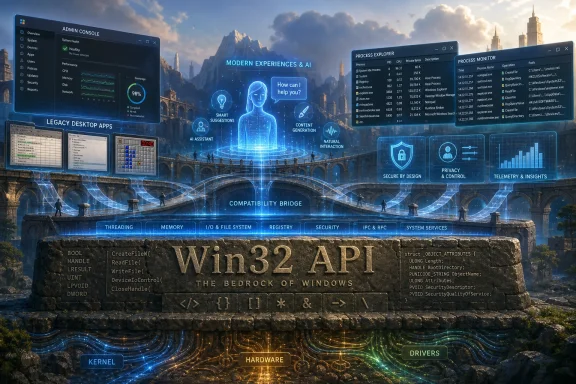 Microsoft Discovers That Legacy Is a Product Strategy
For years, Microsoft’s Windows messaging has oscillated between two incompatible pitches. One says Windows is the familiar platform that runs everything from a 1998 accounting package to a 2026 AI development stack. The other says Windows is the future-facing client for Copilot, cloud identity, new silicon, app containers, and whatever “agentic OS” happens to mean this quarter.Russinovich’s comments cut through that tension because they acknowledge the thing every Windows administrator already knows: the old platform is not a museum wing. It is the load-bearing wall. Win32 is still where much of the serious Windows ecosystem lives, and pretending otherwise has mostly produced branding exercises, developer confusion, and app models that arrive with ambition and leave with compatibility exceptions.
That does not mean Win32 is elegant, fashionable, or free of baggage. It means the Windows promise has always been less about purity than continuity. Microsoft’s customers did not buy into Windows because it was the cleanest operating system architecture on Earth; they bought into it because software kept working, hardware vendors kept targeting it, and the platform absorbed change without burning down the installed base.
In that sense, the “30-year-old code” framing is both true and misleading. Old code can be technical debt, but old interfaces can also be public infrastructure. A road built decades ago may need resurfacing, but if it connects every warehouse, hospital, factory, school, and developer workstation in the country, you do not replace it by announcing a sleeker road in a press release.
Win32 Won Because Windows Users Punish Clean Breaks
The history of Windows modernization is littered with attempts to move developers somewhere else. Microsoft has tried to elevate managed frameworks, sandboxed app models, Store-first distribution, Windows Runtime, Universal Windows Platform, and more recently the Windows App SDK and WinUI stack. Some of those technologies are useful. None displaced Win32 as the center of gravity.The reason is not simply developer nostalgia. Win32 apps can touch the system deeply, integrate with old workflows, ship outside Microsoft’s store, use mature libraries, support complex input and output scenarios, and run across a vast span of Windows installations. That flexibility is exactly what makes them messy from a modern platform-security standpoint, but it is also why they remain indispensable.
Windows 8 was the great cautionary tale. Microsoft attempted to push a new app model and a new interface paradigm at the same time, betting that tablets, touch, and Store apps would redefine the PC. Instead, many desktop users felt displaced, developers hesitated, and enterprises treated the new model as something to route around rather than build upon.
WinRT did not fail because it had no technical merit. It failed because the Windows ecosystem is not governed solely by technical merit. It is governed by switching costs, user habits, deployment pipelines, procurement rules, compliance testing, plugin ecosystems, peripheral support, and the practical terror of breaking the one weird application that still runs payroll every other Friday.
That is the part Microsoft has relearned repeatedly. Windows users say they want modernization, but what they often mean is: make the platform faster, safer, cleaner, and less annoying without forcing me to rewrite my tools, retrain my staff, or rebuy my workflow. That is not hypocrisy. It is the operating system equivalent of wanting a bridge repaired without closing the highway.
The Bedrock Is Also the Burden
Win32’s endurance gives Windows its superpower, but it also explains many of its frustrations. The same compatibility instinct that lets ancient programs run on modern systems makes it harder for Microsoft to impose clean security boundaries, simplify settings, eliminate old UI layers, or guarantee consistent behavior across applications. Every sweeping change risks becoming another support incident.This is where enthusiasts and enterprise administrators often talk past each other. Enthusiasts see cruft, duplicated control panels, old dialogs, inconsistent design language, and background services that feel like sedimentary layers of Microsoft history. Administrators see survivability. They see a platform where a vendor’s unsigned-looking utility, a custom COM add-in, an industrial control panel, and a modern Microsoft 365 client can coexist just long enough to keep the business functioning.
Both views are right. Windows 11 can feel less like a single operating system than a negotiated settlement between eras. It has rounded corners and mica effects up front, but older management consoles, classic installers, legacy control surfaces, and deep Win32 assumptions underneath. The result is sometimes inelegant, sometimes maddening, and often commercially unbeatable.
The uncomfortable truth is that compatibility is not a passive feature. It is an engineering choice that consumes time, constrains design, and creates attack surface. When Microsoft chooses not to break things, it is also choosing to carry them, test against them, document around them, and sometimes defend them in a world that has changed dramatically since the mid-1990s.
That burden becomes more visible as Microsoft tries to make Windows feel modern again. Users complain about performance, ads, telemetry, forced account flows, inconsistent settings, and Copilot integration not because they hate Windows in principle, but because Windows’ old bargain feels strained. If the platform is going to remain compatible at almost any cost, users expect the basics to be excellent.
Sysinternals Became the Counterargument to Microsoft’s Own Abstractions
Russinovich is an unusually credible messenger for this argument because his career has been built around showing what Windows is actually doing. Sysinternals tools became essential precisely because they exposed the operating system beneath the marketing layer. Process Explorer, Autoruns, Procmon, Sysmon, ZoomIt, and the rest of that toolbox earned trust by treating Windows as a system to be inspected, not merely consumed.That matters because the Win32 discussion is not just academic. Sysmon and ZoomIt are examples of old-school Windows utilities that survived because they did something specific, powerful, and useful. Sysmon became a staple for security monitoring because it provided detailed event visibility that defenders could operationalize. ZoomIt became a fixture for presenters and trainers because it solved a small problem better than many larger products.
When Microsoft folds this kind of tooling closer to Windows itself, it is tacitly admitting that the enthusiast and administrator ecosystem has often solved real problems faster than the platform team’s official abstractions. The utilities that live closest to Windows internals are not relics. They are part of the reason power users still tolerate Windows’ rough edges.
There is also a cultural point here. Sysinternals represents a version of Microsoft that technical users tend to respect: transparent, practical, low-fluff, and unafraid of complexity. That is very different from the Microsoft that tells users their operating system is becoming “agentic” before it has convinced them that search, settings, sleep, updates, and performance are all under control.
Russinovich’s Win32 remarks land because they sound like the former Microsoft speaking. They acknowledge reality instead of trying to rebrand it. For a company currently trying to rebuild goodwill among Windows enthusiasts, that tone may be as important as the technical substance.
The AI Era Makes the Old API More Awkward, Not Less Important
Microsoft’s current Windows strategy is unmistakably tied to AI. Copilot, local models, NPUs, semantic search, Recall-style memory features, developer agents, and cloud-connected assistance all point toward a Windows client that does more than launch applications. Microsoft wants the OS to understand context, automate tasks, and mediate between the user, the cloud, and the app ecosystem.That ambition collides directly with Win32’s openness. Classic desktop applications were not designed for a world in which the operating system might index user activity, reason across app boundaries, summarize workflows, or automate UI interactions through an AI layer. They were designed for a PC model where local software had broad freedom and the user, in theory, was in charge.
This is why Windows modernization is so difficult now. Microsoft cannot simply declare the PC an AI appliance while preserving the trust assumptions of the classic desktop unchanged. But it also cannot lock down Windows like a phone without destroying the reasons many people still choose Windows over macOS, ChromeOS, or Linux.
Win32 is therefore both the foundation of Microsoft’s AI PC ambitions and a constraint on them. If Copilot is going to be useful across real Windows workflows, it must interact with Win32 apps, not just pristine modern ones. But the more it interacts with them, the more Microsoft must answer hard questions about permissions, visibility, data boundaries, enterprise control, and user consent.
That is where the old platform becomes newly relevant. The future of Windows will not be decided by whether Microsoft can demo an AI feature in a modern app. It will be decided by whether those features can safely coexist with the messy desktop universe people actually use.
Developers Already Voted With Their Installers
The persistence of Win32 also says something about the Windows developer story. Developers have spent years hearing that the future is somewhere else: UWP, Store apps, MSIX, WinUI, Windows App SDK, web wrappers, cross-platform frameworks, cloud-native clients, and now AI-infused experiences. Yet the practical center of Windows development remains stubbornly hybrid.A modern Windows application may use Win32 foundations, a web-rendered interface, .NET components, packaged deployment, Windows App SDK features, cloud identity, and a background updater that behaves like it came from another decade. That is not clean, but it is how real software ships. Developers optimize for reach, control, tooling, revenue, and supportability before they optimize for Microsoft’s preferred architecture diagram.
Microsoft knows this, which is why its modern guidance has gradually shifted from replacement to incremental adoption. Instead of demanding that developers rewrite everything for a new app model, the company increasingly tells them they can add modern Windows features to existing desktop apps. That is a pragmatic retreat from revolution to renovation.
The retreat is sensible. Windows has too many developers and too much software history for a single grand migration. The better path is to make the old platform safer, more observable, better packaged, and more capable without pretending that everyone is about to start over.
But that compromise comes at a cost. Windows development can feel fragmented because it is fragmented. A newcomer trying to understand whether to use Win32, .NET, WinUI, WPF, Windows Forms, Electron, WebView2, MAUI, or something else quickly discovers that Microsoft’s greatest platform asset is also its greatest documentation challenge: there is rarely one obvious way to build a Windows app.
Enterprises Hear Reassurance Where Enthusiasts Hear Stagnation
For enterprise IT, Russinovich’s admission is mostly comforting. The nightmare scenario for administrators is not that Windows contains old APIs. It is that Microsoft might abruptly decide those APIs are embarrassing and begin breaking the estate in pursuit of strategic cleanliness. The continued centrality of Win32 signals that Microsoft still understands the economic gravity of business software.That matters in sectors where replacement cycles are measured in decades. Manufacturing systems, medical equipment, government applications, financial tools, laboratory instruments, point-of-sale software, engineering suites, and bespoke internal apps often depend on very specific Windows behaviors. The people responsible for those environments do not celebrate churn.
At the same time, enterprise reassurance should not be confused with a free pass. Compatibility does not absolve Microsoft from making Windows more manageable, predictable, and transparent. In fact, the more Windows leans on its legacy promise, the more disciplined Microsoft must be about updates, telemetry, default apps, cloud prompts, and feature rollouts that can disrupt carefully managed environments.
This is where recent Windows criticism has teeth. Users and administrators are not merely objecting to change. They are objecting to change that feels misprioritized. If Microsoft has the engineering patience to preserve Win32 for three decades, it should also have the product discipline to stop making basic OS interactions feel like ad inventory, onboarding funnels, or experiments in consent fatigue.
The durability of Win32 therefore raises the bar. Microsoft cannot claim Windows is too complex to polish while simultaneously proving that it can preserve deep compatibility across generations. The company’s own success at keeping the old world alive makes excuses for present-day roughness less persuasive.
The Mac and Linux Threat Is Really a Trust Problem
It is tempting to frame this story as Windows versus macOS and Linux. That is partly fair. Developers have moved plenty of workflows to macOS, Linux has become dominant in servers and development infrastructure, and enthusiast frustration with Windows has created a steady undercurrent of defection talk. Microsoft’s desktop monopoly is not what it was culturally, even if Windows remains enormously important commercially.But the bigger issue is trust. Users do not leave Windows only because another platform has a cleaner API story. They leave when they conclude that Windows no longer respects their time, attention, hardware, or preferences. A legacy API does not drive someone to install Linux; a feeling of being managed, monetized, or ignored might.
Win32 can actually help Microsoft here, because it represents the part of Windows that users still experience as theirs. It is the world of local applications, deep customization, utilities, scripts, context menus, shell extensions, and weird little tools that do exactly one thing. That culture is not obsolete. It is one of Windows’ last major differentiators.
The danger is that Microsoft mistakes the persistence of the Windows ecosystem for unconditional loyalty. Users may tolerate old code if it serves them. They are less forgiving when new layers appear to serve Microsoft first. Compatibility feels like a gift; coercive integration feels like rent extraction.
If Microsoft wants to stop users from wandering toward Mac and Linux, the answer is not to apologize for Win32. The answer is to make the modern layers of Windows earn the same trust that Win32 earned: by being useful, stable, controllable, and respectful of existing workflows.
Security Turns Bedrock Into a Blast Radius
The security implications of Win32’s staying power are complicated. On one hand, the classic Windows desktop model gives defenders unmatched visibility and control when paired with the right tooling. Sysmon, PowerShell logging, endpoint detection platforms, event forwarding, application control, and mature administrative interfaces all benefit from Windows’ depth and openness.On the other hand, that openness is exactly what attackers have spent decades learning to abuse. Legacy behaviors, broad process privileges, scriptability, DLL search paths, COM hijacking, living-off-the-land binaries, Office automation, and user-space persistence techniques all thrive in a platform built for compatibility and extensibility. Windows is defensible, but rarely simple.
This is why Microsoft’s security strategy increasingly layers controls around the old model rather than replacing it. Smart App Control, virtualization-based security, protected processes, driver signing, memory protections, Defender improvements, application control, and cloud reputation systems all represent attempts to contain risk without breaking the desktop universe. The architecture is less cathedral than containment vessel.
For administrators, that means Win32’s survival is not a reason to relax. It is a reason to invest in visibility, least privilege, application inventory, patch discipline, and logging that can survive real-world messiness. The old platform will not disappear before the next incident response call.
For Microsoft, the challenge is sharper. If Windows is going to keep supporting the old model, the company must keep making the guardrails stronger without turning the PC into a locked appliance. That balance is hard, but it is also the business Microsoft chose when it made backward compatibility the soul of Windows.
The Real Modernization Is Under the Floorboards
The least interesting version of this debate asks whether Win32 is good or bad. The better question is what kind of modernization is possible when the public contract cannot be casually broken. Windows does modernize, but often beneath the surface: scheduler changes, driver models, graphics stacks, security boundaries, package formats, management channels, subsystem work, kernel hardening, and developer tooling.That kind of modernization is less glamorous than a new app platform, but it is often more important. Users notice when the Start menu changes. They may not notice when Windows becomes better at isolating credentials, handling memory, supporting new silicon, or exposing diagnostics. Yet those under-the-floorboards improvements determine whether the old platform can keep carrying new demands.
Microsoft’s mistake has often been presenting surface change as transformation while under-communicating the practical work that serious users value. Enthusiasts do not need every Windows announcement to be a moonshot. Many would be thrilled by measurable improvements in responsiveness, battery life, update reliability, Settings coherence, local account flexibility, and reduced background noise.
That is why Russinovich’s comments have resonance. They point to a version of Windows evolution that is evolutionary by necessity. The platform can be renewed, but the renewal must respect the ecosystem that made it worth renewing.
A cleaner Windows is possible. A Windows without Win32 is, for the foreseeable future, mostly a thought experiment.
The 1990s Layer Is the 2026 Reality Check
The practical lesson from Russinovich’s remarks is not that Windows is trapped in the past. It is that Windows’ future has to be built through the past, not around it. For users, developers, and administrators, several concrete conclusions follow.- Windows 11 still depends on Win32 because the classic desktop ecosystem remains too large, too useful, and too economically important to replace wholesale.
- Microsoft’s failed or limited attempts to supersede Win32 show that app platforms succeed only when developers and customers can adopt them without abandoning working software.
- The continued relevance of Sysinternals-style tools proves that power users and administrators still value Windows most when it is observable, scriptable, and locally controllable.
- Microsoft’s AI ambitions will have to work with classic desktop applications, because a Windows assistant that only understands modern app models would miss much of the real PC workload.
- Compatibility remains Windows’ defining advantage, but it also increases Microsoft’s responsibility to improve performance, reliability, security, and user trust.
The irony of Windows in 2026 is that its most future-proof asset may be the thing everyone expected it to outgrow. Win32 survived not because Microsoft lacked imagination, but because the PC ecosystem kept choosing continuity over reinvention. If Microsoft is smart, it will treat that not as a confession to be managed, but as a mandate: build the next Windows in a way that respects why the old one endured.
Source: Tom's Hardware Microsoft CTO confesses that 30-year-old code from the mid-90s still forms the bedrock of Windows 11 — ancient Win32 API still the backbone, but CTO says it's 'more relevant than ever in 2026'
