

Windows GUI development did not become chaotic overnight; it became chaotic by accumulation. Over decades, Microsoft layered new frameworks, new app models, and new marketing narratives on top of old ones, often without fully retiring the previous path. The result is a platform that remains extraordinarily capable, but still carries the scars of strategic drift, internal competition, and unresolved compatibility demands. That history matters because Windows 11’s current developer story, and even Microsoft’s push for modern app tooling, cannot be understood without it.
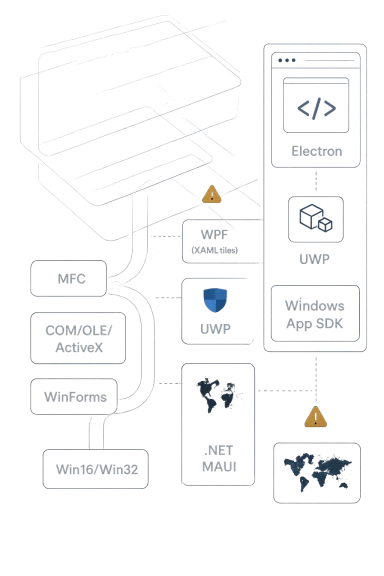
For most of the PC era, Windows development had a relatively simple center of gravity: Win16 gave way to Win32, and that shared API foundation became the anchor for a huge ecosystem of native software. Microsoft later added higher-level abstractions such as MFC, COM, OLE, and ActiveX, which expanded what developers could build, but also multiplied the number of ways to build it. Even today, Microsoft’s own documentation still treats Win32, COM, WPF, UWP WinRT, and Windows App SDK APIs as part of the broader Windows API family, which is a helpful reminder that the platform never truly narrowed to one model.
The key problem was not simply the number of tools; it was the absence of a durable narrative about which tools were meant to be the future. Microsoft’s internal and external messaging repeatedly shifted as new priorities emerged, whether those priorities were desktop productivity, web delivery, sandboxing, or cross-device reach. That created an environment where developers were encouraged to invest deeply, only to be told later that a different path had become the preferred one. That is the real tax that fragmentation imposes.
WPF is the clearest example of both ambition and hesitation. Microsoft positioned Windows Presentation Foundation as a modern, XAML-based, GPU-accelerated UI stack, and it promised a cleaner future for rich Windows applications. Yet the transition never fully displaced the old desktop world, and Microsoft’s own ecosystem continued to support a growing list of overlapping technologies rather than converging on one canonical framework. The existence of WinForms, WPF, UWP, WinUI, .NET MAUI, React Native for Desktop, and web-based app models in the current Windows developer landscape is not an accident; it is the outcome of years of half-transitions and parallel bets.
Jeffrey Snover’s criticism, as relayed in the coverage that prompted this discussion, lands because it compresses that long arc into one blunt diagnosis: Microsoft’s Windows UI strategy looked less like a roadmap and more like a series of pivots. The historical record supports that impression. Microsoft’s own developer materials now include a feature comparison table spanning WinUI, WPF, Windows Forms, .NET MAUI, React Native, UWP, and Win32, which is useful for customers, but also an implicit admission that the market still needs a map just to choose a starting point.
At a platform level, this kind of heterogeneity is not inherently bad. Windows is a general-purpose ecosystem, and a single UI framework would never satisfy every enterprise, consumer, game, and industrial use case. The issue is that Microsoft often presented each new framework as the answer without a credible story for coexistence, migration, and longevity. That is where confidence eroded.
The consequence, however, is that new frameworks rarely get the room they need to replace old ones. Instead, they must coexist with them, be discussed alongside them, and justify themselves against them. Microsoft’s current documentation still explicitly recognizes Win32, WPF, Windows Forms, UWP, WinUI, and .NET MAUI as valid Windows options, which means fragmentation is now a documented feature of the ecosystem rather than an embarrassing side effect.
Snover’s broader critique, as presented in the source material, is that talented teams were often undermined by shifting direction. That kind of churn damages trust because developers do not just buy a technology; they buy its future. If the future keeps changing, even a good framework begins to look risky.
Microsoft’s own historical documents still frame WPF and Silverlight as related but distinct approaches, with Silverlight described as a web-based implementation of WPF in older materials. That lineage is revealing because it shows how Microsoft’s strategy evolved through adaptation rather than consolidation.
The result was stagnation. Once a framework stops being the obvious future, it becomes one option among many, and then it starts losing mindshare. That is exactly what happened to WPF over time, despite its enduring relevance for a subset of desktop applications.
Instead, Microsoft often layered the new atop the old while the old remained fully alive. That made the platform feel open, but not decisive. In a market where engineering teams must make multi-year bets, indecision is its own kind of failure.
That limitation mattered because enterprise developers are not chasing theoretical elegance. They are chasing workflows, compatibility, device access, automation, and long-term maintainability. If a framework makes those harder, adoption stalls.
The rejection was therefore not just ideological; it was practical. Developers did not refuse UWP because they disliked modernization. They refused it because it failed to solve enough of their real problems.
The problem is that UWP was sold as a unifier while the rest of the platform remained pluralistic. That mismatch undermined its credibility. A unifying framework cannot succeed if the ecosystem around it still looks like a catalog of semi-competing alternatives.
But WinUI is also a bridge product. It does not erase WPF, WinForms, MFC, or Win32. Instead, it tries to offer a new center of gravity without forcing everyone through the same door. That may be the only realistic option, but it also means the platform remains multi-headed.
The strategic point is that MAUI reflects the reality that many developers no longer see Windows as the only destination. Microsoft must therefore compete not just against internal legacy complexity, but against the wider expectation that an app framework should travel well.
That is a powerful counterweight to native fragmentation. When platform vendors present too many official options, teams often gravitate to a single external option that offers a cleaner decision. This is what happens when strategy noise exceeds framework advantage.
That is the deeper lesson for Microsoft. Developers do not merely choose frameworks on technical merit; they choose them on long-term organizational fit. If a stack helps them hire, ship, and support software with less uncertainty, it can win even when it is less elegant.
That is why Win32, WPF, and Windows Forms continue to have real staying power. They may not be the flashiest options, but they are deeply embedded in business workflows. Microsoft’s own guidance now recognizes that reality instead of pretending it can disappear.
The result is a mixed experience: some Windows apps look and feel current, while others still carry old UI patterns or cross-platform compromises. The platform remains highly capable, but not consistently coherent.
That scattered attention is exactly how fragmentation becomes self-reinforcing. Developers see confusion and hedge. Microsoft sees hedging and adds another framework. The cycle repeats.
The opportunity is not to erase Windows history, but to organize it. Developers do not need one framework to rule them all; they need a clear hierarchy, honest documentation, and a credible modernization path that does not invalidate existing investments.
There is also a performance risk. Heavy cross-platform frameworks, web wrappers, and compatibility layers can all make Windows feel less efficient than it should. If Microsoft does not improve the baseline user experience, it will keep handing rhetorical ammunition to critics who argue that the platform has become bloated.
It is also worth watching whether Microsoft becomes more disciplined about internal platform politics. A company this large will never eliminate disagreement, but it can reduce the visible cost of disagreement by making clearer bets and standing behind them longer. Consistency may be boring, but on Windows it would be revolutionary.
If Microsoft is serious about the next era of Windows development, it has to do more than ship another framework or promise another reset. It has to prove that the future is not just new, but finally clear.
Source: https://windowsreport.com/windows-gui-development-called-chaotic-by-former-microsoft-executive/
 Background
For most of the PC era, Windows development had a relatively simple center of gravity: Win16 gave way to Win32, and that shared API foundation became the anchor for a huge ecosystem of native software. Microsoft later added higher-level abstractions such as MFC, COM, OLE, and ActiveX, which expanded what developers could build, but also multiplied the number of ways to build it. Even today, Microsoft’s own documentation still treats Win32, COM, WPF, UWP WinRT, and Windows App SDK APIs as part of the broader Windows API family, which is a helpful reminder that the platform never truly narrowed to one model.The key problem was not simply the number of tools; it was the absence of a durable narrative about which tools were meant to be the future. Microsoft’s internal and external messaging repeatedly shifted as new priorities emerged, whether those priorities were desktop productivity, web delivery, sandboxing, or cross-device reach. That created an environment where developers were encouraged to invest deeply, only to be told later that a different path had become the preferred one. That is the real tax that fragmentation imposes.
WPF is the clearest example of both ambition and hesitation. Microsoft positioned Windows Presentation Foundation as a modern, XAML-based, GPU-accelerated UI stack, and it promised a cleaner future for rich Windows applications. Yet the transition never fully displaced the old desktop world, and Microsoft’s own ecosystem continued to support a growing list of overlapping technologies rather than converging on one canonical framework. The existence of WinForms, WPF, UWP, WinUI, .NET MAUI, React Native for Desktop, and web-based app models in the current Windows developer landscape is not an accident; it is the outcome of years of half-transitions and parallel bets.
Jeffrey Snover’s criticism, as relayed in the coverage that prompted this discussion, lands because it compresses that long arc into one blunt diagnosis: Microsoft’s Windows UI strategy looked less like a roadmap and more like a series of pivots. The historical record supports that impression. Microsoft’s own developer materials now include a feature comparison table spanning WinUI, WPF, Windows Forms, .NET MAUI, React Native, UWP, and Win32, which is useful for customers, but also an implicit admission that the market still needs a map just to choose a starting point.
At a platform level, this kind of heterogeneity is not inherently bad. Windows is a general-purpose ecosystem, and a single UI framework would never satisfy every enterprise, consumer, game, and industrial use case. The issue is that Microsoft often presented each new framework as the answer without a credible story for coexistence, migration, and longevity. That is where confidence eroded.
Why Windows UI Became So Fragmented
The Windows UI stack grew in layers because Microsoft kept chasing new technical goals: richer graphics, web distribution, touch support, sandboxing, and eventually cross-platform development. Each goal was understandable, and in isolation, many of the tools Microsoft introduced were genuinely innovative. But when every innovation ships as a separate framework with a different philosophy, the platform becomes a portfolio rather than a path.The burden of backward compatibility
Windows has to keep old applications running, and that obligation shapes everything. A clean break would have simplified the developer story, but it would also have endangered enormous amounts of business software and consumer software. That is why Win32 never disappeared, and why Microsoft repeatedly chose compatibility over reinvention.The consequence, however, is that new frameworks rarely get the room they need to replace old ones. Instead, they must coexist with them, be discussed alongside them, and justify themselves against them. Microsoft’s current documentation still explicitly recognizes Win32, WPF, Windows Forms, UWP, WinUI, and .NET MAUI as valid Windows options, which means fragmentation is now a documented feature of the ecosystem rather than an embarrassing side effect.
How internal incentives shaped the platform
Microsoft is not one monolith. Different teams optimize for different outcomes, and platform strategy can become a compromise between them. That is how a framework can be technically impressive and strategically under-supported at the same time.Snover’s broader critique, as presented in the source material, is that talented teams were often undermined by shifting direction. That kind of churn damages trust because developers do not just buy a technology; they buy its future. If the future keeps changing, even a good framework begins to look risky.
The market’s response to inconsistency
When Microsoft sends mixed signals, the market fills the gap with alternatives. That is one reason Electron became so successful: it offered a clear, web-native mental model for shipping desktop software even if it carried significant memory overhead. Developers chose predictability over platform purity, and that trade-off became increasingly attractive as Microsoft’s own UI guidance grew more complex.- Developers value certainty as much as features.
- Enterprises value supportability more than novelty.
- Consumers care about performance, but they also care about whether software simply works.
- Fragmentation creates room for third-party stacks to become de facto standards.
- Once developers standardize elsewhere, platform recovery becomes harder.
The Longhorn Lesson
The Longhorn era remains one of the most important chapters in Windows UI history because it symbolized both the promise of reinvention and the risk of overreach. WPF was supposed to mark a generational leap, bringing a cleaner XAML model and a modern visual system to Windows development. Instead, Longhorn became a cautionary tale about how internal friction can dilute even a strong technical vision.WPF as ambition and compromise
WPF was not a trivial update. It represented a substantive rethinking of how Windows applications could be designed, rendered, and composed. In theory, this should have given Microsoft a strong foundation for a unified future. In practice, the company never fully simplified the surrounding ecosystem enough for WPF to become that foundation.Microsoft’s own historical documents still frame WPF and Silverlight as related but distinct approaches, with Silverlight described as a web-based implementation of WPF in older materials. That lineage is revealing because it shows how Microsoft’s strategy evolved through adaptation rather than consolidation.
Why internal conflict matters more than technical merit
A framework can be elegant and still fail if the organization behind it cannot coordinate around it. That is especially true at Microsoft, where Windows, developer tools, web strategy, and cloud priorities all influence the same customer-facing narrative. The source’s description of conflict between Windows and .NET teams should be understood in that context: it is less about one bad meeting and more about mismatched incentives across a giant company.The result was stagnation. Once a framework stops being the obvious future, it becomes one option among many, and then it starts losing mindshare. That is exactly what happened to WPF over time, despite its enduring relevance for a subset of desktop applications.
The failure to make “the next thing” feel inevitable
Microsoft often struggled not with launching the next framework, but with making it feel inevitable enough that developers would commit. That requires more than marketing. It requires strong tooling, reliable migration paths, consistent documentation, and the willingness to deprioritize competing stacks.Instead, Microsoft often layered the new atop the old while the old remained fully alive. That made the platform feel open, but not decisive. In a market where engineering teams must make multi-year bets, indecision is its own kind of failure.
- WPF was technically important.
- Longhorn exposed organizational weaknesses.
- Silverlight added reach, but not unity.
- The ecosystem learned to distrust “next generation” labels.
- Microsoft inherited the cost of every unresolved transition.
UWP and the Promise of Unity
If WPF represented a modern desktop future, UWP represented Microsoft’s attempt to unify the Windows application model across devices. The idea was compelling: one platform, one packaging model, one store-friendly distribution path, and a modern API surface. On paper, that should have reduced confusion. In reality, it introduced a different kind of complexity.Sandboxing as both feature and limitation
UWP’s sandboxing was part of its identity. It promised safety, consistency, and a more controlled app lifecycle. Those are attractive properties for consumers and for some classes of enterprise deployment. But the same model also limited access to the full Win32 API surface, and that made it a poor fit for many professional applications that depended on deep system integration. Microsoft’s own materials emphasize UWP’s single-binary, Store-friendly model, but the same documents also show that Windows development remained broader than UWP alone.That limitation mattered because enterprise developers are not chasing theoretical elegance. They are chasing workflows, compatibility, device access, automation, and long-term maintainability. If a framework makes those harder, adoption stalls.
Why enterprises walked away
Enterprise software is especially resistant to constrained platforms. Companies often need custom integrations, mature deployment tools, legacy interoperability, and precise control over behavior. UWP’s model was simply too narrow for many of those needs.The rejection was therefore not just ideological; it was practical. Developers did not refuse UWP because they disliked modernization. They refused it because it failed to solve enough of their real problems.
What UWP got right
To be fair, UWP was not a dead end in every sense. It helped articulate the need for cleaner packaging, better security boundaries, and a more coherent app identity model. It also pushed Microsoft to think harder about modern UI primitives and cross-device adaptability.The problem is that UWP was sold as a unifier while the rest of the platform remained pluralistic. That mismatch undermined its credibility. A unifying framework cannot succeed if the ecosystem around it still looks like a catalog of semi-competing alternatives.
The Modern Stack: WinUI, Windows App SDK, and .NET MAUI
Microsoft’s current response to the fragmentation problem is not to erase the past, but to create a more modern layer on top of it. WinUI and the Windows App SDK are now positioned as the latest and recommended path for new desktop experiences, while .NET MAUI offers cross-platform reach for C# developers. That is a pragmatic strategy, but it is also an admission that Windows is still managing complexity rather than eliminating it.WinUI as a bridge, not a revolution
WinUI is important because it decouples modern UI development from the operating system in a way that Microsoft hopes will be more sustainable. Its positioning as the recommended desktop UI framework is significant, especially because Microsoft now documents migration and coexistence paths for older app types. The company is clearly trying to make modernization incremental rather than explosive.But WinUI is also a bridge product. It does not erase WPF, WinForms, MFC, or Win32. Instead, it tries to offer a new center of gravity without forcing everyone through the same door. That may be the only realistic option, but it also means the platform remains multi-headed.
.NET MAUI and the cross-platform imperative
.NET MAUI addresses a different market need: code sharing across Android, iOS, macOS, and Windows. For teams that want one C# codebase and a native feel on each platform, that is a meaningful value proposition. Microsoft’s own documentation describes MAUI as using WinUI and the Windows App SDK under the hood on Windows, which helps explain why it can feel like a front-end choice as much as a platform choice.The strategic point is that MAUI reflects the reality that many developers no longer see Windows as the only destination. Microsoft must therefore compete not just against internal legacy complexity, but against the wider expectation that an app framework should travel well.
The coexistence problem remains
Microsoft now offers a feature comparison that spans WinUI, WPF, Windows Forms, .NET MAUI, React Native, UWP, and Win32. That comparison is helpful, but it also functions as a quiet confession that there is no single obvious answer for all developers. Windows remains a platform of choices, not commandments.- WinUI is the modern Windows-first bet.
- WPF remains relevant for established desktop apps.
- WinForms still matters for straightforward enterprise tooling.
- MAUI serves cross-platform teams.
- Win32 still underpins a huge amount of software.
- React Native for Desktop shows that Microsoft is also courting web-centric talent.
Why Electron Won So Much Ground
The rise of Electron is one of the clearest signs that developer psychology matters as much as platform engineering. Electron is often criticized for memory consumption and runtime overhead, but it succeeds because it gives teams a familiar technology stack and a predictable deployment model. In a world where Microsoft’s own guidance kept changing, predictability became a feature.The appeal of “good enough” consistency
Electron’s great strength is not that it is the most efficient way to build a desktop app. It is that it is a comprehensible one. Web developers already know the stack, and the same model can be deployed across Windows, macOS, and Linux with less conceptual churn.That is a powerful counterweight to native fragmentation. When platform vendors present too many official options, teams often gravitate to a single external option that offers a cleaner decision. This is what happens when strategy noise exceeds framework advantage.
Performance trade-offs are real, but tolerated
Yes, Electron apps often consume more memory than native alternatives. Yes, that matters on lower-end machines and in large fleets. But software buyers routinely accept overhead if the app is stable, maintainable, and easy to staff.That is the deeper lesson for Microsoft. Developers do not merely choose frameworks on technical merit; they choose them on long-term organizational fit. If a stack helps them hire, ship, and support software with less uncertainty, it can win even when it is less elegant.
Microsoft’s awkward relationship with Electron
The irony, of course, is that Microsoft itself increasingly tolerates or even encourages Electron in parts of its own ecosystem. That says something important about where the company has landed: it is less interested in doctrinal purity than in practical delivery. In a fragmented platform market, Microsoft sometimes behaves like any other large app vendor, choosing whatever makes shipping easier.- Electron wins on familiarity.
- It wins on cross-platform reach.
- It wins on developer availability.
- It loses on efficiency.
- It persists because it solves a management problem as much as a technical one.
Enterprise vs. Consumer Impact
The consequences of Windows GUI fragmentation are not identical for enterprises and consumers. Enterprises care about stability, lifecycle, and internal tooling. Consumers care about responsiveness, polish, and whether the app feels modern. Microsoft’s historical inconsistency has hurt both groups, but in different ways.Enterprise developers need predictability
Enterprises are notoriously conservative for good reason. A framework choice can affect support costs, hiring, testing, deployment, and integration with existing systems. If Microsoft changes direction too often, enterprises conclude that the safest path is to stay with what already works.That is why Win32, WPF, and Windows Forms continue to have real staying power. They may not be the flashiest options, but they are deeply embedded in business workflows. Microsoft’s own guidance now recognizes that reality instead of pretending it can disappear.
Consumer apps need speed and modern design
Consumers may not care what framework an app uses, but they absolutely notice when it launches slowly, feels heavy, or looks outdated. This is where Microsoft’s churn has been especially damaging, because repeated platform resets made it harder for the company to consistently push a modern, lightweight UI story across its own products.The result is a mixed experience: some Windows apps look and feel current, while others still carry old UI patterns or cross-platform compromises. The platform remains highly capable, but not consistently coherent.
The strategic cost of divided attention
A platform vendor can survive one big transition, but not endless uncertainty. Each new framework consumes documentation effort, tooling effort, evangelism effort, and compatibility effort. When too many frameworks coexist with no clear hierarchy, even Microsoft’s own engineering energy gets spread thin.That scattered attention is exactly how fragmentation becomes self-reinforcing. Developers see confusion and hedge. Microsoft sees hedging and adds another framework. The cycle repeats.
Strengths and Opportunities
Despite the chaos, Windows still has significant advantages. It remains the dominant desktop ecosystem, it supports an enormous installed base, and Microsoft has not stopped investing in modern tooling. If the company can finally align messaging, platform engineering, and migration paths, there is still a path toward a more coherent future.The opportunity is not to erase Windows history, but to organize it. Developers do not need one framework to rule them all; they need a clear hierarchy, honest documentation, and a credible modernization path that does not invalidate existing investments.
- Massive installed base gives Microsoft an unmatched distribution advantage.
- WinUI and Windows App SDK provide a clearer modern destination.
- Compatibility remains a strength, not just a burden.
- WPF and WinForms migration paths can reduce upgrade friction.
- Cross-platform frameworks like MAUI expand Windows relevance beyond Windows alone.
- Developer choice can be a virtue if the options are clearly tiered.
- Enterprise trust can recover if Microsoft stops overpromising the one future.
Risks and Concerns
The biggest risk is that Windows remains a collection of good answers instead of a coherent strategy. That might sound acceptable to a large platform, but for developers it often translates into confusion, duplicated learning, and skepticism about Microsoft’s long-term commitment. Without decisive stewardship, every new framework risks becoming another item in the graveyard of partial transitions.There is also a performance risk. Heavy cross-platform frameworks, web wrappers, and compatibility layers can all make Windows feel less efficient than it should. If Microsoft does not improve the baseline user experience, it will keep handing rhetorical ammunition to critics who argue that the platform has become bloated.
- Strategic ambiguity discourages long-term developer bets.
- Framework sprawl increases training and maintenance costs.
- Legacy dependence can slow modernization.
- Performance overhead can erode user confidence.
- Mixed messaging weakens Microsoft’s credibility.
- Enterprise mistrust is hard to reverse once it sets in.
- Too many partial migrations can make the platform feel unfinished.
What to Watch Next
The most interesting question is not whether Windows will keep changing; it clearly will. The real question is whether Microsoft can finally make those changes additive rather than disorienting. If the company can simplify the story around WinUI, improve performance, and reduce conflicting messages, it may yet restore some of the confidence that was lost over decades.It is also worth watching whether Microsoft becomes more disciplined about internal platform politics. A company this large will never eliminate disagreement, but it can reduce the visible cost of disagreement by making clearer bets and standing behind them longer. Consistency may be boring, but on Windows it would be revolutionary.
- Whether Microsoft narrows the practical role of older UI stacks in its guidance.
- Whether Windows App SDK and WinUI become more visibly central to new Microsoft apps.
- Whether enterprise developers see enough stability to modernize legacy desktop code.
- Whether Windows 11 performance work translates into noticeable everyday gains.
- Whether Microsoft’s consumer apps begin to show a more unified UI identity.
- Whether third-party frameworks continue to outpace native Windows stacks in mindshare.
If Microsoft is serious about the next era of Windows development, it has to do more than ship another framework or promise another reset. It has to prove that the future is not just new, but finally clear.
Source: https://windowsreport.com/windows-gui-development-called-chaotic-by-former-microsoft-executive/
