

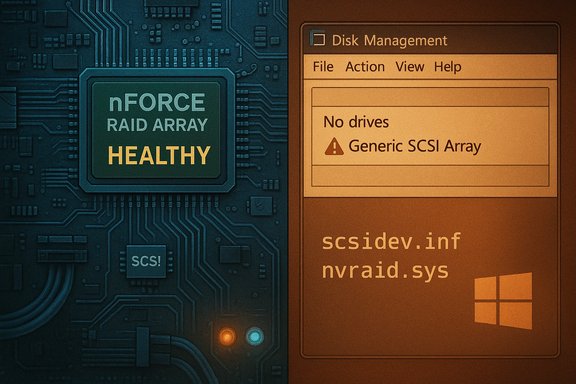
A Windows 10 feature update that shipped in 2016 quietly broke access to many NVIDIA nForce RAID arrays — and the ripple effects are still a cautionary tale for anyone running legacy nForce chipsets, nForce networking controllers, or nvraid-based RAID sets on modern Windows builds. The failure mode was specific and insidious: after the Anniversary Update hit some systems, Windows began identifying nForce RAID members as generic SCSI array devices (or not at all), the OS failed to expose array members to Disk Management and the NVIDIA MediaShield tools, and users were left with arrays that appeared healthy in the motherboard RAID ROM but were inaccessible from Windows. The problem underlines three hard truths for Windows power users: legacy drivers can be brittle against OS changes, driver INF and OS in‑box metadata are part of the compatibility contract, and recovery often demands careful offline preparation and conservative rollback plans.
For more than a decade the NVIDIA nForce family supplied chipsets that combined SATA controllers, RAID engines, and integrated networking for many consumer and enthusiast motherboards. NVIDIA provided SATA/AHCI/RAID stacks and management utilities (MediaShield / RAIDTool), and Windows historically shipped compatible in‑box drivers that could recognize nForce RAID devices when appropriate drivers were present. However, Windows driver matching is not just about kernel binaries — INF files, enumerated hardware IDs, and the OS's own in‑box driver tables all govern whether a device is recognized and which driver is bound to it. In mid‑2016 the Windows 10 Anniversary Update (v1607) included an updated in‑box SCSI/array INF (scsidev.inf) and apparently changed the driver matching rules. The result: certain nForce RAID device IDs were no longer matched to the NVIDIA nvraid driver and were instead claimed by a generic Microsoft scsidev driver (or omitted from detection entirely). That change caused many RAID arrays to appear inaccessible inside Windows even though the BIOS/RAID ROM reported them as healthy. Practical troubleshooting showed the problem was not failing hardware but mismatched driver bindings and INF behavior. This is not an isolated anecdote. Multiple community threads and user reports from the time document the same failure pattern: arrays visible and manageable in the motherboard RAID ROM, but invisible to Windows tools and the NVIDIA control panel after the OS update. Attempts to "fix" the problem by reinstalling NVIDIA drivers often did not work because the in‑box INF / driver replacement logic in the update side‑stepped the expected bindings. Community developers responded with custom INF alterations, signature‑patched driver packs, and ISO customizations to avoid the problematic scsidev.inf behavior — but those workarounds carried their own risks and complexity.
Practical notes for the network controller:
For enthusiasts who still run nForce platforms, the practical takeaway is twofold: create reliable images and backups, and treat driver updates (especially feature updates) as high‑risk maintenance events. If an update lands and RAID arrays vanish, the right first move is to stop, document, and image — not to experiment blindly. Community fixes can work, but they require caution, validation, and a conservative rollback plan. Note on the linked content you provided: the specific Born2Invest URL could not be fetched (server returned a 404 for the supplied link). If you intended a particular Born2Invest article, please provide the corrected link or the article text; the analysis above is based on archived forum investigations, Microsoft and vendor driver pages, and community technical threads documenting the nForce RAID incompatibility introduced around the Windows 10 Anniversary Update. ([]
If immediate recovery help is required, the safest high‑value next steps are: create a full sector image (if at all possible), capture screenshots of Device Manager (with Hidden Devices shown), export the Hardware Id strings for all storage controller and unknown devices, and then test driver binding changes in a cloned/testing environment rather than on the production system. The RAID metadata sits at the BIOS/ROM level; when that layer shows “healthy” but Windows doesn’t, the problem is almost always the driver/INF/OS detection chain — and that chain is repairable, but only with care and appropriate backups.
Source: Born2Invest https://born2invest.com/?b=style-229959412/
 Background / Overview
For more than a decade the NVIDIA nForce family supplied chipsets that combined SATA controllers, RAID engines, and integrated networking for many consumer and enthusiast motherboards. NVIDIA provided SATA/AHCI/RAID stacks and management utilities (MediaShield / RAIDTool), and Windows historically shipped compatible in‑box drivers that could recognize nForce RAID devices when appropriate drivers were present. However, Windows driver matching is not just about kernel binaries — INF files, enumerated hardware IDs, and the OS's own in‑box driver tables all govern whether a device is recognized and which driver is bound to it. In mid‑2016 the Windows 10 Anniversary Update (v1607) included an updated in‑box SCSI/array INF (scsidev.inf) and apparently changed the driver matching rules. The result: certain nForce RAID device IDs were no longer matched to the NVIDIA nvraid driver and were instead claimed by a generic Microsoft scsidev driver (or omitted from detection entirely). That change caused many RAID arrays to appear inaccessible inside Windows even though the BIOS/RAID ROM reported them as healthy. Practical troubleshooting showed the problem was not failing hardware but mismatched driver bindings and INF behavior. This is not an isolated anecdote. Multiple community threads and user reports from the time document the same failure pattern: arrays visible and manageable in the motherboard RAID ROM, but invisible to Windows tools and the NVIDIA control panel after the OS update. Attempts to "fix" the problem by reinstalling NVIDIA drivers often did not work because the in‑box INF / driver replacement logic in the update side‑stepped the expected bindings. Community developers responded with custom INF alterations, signature‑patched driver packs, and ISO customizations to avoid the problematic scsidev.inf behavior — but those workarounds carried their own risks and complexity. Why the RAID arrays became inaccessible: the technical core
The INF and device‑ID matching problem
Windows chooses which driver to bind to a device using the hardware ID strings produced by the device/driver stack, plus entries in INF files — both vendor‑supplied and in‑box. When Microsoft updated the in‑box scsidev.inf for Windows 10 builds around 10586→14393, the mapping for “Generic SCSI Array” entries and certain NVIDIA hardware strings changed. In concrete terms:- Some pre‑AU (pre‑Anniversary Update) scsidev.inf variants contained matching entries that let the NVIDIA nvraid driver be used as the device driver for nForce RAID members.
- The updated scsidev.inf (or the update flow itself) replaced or remapped those IDs so Windows either loaded a generic scsidev driver or failed to enumerate the array members as RAID devices.
- Once Windows had replaced the binding during upgrade, userland tools (Disk Management, NVIDIA control panel) no longer saw the arrays and could not rebuild or access the data.
Why reinstalling drivers sometimes failed
Reapplying NVIDIA's official SATARAID packages frequently failed to fix the issue. Reasons included:- The in‑box scsidev.inf used by the Anniversary Update could take precedence or overwrite bindings during the upgrade, so simply installing a vendor package didn't always restore the original binding.
- Some vendor packages lacked every device ID necessary to match every nForce variant across the many OEM motherboards; INF files sometimes omitted specific Array* entries that the updated Windows hardware detection now required.
- Driver installers may refuse to run due to INF manifest/OS targeting or may not include signed INF variants accepted by Windows Update without additional steps. Community solutions therefore included INF edits, signature rewrapping, or rebuilding installation media that contained the modified scsidev.inf.
The evidence: what community and vendor records show
Community forensic threads assembled diagnostic facts quickly: screenshots, Device Manager listings, and comparisons between scsidev.inf versions before and after the Anniversary Update showed concrete differences in which hardware IDs the files declared. The Win‑Raid community documented that the older scsidev.inf (example build 10586.x) contained the "Array" entries that allowed nvraid's devices to match correctly, while the updated scsidev.inf in the AU builds did not, or Windows’ post‑install hardware matching used a different logic that resulted in "Generic SCSI Array Device" entries instead of NVIDIA‑branded RAID devices. Users shared walk‑throughs that included rolling back to earlier driver versions, manually forcing INF installations, or using modified signed driver packs to restore functionality. Complementary community threads on general Windows forums and Microsoft’s Q&A boards documented similar symptoms for other RAID vendors and drivers after certain Windows updates — demonstrating that driver/INF mismatches and OS driver model changes are a recurring source of RAID accessibility issues following feature upgrades. Microsoft’s own community pages show multiple cases where a Windows update made previously functional arrays appear “Unallocated” or “Unrecognized” in Disk Management, underscoring that this is not unique to NVIDIA but an outcome of how the OS handles driver updates and in‑box drivers. For the nForce family specifically, NVIDIA’s nForce driver archives and the vendor’s historic SATA/RAID packages date back to Windows Vista/Windows 7 era driver branches (nForce driver family 15.x and earlier), highlighting that official support for modern Windows versions was already legacy territory in many cases. The vendor pages show long‑dated release notes and the final nForce packages targeted Vista/Windows 7 rather than Windows 10, which helps explain the fragility when the Windows 10 update pipeline shifted in 2016. Relying on legacy drivers for a modern OS carries intrinsic risk.Practical recovery strategies — what worked for affected users
Warning: some recovery actions are invasive and can result in data loss. If the RAID array contains critical data, create a full disk image or perform a sector‑level clone of member drives before attempting driver surgery. If you cannot image the array because the OS won't see it, consider using a Linux/Live environment that can read RAID metadata or consult a professional data‑recovery service. The community consensus hierarchy of actions:- Backup first (if possible)
- If Windows still presents the physical drives at any level, use imaging tools (ddrescue, Clonezilla, commercial tools) to capture a copy before attempting INF or registry edits.
- Check BIOS/RAID ROM
- Confirm the array is healthy at the ROM level. If BIOS reports "HEALTHY" and arrays are intact, the issue is in the OS layer.
- Roll back the Windows update (if the rollback window is available)
- Use Windows “go back” options or restore a system image. This is often the fastest way to return to a known working state, but the window is short and sometimes missing.
- Inspect Device Manager (show hidden devices)
- Look under Storage Controllers and System Devices for “Generic SCSI Array Device” or entries for NVIDIA devices with errors. Note exact hardware IDs (Device Manager → Properties → Details → Hardware Ids). This detail is essential for INF matching and manual installs.
- Try vendor/original nForce SATARAID drivers
- Manually install via Device Manager → Update Driver → Browse my computer → Let me pick → Have disk… pointing to the vendor INF. Prefer OEM motherboard packages if available. If official installers refuse, extract the package and use the INF directly.
- If vendor INF lacks the needed IDs, consider a mod/patch or a previously known compatible version
- Community developers produced modified, signed INF/driver packages (with added "Array" IDs) and custom scsidev INF replacements to restore the mapping. These are advanced workflows: validate signatures, validate the provenance of packages, and only* use trustworthy community sources. These steps can restore Windows bindings when done correctly, but using third‑party modded drivers increases risk and may violate security practices on managed systems.
- Rebuild installation media with a “fixed” scsidev INF
- Advanced users created custom Windows images where the in‑box scsidev.inf had been replaced by a modified version to avoid the problem during the install or update flow. This prevents the AU from misbinding devices during OS setup. This is effective for installations but complex and not appropriate for casual users.
- As a last resort: export data via BIOS-level recovery and rebuild arrays
- If driver fixes fail and data recovery is impossible in situ, use the RAID ROM to reconstruct arrays where possible, attach drives to a known‑good controller that supports the same array metadata, or send drives to professionals.
- Do not run Windows Update again until you have a tested plan and backups.
- Boot a Linux live USB (e.g., Ubuntu or SystemRescue) and see if the RAID array metadata is readable outside Windows.
- If the array is readable, clone member disks immediately.
- Try the official NVIDIA nForce SATARAID driver that historically matched your chipset family (check release notes and INF device lists).
- If that fails, document all Hardware IDs and search trusted community repositories for compatible INF entries.
- If you must use a modded package, validate the digital signature and preserve a rollback image.
The networking side: nForce networking controller driver on Windows 10 x64
While the RAID problem grabbed headlines during the Anniversary Update period, nForce systems often faced persistent network driver instability as well. Longstanding community threads document flaky NVIDIA nForce networking controller behavior, intermittent disconnects, and the need to manually update to the latest appropriate driver package for each motherboard OEM. These network driver issues are often solved by using the chipset/motherboard vendor driver rather than a generic Windows Update driver, and by ensuring the correct 32 vs 64‑bit package is used. The same rule applies: when hardware is legacy, prefer OEM archives or validated vendor packages.Practical notes for the network controller:
- For Windows 10 x64, use an nForce package explicitly labeled for 64‑bit (and prefer the most recent WHQL build released for your chipset family).
- If Windows Update installs a driver that breaks functionality, use Device Manager to roll back and then install the OEM driver.
- If the installer rejects hardware (Error 182 or "not compatible"), check the INF for your Hardware Id and try the "Have Disk" manual install.
Strengths, risks, and the long‑term picture
Strengths:- The community response demonstrated practical engineering: diagnostic INF comparisons, working driver variants, and custom scsidev fixes that restored access for many users.
- NVIDIA’s nForce driver archives and existing SATARAID packages include the necessary kernel components (nvraid.sys) to enable RAID on legacy platforms when they are bound correctly.
- Using modded, re‑signed, or community‑patched drivers imposes a security and stability risk. Old driver code may contain unpatched kernel vulnerabilities and is not maintained for modern threat models. The Windows 10 driver model and signing enforcement evolved; sideloading modified drivers can conflict with system policies or enterprise baselines.
- The workaround complexity (INF edits, certificate imports, custom ISO builds) raises the bar beyond typical end‑user comfort and is unsuitable for production or unmanaged systems.
- Long term, Windows 10 itself moved through lifecycle changes. Relying on legacy nForce hardware on modern or unsupported Windows branches becomes an increasingly fragile maintenance path.
Recommendations (practical, prioritized)
- Immediate: If you depend on nForce RAID arrays for critical data, stop applying feature updates and create a full image backup now. An image that includes the boot volume and RAID metadata gives you a clean rollback point.
- Short term: Attempt the safe fixes in this order — roll back update if possible → manual vendor driver install via Device Manager → document hardware IDs and seek validated OEM driver/INF that includes Array* entries.
- Medium term: If vendor support is absent and you need to stay on Windows 10, test any modded INF/driver solution in an isolated environment first, validate with a full image, and prefer community‑vetted packages from long‑standing technical forums — not one‑click driver updaters.
- Long term: Plan hardware migration. Replace nForce‑based motherboards or move arrays to a modern RAID controller with active vendor support. The cost of replacement is typically far lower than repeated recovery work and the risk of silent data loss.
Closing analysis
The nForce RAID incident is a textbook case of how OS vendor choices (in‑box driver packaging and matching rules) and legacy vendor support models collide. The underlying code (nvraid.sys and NVIDIA’s SATARAID toolset) was not the immediate root cause — rather, a change in how Windows matched device IDs during the Anniversary Update broke the chain that allowed Windows to bind the right driver. That nuance matters because it shows there is often a non‑hardware, non‑disk corruption explanation when arrays suddenly disappear after an OS update.For enthusiasts who still run nForce platforms, the practical takeaway is twofold: create reliable images and backups, and treat driver updates (especially feature updates) as high‑risk maintenance events. If an update lands and RAID arrays vanish, the right first move is to stop, document, and image — not to experiment blindly. Community fixes can work, but they require caution, validation, and a conservative rollback plan. Note on the linked content you provided: the specific Born2Invest URL could not be fetched (server returned a 404 for the supplied link). If you intended a particular Born2Invest article, please provide the corrected link or the article text; the analysis above is based on archived forum investigations, Microsoft and vendor driver pages, and community technical threads documenting the nForce RAID incompatibility introduced around the Windows 10 Anniversary Update. ([]
If immediate recovery help is required, the safest high‑value next steps are: create a full sector image (if at all possible), capture screenshots of Device Manager (with Hidden Devices shown), export the Hardware Id strings for all storage controller and unknown devices, and then test driver binding changes in a cloned/testing environment rather than on the production system. The RAID metadata sits at the BIOS/ROM level; when that layer shows “healthy” but Windows doesn’t, the problem is almost always the driver/INF/OS detection chain — and that chain is repairable, but only with care and appropriate backups.
Source: Born2Invest https://born2invest.com/?b=style-229959412/
