

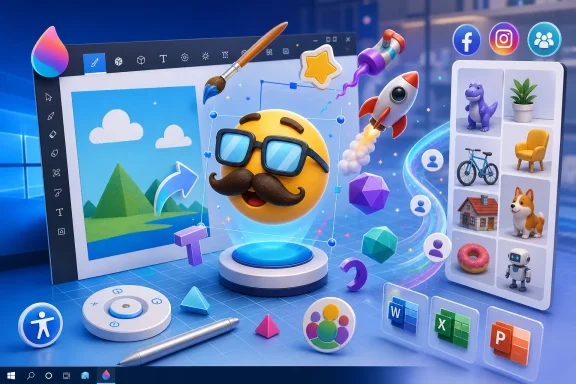
Microsoft announced on Wednesday that a free Windows 10 update arriving in early 2017, called The Creator’s Update, would let users build customizable 3D emoji and other objects in Microsoft Paint 3D, then share the results through Facebook, Instagram, and Microsoft’s new Remix 3D community. The novelty was the emoji; the strategy was much larger. Microsoft was attempting to turn 3D creation from specialist work into an everyday Windows activity, using one of the operating system’s oldest and most familiar applications as the entry point.
Paint had spent 30 years as Windows’ deliberately uncomplicated canvas: open it, draw something, paste a screenshot, save the file. Paint 3D preserved that promise of accessibility while adding a dimension that normally demanded unfamiliar modeling tools, more powerful hardware, and a new technical vocabulary. Microsoft’s bet was that users would try 3D not because they suddenly wanted to become modelers, but because the process could feel as immediate as decorating an emoji with glasses or a mustache.
That makes the announcement more consequential than its playful presentation suggests. The 3D emoji was a gateway product—a recognizable, shareable object designed to teach ordinary users how to manipulate depth, rotation, surfaces, stickers, and reusable models without first telling them they were learning 3D design.
Mashable focused on the most instantly understandable part of Microsoft’s demonstration: users would be able to create 3D emoji and other objects directly in Paint 3D. Those creations could be customized with stickers, including accessories such as glasses or a mustache, and then saved in much the same way as an ordinary 2D Paint image.
That workflow matters because 3D software traditionally announces its complexity before the user creates anything. Professional modeling applications confront newcomers with viewports, coordinate systems, materials, meshes, lights, cameras, and rendering controls. Paint 3D instead started with the behavior Microsoft Paint had taught generations of Windows users: pick something, place it on a canvas, alter it, and save the result.
Emoji made an effective demonstration object because the format was already culturally familiar. Users did not need an explanation of why a cartoon face might be customized, shared, or used to communicate an emotion. Microsoft could therefore demonstrate rotation, dimensional form, surface decoration, and personalization without presenting the exercise as a lesson in computer-aided design.
The sticker feature was especially important to that illusion of simplicity. Stamping glasses or facial hair onto an emoji translated a potentially difficult texture-editing operation into a gesture resembling the placement of clip art. Instead of asking users to understand how an image adheres to a three-dimensional surface, Paint 3D could let them act first and discover the underlying concept through the result.
Ars Technica’s coverage of Microsoft’s wider presentation placed Paint 3D within a broader effort to make 3D creation as straightforward as capturing or editing conventional pictures and video. That framing shows why Microsoft led with approachable examples rather than technical capability. The company was not merely trying to produce a less expensive modeling package; it was trying to establish 3D as another basic media type.
This was the same progression that had made digital photography, video editing, and emoji composition ordinary consumer activities. Each became mainstream only after the machinery was hidden behind direct manipulation and familiar metaphors. Paint 3D’s job was to hide enough of the machinery that a user could produce something recognizable before frustration overcame curiosity.
A new application would have needed to establish an audience and teach its purpose simultaneously. Paint already had a position in Windows culture: it was the tool people opened when they needed to make a quick visual change and did not want to learn a larger application. That reputation gave Paint 3D permission to be imperfect, informal, and exploratory.
The word Paint also lowered expectations in a productive way. Users opening a professional modeling program may assume that worthwhile output demands artistic skill. Users opening Paint expect rough sketches, annotations, jokes, improvised graphics, and fast edits. For Microsoft, that difference offered a route around one of 3D creation’s largest barriers—the fear that the tool is intended for someone more qualified.
There was still a tension at the center of the strategy. Paint’s value came from doing a small number of simple things, while 3D inevitably introduced more states, controls, and ways for an object to behave unexpectedly. An application can conceal technical language, but it cannot eliminate the spatial reasoning required to understand why an object is facing the wrong direction or sitting behind another element.
Microsoft’s challenge was therefore not simply to add features. It had to preserve Paint’s sense of immediate cause and effect while moving from a flat canvas to a workspace containing objects with fronts, backs, sides, surfaces, and depth. If users could not quickly understand what they had selected and how it would move, the familiar name would only make the added complexity more conspicuous.
The 3D emoji demonstration was carefully suited to that challenge. A face has an obvious front, recognizable features, and a clear orientation. It is much easier for a newcomer to notice that a pair of glasses has landed incorrectly on a face than to diagnose the placement of an abstract object in open space.
That made emoji not only a marketing hook but also a sensible teaching object. The user could learn the software’s spatial rules by manipulating something whose correct appearance was already understood.
The typical consumer does not create an object merely to test a file format. People make images to communicate, amuse friends, personalize a profile, illustrate an idea, or participate in an online conversation. By explicitly connecting Paint 3D to Facebook and Instagram, Microsoft positioned the application as a producer of social media rather than an isolated modeling environment.
The ability to save a creation in the same general manner as a 2D Paint image reinforced that message. Users were not supposed to think of the finished emoji as a fragile technical artifact requiring a specialized viewing station. Microsoft wanted the output to behave like something familiar enough to keep, post, and reuse.
Yet the promise of easy sharing also exposed a fundamental problem for consumer 3D. Social networks were built primarily around flat images and video, while a true 3D object invites the viewer to rotate it, inspect it, and possibly alter it. Flattening the result into an image makes it easy to distribute but discards some of what made the creation three-dimensional.
Ars Technica reported that Microsoft demonstrated a 3D-rotating image being exported to Facebook, suggesting one way the company could preserve the sense of dimensionality on a conventional social feed. Even then, the receiving platform would shape the experience. A Paint 3D creation could be fully editable inside Microsoft’s environment but become a more limited presentation once exported elsewhere.
That distinction separated social sharing from creative collaboration. Facebook and Instagram could give a finished object an audience. They could not, by themselves, provide the reusable library and modification workflow Microsoft needed if it wanted users to treat 3D objects as building blocks.
Remix 3D was intended to fill that gap.
That was a pragmatic response to the difficulty of modeling. Even if Paint 3D simplified object manipulation, creating a convincing model from scratch would remain harder than drawing a rough 2D shape. A searchable collection could let users start with an existing object, customize it, combine it with other elements, and publish a new result.
Microsoft’s official presentation described Remix 3D as a community connecting creators and creations, while its later explanation of Paint 3D emphasized the ability to draw from a growing catalog. Together, the two products formed a loop: the community supplied material to the application, and the application supplied new or modified material to the community.
That model resembled the template economy already familiar from presentation software, website builders, clip-art libraries, and social image tools. Most users do not need to create every component themselves. They need permission to begin with something useful and enough control to make the result feel personal.
The approach also changed what “using Paint” meant. Traditional Paint files were usually endpoints: a user made or modified an image, saved it, and perhaps shared it. A model obtained through Remix 3D could be an input, an ingredient in another composition, and eventually an input for somebody else.
This is where Microsoft’s 3D push became a platform strategy rather than an application update. Paint 3D handled creation and modification; Remix 3D handled discovery and circulation; social networks handled public distribution; and Office applications were expected to extend the objects into productivity work.
The individual components were less important than the proposed movement between them. Microsoft wanted 3D content to travel.
The table shows why this was not simply a new version of Paint. Microsoft was proposing a content chain that began with casual creation and ended in both public communication and workplace documents.
Paint 3D was the most visible component because it gave people a way to make the object. Remix 3D addressed the shortage of starting material. Facebook and Instagram offered reach, while Word, Excel, and PowerPoint promised legitimacy beyond novelty.
That last step was strategically crucial. A platform feature becomes harder to dismiss when the same object can appear in a presentation, document, or spreadsheet rather than remaining trapped in a playful app. Microsoft was trying to make 3D portable enough to cross the boundary between personal expression and productivity.
PowerPoint was the most obvious fit. A three-dimensional model can communicate shape, orientation, and mechanical relationships in ways that a collection of flat photographs cannot. A presenter could potentially rotate an object to reveal the relevant side rather than filling a slide with separate views.
Word offered a different possibility. A document containing an object that could be viewed from multiple angles could make instructional, educational, or design-oriented material more expressive. The value would depend on whether the model remained understandable when printed or viewed in an environment without the same interactive capability.
Excel was the more revealing inclusion precisely because its use case was less immediately apparent. Adding 3D to a spreadsheet suggested that Microsoft regarded the format as a system-level type of content rather than an effect restricted to art and presentation software. The company was signaling that 3D objects should eventually be insertable wherever users already assembled information.
That ambition carried administrative and compatibility consequences. A conventional image has predictable behavior across displays, printers, export formats, document viewers, and older software. A three-dimensional object may rely on rendering capability, supported formats, application updates, and enough system resources to remain responsive.
For IT departments, the important question was not whether employees could make amusing emoji. It was whether a document containing 3D material would open reliably for recipients, survive conversion, behave correctly on managed devices, and remain usable when shared outside the organization.
The expansion into Office therefore raised the standard Paint 3D had to meet. A social post can tolerate visual quirks. A training deck, technical document, or client presentation cannot.
Microsoft’s plan could succeed only if 3D content became boring in the best possible sense: predictable to insert, straightforward to distribute, and uneventful to open.
That invitation served two functions. It gave enthusiasts early access, but it also turned those users into a public testing population for an interaction model Microsoft was still trying to prove.
Early feedback would be especially valuable for Paint 3D because usability could not be measured by whether the program merely launched or saved a file. Microsoft needed to know whether people understood object selection, placement, rotation, stickers, and sharing without extensive instruction. A technically functional tool could still fail if users repeatedly lost objects in space or could not reproduce the result shown during the announcement.
The Insider route also created an early supply problem for Remix 3D. A sharing community is unappealing when there is little to discover, and creators are less likely to contribute when there is no audience. Inviting Windows enthusiasts before the broader update offered Microsoft a chance to populate the ecosystem and identify its most compelling uses before mainstream users arrived.
For organizations, however, an Insider build and a production deployment serve different purposes. The preview could demonstrate workflow and compatibility, but it should not be mistaken for a guaranteed picture of the final update. The sensible enterprise response was controlled evaluation rather than broad enthusiasm or outright dismissal.
Early 2017 — The free Windows 10 release called The Creator’s Update was scheduled to bring Paint 3D and its 3D emoji workflow to users.
Over the next year — Microsoft planned to add the 3D feature to Word, Excel, and PowerPoint, extending the format from casual creation into its productivity suite.
The sequence reveals a deliberate adoption strategy. Enthusiasts would test the creation tools and help seed the community; the Windows update would broaden access; and Office integration would expand the practical settings in which the resulting objects might be used.
Any application that creates reusable content and offers direct paths to external services can affect data handling. The issue is not that every 3D emoji contains sensitive information. It is that users often repurpose creative tools in ways administrators did not anticipate, combining internal images, branding, screenshots, product concepts, or training material with publicly shareable assets.
Remix 3D introduced a second consideration: externally sourced content. A searchable community could reduce the effort required to build an object, but organizations would still need to decide whether community assets were appropriate for business use. Ease of access does not resolve questions of provenance, licensing, brand suitability, or the permanence of an external dependency.
The Office roadmap made those questions more urgent. Once a 3D object entered Word, Excel, or PowerPoint, it could circulate through ordinary document channels and appear in archives, collaboration systems, email attachments, or client deliverables. IT staff would need to understand what happened when the content reached a device or application without equivalent support.
Performance was another practical concern. A simple 2D image is computationally modest and visually stable. An interactive model may require more rendering work, and a document containing several models could behave differently across a mixed hardware fleet.
None of these issues made Paint 3D inherently unsuitable for organizations. They made it worthy of the same controlled testing applied to any new content type. The mistake would have been to let the emoji presentation define the risk analysis.
Emoji offered an appealing first experience because they were expressive, customizable, and easy to share. But a feature does not become a platform merely because users enjoy trying it once. Microsoft needed repeatable uses that were faster, clearer, or more compelling in 3D than in two dimensions.
Remix 3D could help by reducing the cost of starting, while Office could provide situations where dimensional content communicated information more effectively. The challenge was connecting those advantages to ordinary work rather than expecting users to adopt 3D because it looked futuristic.
This is a recurring problem in platform design. Companies often assume that lowering the technical barrier automatically creates demand. In reality, accessibility and purpose are separate requirements: users must be able to perform the task, and the result must justify the effort.
Paint 3D’s strongest argument was not that everything should become three-dimensional. It was that Windows should make 3D available at the moment it was useful, without forcing users to leave familiar software or learn a professional suite.
That was a more defensible goal than replacing 2D media. A screenshot, diagram, photograph, or ordinary emoji remains efficient precisely because it is flat. Three dimensions add value only when depth, shape, orientation, or physical relationships carry information that a flat image obscures.
Microsoft’s Office plan provided the clearest opportunity to prove that value. If a model helped a student understand an object, helped a presenter reveal a product’s structure, or helped a document communicate spatial information, 3D could become a practical option rather than a decorative effect.
That strategy built on Windows’ scale. With more than 100 million people using Paint technology, according to Microsoft, even a modest rate of experimentation could produce a substantial creator population. The company did not need every Windows user to adopt 3D; it needed enough users to make the workflow visible, populate Remix 3D, and encourage developers and application teams to treat the format seriously.
The free-update model removed a purchase decision from that process. Users receiving The Creator’s Update would not need to decide whether a stand-alone 3D package was worth buying. The capability would be placed within the normal Windows experience, where curiosity could produce adoption.
That distribution advantage also carried a burden. Bundling can put a feature in front of users, but it cannot make the feature coherent. If the creation tool, community, sharing destinations, and Office applications behaved like disconnected experiments, Windows’ reach would only expose those seams to a larger audience.
Microsoft was trying to bootstrap an ecosystem, not ship a single app. Paint 3D needed Remix 3D to make creation easier; Remix 3D needed creators to make discovery worthwhile; external networks gave the results an audience; and Office offered reasons for 3D objects to persist after the novelty faded.
The strength of that ecosystem would depend on movement between its parts. Every unnecessary conversion, unsupported destination, missing object, or confusing sharing step would make 3D feel less like a native Windows medium and more like a demonstration assembled from separate products.
A successful Paint 3D interaction would teach by implication. Rotating an emoji would introduce the idea that the object had multiple sides. Applying a sticker would demonstrate that a flat graphic could conform to a surface. Combining community assets would teach composition, while sharing the result would make the work feel complete.
That progression could give users a practical mental model before they encountered the formal language of 3D design. It was the same philosophy that allowed early Paint users to understand pixels, fills, selections, and cropping through experimentation rather than instruction manuals.
The difference was that 3D multiplies ambiguity. In a flat image, a selected item is where it appears to be. In a spatial scene, an object may look aligned from one angle and be distant from another. Microsoft had to help users build spatial confidence without allowing the interface to become a simplified copy of professional software.
The decision to let creations be saved and shared like familiar images was therefore not merely convenient. It established continuity with the older Paint workflow: experimentation should lead to an artifact the user understands and can take elsewhere.
If Paint 3D succeeded, users would not describe themselves as having learned a new technical discipline. They would say they made something.
Microsoft’s early-2017 plan placed an unusually ambitious burden on one of Windows’ humblest names. If Paint 3D could turn playful customization into a gateway for broader creation, The Creator’s Update would do more than add depth to emoji; it would show that the next mainstream media format might arrive not through professional tools, but through a familiar application that persuaded millions of users to experiment before they realized they were learning something new.
Paint had spent 30 years as Windows’ deliberately uncomplicated canvas: open it, draw something, paste a screenshot, save the file. Paint 3D preserved that promise of accessibility while adding a dimension that normally demanded unfamiliar modeling tools, more powerful hardware, and a new technical vocabulary. Microsoft’s bet was that users would try 3D not because they suddenly wanted to become modelers, but because the process could feel as immediate as decorating an emoji with glasses or a mustache.
That makes the announcement more consequential than its playful presentation suggests. The 3D emoji was a gateway product—a recognizable, shareable object designed to teach ordinary users how to manipulate depth, rotation, surfaces, stickers, and reusable models without first telling them they were learning 3D design.
 Microsoft Used Emoji to Make 3D Creation Feel Ordinary
Mashable focused on the most instantly understandable part of Microsoft’s demonstration: users would be able to create 3D emoji and other objects directly in Paint 3D. Those creations could be customized with stickers, including accessories such as glasses or a mustache, and then saved in much the same way as an ordinary 2D Paint image.That workflow matters because 3D software traditionally announces its complexity before the user creates anything. Professional modeling applications confront newcomers with viewports, coordinate systems, materials, meshes, lights, cameras, and rendering controls. Paint 3D instead started with the behavior Microsoft Paint had taught generations of Windows users: pick something, place it on a canvas, alter it, and save the result.
Emoji made an effective demonstration object because the format was already culturally familiar. Users did not need an explanation of why a cartoon face might be customized, shared, or used to communicate an emotion. Microsoft could therefore demonstrate rotation, dimensional form, surface decoration, and personalization without presenting the exercise as a lesson in computer-aided design.
The sticker feature was especially important to that illusion of simplicity. Stamping glasses or facial hair onto an emoji translated a potentially difficult texture-editing operation into a gesture resembling the placement of clip art. Instead of asking users to understand how an image adheres to a three-dimensional surface, Paint 3D could let them act first and discover the underlying concept through the result.
Ars Technica’s coverage of Microsoft’s wider presentation placed Paint 3D within a broader effort to make 3D creation as straightforward as capturing or editing conventional pictures and video. That framing shows why Microsoft led with approachable examples rather than technical capability. The company was not merely trying to produce a less expensive modeling package; it was trying to establish 3D as another basic media type.
This was the same progression that had made digital photography, video editing, and emoji composition ordinary consumer activities. Each became mainstream only after the machinery was hidden behind direct manipulation and familiar metaphors. Paint 3D’s job was to hide enough of the machinery that a user could produce something recognizable before frustration overcame curiosity.
Paint’s 30-Year Legacy Became Microsoft’s Distribution Strategy
Microsoft said Paint had been around for 30 years and that more than 100 million people used the technology. Those figures supplied more than nostalgic color. They explained why Microsoft attached its 3D ambitions to Paint rather than introducing the project solely as an unfamiliar design suite.A new application would have needed to establish an audience and teach its purpose simultaneously. Paint already had a position in Windows culture: it was the tool people opened when they needed to make a quick visual change and did not want to learn a larger application. That reputation gave Paint 3D permission to be imperfect, informal, and exploratory.
The word Paint also lowered expectations in a productive way. Users opening a professional modeling program may assume that worthwhile output demands artistic skill. Users opening Paint expect rough sketches, annotations, jokes, improvised graphics, and fast edits. For Microsoft, that difference offered a route around one of 3D creation’s largest barriers—the fear that the tool is intended for someone more qualified.
There was still a tension at the center of the strategy. Paint’s value came from doing a small number of simple things, while 3D inevitably introduced more states, controls, and ways for an object to behave unexpectedly. An application can conceal technical language, but it cannot eliminate the spatial reasoning required to understand why an object is facing the wrong direction or sitting behind another element.
Microsoft’s challenge was therefore not simply to add features. It had to preserve Paint’s sense of immediate cause and effect while moving from a flat canvas to a workspace containing objects with fronts, backs, sides, surfaces, and depth. If users could not quickly understand what they had selected and how it would move, the familiar name would only make the added complexity more conspicuous.
The 3D emoji demonstration was carefully suited to that challenge. A face has an obvious front, recognizable features, and a clear orientation. It is much easier for a newcomer to notice that a pair of glasses has landed incorrectly on a face than to diagnose the placement of an abstract object in open space.
That made emoji not only a marketing hook but also a sensible teaching object. The user could learn the software’s spatial rules by manipulating something whose correct appearance was already understood.
Sharing Was Built Into the Product, Not Added Afterward
Mashable reported that creations could be uploaded directly to Facebook, Instagram, and other social networks. This sharing path was essential to Microsoft’s case because a creative tool is easier to justify when the result has an immediate destination.The typical consumer does not create an object merely to test a file format. People make images to communicate, amuse friends, personalize a profile, illustrate an idea, or participate in an online conversation. By explicitly connecting Paint 3D to Facebook and Instagram, Microsoft positioned the application as a producer of social media rather than an isolated modeling environment.
The ability to save a creation in the same general manner as a 2D Paint image reinforced that message. Users were not supposed to think of the finished emoji as a fragile technical artifact requiring a specialized viewing station. Microsoft wanted the output to behave like something familiar enough to keep, post, and reuse.
Yet the promise of easy sharing also exposed a fundamental problem for consumer 3D. Social networks were built primarily around flat images and video, while a true 3D object invites the viewer to rotate it, inspect it, and possibly alter it. Flattening the result into an image makes it easy to distribute but discards some of what made the creation three-dimensional.
Ars Technica reported that Microsoft demonstrated a 3D-rotating image being exported to Facebook, suggesting one way the company could preserve the sense of dimensionality on a conventional social feed. Even then, the receiving platform would shape the experience. A Paint 3D creation could be fully editable inside Microsoft’s environment but become a more limited presentation once exported elsewhere.
That distinction separated social sharing from creative collaboration. Facebook and Instagram could give a finished object an audience. They could not, by themselves, provide the reusable library and modification workflow Microsoft needed if it wanted users to treat 3D objects as building blocks.
Remix 3D was intended to fill that gap.
Remix 3D Turned Objects Into Raw Material
Microsoft introduced Remix 3D as a social network where users could search for, share, and obtain 3D creations for use in Paint 3D. The significant word was not social but remix. Microsoft was arguing that consumer creativity did not need to begin with an empty canvas.That was a pragmatic response to the difficulty of modeling. Even if Paint 3D simplified object manipulation, creating a convincing model from scratch would remain harder than drawing a rough 2D shape. A searchable collection could let users start with an existing object, customize it, combine it with other elements, and publish a new result.
Microsoft’s official presentation described Remix 3D as a community connecting creators and creations, while its later explanation of Paint 3D emphasized the ability to draw from a growing catalog. Together, the two products formed a loop: the community supplied material to the application, and the application supplied new or modified material to the community.
That model resembled the template economy already familiar from presentation software, website builders, clip-art libraries, and social image tools. Most users do not need to create every component themselves. They need permission to begin with something useful and enough control to make the result feel personal.
The approach also changed what “using Paint” meant. Traditional Paint files were usually endpoints: a user made or modified an image, saved it, and perhaps shared it. A model obtained through Remix 3D could be an input, an ingredient in another composition, and eventually an input for somebody else.
This is where Microsoft’s 3D push became a platform strategy rather than an application update. Paint 3D handled creation and modification; Remix 3D handled discovery and circulation; social networks handled public distribution; and Office applications were expected to extend the objects into productivity work.
The individual components were less important than the proposed movement between them. Microsoft wanted 3D content to travel.
One Object, Several Microsoft Destinations
The announcement named multiple applications and networks, but they did not serve interchangeable purposes. Their roles reveal the pipeline Microsoft was attempting to establish.| Destination | Role in the 3D workflow | User activity | Announced timing |
|---|---|---|---|
| Paint 3D | Primary creation and editing application | Build and customize 3D emoji and other objects | Early 2017 with The Creator’s Update |
| Remix 3D | Microsoft’s sharing and discovery community | Search for, share, and reuse 3D creations | Available for early creation and sharing through the Windows Insider Program |
| External social destination | Upload and present creations | With the Paint 3D sharing workflow | |
| External social destination | Upload and present creations | With the Paint 3D sharing workflow | |
| Word, Excel, and PowerPoint | Productivity destinations | Incorporate 3D content into documents, data work, and presentations | Over the next year |
Paint 3D was the most visible component because it gave people a way to make the object. Remix 3D addressed the shortage of starting material. Facebook and Instagram offered reach, while Word, Excel, and PowerPoint promised legitimacy beyond novelty.
That last step was strategically crucial. A platform feature becomes harder to dismiss when the same object can appear in a presentation, document, or spreadsheet rather than remaining trapped in a playful app. Microsoft was trying to make 3D portable enough to cross the boundary between personal expression and productivity.
Office Was the Test of Whether 3D Could Become Useful
Mashable reported that Microsoft planned to add the 3D feature to Word, Excel, and PowerPoint over the next year. The phased timing implied that Paint 3D was the beginning of the rollout, not the final destination.PowerPoint was the most obvious fit. A three-dimensional model can communicate shape, orientation, and mechanical relationships in ways that a collection of flat photographs cannot. A presenter could potentially rotate an object to reveal the relevant side rather than filling a slide with separate views.
Word offered a different possibility. A document containing an object that could be viewed from multiple angles could make instructional, educational, or design-oriented material more expressive. The value would depend on whether the model remained understandable when printed or viewed in an environment without the same interactive capability.
Excel was the more revealing inclusion precisely because its use case was less immediately apparent. Adding 3D to a spreadsheet suggested that Microsoft regarded the format as a system-level type of content rather than an effect restricted to art and presentation software. The company was signaling that 3D objects should eventually be insertable wherever users already assembled information.
That ambition carried administrative and compatibility consequences. A conventional image has predictable behavior across displays, printers, export formats, document viewers, and older software. A three-dimensional object may rely on rendering capability, supported formats, application updates, and enough system resources to remain responsive.
For IT departments, the important question was not whether employees could make amusing emoji. It was whether a document containing 3D material would open reliably for recipients, survive conversion, behave correctly on managed devices, and remain usable when shared outside the organization.
The expansion into Office therefore raised the standard Paint 3D had to meet. A social post can tolerate visual quirks. A training deck, technical document, or client presentation cannot.
Microsoft’s plan could succeed only if 3D content became boring in the best possible sense: predictable to insert, straightforward to distribute, and uneventful to open.
The Windows Insider Program Made Users Part of the Demonstration
Microsoft did not ask everyone to wait for the early 2017 rollout. Mashable reported that the company welcomed users on Wednesday to begin creating and sharing in 3D Paint by joining the Windows Insider Program.That invitation served two functions. It gave enthusiasts early access, but it also turned those users into a public testing population for an interaction model Microsoft was still trying to prove.
Early feedback would be especially valuable for Paint 3D because usability could not be measured by whether the program merely launched or saved a file. Microsoft needed to know whether people understood object selection, placement, rotation, stickers, and sharing without extensive instruction. A technically functional tool could still fail if users repeatedly lost objects in space or could not reproduce the result shown during the announcement.
The Insider route also created an early supply problem for Remix 3D. A sharing community is unappealing when there is little to discover, and creators are less likely to contribute when there is no audience. Inviting Windows enthusiasts before the broader update offered Microsoft a chance to populate the ecosystem and identify its most compelling uses before mainstream users arrived.
For organizations, however, an Insider build and a production deployment serve different purposes. The preview could demonstrate workflow and compatibility, but it should not be mistaken for a guaranteed picture of the final update. The sensible enterprise response was controlled evaluation rather than broad enthusiasm or outright dismissal.
Timeline
Wednesday — Microsoft announced its Windows 10 3D-creation push and welcomed users to begin creating and sharing through the Windows Insider Program.Early 2017 — The free Windows 10 release called The Creator’s Update was scheduled to bring Paint 3D and its 3D emoji workflow to users.
Over the next year — Microsoft planned to add the 3D feature to Word, Excel, and PowerPoint, extending the format from casual creation into its productivity suite.
The sequence reveals a deliberate adoption strategy. Enthusiasts would test the creation tools and help seed the community; the Windows update would broaden access; and Office integration would expand the practical settings in which the resulting objects might be used.
IT Departments Needed to Evaluate a Content Pipeline, Not a Toy
For managed Windows environments, it would have been easy to categorize Paint 3D as a consumer feature and move on. That interpretation ignored the planned connections to Office, social networks, and Microsoft’s own sharing community.Any application that creates reusable content and offers direct paths to external services can affect data handling. The issue is not that every 3D emoji contains sensitive information. It is that users often repurpose creative tools in ways administrators did not anticipate, combining internal images, branding, screenshots, product concepts, or training material with publicly shareable assets.
Remix 3D introduced a second consideration: externally sourced content. A searchable community could reduce the effort required to build an object, but organizations would still need to decide whether community assets were appropriate for business use. Ease of access does not resolve questions of provenance, licensing, brand suitability, or the permanence of an external dependency.
The Office roadmap made those questions more urgent. Once a 3D object entered Word, Excel, or PowerPoint, it could circulate through ordinary document channels and appear in archives, collaboration systems, email attachments, or client deliverables. IT staff would need to understand what happened when the content reached a device or application without equivalent support.
Performance was another practical concern. A simple 2D image is computationally modest and visually stable. An interactive model may require more rendering work, and a document containing several models could behave differently across a mixed hardware fleet.
None of these issues made Paint 3D inherently unsuitable for organizations. They made it worthy of the same controlled testing applied to any new content type. The mistake would have been to let the emoji presentation define the risk analysis.
Action checklist for admins
- Evaluate Paint 3D first on non-production devices enrolled in the Windows Insider Program.
- Test creation, saving, reopening, and sharing rather than judging only the application’s launch behavior.
- Review whether direct sharing to Facebook, Instagram, or Remix 3D fits existing organizational policies.
- Check how 3D content behaves when moved between devices with different capabilities.
- Plan compatibility testing for Word, Excel, and PowerPoint as the feature reaches those applications.
- Establish guidance for using externally obtained Remix 3D objects in business documents and presentations.
Microsoft’s Hardest Problem Was Giving 3D a Daily Purpose
The technical demonstration answered the question “Can ordinary users create 3D objects?” It did not fully answer the more important question: “Why would they keep doing it?”Emoji offered an appealing first experience because they were expressive, customizable, and easy to share. But a feature does not become a platform merely because users enjoy trying it once. Microsoft needed repeatable uses that were faster, clearer, or more compelling in 3D than in two dimensions.
Remix 3D could help by reducing the cost of starting, while Office could provide situations where dimensional content communicated information more effectively. The challenge was connecting those advantages to ordinary work rather than expecting users to adopt 3D because it looked futuristic.
This is a recurring problem in platform design. Companies often assume that lowering the technical barrier automatically creates demand. In reality, accessibility and purpose are separate requirements: users must be able to perform the task, and the result must justify the effort.
Paint 3D’s strongest argument was not that everything should become three-dimensional. It was that Windows should make 3D available at the moment it was useful, without forcing users to leave familiar software or learn a professional suite.
That was a more defensible goal than replacing 2D media. A screenshot, diagram, photograph, or ordinary emoji remains efficient precisely because it is flat. Three dimensions add value only when depth, shape, orientation, or physical relationships carry information that a flat image obscures.
Microsoft’s Office plan provided the clearest opportunity to prove that value. If a model helped a student understand an object, helped a presenter reveal a product’s structure, or helped a document communicate spatial information, 3D could become a practical option rather than a decorative effect.
The Creator’s Update Reframed Windows as a Production System
The broader significance of Paint 3D lay in Microsoft’s description of creation as a core Windows activity. The operating system was not being presented merely as the place where professional creative software happened to run. Microsoft wanted Windows itself to supply the basic tools, community, and application support required to make a new category of content.That strategy built on Windows’ scale. With more than 100 million people using Paint technology, according to Microsoft, even a modest rate of experimentation could produce a substantial creator population. The company did not need every Windows user to adopt 3D; it needed enough users to make the workflow visible, populate Remix 3D, and encourage developers and application teams to treat the format seriously.
The free-update model removed a purchase decision from that process. Users receiving The Creator’s Update would not need to decide whether a stand-alone 3D package was worth buying. The capability would be placed within the normal Windows experience, where curiosity could produce adoption.
That distribution advantage also carried a burden. Bundling can put a feature in front of users, but it cannot make the feature coherent. If the creation tool, community, sharing destinations, and Office applications behaved like disconnected experiments, Windows’ reach would only expose those seams to a larger audience.
Microsoft was trying to bootstrap an ecosystem, not ship a single app. Paint 3D needed Remix 3D to make creation easier; Remix 3D needed creators to make discovery worthwhile; external networks gave the results an audience; and Office offered reasons for 3D objects to persist after the novelty faded.
The strength of that ecosystem would depend on movement between its parts. Every unnecessary conversion, unsupported destination, missing object, or confusing sharing step would make 3D feel less like a native Windows medium and more like a demonstration assembled from separate products.
The Emoji Headline Concealed a Serious Interface Experiment
Mashable’s 3D emoji angle captured the announcement’s consumer appeal, but it also risked reducing Paint 3D to a novelty generator. The more interesting experiment was Microsoft’s attempt to discover whether decades of graphical-interface lessons could make spatial content understandable to non-specialists.A successful Paint 3D interaction would teach by implication. Rotating an emoji would introduce the idea that the object had multiple sides. Applying a sticker would demonstrate that a flat graphic could conform to a surface. Combining community assets would teach composition, while sharing the result would make the work feel complete.
That progression could give users a practical mental model before they encountered the formal language of 3D design. It was the same philosophy that allowed early Paint users to understand pixels, fills, selections, and cropping through experimentation rather than instruction manuals.
The difference was that 3D multiplies ambiguity. In a flat image, a selected item is where it appears to be. In a spatial scene, an object may look aligned from one angle and be distant from another. Microsoft had to help users build spatial confidence without allowing the interface to become a simplified copy of professional software.
The decision to let creations be saved and shared like familiar images was therefore not merely convenient. It established continuity with the older Paint workflow: experimentation should lead to an artifact the user understands and can take elsewhere.
If Paint 3D succeeded, users would not describe themselves as having learned a new technical discipline. They would say they made something.
What Windows Users Should Carry Forward
The announcement’s enduring lesson is that Paint 3D should be judged as the first stage of a broader content strategy, not solely by the quality or popularity of its customizable emoji. Microsoft’s claims linked creation, community discovery, external sharing, and Office integration into one proposed Windows workflow.- The free update was scheduled for early 2017 under the name The Creator’s Update.
- Paint 3D would let users create customizable 3D emoji and other objects.
- Facebook and Instagram were explicitly named as upload destinations.
- Remix 3D was intended for finding, sharing, and reusing 3D creations.
- Windows Insider Program members could begin creating and sharing on Wednesday.
- Word, Excel, and PowerPoint were slated to gain the 3D feature over the next year.
Microsoft’s early-2017 plan placed an unusually ambitious burden on one of Windows’ humblest names. If Paint 3D could turn playful customization into a gateway for broader creation, The Creator’s Update would do more than add depth to emoji; it would show that the next mainstream media format might arrive not through professional tools, but through a familiar application that persuaded millions of users to experiment before they realized they were learning something new.
References
- Primary source: Mashable
Published: 2026-07-10T22:20:11.538061
Loading…
mashable.com - Official source: news.microsoft.com
Loading…
news.microsoft.com - Related coverage: arstechnica.com
Loading…
arstechnica.com - Official source: blogs.windows.com
Loading…
blogs.windows.com - Official source: techcommunity.microsoft.com
- Official source: microsoft.com
Loading…
www.microsoft.com
- Related coverage: time.com
Loading…
time.com