

Lansweeper’s latest asset telemetry puts the Windows 10 security problem in stark numerical terms: the remaining Windows 10 devices in its customer dataset average 1,903 active CVEs per endpoint, compared with 652 for Windows 11 devices. That is a 2.9-to-1 gap, and it arrives nine months after mainstream support for Windows 10 ended on October 14, 2025.
As reported by SC Media and based on Lansweeper’s July 14 analysis, 16.9% of Windows client devices in the sampled estate still run Windows 10. Windows 11 accounts for 78.8%. The broad migration happened; what remains is the expensive and operationally difficult tail, concentrated in devices that cannot simply be replaced or reimaged without disrupting the business.
The practical takeaway for administrators is not that every Windows 10 PC is automatically compromised. It is that the remaining estate must now be treated as a risk-reduction project with a deadline, rather than an ordinary desktop-refresh backlog. Unsupported endpoints need an owner, an upgrade or retirement date, and compensating controls where neither is immediately possible.
Lansweeper says 66.6% of the active CVEs associated with its Windows 10 devices are high or critical, while 2.4% are known to be exploited in the wild. Its reported exploitable-vulnerability rate is roughly 1.7 times that of Windows 11 endpoints.
Those are serious figures, but they need to be read accurately. This is vendor telemetry from a subset of millions of assets across tens of thousands of customer sites, not a controlled Microsoft comparison of the Windows 10 and Windows 11 kernels. An endpoint’s CVE total can reflect installed software, firmware, missing application patches, browser components, drivers, and how long the device has sat outside a managed patch process. The number is therefore best understood as a measure of observed endpoint exposure, not proof that Windows 10 itself contains exactly three times as many exploitable flaws as Windows 11.
That caveat does not soften the operational conclusion. Once a supported operating system receives a security fix that its predecessor no longer receives, attackers can compare the patched code with the old code to identify the vulnerable logic. This practice, commonly called patch diffing, makes unpatched legacy platforms especially attractive when a flaw spans generations of Windows.
Microsoft’s July 2026 Patch Tuesday illustrates the widening maintenance divide. Windows 11 continues to receive cumulative security updates, while standard Windows 10 22H2 installations outside Extended Security Updates do not. Every monthly release can add to the remediation gap for organizations that leave legacy machines connected to ordinary corporate networks.
That distinction matters. A Windows 10 laptop used for office productivity is usually a lifecycle-management problem. A Windows 10 machine integrated with an imaging device or a production line is an engineering, procurement, validation, and downtime-management problem. Treating both as simple “upgrade failures” obscures the real work required.
The report also challenges a common assumption about Windows 11 readiness. Lansweeper says only 2.8% of the remaining Windows 10 devices in its data cannot meet Windows 11 hardware requirements. If representative, that suggests hardware compatibility is not the dominant barrier for most holdouts. Application testing, vendor approvals, funding cycles, deployment capacity, and incomplete asset inventories are likely to account for far more of the delay.
Healthcare is particularly revealing in Lansweeper’s numbers. It has one of the largest Windows 10 populations, but only 1.1% of its Windows 10 estate is described as incapable of moving to Windows 11 on hardware grounds. That points less to a fleet of impossible-to-upgrade devices than to deferred migration work, with all the operational complexity that entails.
That means an inventory that merely reports “Windows 10” is insufficient. Administrators need to distinguish at least four groups:
For security teams, this is where asset-management data must meet endpoint-management data. An accurate dashboard should show the Windows edition and build, ESU status, last successful cumulative update, local administrator exposure, network location, application criticality, and whether the device handles regulated data or controls physical processes. Counting operating-system versions alone will not establish actual risk.
For endpoints that cannot move immediately, the first controls are unglamorous but effective: remove direct internet exposure, segment them from user and server networks, eliminate unnecessary local administrator rights, restrict inbound management protocols, enforce application allow-listing where feasible, and monitor for unusual authentication and lateral-movement activity. A legacy endpoint should not retain the same trust relationships as a fully supported Windows 11 PC.
Organizations should also avoid using ESU as an excuse to stop planning. ESU is a bridge for systems with a verified migration path, not a permanent platform strategy. It preserves the ability to receive selected security updates; it does not deliver feature updates, modernize old application dependencies, or remove the operational cost of maintaining a shrinking exception fleet.
The report’s central finding is less about a rivalry between Windows 10 and Windows 11 than about the economics of delay. The easy devices have already moved. The endpoints left behind are more likely to be invisible, specialized, poorly documented, or business-critical—and those are precisely the machines that require the most deliberate inventory, isolation, funding, and replacement decisions before the next support deadline arrives.
As reported by SC Media and based on Lansweeper’s July 14 analysis, 16.9% of Windows client devices in the sampled estate still run Windows 10. Windows 11 accounts for 78.8%. The broad migration happened; what remains is the expensive and operationally difficult tail, concentrated in devices that cannot simply be replaced or reimaged without disrupting the business.
The practical takeaway for administrators is not that every Windows 10 PC is automatically compromised. It is that the remaining estate must now be treated as a risk-reduction project with a deadline, rather than an ordinary desktop-refresh backlog. Unsupported endpoints need an owner, an upgrade or retirement date, and compensating controls where neither is immediately possible.
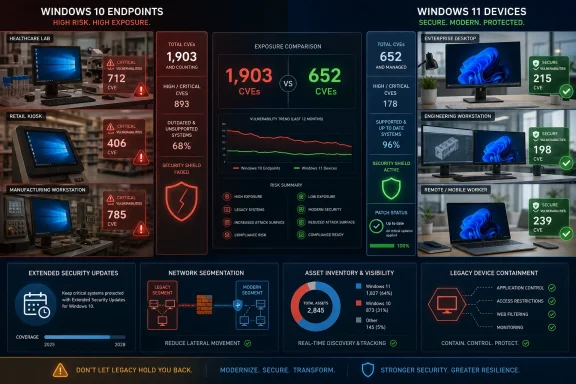 The CVE count is an exposure signal, not an attack forecast
Lansweeper says 66.6% of the active CVEs associated with its Windows 10 devices are high or critical, while 2.4% are known to be exploited in the wild. Its reported exploitable-vulnerability rate is roughly 1.7 times that of Windows 11 endpoints.Those are serious figures, but they need to be read accurately. This is vendor telemetry from a subset of millions of assets across tens of thousands of customer sites, not a controlled Microsoft comparison of the Windows 10 and Windows 11 kernels. An endpoint’s CVE total can reflect installed software, firmware, missing application patches, browser components, drivers, and how long the device has sat outside a managed patch process. The number is therefore best understood as a measure of observed endpoint exposure, not proof that Windows 10 itself contains exactly three times as many exploitable flaws as Windows 11.
That caveat does not soften the operational conclusion. Once a supported operating system receives a security fix that its predecessor no longer receives, attackers can compare the patched code with the old code to identify the vulnerable logic. This practice, commonly called patch diffing, makes unpatched legacy platforms especially attractive when a flaw spans generations of Windows.
Microsoft’s July 2026 Patch Tuesday illustrates the widening maintenance divide. Windows 11 continues to receive cumulative security updates, while standard Windows 10 22H2 installations outside Extended Security Updates do not. Every monthly release can add to the remediation gap for organizations that leave legacy machines connected to ordinary corporate networks.
The holdouts are clustered where replacement is hardest
Lansweeper reports that Windows 10 is most prevalent in healthcare and pharmaceuticals, where 23.0% of Windows devices remain on the older OS; consumer and retail follows at 22.7%, with manufacturing at 18.0%. These are sectors where endpoints are often tied to point-of-sale systems, laboratory instruments, diagnostic devices, industrial controllers, kiosks, rugged handhelds, or vendor-certified applications.That distinction matters. A Windows 10 laptop used for office productivity is usually a lifecycle-management problem. A Windows 10 machine integrated with an imaging device or a production line is an engineering, procurement, validation, and downtime-management problem. Treating both as simple “upgrade failures” obscures the real work required.
The report also challenges a common assumption about Windows 11 readiness. Lansweeper says only 2.8% of the remaining Windows 10 devices in its data cannot meet Windows 11 hardware requirements. If representative, that suggests hardware compatibility is not the dominant barrier for most holdouts. Application testing, vendor approvals, funding cycles, deployment capacity, and incomplete asset inventories are likely to account for far more of the delay.
Healthcare is particularly revealing in Lansweeper’s numbers. It has one of the largest Windows 10 populations, but only 1.1% of its Windows 10 estate is described as incapable of moving to Windows 11 on hardware grounds. That points less to a fleet of impossible-to-upgrade devices than to deferred migration work, with all the operational complexity that entails.
Extended Security Updates buy time, but only if they are deployed
There is an important correction to the broad “Windows 10 is unpatched” framing. Microsoft’s Extended Security Updates program remains available for eligible Windows 10 version 22H2 systems. For consumers, Microsoft states that the program provides security updates through October 13, 2026. Commercial customers can license ESU coverage beyond the end of standard support, while Windows 10 LTSC and LTSB editions follow separate product lifecycles.That means an inventory that merely reports “Windows 10” is insufficient. Administrators need to distinguish at least four groups:
- Windows 10 22H2 devices enrolled in and successfully receiving ESU updates.
- Windows 10 22H2 devices eligible for ESU but not enrolled, activated, or consistently patched.
- Windows 10 LTSC or LTSB devices that remain supported under their own lifecycle dates.
- Windows 10, Windows 7, Windows 8.1, and Windows XP endpoints that have no applicable supported servicing path.
For security teams, this is where asset-management data must meet endpoint-management data. An accurate dashboard should show the Windows edition and build, ESU status, last successful cumulative update, local administrator exposure, network location, application criticality, and whether the device handles regulated data or controls physical processes. Counting operating-system versions alone will not establish actual risk.
The next phase is containment, not persuasion
The Lansweeper report says 18.7% of all monitored Windows devices run an end-of-life operating system when Windows 7, Windows 8.1, and Windows XP are included. That is a more consequential figure than Windows 10’s share alone. Older operating systems often live outside mainstream device management altogether, appearing in workshops, retail branches, labs, warehouses, and isolated-looking networks that eventually prove not to be isolated.For endpoints that cannot move immediately, the first controls are unglamorous but effective: remove direct internet exposure, segment them from user and server networks, eliminate unnecessary local administrator rights, restrict inbound management protocols, enforce application allow-listing where feasible, and monitor for unusual authentication and lateral-movement activity. A legacy endpoint should not retain the same trust relationships as a fully supported Windows 11 PC.
Organizations should also avoid using ESU as an excuse to stop planning. ESU is a bridge for systems with a verified migration path, not a permanent platform strategy. It preserves the ability to receive selected security updates; it does not deliver feature updates, modernize old application dependencies, or remove the operational cost of maintaining a shrinking exception fleet.
The report’s central finding is less about a rivalry between Windows 10 and Windows 11 than about the economics of delay. The easy devices have already moved. The endpoints left behind are more likely to be invisible, specialized, poorly documented, or business-critical—and those are precisely the machines that require the most deliberate inventory, isolation, funding, and replacement decisions before the next support deadline arrives.