

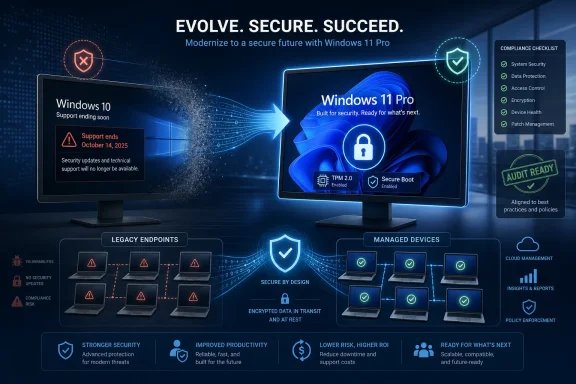
Microsoft ended mainstream support for Windows 10 on October 14, 2025, leaving businesses that have not enrolled in Extended Security Updates or moved to Windows 11 exposed to a growing gap in security maintenance, vendor support, and platform compatibility. That is the plain operational fact behind a new upgrade pitch from Tarsus Distribution, published by MyBroadband, urging organisations to move to Windows 11 Pro. The pitch is commercial, but the underlying risk is not imaginary. Windows 10 has crossed the line from familiar workhorse to managed exception.
The end of Windows 10 support was not a surprise. Microsoft spent years telegraphing the October 2025 deadline, and Windows 10 version 22H2 was long identified as the final feature update for the operating system. Yet the deadline still landed with the force of a budget event because many organisations treat desktop operating systems less like infrastructure and more like office furniture: if it still turns on, it stays.
That habit is now expensive. Unsupported Windows 10 machines do not instantly stop working, and that is precisely why they are dangerous. They can keep authenticating to networks, opening mail attachments, running line-of-business applications, and storing sensitive data while quietly slipping outside the normal patch-and-support covenant that enterprise IT depends on.
The MyBroadband/Tarsus article frames this as a business risk rather than a technology refresh, and that is the correct framing. The issue is not whether Windows 10 was a good operating system. It was. The issue is whether a business can justify running endpoints that no longer receive normal security updates, bug fixes, or technical support while regulators, insurers, customers, and attackers all assume patching discipline is table stakes.
There is also a psychological trap here. Because Windows 10 was stable and widely liked, many users mistake comfort for safety. But in security terms, an operating system’s reputation matters less than its update channel.
But ESU is a bridge, not a destination. It is designed to reduce risk while organisations transition away from Windows 10, not to preserve Windows 10 as a permanent enterprise baseline. It does not bring new features, modern management improvements, or a reprieve from the broader ecosystem shift toward Windows 11-era assumptions.
That distinction matters for IT leaders who need to explain the budget. Paying for ESU can be rational if a factory workstation controls expensive machinery, if a medical device stack is certified only on Windows 10, or if a custom application needs remediation before it can move. Paying for ESU across a general office fleet because migration planning started too late is a different matter.
The longer a company relies on ESU, the more it turns a migration project into a risk exception register. Every deferred endpoint has to be tracked, justified, isolated where appropriate, and eventually retired or upgraded. That is not free, even when the desktop itself looks unchanged to the user.
TPM 2.0, Secure Boot, virtualisation-based security, device encryption, identity protection, and tighter hardware-backed defences are not glamorous features. They are the plumbing that makes modern endpoint security less dependent on users doing the right thing at the right time. Windows 11 did not invent all of these concepts, but it made them harder to ignore.
That is why the Windows 11 hardware requirements were so controversial. Microsoft effectively told a large installed base of PCs that being functional was not the same as being fit for the next decade of Windows. Critics were right that some older machines remained perfectly capable for everyday computing. Microsoft was also right that a modern security model depends on more than CPU speed and RAM.
For businesses, the Windows 11 Pro migration is therefore not merely an OS deployment. It is an inventory exercise, a procurement exercise, a security baseline exercise, and a management exercise. The organisations that treat it as “run setup.exe on everything” will discover the hard parts late.
Many frameworks and audit regimes do not need to say “Windows 10” by name. They ask whether systems are supported, patched, monitored, and protected against known vulnerabilities. Once an operating system falls out of normal support, the burden shifts. The organisation must prove it has compensating controls, paid security coverage where available, and a credible migration plan.
That burden can affect cyber insurance renewals, customer security questionnaires, vendor risk reviews, and sector-specific audits. A few unsupported endpoints in a segmented lab are one conversation. Hundreds of everyday laptops running mail, browser sessions, cloud apps, and local files are another.
The danger is not only that an auditor finds Windows 10. It is that the presence of Windows 10 reveals weak asset management. If IT cannot say which devices are unsupported, which are enrolled in ESU, which are blocked by application compatibility, and which users still have local administrator rights, the operating system version becomes a symptom of a bigger governance problem.
Copilot may improve workflows for some users, especially where Microsoft 365 data, Teams meetings, documents, and administrative tasks are already deeply embedded. It may also require licensing, governance, user training, and data controls that many organisations have not fully worked through. AI integration is a reason to modernise the platform; it is not the reason Windows 10 suddenly became risky.
Security and manageability remain the sturdier case. Windows 11 Pro gives IT teams a better foundation for enforcing policy, protecting credentials, integrating with modern endpoint management, and standardising devices around current Microsoft assumptions. Those benefits are less exciting than generative AI demos, but they are easier to defend in a risk meeting.
There is a lesson here for vendors and resellers as well. The best Windows 11 pitch is not “look at the new thing.” It is “stop carrying old risk into new workflows.”
Still, dismissing the message because it is commercial would be a mistake. Many small and midsize organisations do need help moving from Windows 10 to Windows 11, especially if they lack mature endpoint management, accurate hardware inventory, or in-house application packaging skills. Migration projects fail less often because nobody knows Windows 11 exists and more often because nobody owns the messy middle.
That messy middle includes BIOS settings, TPM readiness, incompatible CPUs, old peripherals, VPN clients, printer drivers, finance applications, security agents, and remote users who never seem to be on a fast connection when IT needs them. It includes deciding whether to perform in-place upgrades, wipe-and-load deployments, device replacements, or some combination of all three.
A good migration partner can shorten that process. A bad one can turn it into a licensing exercise with a PowerPoint attached. The difference is whether the partner starts with discovery and risk segmentation rather than a blanket promise that migration will be seamless.
Now the backlog has become a deadline. Some machines can be upgraded. Some can remain temporarily under ESU. Some should be replaced. Some should probably have been retired years ago, but Windows 10’s long life made it easy to pretend otherwise.
This is where the Windows 11 discussion becomes uncomfortable for sustainability-minded IT teams. Replacing working hardware carries cost and waste implications. But keeping old endpoints in production also has a cost, especially when their security posture depends on exceptions, manual tracking, and declining compatibility.
The practical answer is not ideological purity. It is segmentation. Devices that meet Windows 11 requirements should move. Devices that cannot move but perform critical functions should be isolated and covered through ESU or other compensating controls. Devices that are merely old office PCs should not be allowed to dictate enterprise risk policy.
This is especially common in small and midsize organisations where “the application” is not a polished enterprise product but a mixture of old accounting software, browser dependencies, macros, drivers, label printers, shared folders, and a vendor portal that behaves differently in every browser. Windows 11 compatibility is generally strong, but “generally” is not a deployment plan.
The right migration process starts with telemetry, not hope. IT needs to know what hardware exists, what software actually runs, which users depend on which applications, and which devices are business-critical. That data turns the migration from a scary all-at-once event into a staged programme.
Pilot rings matter here. A well-run Windows 11 rollout begins with IT, then technically confident users, then representative departments, then broader deployment. The point is not to avoid every issue. The point is to find issues while they are still small enough to fix.
The better approach is risk-based triage. Internet-facing, user-driven, data-rich endpoints should move first. Devices used by executives, finance teams, HR departments, administrators, and privileged IT staff deserve special attention because they combine valuable data with high-impact credentials.
Lower-risk devices may still need action, but the action can differ. Some should be upgraded later in the schedule. Some should be replaced at lease refresh. Some should be isolated and monitored. Some should be removed from the network entirely if their business purpose no longer justifies the exposure.
This is where Windows 10’s end of support can become useful. It gives IT a forcing function to clean up the endpoint estate, retire abandoned hardware, standardise management, and tighten policies that should have been tightened already.
That uncertainty is what makes unsupported operating systems so difficult to manage. Risk does not increase in a neat straight line. It sits quietly, then spikes when exploit code becomes available, when attackers industrialise a technique, or when a business discovers that one old machine had more access than anyone remembered.
Windows 11 Pro is not a magic shield against that world. It will have vulnerabilities, bad patches, compatibility headaches, and its own lifecycle deadlines. But it is inside the support model. That means it participates in the monthly rhythm of fixes, advisories, vendor accountability, and defensive improvement.
Unsupported Windows 10 devices sit outside that rhythm unless they are explicitly covered by ESU. In enterprise security, being outside the rhythm is often where trouble starts.
This is also the moment to revisit identity. Windows endpoints are only one layer in a stack that includes Microsoft Entra ID, Active Directory, multifactor authentication, conditional access, endpoint detection and response, and cloud application controls. Moving to Windows 11 while leaving weak passwords, unmanaged devices, and excessive privileges untouched would squander the opportunity.
For many organisations, the move to Windows 11 Pro should coincide with a clearer distinction between managed and unmanaged work. If a device accesses business data, it should meet business policy. If it cannot meet that policy, it should not be treated as a normal workstation.
That may sound obvious, but Windows 10’s long tail shows how often businesses tolerate ambiguity. The upgrade is a chance to replace ambiguity with inventory, policy, and enforcement.
Organisations should first establish the truth of their fleet. How many Windows 10 devices remain? Which edition and build are they running? Which are eligible for Windows 11? Which are already covered by ESU? Which are unmanaged, remote, lost, or functionally abandoned?
Then comes prioritisation. High-risk users and compatible hardware should move quickly. Incompatible but important systems should receive documented exception handling. Devices with no clear owner should be investigated or removed. Procurement should be tied to the Windows 11 baseline rather than treated as a separate purchasing cycle.
Communication also matters. Users do not need a lecture about lifecycle policy; they need to know when their device will change, whether their apps and files will remain available, and whom to contact if something breaks. A calm migration still requires urgency, but it does not require theatre.
The article is less convincing when it implies that Windows 11 Pro is automatically a seamless path to AI-powered modernity. Some businesses will gain from Copilot integration and new productivity features. Others will care far more about patchability, device management, and passing the next audit without a spreadsheet full of exceptions.
Still, the strategic direction is hard to dispute. Windows 10 had a long run, but its normal support life is over. From here, every remaining Windows 10 device needs a reason to exist, a compensating control, and an exit date.
That is a healthier conversation than the one many organisations had before October 2025. Back then, Windows 10 was the default. Now it must be the exception.
 Windows 10 Did Not Become Unsafe Overnight, but It Did Become Someone’s Liability
The end of Windows 10 support was not a surprise. Microsoft spent years telegraphing the October 2025 deadline, and Windows 10 version 22H2 was long identified as the final feature update for the operating system. Yet the deadline still landed with the force of a budget event because many organisations treat desktop operating systems less like infrastructure and more like office furniture: if it still turns on, it stays.That habit is now expensive. Unsupported Windows 10 machines do not instantly stop working, and that is precisely why they are dangerous. They can keep authenticating to networks, opening mail attachments, running line-of-business applications, and storing sensitive data while quietly slipping outside the normal patch-and-support covenant that enterprise IT depends on.
The MyBroadband/Tarsus article frames this as a business risk rather than a technology refresh, and that is the correct framing. The issue is not whether Windows 10 was a good operating system. It was. The issue is whether a business can justify running endpoints that no longer receive normal security updates, bug fixes, or technical support while regulators, insurers, customers, and attackers all assume patching discipline is table stakes.
There is also a psychological trap here. Because Windows 10 was stable and widely liked, many users mistake comfort for safety. But in security terms, an operating system’s reputation matters less than its update channel.
The ESU Escape Hatch Buys Time, Not Forgiveness
Microsoft’s Extended Security Updates program complicates the story, as it should. Businesses are not choosing between “upgrade today” and “be hacked tomorrow.” Organisations with eligible Windows 10 version 22H2 devices can pay for continued security updates for a limited period, and that option matters for fleets that cannot be migrated cleanly by decree.But ESU is a bridge, not a destination. It is designed to reduce risk while organisations transition away from Windows 10, not to preserve Windows 10 as a permanent enterprise baseline. It does not bring new features, modern management improvements, or a reprieve from the broader ecosystem shift toward Windows 11-era assumptions.
That distinction matters for IT leaders who need to explain the budget. Paying for ESU can be rational if a factory workstation controls expensive machinery, if a medical device stack is certified only on Windows 10, or if a custom application needs remediation before it can move. Paying for ESU across a general office fleet because migration planning started too late is a different matter.
The longer a company relies on ESU, the more it turns a migration project into a risk exception register. Every deferred endpoint has to be tracked, justified, isolated where appropriate, and eventually retired or upgraded. That is not free, even when the desktop itself looks unchanged to the user.
Windows 11 Pro Is Really a Hardware and Management Argument
The marketing case for Windows 11 Pro often leans on polish: a cleaner interface, better multitasking, Copilot integration, and improved performance on modern hardware. Those are not irrelevant, but they are not the central enterprise argument. The stronger case is that Windows 11 formalises a security baseline Microsoft wanted the PC ecosystem to adopt years ago.TPM 2.0, Secure Boot, virtualisation-based security, device encryption, identity protection, and tighter hardware-backed defences are not glamorous features. They are the plumbing that makes modern endpoint security less dependent on users doing the right thing at the right time. Windows 11 did not invent all of these concepts, but it made them harder to ignore.
That is why the Windows 11 hardware requirements were so controversial. Microsoft effectively told a large installed base of PCs that being functional was not the same as being fit for the next decade of Windows. Critics were right that some older machines remained perfectly capable for everyday computing. Microsoft was also right that a modern security model depends on more than CPU speed and RAM.
For businesses, the Windows 11 Pro migration is therefore not merely an OS deployment. It is an inventory exercise, a procurement exercise, a security baseline exercise, and a management exercise. The organisations that treat it as “run setup.exe on everything” will discover the hard parts late.
The Compliance Problem Is Less Dramatic Than Ransomware and More Persistent
Ransomware is the obvious fear in any unsupported-OS discussion. It is vivid, expensive, and easy to explain to executives. But compliance may be the more durable reason Windows 10 becomes hard to defend inside a business.Many frameworks and audit regimes do not need to say “Windows 10” by name. They ask whether systems are supported, patched, monitored, and protected against known vulnerabilities. Once an operating system falls out of normal support, the burden shifts. The organisation must prove it has compensating controls, paid security coverage where available, and a credible migration plan.
That burden can affect cyber insurance renewals, customer security questionnaires, vendor risk reviews, and sector-specific audits. A few unsupported endpoints in a segmented lab are one conversation. Hundreds of everyday laptops running mail, browser sessions, cloud apps, and local files are another.
The danger is not only that an auditor finds Windows 10. It is that the presence of Windows 10 reveals weak asset management. If IT cannot say which devices are unsupported, which are enrolled in ESU, which are blocked by application compatibility, and which users still have local administrator rights, the operating system version becomes a symptom of a bigger governance problem.
Copilot Is the Shiny Part, but Security Is the Sale That Matters
The MyBroadband/Tarsus article points to AI-powered productivity and Microsoft Copilot as part of the Windows 11 Pro value proposition. That is unsurprising; every Microsoft-adjacent technology pitch now has an AI paragraph. But businesses should be careful not to let the most fashionable feature obscure the most urgent one.Copilot may improve workflows for some users, especially where Microsoft 365 data, Teams meetings, documents, and administrative tasks are already deeply embedded. It may also require licensing, governance, user training, and data controls that many organisations have not fully worked through. AI integration is a reason to modernise the platform; it is not the reason Windows 10 suddenly became risky.
Security and manageability remain the sturdier case. Windows 11 Pro gives IT teams a better foundation for enforcing policy, protecting credentials, integrating with modern endpoint management, and standardising devices around current Microsoft assumptions. Those benefits are less exciting than generative AI demos, but they are easier to defend in a risk meeting.
There is a lesson here for vendors and resellers as well. The best Windows 11 pitch is not “look at the new thing.” It is “stop carrying old risk into new workflows.”
The Partner Pitch Is Commercial, but the Migration Pain Is Real
Tarsus Distribution’s role in the article is clear: it wants businesses to buy Windows 11 Pro and related migration help through a Microsoft distribution partner. Readers should recognise the commercial context. This is not neutral public-service messaging; it is a sales funnel wrapped around a real deadline.Still, dismissing the message because it is commercial would be a mistake. Many small and midsize organisations do need help moving from Windows 10 to Windows 11, especially if they lack mature endpoint management, accurate hardware inventory, or in-house application packaging skills. Migration projects fail less often because nobody knows Windows 11 exists and more often because nobody owns the messy middle.
That messy middle includes BIOS settings, TPM readiness, incompatible CPUs, old peripherals, VPN clients, printer drivers, finance applications, security agents, and remote users who never seem to be on a fast connection when IT needs them. It includes deciding whether to perform in-place upgrades, wipe-and-load deployments, device replacements, or some combination of all three.
A good migration partner can shorten that process. A bad one can turn it into a licensing exercise with a PowerPoint attached. The difference is whether the partner starts with discovery and risk segmentation rather than a blanket promise that migration will be seamless.
The Hardware Refresh Nobody Wanted Is Now Part of the Bill
One reason Windows 10 lingered is that many businesses stretched pandemic-era and pre-pandemic PC fleets longer than usual. Remote work changed procurement priorities, inflation squeezed budgets, and Windows 11’s requirements made some otherwise usable devices look prematurely obsolete. That created a backlog.Now the backlog has become a deadline. Some machines can be upgraded. Some can remain temporarily under ESU. Some should be replaced. Some should probably have been retired years ago, but Windows 10’s long life made it easy to pretend otherwise.
This is where the Windows 11 discussion becomes uncomfortable for sustainability-minded IT teams. Replacing working hardware carries cost and waste implications. But keeping old endpoints in production also has a cost, especially when their security posture depends on exceptions, manual tracking, and declining compatibility.
The practical answer is not ideological purity. It is segmentation. Devices that meet Windows 11 requirements should move. Devices that cannot move but perform critical functions should be isolated and covered through ESU or other compensating controls. Devices that are merely old office PCs should not be allowed to dictate enterprise risk policy.
Compatibility Is the Quiet Migration Killer
Security deadlines get executive attention, but compatibility determines whether a migration succeeds. A business can agree in principle that Windows 11 Pro is the right target and still be blocked by a single legacy workflow that nobody documented until the pilot group broke it.This is especially common in small and midsize organisations where “the application” is not a polished enterprise product but a mixture of old accounting software, browser dependencies, macros, drivers, label printers, shared folders, and a vendor portal that behaves differently in every browser. Windows 11 compatibility is generally strong, but “generally” is not a deployment plan.
The right migration process starts with telemetry, not hope. IT needs to know what hardware exists, what software actually runs, which users depend on which applications, and which devices are business-critical. That data turns the migration from a scary all-at-once event into a staged programme.
Pilot rings matter here. A well-run Windows 11 rollout begins with IT, then technically confident users, then representative departments, then broader deployment. The point is not to avoid every issue. The point is to find issues while they are still small enough to fix.
The Risk Is Uneven, So the Response Should Be Uneven Too
Not every Windows 10 machine represents the same level of risk. A domain-joined laptop used by a finance manager, travelling between networks and handling attachments, is not equivalent to a locked-down kiosk on a segmented network. Treating them as identical leads either to panic or complacency.The better approach is risk-based triage. Internet-facing, user-driven, data-rich endpoints should move first. Devices used by executives, finance teams, HR departments, administrators, and privileged IT staff deserve special attention because they combine valuable data with high-impact credentials.
Lower-risk devices may still need action, but the action can differ. Some should be upgraded later in the schedule. Some should be replaced at lease refresh. Some should be isolated and monitored. Some should be removed from the network entirely if their business purpose no longer justifies the exposure.
This is where Windows 10’s end of support can become useful. It gives IT a forcing function to clean up the endpoint estate, retire abandoned hardware, standardise management, and tighten policies that should have been tightened already.
The Real Deadline Is the Next Unpatched Vulnerability
October 14, 2025, was the formal deadline. The operational deadline is more fluid: it arrives when a vulnerability appears that affects Windows 10 systems not receiving the relevant fix, or when an audit, insurer, customer, or incident responder asks why unsupported endpoints were still in normal use.That uncertainty is what makes unsupported operating systems so difficult to manage. Risk does not increase in a neat straight line. It sits quietly, then spikes when exploit code becomes available, when attackers industrialise a technique, or when a business discovers that one old machine had more access than anyone remembered.
Windows 11 Pro is not a magic shield against that world. It will have vulnerabilities, bad patches, compatibility headaches, and its own lifecycle deadlines. But it is inside the support model. That means it participates in the monthly rhythm of fixes, advisories, vendor accountability, and defensive improvement.
Unsupported Windows 10 devices sit outside that rhythm unless they are explicitly covered by ESU. In enterprise security, being outside the rhythm is often where trouble starts.
The Windows 11 Migration Should Be Treated as a Security Programme
The weakest version of a Windows 11 project is a cosmetic upgrade. The strongest version uses the migration to reset endpoint standards. That means enforcing encryption, reviewing local administrator rights, checking firmware settings, validating backup and recovery processes, and bringing devices under consistent management.This is also the moment to revisit identity. Windows endpoints are only one layer in a stack that includes Microsoft Entra ID, Active Directory, multifactor authentication, conditional access, endpoint detection and response, and cloud application controls. Moving to Windows 11 while leaving weak passwords, unmanaged devices, and excessive privileges untouched would squander the opportunity.
For many organisations, the move to Windows 11 Pro should coincide with a clearer distinction between managed and unmanaged work. If a device accesses business data, it should meet business policy. If it cannot meet that policy, it should not be treated as a normal workstation.
That may sound obvious, but Windows 10’s long tail shows how often businesses tolerate ambiguity. The upgrade is a chance to replace ambiguity with inventory, policy, and enforcement.
The Sensible Windows 10 Exit Plan Is Already Late, but Not Impossible
The worst response now is denial. The second-worst response is a rushed migration that breaks business processes and teaches users to fear every IT change. The right response is urgency with sequencing.Organisations should first establish the truth of their fleet. How many Windows 10 devices remain? Which edition and build are they running? Which are eligible for Windows 11? Which are already covered by ESU? Which are unmanaged, remote, lost, or functionally abandoned?
Then comes prioritisation. High-risk users and compatible hardware should move quickly. Incompatible but important systems should receive documented exception handling. Devices with no clear owner should be investigated or removed. Procurement should be tied to the Windows 11 baseline rather than treated as a separate purchasing cycle.
Communication also matters. Users do not need a lecture about lifecycle policy; they need to know when their device will change, whether their apps and files will remain available, and whom to contact if something breaks. A calm migration still requires urgency, but it does not require theatre.
The Upgrade Pitch Gets One Big Thing Right
The MyBroadband/Tarsus argument is at its strongest when it says that staying on Windows 10 is no longer simply a technology decision. That line deserves to survive the marketing around it. Unsupported endpoints are not just old computers; they are business decisions with security, compliance, productivity, and reputational consequences.The article is less convincing when it implies that Windows 11 Pro is automatically a seamless path to AI-powered modernity. Some businesses will gain from Copilot integration and new productivity features. Others will care far more about patchability, device management, and passing the next audit without a spreadsheet full of exceptions.
Still, the strategic direction is hard to dispute. Windows 10 had a long run, but its normal support life is over. From here, every remaining Windows 10 device needs a reason to exist, a compensating control, and an exit date.
That is a healthier conversation than the one many organisations had before October 2025. Back then, Windows 10 was the default. Now it must be the exception.
The Windows 10 Holdouts Need a Ledger, Not a Slogan
The practical lesson is not that every organisation must complete every upgrade tomorrow. It is that Windows 10 can no longer be treated as invisible background infrastructure. If it remains, it needs to be counted, funded, protected, and scheduled for removal.- Businesses should identify every remaining Windows 10 device and separate upgrade-ready PCs from machines that require replacement, isolation, or temporary ESU coverage.
- ESU should be used as a time-limited safety net for specific devices, not as a substitute for a Windows 11 migration plan.
- Windows 11 Pro’s strongest business case is hardware-backed security and modern management, not merely interface changes or AI branding.
- Compliance, insurance, and customer security reviews may turn unsupported Windows 10 systems into business problems even before a technical incident occurs.
- A successful migration should include application testing, pilot rings, user communication, and a clean policy for devices that cannot meet the new baseline.
References
- Primary source: MyBroadband
Published: Tue, 02 Jun 2026 13:48:39 GMT
Windows 10 Is Now a Business Risk — Why Upgrading to Windows 11 Pro Can’t Wait
Support for Windows 10 has ended, and businesses that continue to rely on the operating system are exposing themselves to increasing security, compliance, and operational risks. mybroadband.co.za
- Related coverage: windowscentral.com
HP’s Windows 10 holdouts show just how hard Microsoft’s Windows 11 upgrade push really is | Windows Central
Three out of ten HP PCs are still running Windows 10.www.windowscentral.com - Official source: microsoft.com
Windows 10 Extended Security Updates | Microsoft Windows
Use Windows 10 securely with the Extended Security Updates program. See how it helps protect your PC and find out how to get it.www.microsoft.com - Official source: learn.microsoft.com
Windows 10 - release information | Microsoft Learn
Learn release information for Windows 10 releaseslearn.microsoft.com - Official source: support.microsoft.com
Device Security in the Windows Security App | Microsoft Support
Learn how to access Windows device security settings in Windows Security to help protect your device from malicious software.support.microsoft.com - Related coverage: rcpmag.com
The Era of Windows 10 (and Some Office and Skype Editions) Officially Comes to an End -- Redmond Channel Partner
Microsoft has formally withdrawn support for Windows 10 as of Oct. 14, 2025, bringing the curtain down on one of its most widely adopted operating systems.rcpmag.com
- Related coverage: tomshardware.com
Windows 10 support ends today — here's who's affected and what you need to do | Tom's Hardware
Update if you can, upgrade if you can't, or at least get the extended support license.www.tomshardware.com - Related coverage: techradar.com
"Almost all" businesses being weighed down by Microsoft technical debt ahead of Windows 10 End Of Life | TechRadar
Time for an upgrade as Windows 10 EOL approacheswww.techradar.com - Related coverage: itecsonline.com
Windows 10 End of Support: Dallas Business Migration Guide | ITECS
Microsoft ended Windows 10 support in October 2025. Learn the security risks, compliance exposure, and how Dallas businesses should plan their migration.itecsonline.com - Related coverage: tomsguide.com
Windows 10 support officially ends — are you upgrading to Windows 11? | Tom's Guide
Windows 10 has reached its end of life, but millions of PCs are still using Microsoft's older OS. Tell us if you're upgrading to Windows 11 or keeping your Windows 10 PC!www.tomsguide.com - Related coverage: windowsforum.com
Windows 10 Ends Oct 14, 2025: ESU Bridge to 2026
Microsoft’s formal retirement of Windows 10 is now official and imminent: free support and monthly security updates end on October 14, 2025, and the company has rolled out a consumer-focused bridge — the Windows 10 Consumer Extended Security Updates (ESU) program — to give households and small... windowsforum.com
- Related coverage: novabackup.com
Windows 10 End of Support Preparations
MSP Guide for Windows 10 end-of-support preparation to ensure seamless migrations, mitigate risk, and maintain compliance.www.novabackup.com
- Related coverage: transparity.com
- Related coverage: atomicdata.com
- Related coverage: barronmccann.com
