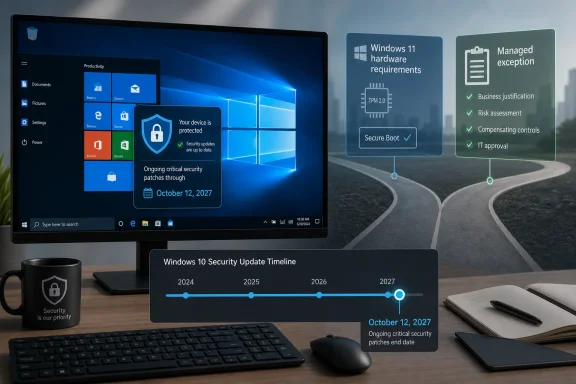
Microsoft has extended Windows 10’s consumer Extended Security Updates program for eligible enrolled PCs until October 12, 2027, giving New Zealand users and some small businesses another year of security patches after the operating system’s formal support deadline of October 14, 2025. The reprieve matters because Windows 10 is not a rounding error in New Zealand; it remains a live platform for a substantial share of desktop users. But the extension is less a pardon than a pressure valve, and enterprises should read the fine print before treating it as a migration strategy.
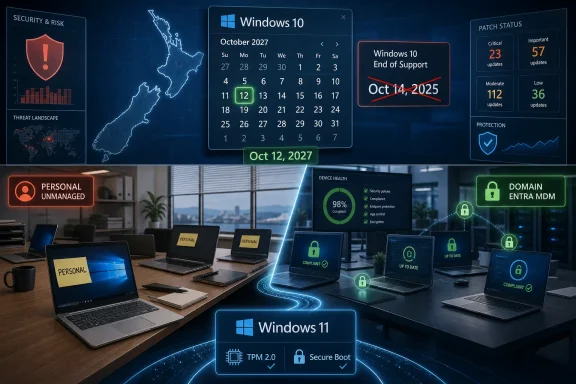
The uncomfortable catch is that Microsoft has not given every Windows 10 machine the same lifeline. The consumer ESU path is aimed at personal devices, while domain-joined, Microsoft Entra-joined, and mobile-device-managed PCs are pushed toward commercial ESU licensing. For New Zealand’s many small firms, that distinction blurs the line between “home PC” and “business endpoint” in exactly the place where security policy usually gets messy.
Windows 10 has already crossed the psychological line from “current enough” to “legacy with conditions.” Microsoft’s mainstream message remains clear: move to Windows 11, buy newer hardware where required, and stop treating Windows 10 as a permanent base layer. The ESU extension does not reverse that message; it softens the landing for users who cannot or will not move quickly.
That is why the October 12, 2027 date should not be mistaken for a new lease on Windows 10 as a first-class platform. ESU is a security patch channel, not a product roadmap. It does not promise feature development, broad hardware optimism, or a guarantee that every application vendor will keep testing against Windows 10 for another year.
For households, the extension is straightforward enough. A compatible Windows 10 PC can remain patched while its owner delays the Windows 11 question, saves for a replacement, or decides that the old machine has a second life with another operating system. For a business, the same delay carries governance costs.
That distinction matters more in New Zealand than it might in a market where large corporate IT dominates the endpoint picture. The country’s economy is built around small enterprises, many with fewer than 20 employees, and those firms often live in a hybrid reality: business data on consumer hardware, cloud services instead of on-prem infrastructure, and IT support that ranges from a managed service provider to “the person who knows computers.”
The obvious explanation is hardware. Windows 11’s requirements, especially around TPM 2.0, supported processors, Secure Boot, and Microsoft’s broader security baseline, made the upgrade more than a download for many older PCs. A machine that runs Windows 10 adequately for email, accounting, point-of-sale access, remote desktop, and browser-based tools may still be excluded from Windows 11 by policy rather than performance.
That gap hits small organizations first. A large enterprise can spread replacement cycles across procurement windows, negotiate licensing, standardize images, and absorb ESU as a transitional line item. A ten-person business in Hamilton, Christchurch, or Dunedin may be looking at a perfectly functional laptop fleet and wondering why it must spend scarce cash to preserve a status quo that worked last month.
The ESU extension therefore arrives as relief, but not as simplicity. The same device can look like a consumer PC to Microsoft and a business-critical endpoint to its owner. If that PC stores client records, accesses payroll, or authenticates into cloud services, the label on the box matters less than the risk attached to it.
But the eligibility boundary is the whole story for businesses. Devices joined to an Active Directory domain, joined to Microsoft Entra, or managed through MDM are not meant to use the consumer program. That exclusion is not a minor administrative detail; it is Microsoft drawing a line between a personal PC and a corporate-controlled endpoint.
For larger organizations, the answer is commercially boring and operationally sane: buy commercial ESU if Windows 10 must remain in production, then keep the machines under normal management until they can be replaced or upgraded. That preserves centralized patching, identity controls, compliance reporting, device policies, and the ability to know what is actually happening across the fleet.
For very small businesses, the temptation is different. If staff are using unmanaged consumer laptops, the consumer ESU route may appear to solve the immediate problem without procurement overhead. The device remains patched, the business avoids a hardware bill, and nobody has to redesign the environment.
That is also where the trap lies. An unmanaged patched PC is still unmanaged. It may receive Windows security fixes, but it may not enforce disk encryption, conditional access, least-privilege account use, approved software, browser policy, or remote wipe. ESU can keep the operating system from becoming an obvious open wound; it cannot turn a consumer laptop into an enterprise endpoint.
That matters because exceptions spread. A business that allows one unmanaged Windows 10 machine to remain because it “only runs accounting” may soon tolerate another because it “only talks to the label printer,” then another because a senior employee prefers the old laptop. Before long, the migration plan is no longer a plan but a set of sentimental carve-outs.
Commercial ESU does not remove the need for hard decisions. It buys time for application testing, hardware replacement, vendor coordination, and budget planning. But it preserves the basic principle that business endpoints should be visible, governed, and accountable.
For New Zealand organizations with limited IT staff, that principle can feel expensive. Yet the alternative is often more expensive in slower, less visible ways. A device outside policy is harder to audit, harder to support, harder to secure, and harder to explain after an incident.
Security updates are necessary, but they do not guarantee compatibility. Software vendors make their own support decisions, and many will increasingly prioritize Windows 11 as their tested baseline. A patched Windows 10 machine may still find itself running an accounting package, VPN client, browser extension, line-of-business app, or hardware driver that no longer receives meaningful vendor attention.
That is especially awkward for sectors with compliance obligations. A small medical practice, legal office, exporter, construction firm, or financial services provider may not be able to wave away unsupported software simply because Windows itself remains patched. Auditors and insurers tend to care about the whole environment, not only the Microsoft lifecycle calendar.
Then there is the productivity tax. Older machines may be slower, batteries may be failing, storage may be constrained, and driver support may be brittle. Keeping them alive can be rational when tied to a specific use case, but irrational when it becomes the default posture for the organization.
The point is not that every Windows 10 PC must be ripped out immediately. It is that ESU should be treated as a bridge with a destination. If the organization cannot name the device, the application dependency, the replacement date, and the owner of the exception, it is not managing risk; it is postponing recognition of it.
That does not make the transition painless. Many Windows 10 systems excluded from Windows 11 are not obviously obsolete to their owners. They open browsers, run Office, connect to printers, and handle day-to-day work without complaint. The mismatch between perceived usefulness and official supportability is what makes this migration so politically sensitive.
Workarounds exist, and enthusiasts know them well. Unsupported Windows 11 installs can be forced onto older hardware, and some machines run acceptably afterward. But what is tolerable for a hobbyist is not necessarily acceptable for a business that needs predictable updates, vendor support, and a defensible security posture.
For business continuity systems, unsupported upgrades can be worse than a managed delay. If a machine controls specialized equipment, runs legacy peripherals, or depends on a vendor-certified configuration, stability may matter more than symbolic compliance with the newest OS version. That is precisely the kind of case ESU was built for: not to avoid migration forever, but to keep the lights on while the real replacement path is engineered.
But Linux migration is not a generic remedy for Windows lifecycle pain. The question is not whether Linux can run on the hardware; it almost certainly can. The question is whether the business can run on Linux without breaking the applications, peripherals, workflows, and support arrangements that make the machine useful.
That means testing printers, scanners, accounting tools, tax software, VPN clients, remote access systems, authentication flows, and document templates. It means training users who may not care about operating systems but absolutely care when a familiar process changes. It also means deciding who supports the environment when something fails.
For enthusiast-run small businesses, Linux may be liberating. For firms dependent on Windows-only applications or vendor-certified configurations, it may simply replace one support problem with another. The smart move is not ideological; it is workload-specific.
A small firm with five staff-owned laptops may decide that consumer ESU is good enough for a short transition. That can be reasonable if the data footprint is low, cloud services enforce strong authentication, backups are tested, and there is a clear replacement plan. But “good enough” should be a documented exception, not a shrug.
A larger organization does not have that luxury. Once devices are domain-joined, Entra-joined, or MDM-managed, consumer ESU is off the table. The organization either pays for commercial ESU, migrates the devices, replaces them, retires them, or isolates them for a narrow purpose.
This is where IT teams should be blunt with leadership. The cost of Windows 11 migration is visible in invoices; the cost of unmanaged exceptions is visible only after something breaks. Finance departments often prefer the former once the latter is explained in operational terms.
The first group is easy: devices that can move to Windows 11 cleanly should move on a schedule that avoids peak business periods. The second group needs budget treatment: devices that cannot move but perform ordinary office work should be replaced. The third group deserves architectural attention: machines tied to specialized software, industrial equipment, medical systems, point-of-sale dependencies, or vendor-certified environments.
That third group is where ESU earns its keep. It allows IT teams to negotiate with vendors, test replacements, virtualize workloads where appropriate, or isolate systems without accepting an immediate security cliff. But it should come with an expiration date.
Organizations should also resist treating ESU enrollment as a one-time checkbox. Patch compliance, backup status, endpoint protection health, identity posture, and software support should all remain part of the conversation. A patched Windows 10 machine with weak credentials and no monitoring is still a soft target.
The company is balancing three pressures. It wants a more secure Windows ecosystem, it wants to avoid stranding users with still-functional PCs, and it wants to protect the reputation of Windows as a platform that businesses can plan around. Those goals do not always align neatly.
For enthusiasts, the move is vindication of sorts. Many argued that Windows 10’s user base was too large and too useful to push abruptly into insecurity. For enterprises, the lesson is more restrained: Microsoft may extend a runway, but it will still charge for the parts of the airport businesses actually need.
That split is likely to remain. Consumer messaging will emphasize safety and flexibility. Enterprise licensing will emphasize managed compliance and lifecycle discipline. New Zealand businesses sitting between those worlds will have to decide which side they are really on.
Microsoft has given Windows 10 users in New Zealand another year of breathing room, but not another era of certainty. The businesses that benefit most will be the ones that turn the extension into a migration calendar, a procurement plan, and a cleaner endpoint inventory. The ones that treat October 12, 2027 as a distant problem may discover that the real deadline arrives earlier, in the form of unsupported software, audit pressure, failing hardware, or one unmanaged laptop too many.
The uncomfortable catch is that Microsoft has not given every Windows 10 machine the same lifeline. The consumer ESU path is aimed at personal devices, while domain-joined, Microsoft Entra-joined, and mobile-device-managed PCs are pushed toward commercial ESU licensing. For New Zealand’s many small firms, that distinction blurs the line between “home PC” and “business endpoint” in exactly the place where security policy usually gets messy.
 Microsoft Buys Time Without Changing the Deadline
Windows 10 has already crossed the psychological line from “current enough” to “legacy with conditions.” Microsoft’s mainstream message remains clear: move to Windows 11, buy newer hardware where required, and stop treating Windows 10 as a permanent base layer. The ESU extension does not reverse that message; it softens the landing for users who cannot or will not move quickly.That is why the October 12, 2027 date should not be mistaken for a new lease on Windows 10 as a first-class platform. ESU is a security patch channel, not a product roadmap. It does not promise feature development, broad hardware optimism, or a guarantee that every application vendor will keep testing against Windows 10 for another year.
For households, the extension is straightforward enough. A compatible Windows 10 PC can remain patched while its owner delays the Windows 11 question, saves for a replacement, or decides that the old machine has a second life with another operating system. For a business, the same delay carries governance costs.
That distinction matters more in New Zealand than it might in a market where large corporate IT dominates the endpoint picture. The country’s economy is built around small enterprises, many with fewer than 20 employees, and those firms often live in a hybrid reality: business data on consumer hardware, cloud services instead of on-prem infrastructure, and IT support that ranges from a managed service provider to “the person who knows computers.”
New Zealand’s Windows 10 Problem Is Really a Small-Business Problem
StatCounter’s desktop operating system figures put Windows 10 at roughly one quarter of New Zealand’s Windows desktop footprint around the time this change surfaced. Market-share data is never a perfect inventory of business endpoints, but it is a useful smoke alarm. If nearly one in four desktop Windows sessions in the country still come from Windows 10, then the migration is not finished in the real world, whatever Microsoft’s preferred adoption curve says.The obvious explanation is hardware. Windows 11’s requirements, especially around TPM 2.0, supported processors, Secure Boot, and Microsoft’s broader security baseline, made the upgrade more than a download for many older PCs. A machine that runs Windows 10 adequately for email, accounting, point-of-sale access, remote desktop, and browser-based tools may still be excluded from Windows 11 by policy rather than performance.
That gap hits small organizations first. A large enterprise can spread replacement cycles across procurement windows, negotiate licensing, standardize images, and absorb ESU as a transitional line item. A ten-person business in Hamilton, Christchurch, or Dunedin may be looking at a perfectly functional laptop fleet and wondering why it must spend scarce cash to preserve a status quo that worked last month.
The ESU extension therefore arrives as relief, but not as simplicity. The same device can look like a consumer PC to Microsoft and a business-critical endpoint to its owner. If that PC stores client records, accesses payroll, or authenticates into cloud services, the label on the box matters less than the risk attached to it.
The Consumer Lifeline Comes With Enterprise Strings Attached
Microsoft’s consumer ESU offer is attractive because it is simple, familiar, and in some cases free. For eligible personal PCs, enrollment can be tied to a Microsoft account and the Windows Backup flow, with alternative routes such as Microsoft Rewards points or a one-time payment in some markets. Once enrolled, the machine keeps receiving security updates through the extended period.But the eligibility boundary is the whole story for businesses. Devices joined to an Active Directory domain, joined to Microsoft Entra, or managed through MDM are not meant to use the consumer program. That exclusion is not a minor administrative detail; it is Microsoft drawing a line between a personal PC and a corporate-controlled endpoint.
For larger organizations, the answer is commercially boring and operationally sane: buy commercial ESU if Windows 10 must remain in production, then keep the machines under normal management until they can be replaced or upgraded. That preserves centralized patching, identity controls, compliance reporting, device policies, and the ability to know what is actually happening across the fleet.
For very small businesses, the temptation is different. If staff are using unmanaged consumer laptops, the consumer ESU route may appear to solve the immediate problem without procurement overhead. The device remains patched, the business avoids a hardware bill, and nobody has to redesign the environment.
That is also where the trap lies. An unmanaged patched PC is still unmanaged. It may receive Windows security fixes, but it may not enforce disk encryption, conditional access, least-privilege account use, approved software, browser policy, or remote wipe. ESU can keep the operating system from becoming an obvious open wound; it cannot turn a consumer laptop into an enterprise endpoint.
Commercial ESU Is the Price of Staying Managed
Commercial ESU is the less glamorous half of the story because it does not make for a consumer-friendly headline. It is the option for organizations that need to keep Windows 10 alive without dismantling the controls that make business IT defensible. In other words, it is not just a patch subscription; it is a way to avoid creating an exception culture.That matters because exceptions spread. A business that allows one unmanaged Windows 10 machine to remain because it “only runs accounting” may soon tolerate another because it “only talks to the label printer,” then another because a senior employee prefers the old laptop. Before long, the migration plan is no longer a plan but a set of sentimental carve-outs.
Commercial ESU does not remove the need for hard decisions. It buys time for application testing, hardware replacement, vendor coordination, and budget planning. But it preserves the basic principle that business endpoints should be visible, governed, and accountable.
For New Zealand organizations with limited IT staff, that principle can feel expensive. Yet the alternative is often more expensive in slower, less visible ways. A device outside policy is harder to audit, harder to support, harder to secure, and harder to explain after an incident.
The Real Cost Is Not the ESU Fee
The debate around Windows 10’s end of support often collapses into the price of ESU or the price of new PCs. That is understandable but incomplete. The real cost is the operational drag of running an aging platform while the ecosystem around it moves on.Security updates are necessary, but they do not guarantee compatibility. Software vendors make their own support decisions, and many will increasingly prioritize Windows 11 as their tested baseline. A patched Windows 10 machine may still find itself running an accounting package, VPN client, browser extension, line-of-business app, or hardware driver that no longer receives meaningful vendor attention.
That is especially awkward for sectors with compliance obligations. A small medical practice, legal office, exporter, construction firm, or financial services provider may not be able to wave away unsupported software simply because Windows itself remains patched. Auditors and insurers tend to care about the whole environment, not only the Microsoft lifecycle calendar.
Then there is the productivity tax. Older machines may be slower, batteries may be failing, storage may be constrained, and driver support may be brittle. Keeping them alive can be rational when tied to a specific use case, but irrational when it becomes the default posture for the organization.
The point is not that every Windows 10 PC must be ripped out immediately. It is that ESU should be treated as a bridge with a destination. If the organization cannot name the device, the application dependency, the replacement date, and the owner of the exception, it is not managing risk; it is postponing recognition of it.
Windows 11 Migration Is Still a Hardware Story
Microsoft has spent years framing Windows 11 as a more secure platform, and the hardware requirements are central to that argument. TPM-backed security, virtualization-based protections, Secure Boot, and newer processor baselines are not cosmetic choices. They reflect Microsoft’s attempt to make the default Windows endpoint harder to attack and easier to manage in a threat environment shaped by credential theft, ransomware, and supply-chain compromise.That does not make the transition painless. Many Windows 10 systems excluded from Windows 11 are not obviously obsolete to their owners. They open browsers, run Office, connect to printers, and handle day-to-day work without complaint. The mismatch between perceived usefulness and official supportability is what makes this migration so politically sensitive.
Workarounds exist, and enthusiasts know them well. Unsupported Windows 11 installs can be forced onto older hardware, and some machines run acceptably afterward. But what is tolerable for a hobbyist is not necessarily acceptable for a business that needs predictable updates, vendor support, and a defensible security posture.
For business continuity systems, unsupported upgrades can be worse than a managed delay. If a machine controls specialized equipment, runs legacy peripherals, or depends on a vendor-certified configuration, stability may matter more than symbolic compliance with the newest OS version. That is precisely the kind of case ESU was built for: not to avoid migration forever, but to keep the lights on while the real replacement path is engineered.
Linux Is an Escape Hatch, Not a Magic Door
The obvious non-Microsoft answer is Linux, especially for older hardware that cannot meet Windows 11 requirements. For some New Zealand businesses, it will be the right move. A browser-first workstation, a kiosk, a basic office PC, or a back-office terminal may be perfectly serviceable on a modern Linux distribution, with years of updates and lower hardware pressure.But Linux migration is not a generic remedy for Windows lifecycle pain. The question is not whether Linux can run on the hardware; it almost certainly can. The question is whether the business can run on Linux without breaking the applications, peripherals, workflows, and support arrangements that make the machine useful.
That means testing printers, scanners, accounting tools, tax software, VPN clients, remote access systems, authentication flows, and document templates. It means training users who may not care about operating systems but absolutely care when a familiar process changes. It also means deciding who supports the environment when something fails.
For enthusiast-run small businesses, Linux may be liberating. For firms dependent on Windows-only applications or vendor-certified configurations, it may simply replace one support problem with another. The smart move is not ideological; it is workload-specific.
The Managed-Unmanaged Divide Will Define the Next Year
The most important decision for New Zealand businesses is not “Windows 10 or Windows 11.” It is whether they are willing to let unmanaged devices become part of the business fabric. Microsoft’s ESU extension makes that question more urgent because it gives some PCs a legitimate security path outside commercial management.A small firm with five staff-owned laptops may decide that consumer ESU is good enough for a short transition. That can be reasonable if the data footprint is low, cloud services enforce strong authentication, backups are tested, and there is a clear replacement plan. But “good enough” should be a documented exception, not a shrug.
A larger organization does not have that luxury. Once devices are domain-joined, Entra-joined, or MDM-managed, consumer ESU is off the table. The organization either pays for commercial ESU, migrates the devices, replaces them, retires them, or isolates them for a narrow purpose.
This is where IT teams should be blunt with leadership. The cost of Windows 11 migration is visible in invoices; the cost of unmanaged exceptions is visible only after something breaks. Finance departments often prefer the former once the latter is explained in operational terms.
The Extension Rewards Planning, Not Delay
The right response to Microsoft’s extension is an inventory, not a celebration. Every Windows 10 device should be classified by owner, hardware eligibility, business function, management state, application dependency, and replacement path. That exercise is tedious, but it is also the difference between controlled migration and a panic purchase order.The first group is easy: devices that can move to Windows 11 cleanly should move on a schedule that avoids peak business periods. The second group needs budget treatment: devices that cannot move but perform ordinary office work should be replaced. The third group deserves architectural attention: machines tied to specialized software, industrial equipment, medical systems, point-of-sale dependencies, or vendor-certified environments.
That third group is where ESU earns its keep. It allows IT teams to negotiate with vendors, test replacements, virtualize workloads where appropriate, or isolate systems without accepting an immediate security cliff. But it should come with an expiration date.
Organizations should also resist treating ESU enrollment as a one-time checkbox. Patch compliance, backup status, endpoint protection health, identity posture, and software support should all remain part of the conversation. A patched Windows 10 machine with weak credentials and no monitoring is still a soft target.
Microsoft’s Quiet Move Says Plenty About Windows 11
There is a reason this extension landed quietly. Microsoft wants users to move to Windows 11, but it also knows that hard cutoffs create backlash when the installed base remains large. Extending consumer ESU lets the company appear pragmatic without admitting that the Windows 11 hardware wall remains a major obstacle for many users.The company is balancing three pressures. It wants a more secure Windows ecosystem, it wants to avoid stranding users with still-functional PCs, and it wants to protect the reputation of Windows as a platform that businesses can plan around. Those goals do not always align neatly.
For enthusiasts, the move is vindication of sorts. Many argued that Windows 10’s user base was too large and too useful to push abruptly into insecurity. For enterprises, the lesson is more restrained: Microsoft may extend a runway, but it will still charge for the parts of the airport businesses actually need.
That split is likely to remain. Consumer messaging will emphasize safety and flexibility. Enterprise licensing will emphasize managed compliance and lifecycle discipline. New Zealand businesses sitting between those worlds will have to decide which side they are really on.
The Sensible Path Through New Zealand’s Windows 10 Grace Period
The extension gives New Zealand organizations a rare commodity in endpoint management: time that can be spent deliberately rather than reactively. But the value of that time depends entirely on whether businesses use it to shrink the Windows 10 estate or merely to normalize it.- Organizations should identify which Windows 10 PCs are unmanaged consumer devices and which are domain-joined, Entra-joined, or MDM-managed before choosing an ESU path.
- Small businesses using consumer ESU should treat it as a temporary exception and avoid storing sensitive business data on devices outside normal controls.
- Larger organizations should assume commercial ESU is the supported route for managed Windows 10 fleets that cannot migrate immediately.
- IT teams should test business-critical applications against Windows 11 now, rather than discovering vendor or driver problems near the next deadline.
- Unsupported Windows 11 installs may be useful for hobbyists, but they are a weak foundation for business continuity unless the risks are explicitly accepted.
- Linux can extend the life of older hardware for suitable workloads, but it requires application, peripheral, support, and user-readiness testing before deployment.
Microsoft has given Windows 10 users in New Zealand another year of breathing room, but not another era of certainty. The businesses that benefit most will be the ones that turn the extension into a migration calendar, a procurement plan, and a cleaner endpoint inventory. The ones that treat October 12, 2027 as a distant problem may discover that the real deadline arrives earlier, in the form of unsupported software, audit pressure, failing hardware, or one unmanaged laptop too many.
References
- Primary source: TechRepublic
Published: 2026-07-01T16:10:17.539966
Windows 10 Gets More Time, but NZ Businesses Face a Catch
Microsoft has extended Windows 10 security updates until 2027. Learn how New Zealand businesses can navigate their options for migration and device security.www.techrepublic.com
- Related coverage: tomshardware.com
Microsoft extends free Windows 10 security updates for a second year — program now ends on October 12, 2027 | Tom's Hardware
Just as the memory shortage pushes PC prices even higher.www.tomshardware.com - Related coverage: windowscentral.com
Microsoft quietly extends Windows 10's extra security updates program for free: Users can now stay on Windows 10 until October 2027 securely | Windows Central
Windows 10's ESU program has been quietly extended by an extra year, now ending on October 12, 2027 instead of October 2026.www.windowscentral.com - Official source: microsoft.com
Windows 10 Extended Security Updates | Microsoft Windows
Use Windows 10 securely with the Extended Security Updates program. See how it helps protect your PC and find out how to get it.www.microsoft.com - Related coverage: gs.statcounter.com
Desktop Windows Version Market Share New Zealand | Statcounter Global Stats
This graph shows the market share of desktop windows versions in New Zealand based on over 3 billion monthly page views.gs.statcounter.com - Related coverage: kiwiunity.co.nz
How Businesses Operate in New Zealand / How It Works | Kiwi Unity
Business is the engine of New Zealand's economy. It is how goods are produced, services are delivered, people are employed, and wealth is created. Behind every café, farm, law firm, software company, and construction crew is a set of decisions about how to structure, fund, run, and grow a...www.kiwiunity.co.nz
- Official source: support.microsoft.com
Mises à jour de sécurité étendue de Windows 10 | Microsoft Windows
Utilisez Windows 10 en toute sécurité avec la prolongation des mises à jour de sécurité. Découvrez comment il aide à protéger votre PC et comment l’obtenir.support.microsoft.com - Official source: learn.microsoft.com
Windows 10 - release information | Microsoft Learn
Learn release information for Windows 10 releaseslearn.microsoft.com - Related coverage: studylib.net
SMALL BUSINESSES IN NEW ZEALAND
Free essays, homework help, flashcards, research papers, book reports, term papers, history, science, politicsstudylib.net - Related coverage: beehive.govt.nz
- Related coverage: techradar.com
Can't get extended updates for Windows 10 due to a frustrating error message? Microsoft has rolled out a fix | TechRadar
Emergency patch fixes bug causing enrollment wizard to failwww.techradar.com - Related coverage: mbie.govt.nz