

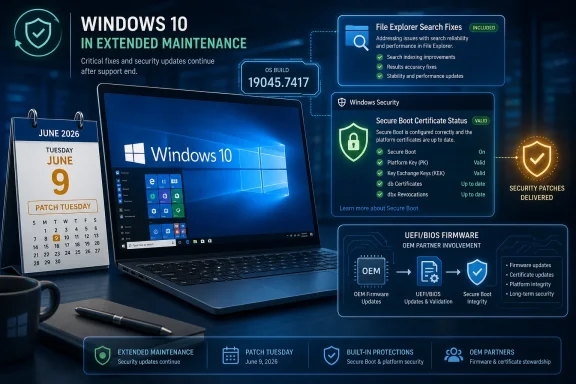
Microsoft released Windows 10 KB5094127 on June 9, 2026, as the June Patch Tuesday cumulative update for Windows 10 22H2 systems covered by Extended Security Updates, raising eligible PCs to build 19045.7417 and adding File Explorer search fixes, Secure Boot certificate status reporting, and security patches. The update is less a revival of Windows 10 than a reminder that the operating system has entered its paid-maintenance era. For home users, admins, and holdout fleets, KB5094127 shows what Windows 10 looks like after the finish line: smaller changes, sharper security obligations, and fewer excuses for avoiding lifecycle planning.
KB5094127 lands in a strange moment for Windows 10. The operating system remains everywhere, but its mainstream story is over; Microsoft’s effort is now concentrated on Windows 11, while Windows 10 receives the kind of care reserved for platforms that are still operationally important but strategically retired.
That distinction matters. A cumulative update in 2023 could be read as part of an actively evolving Windows 10 branch. A cumulative update in June 2026 is something else: a paid security bridge for machines that cannot or will not move yet.
The headline changes in KB5094127 are modest by design. File Explorer search gets better, Secure Boot reporting becomes more visible, and the update includes the usual security rollup. There is no new shell direction, no renewed promise of feature investment, and no hint that Windows 10 has escaped its status as yesterday’s default.
That is not a criticism so much as a lifecycle reality. Microsoft is still patching Windows 10 because enterprises, labs, point-of-sale systems, medical devices, industrial workstations, and conservative home users still run it. But the update also reinforces the bargain: if you are staying, you are now paying for time rather than buying into a future.
For IT teams, build numbers are the antidote to vague user reports. “I installed the latest update” is not an audit trail. “This device is on 19045.7417” is at least a concrete starting point.
The update is described as mandatory for eligible Windows 10 systems, but eligibility is now the catch. Machines enrolled in the Extended Security Updates program, or supported long-term servicing scenarios, are the expected audience. A consumer Windows 10 PC outside that path should not be assumed to see the same update behavior just because it still boots and still has a Windows Update button.
That is where confusion will keep surfacing. Windows 10 looks familiar enough that users expect the old rhythm to continue. But the maintenance model has changed underneath them, and KB5094127 is one of the clearest examples yet of that shift.
This is not glamorous work, but it is the sort of fix that matters on a mature operating system. File Explorer search has long been one of those Windows features that users rely on daily while also distrusting instinctively. When it fails, it fails in small but corrosive ways: a document appears in one tool but not another, a filename with non-English characters behaves inconsistently, or results arrive slowly enough that the user gives up and opens Everything, PowerShell, or a third-party indexer.
The UTF-8 detail is particularly telling. Modern file estates are messy. Even in conservative Windows environments, text files may come from Linux servers, developer tooling, cloud systems, export jobs, localization workflows, or old applications that never expected Windows Search to be the final arbiter of truth. Supporting UTF-8 without a byte order mark sounds obscure until you are the person trying to locate a configuration file by content and Explorer misses it.
The Chinese text fix also fits a broader pattern. Windows 10 may be in extended support, but Microsoft cannot treat global text handling as optional. If the company is charging organizations to keep the platform secure, basic search reliability across languages and encodings is part of the bargain.
Still, nobody should mistake this for a File Explorer rebuild. Search remains bound by Windows indexing behavior, system configuration, folder scope, and the long history of Explorer’s compromises. KB5094127 appears to improve specific cases rather than change the architecture.
KB5094127 expands the machinery around Secure Boot certificate reporting in Windows Security, giving users and administrators a clearer view of whether the relevant certificates are current. That may sound like housekeeping, but the timing is not accidental: long-lived Secure Boot certificates from the 2011 era are reaching expiration milestones in 2026, and Microsoft has been pushing a migration to newer 2023 certificate authorities.
Secure Boot is one of those technologies that works best when nobody has to think about it. Firmware verifies signed boot components, Windows starts, and the user moves on. But certificate rollover is different. It forces the quiet trust anchors of the PC ecosystem into view.
The risk is not that every unremediated machine suddenly turns into a brick the moment a calendar date passes. The more realistic concern is that devices with stale Secure Boot state may lose the ability to receive or validate future protections for early boot components. That is a subtler failure mode, and arguably a more dangerous one for enterprise security, because the system can look healthy while drifting away from the supported trust chain.
By surfacing status in Windows Security, Microsoft is trying to turn an invisible firmware-and-bootloader problem into something administrators can inventory. The company is also adding Group Policy control through a setting named LimitSecureBootRequiredServiceData, intended to limit the Secure Boot service data sent by suppressing an event normally sent to Microsoft. That is a very enterprise-shaped addition: telemetry control, policy surface, compliance language, and all.
That reality is especially awkward for Windows 10 holdouts. Many of the machines still clinging to Windows 10 are older systems, machines rejected by Windows 11 hardware requirements, or purpose-built devices that administrators are reluctant to disturb. Those are exactly the kinds of PCs where firmware currency may be uneven.
KB5094127 can help report status and deliver operating system-side pieces of the transition, but it cannot magically modernize a neglected firmware stack. If Windows Security reports that Secure Boot needs attention, the next step may be an OEM BIOS update rather than another trip through Windows Update. For home users, that means the least friendly part of PC maintenance is back on the table. For enterprises, it means firmware management can no longer be treated as a side quest.
This is where the Windows 10 lifecycle becomes operationally expensive. Paying for Extended Security Updates buys continued patches, but it does not buy away hardware entropy. A fleet that skipped BIOS governance for years may now have to confront it under deadline pressure.
BitLocker adds another layer of anxiety. Secure Boot changes and firmware updates can trigger recovery prompts in some scenarios, especially where devices have particular virtualization, TPM, or boot configuration characteristics. Microsoft has acknowledged continuing BitLocker recovery behavior as a known issue in recent Windows servicing contexts, and administrators should treat that as a warning to verify recovery key escrow before broad deployment.
But the Catalog is not a substitute for update management. It is a tool, and a slightly unforgiving one. Installing the wrong package, missing a prerequisite servicing stack condition, or assuming an unsupported PC can be dragged forward by manually clicking an .msu file is how troubleshooting sessions get longer.
For most eligible users, Settings remains the safer path. Windows Update understands applicability, sequencing, and servicing dependencies better than a human grabbing packages in a browser. The Catalog becomes valuable when the normal channel fails or when an organization has a deliberate offline process.
That distinction is worth stressing because Windows 10’s ESU era will generate a cottage industry of “direct download” articles, scripts, and package links. Some of that information will be useful. Some will be stale within weeks. The administrator’s job is to keep the source of truth tied to Microsoft’s servicing metadata, not to a copied link in a forum post or a bookmarked download page.
A modern Windows 10 estate in 2026 needs more than monthly patch compliance. It needs proof of ESU eligibility, firmware visibility, BitLocker recovery readiness, Secure Boot certificate status, application compatibility testing, and a migration runway. Without those pieces, KB5094127 becomes another monthly ritual that hides a larger strategic failure.
Small businesses are particularly exposed here. Many have stayed on Windows 10 because the PCs still work, Windows 11 hardware requirements are inconvenient, and replacing a fleet is expensive. ESU can be rational in that context, but only if it is treated as a temporary bridge rather than a permanent accommodation.
Home enthusiasts face a different calculation. Some will pay for continued updates because they prefer Windows 10’s interface, dislike Windows 11’s design choices, or run older hardware. That is understandable. But the further Windows 10 moves into extended support, the more each update will feel like maintenance of a museum piece that happens to be connected to the internet.
There is nothing shameful about keeping an old operating system alive for good reasons. The danger is pretending the reasons do not have an expiration date.
That creates a delicate product message. Microsoft must keep Windows 10 secure enough to avoid a public security disaster, but not so vibrant that it undermines the push to Windows 11. KB5094127 fits that balance perfectly: security fixes, targeted reliability work, Secure Boot hygiene, and no new reason to fall back in love with Windows 10.
This is why the File Explorer improvement is interesting but not transformative. It is a quality fix for a supported legacy platform. It is not an invitation to expect a second life.
The Secure Boot work, meanwhile, serves both Windows 10 and Microsoft’s broader platform-security agenda. Certificate rollover is not a Windows 10-only problem; it touches the PC ecosystem. But Windows 10’s age makes it a more revealing test case, because older devices are where certificate, firmware, and management gaps are most likely to collide.
Cumulative updates are broad by nature. They land on clean corporate images, heavily customized endpoints, gaming rigs, lab machines, domain-joined laptops, offline systems, and PCs that have survived years of driver archaeology. A clean known-issues list at release does not guarantee a quiet month.
For KB5094127, administrators should pay particular attention to boot-adjacent symptoms. Secure Boot reporting, firmware dependencies, and BitLocker recovery prompts sit close enough to the startup chain that a small percentage of problem machines can create outsized help desk pain. The update may install smoothly on most PCs, but “most” is not an operational plan.
The prudent approach is the boring one: pilot first, confirm recovery keys, verify Secure Boot status, check build numbers, and then broaden deployment. In an ESU world, boring is not merely safe. It is the cost of refusing to move faster.
For administrators, the update is more valuable as a signal than as a feature package. It tells you which machines are still receiving ESU updates, which ones need Secure Boot attention, and which parts of your fleet may be entering the danger zone where firmware, encryption, and Windows servicing intersect.
For Microsoft, KB5094127 is proof that extended support does not mean no engineering. But it also proves the opposite of what some Windows 10 fans want to hear: the engineering is increasingly bounded, security-driven, and lifecycle-aware.
That makes the update useful, but not comforting. It improves real things while reminding everyone why Windows 10 is no longer the destination.
 Windows 10 Is Still Being Patched, But the Deal Has Changed
KB5094127 lands in a strange moment for Windows 10. The operating system remains everywhere, but its mainstream story is over; Microsoft’s effort is now concentrated on Windows 11, while Windows 10 receives the kind of care reserved for platforms that are still operationally important but strategically retired.That distinction matters. A cumulative update in 2023 could be read as part of an actively evolving Windows 10 branch. A cumulative update in June 2026 is something else: a paid security bridge for machines that cannot or will not move yet.
The headline changes in KB5094127 are modest by design. File Explorer search gets better, Secure Boot reporting becomes more visible, and the update includes the usual security rollup. There is no new shell direction, no renewed promise of feature investment, and no hint that Windows 10 has escaped its status as yesterday’s default.
That is not a criticism so much as a lifecycle reality. Microsoft is still patching Windows 10 because enterprises, labs, point-of-sale systems, medical devices, industrial workstations, and conservative home users still run it. But the update also reinforces the bargain: if you are staying, you are now paying for time rather than buying into a future.
The Build Number Tells the Real Story
KB5094127 moves Windows 10 version 22H2 to build 19045.7417. That number is useful not because it is memorable, but because it gives administrators a clean way to verify whether a machine has crossed the June 2026 Patch Tuesday line.For IT teams, build numbers are the antidote to vague user reports. “I installed the latest update” is not an audit trail. “This device is on 19045.7417” is at least a concrete starting point.
The update is described as mandatory for eligible Windows 10 systems, but eligibility is now the catch. Machines enrolled in the Extended Security Updates program, or supported long-term servicing scenarios, are the expected audience. A consumer Windows 10 PC outside that path should not be assumed to see the same update behavior just because it still boots and still has a Windows Update button.
That is where confusion will keep surfacing. Windows 10 looks familiar enough that users expect the old rhythm to continue. But the maintenance model has changed underneath them, and KB5094127 is one of the clearest examples yet of that shift.
File Explorer Search Gets a Practical Fix, Not a Renaissance
The most visible user-facing improvement in KB5094127 is File Explorer search. Microsoft’s notes point to better search behavior, including Chinese text handling and UTF-8 encoded files without a byte order mark, along with clearer and more consistent text across search results, Content view, and tooltips.This is not glamorous work, but it is the sort of fix that matters on a mature operating system. File Explorer search has long been one of those Windows features that users rely on daily while also distrusting instinctively. When it fails, it fails in small but corrosive ways: a document appears in one tool but not another, a filename with non-English characters behaves inconsistently, or results arrive slowly enough that the user gives up and opens Everything, PowerShell, or a third-party indexer.
The UTF-8 detail is particularly telling. Modern file estates are messy. Even in conservative Windows environments, text files may come from Linux servers, developer tooling, cloud systems, export jobs, localization workflows, or old applications that never expected Windows Search to be the final arbiter of truth. Supporting UTF-8 without a byte order mark sounds obscure until you are the person trying to locate a configuration file by content and Explorer misses it.
The Chinese text fix also fits a broader pattern. Windows 10 may be in extended support, but Microsoft cannot treat global text handling as optional. If the company is charging organizations to keep the platform secure, basic search reliability across languages and encodings is part of the bargain.
Still, nobody should mistake this for a File Explorer rebuild. Search remains bound by Windows indexing behavior, system configuration, folder scope, and the long history of Explorer’s compromises. KB5094127 appears to improve specific cases rather than change the architecture.
Secure Boot Becomes a Dashboard Problem
The more important change is not the search bar. It is Secure Boot.KB5094127 expands the machinery around Secure Boot certificate reporting in Windows Security, giving users and administrators a clearer view of whether the relevant certificates are current. That may sound like housekeeping, but the timing is not accidental: long-lived Secure Boot certificates from the 2011 era are reaching expiration milestones in 2026, and Microsoft has been pushing a migration to newer 2023 certificate authorities.
Secure Boot is one of those technologies that works best when nobody has to think about it. Firmware verifies signed boot components, Windows starts, and the user moves on. But certificate rollover is different. It forces the quiet trust anchors of the PC ecosystem into view.
The risk is not that every unremediated machine suddenly turns into a brick the moment a calendar date passes. The more realistic concern is that devices with stale Secure Boot state may lose the ability to receive or validate future protections for early boot components. That is a subtler failure mode, and arguably a more dangerous one for enterprise security, because the system can look healthy while drifting away from the supported trust chain.
By surfacing status in Windows Security, Microsoft is trying to turn an invisible firmware-and-bootloader problem into something administrators can inventory. The company is also adding Group Policy control through a setting named LimitSecureBootRequiredServiceData, intended to limit the Secure Boot service data sent by suppressing an event normally sent to Microsoft. That is a very enterprise-shaped addition: telemetry control, policy surface, compliance language, and all.
The BIOS Is Now Part of the Patch Conversation
The uncomfortable truth behind Secure Boot certificate updates is that Windows cannot solve every Secure Boot problem from Windows. Firmware matters. OEM implementation matters. BIOS and UEFI versions matter.That reality is especially awkward for Windows 10 holdouts. Many of the machines still clinging to Windows 10 are older systems, machines rejected by Windows 11 hardware requirements, or purpose-built devices that administrators are reluctant to disturb. Those are exactly the kinds of PCs where firmware currency may be uneven.
KB5094127 can help report status and deliver operating system-side pieces of the transition, but it cannot magically modernize a neglected firmware stack. If Windows Security reports that Secure Boot needs attention, the next step may be an OEM BIOS update rather than another trip through Windows Update. For home users, that means the least friendly part of PC maintenance is back on the table. For enterprises, it means firmware management can no longer be treated as a side quest.
This is where the Windows 10 lifecycle becomes operationally expensive. Paying for Extended Security Updates buys continued patches, but it does not buy away hardware entropy. A fleet that skipped BIOS governance for years may now have to confront it under deadline pressure.
BitLocker adds another layer of anxiety. Secure Boot changes and firmware updates can trigger recovery prompts in some scenarios, especially where devices have particular virtualization, TPM, or boot configuration characteristics. Microsoft has acknowledged continuing BitLocker recovery behavior as a known issue in recent Windows servicing contexts, and administrators should treat that as a warning to verify recovery key escrow before broad deployment.
Offline Installers Are a Safety Valve, Not a Strategy
The availability of Microsoft Update Catalog .msu packages matters because not every Windows update succeeds through the neat consumer path. Offline installers are useful when Windows Update is broken, when a machine sits on a restricted network, or when an administrator needs to stage updates into a controlled workflow.But the Catalog is not a substitute for update management. It is a tool, and a slightly unforgiving one. Installing the wrong package, missing a prerequisite servicing stack condition, or assuming an unsupported PC can be dragged forward by manually clicking an .msu file is how troubleshooting sessions get longer.
For most eligible users, Settings remains the safer path. Windows Update understands applicability, sequencing, and servicing dependencies better than a human grabbing packages in a browser. The Catalog becomes valuable when the normal channel fails or when an organization has a deliberate offline process.
That distinction is worth stressing because Windows 10’s ESU era will generate a cottage industry of “direct download” articles, scripts, and package links. Some of that information will be useful. Some will be stale within weeks. The administrator’s job is to keep the source of truth tied to Microsoft’s servicing metadata, not to a copied link in a forum post or a bookmarked download page.
Patch Tuesday Has Become a Test of Windows 10 Governance
The June 2026 update is not just about a specific build. It is a test of whether Windows 10 environments have grown up enough to be managed as legacy estates.A modern Windows 10 estate in 2026 needs more than monthly patch compliance. It needs proof of ESU eligibility, firmware visibility, BitLocker recovery readiness, Secure Boot certificate status, application compatibility testing, and a migration runway. Without those pieces, KB5094127 becomes another monthly ritual that hides a larger strategic failure.
Small businesses are particularly exposed here. Many have stayed on Windows 10 because the PCs still work, Windows 11 hardware requirements are inconvenient, and replacing a fleet is expensive. ESU can be rational in that context, but only if it is treated as a temporary bridge rather than a permanent accommodation.
Home enthusiasts face a different calculation. Some will pay for continued updates because they prefer Windows 10’s interface, dislike Windows 11’s design choices, or run older hardware. That is understandable. But the further Windows 10 moves into extended support, the more each update will feel like maintenance of a museum piece that happens to be connected to the internet.
There is nothing shameful about keeping an old operating system alive for good reasons. The danger is pretending the reasons do not have an expiration date.
Microsoft’s Incentives Are No Longer Ambiguous
Microsoft’s posture around Windows 10 is easy to read. The company wants users on Windows 11, wants hardware aligned with newer security baselines, and wants enterprises consuming modern management services. Windows 10 ESU exists because the installed base is too large and too economically important to abandon abruptly.That creates a delicate product message. Microsoft must keep Windows 10 secure enough to avoid a public security disaster, but not so vibrant that it undermines the push to Windows 11. KB5094127 fits that balance perfectly: security fixes, targeted reliability work, Secure Boot hygiene, and no new reason to fall back in love with Windows 10.
This is why the File Explorer improvement is interesting but not transformative. It is a quality fix for a supported legacy platform. It is not an invitation to expect a second life.
The Secure Boot work, meanwhile, serves both Windows 10 and Microsoft’s broader platform-security agenda. Certificate rollover is not a Windows 10-only problem; it touches the PC ecosystem. But Windows 10’s age makes it a more revealing test case, because older devices are where certificate, firmware, and management gaps are most likely to collide.
The Known-Issue Silence Should Not Be Overread
Microsoft reportedly says it is not aware of new issues specific to KB5094127, while older known issues remain in view. That is reassuring, but only to a point.Cumulative updates are broad by nature. They land on clean corporate images, heavily customized endpoints, gaming rigs, lab machines, domain-joined laptops, offline systems, and PCs that have survived years of driver archaeology. A clean known-issues list at release does not guarantee a quiet month.
For KB5094127, administrators should pay particular attention to boot-adjacent symptoms. Secure Boot reporting, firmware dependencies, and BitLocker recovery prompts sit close enough to the startup chain that a small percentage of problem machines can create outsized help desk pain. The update may install smoothly on most PCs, but “most” is not an operational plan.
The prudent approach is the boring one: pilot first, confirm recovery keys, verify Secure Boot status, check build numbers, and then broaden deployment. In an ESU world, boring is not merely safe. It is the cost of refusing to move faster.
Windows 10 Holdouts Get a Narrower Set of Wins
For individual users, KB5094127 offers a simple value proposition. If your PC is eligible, install it. You get June security fixes, a better File Explorer search experience in certain cases, and better visibility into Secure Boot certificate status.For administrators, the update is more valuable as a signal than as a feature package. It tells you which machines are still receiving ESU updates, which ones need Secure Boot attention, and which parts of your fleet may be entering the danger zone where firmware, encryption, and Windows servicing intersect.
For Microsoft, KB5094127 is proof that extended support does not mean no engineering. But it also proves the opposite of what some Windows 10 fans want to hear: the engineering is increasingly bounded, security-driven, and lifecycle-aware.
That makes the update useful, but not comforting. It improves real things while reminding everyone why Windows 10 is no longer the destination.
June’s Windows 10 Patch Draws the Map for the Holdout Years
KB5094127 is a small update with large implications. Its details are concrete enough for immediate action, but its broader message is that Windows 10 maintenance has become a discipline, not a habit.- Windows 10 KB5094127 is the June 2026 Patch Tuesday cumulative update for eligible Windows 10 22H2 systems under Extended Security Updates, moving them to build 19045.7417.
- File Explorer search receives targeted improvements, including better handling of Chinese text and UTF-8 files without a byte order mark.
- Secure Boot certificate status is becoming more visible in Windows Security as Microsoft pushes the ecosystem away from expiring 2011-era trust anchors.
- Some Secure Boot remediation may depend on OEM firmware updates, so Windows Update alone may not be enough for every device.
- Offline .msu installers from the Microsoft Update Catalog are useful for repair and controlled deployment, but they should not replace normal update management where Windows Update works.
- BitLocker recovery readiness should be checked before broad deployment, especially in environments touching Secure Boot, firmware, or TPM-related changes.
References
- Primary source: Windows Latest
Published: Tue, 09 Jun 2026 21:32:28 GMT
Windows 10 KB5094127 improves File Explorer search, direct download links for offline installers (.msu)
Windows 10 KB5094127 Patch Tuesday update is rolling out as part of Microsoft's Extended Security Updates program. www.windowslatest.com
- Related coverage: bleepingcomputer.com
Microsoft releases Windows 10 KB5094127 extended security update
Microsoft has released the Windows 10 KB5094127 extended security update, which fixes the June 2026 Patch Tuesday vulnerabilities and adds new functionality to monitor the rollout of updated Secure Boot certificates that replace those expiring this month.www.bleepingcomputer.com
- Official source: learn.microsoft.com
How to download updates that include drivers and hotfixes from the Windows Update Catalog - Windows Client | Microsoft Learn
Describes how to obtain updates, WHQL drivers, and hotfixes from the Windows Update Catalog. This information is for advanced users only.learn.microsoft.com - Related coverage: thewindows12.com
Microsoft Update Catalog: Download Any Windows Update | theWindows12
Microsoft Update Catalog is an official tool where you can manually search and download any Windows update with a KB number. This article shows how to use it. www.thewindows12.com
- Related coverage: notebookcheck.net
Windows 10 ESU update KB5075912 bumps 22H2 to Build 19045.6937 - Notebookcheck News
Windows 10 ESU update KB5075912 (Build 19045.6937) is rolling out for February 2026, addressing a shutdown/hibernation restart issue on some Secure Launch-capable PCs and carrying Secure Boot rollout targeting data. www.notebookcheck.net
