

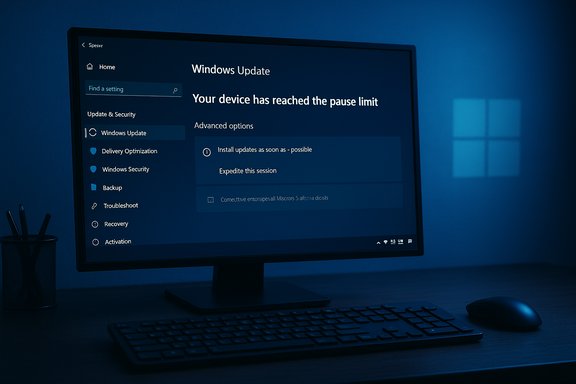
Microsoft’s update controls for Windows 10 are suddenly behaving differently on a growing number of machines: users report the familiar “Pause updates for 7 days” button is greyed out or replaced by an “Install updates as soon as possible / Expedite this session” prompt, and the Settings page claims the device has “reached the pause limit” even when the user never paused updates. The change is appearing primarily on Windows 10 PCs that are not enrolled in Microsoft’s Extended Security Updates (ESU) program, and it has revived a familiar debate: is this an intentional nudge to push holdouts to Windows 11 and ESU, or a logic bug in Windows Update that removes a last-minute safety valve for users?
Source: Daily Express US Microsoft is making it harder to stay on Windows 10 - Tech News - Tech - Daily Express US
 Background
Windows 10 lifecycle, ESU and why this matters
Windows 10 reached its official end-of-support date on October 14, 2025. Microsoft created a consumer-facing Extended Security Updates (ESU) pathway that extends critical and important security updates for enrolled devices through October 13, 2026. Enrollment options include syncing PC settings to a Microsoft account (no additional charge), redeeming Microsoft Rewards, or paying a one‑time fee (roughly $30 USD per device for consumers). ESU is explicitly about security fixes — not feature updates — and it’s intended as a short-term bridge for users and organizations that cannot immediately migrate to Windows 11. For many home users the Pause updates for 7 days control has been the most practical, low-friction way to postpone a download or reboot until a convenient moment. Losing that one-click pause removes a quick fail-safe and raises the stakes of any unexpected or poorly timed update — including an accidental opt-in to a Windows 11 installer. That loss of agency is exactly what’s being reported in multiple places.How pause normally works (short recap)
- In Windows 10/11, the Settings UI allows a one-week pause per click, repeatable up to a 35‑day maximum through repeated presses or by selecting a specific date in Advanced options.
- After the maximum pause window is reached the OS normally requires the system to install available updates before allowing another pause. This behavior is documented in Microsoft’s Pause updates guidance.
What users are seeing right now
Reported symptoms
- The “Pause updates for 7 days” control in Settings → Windows Update appears faded/disabled on some Windows 10 PCs that are not enrolled in ESU.
- When users open Advanced options, the UI may show “Your device has reached the pause limit” even if the user has never used Pause.
- A new or emphasized option — worded like “Install updates as soon as possible” or “Expedite this session” — may be offered. Accepting it prompts download and installation of pending updates and schedules an automatic restart with relatively short warnings.
Immediate consequences observed
- Users who inadvertently begin a Windows 11 download or start a feature update may find there’s no obvious UI control to suspend or pause the process.
- The system can offer a short countdown and then proceed with installation and restart, interrupting active work and potentially leading to driver or app incompatibility issues after the update.
Investigating the cause: bug, policy change, or both?
The documented behavior vs. current reports
Microsoft documents a pause limit and administrative controls that can block pause (Group Policy, Windows Update for Business, MDM), but Microsoft’s public documentation does not state that the pause UI will be outright disabled for non‑ESU Windows 10 devices after end of support. That discrepancy is the core of the confusion: the mechanism (pause limit) is real and documented, but the reported gating of pause behind ESU enrollment is not an official, documented policy change.Two plausible explanations
- Logic / telemetry bug: Windows Update’s server-side logic that distinguishes ESU-enrolled devices from non-enrolled devices may mis-evaluate some devices as “past due” or otherwise ineligible for deferred behavior. That would cause the client to present the “pause limit reached” state incorrectly and push the device into an expedited-update mode. Multiple independent writeups and debugging threads point to a miscategorization as a likely root cause.
- Undocumented policy decision: Microsoft could have adjusted update logic intentionally to reduce deferrals on non-ESU devices — a security-first posture designed to minimize the number of unpatched devices. However, Microsoft has not published an announcement to that effect, and community reporting and reputable tech outlets treat intentional removal as unlikely without an official communications thread. In short: there is no public Microsoft statement confirming a deliberate removal of the pause control for non‑ESU PCs.
Technical context and mechanics (what’s happening under the hood)
How Windows Update decides when to allow a pause
- Pause increments and the 35‑day cap exist on the client. If the system shows “pause limit reached,” it is usually because the user intentionally exhausted those increments, or an administrator policy blocked the pause feature. The same client code also queries Microsoft’s servicing backend for device eligibility for certain packages (e.g., ESU KBs).
- After Windows 10’s end-of-support, update servers must decide which devices receive which packages. ESU-enrolled devices are entitled to ESU-specific cumulative updates. The enrollment status may therefore factor into the downloadable payloads and possibly into the urgency the client shows. If that logic is buggy, it can flip UI controls into a forced-update state.
Administrative alternatives for businesses and prosumers
- Windows Update for Business and Group Policy remain the supported ways for enterprises to defer updates (e.g., feature updates can be deferred by many months using policy; quality updates have shorter deferral windows). Those controls are not the same as the one‑click pause in Settings and require Pro/Enterprise SKUs or MDM.
The “Install updates as soon as possible / Expedite this session” flow
This option appears to be a client-side prompt that accelerates download/installation and schedules a restart, intended for cases where the OS believes the device is overdue for required security updates. If the device is mis-categorized, that prompt can effectively bypass the normal user pause option and start an install sequence.Cross-check: what trusted sources say
- Microsoft’s ESU program documentation confirms the Oct. 14, 2025 end-of-support date and explains consumer enrollment options (sync settings, redeem Rewards, or pay). It also says ESU coverage runs to October 13, 2026 and that ESU-provisioned updates will be delivered through Windows Update for enrolled devices. There is no mention in the official ESU docs that Microsoft will remove the Pause button for non-ESU devices.
- Multiple independent tech outlets and community forums have documented the pause-control problem and reproduced the UI behavior, concluding it’s likely a bug or undocumented server-side change rather than a clearly-communicated policy shift. Reputable reporting includes diagnostic screenshots and first-person testing notes. Those reports align with the symptom set described above.
- Community and vendor support materials (How‑To Geek, TenForums, Dell knowledgebase) continue to describe the pause mechanics and 35‑day limit as the canonical behavior, underscoring that the current behavior is outside the normal, documented experience for an unmanaged home PC.
Risks and real world impact
For home users and prosumers
- Lost short-term control: The one-click pause has been a reliable, low-risk way to avoid interruptions; losing it increases the chance of forced restarts during critical work.
- Accidental feature upgrades: If a user accidentally triggers a feature upgrade or the Windows 11 installer and cannot pause, recovery becomes harder and may require time-consuming rollbacks or clean reinstalls.
- Compatibility fallout: Drivers, niche peripherals, or specialized software can break after a forced feature update; restoring previous versions is not always smooth.
For small organizations and unmanaged fleets
- Increased support costs: More unexpected updates mean more help-desk calls, increased downtime, and pressure to enroll in ESU or hasten migrations.
- Policy gaps: Small shops that depend on the Settings UI instead of Group Policy are uniquely exposed if the pause control disappears.
Security trade-offs and sustainability
From Microsoft’s perspective, reducing the number of unpatched devices shrinks the overall attack surface. That objective is defensible — but the method matters. Removing user controls without clear explanation or alternatives increases user frustration and may push people to unsafe workarounds. Meanwhile, forcing upgrades onto unsupported hardware accelerates device replacement cycles and raises e‑waste concerns. Those ethical and sustainability dimensions are part of the broader debate about vendor-driven platform transitions.Practical guidance: what to do now
If you’re running Windows 10 and encounter a greyed-out pause button or the “pause limit reached” message, here are concrete, practical measures (ranked by safety):- Check ESU enrollment status
- Open Settings → Update & Security → Windows Update and look for the ESU enrollment prompt or “Enroll now” link. If you want to remain on Windows 10 with security patches, enrolling via the consumer ESU path is the supported option. Microsoft’s consumer ESU documentation explains prerequisites and enrollment methods. Note: enrolling typically requires signing in with a Microsoft account in many scenarios.
- Use a Microsoft account temporarily (if acceptable)
- Microsoft’s consumer ESU options are linked to a Microsoft account; signing in and syncing settings may be the simplest no-cost way to receive ESU coverage if you intend to stay on Windows 10. Be aware of the privacy and account implications.
- Meter your connection to slow automatic downloads
- Mark your Wi‑Fi connection as metered (Settings → Network & Internet → Wi‑Fi → Manage known networks → Properties → Set as metered connection). This is a pragmatic way to delay downloads while you assess the situation; it is not a long-term substitute for updates.
- For Pro/Enterprise users: use Group Policy or Windows Update for Business
- Configure deferral policies via Group Policy (or MDM) to control feature update timing. These tools are the supported enterprise-grade mechanisms for controlling update cadence.
- Back up and image your system before any manual upgrade
- If you must proceed with a major feature update or accept an expedited session, create a full disk image and a file backup beforehand so you can roll back if the update breaks critical functionality.
- Avoid risky registry hacks or permanent service disables
- Tactics such as disabling the Windows Update service or extreme registry edits can leave the system unpatched and vulnerable. Use them only as temporary, last-resort measures and with full backups.
- Monitor official Microsoft channels
- Watch Microsoft’s Windows Experience Blog, support pages and the Microsoft Learn ESU documentation for an official statement or a fix. As of writing, Microsoft has published ESU enrollment guidance, but it has not published an advisory specifically acknowledging or explaining the pause-control behavior.
Critical analysis: strengths, weaknesses and risks of Microsoft’s current approach
Strengths (from Microsoft’s perspective)
- Concentrated protection: By funneling update eligibility and controls through ESU and centralized servicing, Microsoft reduces variability and can target security fixes to enrolled devices reliably.
- Clear lifecycle boundaries: The ESU program offers a defined, time-limited bridge for users who can’t immediately migrate to Windows 11. That helps Microsoft focus engineering and testing resources on the current platform.
Weaknesses and user harm
- Loss of predictable user controls: The one-click pause is not just convenience — it’s a safety valve. Removing or disabling it without transparent communication undermines trust and increases the risk of disruptive, ill-timed updates.
- Poor communication: If the behavior is an intended policy, Microsoft failed to publish a clear advisory. If it’s a bug, Microsoft should acknowledge it and provide guidance. The current silence amplifies confusion and rumor.
- Practical inequity: The change disproportionately affects users who prefer local accounts, run older hardware, or cannot afford ESU — essentially, the least-resourced users who are least able to absorb forced upgrades or replacement costs. The ESU requirement to sign in with a Microsoft account (for free enrollment options) raises privacy and access concerns.
Potential long-term risks
- User pushback and migration to alternatives: Heavy-handed update management risks pushing disgruntled users toward alternative operating systems or unsupported workarounds, fragmenting the Windows ecosystem and complicating security posture.
- Regulatory and reputational exposure: If the change is seen as coercive — especially in certain jurisdictions with consumer protection rules — Microsoft could face scrutiny or regulatory inquiries. Public-facing transparency would reduce that exposure.
What to watch next
- Official Microsoft response: An acknowledgement and clarification would materially reduce uncertainty. Microsoft’s ESU pages and Windows Experience Blog are the most likely channels for such an update.
- Fix or rollback: If the issue is a bug, expect an out-of-band fix to restore normal pause functionality on non-ESU devices. Watch Windows Update client updates and servicing stack patches for corrections.
- Broader policy signals: Changes to ESU enrollment rules, Microsoft account requirements, or explicit update-behavior advisories would confirm whether this was a deliberate policy shift or an unintended side-effect.
Conclusion
The recent wave of reports showing the Pause updates control greyed out on non‑ESU Windows 10 PCs is a significant usability and trust issue: it removes a low‑friction escape hatch many users relied on, and it increases the risk of disruptive or unwanted installs. Multiple independent outlets and community threads corroborate the behavior, while Microsoft’s ESU documentation explains the new post‑EOL servicing path — but Microsoft has not publicly confirmed whether disabling the pause UI for non‑ESU devices is intentional. At present the safest interpretation is that this is an emergent servicing/logic problem with real consequences for users, rather than a fully explained policy change. For now, users should verify ESU enrollment status, consider the consumer ESU enrollment options if they intend to remain on Windows 10, use metered connections as a temporary throttle for downloads, and rely on Group Policy/Windows Update for Business where available. Above all, create backups before any forced or expedited update — and watch Microsoft’s official channels for clarification or a corrective update. The change — whether a bug, an undocumented policy, or premature rollout logic tied to ESU — is a reminder of the fragile balance between platform security and individual control. In a world where updates are critical to safety, vendors must still preserve predictable, documented controls and communicate clearly when those controls change. Users deserve nothing less.Source: Daily Express US Microsoft is making it harder to stay on Windows 10 - Tech News - Tech - Daily Express US
