

Microsoft pushed a focused batch of Windows 10 Setup and Safe OS (WinRE) dynamic updates on November 11, 2025 — including KB5069340, KB5068795, KB5068790, KB5068794 and KB5068789 — alongside an urgent out‑of‑band ESU enrollment fix (KB5071959), refreshing recovery and setup binaries that imaging teams and administrators should verify and, in many cases, inject into deployment media immediately.
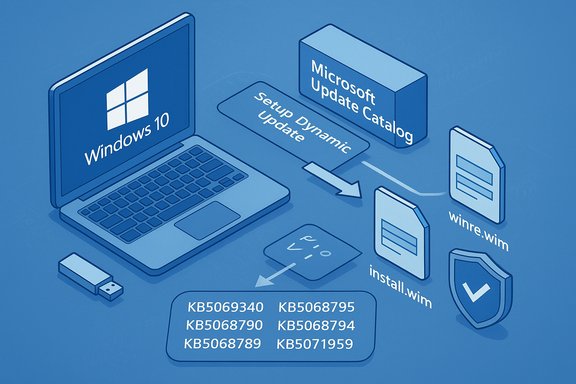
Dynamic Updates are surgical servicing packages Microsoft uses to refresh the small set of files that Windows Setup and the Windows Recovery Environment (WinRE, often called Safe OS) rely on during in‑place upgrades, media installs, reset flows and automatic repair. These updates are deliberately narrow: they replace a handful of binaries, updated drivers, and orchestration libraries inside install.wim and winre.wim so that frozen images behave like newly-built media without a full image rebuild.
Apply these updates in a staged, test-driven manner: verify WinRE versions and file manifests, maintain golden backups of pre‑DU images, and pilot across representative hardware before broad rollouts. For consumer devices blocked from ESU enrollment, KB5071959 restores the enrollment flow so eligible machines can receive ongoing security coverage. The technical details and file manifests on Microsoft’s KB pages provide the definitive verification steps administrators need to deploy these updates safely.
Source: Neowin Microsoft released Windows 10 KB5069340 KB5068795 KB5068790 and more Setup, Recovery updates
 Background: what are Setup and Safe OS (WinRE) dynamic updates?
Dynamic Updates are surgical servicing packages Microsoft uses to refresh the small set of files that Windows Setup and the Windows Recovery Environment (WinRE, often called Safe OS) rely on during in‑place upgrades, media installs, reset flows and automatic repair. These updates are deliberately narrow: they replace a handful of binaries, updated drivers, and orchestration libraries inside install.wim and winre.wim so that frozen images behave like newly-built media without a full image rebuild.- Setup Dynamic Updates refresh the Setup binaries (e.g., Setup.exe, Appraiser, SetupPlatform) used during feature updates and ISO-based installation.
- Safe OS / WinRE Dynamic Updates update winre.wim and the small pre‑boot runtime used for Reset this PC, Automatic Repair, cloud-reinstall and other recovery flows.
What Microsoft released on November 11, 2025 — the essential list
Microsoft’s public KB pages summarize each package succinctly. The critical items released for Windows 10 on November 11, 2025 are:- KB5069340 — Safe OS Dynamic Update for Windows 10, versions 21H2 and 22H2. This package updates WinRE on supported Windows 10 branches; after installation WinRE should report version 10.0.19041.6566.
- KB5068795 — Setup Dynamic Update for Windows 10, version 1809 and Windows Server 2019. Refreshes setup binaries used for feature updates and media installs; file manifests (for example acmigration.dll and Appraiser artifacts) are listed in the KB.
- KB5068790 — Safe OS Dynamic Update for Windows 10, version 1809 and Windows Server 2019. Updates the WinRE payload and includes refreshed USB and storage drivers used in pre‑boot. The KB includes exact file versions for files such as winload and USB drivers.
- KB5068794 — Setup Dynamic Update for Windows 10, version 1607 and Windows Server 2016. Refreshes the setup binaries for the 1607 servicing family and replaces earlier dynamic updates.
- KB5068789 — Safe OS Dynamic Update for Windows 10, version 1607 and Windows Server 2016. Refreshes the WinRE payload for the 1607 branch; available via Windows Update and the Update Catalog.
- KB5071959 — Out‑of‑band update for Windows 10 (22H2) to fix ESU enrollment problems. This emergency patch addresses an enrollment wizard failure that was preventing some consumer devices from enrolling in the Extended Security Updates (ESU) program. It makes affected consumer devices capable of completing ESU enrollment and receiving subsequent ESU rollups.
Why these updates matter: operational and security context
Dynamic updates frequently fly under the radar for everyday users, but their operational impact is outsized for deployments and recovery. Here’s why these November packages deserve attention:- WinRE is the last line of defense. Reset, Automatic Repair and cloud reinstall depend on a small set of pre‑boot drivers and orchestration logic. If WinRE lacks the drivers or the correct binary versions that match the installed OS, recovery flows can fail, trigger BitLocker recovery prompts, or leave technicians unable to input recovery keys. Refreshing WinRE reduces that risk.
- Setup vs. running OS mismatch is a common upgrade failure mode. When frozen installation media or old setup binaries are used during feature updates, compatibility checks and appraiser components can cause upgrades to abort. Injecting Setup Dynamic Updates into install.wim reduces in-place upgrade friction at scale.
- ESU enrollment is operationally critical for Windows 10 fleets. Windows 10 entered end‑of‑mainstream support in October 2025 for most consumer SKUs; eligible devices depend on Extended Security Updates to receive security patches. The KB5071959 out‑of‑band fix restores enrollment paths so eligible devices can continue to receive security rollups.
- Small packages, big consequences. Some Safe OS dynamic updates cannot be removed once injected into an image; that permanence raises the bar for testing and verification before a wide rollout.
Technical verification — what the official KBs say (and what to check in your environment)
Microsoft’s KB pages include file manifests and verification steps; administrators should treat these as the authoritative checklist. Key verification points surfaced in the public documentation:- WinRE target version after KB5069340: After installation, WinRE on affected devices should report 10.0.19041.6566. Microsoft documents command-line and PowerShell verification techniques (GetWinReVersion.ps1, reagentc /info and DISM queries).
- KB5068790 manifest: The Safe OS update for 1809 explicitly lists updated pre‑boot drivers (for example usbccgp.sys, USBHUB3.SYS, usbd.sys, winload.efi) and their file versions in the KB; administrators should compare these file versions against their on‑device WinRE images after applying the update.
- Replacement information: Several of the November packages replace earlier dynamic updates (for example KB5069340 replaces KB5067017). That means the most recent DU is the one administrators should target for image hygiene. The KB entries call out replacement IDs and the fact that some updates cannot be removed once applied.
- Run reagentc /info on a test machine to confirm the active WinRE location and status.
- Use the supplied PowerShell helper (GetWinReVersion.ps1) to report the WinRE image version before and after applying a DU.
- Mount your offline install.wim/winre.wim with DISM and confirm file version numbers match the KB manifest.
- If you use WSUS or SCCM, ensure the new DU CABs/MSUs are synchronized and distributed correctly before approving wide deployments.
Deployment guidance: how to treat these dynamic updates in real operations
Dynamic updates are both helpful and delicate. Follow a disciplined procedure:- For imaging teams and enterprises:
- Inject the Setup and Safe OS DUs into your golden install.wim and winre.wim images in an isolated lab.
- Run full recovery scenarios using the updated winre.wim: Reset this PC, cloud reinstall, Automatic Repair and BitLocker recovery flows.
- Validate on representative hardware groups (old and new, NVMe and SATA controllers, manufacturer driver variants).
- Stage the update in deployment rings (pilot → broader pilot → production).
- For device owners and small IT shops:
- Allow Windows Update to apply these packages automatically; manually downloading from the Update Catalog is only necessary if you maintain offline media.
- Maintain an external recovery USB built from a known-good ISO and keep BitLocker recovery keys backed up to a secure location.
- Download the correct DU CAB/MSU from the Microsoft Update Catalog for your target servicing branch.
- Mount the target WIM and apply the DU with DISM.
- Export the updated WIM, recapture any golden images as appropriate.
- Run recovery and upgrade tests on hardware representative of production.
- Approve the packages in WSUS/SCCM only after validation.
Known risks and observed regressions — what to watch for
These updates are intended to reduce upgrade and recovery risk, but they introduce unique hazards:- Irreversible image changes: Some Safe OS DUs — once injected into a winre.wim image — cannot be removed. That permanence means a bad DU may ship into recovery media that cannot easily be undone. The KBs explicitly warn of this behavior.
- WinRE input regressions have happened recently. Community reporting earlier in the fall documented a Windows 11 WinRE regression that disabled USB input in the recovery environment after a servicing wave — an issue Microsoft acknowledged and worked to mitigate. That incident underlines how fragile pre‑boot components can be and why testing on representative hardware is essential.
- BitLocker/Device Encryption surface area. Updates to pre‑boot components can change platform measurements and sometimes trigger BitLocker recovery. Keep BitLocker recovery keys accessible and validate that updated WinRE handles TPM and encryption unlock scenarios on your hardware.
- WSUS/Distribution pitfalls. WSUS synchronization or catalog issues can block distribution of DU CABs to downstream distribution points; coordinate with vendor channels and monitor update distribution health before starting wide rollouts.
Cross-checking the record: independent confirmation and editorial assessment
To ensure accuracy, the KB details above were verified against Microsoft’s official support pages for the packages listed (the KB pages include file manifests and verification instructions). Independent reporting from mainstream outlets and community trackers corroborated the practical implications: news outlets noted the ESU enrollment fix (KB5071959) and explained why it was issued out‑of‑band, while community and enterprise commentary stressed that dynamic updates are operationally important for imaging and recovery hygiene. Those observations match the technical reality documented in Microsoft’s KBs and in the community guidance on staging dynamic updates. Editorial assessment — strengths and weaknesses:- Strengths:
- Microsoft’s approach keeps frozen images functional without frequent rebuilds; these DUs are targeted and small.
- The out‑of‑band ESU enrollment fix demonstrates responsiveness to a customer-impacting enrollment regression.
- KB manifests and verification tools give administrators the means to validate results exactly.
- Weaknesses / risks:
- The non‑removable nature of some Safe OS DUs increases deployment risk.
- Pre‑boot regressions (like the prior WinRE USB input issue) are possible and disruptive.
- The diversity of hardware in the field makes a single DU brittle unless validated across representative device classes.
Practical recommendations — conservative, test-driven deployment
Given the balance of value and risk, the recommended posture for administrators is conservative and test-driven:- Treat Safe OS DUs as image-hardening tasks, not routine patching. Apply to offline images in a lab first.
- Maintain golden copies of winre.wim and store pre‑DU images to enable recovery if needed.
- Use the KB verification methods to confirm WinRE versions and file manifests after DU injection.
- Keep a small pilot ring that mirrors production hardware before approving WSUS or SCCM deployments.
- For consumer devices that were unable to enroll in ESU, apply KB5071959 before expecting subsequent ESU rollups to appear.
- Let Windows Update install these DUs automatically unless you maintain your own installation media.
- Keep an external recovery USB and ensure BitLocker recovery keys are safely backed up in your Microsoft account or an enterprise escrowing method.
What to watch next: signals and telemetry to monitor
After deploying these DUs, track the following signals:- WinRE version via reagentc /info or GetWinReVersion.ps1 to confirm DU applied successfully.
- Field reports of failed recovery scenarios (BitLocker prompts that previously did not appear, inability to use USB input inside WinRE).
- WSUS/SCCM distribution errors and missing catalog entries that would block DU distribution.
- Microsoft Release Health updates for any emerging known issues or rollbacks.
Conclusion
The November 11, 2025 set of Setup and Safe OS dynamic updates for Windows 10 (KB5069340, KB5068795, KB5068790, KB5068794 and KB5068789) and the out‑of‑band ESU enrollment fix (KB5071959) are small in download size but large in operational significance. They refresh the pre‑boot environment and setup binaries that determine whether recovery tools work and whether in‑place upgrades succeed. Administrators and imaging teams should treat these packages as mandatory hygiene for deployment media — but they must also respect the inherent risk: some changes are permanent and pre‑boot regressions can lock out recovery paths if not validated.Apply these updates in a staged, test-driven manner: verify WinRE versions and file manifests, maintain golden backups of pre‑DU images, and pilot across representative hardware before broad rollouts. For consumer devices blocked from ESU enrollment, KB5071959 restores the enrollment flow so eligible machines can receive ongoing security coverage. The technical details and file manifests on Microsoft’s KB pages provide the definitive verification steps administrators need to deploy these updates safely.
Source: Neowin Microsoft released Windows 10 KB5069340 KB5068795 KB5068790 and more Setup, Recovery updates

 U-package.cab