

Microsoft has confirmed that a Windows 11 update due later in 2026 will let PCs with a dedicated Copilot key remap that key to Right Ctrl or the Context Menu key through native Settings. The change is small in code but large in symbolism: after two years of treating AI as something deserving permanent real estate on the keyboard, Microsoft is acknowledging that a physical shortcut can break real workflows. The Copilot key was sold as the future of the PC; the remap option is Microsoft quietly admitting that the future still has to respect muscle memory, accessibility tools, and the people who actually type on these machines all day.
When Microsoft announced the Copilot key in January 2024, it framed the move as the first major change to the Windows PC keyboard in nearly three decades. That was not marketing trivia. The Windows key became a platform symbol because it mapped to something foundational: Start, search, shortcuts, task switching, system navigation, the grammar of the desktop.
The Copilot key was different from the start. It was not a neutral modifier or a system-wide navigation affordance. It was a product key — a hardware endorsement of Microsoft’s AI strategy, printed onto laptops before the usefulness of Copilot in Windows had settled into anything like universal necessity.
That distinction matters because keyboards are not splash screens. A keycap is not a banner ad that disappears after a campaign ends. It is a contract with the user’s hands, and when Microsoft persuaded OEMs to replace Right Ctrl or the Context Menu key with Copilot on some designs, the company was not merely adding a shortcut. It was spending the accumulated trust of a decades-old layout.
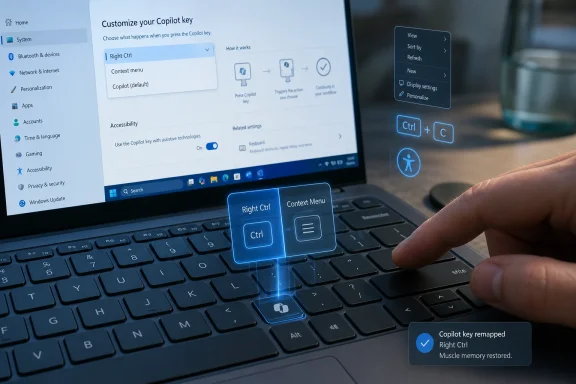
Now Microsoft says a future Windows 11 update will add a setting under Settings, Bluetooth & devices, Keyboard that allows the Copilot key to behave as Copilot, Right Ctrl, Context Menu, or other supported options. The company’s own support language acknowledges that users who depend on Right Ctrl or the Context Menu key for shortcuts or assistive technologies, including screen readers, “faced challenges” when those keys disappeared.
That is a careful corporate phrase for a blunt user reality: Microsoft moved a key that some people needed and replaced it with a key many people did not ask for.
That is why the backlash has been so persistent. The complaint was never simply that Copilot opened when users pressed a key. The complaint was that Microsoft collapsed three categories — operating system, assistant, and marketing channel — into one piece of hardware.
For casual users, the key may have been merely ignorable. For power users, programmers, multilingual typists, accessibility users, remote desktop regulars, and anyone with years of shortcut habits, the change was more intrusive. Right Ctrl is not decorative. The Context Menu key, often ignored by people who live on a mouse, is valuable for keyboard-only operation and can be essential in accessibility workflows.
Microsoft’s new remapping option recognizes that a keyboard is a shared surface. The same physical layout has to serve a gamer, a spreadsheet user, a screen reader user, a developer in Vim, a sysadmin in remote consoles, and a student writing in Word. A single-purpose AI invocation key may fit Microsoft’s sales story, but it does not automatically fit those lives.
That is the lesson here. Windows has always won by being adaptable, messy, and accommodating. The Copilot key was a strangely un-Windows move: a rigid hardware assertion in an ecosystem whose users expect to bend the system to their work.
A native Windows setting changes the calculus. It gives users and administrators a predictable location, a consistent interface, and the promise that the behavior follows the OS rather than the whims of a vendor control panel. For a feature that Microsoft encouraged across the Windows hardware ecosystem, that consistency should have existed from day one.
The implementation path described by Microsoft is straightforward: users will go to Settings, Bluetooth & devices, Keyboard and choose the Copilot key behavior from a dropdown. The available choices are expected to include Copilot, Right Ctrl, Context Menu, and other supported options. That phrasing leaves Microsoft room to maintain the earlier ability to launch Search or a supported app, but the crucial addition is that the key can now become a real key again, not merely an app launcher.
This distinction is important. Remapping a key to open another app is not the same as restoring a modifier. A modifier participates in combinations. It becomes part of the keyboard’s grammar. If a user lost Right Ctrl, giving them a shortcut to Search does not repair the damage.
There may still be edge cases. The Copilot key has been implemented in ways that behave more like a shortcut sequence than a conventional scan-code key on some devices, and users have complained that third-party remapping tools could not reliably turn it into a clean Right Ctrl equivalent. Microsoft’s native solution will be judged not by whether the dropdown exists, but by whether modifier combinations behave correctly in the applications and assistive technologies that were broken in the first place.
Keyboard accessibility is built on predictability. Screen readers, command layers, application shortcuts, and alternative input techniques often assume that keys remain where they have traditionally been. Remove or repurpose one, and the consequence is not annoyance but interruption: a workflow that used to be repeatable becomes uncertain.
Microsoft’s support document makes the accessibility angle explicit, and that is notable. The company could have presented the new setting as a customization perk. Instead, it concedes that customers who depended on those keys encountered problems. That is a more meaningful admission than the usual “we’ve heard your feedback” boilerplate.
It also points to a larger tension in modern Windows design. Microsoft has been eager to move fast with AI features, but accessibility is not compatible with surprise. When the company adds Copilot to Windows, Office, Edge, Notepad, Paint, context menus, and now hardware, it is changing more than branding. It is changing pathways through the system.
The best version of AI in Windows will be optional, scriptable, policy-aware, and respectful of input diversity. The worst version will be an overlay that assumes every user wants the same assistant at the same moment through the same gesture. The Copilot key controversy is a hardware-level reminder that inclusion is not achieved by adding a feature; it is achieved by not taking away the controls people already use.
That matters more than it sounds. Windows remains full of operations where context menus are the fastest path to action. File Explorer, desktop management, development tools, admin consoles, and legacy applications all depend on context menus as a kind of local command surface. A key that opens that surface is not obsolete just because many users ignore it.
Ironically, Microsoft has spent years trying to modernize and simplify context menus in Windows 11, sometimes frustrating users in the process. The redesigned right-click menu hid legacy commands behind “Show more options,” creating a split between the clean interface Microsoft wanted and the dense command surface power users needed. Against that backdrop, replacing the physical Context Menu key with an AI key looked less like progress and more like another example of Windows forgetting its own ergonomics.
Restoring the Context Menu option does not solve Windows 11’s context menu debates. It does, however, restore user agency. If your laptop shipped with Copilot where Menu used to be, you will be able to make the key behave like the thing the key position historically implied.
That is not nostalgia. It is continuity. The Windows desktop is still a place where files, shortcuts, shell extensions, and enterprise tools accumulate over time. A context menu is one of the few interfaces that can absorb that complexity. Taking away the keyboard path to it was always harder to justify than Microsoft seemed to realize.
This does not mean Microsoft is abandoning AI in Windows. It means the company is learning that AI cannot be injected into every surface with equal legitimacy. A keyboard key, a settings page, a file manager verb, and a notepad rewrite button are not interchangeable pieces of marketing inventory.
The early Copilot push often treated visibility as value. Put Copilot everywhere, the thinking seemed to go, and users would learn to reach for it. But operating systems are not social feeds. Repetition can produce fluency, but it can also produce fatigue, especially when the feature being promoted is not yet central to the task at hand.
The remapping update suggests a more mature model: Copilot can be present without being compulsory. That is a healthier posture for Windows because it aligns with how the platform is actually used. Some people will want a hardware AI key. Others will want Right Ctrl. Others will want Context Menu. The OS should not confuse Microsoft’s strategic priorities with the user’s immediate need.
There is a commercial lesson here, too. The AI PC market depends on convincing buyers that new hardware enables meaningful new work, not merely that it ships with a new logo on the keyboard. A forced key can advertise the category, but a remappable key can make the device easier to live with after the launch campaign fades.
But the delay matters. The Copilot key began appearing on new Windows 11 PCs in 2024, and Microsoft is now pointing to a Windows 11 update later in 2026 for the native remapping fix. That leaves a long window in which users had to rely on OEM utilities, third-party tools, registry workarounds, or simple frustration.
For IT departments, that lag is familiar. Consumer-facing Windows changes often arrive with broad ambition and limited manageability, then acquire enterprise polish after the pain becomes obvious. A keyboard remap may sound minor compared with security baselines or update rings, but it touches the same principle: administrators need predictable controls before hardware changes land at scale.
The same is true for accessibility. If a design change can interfere with assistive workflows, mitigation should not be a later-year feature. It should be part of the launch criteria. Microsoft has the resources and institutional knowledge to know this, which is why the Copilot key episode feels less like an unforeseeable mistake than a preventable overreach.
Still, late is better than never. Once the setting ships, it will give affected users a supported path back to the layout they expected. That support matters because workarounds are brittle. A native Windows option can survive driver updates, OEM software removal, and the next round of Copilot app changes.
A good operating system makes powerful features easy to find and easy to ignore. It supports defaults without worshipping them. It understands that the user’s machine is not just a delivery vehicle for the vendor’s roadmap.
The Copilot key failed that test in its initial form because it turned Microsoft’s AI ambition into a physical default at the expense of established keys. The remap option moves the design back toward the Windows tradition: make the new thing available, but let the user decide how much space it deserves.
That should become the template for Copilot across the OS. AI features should be discoverable, removable where appropriate, controllable by policy, and reversible when they collide with existing habits. Microsoft does not need to hide Copilot to make Windows users accept it. It needs to stop making Copilot feel like rent collected on every interface surface.
The danger for Microsoft is not that users hate AI. Many do not. Developers use coding assistants. Office users experiment with summaries and drafts. Admins are curious about automation and diagnostics. The danger is that users learn to associate Copilot not with capability, but with intrusion.
 Microsoft’s AI Key Meets the Old Windows Rule: Don’t Break the Keyboard
When Microsoft announced the Copilot key in January 2024, it framed the move as the first major change to the Windows PC keyboard in nearly three decades. That was not marketing trivia. The Windows key became a platform symbol because it mapped to something foundational: Start, search, shortcuts, task switching, system navigation, the grammar of the desktop.The Copilot key was different from the start. It was not a neutral modifier or a system-wide navigation affordance. It was a product key — a hardware endorsement of Microsoft’s AI strategy, printed onto laptops before the usefulness of Copilot in Windows had settled into anything like universal necessity.
That distinction matters because keyboards are not splash screens. A keycap is not a banner ad that disappears after a campaign ends. It is a contract with the user’s hands, and when Microsoft persuaded OEMs to replace Right Ctrl or the Context Menu key with Copilot on some designs, the company was not merely adding a shortcut. It was spending the accumulated trust of a decades-old layout.
Now Microsoft says a future Windows 11 update will add a setting under Settings, Bluetooth & devices, Keyboard that allows the Copilot key to behave as Copilot, Right Ctrl, Context Menu, or other supported options. The company’s own support language acknowledges that users who depend on Right Ctrl or the Context Menu key for shortcuts or assistive technologies, including screen readers, “faced challenges” when those keys disappeared.
That is a careful corporate phrase for a blunt user reality: Microsoft moved a key that some people needed and replaced it with a key many people did not ask for.
The Copilot Key Was Always More Than a Shortcut
The dedicated Copilot key arrived as part of Microsoft’s broader “AI PC” campaign. It was meant to make AI feel native, not installed; embodied, not merely launched. A button on the keyboard says something stronger than a taskbar icon. It says this feature belongs beside Ctrl, Alt, Windows, and Enter.That is why the backlash has been so persistent. The complaint was never simply that Copilot opened when users pressed a key. The complaint was that Microsoft collapsed three categories — operating system, assistant, and marketing channel — into one piece of hardware.
For casual users, the key may have been merely ignorable. For power users, programmers, multilingual typists, accessibility users, remote desktop regulars, and anyone with years of shortcut habits, the change was more intrusive. Right Ctrl is not decorative. The Context Menu key, often ignored by people who live on a mouse, is valuable for keyboard-only operation and can be essential in accessibility workflows.
Microsoft’s new remapping option recognizes that a keyboard is a shared surface. The same physical layout has to serve a gamer, a spreadsheet user, a screen reader user, a developer in Vim, a sysadmin in remote consoles, and a student writing in Word. A single-purpose AI invocation key may fit Microsoft’s sales story, but it does not automatically fit those lives.
That is the lesson here. Windows has always won by being adaptable, messy, and accommodating. The Copilot key was a strangely un-Windows move: a rigid hardware assertion in an ecosystem whose users expect to bend the system to their work.
Native Remapping Beats OEM Guesswork
Some PC makers already offer ways to alter the Copilot key’s behavior through their own utilities. That is better than nothing, but it is not a platform answer. OEM utilities vary wildly in quality, longevity, manageability, and discoverability; they also tend to be among the first things IT departments remove from clean corporate images.A native Windows setting changes the calculus. It gives users and administrators a predictable location, a consistent interface, and the promise that the behavior follows the OS rather than the whims of a vendor control panel. For a feature that Microsoft encouraged across the Windows hardware ecosystem, that consistency should have existed from day one.
The implementation path described by Microsoft is straightforward: users will go to Settings, Bluetooth & devices, Keyboard and choose the Copilot key behavior from a dropdown. The available choices are expected to include Copilot, Right Ctrl, Context Menu, and other supported options. That phrasing leaves Microsoft room to maintain the earlier ability to launch Search or a supported app, but the crucial addition is that the key can now become a real key again, not merely an app launcher.
This distinction is important. Remapping a key to open another app is not the same as restoring a modifier. A modifier participates in combinations. It becomes part of the keyboard’s grammar. If a user lost Right Ctrl, giving them a shortcut to Search does not repair the damage.
There may still be edge cases. The Copilot key has been implemented in ways that behave more like a shortcut sequence than a conventional scan-code key on some devices, and users have complained that third-party remapping tools could not reliably turn it into a clean Right Ctrl equivalent. Microsoft’s native solution will be judged not by whether the dropdown exists, but by whether modifier combinations behave correctly in the applications and assistive technologies that were broken in the first place.
Accessibility Turned a Preference Fight Into a Platform Problem
It is tempting to frame this as another chapter in the never-ending war between power users and Microsoft’s defaults. That would miss the more serious issue. The Right Ctrl and Context Menu keys are not just sentimental artifacts for people who dislike AI branding. They are part of how some users operate Windows without relying on a mouse or a conventional interaction pattern.Keyboard accessibility is built on predictability. Screen readers, command layers, application shortcuts, and alternative input techniques often assume that keys remain where they have traditionally been. Remove or repurpose one, and the consequence is not annoyance but interruption: a workflow that used to be repeatable becomes uncertain.
Microsoft’s support document makes the accessibility angle explicit, and that is notable. The company could have presented the new setting as a customization perk. Instead, it concedes that customers who depended on those keys encountered problems. That is a more meaningful admission than the usual “we’ve heard your feedback” boilerplate.
It also points to a larger tension in modern Windows design. Microsoft has been eager to move fast with AI features, but accessibility is not compatible with surprise. When the company adds Copilot to Windows, Office, Edge, Notepad, Paint, context menus, and now hardware, it is changing more than branding. It is changing pathways through the system.
The best version of AI in Windows will be optional, scriptable, policy-aware, and respectful of input diversity. The worst version will be an overlay that assumes every user wants the same assistant at the same moment through the same gesture. The Copilot key controversy is a hardware-level reminder that inclusion is not achieved by adding a feature; it is achieved by not taking away the controls people already use.
The Context Menu Key Deserved a Better Defense
The Context Menu key has always been one of the more underappreciated pieces of the Windows keyboard. It lacks the fame of Ctrl or the branding power of the Windows key, but for keyboard-heavy users it performs a simple and valuable trick: it summons the right-click menu without requiring a right click.That matters more than it sounds. Windows remains full of operations where context menus are the fastest path to action. File Explorer, desktop management, development tools, admin consoles, and legacy applications all depend on context menus as a kind of local command surface. A key that opens that surface is not obsolete just because many users ignore it.
Ironically, Microsoft has spent years trying to modernize and simplify context menus in Windows 11, sometimes frustrating users in the process. The redesigned right-click menu hid legacy commands behind “Show more options,” creating a split between the clean interface Microsoft wanted and the dense command surface power users needed. Against that backdrop, replacing the physical Context Menu key with an AI key looked less like progress and more like another example of Windows forgetting its own ergonomics.
Restoring the Context Menu option does not solve Windows 11’s context menu debates. It does, however, restore user agency. If your laptop shipped with Copilot where Menu used to be, you will be able to make the key behave like the thing the key position historically implied.
That is not nostalgia. It is continuity. The Windows desktop is still a place where files, shortcuts, shell extensions, and enterprise tools accumulate over time. A context menu is one of the few interfaces that can absorb that complexity. Taking away the keyboard path to it was always harder to justify than Microsoft seemed to realize.
Microsoft’s AI Retrenchment Is Becoming a Pattern
The Copilot key remap is not happening in isolation. Over the past year, Microsoft has repeatedly adjusted its Windows AI posture after user and administrator pushback. Some Copilot branding has been softened or removed in places where it felt tacked on. Some proposed integrations have reportedly been delayed, reduced, or canceled. Enterprise controls around Copilot have become more important as organizations try to separate useful assistance from unmanaged data exposure and interface clutter.This does not mean Microsoft is abandoning AI in Windows. It means the company is learning that AI cannot be injected into every surface with equal legitimacy. A keyboard key, a settings page, a file manager verb, and a notepad rewrite button are not interchangeable pieces of marketing inventory.
The early Copilot push often treated visibility as value. Put Copilot everywhere, the thinking seemed to go, and users would learn to reach for it. But operating systems are not social feeds. Repetition can produce fluency, but it can also produce fatigue, especially when the feature being promoted is not yet central to the task at hand.
The remapping update suggests a more mature model: Copilot can be present without being compulsory. That is a healthier posture for Windows because it aligns with how the platform is actually used. Some people will want a hardware AI key. Others will want Right Ctrl. Others will want Context Menu. The OS should not confuse Microsoft’s strategic priorities with the user’s immediate need.
There is a commercial lesson here, too. The AI PC market depends on convincing buyers that new hardware enables meaningful new work, not merely that it ships with a new logo on the keyboard. A forced key can advertise the category, but a remappable key can make the device easier to live with after the launch campaign fades.
The Setting Is Late, But It Is the Right Kind of Late
Microsoft deserves some credit for choosing a practical repair rather than a rhetorical defense. It could have argued that users should adapt, or that Copilot’s growing capabilities would justify the lost key over time. Instead, it is adding a setting that directly addresses the complaint.But the delay matters. The Copilot key began appearing on new Windows 11 PCs in 2024, and Microsoft is now pointing to a Windows 11 update later in 2026 for the native remapping fix. That leaves a long window in which users had to rely on OEM utilities, third-party tools, registry workarounds, or simple frustration.
For IT departments, that lag is familiar. Consumer-facing Windows changes often arrive with broad ambition and limited manageability, then acquire enterprise polish after the pain becomes obvious. A keyboard remap may sound minor compared with security baselines or update rings, but it touches the same principle: administrators need predictable controls before hardware changes land at scale.
The same is true for accessibility. If a design change can interfere with assistive workflows, mitigation should not be a later-year feature. It should be part of the launch criteria. Microsoft has the resources and institutional knowledge to know this, which is why the Copilot key episode feels less like an unforeseeable mistake than a preventable overreach.
Still, late is better than never. Once the setting ships, it will give affected users a supported path back to the layout they expected. That support matters because workarounds are brittle. A native Windows option can survive driver updates, OEM software removal, and the next round of Copilot app changes.
A Small Dropdown Carries a Bigger Windows Lesson
The most interesting thing about the coming setting is not the dropdown itself. It is what the dropdown says about where Windows is headed. Microsoft is trying to make AI feel ambient, but Windows users keep reminding the company that ambient does not mean unavoidable.A good operating system makes powerful features easy to find and easy to ignore. It supports defaults without worshipping them. It understands that the user’s machine is not just a delivery vehicle for the vendor’s roadmap.
The Copilot key failed that test in its initial form because it turned Microsoft’s AI ambition into a physical default at the expense of established keys. The remap option moves the design back toward the Windows tradition: make the new thing available, but let the user decide how much space it deserves.
That should become the template for Copilot across the OS. AI features should be discoverable, removable where appropriate, controllable by policy, and reversible when they collide with existing habits. Microsoft does not need to hide Copilot to make Windows users accept it. It needs to stop making Copilot feel like rent collected on every interface surface.
The danger for Microsoft is not that users hate AI. Many do not. Developers use coding assistants. Office users experiment with summaries and drafts. Admins are curious about automation and diagnostics. The danger is that users learn to associate Copilot not with capability, but with intrusion.
The Keyboard Revolt Leaves Microsoft a Clearer Map
The practical outcome is straightforward, and it will be welcomed most by the people who felt the Copilot key in their hands rather than saw it in a keynote. The larger outcome is more strategic: Microsoft is being forced to distinguish between AI as a useful layer and AI as a compulsory brand presence.- Windows 11 PCs with a dedicated Copilot key are slated to receive a native remapping option later in 2026.
- The new Settings control will allow the Copilot key to behave as Right Ctrl or the Context Menu key on supported devices.
- The change is intended to help users whose shortcuts, accessibility tools, or keyboard-only workflows were disrupted by the loss of those traditional keys.
- OEM remapping utilities may remain useful, but a Windows-native option gives users and administrators a more consistent baseline.
- The update does not signal the end of Copilot in Windows; it signals that Microsoft is learning where forced AI placement creates more friction than value.
- The real test will be whether the remapped key behaves like a true modifier or menu key in demanding software, remote sessions, and assistive technology workflows.
References
- Primary source: gHacks
Published: Tue, 19 May 2026 10:06:59 GMT

Microsoft Adds Option to Remap Windows 11 Copilot Key Back to Right Ctrl or Context Menu - gHacks Tech News
Microsoft has confirmed that a Windows 11 update later this year will let users remap the dedicated Copilot key back to a Right Ctrl or Context Menu key. www.ghacks.net
- Related coverage: windowscentral.com

Don't like Windows 11's Copilot key? Microsoft confirms it will let you remap it later this year
Windows 11's special Copilot Key has not been the popular hit that Microsoft was hoping it would be, and has now confirmed plans to let users remap the button back to its old functionality. www.windowscentral.com
- Official source: support.microsoft.com

Understand updates to the Copilot key on Windows devices | Microsoft Support
Understand updates to the Copilot key on Windows devices
support.microsoft.com
- Related coverage: tweaktown.com

Microsoft confirms Windows 11 update will let users remap the Copilot key back to Right Ctrl or Context Menu
The hardware is already out there, so a software fix is the natural solution, and it will be a godsend for anyone who relied on the Right Ctrl key. www.tweaktown.com
- Related coverage: business-standard.com
Soon, Microsoft will let users reconfigure control of Copilot key: Know why | Tech News - Business Standard
Windows 11 Copilot key and Updates: Microsoft has confirmed a future Windows 11 update that will allow users to convert the Copilot key back into a Right Ctrl or Context Menu keywww.business-standard.com
- Related coverage: techtimes.com

Microsoft Expands Windows 11 Copilot Key Customization After User Backlash
Microsoft will soon allow Windows 11 users to remap the Copilot key as Right Ctrl or Context Menu for better accessibility. www.techtimes.com
- Related coverage: windowsnews.ai
Windows 11 2026 Update Lets You Remap the Copilot Key to Right Ctrl or Context Menu
A Windows 11 update scheduled for late 2026 will let users remap the dedicated Copilot key to either Right Ctrl or the Context menu key directly from...windowsnews.ai
- Related coverage: windowsforum.com

Windows 11 Lets You Remap the Copilot Key Back to Right Ctrl or Menu
Microsoft has confirmed in May 2026 that a future Windows 11 update will let users remap the dedicated Copilot key on newer PCs so it behaves as either Right Ctrl or the Context Menu key instead. That sounds like a small concession, but it is really an admission that Microsoft overreached when... windowsforum.com
- Related coverage: techradar.com
Fed up with Windows 11's clunky right-click menu? Microsoft just dropped a hint that it could become more streamlined | TechRadar
Some apps are getting tidier context-sensitive options, and the hope is that this might be applied more broadlywww.techradar.com - Official source: news.microsoft.com
- Official source: blogs.windows.com

Introducing a new Copilot key to kick off the year of AI-powered Windows PCs
Today, we are excited to take the next significant step forward and introduce a new Copilot key to Windows 11 PCs. In this new year, we will be ushering in a significant shift toward a more personal and intelligent computing future where AI will be s blogs.windows.com
- Related coverage: techcrunch.com

Microsoft wants to add a Copilot key to your PC keyboard | TechCrunch
Microsoft would like 2024 to be the "year of the AI PC," and to put a point on that, the company today announced a new key for Copilot -- that is, a techcrunch.com
- Related coverage: techspot.com
Microsoft is adding a dedicated Copilot key to Windows keyboards | TechSpot
The Copilot key will appear on new PCs and laptops from Microsoft partners. It will, of course, be used to open Microsoft's Windows Copilot generative AI assistant...www.techspot.com - Related coverage: tomshardware.com
New Windows 11 Insider build autostarts Copilot AI assistant and enables USB 4 80Gbps support
AI is ready to go from bootwww.tomshardware.com
- Related coverage: cnbc.com

Microsoft says a Copilot key is coming to keyboards on Windows PCs starting this month
Microsoft sees 2024 as the year of the artificial intelligence personal computer. A new key on Surface PCs and other devices might help.www.cnbc.com
- Related coverage: gigazine.net

Microsoft adds new keys to standard PC keyboard for the first time in 30 years, 'Copilot' key to access generation AI tool appears
The news blog specialized in Japanese culture, odd news, gadgets and all other funny stuffs. Updated everyday. gigazine.net
- Related coverage: pymnts.com

Microsoft Adds Copilot Button to Keyboards | PYMNTS.com
Microsoft is putting its artificial intelligence Copilot tool at users’ fingertips. The tech giant said in a Thursday (Jan. 4) blog post it is adding a www.pymnts.com
- Related coverage: axios.com

Microsoft gives AI a place on the Windows keyboard
It's the first change to the PC keyboard since the addition of the Windows button 30 years ago.www.axios.com
- Official source: wwps.microsoft.com
