

Microsoft changed Windows 11 version 22H2 so that, after the October 2022 update, Command Prompt, Windows PowerShell, and other console applications open inside Windows Terminal by default rather than the older Windows Console Host, while still allowing users and administrators to switch back. That sounds like a cosmetic reshuffle until an old deployment tool, installer, text UI, or background script suddenly behaves differently. The move is less about killing Command Prompt than about changing the room in which it lives. For Windows users and IT shops, the real story is Microsoft’s continuing effort to modernize Windows without quite severing the compatibility bargain that made Windows Windows.
The support-page phrasing is easy to misread, especially because Microsoft’s own older help articles have sometimes framed the Command Prompt and PowerShell transition in ways that blur the distinction between shell and host. Command Prompt is still
That distinction matters because many Windows arguments are really arguments about layers. A shell interprets commands. A console host provides the window and the I/O surface. A terminal emulator mediates how text, colors, keyboard input, escape sequences, tabs, rendering, and process attachment behave. Microsoft’s change moved the default experience from the old
For normal users, the immediate effect is simple: launch Command Prompt or Windows PowerShell and it appears in a Windows Terminal window. For developers and sysadmins, the consequences are subtler. Anything that assumed it was talking to the old console host may now be dealing with a different host with different behavior, different window management, and a different relationship to graphical shell features.
This is why Microsoft’s support note includes a compatibility warning. The company specifically calls out applications that blend graphical elements with text-mode elements, a phrase that should make anyone with a decade-old installer, diagnostic utility, serial-console tool, or curses-like text UI pay attention. The command line is often treated as the most stable surface in computing, but in practice it is full of undocumented habits.
That durability is why terminal changes are more sensitive than they look. Windows administrators do not just use command-line windows interactively. They use them as a substrate for logon scripts, service wrappers, installers, software deployment tools, recovery procedures, serial adapters, firmware utilities, build systems, remote-support workflows, and “temporary” scripts that somehow become infrastructure.
The old console host accumulated compatibility behaviors precisely because Windows had to run everything. Its limitations were visible: rough Unicode history, awkward resizing, limited tab story, dated rendering, and weaker fit with modern developer workflows. But its predictability made it a kind of truce between Microsoft and the long tail of Windows software.
Windows Terminal represents a different bet. It assumes users want tabs, profiles, GPU-accelerated rendering, modern text handling, better customization, and a single place for Command Prompt, PowerShell, WSL, SSH sessions, and cloud shells. That is an obviously better experience for many people. It is also a different default for software that may have assumed the host was invisible and unchanging.
For years, Windows users who cared about terminals assembled their own solutions. Some used Console2, ConEmu, Cmder, mintty, third-party SSH clients, or integrated terminals in editors. Others avoided the Windows console entirely when possible. Microsoft’s old terminal story was not just aesthetically dated; it was strategically out of sync with where development had moved.
Windows Terminal was the correction. It gave Microsoft a modern first-party answer: tabs, profiles, themes, panes, Unicode, GPU-backed text rendering, JSON-era configuration roots, and a UI that did not immediately signal “legacy subsystem.” Making it the default in Windows 11 22H2 was the moment Microsoft stopped treating Terminal as an optional enthusiast app and started treating it as the front door to command-line Windows.
That shift aligns with the broader Windows 11 posture. Microsoft is willing to change defaults where it believes the modern experience is mature enough, while retaining fallback paths for the enterprise and the long tail. File Explorer gets tabs. Settings absorbs more Control Panel territory. Security defaults ratchet upward. And the console host, once untouchable by inertia, becomes a legacy option rather than the first stop.
The most visible complaints tend to come from users who notice a window they did not expect. A scheduled task, startup helper, sync tool, or script that used to flash briefly or hide behind the scenes may now appear as a Terminal window. That is not always a Terminal bug. It can be the result of an application relying on implicit host behavior that changed when Windows Terminal became the default.
More technical failures can be harder to diagnose. Rendering differences may alter box-drawing characters, progress bars, cursor positioning, color handling, or pseudo-graphical layouts. Input behavior can differ in edge cases. Window title handling, process lifetime, focus, elevation prompts, and profile selection can interact with user expectations in surprising ways.
There is a familiar Windows lesson here: compatibility issues rarely arrive as clean breakages. They arrive as “it looks weird,” “it stays open now,” “the cursor jumps,” “the installer hangs,” “the window is different,” or “our support script stopped behaving on new machines.” Those are the cases that consume help-desk hours because the underlying platform change is easy to miss.
That is the Windows compromise in miniature. Microsoft changes the default for the consumer and developer mainstream, but it leaves administrators a way to pin behavior to the older host. The documented registry location under the current user’s console startup settings and the GUID values for automatic selection, legacy Windows Console Host, and Windows Terminal are not glamorous. They are the difference between a modernization push and an operational incident.
For individual users, the fix is straightforward. Go to Settings, then System, then For developers, and set the Terminal option to Windows Console Host. Or open Windows Terminal, go to Startup, and change the default terminal application. The old host is not gone; it is no longer the default.
For managed fleets, the user-level nature of the setting is both useful and annoying. It means organizations can target the change without replacing system files or blocking Windows Terminal outright. It also means profile management, existing user state, and policy timing matter. A clean build, an upgraded workstation, and a roaming-profile scenario may not all present the same support surface.
This matters because Windows Terminal is not merely a replacement executable. It is part of a broader redirection architecture for console hosting. The operating system needs a way to decide what happens when a console process starts, whether it should be hosted by the older console host or by Terminal, and how to preserve compatibility for systems without Terminal or with policies that disable it.
The GUIDs are the administrative fingerprints of that design. They are ugly in the way enterprise Windows is often ugly: precise, scriptable, and meant for people who need deterministic behavior more than elegant UI. If you are building a standard operating environment, those values are not trivia. They are how you keep a fleet from changing command-line behavior underneath a fragile toolchain.
It also shows why “just uninstall Windows Terminal” is the wrong mental model. Windows Terminal is now part of the Windows command-line experience, not merely a Store app sitting off to the side. You can avoid making it the default, and you can fall back to Console Host where required, but Microsoft’s preferred direction is clear.
Profiles are another practical improvement. A single Terminal window can host Command Prompt, Windows PowerShell, PowerShell 7, WSL distributions, SSH sessions, and developer shells with different startup directories and fonts. For anyone who moves between local administration, Linux tooling, cloud commands, and scripting, the old console host feels like a tool from another era.
The rendering improvements also matter. Modern command-line tools are more visually ambitious than their predecessors. They use color, Unicode, tables, progress indicators, inline prompts, and interactive selection interfaces. A better terminal does not merely make these prettier; it makes Windows a more reliable target for cross-platform command-line applications.
But none of that invalidates the compatibility complaints. A better default can still be a breaking default. The right argument is not that Windows Terminal should never have become the default. The right argument is that Microsoft’s support page should be read as an operational advisory, not just a help article.
Organizations running Windows 11 22H2 or later should decide explicitly what they support. If the environment mostly uses modern tooling, Windows Terminal should probably remain the default. If the environment depends on legacy console utilities, old installers, or brittle text-mode applications, administrators should test those workflows and consider forcing Console Host for affected users or devices.
The testing should be concrete. Do not simply launch Command Prompt and declare victory. Run the actual deployment scripts, vendor utilities, recovery tools, remote-support scripts, text UI programs, and scheduled tasks that the organization depends on. Watch not only for crashes but for changed window behavior, focus problems, rendering artifacts, and processes that remain visible when they used to disappear.
Help desks should also know the vocabulary. If a user says “PowerShell changed,” the answer may not involve PowerShell at all. The shell may be identical while the host has changed. That distinction can save time, especially when troubleshooting screenshots show a tabbed Terminal window instead of the older console frame.
This naming stack creates support confusion. A user launching “PowerShell” may be launching Windows PowerShell inside Windows Terminal. Another user launching “Terminal” may open a profile that starts PowerShell, Command Prompt, or WSL. An administrator changing the default terminal application is not changing the default shell. A script failing in a Terminal-hosted session may not be failing because of the script language.
Microsoft’s support article tries to separate these concepts, but the ecosystem still inherits years of loose language. Even the phrase “Command Prompt and Windows PowerShell” in a support title can lead readers to think one is replacing the other. The actual change is more specific and more interesting: the host for console windows changed.
That precision matters for WindowsForum readers because many problems live exactly in that boundary layer. If the command parser, profile script, execution policy, and PATH are unchanged, but the window behavior changed after the October 2022 update, the terminal host belongs high on the suspect list.
That complicates the old “new Terminal versus old Console Host” dichotomy. Microsoft can make Terminal the preferred default while also bringing some improvements back to Console Host for environments where Terminal is unavailable, inappropriate, or not the right UI surface. That is a pragmatic strategy. Recovery environments, minimal systems, servers, and tightly managed desktops do not always want the full Terminal app.
It also means administrators should avoid treating Console Host as a permanent museum piece. It remains a compatibility option, but the underlying command-line platform is moving. The distinction between shell, terminal, and console host will keep mattering as Microsoft updates one without necessarily changing the others.
For developers, the lesson is similar. If an application depends on console behavior, test against both hosts. Do not assume the host is invisible. Do not assume users are on the same default. And do not assume a graphical-text hybrid that behaved acceptably in the old console will automatically behave in Terminal, or vice versa.
The operational lesson is that defaults are infrastructure. A default terminal application sounds like a personal preference until it affects every invocation path for console applications. Once that happens, it becomes part of the compatibility matrix for Windows 11.
This is the same pattern Windows administrators have seen with browser defaults, application control, driver models, macro policies, security baselines, and Start menu layouts. Microsoft changes a default in pursuit of a more modern or secure posture. Consumers mostly absorb it. Enterprises need to decide whether to accept, defer, override, or phase it.
The good news is that Microsoft did not remove the old behavior. The bad news is that the old behavior is now something you may have to choose deliberately. That is a meaningful shift in the Windows social contract.
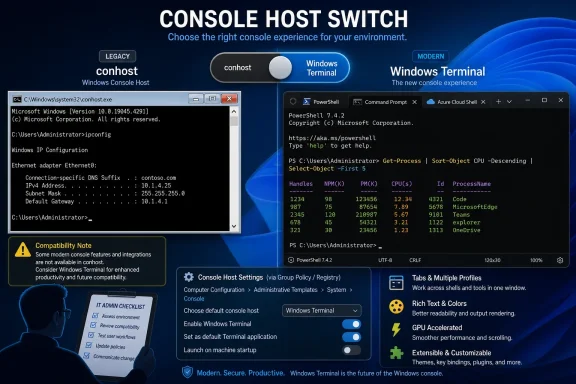 Microsoft Did Not Replace PowerShell — It Replaced the Stage
The support-page phrasing is easy to misread, especially because Microsoft’s own older help articles have sometimes framed the Command Prompt and PowerShell transition in ways that blur the distinction between shell and host. Command Prompt is still cmd.exe. Windows PowerShell is still Windows PowerShell. What changed in Windows 11 22H2 is the default terminal application: the windowing, rendering, input, tab, and session-hosting layer around those shells.That distinction matters because many Windows arguments are really arguments about layers. A shell interprets commands. A console host provides the window and the I/O surface. A terminal emulator mediates how text, colors, keyboard input, escape sequences, tabs, rendering, and process attachment behave. Microsoft’s change moved the default experience from the old
conhost.exe model to Windows Terminal, a more modern app built for multiple shells and modern rendering expectations.For normal users, the immediate effect is simple: launch Command Prompt or Windows PowerShell and it appears in a Windows Terminal window. For developers and sysadmins, the consequences are subtler. Anything that assumed it was talking to the old console host may now be dealing with a different host with different behavior, different window management, and a different relationship to graphical shell features.
This is why Microsoft’s support note includes a compatibility warning. The company specifically calls out applications that blend graphical elements with text-mode elements, a phrase that should make anyone with a decade-old installer, diagnostic utility, serial-console tool, or curses-like text UI pay attention. The command line is often treated as the most stable surface in computing, but in practice it is full of undocumented habits.
The Old Console Host Was a Compatibility Contract in Executable Form
The Windows Console Host was never glamorous. It was the square, stubborn, occasionally infuriating window that launched when a batch file, command interpreter, or console program needed a screen. Its value was not beauty; its value was predictability. If you wrote something odd in 2008 and it worked in a console window, there was a good chance it would limp along years later.That durability is why terminal changes are more sensitive than they look. Windows administrators do not just use command-line windows interactively. They use them as a substrate for logon scripts, service wrappers, installers, software deployment tools, recovery procedures, serial adapters, firmware utilities, build systems, remote-support workflows, and “temporary” scripts that somehow become infrastructure.
The old console host accumulated compatibility behaviors precisely because Windows had to run everything. Its limitations were visible: rough Unicode history, awkward resizing, limited tab story, dated rendering, and weaker fit with modern developer workflows. But its predictability made it a kind of truce between Microsoft and the long tail of Windows software.
Windows Terminal represents a different bet. It assumes users want tabs, profiles, GPU-accelerated rendering, modern text handling, better customization, and a single place for Command Prompt, PowerShell, WSL, SSH sessions, and cloud shells. That is an obviously better experience for many people. It is also a different default for software that may have assumed the host was invisible and unchanging.
Windows Terminal Won Because the Command Line Became a Developer Product Again
The irony of this change is that Windows Terminal’s rise was not driven by nostalgia for DOS boxes. It was driven by the opposite: Microsoft needed Windows to look credible to developers who live in terminals all day. The modern Windows command-line story had to accommodate PowerShell, WSL, Git, Node, Python, SSH, Azure tooling, package managers, containers, and a generation of workflows imported from Unix-like environments.For years, Windows users who cared about terminals assembled their own solutions. Some used Console2, ConEmu, Cmder, mintty, third-party SSH clients, or integrated terminals in editors. Others avoided the Windows console entirely when possible. Microsoft’s old terminal story was not just aesthetically dated; it was strategically out of sync with where development had moved.
Windows Terminal was the correction. It gave Microsoft a modern first-party answer: tabs, profiles, themes, panes, Unicode, GPU-backed text rendering, JSON-era configuration roots, and a UI that did not immediately signal “legacy subsystem.” Making it the default in Windows 11 22H2 was the moment Microsoft stopped treating Terminal as an optional enthusiast app and started treating it as the front door to command-line Windows.
That shift aligns with the broader Windows 11 posture. Microsoft is willing to change defaults where it believes the modern experience is mature enough, while retaining fallback paths for the enterprise and the long tail. File Explorer gets tabs. Settings absorbs more Control Panel territory. Security defaults ratchet upward. And the console host, once untouchable by inertia, becomes a legacy option rather than the first stop.
The Compatibility Warning Is Doing More Work Than It Seems
Microsoft’s note says users “might experience compatibility issues” with apps, especially those that blend graphical elements with text-mode elements. That language is mild, but the category is broad. It can include old setup programs, character-cell applications, custom admin tools, progress-display utilities, screen scrapers, test harnesses, and tools that assume particular console APIs or window behaviors.The most visible complaints tend to come from users who notice a window they did not expect. A scheduled task, startup helper, sync tool, or script that used to flash briefly or hide behind the scenes may now appear as a Terminal window. That is not always a Terminal bug. It can be the result of an application relying on implicit host behavior that changed when Windows Terminal became the default.
More technical failures can be harder to diagnose. Rendering differences may alter box-drawing characters, progress bars, cursor positioning, color handling, or pseudo-graphical layouts. Input behavior can differ in edge cases. Window title handling, process lifetime, focus, elevation prompts, and profile selection can interact with user expectations in surprising ways.
There is a familiar Windows lesson here: compatibility issues rarely arrive as clean breakages. They arrive as “it looks weird,” “it stays open now,” “the cursor jumps,” “the installer hangs,” “the window is different,” or “our support script stopped behaving on new machines.” Those are the cases that consume help-desk hours because the underlying platform change is easy to miss.
Microsoft Left the Escape Hatch Exactly Where Enterprises Need It
The most important part of the support article is not the announcement of Windows Terminal as the default. It is the opt-out path. Microsoft provides user-facing switches through Settings, through Windows Terminal’s own startup settings, and through the properties of an existing Windows Console Host window. More importantly, it documents registry values and notes that the change can be applied using Group Policy.That is the Windows compromise in miniature. Microsoft changes the default for the consumer and developer mainstream, but it leaves administrators a way to pin behavior to the older host. The documented registry location under the current user’s console startup settings and the GUID values for automatic selection, legacy Windows Console Host, and Windows Terminal are not glamorous. They are the difference between a modernization push and an operational incident.
For individual users, the fix is straightforward. Go to Settings, then System, then For developers, and set the Terminal option to Windows Console Host. Or open Windows Terminal, go to Startup, and change the default terminal application. The old host is not gone; it is no longer the default.
For managed fleets, the user-level nature of the setting is both useful and annoying. It means organizations can target the change without replacing system files or blocking Windows Terminal outright. It also means profile management, existing user state, and policy timing matter. A clean build, an upgraded workstation, and a roaming-profile scenario may not all present the same support surface.
The Registry Details Reveal Microsoft’s Real Design Goal
The registry values Microsoft documents are telling. There is an automatic selection mode, a Windows Console Host legacy mode, and a Windows Terminal mode. That is not a binary “new versus old” switch; it is a delegation model. Windows can decide which host should receive console applications, or administrators can force the decision.This matters because Windows Terminal is not merely a replacement executable. It is part of a broader redirection architecture for console hosting. The operating system needs a way to decide what happens when a console process starts, whether it should be hosted by the older console host or by Terminal, and how to preserve compatibility for systems without Terminal or with policies that disable it.
The GUIDs are the administrative fingerprints of that design. They are ugly in the way enterprise Windows is often ugly: precise, scriptable, and meant for people who need deterministic behavior more than elegant UI. If you are building a standard operating environment, those values are not trivia. They are how you keep a fleet from changing command-line behavior underneath a fragile toolchain.
It also shows why “just uninstall Windows Terminal” is the wrong mental model. Windows Terminal is now part of the Windows command-line experience, not merely a Store app sitting off to the side. You can avoid making it the default, and you can fall back to Console Host where required, but Microsoft’s preferred direction is clear.
The User Experience Upgrade Is Real, Even If the Breakage Is Too
It would be easy to frame this as another case of Microsoft changing things for the sake of change. That would be too simple. Windows Terminal is genuinely better for a huge share of command-line work. Tabs alone justify the switch for many users who previously had a taskbar full of indistinguishable console windows.Profiles are another practical improvement. A single Terminal window can host Command Prompt, Windows PowerShell, PowerShell 7, WSL distributions, SSH sessions, and developer shells with different startup directories and fonts. For anyone who moves between local administration, Linux tooling, cloud commands, and scripting, the old console host feels like a tool from another era.
The rendering improvements also matter. Modern command-line tools are more visually ambitious than their predecessors. They use color, Unicode, tables, progress indicators, inline prompts, and interactive selection interfaces. A better terminal does not merely make these prettier; it makes Windows a more reliable target for cross-platform command-line applications.
But none of that invalidates the compatibility complaints. A better default can still be a breaking default. The right argument is not that Windows Terminal should never have become the default. The right argument is that Microsoft’s support page should be read as an operational advisory, not just a help article.
Admins Should Treat This as a Baseline Decision, Not a User Preference
In unmanaged environments, the default terminal is a matter of taste until something breaks. In managed environments, it is a baseline decision. The worst outcome is not choosing Windows Terminal or Console Host. The worst outcome is allowing the default to vary randomly across machines, images, update histories, and user profiles.Organizations running Windows 11 22H2 or later should decide explicitly what they support. If the environment mostly uses modern tooling, Windows Terminal should probably remain the default. If the environment depends on legacy console utilities, old installers, or brittle text-mode applications, administrators should test those workflows and consider forcing Console Host for affected users or devices.
The testing should be concrete. Do not simply launch Command Prompt and declare victory. Run the actual deployment scripts, vendor utilities, recovery tools, remote-support scripts, text UI programs, and scheduled tasks that the organization depends on. Watch not only for crashes but for changed window behavior, focus problems, rendering artifacts, and processes that remain visible when they used to disappear.
Help desks should also know the vocabulary. If a user says “PowerShell changed,” the answer may not involve PowerShell at all. The shell may be identical while the host has changed. That distinction can save time, especially when troubleshooting screenshots show a tabbed Terminal window instead of the older console frame.
The Naming Problem Keeps Making Windows Harder to Explain
Microsoft has long struggled with command-line naming. Command Prompt is a shell and a cultural artifact. PowerShell is both a Windows inbox shell and a cross-platform project in its newer form. Windows Terminal is not a shell but often looks like “the command line” to users. Windows Console Host is the thing many users never knew existed until something broke.This naming stack creates support confusion. A user launching “PowerShell” may be launching Windows PowerShell inside Windows Terminal. Another user launching “Terminal” may open a profile that starts PowerShell, Command Prompt, or WSL. An administrator changing the default terminal application is not changing the default shell. A script failing in a Terminal-hosted session may not be failing because of the script language.
Microsoft’s support article tries to separate these concepts, but the ecosystem still inherits years of loose language. Even the phrase “Command Prompt and Windows PowerShell” in a support title can lead readers to think one is replacing the other. The actual change is more specific and more interesting: the host for console windows changed.
That precision matters for WindowsForum readers because many problems live exactly in that boundary layer. If the command parser, profile script, execution policy, and PATH are unchanged, but the window behavior changed after the October 2022 update, the terminal host belongs high on the suspect list.
The 22H2 Change Foreshadowed a More Fluid Windows Console Future
The 2022 default switch was not the end of Microsoft’s console work. It was a marker in a longer migration. Windows Terminal and Windows Console are now part of an intertwined open-source command-line effort, and Microsoft has continued to move improvements across that boundary. The old host is no longer frozen amber; it is being dragged, selectively, into the modern era.That complicates the old “new Terminal versus old Console Host” dichotomy. Microsoft can make Terminal the preferred default while also bringing some improvements back to Console Host for environments where Terminal is unavailable, inappropriate, or not the right UI surface. That is a pragmatic strategy. Recovery environments, minimal systems, servers, and tightly managed desktops do not always want the full Terminal app.
It also means administrators should avoid treating Console Host as a permanent museum piece. It remains a compatibility option, but the underlying command-line platform is moving. The distinction between shell, terminal, and console host will keep mattering as Microsoft updates one without necessarily changing the others.
For developers, the lesson is similar. If an application depends on console behavior, test against both hosts. Do not assume the host is invisible. Do not assume users are on the same default. And do not assume a graphical-text hybrid that behaved acceptably in the old console will automatically behave in Terminal, or vice versa.
The Practical Fix Is Simple; the Operational Lesson Is Not
For a single PC, the fix is almost boring. Change the default terminal application back to Windows Console Host. Microsoft provides multiple routes, and the setting is discoverable enough once you know what to search for. That is why this issue is less a disaster than a diagnostic trap.The operational lesson is that defaults are infrastructure. A default terminal application sounds like a personal preference until it affects every invocation path for console applications. Once that happens, it becomes part of the compatibility matrix for Windows 11.
This is the same pattern Windows administrators have seen with browser defaults, application control, driver models, macro policies, security baselines, and Start menu layouts. Microsoft changes a default in pursuit of a more modern or secure posture. Consumers mostly absorb it. Enterprises need to decide whether to accept, defer, override, or phase it.
The good news is that Microsoft did not remove the old behavior. The bad news is that the old behavior is now something you may have to choose deliberately. That is a meaningful shift in the Windows social contract.
The Console Switch Tells IT Shops Where to Look First
The most useful response is not panic, and it is not indifference. It is inventory. If your environment has console tools that matter, now is the time to know which host they are running under and whether that choice is intentional.- Windows 11 22H2 made Windows Terminal the default host for Command Prompt, Windows PowerShell, and other console applications after the October 2022 update.
- The change does not remove Command Prompt or Windows PowerShell; it changes the application that hosts their windows.
- Compatibility problems are most likely with older or unusual tools that mix text-mode behavior with graphical assumptions.
- Users can switch back to Windows Console Host through Windows Settings, Windows Terminal settings, or console properties.
- Administrators can manage the behavior through documented registry values and policy-based deployment.
- The safest enterprise posture is to test real scripts and utilities under both Windows Terminal and Windows Console Host before standardizing a Windows 11 image.
References
- Primary source: Microsoft Support
Published: Fri, 05 Jun 2026 04:34:59 Z
Command Prompt and Windows Powershell | Microsoft Support
Command Prompt and Windows Powershellsupport.microsoft.com - Related coverage: windowscentral.com
Windows 11 has a new default command line experience | Windows Central
All command line apps on Windows 11 will now automatically open in Windows Terminal.www.windowscentral.com - Related coverage: techworm.net
Windows Terminal Is The Default Command Line Tool In Latest Windows 11 Update
Microsoft on Tuesday announced that Windows Terminal will be the default command line tool for all console programs on the latest Windows 11 2022 optional update. www.techworm.net
- Official source: blogs.windows.com
How to get the Windows 11 2022 Update
Today, Panos Panay announced the release and availability of the Windows 11 2022 Update, the latest version of Windows 11. Windows is a key component of how more than a billion peopblogs.windows.com - Related coverage: phoronix.com
Microsoft Promotes Its Open-Source Terminal To The Default For Windows 11 CLI Apps - Phoronix
As some interesting open-source news out of Microsoft today, their open-source Windows Terminal that has been in development the past few years and providing many modern features is now the default beginning with Windows 11 22H2.www.phoronix.com
- Official source: devblogs.microsoft.com
Windows Terminal as your Default Command Line Experience - Windows Command Line
Hey Windows Terminal fans! This month we are delivering a servicing release and the next feature release is scheduled for January, so we figured we'ddevblogs.microsoft.com
- Related coverage: notebookcheck.net
Windows Terminal will be the default Command Line on Windows - Notebookcheck News
Microsoft has declared that the Windows Terminal app will be the default command line on Windows 11 PCs during 2022. Other third-party terminals will also have full functionality and users will be able to set them as default more easily. The intended change will begin with Windows Insiders, who... www.notebookcheck.net
- Related coverage: technewsday.com
- Related coverage: howtogeek.com
How to Make Windows Terminal Your Default Terminal App
Love using the Windows Terminal? Make it your default on Windows. www.howtogeek.com
- Related coverage: zergroribuck.weebly.com

