

Microsoft has spent years turning Windows 11 from a bare operating-system foundation into a more complete everyday toolkit, and three additions now make that progress unusually tangible: Snipping Tool can replace basic paid screenshot and screen-recording software, File Explorer can handle common archive formats without an extra utility, and Live Captions can transcribe system audio locally. For many home users, students, support technicians, and office workers, these features eliminate three familiar stops in the new-PC setup ritual. The claim that they make third-party apps universally pointless goes too far, however, and one important detail in the original report is already outdated: current Windows 11 releases can create 7z and TAR archives as well as ZIP files, although encrypted archives and advanced workflows still require specialist software.
For much of Windows history, Microsoft supplied the essentials while leaving obvious functional gaps for independent developers. A freshly installed PC could browse the web, manage files, and edit simple documents, but anyone doing serious work quickly added screenshot software, an archive manager, media tools, and accessibility utilities.
That ecosystem produced enduring Windows names such as WinZip, WinRAR, 7-Zip, and Snagit. These applications did not merely duplicate Windows features; they became popular because the built-in alternatives were absent, slow, awkward, or severely limited.
Windows 11 reflects a different strategy. Microsoft now updates many inbox applications through the Microsoft Store, allowing Snipping Tool and other components to evolve independently of the operating system’s traditional annual feature-update cycle.
That distinction matters. A professional technical writer may still need scrolling capture, reusable annotations, templates, and managed cloud publishing, while someone taking occasional screenshots probably needs none of those things. Windows is increasingly designed to satisfy the second user immediately and give the first user enough functionality to postpone a purchase until a genuine requirement emerges.
Archive support followed a similarly gradual path. Windows has handled ZIP files for decades, but formats such as RAR and 7z remained associated with third-party software until Microsoft integrated technology based on the open-source libarchive project.
Live Captions arrived as part of Windows 11’s accessibility improvements. It applies speech recognition across the operating system rather than relying on the individual video player, website, conferencing service, or content creator to supply captions.
Store-delivered application updates changed the equation. Microsoft can now improve Snipping Tool, Notepad, Paint, Photos, and other utilities more frequently, although availability may still vary by Windows version, hardware class, staged rollout, region, and application version.
PC users increasingly expect the same experience. Microsoft’s challenge is to provide it without sacrificing the control, compatibility, and specialized software ecosystem that distinguish Windows from more tightly controlled platforms.
Pressing Print Screen can also launch the snipping interface when the corresponding Windows setting is enabled. The workflow is fast enough that many users never need to open the full application before taking a capture.
These tools cover the most common screenshot workflow: capture a region, draw attention to a button or error message, and paste the result into email, Teams, a forum post, or documentation. They do not provide a complete graphics editor, but they are no longer limited to saving an untouched rectangular image.
OCR is especially valuable when troubleshooting Windows. Instead of manually typing a long error code or PowerShell message, a user can capture it, extract the text, and search or share the exact wording.
Users should still check the result before trusting it. Small fonts, unusual typefaces, low contrast, compression artifacts, and multilingual content can produce recognition errors, and a single incorrect character can invalidate a command, product key, file path, or error identifier.
Microsoft also connects recordings to Clipchamp for more involved editing, including captions and audio work. That handoff reveals the intended boundary: Snipping Tool performs rapid capture, while a video editor handles production.
A person who takes three screenshots a week may see little reason to pay for that package. Someone producing hundreds of annotated captures for manuals, training courses, reviews, or customer support may save enough time to justify it easily.
Browser extensions can fill the webpage portion of this gap, but they do not necessarily capture scrolling content inside desktop applications. Installing an extension also introduces another component with its own permissions, update process, privacy implications, and compatibility risks.
Snipping Tool is better viewed as a highly capable general-purpose utility. It replaces paid software when the paid software was being used only for basic capture, not when its automation and publishing systems were central to the job.
This difference is small for occasional use and significant at scale. Five extra clicks are irrelevant once a week but expensive when repeated hundreds of times.
Windows 11 changed that by adding native support for widely encountered archive formats. Current releases can work with ZIP, RAR, 7z, TAR, and several related compression formats, depending on the operation and file structure involved.
That is a substantial security and usability improvement. Every unnecessary installer removed from a new-PC setup reduces the number of publishers, update services, shell extensions, and background components a user must trust.
Windows also includes a command-line
Feature availability still depends on the installed Windows build. A PC running an older version of Windows 11 may have extraction capabilities but lack the newer File Explorer creation interface, so users should check
Microsoft’s integration brings convenience, but it also makes archive handling part of a heavily used shell. Reliability and defensive extraction behavior therefore matter as much as the number of file extensions listed in a menu.
That alone prevents Windows’ native interface from replacing dedicated tools in many business and personal workflows. Financial records, legal documents, backups, and sensitive transfers are often packaged in encrypted archives precisely because ordinary email or cloud links may not provide the desired portability.
Archive encryption should not be confused with full-drive protection such as BitLocker. The former travels with a file and can be opened on another compatible system; the latter primarily protects data stored on a particular device.
Those controls can be important when compressing source trees, virtual-machine files, database exports, or large collections of similar documents. For a folder containing a few PDFs and photographs, the difference may be negligible, especially because JPEG, MP4, and many modern document formats are already compressed.
The correct conclusion is therefore not that 7-Zip or WinRAR has become pointless. It is that Windows has removed the need to install an archive utility merely to open an ordinary file someone sent you.
The shortcut
That architecture is important for private meetings, sensitive recordings, unreliable internet connections, and users who do not want every piece of spoken content uploaded for analysis. It also reduces network latency, although the PC still needs sufficient processing resources to keep pace.
The caption window can be repositioned and styled to reduce interference with the underlying application. Microphone input can also be included for certain scenarios, enabling support for nearby conversation as well as system audio.
Users should distinguish captioning from translation. Basic Live Captions is broadly available on supported Windows 11 versions, while real-time translation has stricter hardware and release requirements.
Live Captions primarily helps a person understand speech while it is happening. It should not be treated as an automatic replacement for meeting minutes, legal transcription, interview processing, or subtitling production.
These problems are not unique to Windows, but they matter more when captions are being used for safety-critical or legally significant communication. Human review remains essential wherever exact wording carries consequences.
That makes it different from authored accessibility captions, which can include speaker names, meaningful sound effects, music cues, and carefully timed language. Automatically generated text is an aid, not a complete substitute for professionally prepared captions.
Organizations should test the precise languages, accents, applications, and devices used by their workforce. A capability that performs well in an English-language demonstration may behave differently in a multilingual call center or international classroom.
That saves money, but the reduction in software clutter may be more important. Fewer utilities mean fewer startup entries, context-menu additions, update agents, notifications, subscriptions, license accounts, and opportunities to install an imitation package from the wrong website.
Built-in alternatives provide negotiating power. Users can cancel tools they no longer need, while developers must compete on workflow improvements rather than ownership of a basic capability.
Still, inbox capabilities can reduce the software estate. If a department uses a paid screenshot application only to crop images and draw arrows, replacing it with Snipping Tool may reduce licensing costs without meaningfully affecting productivity.
Built-in Windows features shift much of that maintenance to Microsoft’s servicing channels. This is not risk-free, because feature changes can arrive through Store updates and Windows servicing, but it reduces the number of independent supply chains an organization must manage.
Archive handling raises separate concerns. Native extraction does not make an archive trustworthy, and Microsoft Defender, application control, email filtering, and user education remain necessary because compressed packages are commonly used to conceal malicious payloads.
However, companies still have obligations to provide accessible content and reasonable accommodations. Automated captions should supplement, not excuse, the creation of accurate transcripts and accessible media where those are required.
Independent developers cannot win by offering the same basic feature with a different icon. They must move upward into professional workflows, cross-platform support, collaboration, automation, administration, or specialized security.
This advantage also deserves scrutiny. Microsoft must balance improving Windows against using platform control to crowd out independent products, particularly when it bundles services, promotes Microsoft accounts, or favors OneDrive over competing storage providers.
This is healthy when it pushes vendors toward genuine innovation. It becomes harmful if Windows integration blocks competitors from participating equally in sharing, storage, context menus, or file associations.
Snipping Tool is already evolving beyond screenshots through OCR, content-aware capture features on compatible hardware, color identification, recording, and connections to other Windows applications. Live Captions demonstrates how local language models can support privacy-sensitive functions without sending continuous audio to a remote service.
A richer Windows Share system and consistent application extension model could turn built-in tools into starting points rather than closed destinations. That would strengthen Windows while preserving the ecosystem that made the platform successful.
Until then, third-party archive tools retain an unambiguous role. Users who exchange encrypted 7z or ZIP packages should keep a reputable, updated utility installed rather than assuming Explorer can process every archive bearing a familiar extension.
Speaker labeling, timestamps, vocabulary customization, and accessible export formats could make Windows more useful for education and meetings. Those additions would also move Live Captions into more direct competition with commercial transcription platforms.
Windows 11’s built-in screenshot, archive, and captioning capabilities represent more than three convenient utilities; they show Microsoft redefining what users should expect from a freshly installed PC. Snipping Tool is now sufficient for most casual capture work, File Explorer handles ordinary modern archives and can create more formats than some reports acknowledge, and Live Captions delivers unusually useful local speech recognition across applications. Third-party software is not pointless, but it is no longer compulsory by habit. The smartest approach is to begin with Windows, identify the limitations that genuinely affect the job, and pay for specialist tools only when their advanced features save time, protect data, or deliver accuracy that the operating system still cannot match.
 Overview
For much of Windows history, Microsoft supplied the essentials while leaving obvious functional gaps for independent developers. A freshly installed PC could browse the web, manage files, and edit simple documents, but anyone doing serious work quickly added screenshot software, an archive manager, media tools, and accessibility utilities.That ecosystem produced enduring Windows names such as WinZip, WinRAR, 7-Zip, and Snagit. These applications did not merely duplicate Windows features; they became popular because the built-in alternatives were absent, slow, awkward, or severely limited.
Windows 11 reflects a different strategy. Microsoft now updates many inbox applications through the Microsoft Store, allowing Snipping Tool and other components to evolve independently of the operating system’s traditional annual feature-update cycle.
Windows is becoming a complete baseline
The practical change is not that Windows suddenly matches every professional application. It is that the baseline experience has become capable enough for common tasks, reducing the need to install software before a PC feels usable.That distinction matters. A professional technical writer may still need scrolling capture, reusable annotations, templates, and managed cloud publishing, while someone taking occasional screenshots probably needs none of those things. Windows is increasingly designed to satisfy the second user immediately and give the first user enough functionality to postpone a purchase until a genuine requirement emerges.
The three replacement categories
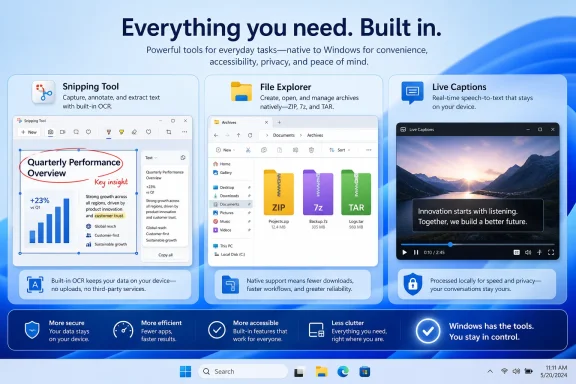
The three built-in capabilities address different parts of everyday computing:- Snipping Tool handles still images, annotations, OCR, and selected-area screen recordings.
- File Explorer opens and creates several widely used archive formats without a separate graphical utility.
- Live Captions generates text from speech playing through the PC, with processing performed locally.
How Windows Reached This Point
The modern Snipping Tool is the product of several overlapping Windows utilities. Earlier releases included the original Snipping Tool for simple captures, while Windows 10 introduced Snip & Sketch as a more touch-friendly replacement. Microsoft eventually consolidated the concepts into the Windows 11 Snipping Tool and began adding OCR, recording, shapes, and other editing functions.Archive support followed a similarly gradual path. Windows has handled ZIP files for decades, but formats such as RAR and 7z remained associated with third-party software until Microsoft integrated technology based on the open-source libarchive project.
Live Captions arrived as part of Windows 11’s accessibility improvements. It applies speech recognition across the operating system rather than relying on the individual video player, website, conferencing service, or content creator to supply captions.
Why inbox application updates matter
Older Windows tools tended to remain unchanged until Microsoft shipped a major operating-system release. That model made even minor improvements slow and politically difficult because every feature competed for space in the larger Windows engineering schedule.Store-delivered application updates changed the equation. Microsoft can now improve Snipping Tool, Notepad, Paint, Photos, and other utilities more frequently, although availability may still vary by Windows version, hardware class, staged rollout, region, and application version.
The influence of smartphones
Windows is also catching up with expectations created by Android and iOS. Mobile users assume that screenshots can be cropped and marked up immediately, spoken media can be captioned, and common files can be opened without researching an appropriate application.PC users increasingly expect the same experience. Microsoft’s challenge is to provide it without sacrificing the control, compatibility, and specialized software ecosystem that distinguish Windows from more tightly controlled platforms.
Snipping Tool Has Become a Serious Everyday Utility
The keyboard shortcutWindows + Shift + S remains the fastest way to capture part of the screen. Users can select a rectangle, a free-form area, a specific window, or the full display, after which Windows copies the image to the clipboard and presents a notification that opens the editor.Pressing Print Screen can also launch the snipping interface when the corresponding Windows setting is enabled. The workflow is fast enough that many users never need to open the full application before taking a capture.
Annotation and basic image editing
The editor supports pens, highlighting, cropping, shapes, emojis, erasing, and undo or redo operations. Pen-enabled PCs can use a stylus, making the application particularly useful for teachers, designers reviewing drafts, and technicians marking areas of a user interface.These tools cover the most common screenshot workflow: capture a region, draw attention to a button or error message, and paste the result into email, Teams, a forum post, or documentation. They do not provide a complete graphics editor, but they are no longer limited to saving an untouched rectangular image.
OCR changes the value of screenshots
Text Actions can recognize text contained in an image and copy it to the clipboard. This optical character recognition capability turns Snipping Tool into more than a capture utility because it can recover text from dialog boxes, scanned material, videos, remote desktops, and applications that do not expose selectable text.OCR is especially valuable when troubleshooting Windows. Instead of manually typing a long error code or PowerShell message, a user can capture it, extract the text, and search or share the exact wording.
Users should still check the result before trusting it. Small fonts, unusual typefaces, low contrast, compression artifacts, and multilingual content can produce recognition errors, and a single incorrect character can invalidate a command, product key, file path, or error identifier.
Screen recording closes another gap
Snipping Tool can record a selected portion of the display, withWindows + Shift + R providing direct access on supported versions. This is useful for short demonstrations, software bug reports, training clips, and visual instructions that would be difficult to communicate through static images.Microsoft also connects recordings to Clipchamp for more involved editing, including captions and audio work. That handoff reveals the intended boundary: Snipping Tool performs rapid capture, while a video editor handles production.
Why Snipping Tool Does Not Completely Replace Snagit
Snagit remains a workflow product rather than merely a screenshot button. Its value comes from combining capture, editing, organization, templates, scrolling content, effects, and sharing into a repeatable professional process.A person who takes three screenshots a week may see little reason to pay for that package. Someone producing hundreds of annotated captures for manuals, training courses, reviews, or customer support may save enough time to justify it easily.
Scrolling capture remains a major dividing line
Long webpages, settings panels, chat histories, and documents often extend beyond the visible display. Dedicated capture tools can stitch that content into one continuous image, whereas Snipping Tool is principally designed around what is currently visible on screen.Browser extensions can fill the webpage portion of this gap, but they do not necessarily capture scrolling content inside desktop applications. Installing an extension also introduces another component with its own permissions, update process, privacy implications, and compatibility risks.
Professional annotation goes further
Advanced screenshot tools may offer numbered steps, callouts, magnification effects, borders, shadows, blur tools, saved styles, reusable stamps, automatic metadata, and project libraries. Those features matter when images must be consistent across a large publication or support organization.Snipping Tool is better viewed as a highly capable general-purpose utility. It replaces paid software when the paid software was being used only for basic capture, not when its automation and publishing systems were central to the job.
Sharing is still fragmented
Windows can invoke its standard Share interface, save captures locally, and work naturally with OneDrive-backed folders. Other cloud platforms can participate through synchronized desktop folders, but that is less direct than a capture application with native destinations and automated naming or upload rules.This difference is small for occasional use and significant at scale. Five extra clicks are irrelevant once a week but expensive when repeated hundreds of times.
File Explorer Finally Understands Modern Archives
Windows’ long-standing ZIP support created the illusion that archive management was already built in. In practice, downloading a RAR or 7z file usually sent users searching for another program, and software download sites often exposed inexperienced users to misleading advertisements, bundled installers, and outdated packages.Windows 11 changed that by adding native support for widely encountered archive formats. Current releases can work with ZIP, RAR, 7z, TAR, and several related compression formats, depending on the operation and file structure involved.
Opening archives is now routine
For ordinary unencrypted archives, the experience resembles working with a folder. Users can open an archive, inspect its contents, copy files out, or invoke extraction without first choosing and configuring a third-party program.That is a substantial security and usability improvement. Every unnecessary installer removed from a new-PC setup reduces the number of publishers, update services, shell extensions, and background components a user must trust.
Windows can create more than ZIP
The assertion that Windows can only create ZIP archives is no longer correct for properly updated Windows 11 systems. Windows 11 version 24H2 introduced File Explorer creation of 7z and TAR archives in addition to ZIP, including a compression wizard with format and compression-level choices.Windows also includes a command-line
tar implementation based on libarchive. It can create, inspect, and extract formats including TAR, compressed TAR variants, ZIP, and 7z, making it useful for scripts and cross-platform development workflows.Feature availability still depends on the installed Windows build. A PC running an older version of Windows 11 may have extraction capabilities but lack the newer File Explorer creation interface, so users should check
Settings > System > About and install supported updates before concluding that the option is missing.The interface matters more than the library
Archive formats are not difficult to support only because of their compression algorithms. A useful implementation must also handle filenames, directory structures, timestamps, permissions, symbolic links, large files, corruption, multipart sets, encryption, and malicious path manipulation safely.Microsoft’s integration brings convenience, but it also makes archive handling part of a heavily used shell. Reliability and defensive extraction behavior therefore matter as much as the number of file extensions listed in a menu.
Why 7-Zip, WinRAR, and Other Archive Tools Still Matter
Third-party archive managers remain valuable for users who need more than casual extraction. The most obvious limitation is encrypted content: File Explorer does not provide complete support for creating or extracting password-protected archives across the formats it recognizes.That alone prevents Windows’ native interface from replacing dedicated tools in many business and personal workflows. Financial records, legal documents, backups, and sensitive transfers are often packaged in encrypted archives precisely because ordinary email or cloud links may not provide the desired portability.
Encryption and password protection
A dedicated archive manager can create AES-encrypted archives, protect filenames, configure compression parameters, and test the result. It may also support self-extracting packages, recovery records, split volumes, and secure deletion options.Archive encryption should not be confused with full-drive protection such as BitLocker. The former travels with a file and can be opened on another compatible system; the latter primarily protects data stored on a particular device.
Performance and compression ratios
The native Windows interface prioritizes simplicity. Specialist tools expose dictionary size, compression method, solid blocks, thread count, update mode, and other parameters that affect speed, memory consumption, and final archive size.Those controls can be important when compressing source trees, virtual-machine files, database exports, or large collections of similar documents. For a folder containing a few PDFs and photographs, the difference may be negligible, especially because JPEG, MP4, and many modern document formats are already compressed.
Testing and repairing archives
Power users frequently need to verify an archive without extracting it, inspect checksums, recover damaged data, or process a multipart set. Dedicated applications provide clearer diagnostics and more mature tools for these edge cases.The correct conclusion is therefore not that 7-Zip or WinRAR has become pointless. It is that Windows has removed the need to install an archive utility merely to open an ordinary file someone sent you.
Live Captions May Be the Most Transformative Feature
Live Captions converts speech from audio passing through the PC into text shown in a movable caption window. It works across applications, so it can caption a browser video, local media file, conferencing application, game stream, or other source without depending on that source to supply subtitles.The shortcut
Windows + Ctrl + L activates the feature. Initial setup requires consent and a language-component download, after which supported caption generation can operate without a continuing internet connection.Local processing improves privacy
Microsoft states that caption processing occurs on the device and that the audio, voice data, and generated captions are not sent to its cloud service. The generated captions are also not intended to become a stored transcript automatically.That architecture is important for private meetings, sensitive recordings, unreliable internet connections, and users who do not want every piece of spoken content uploaded for analysis. It also reduces network latency, although the PC still needs sufficient processing resources to keep pace.
Accessibility benefits everyone
Live Captions was built primarily as an accessibility feature, particularly for people who are deaf or hard of hearing. Its wider utility demonstrates the value of inclusive design: the same tool helps someone watching a video in a noisy room, working beside sleeping family members, struggling with an unfamiliar accent, or using a laptop with damaged speakers.The caption window can be repositioned and styled to reduce interference with the underlying application. Microphone input can also be included for certain scenarios, enabling support for nearby conversation as well as system audio.
Copilot+ PCs extend the concept
On compatible Copilot+ PCs, Live Captions can translate supported spoken languages into English and, in supported configurations, Simplified Chinese. This capability relies on the class of neural processing hardware and Windows AI components associated with Copilot+ systems.Users should distinguish captioning from translation. Basic Live Captions is broadly available on supported Windows 11 versions, while real-time translation has stricter hardware and release requirements.
Live Captions Is Not a Transcription Service
The feature’s privacy advantages create a significant limitation: generated captions are not automatically preserved as a polished transcript. A professional transcription service typically provides speaker identification, timestamps, export formats, editing tools, search, summaries, and a permanent document.Live Captions primarily helps a person understand speech while it is happening. It should not be treated as an automatic replacement for meeting minutes, legal transcription, interview processing, or subtitling production.
Accuracy depends on the audio
Speech recognition can struggle with overlapping speakers, poor microphones, background music, heavy compression, technical vocabulary, names, rapid speech, and strong regional accents. Resource-intensive applications can also contribute to delays or dropped text if the system is under load.These problems are not unique to Windows, but they matter more when captions are being used for safety-critical or legally significant communication. Human review remains essential wherever exact wording carries consequences.
It captions speech, not every audible event
Live Captions focuses on detected speech. It does not reliably describe music, applause, alarms, footsteps, or other non-speech sounds, and sung lyrics may not be recognized accurately.That makes it different from authored accessibility captions, which can include speaker names, meaningful sound effects, music cues, and carefully timed language. Automatically generated text is an aid, not a complete substitute for professionally prepared captions.
Language support is not universal
Recognition availability varies by language and regional variant. Translation support is narrower still and depends on Copilot+ hardware as well as the installed Windows release and language components.Organizations should test the precise languages, accents, applications, and devices used by their workforce. A capability that performs well in an English-language demonstration may behave differently in a multilingual call center or international classroom.
Consumer Impact
For consumers, the strongest benefit is a cleaner setup. A new Windows 11 PC can perform many routine capture, extraction, and captioning tasks before the owner opens a browser to download anything.That saves money, but the reduction in software clutter may be more important. Fewer utilities mean fewer startup entries, context-menu additions, update agents, notifications, subscriptions, license accounts, and opportunities to install an imitation package from the wrong website.
A safer new-PC routine
A sensible setup sequence now looks like this:- Install all supported Windows updates and Microsoft Store application updates.
- Test Snipping Tool for still capture, OCR, annotation, and short recordings.
- Open and create sample archives in the formats used most often.
- Download the required Live Captions language components and test representative audio.
- Add third-party software only when a specific missing capability appears.
Lower subscription fatigue
Screenshot software is one of many desktop categories moving toward recurring billing. A subscription may be justified by continuous development and cloud services, but it can feel disproportionate when the customer uses only one or two basic functions.Built-in alternatives provide negotiating power. Users can cancel tools they no longer need, while developers must compete on workflow improvements rather than ownership of a basic capability.
Enterprise and IT Impact
Businesses should not interpret these additions as an instruction to remove approved tools immediately. Enterprise software decisions involve documentation standards, automation, support contracts, accessibility requirements, data handling, application control, and employee training.Still, inbox capabilities can reduce the software estate. If a department uses a paid screenshot application only to crop images and draw arrows, replacing it with Snipping Tool may reduce licensing costs without meaningfully affecting productivity.
Fewer packages to deploy
Every third-party application creates operational work. IT must package it, test updates, monitor vulnerabilities, manage licensing, resolve conflicts, and remove unsupported versions.Built-in Windows features shift much of that maintenance to Microsoft’s servicing channels. This is not risk-free, because feature changes can arrive through Store updates and Windows servicing, but it reduces the number of independent supply chains an organization must manage.
Standardization requires policy
Enterprises may need to control Snipping Tool recording, clipboard behavior, cloud sharing, Store application updates, or Live Captions language downloads. Security teams must also consider whether users can capture sensitive applications and how screenshots are stored or transmitted.Archive handling raises separate concerns. Native extraction does not make an archive trustworthy, and Microsoft Defender, application control, email filtering, and user education remain necessary because compressed packages are commonly used to conceal malicious payloads.
Accessibility becomes part of the platform
Live Captions can support employees without requiring every internal application to implement its own captioning system. That is valuable for legacy software, prerecorded training material, and mixed communication platforms.However, companies still have obligations to provide accessible content and reasonable accommodations. Automated captions should supplement, not excuse, the creation of accurate transcripts and accessible media where those are required.
Competitive Implications for Windows Software
When Microsoft adds a popular third-party capability to Windows, it changes the market even if the implementation is less powerful. The built-in tool enjoys zero-cost distribution, prominent shortcuts, default integration, and installation on hundreds of millions of potential systems.Independent developers cannot win by offering the same basic feature with a different icon. They must move upward into professional workflows, cross-platform support, collaboration, automation, administration, or specialized security.
The platform-owner advantage
Microsoft controls File Explorer, the clipboard, Windows Share, Store delivery, accessibility APIs, and operating-system shortcuts. That integration allows a basic inbox application to feel faster and more natural than a feature-rich competitor in routine use.This advantage also deserves scrutiny. Microsoft must balance improving Windows against using platform control to crowd out independent products, particularly when it bundles services, promotes Microsoft accounts, or favors OneDrive over competing storage providers.
Specialist software must become more specialized
The likely survivors are not generic “screenshot apps” but products for documentation teams, quality assurance, education, compliance, and technical support. Likewise, archive managers will remain relevant when they provide encryption, recovery, performance, scripting, and format breadth beyond Explorer.This is healthy when it pushes vendors toward genuine innovation. It becomes harmful if Windows integration blocks competitors from participating equally in sharing, storage, context menus, or file associations.
Strengths and Opportunities
The three Windows features create a stronger default environment without preventing users from installing alternatives. Their greatest advantage lies in covering routine needs with tools that are already present, familiar, and maintained through Microsoft’s ecosystem.- Windows reduces new-PC friction by eliminating several automatic downloads.
- Snipping Tool combines capture, OCR, annotation, and recording in one lightweight interface.
- Native archive support lowers exposure to deceptive download pages and unnecessary shell extensions.
- File Explorer can create ZIP, 7z, and TAR archives on current Windows 11 releases, correcting an important misconception about its limitations.
- Live Captions provides system-wide, offline-capable speech recognition with on-device processing.
- Businesses can potentially reduce licensing, packaging, and patch-management overhead.
- Developers face stronger pressure to distinguish professional products from basic utilities.
- Accessibility features gain mainstream visibility and benefit a much broader population.
Risks and Concerns
Built-in does not automatically mean complete, private in every circumstance, or suitable for every organization. Users can create new problems if they remove specialist tools without understanding which capabilities their workflows actually depend on.- Snipping Tool still lacks important professional features such as universal scrolling capture and advanced publishing automation.
- File Explorer cannot fully replace archive managers where encryption, multipart archives, recovery, or detailed compression control is required.
- Native archive support may encourage users to open unfamiliar compressed files without considering their origin.
- Live Captions can misrecognize speech and should not be trusted as an authoritative transcript.
- Caption and translation capabilities vary by Windows version, language, hardware, and update state.
- Store-delivered app changes can complicate enterprise testing and documentation.
- Microsoft’s integration advantages may make it harder for smaller utility developers to compete.
- Users may overestimate what “on-device” means if they later copy captions, recordings, or screenshots into cloud-connected applications.
What to Watch Next
Microsoft’s direction is clear: more image understanding, speech processing, and content actions will move into Windows itself. The division between a traditional desktop utility and an AI-assisted operating-system service will continue to blur, especially on Copilot+ PCs.Snipping Tool is already evolving beyond screenshots through OCR, content-aware capture features on compatible hardware, color identification, recording, and connections to other Windows applications. Live Captions demonstrates how local language models can support privacy-sensitive functions without sending continuous audio to a remote service.
Better integration without forced lock-in
The most important test will be whether Microsoft opens these workflows to competing services. Users should be able to send a capture to their preferred editor, synchronize it with their chosen cloud provider, and invoke third-party actions without awkward workarounds.A richer Windows Share system and consistent application extension model could turn built-in tools into starting points rather than closed destinations. That would strengthen Windows while preserving the ecosystem that made the platform successful.
Archive encryption is the obvious missing feature
Password-protected archive support remains the clearest functional gap in File Explorer. Microsoft could add it, but doing so would require careful design around cryptographic standards, password handling, recovery expectations, interoperability, and enterprise policy.Until then, third-party archive tools retain an unambiguous role. Users who exchange encrypted 7z or ZIP packages should keep a reputable, updated utility installed rather than assuming Explorer can process every archive bearing a familiar extension.
Captions need export and review options
An optional, privacy-conscious method to save captions would broaden the feature’s usefulness. Microsoft would need explicit consent, clear retention controls, and a distinction between an unverified machine transcript and reviewed text.Speaker labeling, timestamps, vocabulary customization, and accessible export formats could make Windows more useful for education and meetings. Those additions would also move Live Captions into more direct competition with commercial transcription platforms.
Windows 11’s built-in screenshot, archive, and captioning capabilities represent more than three convenient utilities; they show Microsoft redefining what users should expect from a freshly installed PC. Snipping Tool is now sufficient for most casual capture work, File Explorer handles ordinary modern archives and can create more formats than some reports acknowledge, and Live Captions delivers unusually useful local speech recognition across applications. Third-party software is not pointless, but it is no longer compulsory by habit. The smartest approach is to begin with Windows, identify the limitations that genuinely affect the job, and pay for specialist tools only when their advanced features save time, protect data, or deliver accuracy that the operating system still cannot match.
References
- Primary source: MakeUseOf
Published: 2026-07-21T10:01:12+00:00
Windows finally has 3 built-in features that make expensive third-party apps pointless
Thanks to built-in features of Windows 11, I don't need to download or pay for these other tools for screenshots, captioning, and file compression. www.makeuseof.com
- Official source: support.microsoft.com
Use Snipping Tool to capture screenshots | Microsoft Support
Learn how to use Snipping Tool to capture a screenshot, or snip, of any object on your screen, and then annotate, save, or share the image.support.microsoft.com