

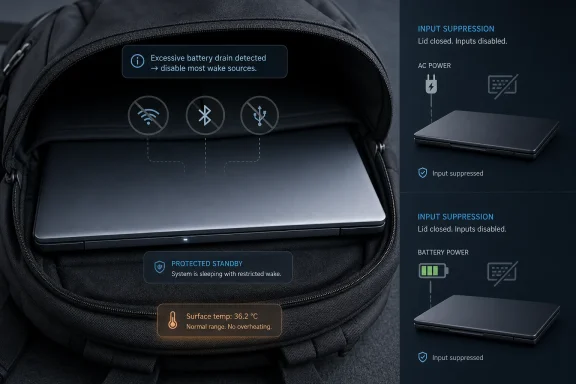
Microsoft has changed Windows 11 version 24H2 so Modern Standby systems can disable most wake sources after detecting excessive battery drain, while also extending lid-closed input suppression to both battery and AC power on supported clamshell laptops. That is the plain-English fix behind a long-running Windows complaint: laptops that were supposedly asleep but arrived hot, awake, and depleted. The more interesting story is not that Microsoft found another power-management knob to turn. It is that Windows is finally admitting that the always-ready PC model needs guardrails when the laptop is in a bag, not a demo room.
For years, the conventional Windows sleep story was simple enough for users to understand. Close the lid, the machine enters the S3 sleep state, the CPU stops doing meaningful work, RAM keeps just enough power to preserve your session, and the laptop stays quiet until you wake it. It was not glamorous, but it aligned with the mental model everyone had: sleep means sleep.
Modern Standby changed that bargain. First arriving as Connected Standby in the Windows 8 era and later becoming the default direction for many Windows 10 and Windows 11 laptops, the S0 low-power idle model aimed to make PCs behave more like phones. The machine would appear off, but remain capable of network activity, notifications, background sync, audio scenarios, and quick resume.
The pitch made sense in a world where users expected instant-on computing. Microsoft, Intel, and PC makers wanted Windows notebooks to feel less like old laptops and more like sealed, mobile-first devices. Intel’s Project Athena era made that expectation even more explicit: quick wake, long standby, and persistent readiness were part of the premium PC story.
But the PC is not a phone, and the laptop bag is not a nightstand. A phone’s hardware, software, modem stack, thermal envelope, and app model are tightly controlled compared with the sprawling Windows ecosystem. Windows laptops inherit decades of drivers, peripherals, scheduled tasks, management agents, update services, Bluetooth devices, docks, USB controllers, and OEM utilities, all of which can behave differently when the lid is closed and the system is technically still alive.
That gap between promise and reality became the defining failure of Modern Standby. The user thought the laptop had gone to sleep. Windows thought it had entered a managed low-power state. Some driver, device, update client, radio, or scheduled job thought it had permission to do something useful. The battery and heat sink were left to settle the argument.
That is why Modern Standby became so uniquely irritating. Users can tolerate an application crash, a bad cumulative update, or a flaky driver if there is a visible failure mode and a plausible workaround. Modern Standby failures often felt invisible. The lid was closed, the screen was off, the user had moved on, and only later did the evidence appear: a warm chassis, spinning fans, or a battery graph that fell off a cliff.
The MakeUseOf complaint captures what many Windows users have been saying for years. Traditional S3 sleep was boring but predictable. Modern Standby was ambitious but opaque. It turned a user-controlled state into a negotiation between Windows, firmware, silicon, drivers, apps, and devices.
That opacity is where Microsoft lost the plot. If a machine drains overnight because a user left a game running, the cause is obvious. If it drains because Modern Standby permitted wake activity that never should have mattered with the lid closed, the system feels arbitrary. Users do not experience that as sophisticated power management. They experience it as Windows ignoring the lid.
The old workarounds were a confession by omission. Set the lid action to hibernate. Disable network connectivity in standby where possible. Dig through Device Manager power settings. Run
Hibernate works because it refuses the premise of Modern Standby. It writes memory state to disk and powers the machine down more completely, trading instant resume for reliability. That tradeoff is rational for people who have been burned. It is also an indictment of the platform when users must abandon the advertised sleep model to protect their battery.
That is not a return to S3. It is not an admission that Modern Standby itself is dead. It is a containment policy, and that distinction matters.
Modern Standby still depends on the S0 low-power idle design. The device can still enter a state where the screen is off but the system remains capable of managed activity. Windows still distinguishes between waking the system-on-chip and turning on the display. It still has rules for timers, networking, Windows Update, UWP notifications, remote access, audio, environmental changes, and input devices.
The difference is that Microsoft is now adding a circuit breaker. If the system observes abnormal drain, it can restrict the very wake sources that made Modern Standby powerful and unpredictable. Instead of assuming the ecosystem will behave, Windows can respond when it does not.
This is a pragmatic fix, not an elegant one. In an ideal world, every driver would behave, every platform would implement low-power states correctly, every app would respect background limits, and every device would know when the lid is closed. In the real world, Windows ships on machines assembled from many vendors’ components, and the operating system needs a way to protect the user when the chain of trust breaks.
That is why the change is more consequential than it first appears. Microsoft is not simply tuning a power profile. It is changing the burden of proof. Wake sources that once existed as part of the modern, connected experience can now lose their privileges when the system decides they are harming battery life.
For users, the practical result should be fewer cases where a sleeping laptop wakes itself into trouble. For administrators, the more important point is that this behavior arrives automatically with the supported Windows version rather than as a registry spelunking exercise. For OEMs and driver vendors, it is another signal that Windows is becoming less tolerant of sloppy standby behavior.
That sounds like a small edge case until you think through how people actually use laptops. A user finishes work at a desk with the laptop plugged in, closes the lid, unplugs the charger, drops the machine into a bag, and walks out. Somewhere in that transition, Windows has to correctly interpret lid state, power source, input devices, and wake events. If a Bluetooth mouse shifts, a USB peripheral chatters, or a touch device generates bad input, the machine may wake at precisely the wrong time.
The AC-versus-DC distinction made more sense in a lab than in a backpack. On AC, a laptop is often docked, connected to external displays, or intentionally used closed. On battery, preserving standby life is more urgent. But users do not live inside static power categories. They move between them, and race conditions appear in those moments of transition.
By extending input suppression to AC power in Windows 11 24H2, Microsoft is acknowledging that the lid-closed state should carry more authority. If the clamshell is closed and there is no external display, accidental input should not be treated as an invitation to wake the display or spin the system into activity. A Bluetooth mouse bouncing inside a bag is not a user intent signal.
There are caveats, and they matter. Input suppression does not apply if the lid close action is set to “Do nothing” for the current power source. If an external display is connected, the behavior changes because the laptop may legitimately be operating in clamshell mode. Microsoft also notes that disabling input suppression is not recommended, which is the polite documentation version of saying this feature exists because the alternative creates real problems.
This is where the fix becomes philosophically interesting. Modern Standby was built around the idea that the computer can remain contextually alive. The new input suppression behavior says context has to include physical reality. A closed laptop with no external display is not merely a screen-off PC. It is probably being stored, moved, or ignored, and the operating system should behave accordingly.
That ecosystem explains why the problem lingered. S3 sleep was relatively easy for users to understand because the machine entered a deeper, more static state. Modern Standby requires participation. Devices must enter low-power modes correctly. The SoC must idle deeply. Network adapters must support the right offloads. Firmware must report lid, power, and thermal events properly. Drivers must not keep the system busy. Apps and services must not abuse background opportunities.
One broken participant can spoil the experience. Worse, the visible symptom is often generic: battery drain. The root cause might be a network adapter, an audio device, an update task, a Bluetooth peripheral, a vendor utility, or a power policy. Two users with the same Windows version may have entirely different standby behavior because their hardware stack differs.
That fragmentation is why enthusiasts have long shared contradictory advice. Some laptops lose one or two percent over many hours and resume instantly, which is exactly what Modern Standby was supposed to deliver. Others drain at alarming rates, wake unpredictably, or get hot with the lid closed. Both experiences can be real.
Microsoft’s new abnormal-drain response is a way to impose an operating-system-level backstop on that messy ecosystem. It does not require every component to be perfect. It says that if the overall system is failing the user, Windows can shut down most of the pathways that allow that failure to continue.
That is also why skepticism is healthy. A reactive drain detector is not the same as a guaranteed prevention mechanism. If the system has to observe excessive drain before restricting wake sources, some loss has already occurred. If the platform’s firmware or driver behavior is poor enough, Windows may still be fighting uphill. If a user relies on certain standby-connected features, the protective behavior may feel like a regression in edge cases.
But late and imperfect is not the same as meaningless. Modern Standby’s worst failure was not that it sometimes used power. It was that the user had no reason to trust it. A mechanism that clamps down after bad behavior is a step toward restoring that trust.
Many IT teams have already adapted by standardizing on hibernate-heavy policies or vendor-approved power profiles. Some organizations care less about instant resume than about ensuring a laptop survives a commute, a flight, or an overnight bag. In regulated or security-conscious environments, a fully powered-down or hibernated state may also be easier to reason about than a connected standby state that can perform background work.
The Windows 11 24H2 changes do not erase those policies overnight. Administrators will still want to test behavior across models, BIOS revisions, docking stations, VPN clients, endpoint protection suites, and management agents. A Modern Standby fix that works beautifully on a new premium ultrabook may not behave identically on an older fleet device with a vendor-specific driver stack.
Still, the direction matters. If Windows can automatically disable most wake sources after detecting excessive drain, IT gets a platform-level mitigation that does not depend entirely on user education. If lid-closed input suppression is more robust across power states, one common accidental wake path becomes less dangerous. Those are not shiny features, but they are the kind of boring reliability improvements that reduce friction across a fleet.
There is also a messaging benefit. For years, telling users to run diagnostic commands or change obscure settings made Windows look like the problem belonged to the user. With 24H2, Microsoft is at least moving the default closer to the expected behavior. Close the lid, carry the laptop, arrive with battery remaining. That should not be an advanced configuration goal.
The administrator’s caution will be around visibility. If Windows disables wake sources because it detected excessive drain, IT teams will want clear telemetry and logs. They will want to know which machines are entering that protective state, how often, and why. A self-healing system is useful; a self-healing system that cannot explain itself can become another black box.
Sleep is for short interruptions. Hibernate is for longer gaps where reliability matters more than instant resume. Shutdown is for maintenance, troubleshooting, or a clean start. Modern Standby complicates the first category because “sleep” no longer necessarily means the machine is inert.
That does not mean everyone should immediately disable sleep or switch every lid close action to hibernate. On well-behaved hardware, Modern Standby can deliver exactly the experience users want: quick resume, modest overnight drain, and background readiness without drama. The problem is that users should not have to discover through a hot backpack whether their laptop belongs to that category.
The simplest diagnostic remains
Battery reports and SleepStudy remain useful for deeper troubleshooting, especially for IT pros. But Microsoft’s fix is valuable precisely because ordinary users should not need to become power-state analysts. The laptop should do the safe thing when it detects that standby is failing.
There is a cultural point here, too. Windows enthusiasts often respond to platform problems with workarounds because that has always been part of the PC experience. Registry tweaks, firmware settings, command-line reports, and device-specific hacks are familiar territory. But a mainstream operating system cannot rely on hobbyist resilience. The default has to be trustworthy.
 Windows Sleep Tried to Become a Phone, Then Met the Laptop Bag
For years, the conventional Windows sleep story was simple enough for users to understand. Close the lid, the machine enters the S3 sleep state, the CPU stops doing meaningful work, RAM keeps just enough power to preserve your session, and the laptop stays quiet until you wake it. It was not glamorous, but it aligned with the mental model everyone had: sleep means sleep.Modern Standby changed that bargain. First arriving as Connected Standby in the Windows 8 era and later becoming the default direction for many Windows 10 and Windows 11 laptops, the S0 low-power idle model aimed to make PCs behave more like phones. The machine would appear off, but remain capable of network activity, notifications, background sync, audio scenarios, and quick resume.
The pitch made sense in a world where users expected instant-on computing. Microsoft, Intel, and PC makers wanted Windows notebooks to feel less like old laptops and more like sealed, mobile-first devices. Intel’s Project Athena era made that expectation even more explicit: quick wake, long standby, and persistent readiness were part of the premium PC story.
But the PC is not a phone, and the laptop bag is not a nightstand. A phone’s hardware, software, modem stack, thermal envelope, and app model are tightly controlled compared with the sprawling Windows ecosystem. Windows laptops inherit decades of drivers, peripherals, scheduled tasks, management agents, update services, Bluetooth devices, docks, USB controllers, and OEM utilities, all of which can behave differently when the lid is closed and the system is technically still alive.
That gap between promise and reality became the defining failure of Modern Standby. The user thought the laptop had gone to sleep. Windows thought it had entered a managed low-power state. Some driver, device, update client, radio, or scheduled job thought it had permission to do something useful. The battery and heat sink were left to settle the argument.
The Hotbag Problem Was a Trust Problem Before It Was a Battery Problem
The phrase hotbag sounds almost comic until it happens to a business traveler, student, field technician, or sysadmin carrying a machine between meetings. A laptop that wakes in a backpack is not merely wasting a few percentage points of battery. It is generating heat in an enclosed space, accelerating drain, and undermining the user’s confidence in the most basic action a portable computer can perform.That is why Modern Standby became so uniquely irritating. Users can tolerate an application crash, a bad cumulative update, or a flaky driver if there is a visible failure mode and a plausible workaround. Modern Standby failures often felt invisible. The lid was closed, the screen was off, the user had moved on, and only later did the evidence appear: a warm chassis, spinning fans, or a battery graph that fell off a cliff.
The MakeUseOf complaint captures what many Windows users have been saying for years. Traditional S3 sleep was boring but predictable. Modern Standby was ambitious but opaque. It turned a user-controlled state into a negotiation between Windows, firmware, silicon, drivers, apps, and devices.
That opacity is where Microsoft lost the plot. If a machine drains overnight because a user left a game running, the cause is obvious. If it drains because Modern Standby permitted wake activity that never should have mattered with the lid closed, the system feels arbitrary. Users do not experience that as sophisticated power management. They experience it as Windows ignoring the lid.
The old workarounds were a confession by omission. Set the lid action to hibernate. Disable network connectivity in standby where possible. Dig through Device Manager power settings. Run
powercfg /batteryreport or SleepStudy and try to identify the culprit. Change registry settings that may no longer work on modern firmware. None of this is a consumer solution, and much of it is unsatisfying even for IT professionals.Hibernate works because it refuses the premise of Modern Standby. It writes memory state to disk and powers the machine down more completely, trading instant resume for reliability. That tradeoff is rational for people who have been burned. It is also an indictment of the platform when users must abandon the advertised sleep model to protect their battery.
Microsoft’s New Rule Is Simple: If Standby Misbehaves, Stop Letting Everything Wake It
The important Windows 11 24H2 change is a new power-saving behavior in Modern Standby. Microsoft’s documentation now says that when excessive battery drain is detected, most wake sources will be disabled. In that state, the system can be woken from Modern Standby by pressing the power button or opening the lid.That is not a return to S3. It is not an admission that Modern Standby itself is dead. It is a containment policy, and that distinction matters.
Modern Standby still depends on the S0 low-power idle design. The device can still enter a state where the screen is off but the system remains capable of managed activity. Windows still distinguishes between waking the system-on-chip and turning on the display. It still has rules for timers, networking, Windows Update, UWP notifications, remote access, audio, environmental changes, and input devices.
The difference is that Microsoft is now adding a circuit breaker. If the system observes abnormal drain, it can restrict the very wake sources that made Modern Standby powerful and unpredictable. Instead of assuming the ecosystem will behave, Windows can respond when it does not.
This is a pragmatic fix, not an elegant one. In an ideal world, every driver would behave, every platform would implement low-power states correctly, every app would respect background limits, and every device would know when the lid is closed. In the real world, Windows ships on machines assembled from many vendors’ components, and the operating system needs a way to protect the user when the chain of trust breaks.
That is why the change is more consequential than it first appears. Microsoft is not simply tuning a power profile. It is changing the burden of proof. Wake sources that once existed as part of the modern, connected experience can now lose their privileges when the system decides they are harming battery life.
For users, the practical result should be fewer cases where a sleeping laptop wakes itself into trouble. For administrators, the more important point is that this behavior arrives automatically with the supported Windows version rather than as a registry spelunking exercise. For OEMs and driver vendors, it is another signal that Windows is becoming less tolerant of sloppy standby behavior.
Lid-Closed Input Suppression Finally Treats AC Power as Part of Real Life
The second change is less dramatic but just as revealing. Microsoft’s input suppression setting is designed to prevent unintended wakes on Modern Standby clamshell systems when the lid is closed and no external display is connected. Before Windows 11 24H2, that suppression applied only on DC power. Starting with 24H2, it can apply on both battery and AC.That sounds like a small edge case until you think through how people actually use laptops. A user finishes work at a desk with the laptop plugged in, closes the lid, unplugs the charger, drops the machine into a bag, and walks out. Somewhere in that transition, Windows has to correctly interpret lid state, power source, input devices, and wake events. If a Bluetooth mouse shifts, a USB peripheral chatters, or a touch device generates bad input, the machine may wake at precisely the wrong time.
The AC-versus-DC distinction made more sense in a lab than in a backpack. On AC, a laptop is often docked, connected to external displays, or intentionally used closed. On battery, preserving standby life is more urgent. But users do not live inside static power categories. They move between them, and race conditions appear in those moments of transition.
By extending input suppression to AC power in Windows 11 24H2, Microsoft is acknowledging that the lid-closed state should carry more authority. If the clamshell is closed and there is no external display, accidental input should not be treated as an invitation to wake the display or spin the system into activity. A Bluetooth mouse bouncing inside a bag is not a user intent signal.
There are caveats, and they matter. Input suppression does not apply if the lid close action is set to “Do nothing” for the current power source. If an external display is connected, the behavior changes because the laptop may legitimately be operating in clamshell mode. Microsoft also notes that disabling input suppression is not recommended, which is the polite documentation version of saying this feature exists because the alternative creates real problems.
This is where the fix becomes philosophically interesting. Modern Standby was built around the idea that the computer can remain contextually alive. The new input suppression behavior says context has to include physical reality. A closed laptop with no external display is not merely a screen-off PC. It is probably being stored, moved, or ignored, and the operating system should behave accordingly.
The Fix Arrives Late Because Modern Standby Was Never Just a Windows Feature
It is tempting to frame this as Microsoft finally fixing a Microsoft mistake. That is partly fair. Windows exposed the behavior, Windows users suffered the consequences, and Microsoft owns the user experience. But Modern Standby has always been a platform bargain involving Microsoft, silicon vendors, OEM firmware teams, driver developers, and peripheral makers.That ecosystem explains why the problem lingered. S3 sleep was relatively easy for users to understand because the machine entered a deeper, more static state. Modern Standby requires participation. Devices must enter low-power modes correctly. The SoC must idle deeply. Network adapters must support the right offloads. Firmware must report lid, power, and thermal events properly. Drivers must not keep the system busy. Apps and services must not abuse background opportunities.
One broken participant can spoil the experience. Worse, the visible symptom is often generic: battery drain. The root cause might be a network adapter, an audio device, an update task, a Bluetooth peripheral, a vendor utility, or a power policy. Two users with the same Windows version may have entirely different standby behavior because their hardware stack differs.
That fragmentation is why enthusiasts have long shared contradictory advice. Some laptops lose one or two percent over many hours and resume instantly, which is exactly what Modern Standby was supposed to deliver. Others drain at alarming rates, wake unpredictably, or get hot with the lid closed. Both experiences can be real.
Microsoft’s new abnormal-drain response is a way to impose an operating-system-level backstop on that messy ecosystem. It does not require every component to be perfect. It says that if the overall system is failing the user, Windows can shut down most of the pathways that allow that failure to continue.
That is also why skepticism is healthy. A reactive drain detector is not the same as a guaranteed prevention mechanism. If the system has to observe excessive drain before restricting wake sources, some loss has already occurred. If the platform’s firmware or driver behavior is poor enough, Windows may still be fighting uphill. If a user relies on certain standby-connected features, the protective behavior may feel like a regression in edge cases.
But late and imperfect is not the same as meaningless. Modern Standby’s worst failure was not that it sometimes used power. It was that the user had no reason to trust it. A mechanism that clamps down after bad behavior is a step toward restoring that trust.
IT Departments Will Read This as Risk Reduction, Not Innovation
For enterprise IT, the sleep-state debate is not about philosophical purity. It is about fleet predictability. A laptop that fails to sleep properly creates help-desk tickets, battery complaints, thermal concerns, unreliable meeting-room behavior, and inconsistent travel readiness. Multiply that across thousands of devices, and Modern Standby becomes an operational variable.Many IT teams have already adapted by standardizing on hibernate-heavy policies or vendor-approved power profiles. Some organizations care less about instant resume than about ensuring a laptop survives a commute, a flight, or an overnight bag. In regulated or security-conscious environments, a fully powered-down or hibernated state may also be easier to reason about than a connected standby state that can perform background work.
The Windows 11 24H2 changes do not erase those policies overnight. Administrators will still want to test behavior across models, BIOS revisions, docking stations, VPN clients, endpoint protection suites, and management agents. A Modern Standby fix that works beautifully on a new premium ultrabook may not behave identically on an older fleet device with a vendor-specific driver stack.
Still, the direction matters. If Windows can automatically disable most wake sources after detecting excessive drain, IT gets a platform-level mitigation that does not depend entirely on user education. If lid-closed input suppression is more robust across power states, one common accidental wake path becomes less dangerous. Those are not shiny features, but they are the kind of boring reliability improvements that reduce friction across a fleet.
There is also a messaging benefit. For years, telling users to run diagnostic commands or change obscure settings made Windows look like the problem belonged to the user. With 24H2, Microsoft is at least moving the default closer to the expected behavior. Close the lid, carry the laptop, arrive with battery remaining. That should not be an advanced configuration goal.
The administrator’s caution will be around visibility. If Windows disables wake sources because it detected excessive drain, IT teams will want clear telemetry and logs. They will want to know which machines are entering that protective state, how often, and why. A self-healing system is useful; a self-healing system that cannot explain itself can become another black box.
Users Should Still Know the Difference Between Sleep and Hibernate
The new behavior should make Modern Standby safer, but it does not make power management magic. Users still need to understand that sleep, hibernate, and shutdown are different tools. Windows has blurred that distinction over time in the name of simplicity, but the difference matters when battery life, heat, and travel are involved.Sleep is for short interruptions. Hibernate is for longer gaps where reliability matters more than instant resume. Shutdown is for maintenance, troubleshooting, or a clean start. Modern Standby complicates the first category because “sleep” no longer necessarily means the machine is inert.
That does not mean everyone should immediately disable sleep or switch every lid close action to hibernate. On well-behaved hardware, Modern Standby can deliver exactly the experience users want: quick resume, modest overnight drain, and background readiness without drama. The problem is that users should not have to discover through a hot backpack whether their laptop belongs to that category.
The simplest diagnostic remains
powercfg /a, which tells users what sleep states their system supports. If the output shows S0 Low Power Idle, the machine uses Modern Standby. On most modern laptops, S3 will not be available because the firmware does not expose it. That is not a Windows setting so much as a platform design choice.Battery reports and SleepStudy remain useful for deeper troubleshooting, especially for IT pros. But Microsoft’s fix is valuable precisely because ordinary users should not need to become power-state analysts. The laptop should do the safe thing when it detects that standby is failing.
There is a cultural point here, too. Windows enthusiasts often respond to platform problems with workarounds because that has always been part of the PC experience. Registry tweaks, firmware settings, command-line reports, and device-specific hacks are familiar territory. But a mainstream operating system cannot rely on hobbyist resilience. The default has to be trustworthy.
Microsoft’s Standby Repair Is a Reset of Expectations, Not a Victory Lap
The concrete take is simple: Windows 11 24H2 makes Modern Standby less reckless in the scenarios where it has most visibly failed. It does that by restricting wake sources after abnormal drain and by making lid-closed input suppression apply more broadly. That should reduce the classic hotbag failure, but it does not turn every Windows laptop into a perfectly behaved sealed appliance.- Windows 11 24H2 introduces a Modern Standby safeguard that can disable most wake sources when excessive battery drain is detected.
- A protected Modern Standby system should still wake through deliberate physical actions such as pressing the power button or opening the lid.
- Lid-closed input suppression now applies on both AC and battery power on supported clamshell systems, provided the lid close policy and external display state allow it.
- Users can check whether their laptop uses Modern Standby by running
powercfg /aand looking for S0 Low Power Idle. - Hibernate remains the safer choice when a laptop will be packed away for a long trip, stored overnight with critical battery needs, or carried in conditions where heat would be unacceptable.
- IT teams should validate the new behavior across specific hardware models, docks, firmware versions, and endpoint software rather than assuming every 24H2 system behaves identically.
References
- Primary source: MakeUseOf
Published: Fri, 12 Jun 2026 10:00:24 GMT
Microsoft is finally fixing my biggest complaint with Windows
Windows sleep might actually work now. www.makeuseof.com
- Official source: learn.microsoft.com
EnableInputSuppression | Microsoft Learn
Use to enable input suppression on a Modern Standby system with a clamshell form factor when the lid is closed and there is no external monitor connected.learn.microsoft.com - Official source: support.microsoft.com
Shut down, sleep, or hibernate your PC | Microsoft Support
Learn how to shut down, sleep, or hibernate your PCsupport.microsoft.com - Related coverage: windowsforum.com
Windows 11 24H2: Closing the Lid Stops Music on Modern Standby | Windows Forum
Microsoft has changed Windows 11 version 24H2 and later so that audio playback stops when a Modern Standby laptop is deliberately put to sleep by closing...windowsforum.com - Related coverage: asted.cloud
Microsoft fixed a bug in Windows 11 that caused computers to go to sleep on their own and quickly drain the battery. - Asted Cloud
Microsoft fixes Modern Standby issues in Windows 11 What happened The Microsoft company announced that in new versions of Windows 11 (starting with the 24H2...asted.cloud
- Official source: microsofters.com
Windows 11 arregla el drenaje de batería en Modern Standby | Microsofters
Microsoft refuerza Modern Standby en Windows 11 24H2: menos despertares fantasma y menos drenaje. Te explico cómo comprobarlo. microsofters.com
- Related coverage: windowscentral.com
The first Windows 11 OS update for 2026 is now rolling out with important fixes — including one that impacts battery life on PCs with an NPU | Windows Central
Microsoft has issued its first Patch Tuesday security updates for Windows 11 in 2026, and this round includes some important fixes for battery life and networking.www.windowscentral.com - Related coverage: ww1.microchip.com
PAC193X Microsoft Windows 10 and Windows 11 Device Driver Users Guide DS50002666
PDF documentww1.microchip.com
- Official source: learn-attachment.microsoft.com
