

Microsoft’s Windows 11 servicing model has reached a familiar but still consequential moment: a newer annual release is now taking over as the older one nears the end of its support window. The company has been steadily moving commercial and consumer devices toward Windows 11, version 25H2, while 24H2 remains on the clock under Microsoft’s lifecycle rules. What is being portrayed as a “mandatory” upgrade in some reports is better understood as Microsoft’s normal feature-update servicing behavior combined with policy-driven rollout mechanics and the finite support window for each version. Microsoft’s own lifecycle and release documentation shows that Home and Pro editions of Windows 11 feature updates receive 24 months of support, while Enterprise and Education receive 36 months, and that 24H2 and 25H2 are distinct supported releases with different retirement dates. (learn.microsoft.com)
Windows 11 has long been managed as a versioned service, not a one-and-done operating system. That matters because each annual release is effectively its own support commitment, its own security horizon, and its own deployment cycle. The operating system’s lifecycle page confirms that Windows 11 Home and Pro follow the Modern Lifecycle Policy, and that versioned releases are retired on a schedule rather than supported indefinitely. (learn.microsoft.com)
The big picture is simple: Microsoft wants users on the latest supported release because security, compatibility, and servicing are easier to manage when the ecosystem is consolidated. The company also uses phased rollouts, so “mandatory” in practical terms often means “eventually enforced through support deadlines and update targeting,” not necessarily an instant forced reboot on every PC. Microsoft’s release information page explicitly states that feature updates arrive annually and that Home, Pro, Pro for Workstations, and Pro Education editions receive 24 months of support, while Enterprise and Education receive 36 months. (learn.microsoft.com)
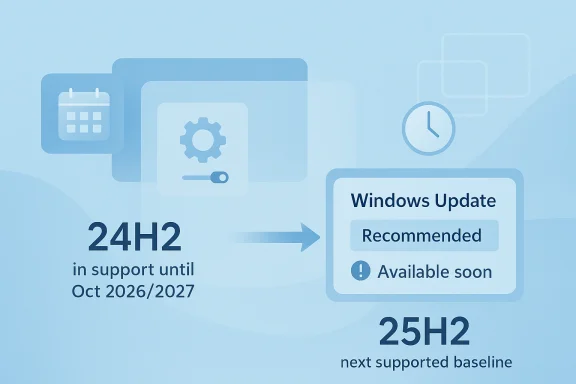
The specific version pair at the center of this story is 24H2 and 25H2. Microsoft’s lifecycle data shows 24H2 for Home and Pro reaching end of updates on October 13, 2026, while 25H2 reaches end of updates on October 12, 2027 for the same consumer and prosumer editions. That means 25H2 is not replacing an already dead release; it is replacing a still-supported release with a newer one that extends the security runway by roughly a year. (learn.microsoft.com)
There is also a subtle but important servicing nuance here. Microsoft introduced 25H2 as an enablement-package update, sharing the same servicing branch as 24H2. In plain English, that means 25H2 is less like a dramatic overhaul and more like a switch that turns on already-delivered functionality and aligns the device with the newer release track. Microsoft says the two versions share the same new features and enhancements delivered through continuous innovation, and that 25H2 is delivered as a small enablement package rather than a full rewrite.
What Microsoft did do is make 25H2 the current path forward, especially now that it is already in release and servicing channels. Microsoft’s documentation for IT pros says 25H2 is available through WSUS, Configuration Manager, Windows Update client policies, and the Microsoft 365 admin center. It also says commercial customers can validate it and that the update is accessible through normal enterprise management channels.
This is a servicing transition, not a dramatic consumer-facing product launch. Microsoft’s own release notes emphasize that 25H2 and 24H2 share a branch, and that many devices will simply receive the update when they are deemed ready. The lifecycle page likewise shows that 24H2 is still supported into late 2026 for Home and Pro, which means the new release is not being pushed because 24H2 is already out of support. (learn.microsoft.com)
A more accurate way to describe the situation is that Microsoft is steering devices toward 25H2 because it is the newest supported annual release. The support policy means there is a compelling reason to move, but the rollout mechanics still depend on hardware compatibility, device health, and administrative settings. In other words, the pressure is real, but the mechanism is usually managed servicing, not a cinematic switch flip. (learn.microsoft.com)
That timeline also explains why Microsoft often begins nudging users before a version actually ages out. Support windows are not just legal or administrative markers; they are operational deadlines. Once a version is too close to retirement, the cost of fragmented patch baselines rises, and Microsoft’s support burden becomes harder to manage across telemetry, known issues, and monthly security updates. (learn.microsoft.com)
For consumers, the practical deadline is not usually the exact end-of-support date itself but the growing likelihood of update prompts and installation recommendations well before that date. For enterprises, the timeline is even more calculated because IT leaders need time for pilot rings, app validation, driver testing, and rollback planning. Microsoft’s documented enterprise support model is designed to make those transitions predictable, but predictability does not mean complacency. (learn.microsoft.com)
The result is that 25H2 becomes the next logical floor for most devices even when 24H2 is still technically safe to run. Microsoft has no incentive to leave millions of users spread across older feature levels when a newer release offers the same branch, the same monthly servicing path, and a longer lifetime ahead. That is especially true when the newer version was designed as a light-touch enablement package.
The enablement-package approach also lowers operational cost. Because 24H2 and 25H2 share a branch, Microsoft can move users onto the newer release with less disruption than a full upgrade. That means fewer installation barriers, less downtime, and a smoother path for enterprise deployment tools like WSUS and Configuration Manager.
There is also a strategic dimension. Microsoft has been pushing Windows toward a more cloud-managed, policy-driven model for years, and annual releases fit that model much better than sprawling long-term fragmentation. The more devices that stay on a current release, the more value Microsoft gets from telemetry, compatibility signals, and unified servicing. (learn.microsoft.com)
Microsoft’s own lifecycle posture also gives the company cover to be assertive. If a version is nearing retirement, continued delays become harder to defend as best practice. That is especially true when the newer release is not a radically different codebase but a continuation of the same branch, which lowers the justification for staying behind.
The good news is that the enablement-package model should make the transition far easier than older Windows upgrades. Microsoft’s 25H2 preview materials describe it as a quick switch that activates dormant features rather than a heavy lift. That should reduce install time and the chance of major migration pain for most reasonably current systems.
Still, consumer impact is not identical across the board. Devices with older peripherals, vendor-tuned software, or niche security tools can still encounter hiccups during feature updates even when Microsoft says the branch is shared. That is why a seamless update for one household can be a frustrating afternoon for another.
The key practical message for consumers is simple: do not assume postponing 24H2 forever is a viable strategy. Support windows are finite, and Microsoft’s servicing model is built to move the installed base forward. Waiting usually just means a bigger update queue later and less flexibility in choosing when the transition happens. (learn.microsoft.com)
The enterprise upside of a shared servicing branch is straightforward: fewer surprises. If 24H2 and 25H2 are closely related, then organizations can plan around a smaller delta than they might have faced in older Windows eras. Microsoft also highlights feature removals such as PowerShell 2.0 and WMIC in 25H2, which tells admins that the release is not just cosmetic—it carries platform housekeeping that can matter in scripted environments.
That said, enterprise is where the real burden of upgrade timing lives. Even a small feature update can trip policies, break legacy workflows, or expose dormant compatibility issues in third-party software. The longer an organization delays, the more compressed its validation window becomes when the move finally turns unavoidable. (learn.microsoft.com)
The more complex the device estate, the more important the release cycle becomes. Kiosks, domain-joined laptops, remote workers, and line-of-business terminals rarely behave the same way under upgrade pressure. The newer the release, the more admins want to see hard proof that printers, VPN clients, remote access stacks, and device control agents continue to work as expected.
That said, there is a threshold where user choice narrows. Once a release is the clear successor and the previous version is approaching retirement, Microsoft can increasingly treat the new version as the recommended path. This is especially true when the newer release shares the same servicing branch, because the upgrade is operationally less disruptive and easier to justify.
So the truth sits between the extremes. It is not accurate to say Microsoft has ripped away all control, but it is equally misleading to suggest users can ignore the lifecycle indefinitely. The company’s model is softly coercive: first recommended, then increasingly expected, then eventually unavoidable. (learn.microsoft.com)
There is also the emotional reality of Windows updates themselves. Users remember the pain points, not the servicing charts. A release that is technically small can still provoke strong resistance if people have been burned by prior upgrades, which is why Microsoft works hard to present 25H2 as low friction and branch-shared.
For competitors, the message is double-edged. On one hand, aggressive servicing can frustrate users who prefer more control, and that frustration can fuel interest in rival ecosystems. On the other hand, Microsoft’s enterprise-grade lifecycle support remains a major advantage, especially for organizations that need predictable deadlines and formal servicing policies. (learn.microsoft.com)
The 25H2/24H2 relationship also shows how Microsoft has optimized for incremental evolution. That contrasts with older operating-system upgrade models that made each release feel like a large event. The more Microsoft can make version transitions feel routine, the more it normalizes Windows as an always-current managed environment.
That matters because operating-system loyalty increasingly depends on trust in the update process. If Windows can reduce upgrade friction while keeping strict lifecycle discipline, it preserves enterprise confidence and blunts consumer resentment. That is a competitive position worth protecting. (learn.microsoft.com)
The other concern is communication. If Microsoft or third-party reporting frames a normal lifecycle transition as a hard mandate too early, users may assume the worst and either panic-update or avoid updating altogether. Both reactions are counterproductive, which is why precise language matters more than ever here. (learn.microsoft.com)
The other thing to watch is how Microsoft handles edge cases. If the company keeps rollout guardrails tight and surfaces known issues clearly, it can preserve confidence in the process. If not, the same update mechanism that helps standardize Windows could become a recurring source of friction for users who feel pushed before they are ready.
Source: National Today Microsoft Initiates Mandatory Windows 11 25H2 Upgrade Ahead of 24H2 Support Ending - Redmond Today
 Background
Windows 11 has long been managed as a versioned service, not a one-and-done operating system. That matters because each annual release is effectively its own support commitment, its own security horizon, and its own deployment cycle. The operating system’s lifecycle page confirms that Windows 11 Home and Pro follow the Modern Lifecycle Policy, and that versioned releases are retired on a schedule rather than supported indefinitely. (learn.microsoft.com)The big picture is simple: Microsoft wants users on the latest supported release because security, compatibility, and servicing are easier to manage when the ecosystem is consolidated. The company also uses phased rollouts, so “mandatory” in practical terms often means “eventually enforced through support deadlines and update targeting,” not necessarily an instant forced reboot on every PC. Microsoft’s release information page explicitly states that feature updates arrive annually and that Home, Pro, Pro for Workstations, and Pro Education editions receive 24 months of support, while Enterprise and Education receive 36 months. (learn.microsoft.com)
The specific version pair at the center of this story is 24H2 and 25H2. Microsoft’s lifecycle data shows 24H2 for Home and Pro reaching end of updates on October 13, 2026, while 25H2 reaches end of updates on October 12, 2027 for the same consumer and prosumer editions. That means 25H2 is not replacing an already dead release; it is replacing a still-supported release with a newer one that extends the security runway by roughly a year. (learn.microsoft.com)
There is also a subtle but important servicing nuance here. Microsoft introduced 25H2 as an enablement-package update, sharing the same servicing branch as 24H2. In plain English, that means 25H2 is less like a dramatic overhaul and more like a switch that turns on already-delivered functionality and aligns the device with the newer release track. Microsoft says the two versions share the same new features and enhancements delivered through continuous innovation, and that 25H2 is delivered as a small enablement package rather than a full rewrite.
What Microsoft Actually Changed
The first thing to clear up is the word “mandatory.” Microsoft does not publicly frame 25H2 as a one-size-fits-all emergency upgrade for all devices on the same day. Instead, it has documented an annual release cadence, support windows tied to each release, and gradual update availability based on device readiness and update policy. That distinction matters because users often conflate available, offered, and enforced. (learn.microsoft.com)What Microsoft did do is make 25H2 the current path forward, especially now that it is already in release and servicing channels. Microsoft’s documentation for IT pros says 25H2 is available through WSUS, Configuration Manager, Windows Update client policies, and the Microsoft 365 admin center. It also says commercial customers can validate it and that the update is accessible through normal enterprise management channels.
This is a servicing transition, not a dramatic consumer-facing product launch. Microsoft’s own release notes emphasize that 25H2 and 24H2 share a branch, and that many devices will simply receive the update when they are deemed ready. The lifecycle page likewise shows that 24H2 is still supported into late 2026 for Home and Pro, which means the new release is not being pushed because 24H2 is already out of support. (learn.microsoft.com)
Why the messaging sounds harsher than the policy
The language around “forced” upgrades tends to come from the lived experience of users who see Windows Update nudge, recommend, or stage a feature update aggressively. Microsoft’s own model uses phased rollout, readiness checks, and device policies, so the practical effect can feel mandatory even when the lifecycle clock has not yet expired. That is especially true in managed environments where administrators prefer standardized baselines and automatic maintenance windows.A more accurate way to describe the situation is that Microsoft is steering devices toward 25H2 because it is the newest supported annual release. The support policy means there is a compelling reason to move, but the rollout mechanics still depend on hardware compatibility, device health, and administrative settings. In other words, the pressure is real, but the mechanism is usually managed servicing, not a cinematic switch flip. (learn.microsoft.com)
- 25H2 is a continuation of Microsoft’s annual update cadence.
- 24H2 remains supported for consumer and prosumer editions until October 2026.
- Enterprise and Education get a longer servicing window than Home and Pro.
- Enablement packages reduce upgrade friction and install time.
The Timeline Problem
A lot of the confusion comes from dates. Some reports imply that Microsoft is already ending support for 24H2, but the official lifecycle data says otherwise for Home and Pro. Microsoft lists 24H2’s end of updates as October 13, 2026 for Home and Pro, and October 12, 2027 for Enterprise, Education, IoT Enterprise, and multi-session editions. That is not imminent in the sense of “weeks away,” though it is close enough for Microsoft to start steering upgrades now. (learn.microsoft.com)That timeline also explains why Microsoft often begins nudging users before a version actually ages out. Support windows are not just legal or administrative markers; they are operational deadlines. Once a version is too close to retirement, the cost of fragmented patch baselines rises, and Microsoft’s support burden becomes harder to manage across telemetry, known issues, and monthly security updates. (learn.microsoft.com)
For consumers, the practical deadline is not usually the exact end-of-support date itself but the growing likelihood of update prompts and installation recommendations well before that date. For enterprises, the timeline is even more calculated because IT leaders need time for pilot rings, app validation, driver testing, and rollback planning. Microsoft’s documented enterprise support model is designed to make those transitions predictable, but predictability does not mean complacency. (learn.microsoft.com)
The support clock in plain English
Think of Windows feature updates as annual apartments, not permanent homes. Microsoft gives Home and Pro users 24 months before asking them to move on, while enterprise tenants get 36 months if they are on the right edition. That difference is one reason IT departments can stay a release behind consumer devices without falling out of compliance. (learn.microsoft.com)The result is that 25H2 becomes the next logical floor for most devices even when 24H2 is still technically safe to run. Microsoft has no incentive to leave millions of users spread across older feature levels when a newer release offers the same branch, the same monthly servicing path, and a longer lifetime ahead. That is especially true when the newer version was designed as a light-touch enablement package.
Why 25H2 Matters for Microsoft
From Microsoft’s point of view, 25H2 is about simplification as much as it is about features. A single supported baseline is easier to secure, easier to troubleshoot, and easier to patch consistently across the Windows ecosystem. The company’s release information page makes clear that monthly security updates are cumulative, and cumulative patching is far cleaner when the fleet is not split across too many feature versions. (learn.microsoft.com)The enablement-package approach also lowers operational cost. Because 24H2 and 25H2 share a branch, Microsoft can move users onto the newer release with less disruption than a full upgrade. That means fewer installation barriers, less downtime, and a smoother path for enterprise deployment tools like WSUS and Configuration Manager.
There is also a strategic dimension. Microsoft has been pushing Windows toward a more cloud-managed, policy-driven model for years, and annual releases fit that model much better than sprawling long-term fragmentation. The more devices that stay on a current release, the more value Microsoft gets from telemetry, compatibility signals, and unified servicing. (learn.microsoft.com)
The security argument
Security is the most obvious justification, and it is not a weak one. Windows release information stresses that every monthly update is cumulative and intended to keep devices protected and productive. A current feature update does not make a device invulnerable, but it does reduce the number of version-specific edge cases that security teams have to audit. (learn.microsoft.com)Microsoft’s own lifecycle posture also gives the company cover to be assertive. If a version is nearing retirement, continued delays become harder to defend as best practice. That is especially true when the newer release is not a radically different codebase but a continuation of the same branch, which lowers the justification for staying behind.
- Fewer supported versions simplify patch management.
- A shared servicing branch reduces upgrade friction.
- Security teams prefer a tighter version baseline.
- Microsoft gains more predictable telemetry and support behavior.
Consumer Impact
For home users, the biggest change is not necessarily new features but loss of choice. People who postpone upgrades often do so because of driver anxiety, app compatibility concerns, or the simple desire to avoid disruption. A move from 24H2 to 25H2 is designed to be relatively small, but many users still perceive any feature update as a risk.The good news is that the enablement-package model should make the transition far easier than older Windows upgrades. Microsoft’s 25H2 preview materials describe it as a quick switch that activates dormant features rather than a heavy lift. That should reduce install time and the chance of major migration pain for most reasonably current systems.
Still, consumer impact is not identical across the board. Devices with older peripherals, vendor-tuned software, or niche security tools can still encounter hiccups during feature updates even when Microsoft says the branch is shared. That is why a seamless update for one household can be a frustrating afternoon for another.
What typical users should expect
Most users will see the familiar Windows Update experience: the system checks readiness, offers the update, and may later advance it more aggressively if the device remains eligible and unattended. Microsoft’s known-issues pages make clear that rollout is staged and that devices receive the update when they are ready. This is not random, but it can feel unpredictable from the user’s seat.The key practical message for consumers is simple: do not assume postponing 24H2 forever is a viable strategy. Support windows are finite, and Microsoft’s servicing model is built to move the installed base forward. Waiting usually just means a bigger update queue later and less flexibility in choosing when the transition happens. (learn.microsoft.com)
Enterprise Impact
For IT departments, 25H2 is less about excitement and more about control. Microsoft explicitly says the release is available through enterprise management channels and that commercial customers can validate it in the Windows Insider Program for Business before broad deployment. That gives administrators the tools they need to stage pilots, inspect line-of-business apps, and coordinate with device management policies.The enterprise upside of a shared servicing branch is straightforward: fewer surprises. If 24H2 and 25H2 are closely related, then organizations can plan around a smaller delta than they might have faced in older Windows eras. Microsoft also highlights feature removals such as PowerShell 2.0 and WMIC in 25H2, which tells admins that the release is not just cosmetic—it carries platform housekeeping that can matter in scripted environments.
That said, enterprise is where the real burden of upgrade timing lives. Even a small feature update can trip policies, break legacy workflows, or expose dormant compatibility issues in third-party software. The longer an organization delays, the more compressed its validation window becomes when the move finally turns unavoidable. (learn.microsoft.com)
Deployment mechanics matter
Microsoft’s documentation notes that 25H2 is available through WSUS, Configuration Manager, Windows Update client policies, and the Microsoft 365 admin center. In practice, that means the rollout story is not a consumer-only story; it is also about how enterprise fleets are orchestrated behind the scenes. Organizations that already operate on a ring-based model will find this transition routine, but only if they keep their servicing discipline intact.The more complex the device estate, the more important the release cycle becomes. Kiosks, domain-joined laptops, remote workers, and line-of-business terminals rarely behave the same way under upgrade pressure. The newer the release, the more admins want to see hard proof that printers, VPN clients, remote access stacks, and device control agents continue to work as expected.
- Pilot rings become more important than broad launches.
- Legacy scripts may need review because 25H2 removes older components.
- Shared servicing can reduce app-testing complexity.
- Delay compresses the time available for validation later.
The Reality of “Forced” Rollouts
The phrase forced upgrade sounds dramatic, but Microsoft’s actual update behavior is usually more layered. Devices that are eligible can be offered the update through Windows Update, and Microsoft can progressively widen that offer as confidence grows. In some cases, administrators can still defer or manage timing, especially in enterprise environments using official management tools.That said, there is a threshold where user choice narrows. Once a release is the clear successor and the previous version is approaching retirement, Microsoft can increasingly treat the new version as the recommended path. This is especially true when the newer release shares the same servicing branch, because the upgrade is operationally less disruptive and easier to justify.
So the truth sits between the extremes. It is not accurate to say Microsoft has ripped away all control, but it is equally misleading to suggest users can ignore the lifecycle indefinitely. The company’s model is softly coercive: first recommended, then increasingly expected, then eventually unavoidable. (learn.microsoft.com)
Why users experience pressure
Microsoft’s staged offering process can create the impression of an urgent mandate because different devices receive different prompts at different times. That variation is deliberate, and it reflects Microsoft’s readiness-based rollout strategy. But to the end user, a device that suddenly prioritizes an update feels a lot like an order, even if the plumbing under the hood is more nuanced.There is also the emotional reality of Windows updates themselves. Users remember the pain points, not the servicing charts. A release that is technically small can still provoke strong resistance if people have been burned by prior upgrades, which is why Microsoft works hard to present 25H2 as low friction and branch-shared.
- “Mandatory” often means deadline-driven, not instant.
- Phased rollout makes the experience look inconsistent.
- User anxiety about updates is driven by past disruptions.
- Microsoft prefers controlled escalation over abrupt enforcement.
Competitive Implications
Microsoft’s handling of Windows 11 says a lot about the broader operating system market. By keeping a fast annual cadence and pushing users toward current releases, Microsoft reinforces the idea that Windows is a continuously serviced platform rather than a static desktop product. That strengthens the company’s position against alternatives that compete on simplicity, longevity, or upgrade transparency. (learn.microsoft.com)For competitors, the message is double-edged. On one hand, aggressive servicing can frustrate users who prefer more control, and that frustration can fuel interest in rival ecosystems. On the other hand, Microsoft’s enterprise-grade lifecycle support remains a major advantage, especially for organizations that need predictable deadlines and formal servicing policies. (learn.microsoft.com)
The 25H2/24H2 relationship also shows how Microsoft has optimized for incremental evolution. That contrasts with older operating-system upgrade models that made each release feel like a large event. The more Microsoft can make version transitions feel routine, the more it normalizes Windows as an always-current managed environment.
What rivals may take from this
The real lesson for rivals is not that forced upgrades are popular. It is that users will tolerate them if the transitions are small, the support story is clear, and the platform remains dependable afterward. Microsoft’s enablement-package strategy is a good example of how to make a policy-heavy system feel lighter than it really is.That matters because operating-system loyalty increasingly depends on trust in the update process. If Windows can reduce upgrade friction while keeping strict lifecycle discipline, it preserves enterprise confidence and blunts consumer resentment. That is a competitive position worth protecting. (learn.microsoft.com)
Strengths and Opportunities
Microsoft’s 25H2 transition has several clear strengths, and the underlying opportunity is to make Windows feel both more current and less disruptive. The enablement-package model is the most important advantage because it can compress deployment pain while preserving Microsoft’s servicing discipline. It also gives enterprise teams a cleaner path to standardization, which is always valuable when the support clock is ticking.- Smaller install footprint than a traditional feature upgrade
- Shared servicing branch with 24H2
- Clear support runway through October 2027 for Home and Pro
- Better alignment with enterprise management tools
- More predictable patch and security baselines
- Lower friction for commercial validation and pilot testing
- Improved consistency across a large Windows ecosystem
Risks and Concerns
The biggest concern is that Microsoft’s practical pressure can still feel coercive, especially for users who value control over convenience. Even when an upgrade is technically optional for a time, the combination of prompts, support deadlines, and update targeting can make the experience feel forced. That perception matters because Windows trust is built as much on user sentiment as on lifecycle policy. (learn.microsoft.com)- User backlash over perceived loss of control
- Compatibility surprises in older peripherals or niche apps
- Enterprise breakage from script or tool deprecations
- Confusion caused by mixed messaging about “mandatory” updates
- Resistance from users still recovering from previous upgrade problems
- Administrative burden for organizations with fragmented fleets
- The risk that rollout pacing outstrips support readiness
The hidden cost of delay
Delaying a feature update can look harmless until support windows close in on the calendar. Then organizations face compressed testing windows, rushed migrations, and more support tickets than they would have had with a calm, early rollout. The same logic applies to consumers in a more informal way: postponing the inevitable usually just concentrates the pain later. (learn.microsoft.com)The other concern is communication. If Microsoft or third-party reporting frames a normal lifecycle transition as a hard mandate too early, users may assume the worst and either panic-update or avoid updating altogether. Both reactions are counterproductive, which is why precise language matters more than ever here. (learn.microsoft.com)
Looking Ahead
The next phase will be less about whether 25H2 exists and more about how quickly Microsoft normalizes it as the default current baseline. As the update becomes more visible in Windows Update and enterprise tooling, the real story will shift from availability to adoption. That adoption curve will reveal whether the enablement-package model has done enough to reduce resistance.The other thing to watch is how Microsoft handles edge cases. If the company keeps rollout guardrails tight and surfaces known issues clearly, it can preserve confidence in the process. If not, the same update mechanism that helps standardize Windows could become a recurring source of friction for users who feel pushed before they are ready.
- How quickly 25H2 becomes the default offered release
- Whether Microsoft tightens or relaxes rollout pacing
- Known issues that affect specific hardware or software stacks
- Enterprise adoption through WSUS, Configuration Manager, and M365 admin tooling
- Whether 24H2 devices are nudged more aggressively as October 2026 approaches
Source: National Today Microsoft Initiates Mandatory Windows 11 25H2 Upgrade Ahead of 24H2 Support Ending - Redmond Today
