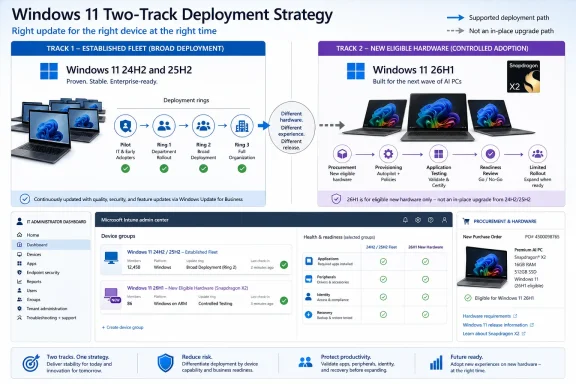
Windows 11 26H1 Beta should be the default validation branch for pilot PCs built around Qualcomm Snapdragon X2 Series silicon, while Experimental belongs only on a deliberately isolated compatibility-and-feedback cohort. For every other pilot, the first decision is not Beta versus Experimental but whether Windows 11 26H1 belongs on that hardware at all; Microsoft generally recommends retaining the default Windows core selection unless the device requires the targeted silicon support in 26H1.
Microsoft created the separate branches on June 8, 2026, assigning Beta to the 28000-series train and Experimental to the 28100-series train. As detailed by the Windows Insider Program, Beta represents nearer-term, more stable previewing, while Experimental remains an active-development environment where features can change, arrive later, or never ship.
That familiar stability distinction matters, but it is secondary to the servicing boundary around 26H1. This is not simply the next broad Windows feature update that organizations should deploy across their usual pre-production population.
Windows 11 26H1 is a targeted platform release supporting new hardware, including Qualcomm Snapdragon X2 Series devices. It uses a different Windows core and is not the general annual Windows 11 feature update expected in the second half of 2026.
Microsoft says devices running 26H1 will not be able to update directly to that annual feature update. A later Windows release will provide a path forward, but the details of that transition have not been announced.
That creates three practical pilot categories:
The important dividing line is therefore hardware enablement, not enthusiasm for Insider builds. A conventional x64 pilot PC should not be moved to 26H1 merely because Beta sounds relatively safe.
WindowsForum users following the June 8 releases reported the move from a shared 26H1 build family into distinct Beta and Experimental trains. Their reports also captured the broader 2026 Insider reset, in which the familiar Canary, Dev, Beta, and Release Preview maze is being simplified around Beta and Experimental choices. Earlier WindowsForum coverage noted that some Canary testers on 28000-series builds had already begun moving into the new Experimental model before the June split.
For enterprise teams, that channel reorganization is useful only after hardware scope has been narrowed to devices with a legitimate reason to run 26H1.
That full number identifies the specific July 6 flight; it should not be treated as a permanent identifier for the Beta branch. Future flights will change the build recorded on enrolled PCs.
Beta’s relative stability does not make it production-ready. It means Microsoft intends it for nearer-term previewing, giving IT teams a more controlled place to validate the 26H1 core without accepting every uncertainty associated with active platform development.
WindowsForum’s operational recommendation is to include application owners, endpoint engineers, help-desk representatives, and carefully selected business users only when their devices remain recoverable and their participation has a defined test purpose. This is pilot-design guidance, not a guarantee implied by Microsoft’s channel definition.
A sensible Beta cohort should cover the applications and controls that would block deployment if they failed. Testing should include:
Beta is also the more suitable branch for measuring operational friction. Service-desk staff can document unfamiliar failures, deployment engineers can verify policy application, and application owners can help determine whether an issue follows the application, device firmware, processor platform, or Windows 11 26H1.
The cohort should nevertheless remain small enough to recover. Enrollment should never be treated as a harmless preference that can be reversed without first checking Microsoft’s available recovery and servicing options.
As with the Beta build, 28120.2387 identifies that particular flight rather than serving as a permanent branch label. Administrators should use the complete build shown on the affected PC when correlating incidents or submitting feedback.
Microsoft describes Experimental as active development. Features may change, be delayed, or never reach a shipping Windows release. That makes it useful for early compatibility discovery, but WindowsForum recommends against using it for a representative business-user pilot.
That recommendation is an operational judgment based on the branch’s stated purpose. Experimental devices should form a separate failure domain rather than becoming the leading edge of the Beta population. They should not be the only machines available to application owners, the sole devices assigned to executives, or endpoints whose loss would interrupt time-sensitive work.
The cohort has a narrow job: identify breaking changes early, reproduce relevant failures, and submit actionable feedback. WindowsForum recommends assigning it to testers who have enough time and technical skill to separate Windows defects from application, policy, firmware, driver, and hardware problems. Microsoft’s channel definition does not itself prescribe those staffing requirements.
Keeping Experimental separate also protects pilot data. If Experimental and Beta devices are mixed into one reporting group, an issue observed on 28120.2387 can be mistaken for a general 26H1 failure and unnecessarily delay the Beta validation project.
The verified distinction is that Beta and Experimental are separate 26H1 build trains. The more consequential limitation is that a 26H1 device cannot move directly to the next annual Windows feature update. Microsoft says a later Windows release will provide the path forward.
Organizations should therefore document recovery requirements before enrollment rather than relying on an assumed exit mechanism. If a pilot cannot tolerate device recovery, application restoration, policy reapplication, or user-state restoration when something goes wrong, it is a poor candidate for 26H1.
The safe planning model is straightforward:
The team should also preserve a known-good deployment route for the organization’s standard Windows environment. Confirm that installation media, required drivers, management enrollment, security tooling, applications, and user-data restoration can return the machine to service if recovery becomes necessary.
Policies should assign Beta and Experimental devices to distinct management and reporting groups. Update-compliance reports, application test results, and incident records lose value when systems from different flight trains are presented as one generic 26H1 population.
Application validation should use explicit outcomes rather than “works” or “fails.” Teams should record whether installation succeeds, core workflows complete, updates apply, hardware integrations operate, and vendor support remains available. Failures first observed on Experimental should be checked against Beta before being classified as blockers for the primary Snapdragon X2 pilot.
WindowsForum user reports are especially valuable here because they show how quickly channel names, build families, and feature-flag behavior can change during an Insider reorganization. Inventory records should therefore include the device model, processor, selected channel, full Windows build, update date, management group, assigned tester, and known recovery route.
For hardware that does not require 26H1, the safest choice is neither branch. Keep Microsoft’s default Windows core selection and avoid creating a temporary servicing island without a concrete silicon-validation need.
The future-release upgrade path remains unknown in detail. Microsoft has stated only that a later Windows release will provide the path forward; organizations should wait for that transition to be documented before making assumptions about deployment or support.
Microsoft created the separate branches on June 8, 2026, assigning Beta to the 28000-series train and Experimental to the 28100-series train. As detailed by the Windows Insider Program, Beta represents nearer-term, more stable previewing, while Experimental remains an active-development environment where features can change, arrive later, or never ship.
That familiar stability distinction matters, but it is secondary to the servicing boundary around 26H1. This is not simply the next broad Windows feature update that organizations should deploy across their usual pre-production population.
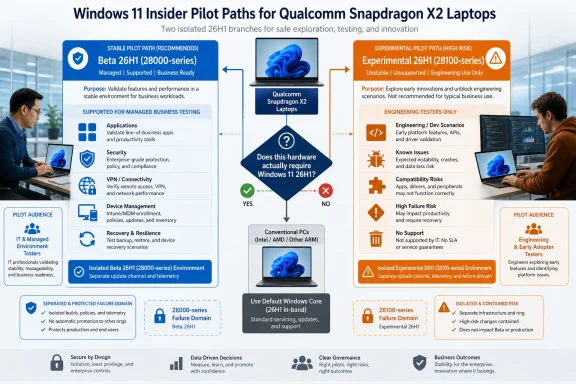 The Windows Core Decision Comes First
Windows 11 26H1 is a targeted platform release supporting new hardware, including Qualcomm Snapdragon X2 Series devices. It uses a different Windows core and is not the general annual Windows 11 feature update expected in the second half of 2026.Microsoft says devices running 26H1 will not be able to update directly to that annual feature update. A later Windows release will provide a path forward, but the details of that transition have not been announced.
That creates three practical pilot categories:
| Pilot hardware and purpose | WindowsForum guidance | Reason |
|---|---|---|
| Snapdragon X2 devices that require 26H1 platform support | Beta (26H1) | It validates the necessary Windows core on the more stable, nearer-term branch. |
| Recoverable Snapdragon X2 engineering devices used to find early compatibility problems | Experimental (26H1) | It exposes active-development changes while keeping the resulting risk isolated. |
| Existing PCs that do not require the 26H1 core | Default Windows core selection | Installing 26H1 introduces a servicing constraint without a demonstrated hardware requirement. |
WindowsForum users following the June 8 releases reported the move from a shared 26H1 build family into distinct Beta and Experimental trains. Their reports also captured the broader 2026 Insider reset, in which the familiar Canary, Dev, Beta, and Release Preview maze is being simplified around Beta and Experimental choices. Earlier WindowsForum coverage noted that some Canary testers on 28000-series builds had already begun moving into the new Experimental model before the June split.
For enterprise teams, that channel reorganization is useful only after hardware scope has been narrowed to devices with a legitimate reason to run 26H1.
26H1 enrollment checklist
The new channel interface is rolling out gradually, so eligible systems may not all display the revised options at the same time.
- Confirm that the PC is a Qualcomm Snapdragon X2 device that needs Windows 11 26H1.
- Open Settings > Windows Update > Windows Insider Program.
- Select Beta (26H1) for the primary pilot, or Experimental (26H1) only for the isolated engineering cohort.
- Return to Windows Update, check for updates, and record the resulting full build number in inventory and support records.
Beta Is the Operational Pilot, Not the Production Ring
Beta (26H1) is the appropriate starting point for Snapdragon X2 pilot devices that need to represent ordinary managed workflows. In the July 6, 2026 flight, Beta received Windows 11 Insider Preview Build 28020.2380.That full number identifies the specific July 6 flight; it should not be treated as a permanent identifier for the Beta branch. Future flights will change the build recorded on enrolled PCs.
Beta’s relative stability does not make it production-ready. It means Microsoft intends it for nearer-term previewing, giving IT teams a more controlled place to validate the 26H1 core without accepting every uncertainty associated with active platform development.
WindowsForum’s operational recommendation is to include application owners, endpoint engineers, help-desk representatives, and carefully selected business users only when their devices remain recoverable and their participation has a defined test purpose. This is pilot-design guidance, not a guarantee implied by Microsoft’s channel definition.
A sensible Beta cohort should cover the applications and controls that would block deployment if they failed. Testing should include:
- Line-of-business applications and their installers
- Identity, multifactor authentication, and sign-in flows
- Endpoint security and data-protection software
- VPN, Wi-Fi, and corporate network access
- Device enrollment and management policy
- Printing, docks, cameras, and other peripherals
- Windows Update installation and restart behavior
- Sleep, resume, battery, and recovery procedures
Beta is also the more suitable branch for measuring operational friction. Service-desk staff can document unfamiliar failures, deployment engineers can verify policy application, and application owners can help determine whether an issue follows the application, device firmware, processor platform, or Windows 11 26H1.
The cohort should nevertheless remain small enough to recover. Enrollment should never be treated as a harmless preference that can be reversed without first checking Microsoft’s available recovery and servicing options.
Experimental Needs Its Own Failure Domain
Experimental (26H1) moved to the 28100-series train on June 8. In the July 6 flight, it received Windows 11 Insider Preview Build 28120.2387.As with the Beta build, 28120.2387 identifies that particular flight rather than serving as a permanent branch label. Administrators should use the complete build shown on the affected PC when correlating incidents or submitting feedback.
Microsoft describes Experimental as active development. Features may change, be delayed, or never reach a shipping Windows release. That makes it useful for early compatibility discovery, but WindowsForum recommends against using it for a representative business-user pilot.
That recommendation is an operational judgment based on the branch’s stated purpose. Experimental devices should form a separate failure domain rather than becoming the leading edge of the Beta population. They should not be the only machines available to application owners, the sole devices assigned to executives, or endpoints whose loss would interrupt time-sensitive work.
The cohort has a narrow job: identify breaking changes early, reproduce relevant failures, and submit actionable feedback. WindowsForum recommends assigning it to testers who have enough time and technical skill to separate Windows defects from application, policy, firmware, driver, and hardware problems. Microsoft’s channel definition does not itself prescribe those staffing requirements.
Keeping Experimental separate also protects pilot data. If Experimental and Beta devices are mixed into one reporting group, an issue observed on 28120.2387 can be mistaken for a general 26H1 failure and unnecessarily delay the Beta validation project.
Channel Choice Does Not Remove the Servicing Boundary
The Windows Insider controls are available under Settings > Windows Update > Windows Insider Program, subject to the gradual rollout of the new interface. However, administrators should not assume that selecting a different 26H1 channel defines a supported in-place transition, downgrade, or recovery procedure.The verified distinction is that Beta and Experimental are separate 26H1 build trains. The more consequential limitation is that a 26H1 device cannot move directly to the next annual Windows feature update. Microsoft says a later Windows release will provide the path forward.
Organizations should therefore document recovery requirements before enrollment rather than relying on an assumed exit mechanism. If a pilot cannot tolerate device recovery, application restoration, policy reapplication, or user-state restoration when something goes wrong, it is a poor candidate for 26H1.
The safe planning model is straightforward:
- Treat Beta and Experimental as distinct test populations.
- Record the full build number after every flight.
- Verify available Microsoft recovery options before attempting a channel or core change.
- Keep deployment media, drivers, applications, and user-data restoration procedures ready.
- Do not plan a direct move from 26H1 to the next annual feature update.
- Reassess the pilot when Microsoft documents the later-release upgrade path.
Enterprise Controls Must Match the Core Risk
Before enrolling a Snapdragon X2 pilot, administrators should verify that BitLocker recovery information is available outside the device. A recovery key accessible only through a path that depends on the affected PC is not an adequate recovery plan.The team should also preserve a known-good deployment route for the organization’s standard Windows environment. Confirm that installation media, required drivers, management enrollment, security tooling, applications, and user-data restoration can return the machine to service if recovery becomes necessary.
Policies should assign Beta and Experimental devices to distinct management and reporting groups. Update-compliance reports, application test results, and incident records lose value when systems from different flight trains are presented as one generic 26H1 population.
Application validation should use explicit outcomes rather than “works” or “fails.” Teams should record whether installation succeeds, core workflows complete, updates apply, hardware integrations operate, and vendor support remains available. Failures first observed on Experimental should be checked against Beta before being classified as blockers for the primary Snapdragon X2 pilot.
WindowsForum user reports are especially valuable here because they show how quickly channel names, build families, and feature-flag behavior can change during an Insider reorganization. Inventory records should therefore include the device model, processor, selected channel, full Windows build, update date, management group, assigned tester, and known recovery route.
Frequently Asked Questions
Should every Windows 11 pilot move to 26H1 Beta?
No. Beta is the preferred 26H1 branch only for pilot hardware that requires 26H1, particularly Snapdragon X2 systems. Other PCs should normally remain on Microsoft’s default Windows core selection.Is Experimental simply a faster version of Beta?
No. Experimental is an active-development environment where features can change, appear selectively, arrive later, or never ship. WindowsForum recommends limiting it to isolated, recoverable engineering systems.Do 28020.2380 and 28120.2387 permanently identify the channels?
No. They are the full verified build numbers for the July 6 flight. Beta uses the 28000-series train and Experimental uses the 28100-series train, but each flight can introduce a new full build number.Can a 26H1 PC update directly to the next annual Windows feature update?
No. Microsoft says that direct update path will not be available. A later Windows release will provide the way forward, but the detailed upgrade process has not been disclosed.What should administrators record after enrollment?
Record the full build number, channel, hardware model, processor, update date, assigned test group, and recovery route. “Windows 11 26H1” alone is not precise enough for incident correlation.The Safe Pilot Boundary Is Deliberately Narrow
For Snapdragon X2 systems that need 26H1, Beta is the defensible default because it tests the required platform release on the more stable branch. Experimental should be limited to recoverable engineering machines whose defined purpose is to expose early compatibility defects.For hardware that does not require 26H1, the safest choice is neither branch. Keep Microsoft’s default Windows core selection and avoid creating a temporary servicing island without a concrete silicon-validation need.
The future-release upgrade path remains unknown in detail. Microsoft has stated only that a later Windows release will provide the path forward; organizations should wait for that transition to be documented before making assumptions about deployment or support.
References
- Primary source: learn.microsoft.com
Flight Hub - Windows Insider Program | Microsoft Learn
Flight schedules and status for Windows Insider Programlearn.microsoft.com - Independent coverage: blogs.windows.com
Announcing new builds 8 June 2026
[Update 6/11/2026: Release notes have now been published to Windows Insider release notes - Windows Insider Program | Microsoft Learn.]blogs.windows.com - Primary source: WindowsForum
Windows 11 Insider June 8: 26H1 Beta vs Experimental Split + Repeated Update Pauses | Windows Forum
Microsoft released new Windows 11 Insider builds on June 8, 2026, splitting Windows 11 version 26H1 into distinct Beta and Experimental build trains while...windowsforum.com