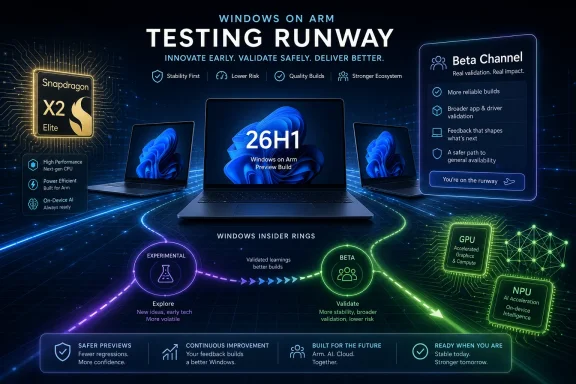
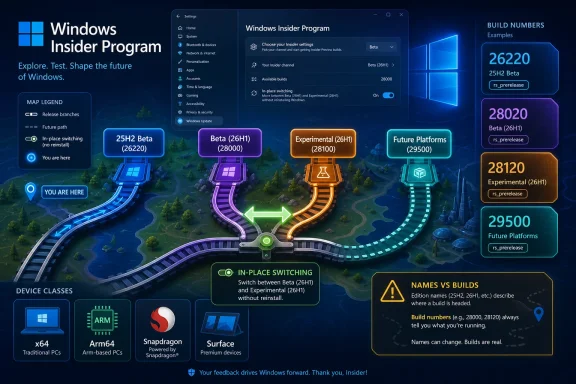
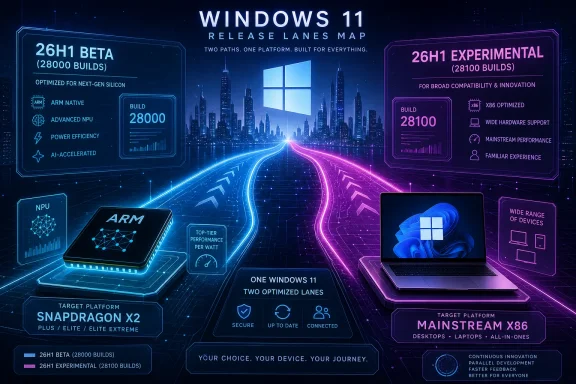
Microsoft released several Windows 11 Insider Preview builds on June 8, 2026, splitting Windows 11 26H1 testing into a new Beta branch in the 28000 build series and a separate Experimental branch in the 28100 series. The move looks procedural, but it is more than bookkeeping. Microsoft is turning the Insider Program into a more explicit routing system: one lane for near-shipping Windows work, another for riskier experimentation, and a very specific lane for next-generation silicon. For Windows enthusiasts, IT admins, and OEM watchers, the message is clear: 26H1 is not the next ordinary Windows upgrade for everyone, but a targeted platform release with hardware implications.
The headline build numbers tell the story. Windows 11 26H1 now has a Beta channel build, 28020.2236, and an Experimental channel build, 28120.2242. That gives Insiders on the 26H1 track a choice that previously existed more clearly for mainstream Windows testing: stay closer to stabilization, or live closer to the blast radius.
Microsoft says Windows 11 26H1 is a targeted release for specific silicon launching this year, including Qualcomm’s Snapdragon X2 Series devices. That single sentence should stop anyone treating 26H1 as a normal “next Windows” milestone. For most users, Microsoft is still recommending the default Windows core version selected in the Advanced options area of Windows Insider settings.
That matters because the Windows Insider Program has long blurred two very different ideas. One is previewing the next broadly available Windows experience. The other is previewing platform plumbing that may exist primarily to bring up new hardware, new driver models, new firmware assumptions, or new security boundaries. The June 8 announcement pushes 26H1 deeper into the second category.
The practical advice is unglamorous but important: if you do not have a reason to be on 26H1, you probably should not chase it. Microsoft is offering a selector, not issuing an invitation to every enthusiast to move their daily driver onto a silicon-targeted train. The build number may be higher, but higher is not the same thing as better, newer in a consumer sense, or more appropriate for the machine on your desk.
With the 28100 series, Microsoft finally gives 26H1 Experimental a distinct identity. The Beta 26H1 lane remains based on the 28000 series, while Experimental 26H1 moves to the 28100 series. For people tracking build numbers, that is a clean separation. For people running test fleets, it is an administrative gift: the branch can now be identified and discussed without the semantic fog of “Beta experience, Experimental ancestry, same build.”
This is also a quiet admission that channel naming only works when the plumbing underneath supports it. If Beta and Experimental are supposed to mean different things, the build trains have to diverge. Otherwise the channel selector becomes a label pasted over a shared payload, which is exactly the kind of ambiguity Microsoft said it wanted to reduce when it reworked the Insider Program earlier this year.
The new split also reduces the social confusion that often surrounds Insider releases. Enthusiasts compare build numbers as if they are sports scores; admins compare them as risk indicators. A distinct 28100 Experimental line gives both groups a clearer signal. If a machine is on 28120.2242, it is not merely “newer” than 28020.2236. It is on a different development branch with different expectations.
The company has been trying to make Insider participation less punishing. Historically, moving backward from a more adventurous channel often meant waiting for production builds to catch up, wiping the machine, or accepting a messy detour through ISO installs and backups. That discouraged experimentation in exactly the audience Microsoft wants: technically literate users willing to test rough code and report failures.
The in-place upgrade model changes the risk calculation. It does not make Experimental safe, and it does not mean every transition will be instant or painless. But it lowers the cost of correcting a channel choice, and that makes the program more honest. If Microsoft wants people to choose a channel based on intent rather than fear, switching lanes cannot feel like stepping off a pier.
For IT shops, the distinction is even sharper. A lab machine that can move between two 26H1 branches without a wipe is more useful than a machine that must be rebuilt every time a test objective changes. That does not make 26H1 appropriate for broad corporate pilots. It does make the branch more viable for hardware validation, driver smoke testing, and pre-production security policy checks.
Those are not glamorous changes. They are the difference between a test build that feels rough and one that feels hostile. Audio failure is the kind of bug that makes a user abandon a flight immediately, because it cuts across meetings, media, accessibility, and basic confidence in the machine. Freezes in search and Notepad are even worse because they hit muscle-memory workflows that users rely on dozens of times per day.
The Installed Apps fix is another reminder that Settings has become the control plane for modern Windows. When Settings reliability breaks, it does not merely inconvenience people who like tidy menus. It disrupts app removal, repair workflows, troubleshooting, and fleet support documentation. In the Windows 11 era, a flaky Settings page is a management problem.
Build 26220.8575 therefore reads like a stabilization release with one major policy-adjacent twist: update pauses. Microsoft says it is adding the ability to extend update pauses as many times as needed. That line deserves more scrutiny than the short release note gives it.
For Insiders, more pause control makes immediate sense. Preview builds can break audio, Settings, search, Notepad, and any number of other daily workflows. If a machine is already on a problematic flight, users may reasonably want to stop the next one from arriving until they have read feedback, watched known issues, or imaged the system. In that context, repeatable pauses are not procrastination; they are survival.
The interesting question is whether this stays confined to Insider behavior or foreshadows a broader shift in Windows Update ergonomics. Microsoft has spent years trying to make Windows feel less arbitrary about restarts and update timing. It has not always succeeded. Giving users more explicit pause extension could be a response to that long-running trust deficit.
Admins will view this through a different lens. In managed environments, update deferral is supposed to be policy-driven, not improvised at the endpoint by whichever user happens to click first. If repeatable pause behavior appears in consumer or unmanaged Pro contexts, it may be welcomed by power users while making security-minded professionals twitch. The usefulness of a pause button depends entirely on who controls it and whether anyone remembers to unpause.
Administrator Protection is one of Microsoft’s more important attempts to rethink the everyday danger of admin accounts. Windows has lived for decades with a compromise: many users run with administrator-capable accounts because Windows software, troubleshooting, and legacy habits often make that convenient. User Account Control added friction, but it did not eliminate the underlying problem of standing administrative privilege.
The newer model aims to make admin rights more just-in-time. Instead of letting an administrator account constantly carry broad authority, Windows can require elevation at the moment of need and reduce the exposure of what Microsoft has called free-floating admin rights. That idea fits the security industry’s broader move toward least privilege, privilege elevation controls, and reducing the blast radius when a user session is compromised.
What changes in this build is visibility. Earlier rollout language emphasized IT-admin enablement through management controls such as Intune or Group Policy. A Settings toggle puts the concept in front of users and testers more directly. That is good for discoverability, but it also means Microsoft must explain the feature in plain language and make failure modes understandable.
Security features often fail not because the concept is wrong, but because the user experience is too cryptic. If Administrator Protection breaks an installer, a script, a device utility, or a power-user workflow, the system needs to make clear what happened and why. Otherwise people will flip the toggle off and never return. The fact that Microsoft is testing the Settings path in Experimental 26H1 suggests the company knows this must become a lived Windows experience, not just a policy checkbox.
The old Insider mental model rewarded motion. Canary meant constant churn, Dev meant early features, Beta meant closer-to-release bits, and Release Preview meant nearly done. The new model is trying to make the channels less about adrenaline and more about intent. Some branches will not move every week. Some branches will exist because Microsoft needs to validate a platform, not because enthusiasts need a Friday afternoon download.
That is healthier, if Microsoft sticks to it. A preview program that ships builds merely to maintain cadence becomes noisy. A preview program that ships builds when there is a meaningful payload becomes more trustworthy. The challenge is that Microsoft has trained its most engaged users to treat silence as either a delay, a problem, or a teaser.
The June 8 post also notes that Microsoft is delayed in publishing release notes to the Windows Insider release notes page on Microsoft Learn. That is a small operational stumble, but it undercuts the same clarity push Microsoft is trying to sell. If the program is being rebuilt around transparency, release notes need to be timely, complete, and aligned across Microsoft’s own publishing surfaces.
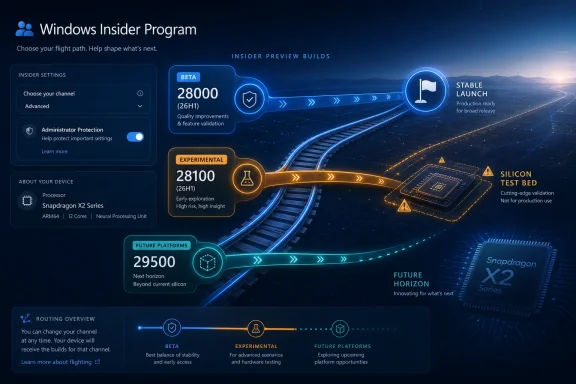
The 26220 line represents the mainstream Beta reality for Windows 11 as most Insiders understand it. The 28000 line now represents a more stable 26H1 branch tied to a specific upcoming hardware story. The 28100 line is the riskier 26H1 development branch. The 29500 line remains the future-platform frontier, detached from a retail Windows version in the ordinary sense.
That segmentation is valuable because Windows is no longer a single monolithic release train in the way casual users imagine. It is a platform spanning x86 PCs, Arm PCs, AI-oriented hardware blocks, OEM-specific enablement, virtualization scenarios, security baselines, and regional compliance pressures. A single “Windows 11 Insider build” label cannot carry that complexity.
But segmentation also raises the burden on Microsoft’s messaging. If users see 26H1 and assume it is the successor to 25H2 for everyone, Microsoft has a problem. If OEM partners see it as the silicon bring-up lane and power users see it as the cool kids’ branch, expectations will collide. The company’s warning that most people should stick with the default Windows core version is therefore not boilerplate. It is a boundary marker.
That could include performance tuning, power management behavior, driver stack changes, AI acceleration plumbing, security requirements, or firmware interactions. Microsoft does not spell out the details in this announcement, and it would be reckless to pretend the build number alone reveals them. But the existence of a targeted 26H1 branch says the company needs a Windows train aligned to hardware launch timing.
This is the quiet reality of the modern Windows ecosystem. The operating system is no longer just the thing that ships after the hardware is done. It is part of the hardware launch. When a new silicon platform arrives, Windows must know how to schedule its cores, expose its accelerators, secure its boot chain, manage its sleep states, and avoid embarrassing day-one compatibility gaps.
That is why enthusiasts should be careful with 26H1. The branch may contain fascinating changes, but some may exist to support hardware most people do not own yet. Running it on the wrong machine may tell you less about the future of your PC than about the compromises Microsoft is making to prepare someone else’s.
That is a sensible model, and it is closer to how many technical users already thought about the program. The previous channel structure had accumulated too much historical baggage. Dev did not always mean developer. Canary did not always mean useful early access. Beta sometimes had features that were announced but not present because controlled rollouts kept them from many users.
The new scheme is not perfect. “Experimental” is clearer than “Dev” in one sense, but it is also broad enough to contain everything from visible UI experiments to deep platform work. The Future Platforms option adds another layer of complexity. The Advanced options picker for Windows core versions is powerful, but it also creates new opportunities for users to put machines on branches they do not understand.
Still, the direction is right. A test program can tolerate rough builds; it cannot tolerate ambiguous promises. If Microsoft says a feature is in Beta, users increasingly expect it to be there. If Microsoft says 26H1 is targeted to specific silicon, users should expect that branch to serve hardware strategy first and general curiosity second.
None of that implies broad deployment. Insider builds remain preview software, and the more specialized the branch, the more carefully it should be isolated. The right place for 26H1 testing is a lab device, a hardware validation bench, or a sacrificial enthusiast machine with backups and a known recovery path. It is not the CFO’s travel laptop, no matter how exciting the build number looks.
The Administrator Protection toggle deserves special attention because it intersects with help desk reality. Least-privilege security is easy to endorse in architecture diagrams and hard to operationalize across line-of-business apps, device utilities, legacy installers, VPN clients, and remote support tools. Testing now gives organizations time to find the weird edge cases before the feature becomes more visible or more broadly recommended.
The repeatable update pause behavior should also be watched. If Microsoft expands it beyond Insider contexts, admins will need to understand how it interacts with Windows Update for Business, Intune policies, compliance reporting, and user autonomy. A feature that helps a home user avoid a bad preview build can become a governance headache if it weakens a managed patch process.
But Windows development news often hides in the scaffolding. The important part is not that Microsoft fixed an audio regression, though affected Insiders will rightly care. It is that Microsoft is arranging its preview machinery around a more fragmented Windows future: mainstream releases, silicon-targeted releases, experimental feature work, and future platform development all moving with clearer labels.
That fragmentation is not necessarily bad. It may be the only realistic way to develop Windows in an era when PC hardware is diversifying again. Arm PCs, AI accelerators, security processors, cloud-managed endpoints, and gaming rigs do not all need the same preview cadence. A single channel hierarchy cannot serve every constituency equally.
The danger is that Microsoft’s terminology becomes another layer of abstraction users must decode. “Beta 26H1” sounds reassuring until one remembers that 26H1 itself is targeted. “Experimental 26H1” sounds exciting until one remembers that it may be about hardware enablement as much as user-facing features. “Future Platforms” sounds futuristic until one remembers that leaving it may still require a clean install.
Microsoft’s June 8 Insider drop is not a flashy feature release; it is a routing update for the next phase of Windows. The company is trying to make its preview program more legible at the same time Windows itself is becoming more hardware-specific, more security-conscious, and more dependent on staged experimentation. If Microsoft can keep the labels honest, publish notes on time, and resist the urge to blur Beta and Experimental again, this new map may make Insider testing less of a guessing game—and give us an earlier, clearer view of the Windows PCs that are coming next.
 Microsoft Turns 26H1 Into a Silicon Test Bed, Not a General Destination
The headline build numbers tell the story. Windows 11 26H1 now has a Beta channel build, 28020.2236, and an Experimental channel build, 28120.2242. That gives Insiders on the 26H1 track a choice that previously existed more clearly for mainstream Windows testing: stay closer to stabilization, or live closer to the blast radius.Microsoft says Windows 11 26H1 is a targeted release for specific silicon launching this year, including Qualcomm’s Snapdragon X2 Series devices. That single sentence should stop anyone treating 26H1 as a normal “next Windows” milestone. For most users, Microsoft is still recommending the default Windows core version selected in the Advanced options area of Windows Insider settings.
That matters because the Windows Insider Program has long blurred two very different ideas. One is previewing the next broadly available Windows experience. The other is previewing platform plumbing that may exist primarily to bring up new hardware, new driver models, new firmware assumptions, or new security boundaries. The June 8 announcement pushes 26H1 deeper into the second category.
The practical advice is unglamorous but important: if you do not have a reason to be on 26H1, you probably should not chase it. Microsoft is offering a selector, not issuing an invitation to every enthusiast to move their daily driver onto a silicon-targeted train. The build number may be higher, but higher is not the same thing as better, newer in a consumer sense, or more appropriate for the machine on your desk.
The New 28100 Series Makes Experimental Mean Experimental Again
The arrival of the 28100 series for Experimental 26H1 is the most important structural change in this drop. Until now, Microsoft says some Insiders who had selected the Beta experience while on Experimental 26H1 were still receiving the same build version while the company prepared a new branch. That was awkward for a program trying to sell clarity as a feature.With the 28100 series, Microsoft finally gives 26H1 Experimental a distinct identity. The Beta 26H1 lane remains based on the 28000 series, while Experimental 26H1 moves to the 28100 series. For people tracking build numbers, that is a clean separation. For people running test fleets, it is an administrative gift: the branch can now be identified and discussed without the semantic fog of “Beta experience, Experimental ancestry, same build.”
This is also a quiet admission that channel naming only works when the plumbing underneath supports it. If Beta and Experimental are supposed to mean different things, the build trains have to diverge. Otherwise the channel selector becomes a label pasted over a shared payload, which is exactly the kind of ambiguity Microsoft said it wanted to reduce when it reworked the Insider Program earlier this year.
The new split also reduces the social confusion that often surrounds Insider releases. Enthusiasts compare build numbers as if they are sports scores; admins compare them as risk indicators. A distinct 28100 Experimental line gives both groups a clearer signal. If a machine is on 28120.2242, it is not merely “newer” than 28020.2236. It is on a different development branch with different expectations.
In-Place Upgrades Are the Real Concession to Testers
Microsoft’s most user-friendly detail is not the branch number. It is the promise that Insiders can switch between Beta 26H1 and Experimental 26H1 through Settings > Windows Update > Windows Insider Program, using an in-place upgrade rather than a clean reinstall. For anyone who has burned a weekend rebuilding a test machine after picking the wrong Insider lane, that is not a footnote.The company has been trying to make Insider participation less punishing. Historically, moving backward from a more adventurous channel often meant waiting for production builds to catch up, wiping the machine, or accepting a messy detour through ISO installs and backups. That discouraged experimentation in exactly the audience Microsoft wants: technically literate users willing to test rough code and report failures.
The in-place upgrade model changes the risk calculation. It does not make Experimental safe, and it does not mean every transition will be instant or painless. But it lowers the cost of correcting a channel choice, and that makes the program more honest. If Microsoft wants people to choose a channel based on intent rather than fear, switching lanes cannot feel like stepping off a pier.
For IT shops, the distinction is even sharper. A lab machine that can move between two 26H1 branches without a wipe is more useful than a machine that must be rebuilt every time a test objective changes. That does not make 26H1 appropriate for broad corporate pilots. It does make the branch more viable for hardware validation, driver smoke testing, and pre-production security policy checks.
The Mainstream Beta Build Gets the Fixes People Actually Notice
Away from 26H1, Microsoft also shipped Beta Build 26220.8575. This is the kind of build that looks modest in release notes but matters to anyone living on Insider flights. It brings fixes for audio failures, Settings reliability under Apps > Installed Apps, and freezes involving search, Notepad, and other scenarios.Those are not glamorous changes. They are the difference between a test build that feels rough and one that feels hostile. Audio failure is the kind of bug that makes a user abandon a flight immediately, because it cuts across meetings, media, accessibility, and basic confidence in the machine. Freezes in search and Notepad are even worse because they hit muscle-memory workflows that users rely on dozens of times per day.
The Installed Apps fix is another reminder that Settings has become the control plane for modern Windows. When Settings reliability breaks, it does not merely inconvenience people who like tidy menus. It disrupts app removal, repair workflows, troubleshooting, and fleet support documentation. In the Windows 11 era, a flaky Settings page is a management problem.
Build 26220.8575 therefore reads like a stabilization release with one major policy-adjacent twist: update pauses. Microsoft says it is adding the ability to extend update pauses as many times as needed. That line deserves more scrutiny than the short release note gives it.
Microsoft Quietly Reopens the Update Pause Debate
The ability to extend update pauses repeatedly is a small UI change with large philosophical baggage. Windows Update has always balanced user control against Microsoft’s desire to keep the ecosystem patched, current, and supportable. Every additional pause affordance gives users breathing room, but it also creates another way for machines to drift away from current security and reliability baselines.For Insiders, more pause control makes immediate sense. Preview builds can break audio, Settings, search, Notepad, and any number of other daily workflows. If a machine is already on a problematic flight, users may reasonably want to stop the next one from arriving until they have read feedback, watched known issues, or imaged the system. In that context, repeatable pauses are not procrastination; they are survival.
The interesting question is whether this stays confined to Insider behavior or foreshadows a broader shift in Windows Update ergonomics. Microsoft has spent years trying to make Windows feel less arbitrary about restarts and update timing. It has not always succeeded. Giving users more explicit pause extension could be a response to that long-running trust deficit.
Admins will view this through a different lens. In managed environments, update deferral is supposed to be policy-driven, not improvised at the endpoint by whichever user happens to click first. If repeatable pause behavior appears in consumer or unmanaged Pro contexts, it may be welcomed by power users while making security-minded professionals twitch. The usefulness of a pause button depends entirely on who controls it and whether anyone remembers to unpause.
Administrator Protection Moves From Policy Concept to User-Visible Toggle
The most security-relevant change lands in Experimental 26H1 Build 28120.2242. Microsoft says it is rolling out the ability to enable Administrator Protection in Settings under Privacy & security > Windows Security > Account protection. A restart is required.Administrator Protection is one of Microsoft’s more important attempts to rethink the everyday danger of admin accounts. Windows has lived for decades with a compromise: many users run with administrator-capable accounts because Windows software, troubleshooting, and legacy habits often make that convenient. User Account Control added friction, but it did not eliminate the underlying problem of standing administrative privilege.
The newer model aims to make admin rights more just-in-time. Instead of letting an administrator account constantly carry broad authority, Windows can require elevation at the moment of need and reduce the exposure of what Microsoft has called free-floating admin rights. That idea fits the security industry’s broader move toward least privilege, privilege elevation controls, and reducing the blast radius when a user session is compromised.
What changes in this build is visibility. Earlier rollout language emphasized IT-admin enablement through management controls such as Intune or Group Policy. A Settings toggle puts the concept in front of users and testers more directly. That is good for discoverability, but it also means Microsoft must explain the feature in plain language and make failure modes understandable.
Security features often fail not because the concept is wrong, but because the user experience is too cryptic. If Administrator Protection breaks an installer, a script, a device utility, or a power-user workflow, the system needs to make clear what happened and why. Otherwise people will flip the toggle off and never return. The fact that Microsoft is testing the Settings path in Experimental 26H1 suggests the company knows this must become a lived Windows experience, not just a policy checkbox.
The Missing Experimental Build Is Part of the Message
Microsoft also said there is no new build for the regular Experimental channel this week, and no new build for Experimental Future Platforms, including the Canary 29500 series. That absence is easy to skip, but it reinforces the larger reorganization.The old Insider mental model rewarded motion. Canary meant constant churn, Dev meant early features, Beta meant closer-to-release bits, and Release Preview meant nearly done. The new model is trying to make the channels less about adrenaline and more about intent. Some branches will not move every week. Some branches will exist because Microsoft needs to validate a platform, not because enthusiasts need a Friday afternoon download.
That is healthier, if Microsoft sticks to it. A preview program that ships builds merely to maintain cadence becomes noisy. A preview program that ships builds when there is a meaningful payload becomes more trustworthy. The challenge is that Microsoft has trained its most engaged users to treat silence as either a delay, a problem, or a teaser.
The June 8 post also notes that Microsoft is delayed in publishing release notes to the Windows Insider release notes page on Microsoft Learn. That is a small operational stumble, but it undercuts the same clarity push Microsoft is trying to sell. If the program is being rebuilt around transparency, release notes need to be timely, complete, and aligned across Microsoft’s own publishing surfaces.
Build Numbers Are Becoming Product Strategy
It is tempting to treat 26220, 28020, 28120, and 29500 as trivia for forum signatures. They are more than that. Microsoft is using build trains to express product segmentation before the marketing names arrive.The 26220 line represents the mainstream Beta reality for Windows 11 as most Insiders understand it. The 28000 line now represents a more stable 26H1 branch tied to a specific upcoming hardware story. The 28100 line is the riskier 26H1 development branch. The 29500 line remains the future-platform frontier, detached from a retail Windows version in the ordinary sense.
That segmentation is valuable because Windows is no longer a single monolithic release train in the way casual users imagine. It is a platform spanning x86 PCs, Arm PCs, AI-oriented hardware blocks, OEM-specific enablement, virtualization scenarios, security baselines, and regional compliance pressures. A single “Windows 11 Insider build” label cannot carry that complexity.
But segmentation also raises the burden on Microsoft’s messaging. If users see 26H1 and assume it is the successor to 25H2 for everyone, Microsoft has a problem. If OEM partners see it as the silicon bring-up lane and power users see it as the cool kids’ branch, expectations will collide. The company’s warning that most people should stick with the default Windows core version is therefore not boilerplate. It is a boundary marker.
Qualcomm’s Shadow Hangs Over the Announcement
The mention of Snapdragon X2 Series devices is not incidental. Qualcomm’s first major Snapdragon X push helped make Arm-based Windows PCs feel more credible, but Microsoft’s platform ambitions require more than one hardware generation. A 26H1 release aimed at specific silicon suggests the next wave needs Windows work that Microsoft does not want to wait to land in a broader annual update.That could include performance tuning, power management behavior, driver stack changes, AI acceleration plumbing, security requirements, or firmware interactions. Microsoft does not spell out the details in this announcement, and it would be reckless to pretend the build number alone reveals them. But the existence of a targeted 26H1 branch says the company needs a Windows train aligned to hardware launch timing.
This is the quiet reality of the modern Windows ecosystem. The operating system is no longer just the thing that ships after the hardware is done. It is part of the hardware launch. When a new silicon platform arrives, Windows must know how to schedule its cores, expose its accelerators, secure its boot chain, manage its sleep states, and avoid embarrassing day-one compatibility gaps.
That is why enthusiasts should be careful with 26H1. The branch may contain fascinating changes, but some may exist to support hardware most people do not own yet. Running it on the wrong machine may tell you less about the future of your PC than about the compromises Microsoft is making to prepare someone else’s.
The Insider Program Is Trying to Recover Trust Through Predictability
Microsoft’s April Insider Program changes were framed around two complaints: confusing channel structure and unpredictable feature availability. The June 8 builds show the company putting that theory into practice. Beta and Experimental are supposed to mean different things. Beta is supposed to be closer to what will ship. Experimental is supposed to house active development where features can change, vanish, or arrive unevenly.That is a sensible model, and it is closer to how many technical users already thought about the program. The previous channel structure had accumulated too much historical baggage. Dev did not always mean developer. Canary did not always mean useful early access. Beta sometimes had features that were announced but not present because controlled rollouts kept them from many users.
The new scheme is not perfect. “Experimental” is clearer than “Dev” in one sense, but it is also broad enough to contain everything from visible UI experiments to deep platform work. The Future Platforms option adds another layer of complexity. The Advanced options picker for Windows core versions is powerful, but it also creates new opportunities for users to put machines on branches they do not understand.
Still, the direction is right. A test program can tolerate rough builds; it cannot tolerate ambiguous promises. If Microsoft says a feature is in Beta, users increasingly expect it to be there. If Microsoft says 26H1 is targeted to specific silicon, users should expect that branch to serve hardware strategy first and general curiosity second.
Where IT Pros Should Draw the Line
For administrators, the June 8 announcement is less about installing the latest build and more about mapping the risk surface. Build 26220.8575 may be worth watching for update pause behavior and reliability fixes. Build 28020.2236 is relevant if the organization expects to evaluate 26H1-class hardware. Build 28120.2242 is relevant for security teams tracking Administrator Protection and privilege elevation changes.None of that implies broad deployment. Insider builds remain preview software, and the more specialized the branch, the more carefully it should be isolated. The right place for 26H1 testing is a lab device, a hardware validation bench, or a sacrificial enthusiast machine with backups and a known recovery path. It is not the CFO’s travel laptop, no matter how exciting the build number looks.
The Administrator Protection toggle deserves special attention because it intersects with help desk reality. Least-privilege security is easy to endorse in architecture diagrams and hard to operationalize across line-of-business apps, device utilities, legacy installers, VPN clients, and remote support tools. Testing now gives organizations time to find the weird edge cases before the feature becomes more visible or more broadly recommended.
The repeatable update pause behavior should also be watched. If Microsoft expands it beyond Insider contexts, admins will need to understand how it interacts with Windows Update for Business, Intune policies, compliance reporting, and user autonomy. A feature that helps a home user avoid a bad preview build can become a governance headache if it weakens a managed patch process.
The June 8 Flight Is Smaller Than Its Implications
The release notes themselves are brief. One mainstream Beta build gets a handful of reliability fixes and an update pause change. One 26H1 Beta build gets general improvements. One 26H1 Experimental build gets general improvements plus Administrator Protection visibility. Two other Experimental lanes get no new build.But Windows development news often hides in the scaffolding. The important part is not that Microsoft fixed an audio regression, though affected Insiders will rightly care. It is that Microsoft is arranging its preview machinery around a more fragmented Windows future: mainstream releases, silicon-targeted releases, experimental feature work, and future platform development all moving with clearer labels.
That fragmentation is not necessarily bad. It may be the only realistic way to develop Windows in an era when PC hardware is diversifying again. Arm PCs, AI accelerators, security processors, cloud-managed endpoints, and gaming rigs do not all need the same preview cadence. A single channel hierarchy cannot serve every constituency equally.
The danger is that Microsoft’s terminology becomes another layer of abstraction users must decode. “Beta 26H1” sounds reassuring until one remembers that 26H1 itself is targeted. “Experimental 26H1” sounds exciting until one remembers that it may be about hardware enablement as much as user-facing features. “Future Platforms” sounds futuristic until one remembers that leaving it may still require a clean install.
The Watermark Crowd Gets a Cleaner Map
For WindowsForum readers who actually run these builds, the immediate map is straightforward.- Build 26220.8575 is the current mainstream Beta build in this announcement, with fixes for audio, Settings reliability, and freezes involving search, Notepad, and related scenarios.
- Build 28020.2236 is the new Beta 26H1 build, intended for Insiders on the 26H1 track who want the less adventurous branch.
- Build 28120.2242 is the new Experimental 26H1 build, now separated into the 28100 series and carrying the new Settings path for Administrator Protection.
- The regular Experimental channel did not receive a new build in this announcement.
- Experimental Future Platforms, including the Canary 29500 series, also did not receive a new build in this announcement.
- Microsoft’s own guidance remains that most users should stay with the default Windows core version unless they have a specific reason to select 26H1.
Microsoft’s June 8 Insider drop is not a flashy feature release; it is a routing update for the next phase of Windows. The company is trying to make its preview program more legible at the same time Windows itself is becoming more hardware-specific, more security-conscious, and more dependent on staged experimentation. If Microsoft can keep the labels honest, publish notes on time, and resist the urge to blur Beta and Experimental again, this new map may make Insider testing less of a guessing game—and give us an earlier, clearer view of the Windows PCs that are coming next.
References
- Primary source: Microsoft - Windows Insiders Blog
Published: Mon, 08 Jun 2026 21:15:32 +0000
Announcing new builds 8 June 2026
[Update 6/11/2026: Release notes have now been published to Windows Insider release notes - Windows Insider Program | Microsoft Learn.]blogs.windows.com