

Microsoft released new Windows 11 Insider builds on June 8, 2026, splitting Windows 11 version 26H1 into distinct Beta and Experimental build trains while expanding a Windows Update pause feature that lets testers repeatedly extend update deferrals. The headline feature sounds like liberation from forced updates, but the more consequential change is architectural. Microsoft is using the Insider Program to separate “future Windows” into clearer lanes, and that matters more than any single Settings toggle.
For years, the Windows Insider Program has been both a preview pipeline and a fog machine. It gave enthusiasts early access, gave Microsoft telemetry at scale, and gave IT admins a warning system for what might be coming. But the names of the channels often mattered less than Microsoft’s internal build branching, and the result was a program that could feel more like reading tea leaves than following a roadmap.
This week’s builds do not fix that entirely. They do, however, show Microsoft trying to make the Insider Program more explicit about what kind of risk a tester is accepting. The company is also quietly acknowledging a truth Windows users have understood for decades: update control is not just a consumer convenience. It is a trust mechanism.
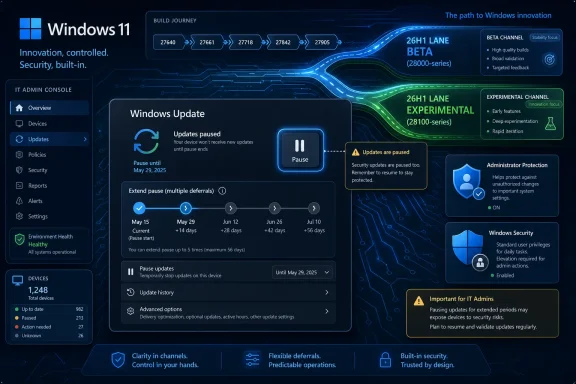
The most important change in the June 8 Insider release is the arrival of a new 26H1 build train. Devices in Experimental 26H1 are moving into the 28100 series, while the newly formalized Beta 26H1 channel uses 28000-series builds. That distinction may sound like numerology to anyone outside the Windows enthusiast bubble, but for testers and administrators, build numbers are the breadcrumb trail that tells you which train you are actually riding.
Until now, some Insiders who had selected a Beta-style experience for 26H1 were still receiving the same underlying build version as those in the more experimental lane. Microsoft’s explanation is straightforward: it had not yet introduced the separate branch needed to make the distinction real. With the new 28100 and 28000 split, the channel picker begins to map more directly to different engineering tracks.
That matters because Windows 11 version 26H1 is not a normal “here are the new features” release. It is primarily a platform and hardware-enablement branch, associated with support for future devices and silicon, including Qualcomm’s next-generation Snapdragon X2 platform. Microsoft has been clear that most Insiders do not need to move to 26H1 unless they have a reason to test those platform-level changes.
This is the part of the story that risks being buried under the more clickable update-pause angle. Microsoft is not merely shipping another preview build. It is putting more structure around how Windows evolves when the operating system must serve both mainstream PCs and new hardware platforms that may require deeper plumbing work.
For the average Windows 11 user, 26H1 is not the next great feature drop. For Microsoft, OEMs, and silicon partners, it is scaffolding. For Insiders, it is a reminder that the Windows version number on the box increasingly tells only part of the story.
“Experimental” says what it means. It is a place where Microsoft can test changes that may not ship quickly, may not ship broadly, or may not ship at all. “Beta” implies a closer relationship to something supportable, although no Insider build should be confused with production-grade code.
The new 26H1 separation gives Microsoft more room to run parallel experiments without pretending they are the same thing. It can stabilize one branch while testing broader changes in another. It can serve hardware-specific needs without dragging every enthusiast into the same churn.
That is the optimistic reading. The less generous reading is that Microsoft is still trying to tame complexity of its own making. Windows now ships as a base OS, enablement packages, controlled feature rollouts, app updates through the Store, driver updates through Windows Update, server-side toggles, and Insider feature flags. The channel name alone cannot fully describe that machine.
Still, clarity is valuable even when it is incomplete. If the 28000-series Beta 26H1 branch and 28100-series Experimental 26H1 branch remain meaningfully distinct, Microsoft will have given Insiders a better signal. If they blur again, the new labels will become one more abstraction layer between users and the code actually running on their PCs.
That is not a small symbolic shift. Windows Update has long been the place where Microsoft’s security priorities collide with user autonomy. The company wants devices patched quickly because unpatched Windows machines are not merely private risks; they are part of a larger ecosystem of botnets, ransomware campaigns, credential theft, and enterprise compromise.
Users, meanwhile, remember the bad updates. They remember broken printers, disappearing taskbar elements, audio regressions, BitLocker surprises, driver conflicts, and the special dread of a reboot landing in the middle of a workday. The rational Microsoft answer is that most updates install successfully on most devices. The rational user answer is that the one that fails on my machine is the only one that matters.
Allowing repeated pause extensions is therefore more than a Settings tweak. It is Microsoft admitting that update timing is part of system reliability. A machine that is theoretically secure but practically unavailable at the wrong moment has failed its user too.
The obvious concern is that an “unlimited” pause pattern can become a self-inflicted security problem. If users can keep deferring updates indefinitely, some will. That risk is real, but it is also not new. Power users already find ways to delay updates, disable services, meter connections, manipulate policies, or otherwise work around the default cadence. Bringing more of that behavior into a visible interface may be safer than forcing it underground.
That is why Windows Update became increasingly assertive over the last decade. It is why reboots became more difficult to avoid. It is why Home editions have fewer administrative levers than business-managed systems. Microsoft has spent years trying to reduce the population of vulnerable machines by making patching ordinary and automatic.
The trouble is that security policy at consumer scale tends to flatten individual circumstances. A gamer with a fragile GPU driver stack, a developer running a carefully tuned local environment, a musician depending on low-latency audio drivers, and a small business owner using a line-of-business peripheral from 2014 all experience Windows Update differently. For some of them, delaying a patch is not negligence. It is change management.
Enterprise IT has always understood this. Administrators stage rings, validate updates, watch known issues, and hold deployment until confidence rises. Consumers and enthusiasts have had fewer official ways to express the same caution. The repeated-pause option narrows that philosophical gap, at least in preview.
Microsoft will need guardrails if this ships broadly. It could distinguish security updates from feature or driver updates more clearly. It could warn users when a paused device is missing a critical fix. It could preserve administrative policy for managed fleets while giving standalone PCs more transparent control. The key is not to pretend that every update has the same urgency.
Qualcomm’s Snapdragon X line already forced Microsoft to make Windows on ARM feel less like a science project and more like a real PC platform. A 26H1 branch aimed at support for newer silicon suggests that this work is continuing under the hood. The features users notice may arrive later, but the foundations have to be laid before devices can ship smoothly.
That is why treating 26H1 as a consumer feature update would be misleading. The branch exists because certain hardware needs platform work on a schedule that may not align neatly with the annual Windows feature cadence. If Microsoft waited for every visible feature to be ready before enabling the hardware, OEM launches could suffer. If it shipped platform work into the mainline too aggressively, mainstream users could absorb unnecessary risk.
A separate 26H1 track is a compromise. It lets the company service a near-term hardware need while keeping the broader Windows 11 population on a more conventional path. For Insiders, it means the “latest” build is not automatically the most relevant build.
That is an important cultural correction. Enthusiasts often equate higher build numbers with progress. In the modern Windows program, a higher build number may simply mean you are testing a different problem.
Administrator Protection is part of a broader push to reduce the everyday exposure of elevated privileges. Windows has spent years balancing compatibility with the reality that too many users, apps, scripts, and installers assume administrative access as a matter of course. Attackers benefit from that habit.
The Windows security model has improved dramatically since the pre-UAC era, but elevation remains a core battleground. The problem is not only whether a user can approve an admin prompt. It is whether the system can limit what runs with elevated rights, when those rights exist, and how easily malicious code can ride along.
Putting Administrator Protection inside Windows Security settings matters because location is product strategy. A hidden policy is for administrators. A visible security control is for a broader class of power users and testers. Microsoft is not yet saying that every consumer PC should flip it on tomorrow, but it is making the feature feel less experimental and more like part of the security baseline it wants Windows to grow into.
The restart requirement is also telling. This is not a cosmetic toggle. It touches enough of the privilege model that Windows needs to reinitialize part of the environment. That is exactly why Microsoft is testing it in Insider channels rather than springing it on the stable population.
Preview builds are often covered as if they are feature vending machines. A new button appears, a hidden setting is spotted, a future UI leaks into view. But for people actually running these builds, the difference between a tolerable preview and a regrettable one is usually mundane stability.
Search freezing matters. Notepad freezing matters. Audio breaking matters. Installed Apps reliability matters. These are the connective tissues of the operating system, and when they fail, no amount of new channel branding makes the experience feel polished.
The 26H1 Beta build, 28020.2236, is described as a smaller package of general improvements and bug fixes. The Experimental 26H1 build, 28120.2242, carries general reliability work alongside Administrator Protection changes. Microsoft did not release a new build for the standard Experimental channel this week, which reinforces the point that the Insider Program is now a matrix rather than a ladder.
That matrix is powerful, but it also increases the burden on testers to know where they are. A Windows Insider device is no longer just “on Beta” or “on Experimental.” It may be on Beta for the mainstream branch, Beta for 26H1, Experimental for 26H1, or waiting on a channel that did not receive a flight this week. This is manageable for enthusiasts. It is perilous for anyone who clicks first and reads later.
This is especially important for Windows on emerging hardware. Early adopters of new ARM devices, developer kits, and specialized laptops may need to test firmware, drivers, emulation behavior, battery management, and app compatibility across branches. A clean install every time would turn channel switching into a weekend project.
In-place upgrades are not frictionless. They can fail, they take time, and they can leave behind quirks that a clean install avoids. But they preserve enough of the user environment to make experimentation realistic. That matters in a program that depends on voluntary testers.
The cleaner Microsoft can make branch movement, the more useful feedback it can collect. The harder it makes branch movement, the more its tester population narrows to hobbyists with spare machines. Microsoft needs both groups, but it especially needs real-world usage from people who will stress the OS in ways lab machines do not.
A single Windows 11 PC now lives at the intersection of OS builds, feature flags, app package versions, driver models, firmware dependencies, Microsoft account services, policy states, region-based rollouts, and hardware capabilities. Two Insiders on the “same” build may not see the same feature set on the same day. Two devices with the same channel selection may be testing different realities because one is on a hardware-specific branch.
This is not necessarily a scandal. It is how modern platforms ship. Apple gates features by chip generation. Google rolls features through server-side flags. Linux distributions vary by kernel, desktop environment, package stream, and vendor patching. The difference is that Windows users still expect a single version number to explain the whole machine.
Microsoft’s challenge is educational as much as technical. It must teach users that “Windows 11 version 26H1” is not the same kind of thing as “Windows 11 version 25H2” if the former is a platform-specific enablement release and the latter is a broader annual update. It must also avoid turning that distinction into a maze of footnotes.
The June 8 builds are a step toward clearer signaling. They are not the destination. The destination would be a Windows Update and Insider interface that tells a user, plainly, what branch they are on, why they are receiving it, what risks are different, and how to move back without guessing.
But more control always transfers some responsibility back to the user. If you repeatedly pause updates, you own the risk of being behind. If you join a 26H1 branch without hardware or testing needs, you own the confusion of running a platform-specific release that may not align with mainstream expectations. If you enable security features that change privilege behavior, you own the possibility that old workflows or tools may complain.
This is not a reason to avoid the builds. It is a reason to treat them as previews rather than prizes. The best Insider testers are not merely people who install the newest bits; they are people who can describe what broke, when it broke, and whether the breakage matters in real use.
Microsoft benefits when that feedback is disciplined. The community benefits when early problems are found before they reach production. But the bargain works only if testers understand that the Insider Program is not early access to finished Windows. It is participation in the messy middle of Windows engineering.
If Microsoft becomes more comfortable giving standalone users visible control over update timing, it may indicate a shift toward more transparent servicing across editions. That would be welcome. Admins do not want users inventing their own update-avoidance rituals because the official interface feels hostile.
At the same time, enterprise IT will want Microsoft to keep a hard distinction between user convenience and fleet governance. A personally owned Insider laptop is one thing. A regulated environment with patch SLAs, compliance requirements, and endpoint detection baselines is another. Unlimited pausing cannot become a loophole in managed environments.
The healthiest outcome is a layered model. Consumers and enthusiasts get clearer controls and stronger warnings. Managed devices remain governed by policy. Security-critical updates receive urgency signals that are difficult to miss. Feature and driver updates become easier to stage, label, and defer without collateral damage.
That would align Windows Update with the way serious IT already works: not as a binary choice between “install everything now” and “never update,” but as a risk-managed pipeline.
The wrong lesson would be that users cannot be trusted. The right lesson is that users need context. A pause control without clear security state is risky. A pause control with plain warnings, update categories, and visible consequences is empowerment.
Windows has too often treated update trust as something users must grant automatically. In reality, trust is earned through predictability. If users know what is installing, why it matters, how long it will take, whether it requires a restart, and how to delay it responsibly, they are less likely to fight the system.
The April and June Insider work around Windows Update suggests Microsoft understands this, at least partially. Grouping updates more clearly, labeling drivers better, reducing disruption, and allowing repeated pause extensions all point in the same direction. The company is trying to make updating feel less like surrender.
The risk is that Microsoft’s security culture reasserts itself in a blunt way before these ideas reach mainstream builds. Security teams will always prefer faster patch adoption. Support teams will always prefer fewer confusing options. Users will always prefer not to have their machines surprise them. Windows Update has to satisfy all three, which is why it remains one of the hardest product surfaces in Windows.
For years, the Windows Insider Program has been both a preview pipeline and a fog machine. It gave enthusiasts early access, gave Microsoft telemetry at scale, and gave IT admins a warning system for what might be coming. But the names of the channels often mattered less than Microsoft’s internal build branching, and the result was a program that could feel more like reading tea leaves than following a roadmap.
This week’s builds do not fix that entirely. They do, however, show Microsoft trying to make the Insider Program more explicit about what kind of risk a tester is accepting. The company is also quietly acknowledging a truth Windows users have understood for decades: update control is not just a consumer convenience. It is a trust mechanism.
 Microsoft Turns 26H1 Into a Real Branch, Not Just a Build Number
The most important change in the June 8 Insider release is the arrival of a new 26H1 build train. Devices in Experimental 26H1 are moving into the 28100 series, while the newly formalized Beta 26H1 channel uses 28000-series builds. That distinction may sound like numerology to anyone outside the Windows enthusiast bubble, but for testers and administrators, build numbers are the breadcrumb trail that tells you which train you are actually riding.Until now, some Insiders who had selected a Beta-style experience for 26H1 were still receiving the same underlying build version as those in the more experimental lane. Microsoft’s explanation is straightforward: it had not yet introduced the separate branch needed to make the distinction real. With the new 28100 and 28000 split, the channel picker begins to map more directly to different engineering tracks.
That matters because Windows 11 version 26H1 is not a normal “here are the new features” release. It is primarily a platform and hardware-enablement branch, associated with support for future devices and silicon, including Qualcomm’s next-generation Snapdragon X2 platform. Microsoft has been clear that most Insiders do not need to move to 26H1 unless they have a reason to test those platform-level changes.
This is the part of the story that risks being buried under the more clickable update-pause angle. Microsoft is not merely shipping another preview build. It is putting more structure around how Windows evolves when the operating system must serve both mainstream PCs and new hardware platforms that may require deeper plumbing work.
For the average Windows 11 user, 26H1 is not the next great feature drop. For Microsoft, OEMs, and silicon partners, it is scaffolding. For Insiders, it is a reminder that the Windows version number on the box increasingly tells only part of the story.
The Insider Program Is Becoming Less Romantic and More Bureaucratic
The old Insider Program had a certain hacker charm. Canary, Dev, Beta, and Release Preview each suggested a risk gradient, even if the actual engineering reality often wandered. Microsoft’s newer Beta and Experimental split is less poetic, but probably more honest.“Experimental” says what it means. It is a place where Microsoft can test changes that may not ship quickly, may not ship broadly, or may not ship at all. “Beta” implies a closer relationship to something supportable, although no Insider build should be confused with production-grade code.
The new 26H1 separation gives Microsoft more room to run parallel experiments without pretending they are the same thing. It can stabilize one branch while testing broader changes in another. It can serve hardware-specific needs without dragging every enthusiast into the same churn.
That is the optimistic reading. The less generous reading is that Microsoft is still trying to tame complexity of its own making. Windows now ships as a base OS, enablement packages, controlled feature rollouts, app updates through the Store, driver updates through Windows Update, server-side toggles, and Insider feature flags. The channel name alone cannot fully describe that machine.
Still, clarity is valuable even when it is incomplete. If the 28000-series Beta 26H1 branch and 28100-series Experimental 26H1 branch remain meaningfully distinct, Microsoft will have given Insiders a better signal. If they blur again, the new labels will become one more abstraction layer between users and the code actually running on their PCs.
The Update Pause Change Is a Trust Concession Disguised as a Convenience
The most user-facing change in this round is the ability to extend Windows Update pauses multiple times. In practice, this means testers can keep pushing out updates beyond the familiar pause window instead of being forced back into the update stream after a single deferral expires.That is not a small symbolic shift. Windows Update has long been the place where Microsoft’s security priorities collide with user autonomy. The company wants devices patched quickly because unpatched Windows machines are not merely private risks; they are part of a larger ecosystem of botnets, ransomware campaigns, credential theft, and enterprise compromise.
Users, meanwhile, remember the bad updates. They remember broken printers, disappearing taskbar elements, audio regressions, BitLocker surprises, driver conflicts, and the special dread of a reboot landing in the middle of a workday. The rational Microsoft answer is that most updates install successfully on most devices. The rational user answer is that the one that fails on my machine is the only one that matters.
Allowing repeated pause extensions is therefore more than a Settings tweak. It is Microsoft admitting that update timing is part of system reliability. A machine that is theoretically secure but practically unavailable at the wrong moment has failed its user too.
The obvious concern is that an “unlimited” pause pattern can become a self-inflicted security problem. If users can keep deferring updates indefinitely, some will. That risk is real, but it is also not new. Power users already find ways to delay updates, disable services, meter connections, manipulate policies, or otherwise work around the default cadence. Bringing more of that behavior into a visible interface may be safer than forcing it underground.
Windows Update Is Still a Security Product, Whether Users Like It or Not
Microsoft’s update philosophy has been shaped by painful history. Worms, zero-days, and mass exploitation events taught the industry that optional patching at consumer scale does not work. If the default is “ask nicely,” millions of machines remain exposed.That is why Windows Update became increasingly assertive over the last decade. It is why reboots became more difficult to avoid. It is why Home editions have fewer administrative levers than business-managed systems. Microsoft has spent years trying to reduce the population of vulnerable machines by making patching ordinary and automatic.
The trouble is that security policy at consumer scale tends to flatten individual circumstances. A gamer with a fragile GPU driver stack, a developer running a carefully tuned local environment, a musician depending on low-latency audio drivers, and a small business owner using a line-of-business peripheral from 2014 all experience Windows Update differently. For some of them, delaying a patch is not negligence. It is change management.
Enterprise IT has always understood this. Administrators stage rings, validate updates, watch known issues, and hold deployment until confidence rises. Consumers and enthusiasts have had fewer official ways to express the same caution. The repeated-pause option narrows that philosophical gap, at least in preview.
Microsoft will need guardrails if this ships broadly. It could distinguish security updates from feature or driver updates more clearly. It could warn users when a paused device is missing a critical fix. It could preserve administrative policy for managed fleets while giving standalone PCs more transparent control. The key is not to pretend that every update has the same urgency.
26H1 Is About Hardware Gravity, Not Feature Hype
The timing of 26H1 is also important because Windows is being pulled harder by hardware again. For much of the Windows 10 and Windows 11 era, the OS story was dominated by interface changes, servicing changes, and cloud-account integration. Now, platform support for ARM PCs, NPUs, AI workloads, and new power-management models is pushing Windows deeper into the hardware stack.Qualcomm’s Snapdragon X line already forced Microsoft to make Windows on ARM feel less like a science project and more like a real PC platform. A 26H1 branch aimed at support for newer silicon suggests that this work is continuing under the hood. The features users notice may arrive later, but the foundations have to be laid before devices can ship smoothly.
That is why treating 26H1 as a consumer feature update would be misleading. The branch exists because certain hardware needs platform work on a schedule that may not align neatly with the annual Windows feature cadence. If Microsoft waited for every visible feature to be ready before enabling the hardware, OEM launches could suffer. If it shipped platform work into the mainline too aggressively, mainstream users could absorb unnecessary risk.
A separate 26H1 track is a compromise. It lets the company service a near-term hardware need while keeping the broader Windows 11 population on a more conventional path. For Insiders, it means the “latest” build is not automatically the most relevant build.
That is an important cultural correction. Enthusiasts often equate higher build numbers with progress. In the modern Windows program, a higher build number may simply mean you are testing a different problem.
Admin Protection Moves From Experiment to Policy Signal
The Experimental 26H1 build also expands the rollout of Administrator Protection and adds an option to enable it through Windows Security settings, with a restart required after activation. This is not the kind of change that generates mainstream excitement, but it is exactly the kind of security plumbing Microsoft has been trying to normalize.Administrator Protection is part of a broader push to reduce the everyday exposure of elevated privileges. Windows has spent years balancing compatibility with the reality that too many users, apps, scripts, and installers assume administrative access as a matter of course. Attackers benefit from that habit.
The Windows security model has improved dramatically since the pre-UAC era, but elevation remains a core battleground. The problem is not only whether a user can approve an admin prompt. It is whether the system can limit what runs with elevated rights, when those rights exist, and how easily malicious code can ride along.
Putting Administrator Protection inside Windows Security settings matters because location is product strategy. A hidden policy is for administrators. A visible security control is for a broader class of power users and testers. Microsoft is not yet saying that every consumer PC should flip it on tomorrow, but it is making the feature feel less experimental and more like part of the security baseline it wants Windows to grow into.
The restart requirement is also telling. This is not a cosmetic toggle. It touches enough of the privilege model that Windows needs to reinitialize part of the environment. That is exactly why Microsoft is testing it in Insider channels rather than springing it on the stable population.
The Fix List Tells the Real Story of Preview Builds
Build 26220.8575 in the regular Beta Channel brings the most practical set of fixes: audio problems on some Insider devices, reliability improvements for Installed Apps settings, and fixes for freezes involving Search, Notepad, and other applications. These are not glamorous changes, but they are the daily texture of using pre-release Windows.Preview builds are often covered as if they are feature vending machines. A new button appears, a hidden setting is spotted, a future UI leaks into view. But for people actually running these builds, the difference between a tolerable preview and a regrettable one is usually mundane stability.
Search freezing matters. Notepad freezing matters. Audio breaking matters. Installed Apps reliability matters. These are the connective tissues of the operating system, and when they fail, no amount of new channel branding makes the experience feel polished.
The 26H1 Beta build, 28020.2236, is described as a smaller package of general improvements and bug fixes. The Experimental 26H1 build, 28120.2242, carries general reliability work alongside Administrator Protection changes. Microsoft did not release a new build for the standard Experimental channel this week, which reinforces the point that the Insider Program is now a matrix rather than a ladder.
That matrix is powerful, but it also increases the burden on testers to know where they are. A Windows Insider device is no longer just “on Beta” or “on Experimental.” It may be on Beta for the mainstream branch, Beta for 26H1, Experimental for 26H1, or waiting on a channel that did not receive a flight this week. This is manageable for enthusiasts. It is perilous for anyone who clicks first and reads later.
Microsoft Is Trying to Make Switching Less Punitive
One welcome detail is that moving between the 26H1 Beta and Experimental experiences is intended to require an in-place upgrade rather than a clean installation. That may sound minor, but it changes the psychology of testing. If switching branches means wiping the machine, only the most committed testers will do it. If it means an in-place upgrade, more users can move as their risk tolerance changes.This is especially important for Windows on emerging hardware. Early adopters of new ARM devices, developer kits, and specialized laptops may need to test firmware, drivers, emulation behavior, battery management, and app compatibility across branches. A clean install every time would turn channel switching into a weekend project.
In-place upgrades are not frictionless. They can fail, they take time, and they can leave behind quirks that a clean install avoids. But they preserve enough of the user environment to make experimentation realistic. That matters in a program that depends on voluntary testers.
The cleaner Microsoft can make branch movement, the more useful feedback it can collect. The harder it makes branch movement, the more its tester population narrows to hobbyists with spare machines. Microsoft needs both groups, but it especially needs real-world usage from people who will stress the OS in ways lab machines do not.
The New Naming System Helps, but It Cannot Hide Windows’ Complexity
The broader Insider Program overhaul has a noble goal: make the difference between stable previewing and experimental previewing easier to understand. But Windows is an operating system with decades of compatibility promises layered under modern cloud-driven deployment habits. No naming system can make that simple.A single Windows 11 PC now lives at the intersection of OS builds, feature flags, app package versions, driver models, firmware dependencies, Microsoft account services, policy states, region-based rollouts, and hardware capabilities. Two Insiders on the “same” build may not see the same feature set on the same day. Two devices with the same channel selection may be testing different realities because one is on a hardware-specific branch.
This is not necessarily a scandal. It is how modern platforms ship. Apple gates features by chip generation. Google rolls features through server-side flags. Linux distributions vary by kernel, desktop environment, package stream, and vendor patching. The difference is that Windows users still expect a single version number to explain the whole machine.
Microsoft’s challenge is educational as much as technical. It must teach users that “Windows 11 version 26H1” is not the same kind of thing as “Windows 11 version 25H2” if the former is a platform-specific enablement release and the latter is a broader annual update. It must also avoid turning that distinction into a maze of footnotes.
The June 8 builds are a step toward clearer signaling. They are not the destination. The destination would be a Windows Update and Insider interface that tells a user, plainly, what branch they are on, why they are receiving it, what risks are different, and how to move back without guessing.
Enthusiasts Get More Control, but Also More Responsibility
For Windows enthusiasts, this is a good week. More branch clarity, more update-pause flexibility, and more visible security toggles are all wins for people who like to understand and shape the systems they run. The Insider Program feels less like a one-way conveyor belt and more like a set of paths.But more control always transfers some responsibility back to the user. If you repeatedly pause updates, you own the risk of being behind. If you join a 26H1 branch without hardware or testing needs, you own the confusion of running a platform-specific release that may not align with mainstream expectations. If you enable security features that change privilege behavior, you own the possibility that old workflows or tools may complain.
This is not a reason to avoid the builds. It is a reason to treat them as previews rather than prizes. The best Insider testers are not merely people who install the newest bits; they are people who can describe what broke, when it broke, and whether the breakage matters in real use.
Microsoft benefits when that feedback is disciplined. The community benefits when early problems are found before they reach production. But the bargain works only if testers understand that the Insider Program is not early access to finished Windows. It is participation in the messy middle of Windows engineering.
Enterprise IT Should Watch the Pause Button, Not Deploy the Preview
For sysadmins, the repeated update-pause option is the most interesting signpost, even if the current builds are not something to roll into production. Business environments already have mature tools for update deferral and ring-based deployment, but consumer-facing Windows behavior often foreshadows Microsoft’s broader philosophy.If Microsoft becomes more comfortable giving standalone users visible control over update timing, it may indicate a shift toward more transparent servicing across editions. That would be welcome. Admins do not want users inventing their own update-avoidance rituals because the official interface feels hostile.
At the same time, enterprise IT will want Microsoft to keep a hard distinction between user convenience and fleet governance. A personally owned Insider laptop is one thing. A regulated environment with patch SLAs, compliance requirements, and endpoint detection baselines is another. Unlimited pausing cannot become a loophole in managed environments.
The healthiest outcome is a layered model. Consumers and enthusiasts get clearer controls and stronger warnings. Managed devices remain governed by policy. Security-critical updates receive urgency signals that are difficult to miss. Feature and driver updates become easier to stage, label, and defer without collateral damage.
That would align Windows Update with the way serious IT already works: not as a binary choice between “install everything now” and “never update,” but as a risk-managed pipeline.
The Real Test Is Whether Microsoft Ships the Control Without Losing Its Nerve
Microsoft has a long history of testing user-friendly controls and then narrowing them before broad release. Sometimes that is prudent. Insider feedback may reveal abuse cases, security risks, or support burdens that require limits. But the company should be careful not to learn the wrong lesson from a feature like repeated update pausing.The wrong lesson would be that users cannot be trusted. The right lesson is that users need context. A pause control without clear security state is risky. A pause control with plain warnings, update categories, and visible consequences is empowerment.
Windows has too often treated update trust as something users must grant automatically. In reality, trust is earned through predictability. If users know what is installing, why it matters, how long it will take, whether it requires a restart, and how to delay it responsibly, they are less likely to fight the system.
The April and June Insider work around Windows Update suggests Microsoft understands this, at least partially. Grouping updates more clearly, labeling drivers better, reducing disruption, and allowing repeated pause extensions all point in the same direction. The company is trying to make updating feel less like surrender.
The risk is that Microsoft’s security culture reasserts itself in a blunt way before these ideas reach mainstream builds. Security teams will always prefer faster patch adoption. Support teams will always prefer fewer confusing options. Users will always prefer not to have their machines surprise them. Windows Update has to satisfy all three, which is why it remains one of the hardest product surfaces in Windows.
The June 8 Builds Draw a Map of Microsoft’s Windows Priorities
This flight is not a flashy consumer milestone, but it is unusually revealing. It shows Microsoft trying to bring order to platform branching, update control, and privilege hardening at the same time. That combination says more about where Windows is headed than any single new app or taskbar tweak.- Microsoft has now split Windows 11 version 26H1 into clearer Beta and Experimental tracks, with 28000-series and 28100-series builds serving different testing purposes.
- Windows 11 version 26H1 remains best understood as a hardware and platform enablement release, not as the next mainstream feature update for every PC.
- The ability to extend update pauses multiple times is a meaningful concession to users who need more control over when Windows changes their machines.
- Administrator Protection’s broader rollout in Experimental 26H1 signals that Microsoft is still pushing toward a more restrictive and modern privilege model.
- The practical fixes in Build 26220.8575 are a reminder that stability, not novelty, is what determines whether an Insider build is livable.
- The new branch structure will help only if Microsoft keeps explaining which devices should be on which path and why.
References
- Primary source: gHacks
Published: Tue, 09 Jun 2026 08:00:34 GMT
Microsoft Releases Windows 11 Insider Builds With Unlimited Update Pause Extension and New 26H1 Branch - gHacks Tech News
Microsoft has released new Windows 11 Insider builds across Beta and Experimental channels, adding unlimited update pause extensions and introducing a new 26H1 build series.www.ghacks.net - Independent coverage: thewincentral.com
Published: 2026-06-09T07:22:15.239922
Windows 11 26H1 Gets New Insider Build Train - WinCentral
Windows 11 26H1 gets a new Insider build train with separate Beta and Experimental channels. - Read in Windows 11 News on WinCentral thewincentral.com
- Official source: blogs.windows.com
Announcing new builds 8 June 2026
[Update 6/11/2026: Release notes have now been published to Windows Insider release notes - Windows Insider Program | Microsoft Learn.]blogs.windows.com - Official source: learn.microsoft.com
Flight Hub - Windows Insider Program | Microsoft Learn
Flight schedules and status for Windows Insider Programlearn.microsoft.com - Related coverage: windowslatest.com
Microsoft is finally giving you full control over Windows 11 updates (hands on)
Microsoft is overhauling Windows 11 updates with options to pause indefinitely, skip updates during setup, and restart without installing. www.windowslatest.com
- Related coverage: windowscentral.com
We’ve tested the April 2026 Windows 11 update, and its 11 improvements genuinely make the OS feel better | Windows Central
Microsoft rolls out major Windows 11 Insider changes in April 2026, focusing on updates, recovery, gaming, and AI improvements.www.windowscentral.com
