Windows 11 Experimental Preview Build 26300.8697 should not enter a routine feature-update pilot while activation and clean-install outcomes remain uncertain. Unless a team needs the build for a narrowly defined validation goal, the correct decision is to wait; if testing is necessary, isolate it in a reversible ring and make activation a formal pass-or-fail gate.
Microsoft announced Build 26300.8697 on June 19, 2026, explicitly describing it as an experimental Windows Insider release. Community reports have since raised questions about activation after a clean installation from a purported Windows 11 26H2 ISO, but Microsoft has not published an incident notice confirming a general activation defect.
That distinction matters. The reports are credible enough to change pilot behavior, but not conclusive enough to establish that Build 26300.8697, every available ISO, or Windows 11 26H2 as a whole has an activation problem.
Pilot teams should decide what they need to learn before downloading or deploying anything. “Trying 26H2” is not a sufficient objective for accepting activation uncertainty, reimaging work, and potentially ambiguous recovery paths.
A defensible pilot should begin with this gate:
A team that cannot restore the target quickly has not created a suitable 26H2 pilot. It has created an uncontrolled migration.
This is especially important when ISO images are involved. A tester may describe an installation as 26H2 based on a download page, filename, anticipated release family, or the version shown after setup. Those labels do not automatically prove that two teams tested the same image under the same conditions.
Before interpreting any result, administrators should capture the exact build shown by the installed system and compare it with the build they intended to deploy. They should also record whether the test was an in-place upgrade or clean installation because those routes exercise different dependencies.
An upgrade preserves an existing Windows installation, including much of its licensing and configuration context. A clean installation rebuilds the operating system environment and may expose activation, edition-selection, account-association, driver, and out-of-box experience behavior that an upgrade never encounters.
This is why the current reports should not be summarized as “26H2 does not activate.” The evidence supports a narrower statement: at least one community tester reported that a clean installation from a 26H2 ISO did not reactivate as expected, while another participant reported completing a similar installation without activation difficulty.
That mixed outcome is not reassuring enough for broad deployment, but it is useful for designing a better test. It indicates that teams must control variables and verify activation rather than assuming either universal failure or universal success.
The report does not establish the root cause. The user had also built a new PC and described an entitlement originating from an older Windows key, introducing licensing history and hardware identity as possible variables. The same user later reported that returning to an earlier ISO did not restore activation, which further weakens any claim that the experimental build alone caused the failure.
That is precisely why activation must be tested as its own workstream. If a pilot starts with uncertain entitlement history, changes hardware, performs a clean installation, introduces an experimental image, and signs in with an account all at once, a failure cannot be cleanly attributed.
Pilot teams should instead establish a known baseline before touching Build 26300.8697. Confirm that the starting installation is activated, record its edition, document the device and account context, and avoid changing unrelated hardware or licensing variables during the test.
After setup, a pass should require more than reaching the desktop. The installed edition must be the intended edition, Windows must report activation successfully, and that state should remain stable after restart and normal connectivity. If the activation result is unclear, the machine should stay outside every expanded pilot ring.
Administrators should also resist buying a replacement license merely to force an experimental test forward. A new license could mask the original failure and convert a validation exercise into an avoidable procurement event. Preserve the failed state and evidence first; otherwise, the team loses the opportunity to determine what went wrong.
An isolated upgrade may be justified when the test objective specifically depends on upgrade behavior. The target should already be a disposable pilot device with a documented activation baseline and a reliable restoration path. Even then, success in an upgrade scenario says little about whether clean deployment will work.
An isolated clean installation is appropriate only when clean deployment, activation, or setup behavior is the reason for the test. It should be treated as destructive validation, not as the quickest route to experiencing new Windows features.
Broadening the pilot is premature when any of these conditions applies:
That leaves administrators with an evidence gap. There is a reported failure, a reported success, and a separate community discussion showing that testers are still comparing whether installations work as expected. There is not yet enough verified information to identify a universal trigger, affected population, or reliable workaround.
The right response to thin evidence is disciplined testing, not confident speculation. Teams should watch for Microsoft to clarify image availability, build identity, activation behavior, or known issues, while also comparing independently reproduced results from tightly controlled installations.
The next meaningful milestone is not another anecdote saying that 26H2 “works” or “doesn’t work.” It is a reproducible clean-install result tied to an exact image and Build 26300.8697, with the edition, starting entitlement, hardware context, and final activation state all documented.
Until that evidence exists, wait by default, isolate when necessary, and never promote the build on boot success alone.
Microsoft announced Build 26300.8697 on June 19, 2026, explicitly describing it as an experimental Windows Insider release. Community reports have since raised questions about activation after a clean installation from a purported Windows 11 26H2 ISO, but Microsoft has not published an incident notice confirming a general activation defect.
That distinction matters. The reports are credible enough to change pilot behavior, but not conclusive enough to establish that Build 26300.8697, every available ISO, or Windows 11 26H2 as a whole has an activation problem.
 Put the Validation Gate Before the Installation
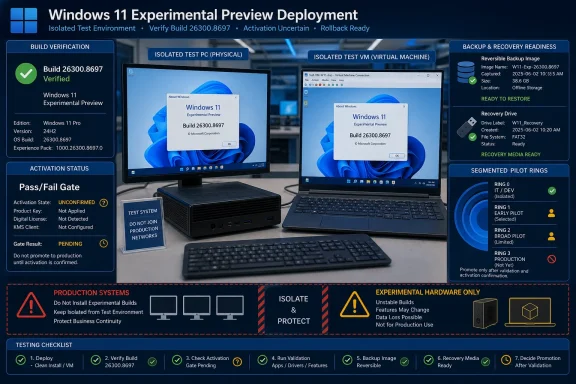
Pilot teams should decide what they need to learn before downloading or deploying anything. “Trying 26H2” is not a sufficient objective for accepting activation uncertainty, reimaging work, and potentially ambiguous recovery paths.A defensible pilot should begin with this gate:
- Record the image source, exact build number, displayed edition, language, architecture, and Insider channel designation.
- State one narrowly scoped objective, such as validating a clean-install workflow, testing an application dependency, or observing activation behavior.
- Use only a nonproduction device or disposable virtual machine that can be restored without affecting business data or a user’s primary Windows license.
- Preserve the previous working image, installation media, recovery material, and any configuration information needed to return the device to its starting state.
- Define activation success before installation, including the expected edition, activation state, account association, and the time allowed for activation to complete.
- Stop the pilot if the resulting build, edition, or channel does not match the test record, or if activation cannot be independently verified.
- Do not expand the ring until a second clean installation reproduces the successful result on another isolated target.
A team that cannot restore the target quickly has not created a suitable 26H2 pilot. It has created an uncontrolled migration.
“26H2” Is Not a Precise Test Record
Microsoft’s June 19 announcement calls the release Windows 11 Insider Experimental Preview Build 26300.8697. Pilot documentation should use that exact identity rather than treating every file, screenshot, forum post, or community reference labeled “26H2” as evidence about the same artifact.This is especially important when ISO images are involved. A tester may describe an installation as 26H2 based on a download page, filename, anticipated release family, or the version shown after setup. Those labels do not automatically prove that two teams tested the same image under the same conditions.
Before interpreting any result, administrators should capture the exact build shown by the installed system and compare it with the build they intended to deploy. They should also record whether the test was an in-place upgrade or clean installation because those routes exercise different dependencies.
An upgrade preserves an existing Windows installation, including much of its licensing and configuration context. A clean installation rebuilds the operating system environment and may expose activation, edition-selection, account-association, driver, and out-of-box experience behavior that an upgrade never encounters.
This is why the current reports should not be summarized as “26H2 does not activate.” The evidence supports a narrower statement: at least one community tester reported that a clean installation from a 26H2 ISO did not reactivate as expected, while another participant reported completing a similar installation without activation difficulty.
That mixed outcome is not reassuring enough for broad deployment, but it is useful for designing a better test. It indicates that teams must control variables and verify activation rather than assuming either universal failure or universal success.
Activation Is Part of the Workload, Not an Afterthought
The activation report posted to the Windows Insiders community describes a system that had previously activated through a Microsoft account after reinstallations. Following a clean installation from a 26H2 ISO, the user said Windows did not activate during setup and remained unactivated after troubleshooting.The report does not establish the root cause. The user had also built a new PC and described an entitlement originating from an older Windows key, introducing licensing history and hardware identity as possible variables. The same user later reported that returning to an earlier ISO did not restore activation, which further weakens any claim that the experimental build alone caused the failure.
That is precisely why activation must be tested as its own workstream. If a pilot starts with uncertain entitlement history, changes hardware, performs a clean installation, introduces an experimental image, and signs in with an account all at once, a failure cannot be cleanly attributed.
Pilot teams should instead establish a known baseline before touching Build 26300.8697. Confirm that the starting installation is activated, record its edition, document the device and account context, and avoid changing unrelated hardware or licensing variables during the test.
After setup, a pass should require more than reaching the desktop. The installed edition must be the intended edition, Windows must report activation successfully, and that state should remain stable after restart and normal connectivity. If the activation result is unclear, the machine should stay outside every expanded pilot ring.
Administrators should also resist buying a replacement license merely to force an experimental test forward. A new license could mask the original failure and convert a validation exercise into an avoidable procurement event. Preserve the failed state and evidence first; otherwise, the team loses the opportunity to determine what went wrong.
Upgrade, Isolate, or Wait
For most organizations, waiting is the strongest option. Build 26300.8697 is experimental Insider material, and the available facts do not indicate that ordinary enterprises need it to prepare for an imminent supported rollout.An isolated upgrade may be justified when the test objective specifically depends on upgrade behavior. The target should already be a disposable pilot device with a documented activation baseline and a reliable restoration path. Even then, success in an upgrade scenario says little about whether clean deployment will work.
An isolated clean installation is appropriate only when clean deployment, activation, or setup behavior is the reason for the test. It should be treated as destructive validation, not as the quickest route to experiencing new Windows features.
Broadening the pilot is premature when any of these conditions applies:
- The team cannot identify the exact build and channel installed.
- The activation baseline was not recorded before testing.
- The image’s origin or identity cannot be verified internally.
- The target contains production data or serves as someone’s primary workstation.
- Recovery depends on downloading an older image after the failure occurs.
- A successful result has not been independently reproduced.
- The team cannot distinguish an image problem from an entitlement, hardware, account, or edition mismatch.
The Missing Microsoft Confirmation Matters
Microsoft’s designation sets expectations: Build 26300.8697 is an experimental preview, not a broadly supported production deployment vehicle. The community reports add a reason for caution, but they do not amount to a Microsoft-confirmed incident affecting all clean installations or all activation methods.That leaves administrators with an evidence gap. There is a reported failure, a reported success, and a separate community discussion showing that testers are still comparing whether installations work as expected. There is not yet enough verified information to identify a universal trigger, affected population, or reliable workaround.
The right response to thin evidence is disciplined testing, not confident speculation. Teams should watch for Microsoft to clarify image availability, build identity, activation behavior, or known issues, while also comparing independently reproduced results from tightly controlled installations.
The next meaningful milestone is not another anecdote saying that 26H2 “works” or “doesn’t work.” It is a reproducible clean-install result tied to an exact image and Build 26300.8697, with the edition, starting entitlement, hardware context, and final activation state all documented.
Until that evidence exists, wait by default, isolate when necessary, and never promote the build on boot success alone.
References
- Primary source: blogs.windows.com
- Independent coverage: reddit.com

Reddit - Please wait for verification
www.reddit.com
- Primary source: WindowsForum
Windows 11 25H2 Release Preview ISO: Insider for Clean Installs & OOBE Validation | Windows Forum
Microsoft has quietly posted official Windows 11 ISO images for Insiders, giving testers, OEMs, and IT teams the first gated chance to perform clean...windowsforum.com