

Organizations that depend on cloud-storage clients, namespace providers, context-menu utilities, DLP agents, or accessibility software should pilot Windows 11 File Explorer’s expanded middle-click navigation before approving the next feature rollout. The concern is not the saved click; it is whether opening folders from Home and the Address Bar through a new tab produces predictable results in an Explorer environment extended by third-party code.
Microsoft added the behavior in Windows 11 Insider Experimental Preview Build 26300.8687, released June 12, 2026. Microsoft’s release notes say users can middle-click folders in the File Explorer Address Bar and Home to open them in new tabs, extending tab activation into two surfaces that may contain local, network, cloud-backed, and virtual locations.
Build 26300.8687 is based on Windows 11 version 25H2 through an enablement package. The feature is under Controlled Feature Rollout, so installing the build does not guarantee that every test device will receive it.
A useful pilot should test the organization’s Explorer ecosystem, not just a clean Windows installation. The same middle-click action can reach an ordinary local folder, a redirected known folder, a OneDrive-backed location, a corporate namespace, or an item surfaced by a storage provider.
IT teams can use this practical go/no-go sequence:
Feature verification should therefore be part of every test record. Capture the build, the presence or absence of middle-click activation in Home and the Address Bar, the installed integration set, and the folder type being opened. A build number by itself is not sufficient evidence that the feature was tested.
That makes Home the highest-value part of the pilot. Test folders while fully synchronized, during active synchronization, while disconnected from the corporate network, and after signing out of the relevant storage client. The objective is not simply to see whether a tab appears, but to determine whether it opens the expected location, displays the correct provider state, and remains responsive.
Administrators should watch for duplicate tabs, unexpected authentication prompts, delayed navigation, blank content, stale folder state, lost selection, and explorer.exe restarts. These are test conditions rather than known defects in Build 26300.8687, but they represent the kinds of observable outcomes that separate a usable feature from a support-ticket generator.
DLP and endpoint security products deserve particular attention because a new navigation path may still trigger inspection, classification, or access-control behavior. The expected result should match opening the same location through a standard left-click or another currently supported navigation route. If the visible destination is identical but enforcement differs, the environment is not yet predictable enough for broad deployment.
Namespace providers require the same comparison. Opening a virtual or provider-managed location in a new tab should preserve navigation, naming, icons, availability information, and any expected access prompts. A tab that opens but loses provider context is not a pass.
Test each meaningful level of representative paths rather than middle-clicking only the final folder. An extension or namespace provider may behave correctly at one level and fail when Explorer creates a tab from a parent or virtual segment.
The comparison should be simple: middle-click a folder or breadcrumb segment, then open the same destination using the organization’s existing workflow. The two routes should produce equivalent location identity, access state, provider indicators, focus behavior, and policy enforcement.
Tab lifecycle also matters. Open several mixed destinations, switch among them, close individual tabs, and reopen locations from Home. Repeat the sequence after a network transition or a cloud client changes state. Explorer problems that remain invisible in a single-tab demonstration may emerge when several provider-backed tabs stay alive simultaneously.
Microsoft has not published general middle-click documentation for these surfaces, so IT cannot yet rely on a detailed compatibility contract. Until that exists, observed behavior in a representative pilot is more useful than assumptions about how extensions ought to respond.
That note does not establish that shell extensions have a problem with middle-click navigation. It does show that Explorer extensibility remains an active reliability concern in Microsoft’s current servicing work, which is enough reason for managed environments to include extension-heavy configurations in the pilot.
Start with the standard corporate image rather than a pristine Insider machine. A clean installation can establish whether the Windows feature works in isolation, but it cannot answer the deployment question facing an organization with sync overlays, security hooks, archive tools, context-menu handlers, and custom namespaces.
If a problem appears, reduce the integration set methodically. Test the same location after disabling or removing one product at a time, where organizational policy and vendor guidance permit. Avoid changing several components simultaneously because that destroys the evidence needed for an application owner or vendor escalation.
A go decision should require more than “Explorer did not crash.” Navigation must also remain functionally equivalent: the correct folder opens, security controls still apply, cloud state remains visible, focus lands sensibly, and tabs can be managed without unexplained delays.
These changes make accessibility validation part of the same release decision. An organization should not approve Explorer navigation based solely on mouse testing when the build modifies screen-reader and scaling behavior in nearby workflows.
The accessibility pass should cover:
WindowsForum’s earlier coverage of Build 26300.8687 and File Explorer accessibility changes provides the broader feature context, but the operational standard should remain concrete: users must be able to identify where the new tab opened, move to it, understand its contents, and recover from copy or move conflicts without losing context.
A no-go is appropriate when cloud or namespace locations resolve inconsistently, explorer.exe becomes unstable, security handling changes by navigation route, focus becomes unpredictable, or scaled and screen-reader workflows regress. It is also reasonable to defer when the feature cannot be enabled consistently enough to produce a meaningful test sample.
Do not build a production schedule around its current Insider appearance. Microsoft has provided no general-availability date, and the company explicitly warns that Experimental features may change, be removed, or never ship outside Insider testing.
That uncertainty does not make the pilot unnecessary. It makes a small, reusable Explorer compatibility ring more valuable. The same devices, test accounts, extension inventory, storage locations, and accessibility scenarios can be used again if the feature moves to another channel or appears in a future Windows 11 rollout.
The next milestone is not a promised release date but a clearer availability signal from Microsoft. Until then, organizations should treat Build 26300.8687 as an opportunity to find hidden dependencies in their managed Explorer environment—not as evidence that middle-click navigation is ready for broad deployment.
Microsoft added the behavior in Windows 11 Insider Experimental Preview Build 26300.8687, released June 12, 2026. Microsoft’s release notes say users can middle-click folders in the File Explorer Address Bar and Home to open them in new tabs, extending tab activation into two surfaces that may contain local, network, cloud-backed, and virtual locations.
Build 26300.8687 is based on Windows 11 version 25H2 through an enablement package. The feature is under Controlled Feature Rollout, so installing the build does not guarantee that every test device will receive it.
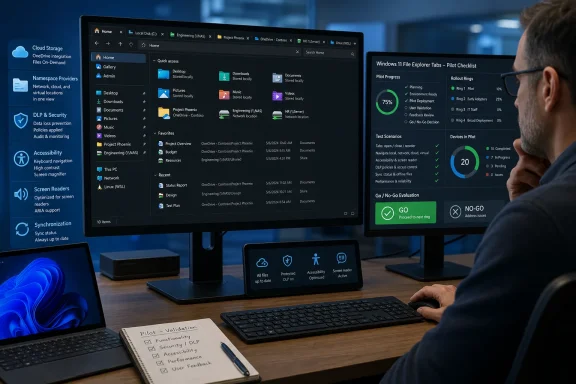 Build the Pilot Around Explorer Dependencies
A useful pilot should test the organization’s Explorer ecosystem, not just a clean Windows installation. The same middle-click action can reach an ordinary local folder, a redirected known folder, a OneDrive-backed location, a corporate namespace, or an item surfaced by a storage provider.IT teams can use this practical go/no-go sequence:
- Inventory software that integrates with File Explorer, including cloud-storage clients, namespace providers, context-menu tools, DLP agents, endpoint security products, and accessibility utilities.
- Create a small test ring running Build 26300.8687, keeping at least one comparable device without the new behavior as a control.
- Confirm that the feature has actually appeared on each pilot device rather than assuming build installation enabled it.
- Test middle-click from both File Explorer Home and the Address Bar against local, network, redirected, synchronized, offline, and virtual folders used by the organization.
- Repeat those tests while synchronization, file inspection, policy enforcement, or other Explorer-related background work is active.
- Validate keyboard navigation, screen-reader output, focus movement, text scaling, and recovery after closing tabs.
- Record failures by location type and installed extension, then remove or disable integrations individually to isolate the dependency.
- Approve deployment only if results remain consistent across representative hardware, user profiles, accessibility configurations, and storage states.
Feature verification should therefore be part of every test record. Capture the build, the presence or absence of middle-click activation in Home and the Address Bar, the installed integration set, and the folder type being opened. A build number by itself is not sufficient evidence that the feature was tested.
Home Is More Complicated Than a Folder Tree
Middle-clicking a folder in a conventional directory tree has a relatively clear destination. File Explorer Home is a more aggregated surface, and organizations often expose content there through synchronization clients, pinned locations, account-connected experiences, and provider-specific integrations.That makes Home the highest-value part of the pilot. Test folders while fully synchronized, during active synchronization, while disconnected from the corporate network, and after signing out of the relevant storage client. The objective is not simply to see whether a tab appears, but to determine whether it opens the expected location, displays the correct provider state, and remains responsive.
Administrators should watch for duplicate tabs, unexpected authentication prompts, delayed navigation, blank content, stale folder state, lost selection, and explorer.exe restarts. These are test conditions rather than known defects in Build 26300.8687, but they represent the kinds of observable outcomes that separate a usable feature from a support-ticket generator.
DLP and endpoint security products deserve particular attention because a new navigation path may still trigger inspection, classification, or access-control behavior. The expected result should match opening the same location through a standard left-click or another currently supported navigation route. If the visible destination is identical but enforcement differs, the environment is not yet predictable enough for broad deployment.
Namespace providers require the same comparison. Opening a virtual or provider-managed location in a new tab should preserve navigation, naming, icons, availability information, and any expected access prompts. A tab that opens but loses provider context is not a pass.
The Address Bar Expands the Test Matrix
The Address Bar presents a different set of dependencies. It can expose breadcrumb segments representing multiple levels of a path, including locations that are not ordinary local directories.Test each meaningful level of representative paths rather than middle-clicking only the final folder. An extension or namespace provider may behave correctly at one level and fail when Explorer creates a tab from a parent or virtual segment.
The comparison should be simple: middle-click a folder or breadcrumb segment, then open the same destination using the organization’s existing workflow. The two routes should produce equivalent location identity, access state, provider indicators, focus behavior, and policy enforcement.
Tab lifecycle also matters. Open several mixed destinations, switch among them, close individual tabs, and reopen locations from Home. Repeat the sequence after a network transition or a cloud client changes state. Explorer problems that remain invisible in a single-tab demonstration may emerge when several provider-backed tabs stay alive simultaneously.
Microsoft has not published general middle-click documentation for these surfaces, so IT cannot yet rely on a detailed compatibility contract. Until that exists, observed behavior in a representative pilot is more useful than assumptions about how extensions ought to respond.
Shell Reliability Is Already on Microsoft’s Radar
The timing makes extension testing more than a theoretical precaution. Microsoft’s separate June 12, 2026 Release Preview notes for Windows 11 versions 24H2 and 25H2 cite improved app-launch reliability when shell extensions are installed.That note does not establish that shell extensions have a problem with middle-click navigation. It does show that Explorer extensibility remains an active reliability concern in Microsoft’s current servicing work, which is enough reason for managed environments to include extension-heavy configurations in the pilot.
Start with the standard corporate image rather than a pristine Insider machine. A clean installation can establish whether the Windows feature works in isolation, but it cannot answer the deployment question facing an organization with sync overlays, security hooks, archive tools, context-menu handlers, and custom namespaces.
If a problem appears, reduce the integration set methodically. Test the same location after disabling or removing one product at a time, where organizational policy and vendor guidance permit. Avoid changing several components simultaneously because that destroys the evidence needed for an application owner or vendor escalation.
A go decision should require more than “Explorer did not crash.” Navigation must also remain functionally equivalent: the correct folder opens, security controls still apply, cloud state remains visible, focus lands sensibly, and tabs can be managed without unexplained delays.
Accessibility Is a Release Gate, Not a Side Test
Build 26300.8687 also changes screen-reader announcements in the File Explorer conflict-resolution dialog used when copying or moving files. Microsoft says the build improves behavior under increased text scaling as well.These changes make accessibility validation part of the same release decision. An organization should not approve Explorer navigation based solely on mouse testing when the build modifies screen-reader and scaling behavior in nearby workflows.
The accessibility pass should cover:
- A screen reader should announce the active location and provide enough feedback to distinguish the newly opened tab from the original tab.
- Keyboard focus should remain visible and should move through tabs, Home items, the Address Bar, and file lists in a repeatable order.
- Increased text scaling should not hide tab controls, clip location names, or make conflict-resolution choices ambiguous.
- Copy and move conflicts should announce the available choices clearly and preserve usable focus after a selection.
- Middle-click testing should not replace keyboard-only testing, because the new mouse action may expose focus changes that affect subsequent keyboard navigation.
WindowsForum’s earlier coverage of Build 26300.8687 and File Explorer accessibility changes provides the broader feature context, but the operational standard should remain concrete: users must be able to identify where the new tab opened, move to it, understand its contents, and recover from copy or move conflicts without losing context.
Set a Conditional Go/No-Go Rule
A conditional go is appropriate when the feature is present on the pilot devices, representative Explorer integrations behave consistently, accessibility checks pass, and no policy-enforcement differences appear between middle-click and established navigation routes. The result should still be documented as specific to the tested build and feature state.A no-go is appropriate when cloud or namespace locations resolve inconsistently, explorer.exe becomes unstable, security handling changes by navigation route, focus becomes unpredictable, or scaled and screen-reader workflows regress. It is also reasonable to defer when the feature cannot be enabled consistently enough to produce a meaningful test sample.
Do not build a production schedule around its current Insider appearance. Microsoft has provided no general-availability date, and the company explicitly warns that Experimental features may change, be removed, or never ship outside Insider testing.
That uncertainty does not make the pilot unnecessary. It makes a small, reusable Explorer compatibility ring more valuable. The same devices, test accounts, extension inventory, storage locations, and accessibility scenarios can be used again if the feature moves to another channel or appears in a future Windows 11 rollout.
The next milestone is not a promised release date but a clearer availability signal from Microsoft. Until then, organizations should treat Build 26300.8687 as an opportunity to find hidden dependencies in their managed Explorer environment—not as evidence that middle-click navigation is ready for broad deployment.
References
- Primary source: learn.microsoft.com
Release Preview Build 28000.2333 - Windows Insider Program | Microsoft Learn
release notes for release preview build 28000.2333learn.microsoft.com - Independent coverage: blogs.windows.com
Improving your Windows Insider experience
Hello Windows Insiders, Last month, Pavan shared our commitment to improving Windows quality, with a focus on performance, reliability and craft, iblogs.windows.com - Primary source: WindowsForum
Windows 11 Insider: File Explorer Gets Better Tabs, Accessibility, and Text Scaling | Windows Forum
Microsoft’s latest Windows 11 Insider work adds three File Explorer refinements in June 2026: middle-click tab opening from more locations, clearer...windowsforum.com