

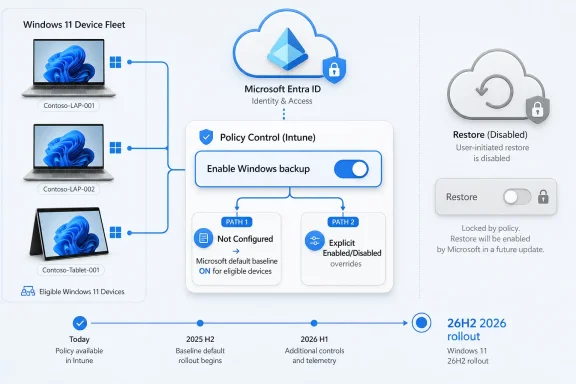
Microsoft says Windows 11 version 26H2 will enable Windows settings backup by default on eligible Microsoft Entra-joined and Entra hybrid-joined devices when administrators leave the backup policy Not Configured, while explicit enable or disable settings still win and restore remains off unless an administrator turns it on. The practical move for IT is simple: audit your current Intune and policy state now, decide whether “Not Configured” should mean “Microsoft default” in your tenant, and set an explicit policy before 26H2 reaches general availability later in 2026. This is less a branding change than a governance deadline.
Microsoft’s documentation frames the change as Windows Backup for Organizations becoming “Windows settings backup and restore,” and the company says the new default behavior is already appearing in Insider Experimental builds before broadening with Windows 11 26H2 general availability later this year. That means administrators should not treat this as a cosmetic rename buried in a Settings catalog. A policy that once behaved like a quiet opt-in will become a baseline behavior for eligible devices if left untouched.
For administrators who want the concrete action first, the place to start is Intune. In the Microsoft Intune admin center, go to Devices > Managed devices > Configuration, create or edit a Windows configuration profile, choose Windows 10 and later as the platform and Settings Catalog as the profile type, then find Sync your settings > Enable Windows backup. Set it explicitly to Enabled if you want Microsoft’s new baseline, or explicitly to Disabled if you do not want eligible 26H2 devices backing up settings by default.
Restore is a separate decision. To control the enrollment restore experience, go to Devices > Enrollment, select the Windows tab, open Windows Backup and Restore under enrollment options, and set Show restore page to On only if you want users to see the restore option during enrollment. Microsoft’s Intune documentation is clear that restore is tenant-wide and remains disabled when Not Configured, so the 26H2 default-on shift applies to backup policy, not to automatically restoring old device state during setup.
That distinction matters because backup and restore are often discussed as one feature, but they carry different operational risks. Backup is about preserving user settings and Microsoft Store app configuration data so a future transition is smoother. Restore is about allowing that saved state back into a new or reimaged device experience, which is why Microsoft keeps it behind an administrator-controlled switch.
The decision tree for admins is therefore not complicated, but it is newly urgent. If your organization likes the idea of settings resilience, explicitly enable and document the setting rather than drifting into it by accident. If your organization has data residency, privacy, compliance, support, or standardization reasons to prevent settings backup, explicitly disable it. If you need more time, target a pilot group before the policy default changes under your feet.
But branding is the least interesting part of the 26H2 shift. The bigger move is that Microsoft is changing the meaning of administrative silence. In today’s enterprise Windows world, Not Configured is often treated as a safe holding pattern, a way to defer a decision until a feature proves itself. With this change, Not Configured becomes an acceptance path for Microsoft’s preferred baseline on eligible devices.
That is a familiar pattern in modern Windows management. Microsoft has repeatedly moved features from optional knobs into expected defaults, especially where the company can argue that the feature improves resilience, security, manageability, or user continuity. WindowsForum readers have seen the same strategic arc in Microsoft’s broader policy work, including recent discussions around configured update policies and the ongoing tension between user control and administrator intent.
The lesson is not that Microsoft is wrong to make backup easier. The lesson is that default baselines are policy decisions made at platform scale. If an enterprise does not make its own decision first, it inherits Microsoft’s.
The relevant population is Microsoft Entra-joined and Microsoft Entra hybrid-joined devices that meet Microsoft’s eligibility requirements. In practical terms, that points the change squarely at cloud-managed and cloud-connected Windows fleets, not unmanaged consumer PCs and not every legacy domain-joined corner case. It is a change designed for organizations that already have one foot, or both feet, in Microsoft’s modern endpoint management model.
That eligibility boundary should shape your rollout planning. A tenant with clean Entra join, Intune enrollment, and standardized Windows 11 deployment rings may see the new baseline appear predictably. A mixed estate with older provisioning flows, hybrid exceptions, shared devices, lab machines, or inconsistent enrollment states may see uneven behavior unless administrators map where the feature actually applies.
This is where IT departments should do more than read the headline. Inventory the device groups that are Entra joined or Entra hybrid joined, identify which configuration profiles touch Sync your settings or Windows backup, and look for places where Not Configured was used because the feature was historically off by default. Those are the places where 26H2 changes the operational meaning of inaction.
That should push administrators toward a boring but healthy practice: make implicit assumptions explicit. “We have not configured it” is no longer the same statement as “we have chosen not to use it.” In 26H2, those two positions diverge.
There are three defensible choices. The first is to accept Microsoft’s baseline and explicitly enable backup, ideally with documentation explaining why settings resilience supports your refresh, reset, or Windows 11 migration strategy. The second is to explicitly disable backup where compliance, supportability, privacy review, or desktop standardization concerns outweigh the benefit. The third is to pilot the feature with a controlled group, then expand or block it based on observed behavior.
What is not defensible is leaving the setting unexamined and then being surprised when eligible 26H2 machines start behaving differently. The point of a default change is to reduce friction for the majority case. Enterprise IT exists in the exception cases.
Backup is a relatively low-friction resilience measure. Restore changes the out-of-box or first-sign-in experience and can reintroduce user-specific state into a newly provisioned device. That is exactly the kind of behavior that help desks, security teams, and endpoint engineering groups want to test before exposing broadly.
Microsoft’s Intune documentation describes restore as a tenant-wide setting in the enrollment area, with the default Not Configured state keeping restore off. That design forces a deliberate administrator act before users see the restore page during enrollment. It also means organizations can permit backup now without necessarily allowing restore during OOBE.
That split is useful. A company might want to accumulate backup data ahead of a hardware refresh cycle but wait to expose restore until its Autopilot, Conditional Access, authentication, and support processes are ready. Another company might never enable restore at all but still use settings backup as a fallback for specific transition scenarios. Microsoft’s policy model allows both, provided admins do not conflate the two toggles.
The operational risk is subtler. If settings backup is enabled by default for some devices but not others, users may develop inconsistent expectations. One employee may move to a new machine and see familiar settings return; another may not. The help desk then has to explain a feature whose behavior depends on Windows version, eligibility, identity join state, policy targeting, and restore configuration.
That is why communication matters almost as much as policy. If you enable backup, tell support teams what is being backed up at a high level and what is not. If restore remains disabled, make that explicit so technicians do not promise a recovery experience that users will not see. If you pilot the feature, document which groups are included and which enrollment paths are excluded.
Microsoft’s framing is resilience. The help desk’s reality is expectation management. The gap between those two is where tickets are born.
But the immediate risk in the 26H2 change is not that Microsoft has secretly turned restore into an uncontrolled free-for-all. The verified facts point in the opposite direction: restore remains off unless admins configure it, and explicit enable or disable settings override the default. The sharper risk is policy ambiguity inside organizations that have not decided what they want.
A regulated company may need to know whether settings backup is appropriate for particular user populations. A heavily standardized desktop environment may not want user-specific settings to follow employees across refresh cycles without testing. A school, kiosk-heavy deployment, frontline environment, or shared-device scenario may have little use for personalized restore behavior. None of those concerns are answered by leaving the policy Not Configured.
The right response is not panic. It is classification. Decide which device groups should be allowed to participate, which should be excluded, and which need pilot validation before 26H2 reaches broad deployment.
The upside of this strategy is obvious. Many organizations never enable useful features because endpoint teams are overloaded, documentation is fragmented, and every new toggle competes with patching, application compatibility, identity cleanup, and security mandates. A sensible default can improve the baseline for tenants that would otherwise remain stuck in inertia.
The downside is that enterprises are not average users at scale. They are collections of exceptions, legacy constraints, audit requirements, and departmental politics. A default that is sensible for Microsoft’s product strategy may be premature for a particular tenant.
That does not make the change hostile. It makes it administratively consequential. Microsoft is saying backup should become a normal part of a managed Windows environment. Administrators now have to say whether they agree.
The hard part is deciding ownership. Is Windows settings backup and restore an endpoint engineering feature, an identity feature, a service desk feature, or a compliance feature? The honest answer is that it touches all four, which is why it can fall through the cracks.
Endpoint teams need to know how it interacts with provisioning and refresh workflows. Identity teams need to understand the Entra account dependency. Service desks need scripts for explaining what users should expect. Compliance teams need enough clarity to decide whether default-on backup is acceptable for the populations they govern.
This is also where internal change control should catch up to Microsoft’s release model. If your CAB or endpoint steering group only evaluates features after they appear in general availability, 26H2 will compress your timeline. Microsoft says the behavior is already appearing in Insider Experimental builds, which makes now the right time to document a tenant position.
Test what happens when backup is enabled but restore is not. Test the enrollment experience when restore is enabled for a small group. Test whether support can tell, from Intune reporting and device records, whether a machine has a backup profile state that explains the user experience. Test whether your Conditional Access and authentication policies create friction during restore, particularly in constrained environments.
Do not overstate the feature to pilot users. Tell them that Windows may preserve certain settings and Microsoft Store app-related state, not that their entire PC will reappear. The fastest way to sour a resilience feature is to market it as a magic migration tool.
This is also the moment to review related policy surfaces. WindowsForum has covered Microsoft’s push toward more granular Windows management, including native controls for default app removal in Windows 11 25H2 and enterprise backup and management changes delivered through servicing updates. The common thread is that Windows administration is becoming less about one monolithic image and more about dozens of cloud-aware policy decisions.
But defaults are blunt instruments. They work best when the cost of a wrong assumption is low, and enterprise Windows is full of environments where assumptions are expensive. Microsoft has preserved the crucial escape hatch by honoring explicit policy and keeping restore disabled by default.
That gives administrators agency, but only if they use it. Windows 11 26H2 turns Not Configured into a meaningful choice for settings backup on eligible Entra-connected devices. The organizations that treat that as a planning prompt will get a cleaner rollout; the ones that treat it as a rename may discover, too late, that silence is now a configuration.
Microsoft’s documentation frames the change as Windows Backup for Organizations becoming “Windows settings backup and restore,” and the company says the new default behavior is already appearing in Insider Experimental builds before broadening with Windows 11 26H2 general availability later this year. That means administrators should not treat this as a cosmetic rename buried in a Settings catalog. A policy that once behaved like a quiet opt-in will become a baseline behavior for eligible devices if left untouched.
 Microsoft Turns “Not Configured” Into a Real Decision
For administrators who want the concrete action first, the place to start is Intune. In the Microsoft Intune admin center, go to Devices > Managed devices > Configuration, create or edit a Windows configuration profile, choose Windows 10 and later as the platform and Settings Catalog as the profile type, then find Sync your settings > Enable Windows backup. Set it explicitly to Enabled if you want Microsoft’s new baseline, or explicitly to Disabled if you do not want eligible 26H2 devices backing up settings by default.Restore is a separate decision. To control the enrollment restore experience, go to Devices > Enrollment, select the Windows tab, open Windows Backup and Restore under enrollment options, and set Show restore page to On only if you want users to see the restore option during enrollment. Microsoft’s Intune documentation is clear that restore is tenant-wide and remains disabled when Not Configured, so the 26H2 default-on shift applies to backup policy, not to automatically restoring old device state during setup.
That distinction matters because backup and restore are often discussed as one feature, but they carry different operational risks. Backup is about preserving user settings and Microsoft Store app configuration data so a future transition is smoother. Restore is about allowing that saved state back into a new or reimaged device experience, which is why Microsoft keeps it behind an administrator-controlled switch.
The decision tree for admins is therefore not complicated, but it is newly urgent. If your organization likes the idea of settings resilience, explicitly enable and document the setting rather than drifting into it by accident. If your organization has data residency, privacy, compliance, support, or standardization reasons to prevent settings backup, explicitly disable it. If you need more time, target a pilot group before the policy default changes under your feet.
The Rename Is the Smallest Part of the Story
Microsoft’s name change from Windows Backup for Organizations to Windows settings backup and restore is useful in the narrow sense that it better describes the feature. This is not a full-device image backup system, and the new name makes that harder to misunderstand. It backs up user settings and Microsoft Store app lists or configurations, not the entire corporate endpoint.But branding is the least interesting part of the 26H2 shift. The bigger move is that Microsoft is changing the meaning of administrative silence. In today’s enterprise Windows world, Not Configured is often treated as a safe holding pattern, a way to defer a decision until a feature proves itself. With this change, Not Configured becomes an acceptance path for Microsoft’s preferred baseline on eligible devices.
That is a familiar pattern in modern Windows management. Microsoft has repeatedly moved features from optional knobs into expected defaults, especially where the company can argue that the feature improves resilience, security, manageability, or user continuity. WindowsForum readers have seen the same strategic arc in Microsoft’s broader policy work, including recent discussions around configured update policies and the ongoing tension between user control and administrator intent.
The lesson is not that Microsoft is wrong to make backup easier. The lesson is that default baselines are policy decisions made at platform scale. If an enterprise does not make its own decision first, it inherits Microsoft’s.
The Eligible Device Clause Is Doing a Lot of Work
Microsoft’s confirmed wording says the new behavior applies only to eligible devices. That is important, because it means administrators should resist the temptation to summarize this as “Windows 11 26H2 turns backup on for everyone.” It does not. It turns backup on by default where the device and identity conditions line up and where the administrator has not explicitly configured the setting.The relevant population is Microsoft Entra-joined and Microsoft Entra hybrid-joined devices that meet Microsoft’s eligibility requirements. In practical terms, that points the change squarely at cloud-managed and cloud-connected Windows fleets, not unmanaged consumer PCs and not every legacy domain-joined corner case. It is a change designed for organizations that already have one foot, or both feet, in Microsoft’s modern endpoint management model.
That eligibility boundary should shape your rollout planning. A tenant with clean Entra join, Intune enrollment, and standardized Windows 11 deployment rings may see the new baseline appear predictably. A mixed estate with older provisioning flows, hybrid exceptions, shared devices, lab machines, or inconsistent enrollment states may see uneven behavior unless administrators map where the feature actually applies.
This is where IT departments should do more than read the headline. Inventory the device groups that are Entra joined or Entra hybrid joined, identify which configuration profiles touch Sync your settings or Windows backup, and look for places where Not Configured was used because the feature was historically off by default. Those are the places where 26H2 changes the operational meaning of inaction.
Explicit Policy Beats Platform Drift
The most important technical fact in Microsoft’s change is also the most reassuring: explicit policy still overrides the new default. If an administrator sets backup to Enabled, it is enabled. If an administrator sets it to Disabled, it is disabled. The default-on behavior matters only when the relevant policy is left Not Configured on eligible devices.That should push administrators toward a boring but healthy practice: make implicit assumptions explicit. “We have not configured it” is no longer the same statement as “we have chosen not to use it.” In 26H2, those two positions diverge.
There are three defensible choices. The first is to accept Microsoft’s baseline and explicitly enable backup, ideally with documentation explaining why settings resilience supports your refresh, reset, or Windows 11 migration strategy. The second is to explicitly disable backup where compliance, supportability, privacy review, or desktop standardization concerns outweigh the benefit. The third is to pilot the feature with a controlled group, then expand or block it based on observed behavior.
What is not defensible is leaving the setting unexamined and then being surprised when eligible 26H2 machines start behaving differently. The point of a default change is to reduce friction for the majority case. Enterprise IT exists in the exception cases.
Restore Staying Off Is Microsoft’s Quiet Concession to IT Reality
Microsoft could have made the story much messier by turning restore on by default as well. It did not. Restore remains administrator-controlled and is not enabled by default, which is the right call.Backup is a relatively low-friction resilience measure. Restore changes the out-of-box or first-sign-in experience and can reintroduce user-specific state into a newly provisioned device. That is exactly the kind of behavior that help desks, security teams, and endpoint engineering groups want to test before exposing broadly.
Microsoft’s Intune documentation describes restore as a tenant-wide setting in the enrollment area, with the default Not Configured state keeping restore off. That design forces a deliberate administrator act before users see the restore page during enrollment. It also means organizations can permit backup now without necessarily allowing restore during OOBE.
That split is useful. A company might want to accumulate backup data ahead of a hardware refresh cycle but wait to expose restore until its Autopilot, Conditional Access, authentication, and support processes are ready. Another company might never enable restore at all but still use settings backup as a fallback for specific transition scenarios. Microsoft’s policy model allows both, provided admins do not conflate the two toggles.
The Support Desk Will Feel the Difference Before the CIO Does
The user-facing promise is simple: a worker moves to a new or reimaged PC and gets more of their familiar Windows environment back. That is attractive in any organization where PC refreshes are still a source of lost time, small annoyances, and avoidable tickets. A restored settings experience will not eliminate migration pain, but it can reduce the “my PC feels wrong” category of support calls.The operational risk is subtler. If settings backup is enabled by default for some devices but not others, users may develop inconsistent expectations. One employee may move to a new machine and see familiar settings return; another may not. The help desk then has to explain a feature whose behavior depends on Windows version, eligibility, identity join state, policy targeting, and restore configuration.
That is why communication matters almost as much as policy. If you enable backup, tell support teams what is being backed up at a high level and what is not. If restore remains disabled, make that explicit so technicians do not promise a recovery experience that users will not see. If you pilot the feature, document which groups are included and which enrollment paths are excluded.
Microsoft’s framing is resilience. The help desk’s reality is expectation management. The gap between those two is where tickets are born.
The Real Risk Is Policy Ambiguity, Not Cloud Backup Itself
Security-minded readers will naturally focus on the word “backup,” especially when paired with cloud identity. That scrutiny is healthy. Any feature that preserves user settings outside the local device deserves review by privacy, security, and compliance stakeholders.But the immediate risk in the 26H2 change is not that Microsoft has secretly turned restore into an uncontrolled free-for-all. The verified facts point in the opposite direction: restore remains off unless admins configure it, and explicit enable or disable settings override the default. The sharper risk is policy ambiguity inside organizations that have not decided what they want.
A regulated company may need to know whether settings backup is appropriate for particular user populations. A heavily standardized desktop environment may not want user-specific settings to follow employees across refresh cycles without testing. A school, kiosk-heavy deployment, frontline environment, or shared-device scenario may have little use for personalized restore behavior. None of those concerns are answered by leaving the policy Not Configured.
The right response is not panic. It is classification. Decide which device groups should be allowed to participate, which should be excluded, and which need pilot validation before 26H2 reaches broad deployment.
Microsoft’s Baseline Strategy Keeps Expanding
This change fits a larger Microsoft pattern: reduce the number of enterprise features that require administrators to discover and enable them before users see a benefit. The company did something similar conceptually with default security and resilience moves in recent Windows releases, where Microsoft’s argument has been that modern hardware and cloud management make stronger defaults practical. WindowsForum readers will recognize the echo from the debates around Windows 11 24H2 and default device encryption, where a quiet backend decision became a very real planning issue for administrators.The upside of this strategy is obvious. Many organizations never enable useful features because endpoint teams are overloaded, documentation is fragmented, and every new toggle competes with patching, application compatibility, identity cleanup, and security mandates. A sensible default can improve the baseline for tenants that would otherwise remain stuck in inertia.
The downside is that enterprises are not average users at scale. They are collections of exceptions, legacy constraints, audit requirements, and departmental politics. A default that is sensible for Microsoft’s product strategy may be premature for a particular tenant.
That does not make the change hostile. It makes it administratively consequential. Microsoft is saying backup should become a normal part of a managed Windows environment. Administrators now have to say whether they agree.
The Intune Path Is Straightforward, but the Governance Path Is Not
The mechanics in Intune are easy enough. Create or edit a Settings Catalog profile, locate Enable Windows backup under Sync your settings, assign it to the intended users or devices, and save. For restore, use the Windows enrollment area and configure the tenant-wide Windows Backup and Restore setting only when you are ready for the enrollment restore experience.The hard part is deciding ownership. Is Windows settings backup and restore an endpoint engineering feature, an identity feature, a service desk feature, or a compliance feature? The honest answer is that it touches all four, which is why it can fall through the cracks.
Endpoint teams need to know how it interacts with provisioning and refresh workflows. Identity teams need to understand the Entra account dependency. Service desks need scripts for explaining what users should expect. Compliance teams need enough clarity to decide whether default-on backup is acceptable for the populations they govern.
This is also where internal change control should catch up to Microsoft’s release model. If your CAB or endpoint steering group only evaluates features after they appear in general availability, 26H2 will compress your timeline. Microsoft says the behavior is already appearing in Insider Experimental builds, which makes now the right time to document a tenant position.
Pilots Should Test the Boring Stuff
A good pilot should not be a demo for leadership. It should be an attempt to break assumptions in mundane ways. Use ordinary users, ordinary refresh scenarios, and ordinary support channels.Test what happens when backup is enabled but restore is not. Test the enrollment experience when restore is enabled for a small group. Test whether support can tell, from Intune reporting and device records, whether a machine has a backup profile state that explains the user experience. Test whether your Conditional Access and authentication policies create friction during restore, particularly in constrained environments.
Do not overstate the feature to pilot users. Tell them that Windows may preserve certain settings and Microsoft Store app-related state, not that their entire PC will reappear. The fastest way to sour a resilience feature is to market it as a magic migration tool.
This is also the moment to review related policy surfaces. WindowsForum has covered Microsoft’s push toward more granular Windows management, including native controls for default app removal in Windows 11 25H2 and enterprise backup and management changes delivered through servicing updates. The common thread is that Windows administration is becoming less about one monolithic image and more about dozens of cloud-aware policy decisions.
The Admin Playbook Before 26H2 Lands
Before Windows 11 26H2 reaches broad availability later in 2026, administrators should turn this from a surprise default into a managed rollout decision. The point is not to rush into enabling restore or to disable a useful feature out of reflex. The point is to make sure Not Configured is not standing in for strategy.- Audit Intune Settings Catalog profiles for Sync your settings > Enable Windows backup and identify where the setting is currently Not Configured.
- Decide whether eligible Entra-joined and Entra hybrid-joined Windows 11 26H2 devices should inherit Microsoft’s default-on backup behavior or receive an explicit Enabled or Disabled policy.
- Keep restore separate from backup and enable Show restore page under Windows enrollment only after testing the OOBE or first-sign-in experience.
- Pilot the feature with a controlled device and user group before expanding it to broad deployment rings.
- Prepare help desk guidance that explains what Windows settings backup and restore does, what it does not do, and why two users may see different behavior during refresh or enrollment.
- Document the tenant decision now so that the 26H2 general availability window does not turn an unreviewed default into production behavior.
Microsoft Has Made the Default Clear; Admins Now Need to Make Their Intent Clearer
The most useful way to read this change is not as Microsoft sneaking another cloud feature into Windows, nor as a mere documentation rename. It is Microsoft telling enterprises that settings backup belongs in the default resilience layer for modern Windows devices. That may be the right answer for many tenants, especially those facing refresh cycles, Windows 11 standardization, or more frequent device resets.But defaults are blunt instruments. They work best when the cost of a wrong assumption is low, and enterprise Windows is full of environments where assumptions are expensive. Microsoft has preserved the crucial escape hatch by honoring explicit policy and keeping restore disabled by default.
That gives administrators agency, but only if they use it. Windows 11 26H2 turns Not Configured into a meaningful choice for settings backup on eligible Entra-connected devices. The organizations that treat that as a planning prompt will get a cleaner rollout; the ones that treat it as a rename may discover, too late, that silence is now a configuration.