

Microsoft’s November 2025 security update brings native support for third‑party passkey managers — starting with 1Password (and Bitwarden) — allowing Windows Hello to authenticate using passkeys stored in those apps and marking a major step toward a practical, system‑level passwordless experience on Windows 11.
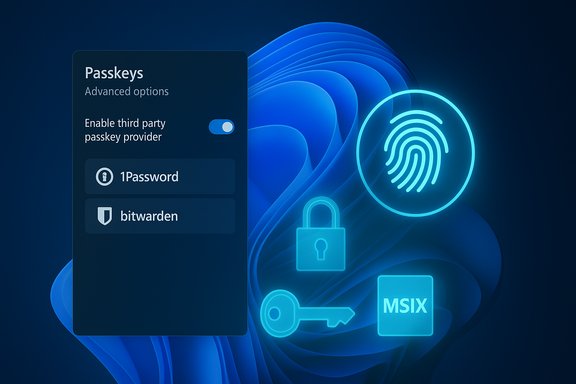
Microsoft has expanded Windows 11’s passkey story from browser‑centric implementations to a system‑level plugin model that lets packaged credential managers integrate directly with the operating system’s passkey UI and Windows Hello verification. This update — rolled into the November 11, 2025 cumulative security release (KB5068861) for Windows 11 versions 24H2 and 25H2 — exposes an “Advanced options” passkeys page enabling users to select a default passkey provider, such as 1Password or Bitwarden, to handle creation, storage, and authentication of passkeys. The net result: sign‑in flows that previously required native browser support or reliance on platform providers now can call out to a third‑party manager at the OS level, and Windows Hello (biometrics or PIN) provides the local user verification step before the passkey private key is used. This changes the model for desktop passkeys in two important ways: it centralizes user choice about where private key material is stored and unlocked, and it allows credential managers to participate in passkey creation and presentation outside the browser.
Microsoft’s push toward passkeys has been steady and deliberate. The company rolled native Windows Hello passkey support into Windows 11 in 2024 and has since nudged users toward enrolling passkeys, set new accounts to be passwordless by default, and phased the Authenticator app away from password autofill to favor passkeys and Edge as a centralized password manager. These moves reduce friction for passkey adoption and position Windows as a platform that can coordinate device keys, cloud sync, and third‑party password managers.
The practical benefits are immediate — phishing resistance, reduced credential leakage risk, and a simpler sign‑in UX — but the transition will take time. Organizations and consumers should plan migrations carefully, prioritize recovery plans, and validate vendor capabilities before fully abandoning legacy credentials. As more password managers adopt the MSIX integration and more services support passkeys, the ecosystem will mature quickly. For now, the November update is a clear signal: passkeys are no longer an exploratory feature; they are becoming an integrated, system‑level option on Windows.
Source: TechRadar Windows 11 boosts security even further by adding native 1Password passkey support
 Overview
Microsoft has expanded Windows 11’s passkey story from browser‑centric implementations to a system‑level plugin model that lets packaged credential managers integrate directly with the operating system’s passkey UI and Windows Hello verification. This update — rolled into the November 11, 2025 cumulative security release (KB5068861) for Windows 11 versions 24H2 and 25H2 — exposes an “Advanced options” passkeys page enabling users to select a default passkey provider, such as 1Password or Bitwarden, to handle creation, storage, and authentication of passkeys. The net result: sign‑in flows that previously required native browser support or reliance on platform providers now can call out to a third‑party manager at the OS level, and Windows Hello (biometrics or PIN) provides the local user verification step before the passkey private key is used. This changes the model for desktop passkeys in two important ways: it centralizes user choice about where private key material is stored and unlocked, and it allows credential managers to participate in passkey creation and presentation outside the browser. Background: why this matters for passwordless authentication
Passkeys are public‑key credentials built on WebAuthn/FIDO2 standards. They replace reusable, server‑side passwords with asymmetric key pairs: the service stores a public key, and the private key remains under user control. When a site requests a passkey sign‑in, a cryptographic challenge is sent to the user’s device; the private key signs the challenge, but only after the user unlocks the credential (typically with biometrics or a PIN). This design removes the single biggest weaknesses of traditional passwords: phishing vulnerability, credential stuffing, and server‑side breach exposure.Microsoft’s push toward passkeys has been steady and deliberate. The company rolled native Windows Hello passkey support into Windows 11 in 2024 and has since nudged users toward enrolling passkeys, set new accounts to be passwordless by default, and phased the Authenticator app away from password autofill to favor passkeys and Edge as a centralized password manager. These moves reduce friction for passkey adoption and position Windows as a platform that can coordinate device keys, cloud sync, and third‑party password managers.
What changed in the November 2025 update
Native plugin credential managers
- Windows 11 now exposes a plugin model (Credential Manager API plugin) for third‑party passkey providers. Apps packaged with MSIX can register as a system passkey manager and appear in Settings > Accounts > Passkeys > Advanced options. When enabled, the registered manager can be used for creating and filling passkeys across apps and browsers.
- The initial launch includes support for 1Password and Bitwarden, with Microsoft indicating that additional password managers will be supported in future updates. This enables users to choose their preferred vendor for passkey storage and sync while preserving Windows Hello for local verification.
Systemic improvements and rollout
- The feature shipped as part of the November cumulative update (KB5068861). Administrators and home users receive this update through Windows Update; in some cases enabling the feature requires both the updated Windows build and the MSIX‑packaged version of the third‑party app. A short delay (24–48 hours) may occur in some rollouts before the OS surfaces the new passkey plugin toggle.
- Microsoft documented the plugin flow and sample code on Microsoft Learn, showing the intended developer and integrator experience and a test/demo app named “Contoso Passkey Manager” for experimentation. The documentation provides step‑by‑step guidance for enabling and testing the plugin model.
1Password’s integration: practical details and limitations
What 1Password delivers
1Password’s desktop and MSIX builds have been updated to support the Windows passkey plugin. Once the MSIX build is installed and the OS toggle is enabled, 1Password can:- Offer passkey suggestions when a website or app requests credential creation or sign‑in.
- Store and sync passkeys across devices via 1Password’s existing sync model.
- Use Windows Hello to verify the user (face, fingerprint, or PIN) before releasing the private key to complete an authentication.
Known friction points and rollout caveats
- Packaging matters. The integration requires the MSIX variant of the password manager. Users who installed a legacy installer may need to reinstall the MSIX build to activate the plugin behavior. Community threads also report occasional timing issues where the Windows UI toggle appears only after a restart or after a short propagation delay.
- Not every website or app supports passkeys yet. Where passkey support is missing, the OS or browser will still fall back to traditional credentials or alternate authentication methods. The migration toward passkeys is substantive but incomplete, so users should maintain at least one recovery option.
- Interoperability challenges can emerge during early rollouts. Some Insiders and beta testers reported greying‑out of controls or disappearing advanced options in certain Insider builds. These are typical of large platform feature launches and usually resolved by coordinating app, OS, and driver updates.
How it works in practice (step‑by‑step)
- Install the November 2025 Windows cumulative update (KB5068861) on a device running Windows 11 24H2 or 25H2.
- Install the MSIX version of the third‑party credential manager (for example, 1Password or Bitwarden).
- Open the credential manager and enable passkey support (often under Settings > Autofill > Show passkey suggestions).
- Go to System Settings > Accounts > Passkeys > Advanced options and toggle the third‑party manager as an approved system passkey provider.
- Register a passkey on a website or app that supports passkeys; when prompted, select the third‑party manager, authenticate with Windows Hello, and complete the registration. The passkey is then available for future sign‑ins.
Security benefits: why this is a strong model
- Phishing resistance: Passkeys guard against credential‑harvesting attacks because an attacker cannot coerce a private key to sign without device possession and biometric/PIN verification.
- Reduced server‑side attack surface: Public keys replace stored passwords on service back ends, dramatically reducing the value of database dumps and password reuse attacks.
- User choice and competition: Allowing third‑party credential managers to operate at the OS level prevents vendor lock‑in, preserves user control over where passkeys and recovery data are stored, and encourages competition among secure vault providers.
- Compatibility with enterprise policies: The plugin model can be managed by IT — admins can configure which providers are allowed via policy, making it suitable for enterprise deployments where centralized credential policy matters.
Risks, limitations, and operational considerations
Risk: recovery and account portability
Passkeys are extremely secure, but they require robust recovery paths. When the private key is stored in a third‑party vault (and synced), losing access to that vault can complicate account recovery. Users should:- Register multiple recovery options where services permit (phone, security key, or a secondary passkey).
- Ensure the chosen credential manager has a reliable account recovery policy and clear documentation for handling lost devices.
Risk: implementation gaps and inconsistent rollouts
Early adopters often see inconsistent behavior across Insider channels, builds, and app packaging variants. The MSIX packaging requirement and OS build dependency mean that some users will not see the feature immediately, even after installing the app. Teams should plan staged rollouts and user education to avoid confusion during migration.Risk: centralization into a single OS toggle
While the OS‑level toggle is powerful, it also centralizes the choice of passkey provider into a single system setting. That creates a potential single point of user confusion (which manager is enabled? and a single target for user mistakes. Clear UI prompts and vendor guidance are essential to reduce accidental lockouts.Risk: incomplete ecosystem adoption
Many apps and services already support passkeys, but many others still rely on passwords or federated logins. Users must anticipate mixed‑mode environments for the medium term and keep at least one alternative sign‑in method available.Enterprise impact and management
IT teams should view this change as both an opportunity and an operational task:- Opportunity: Passkeys reduce phishing risk and credential theft, two common causes of enterprise breaches. Adopting system‑level passkey management can raise an organization’s security baseline quickly when combined with Windows Hello and conditional access policies.
- Operational tasks:
- Audit which services are passkey‑ready and develop a migration plan for high‑value accounts.
- Decide which third‑party passkey providers will be permitted and test MSIX packaging in staging environments.
- Update onboarding and device provisioning scripts to include the MSIX app installation and Settings configuration steps, or craft a policy that enables the selected provider automatically.
The role of Microsoft Edge and cross‑device sync
Passkeys are most useful when they travel with the user across devices. Microsoft has been expanding Edge’s capabilities to sync passkeys via Microsoft Password Manager, enabling users to access passkeys across Windows devices and mobile clients. This system sync complements third‑party vaults: users can either rely on Edge’s synced passkeys, an independent password manager, or both, depending on preference and policy. The availability of multiple sync models increases resilience but also introduces choices that must be explained to end users.What consumers should do now
- Update Windows 11 to the November 2025 cumulative security release (KB5068861) when available and review Settings > Accounts > Passkeys.
- Install the MSIX variant of your preferred passkey‑capable password manager (1Password, Bitwarden, or other vendors as they become supported).
- Enable the app in Settings > Accounts > Passkeys > Advanced options and complete any app onboarding steps to allow passkey suggestions.
- Keep at least one recovery method available for critical accounts while migrating and confirm that vault sync and device links (mobile/desktop) are functioning.
Vendor competition will drive better user experiences
Opening Windows to third‑party passkey managers invites competition on usability: vault unlock flows, cross‑device sync fidelity, and onboarding simplicity will become differentiators. Expect vendors to focus on:- Faster onboarding and clearer first‑time user guidance.
- Better cross‑platform sync (mobile and macOS/Windows interoperability).
- Recoverability features that balance security and practicality.
- Enterprise features like centralized admin controls and compliance reporting.
Reality check: what Microsoft has and hasn’t done
- Microsoft has not “deleted passwords everywhere.” The company has made new Microsoft accounts passwordless by default and aggressively promoted passkeys, but legacy password support remains where required and some users or services will still rely on passwords. Descriptions that claim Microsoft “ditched passwords altogether” overstate the current state of adoption. The practical shift is toward passwordless-first flows, not an immediate global removal of password support.
- The Authenticator app’s password autofill feature was decommissioned in stages through mid‑2025, with passwords moving to be accessible through Edge or to be exported, while passkey functionality remains supported. This is an intentional realignment rather than a wholesale deletion of password technology — it’s a migration toward more secure primitives with managed fallbacks and transitional tooling.
- The November 2025 update (KB5068861) is the delivery vehicle for the plugin capability on consumer and enterprise Windows 11 builds, but third‑party vendor adoption and MSIX packaging remain prerequisites for the complete end‑user experience. Expect staggered vendor rollouts and incremental improvements as feedback from the initial release surfaces.
Conclusion: a meaningful step toward a passwordless future
The addition of native third‑party passkey manager support in Windows 11’s November 2025 security update is a substantive advancement for passwordless authentication on the desktop. It preserves user choice, leverages Windows Hello for strong local verification, and enables credential managers like 1Password to operate at the same privilege level as a native platform provider.The practical benefits are immediate — phishing resistance, reduced credential leakage risk, and a simpler sign‑in UX — but the transition will take time. Organizations and consumers should plan migrations carefully, prioritize recovery plans, and validate vendor capabilities before fully abandoning legacy credentials. As more password managers adopt the MSIX integration and more services support passkeys, the ecosystem will mature quickly. For now, the November update is a clear signal: passkeys are no longer an exploratory feature; they are becoming an integrated, system‑level option on Windows.
Source: TechRadar Windows 11 boosts security even further by adding native 1Password passkey support
