

Microsoft’s latest Insider preview makes the company’s “agentic” ambitions concrete: an experimental Agent Workspace in Windows 11 provisions separate agent accounts and a contained desktop so AI agents can act on your behalf — including accessing common user folders — while Microsoft insists the feature is opt‑in and gated behind preview controls.
Microsoft has been steadily moving Copilot from a chat and suggestion model toward a system that can take action on users’ behalf. The October announcement documented a set of security and privacy primitives — agent accounts, agent workspaces, scoped permissions, and user transparency — intended to make agentic automation auditable and interruptible. That architecture appears in the Windows Experience Blog and in the Copilot/Windows documentation used to brief Insiders and enterprise customers. Insider builds in the 26220 series (the 25H2 enablement branch) are the delivery vehicle for this preview. The specific cumulative update and build identifier that surfaced the toggle to some Insiders is Build 26220.7262 (KB5070303), although Microsoft’s official build posts show the 26220 flight as an ongoing Dev/Beta channel stream and confirm that many features are being rolled out under a controlled feature toggle.
That last point — the suggestion that agents may access known folders “by default” without explicit prompts — conflicts with Microsoft’s stated least‑privilege design in its security blog and support materials, which emphasize user consent and per‑action gating during the preview. Until Microsoft updates the documentation or the Settings UX, treat any claim that the runtime will automatically access your personal folders without prompt as unverified and potentially the result of early preview UI changes or misinterpretation.
The preview is an important moment: it moves agentic AI from concept to operational reality. How Microsoft handles UX clarity, enterprise governance and recovery mechanisms during the preview will decide whether agents become a trusted, widely adopted capability — or a high‑risk novelty best kept out of production devices.
Source: Windows Latest Windows 11 to add an AI agent that runs in background with access to personal folders, warns of security risk
 Background
Microsoft has been steadily moving Copilot from a chat and suggestion model toward a system that can take action on users’ behalf. The October announcement documented a set of security and privacy primitives — agent accounts, agent workspaces, scoped permissions, and user transparency — intended to make agentic automation auditable and interruptible. That architecture appears in the Windows Experience Blog and in the Copilot/Windows documentation used to brief Insiders and enterprise customers. Insider builds in the 26220 series (the 25H2 enablement branch) are the delivery vehicle for this preview. The specific cumulative update and build identifier that surfaced the toggle to some Insiders is Build 26220.7262 (KB5070303), although Microsoft’s official build posts show the 26220 flight as an ongoing Dev/Beta channel stream and confirm that many features are being rolled out under a controlled feature toggle. What Microsoft announced — the technical snapshot
Agent Workspace and agent accounts
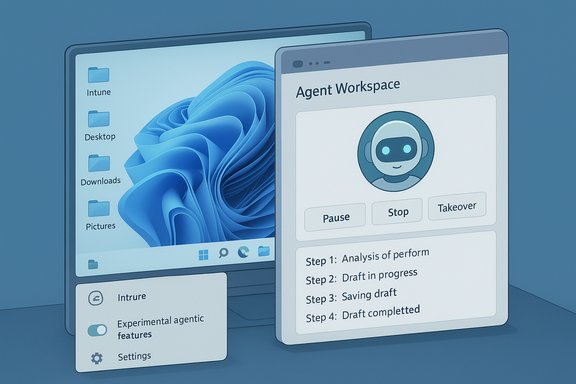
- Agent Workspace is a contained desktop session in which an agent runs independently of the user’s primary desktop. It provides a visible UI showing the agent’s actions and offers controls to pause, stop or take over. Microsoft frames the workspace as a runtime isolation boundary that’s lighter than a full VM but stronger than running code directly in the user session.
- Agent accounts are distinct standard Windows accounts created for agents. Treating agents as first‑class principals enables audit trails, access control lists (ACLs), and policy enforcement similar to service accounts in enterprise deployments. This design is key to distinguishing agent activity from human user activity on a device.
Scoped folder access and the permission model
- During the preview, agents are expected to start with restricted access to “known folders” in a user profile — typically Documents, Desktop, Downloads and Pictures — and to require explicit permission to reach beyond those locations. Microsoft describes a least‑privilege starting posture where agents request elevated permissions for sensitive steps.
- The runtime is gated behind a master opt‑in: Settings → System → AI components → Agent tools → Experimental agentic features. The toggle provisions the agent runtime and agent accounts. Microsoft emphasizes the feature is off by default and being staged to Insiders and Copilot Labs for feedback.
Signing, revocation and operational trust
- To reduce supply‑chain risks, Microsoft requires agents to be digitally signed, enabling certificate validation, revocation, and integration with antivirus/EDR blocking strategies. This creates an operational revocation path if a signed agent becomes malicious or compromised.
Visibility and human‑in‑the‑loop controls
- Agent executions produce step‑by‑step logs visible to the user; sensitive actions prompt for explicit confirmation and users can stop or takeover an agent in real time. These human‑in‑the‑loop controls are central to Microsoft’s risk narrative for agentic automation.
What Windows Latest reported (and where it differs)
Windows Latest published an early hands‑on style report from an Insider installation that highlighted the new toggle and the Agent Workspace UI appearing in Build 26220.7262. The piece noted the Settings warning about potential performance and security/privacy impacts and suggested that some Insiders observed agents being able to access Desktop, Music, Pictures and Videos, and in at least one report implied that certain known folders might be accessible without per‑action prompts.That last point — the suggestion that agents may access known folders “by default” without explicit prompts — conflicts with Microsoft’s stated least‑privilege design in its security blog and support materials, which emphasize user consent and per‑action gating during the preview. Until Microsoft updates the documentation or the Settings UX, treat any claim that the runtime will automatically access your personal folders without prompt as unverified and potentially the result of early preview UI changes or misinterpretation.
Why this matters — the practical implications
Microsoft’s agentic model changes the desktop calculus in concrete ways. An assistant that can click, type, open apps and operate on local files moves from advisory to active execution — and that shift raises new classes of operational risk:- Agents can create real side effects: move or delete files, send emails, place orders, or perform cross‑app workflows that previously required manual steps. Those side effects are now automated and therefore auditable consequences rather than mere suggestions.
- UI automation is brittle. Agents that rely on screen or control recognition can misinterpret layout changes or localization differences, potentially clicking the wrong control and producing destructive outcomes. The preview’s visible step logs mitigate this, but brittle automation remains a core risk.
- The attack surface expands. Even with agent accounts and workspaces, any software that can act on your behalf increases the risk of privilege escalation, cross‑prompt injection (malicious content that influences an agent’s plan), and data exfiltration if connectors or cloud reasoning are used.
- Enterprise governance will be required. Organizations must integrate agent principals into existing MDM/Intune controls, DLP policies, and EDR monitoring to maintain compliance and visibility. Microsoft acknowledges more enterprise hooks (Entra/MSA integration, admin policy controls) are coming.
Strengths: what Microsoft got right so far
- Opt‑in by default reduces accidental rollout risk and gives admins time to plan a controlled pilot.
- Separation of identity (agent accounts) leverages existing OS primitives — ACLs, audit logs, Intune — making it feasible to govern agent behavior with familiar tools.
- Auditable runtime and visible logs put the user back in control: step previews, takeover affordances and explicit confirmation windows help keep humans in the loop.
- Signing and revocation give Microsoft a path to block compromised agents rapidly, which is a practical, industry‑standard mitigation to supply‑chain risk.
- Hybrid execution model (local spotters and cloud reasoning, with Copilot+ NPUs offering on‑device inference) provides a balance between performance, privacy, and capability. The Copilot+ hardware tier (often discussed with a rough NPU baseline of ~40+ TOPS) is intended to enable richer on‑device experiences. Treat the TOPS number as indicative and subject to change.
Risks and open questions — where the preview still leaves gaps
- Permission clarity and UX: early reports and screenshots leave ambiguous whether certain folder grants are nuanced per‑agent or broad by default. Microsoft’s documentation states explicit consent is required, but preview UX and third‑party writeups have raised concerns that users could accidentally grant broader access than intended. This is a high‑value UX problem that must be clarified before general availability.
- Rollback and recovery semantics: agentic actions can be destructive (delete, overwrite). Public documentation does not yet provide a clear, platform‑level guarantee for atomic rollback, automatic snapshots, or transaction semantics that would allow easy recovery from a misbehaving agent. That omission makes it riskier to run agents on critical data until recovery tools are explicit.
- Prompt injection and adversarial content: agents that parse untrusted documents or web pages can be manipulated. The preview highlights the risk class but concrete mitigations — sanitization layers, provenance checks, or strict gating for actions that affect secrets — are still maturing.
- Supply chain & certificate management: while signing helps, the speed and coverage of certificate revocation and the vetting process for third‑party agents remain operational questions. Attackers who gain signing capabilities or exploit gullible users with socially engineered agent installs could still cause harm.
- Enterprise policy coverage: Microsoft says more enterprise controls are coming, but until Intune/ADMX templates, DLP integrations and Entra mappings are widely available, large organizations will rightly keep the feature disabled on managed fleets.
Practical guidance — what responsible users and IT teams should do now
For individual users and power users:- Keep Experimental agentic features off on production devices unless you are explicitly testing in a controlled environment.
- When testing, restrict agents to dedicated test folders and avoid granting blanket permissions. Use read‑only scope where possible.
- Always watch the Agent Workspace during initial runs; test the “pause/stop/takeover” flows to verify behavior.
- Maintain backups and use version control or OneDrive/OneDrive for Business file history for anything agents may touch.
- Treat agent provisioning like a new runtime for potentially untrusted code: require signed binaries and whitelist approved agent publishers.
- Run pilots in segmented labs, instrumenting agent accounts into EDR and SIEM so events are visible and correlated.
- Map agent activity to DLP policies and restrict connector use for regulated data until Microsoft publishes enterprise‑grade controls.
- Prepare Intune/ADMX policies to disable the Experimental agentic features toggle at scale until your validation completes.
How to evaluate the trust trade‑off (a short checklist)
- Is the agent signed and from a vendor you trust?
- Does the agent request only the folders it needs (prefer per‑folder granularity)?
- Are live logs and step previews available and understandable?
- Can you pause/takeover the action at any time?
- Are backups and rollback procedures in place for files the agent may modify?
Where claims are verified and where caution is warranted
- Verified: Microsoft’s architecture primitives (agent accounts, agent workspaces, experimental toggle, scoped known folders during preview) are documented and reiterated in the Windows Experience Blog and the support notes for the preview.
- Corroborated: Independent reporting from security‑aware outlets and hands‑on reviews confirm the visible workspace model, opt‑in toggle, and per‑action confirmations that form the core of Microsoft’s defense‑in‑depth approach.
- Caution: Claims that agents will access personal folders “by default” without explicit user prompts originate in some early hands‑on coverage and screenshots; Microsoft’s official materials emphasize user consent for access and per‑action gating. Until Microsoft clarifies the UX or changes the documentation, treat any suggestion of blanket default access as unverified and exercise caution.
The bigger picture: Windows as an “agentic OS”
This preview is a clear signal that Microsoft intends to treat agents as first‑class actors in Windows. That strategic shift has broad implications:- It can deliver genuine productivity gains by converting repetitive multi‑app tasks into single‑instruction flows.
- It raises the bar for platform governance: identity, certificate management, DLP, EDR and user education all become central to protecting devices and data.
- It forces a rethinking of UI automation reliability, undo semantics and enterprise policy models.
Conclusion
Windows 11’s Agent Workspace and Copilot Actions preview concretely implement the vision of an “agentic OS” — one in which assistants can act as autonomous actors on the desktop. Microsoft built several sensible guardrails (opt‑in defaults, agent accounts, visible workspaces, signing and revocation) and is deliberately staging the rollout through Insider channels. At the same time, early reports and screenshots show why vigilance is needed: permission clarity, recovery semantics, supply‑chain controls and enterprise policy hooks are the remaining work that will determine whether agentic automation enhances day‑to‑day productivity or expands the threat surface. Until those gaps are closed, responsible users and IT teams should treat the feature as experimental, test in controlled environments, and keep sensitive data out of agent reach.The preview is an important moment: it moves agentic AI from concept to operational reality. How Microsoft handles UX clarity, enterprise governance and recovery mechanisms during the preview will decide whether agents become a trusted, widely adopted capability — or a high‑risk novelty best kept out of production devices.
Source: Windows Latest Windows 11 to add an AI agent that runs in background with access to personal folders, warns of security risk
