

Microsoft’s own documentation and Insider notes make an unusually blunt admission: Windows 11 now includes an opt‑in set of experimental agentic features that let AI agents act on a user’s behalf—opening apps, clicking UI elements, reading and writing files in common folders—and Microsoft warns these agents can hallucinate or be manipulated via adversarial content, creating novel security risks such as cross‑prompt injection.
Microsoft introduced the Experimental agentic features toggle in Windows 11 Insider Preview build 26220.7262 as part of a staged rollout intended to give Copilot and related agent experiences the ability to do rather than just suggest. In practical terms, enabling the setting provisions per‑agent, non‑interactive local accounts and an “Agent Workspace”—a contained, parallel Windows session where agents run and can interact with apps and files. The feature is off by default and requires an administrator to enable it; Microsoft labels it explicitly as experimental and subject to change. Some regional and syndicated news outlets have described parts of this functionality using local terms or translations—one Arabic report referred to a “Proxy Server” appearing in the build—but that specific label does not appear in Microsoft’s official support or Insider documentation. The accurate, verifiable terms from Microsoft are Experimental agentic features, Agent Workspace, agent accounts, and the customer‑facing Copilot Actions experience. Treat any other names as reporting shorthand or translation variants unless Microsoft updates its official wording.
Microsoft’s explicit warning about hallucinations, XPIA, and the need for careful governance is a rare and welcome degree of candor from a platform vendor. The feature set they’re previewing is technically ambitious and could reshape desktop productivity—but that reshaping will only be safe if the industry, enterprises, and endpoint vendors converge on rigorous controls: reliable prompt‑injection defenses, proven revocation mechanics, comprehensive logging, and native DLP/EDR integration. Until those controls are demonstrably mature and independently validated, the prudent posture is clear: experiment in controlled environments and keep the global toggle off for production systems. Conclusion: the agentic era in Windows is no longer hypothetical—Microsoft has shipped the building blocks and an unusually frank security advisory. That combination should be treated as both an invitation to innovate and a red flag for caution; the balance between convenience and risk will determine whether agentic Windows becomes an enterprise liability or a productivity breakthrough.
Source: jordannews.jo Microsoft Warns About New Experimental Feature in Windows - Jordan News | Latest News from Jordan, MENA
 Background / Overview
Microsoft introduced the Experimental agentic features toggle in Windows 11 Insider Preview build 26220.7262 as part of a staged rollout intended to give Copilot and related agent experiences the ability to do rather than just suggest. In practical terms, enabling the setting provisions per‑agent, non‑interactive local accounts and an “Agent Workspace”—a contained, parallel Windows session where agents run and can interact with apps and files. The feature is off by default and requires an administrator to enable it; Microsoft labels it explicitly as experimental and subject to change. Some regional and syndicated news outlets have described parts of this functionality using local terms or translations—one Arabic report referred to a “Proxy Server” appearing in the build—but that specific label does not appear in Microsoft’s official support or Insider documentation. The accurate, verifiable terms from Microsoft are Experimental agentic features, Agent Workspace, agent accounts, and the customer‑facing Copilot Actions experience. Treat any other names as reporting shorthand or translation variants unless Microsoft updates its official wording. What the feature actually does
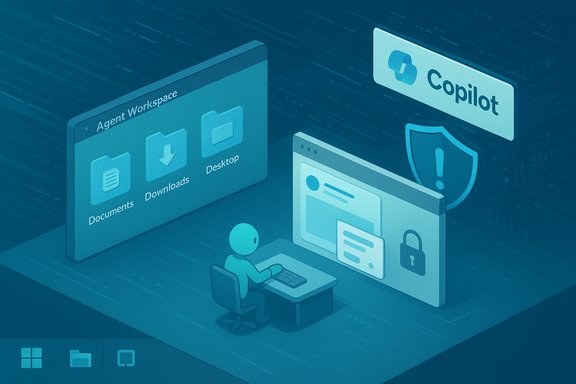
Agent Workspace and agent accounts
- When enabled, Windows creates a lightweight, isolated runtime called Agent Workspace that runs in a separate Windows session. Agents run under dedicated, low‑privilege local accounts that are distinct from the logged‑in human user account. This identity separation aims to make agent actions auditable and governable through standard Windows mechanisms (ACLs, Group Policy, Intune).
- The workspace is intended to be more efficient than a VM for UI automation tasks but still provide runtime isolation and visibility into what agents do. Agents can interact with UI elements (click/type/scroll), call app-specific capabilities, and chain multi‑step workflows (for example, gather data from documents, transform files, or prepare emails).
Scoped file and app access
- During the initial preview, agents are allowed to request read/write access to a defined set of known folders inside the user profile: Documents, Downloads, Desktop, Pictures, Music, and Videos. The support article explicitly states this scoping and warns users to understand the implications before enabling the setting.
- Agents may also interact with applications that are installed for all users by default; apps installed per‑user may remain inaccessible to agent accounts unless specifically permitted. These scoping defaults are Microsoft’s initial mitigation for limiting the agent attack surface.
Human‑in‑the‑loop primitives and auditability
Microsoft plans to surface agent plans and activity logs, require signed agent binaries/connectors, and introduce revocation mechanisms—design choices intended to preserve visibility, control, and non‑repudiation. These are foundational mitigations, but they are still in preview and will evolve.What Microsoft warns about—and why it matters
Microsoft’s support documentation is unusually candid: it states that agentic AI introduces “novel security risks,” that AI models may hallucinate and produce unexpected outputs, and it names a specific attack class—cross‑prompt injection (XPIA)—where malicious content embedded in documents or UI elements overrides or corrupts an agent’s plan. These are not theoretical footnotes; Microsoft elevates them as first‑order concerns for anyone enabling agentic features. Independent technology outlets and security commentators have amplified and expanded on those warnings, noting practical exploitation scenarios such as:- An agent opening a poisoned document in Downloads or Desktop, parsing embedded adversarial text (or OCR‑extracted text from images), then following embedded commands to download and execute a payload.
- A rendered web preview or email snippet containing concealed instructions that an agent—designed to read and act—interprets as part of its task context and thus follows.
Separating fact from local reporting and rumor
Several non‑official articles and regional press pieces used the term “Proxy Server” (possibly a translation choice) to describe the new capability. That phrasing can be misleading:- Microsoft’s documentation does not use “Proxy Server” to describe agentic features, Agent Workspace, or Copilot Actions. The authoritative Microsoft terminology refers to agent accounts, Agent Workspace, Copilot Actions, and Experimental agentic features. The “Proxy Server” label should be treated as unverified nomenclature unless Microsoft adopts the term.
- Similarly, community posts and early hands‑on reports may show different build suffixes, staged flags, or feature gating due to Controlled Feature Rollout (CFR). Build identifiers in community screenshots can therefore vary by region or entitlement; rely on Microsoft’s official release notes and the Windows Insider blog for authoritative build references.
Threat scenarios and attacker playbooks
The combination of action‑capable agents, content parsing, and scoped file access yields several plausible, high‑impact attack paths. These scenarios are practical and have been outlined by security researchers and technology commentators:- Cross‑Prompt Injection (XPIA) attack:
- Attacker embeds adversarial instructions in a benign file (PDF, DOCX, HTML) or an image that will be OCR‑processed.
- An agent, asked to “summarize the Downloads folder” or “extract data from the attached document,” ingests the file and follows the embedded malicious instructions—fetching an external payload or exfiltrating selected files.
- Supply‑chain-style malicious agents or connectors:
- A compromised agent binary or third‑party connector, even if cryptographically signed at time of installation, could later be abused unless revocation and monitoring are robust.
- Past incidents in agent ecosystems (e.g., malicious agents acting as proxies in other platforms) demonstrate the plausibility of such supply‑chain abuses; defenders must treat agent binaries and connectors like any other privileged software component.
- UI automation fragility leading to destructive actions:
- Agents that click and type are brittle when faced with localization differences, timing issues, or unexpected dialogs. Mistaken UI automation can produce data loss (deleting the wrong files), accidental data sharing, or blocking system recovery steps.
Microsoft’s mitigations and where gaps remain
Microsoft has built a mitigation roadmap into the preview: admin‑only enablement, agent accounts, Agent Workspace, known‑folder scoping, plans for signed agent binaries and revocation, and surface logging. Those are sensible foundational controls and reflect an attempt to extend existing Windows governance to a new automation class. Strengths:- Opt‑in by default reduces inadvertent exposure and centralizes the adoption decision with administrators.
- Identity separation (per‑agent accounts) maps to existing Windows auditing and policy controls.
- Scoped defaults for known folders limit broad, unfettered file system access during preview.
- Auditability and plans—if implemented well—offer human‑in‑the‑loop oversight for sensitive actions.
- Prompt injection defenses: Microsoft acknowledges XPIA but building robust, reliable classifiers and runtime filters that can stop sophisticated adversarial prompts is hard and remains a work in progress.
- DLP/EDR integration: Effective enterprise adoption requires tight, tested integration between agent actions and existing Data Loss Prevention (DLP) and Endpoint Detection & Response (EDR) tooling; those integrations are not yet widely documented or validated at scale.
- Revocation and patch speed: Signed agent binaries are only secure if revocation paths, certificate lifecycle, and rapid response processes are exercised and proven in real incidents.
- Cloud vs on‑device reasoning: Agents that call cloud models can leak context unless telemetry and data handling are carefully constrained; on‑device models for Copilot+ hardware reduce this exposure but are not universally available.
Practical guidance for users and IT teams
Microsoft’s recommendation: enable the feature only if you understand the security implications. Below is a practical, staged approach for safe testing and governance.For individual power users and enthusiasts
- Keep the global toggle off unless you’re explicitly experimenting in a disposable environment.
- If you enable it, use a non‑production test account and do not point the agent at sensitive folders or business data.
- Monitor the Agent Workspace activity indicators and close or pause agent sessions immediately if behavior looks unexpected.
For IT teams and enterprise pilots
- Create a restricted pilot group with isolated machines and backups. Require that the experimental toggle be enabled only through Managed IT (Intune/Group Policy).
- Integrate agent logs into SIEM and enforce DLP policies that block automated agent exfiltration to unapproved endpoints.
- Require signed agent binaries and maintain a certificate revocation and quarantine process.
- Conduct red‑team exercises specific to XPIA and UI automation errors before any wider deployment.
- Keep the feature disabled on production fleets until independent verification of containment, logging, and revocation exists.
Quick steps to disable or verify the setting (user path)
- Settings → System → AI Components → Experimental agentic features. The toggle is off by default and can only be turned on by an administrator. If enabled and you want to switch it off, return to the same path and turn the toggle off. Microsoft’s support article documents the toggle and its implications.
Detection and incident response considerations
- Treat agent accounts like service accounts: monitor their authentication activity, process trees, and network connections separately from human users. Correlate file access by agent accounts with SIEM alerts.
- Instrument EDR to detect unusual sequence patterns (e.g., agent reads a document, then immediately invokes a network download and executes a binary).
- Ensure DLP policies block automated uploads of sensitive file types unless explicitly approved and subjected to human review.
- Establish a rapid revocation and rollback playbook for compromised agent binaries or connectors.
Community reaction and early signals
Windows and security communities have rapidly picked up Microsoft’s warnings and begun discussing practical governance and the architectural implications. Community threads underscore two recurring themes: the promise of productivity for automating repetitive tasks, and the immediate need for stronger, enterprise‑grade governance before broad adoption. Pilot guidance emerging in forums aligns with the cautious approach recommended above: test in isolated groups, require admin gating, and integrate with DLP/EDR.Critical analysis — promise vs. peril
The agentic pivot is among the most consequential changes to Windows security since UAC and sandboxing were introduced. On the one hand, the capability is a genuine productivity multiplier: agents that can assemble reports, batch‑clean files, extract data from PDFs, or automate assistive tasks could yield real gains for knowledge workers and accessibility scenarios. Microsoft’s integration approach—identity separation, scoping, audit plans—shows the company understands the architectural requirements for responsible automation. On the other hand, converting the OS into a platform where software actors can perform multi‑step actions introduces hard operational demands:- Defense against sophisticated prompt injection is an arms race; attackers will adapt faster than static rules.
- Enterprises must treat agent binaries and connectors as privileged software, with the same scrutiny and lifecycle controls as endpoint agents and service accounts.
- The potential for accidental, harmful automation (UI automation mistakes) remains non‑trivial and will require robust testing across apps and languages.
Final recommendations (executive checklist)
- Keep Experimental agentic features disabled on production devices.
- If piloting, do so in a controlled lab with representative data and full backups.
- Integrate agent logs into SIEM and require DLP enforcement for any automated file movements.
- Require signed agent binaries, maintain revocation lists, and test revocation/rollback procedures.
- Conduct XPIA‑focused red‑team exercises and validate EDR signatures for agent behaviors.
- Treat community reporting and Microsoft’s preview guidance as the authoritative sources for current behavior; disambiguate any local reporting terms (for example, “Proxy Server”) that don’t appear in Microsoft’s documentation.
Microsoft’s explicit warning about hallucinations, XPIA, and the need for careful governance is a rare and welcome degree of candor from a platform vendor. The feature set they’re previewing is technically ambitious and could reshape desktop productivity—but that reshaping will only be safe if the industry, enterprises, and endpoint vendors converge on rigorous controls: reliable prompt‑injection defenses, proven revocation mechanics, comprehensive logging, and native DLP/EDR integration. Until those controls are demonstrably mature and independently validated, the prudent posture is clear: experiment in controlled environments and keep the global toggle off for production systems. Conclusion: the agentic era in Windows is no longer hypothetical—Microsoft has shipped the building blocks and an unusually frank security advisory. That combination should be treated as both an invitation to innovate and a red flag for caution; the balance between convenience and risk will determine whether agentic Windows becomes an enterprise liability or a productivity breakthrough.
Source: jordannews.jo Microsoft Warns About New Experimental Feature in Windows - Jordan News | Latest News from Jordan, MENA
