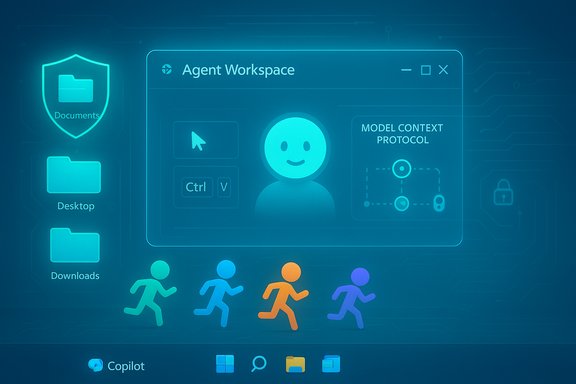
Microsoft’s next big bet on PC productivity is arriving as software that can act for you — not just suggest, but do — and it’s arriving inside Windows 11 as an experimental, opt‑in “agentic AI” platform that can sort photos, send emails, edit files, and automate settings directly from the taskbar.
Microsoft formally introduced the new agentic capabilities for Windows 11 as part of its broader Copilot and AI push. The company describes a new set of primitives — notably agent accounts, an agent workspace, and a discoverability channel in the taskbar called Ask Copilot — that let AI agents execute actions on behalf of a user in a contained environment. The initial rollouts are available to Windows Insiders as an experimental preview and are turned off by default; enabling them requires administrator approval because the setting applies system‑wide.
The design intent is straightforward: move beyond passive chat assistants and bring agents that can perform sequences of UI interactions and file operations directly on the PC. Microsoft frames this as an evolution of Copilot Actions and as an extension of existing Windows search and Settings assistants. In practice, users will be able to invoke agents from the taskbar, type “@” in the Ask Copilot composer to see available agents, and let those agents run in parallel with their desktop session inside a contained agent workspace.
This change is significant because it reframes the Windows desktop as not just a platform for running user‑driven software, but a host for autonomous software agents with the ability to interact with local files, apps, and services — all subject to permissioning and visibility controls Microsoft has said it will provide.
However, the model’s novelty introduces distinct security and privacy challenges. Cross‑prompt injection, third‑party agent trust, system‑wide toggles, and the realities of local file access mean administrators and users must proceed deliberately. Organizations should pilot agentic features under strict policies, integrate audit telemetry into existing security tooling, and require human oversight for sensitive actions.
When deployed with careful governance, agentic Windows features can become a safe and useful part of the PC toolkit. Without that governance — and without continued iteration on model‑level defenses and UI transparency — agentic agents could amplify the same security and privacy problems we’ve faced with other emerging AI systems. The prudent path is clear: enable the capability where it brings real benefit, instrument it for visibility, and harden the platform before broad rollout.
Source: extremetech.com Windows 11's Agentic AI Will Sort Photos, Send Emails, and Tidy Your Files
 Background and overview
Microsoft formally introduced the new agentic capabilities for Windows 11 as part of its broader Copilot and AI push. The company describes a new set of primitives — notably agent accounts, an agent workspace, and a discoverability channel in the taskbar called Ask Copilot — that let AI agents execute actions on behalf of a user in a contained environment. The initial rollouts are available to Windows Insiders as an experimental preview and are turned off by default; enabling them requires administrator approval because the setting applies system‑wide.The design intent is straightforward: move beyond passive chat assistants and bring agents that can perform sequences of UI interactions and file operations directly on the PC. Microsoft frames this as an evolution of Copilot Actions and as an extension of existing Windows search and Settings assistants. In practice, users will be able to invoke agents from the taskbar, type “@” in the Ask Copilot composer to see available agents, and let those agents run in parallel with their desktop session inside a contained agent workspace.
This change is significant because it reframes the Windows desktop as not just a platform for running user‑driven software, but a host for autonomous software agents with the ability to interact with local files, apps, and services — all subject to permissioning and visibility controls Microsoft has said it will provide.
How it works: the technical briefing
Agent accounts and the agent workspace
- Agent accounts: When agentic features are enabled, Windows creates a separate standard account to run agent code. This account is distinct from the logged‑in user’s identity and is used to enforce authorization and access control for agent actions.
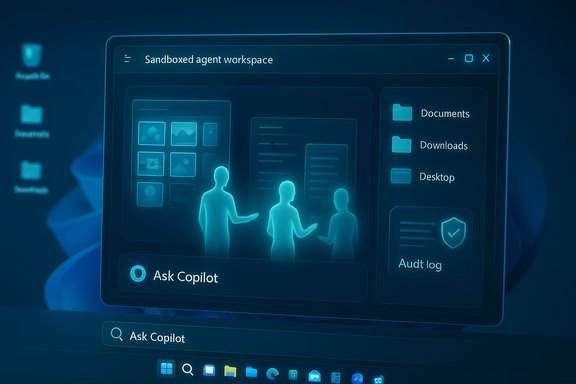
- Agent workspace: Agents operate inside a contained environment that Microsoft calls the agent workspace. The workspace is a runtime isolation boundary — essentially a sandboxed desktop — that enables agents to click, type, and interact with windows without mixing their activity into the user’s primary session.
- Restricted known‑folder access: During the preview, agents are granted access only to a limited set of “known folders” such as Documents, Downloads, Desktop, and Pictures, plus other resources that are generally accessible to all accounts on the system. This is an explicit tradeoff between utility and risk.
- Audit logs and transparency: All agent actions are recorded in a secure, tamper‑evident audit log so users (and administrators) can review what an agent did, when it did it, and what resources it accessed.
Discovery and invocation
- Ask Copilot on the taskbar: The Ask Copilot box becomes a primary UI for discovering agents. Users can press the Copilot icon or type “@” in the Ask composer to reveal available agents and tools they provide.
- Model Context Protocol (MCP): Microsoft is standardizing agent discovery and tool integration via a protocol that helps agents discover capabilities and coordinate workflows across apps and agent services.
Examples of agent capabilities
- File and photo organization: bulk sorting, renaming, deduplication, and album creation.
- Email actions: drafting, summarizing long threads, sending or scheduling messages where permitted.
- Settings automation: changing system preferences via natural language in Settings.
- App interactions: automating multi‑step workflows involving web and native applications.
What this enables: productivity benefits
Agentic AI promises clear wins in several categories:- Time savings: Repetitive tasks like organizing photos, cleaning up downloads, or triaging emails can be delegated to agents, freeing users to focus on higher‑value work.
- Contextual automation: Agents can operate in the context of the user’s files and apps, enabling end‑to‑end task automation that previously required manual scripting or multiple applications.
- Natural language configuration: The new Settings agent allows people to ask for configuration changes in plain English and apply them without hunting through UI menus.
- Parallel work: Because agents run in a separate workspace, they can complete background tasks without interrupting the user’s primary session.
Risks and the security model: what to watch
Agentic action on a desktop exposes a broader attack surface than do passive assistants. Microsoft recognizes this and has described several controls, but the new model still raises material risks:Cross‑prompt injection (XPI) and prompt manipulation
Agents that act autonomously are vulnerable to cross‑prompt injection — scenarios where malicious content encountered by an agent (for example, a rogue file name, a poisoned document, or a web payload) is interpreted as an instruction. This can trick an agent into performing unintended actions, exfiltrating data, or installing malware. Because agents can interact with files and apps, the potential impact is higher than for chat‑only systems.Privilege and lateral access
Although agents run under separate standard accounts, they may still access files and resources that other accounts can access. If an attacker can compromise an agent (through a poisoned prompt or third‑party plugin), they could leverage agent access to reach user data in Documents, Desktop, and other shared locations.Supply‑chain and third‑party agents
Microsoft anticipates third‑party agents and workflow agents will join the ecosystem. Each third‑party agent is an additional trust boundary; malicious or poorly designed agents could request excessive permissions or mishandle sensitive data. The problem compounds when agent discovery and integration are automated by protocols like MCP.User and multi‑user scope
A crucial operational risk is that the agentic toggle is system‑wide. If an administrator enables agentic features, every user on that device becomes part of the agentic environment. That creates hazards in shared or multi‑user systems — for example, family PCs, shared workstations, and kiosks — where one user’s consent can affect others.Privacy, telemetry, and auditing
Agents will log activity, but logging alone doesn’t eliminate data‑exposure risk. Logs must be protected and tamper‑evident. In addition, telemetry between local agents and cloud services (for model calls or LLM integrations) introduces privacy questions about what data leaves the device and how it’s stored.Microsoft’s mitigation approach and its gaps
Microsoft is shipping a set of design controls intended to reduce risk:- Opt‑in, admin approval required: Agentic features are disabled by default; administrative consent is required to turn them on, acknowledging the broader system scope.
- Agent accounts and agent workspace: Identity separation and sandboxing limit some classes of access and make agent actions more auditable.
- Limited folder access during preview: Granting agents access only to a constrained set of known folders reduces initial exposure.
- Audit logs and transparency: Persistent records of agent actions are meant to support review and incident response.
- Human‑in‑the‑loop gating: Microsoft says agents must request user approval for important actions to avoid unbounded autonomy.
- The system‑wide toggle model shifts significant control to administrators without a per‑user consent model.
- Limited folder access is a good first step, but many sensitive files live in Documents or Desktop — the folders that agents can access during preview.
- Audit logs are only useful if they are robustly protected, routinely reviewed, and integrated into an organization's SIEM/EDR workflow.
- Cross‑prompt injection is an emergent attack class that demands both model‑level mitigations (e.g., input sanitization and context separation) and runtime checks; these are hard to get perfect and will need ongoing refinement.
Recommendations for IT teams and power users
Given the power and risks of agentic AI, organizations and advanced users must treat this feature as they would any new privileged platform capability. Below is a practical, sequential checklist for evaluating, piloting, and controlling agentic Windows features.- Inventory & policy. Identify which devices are eligible (Copilot+ PCs, Insider devices) and adopt a written policy governing agentic features (who can enable them, under what use cases, and for which users).
- Start small with pilots. Run proofs of concept on a small set of controlled devices and user groups to observe agent behavior, logging fidelity, and interaction with existing security controls.
- Require administrative gating. Maintain administrator approval for enabling agentic features and restrict the toggle to dedicated test or productivity groups until controls are validated.
- Integrate logs. Ensure agent audit logs are forwarded to centralized logging and SIEM systems. Verify logs are tamper‑evident and correlate agent actions with endpoint telemetry.
- EDR and endpoint hardening. Ensure endpoint detection and response (EDR) tooling understands and monitors agent workspace activity and agent account behavior.
- Data minimization and folder policy. Apply least‑privilege access controls for known folders, and use data classification to limit agent access to sensitive content.
- Education and user prompts. Configure agents so that high‑risk actions require explicit user confirmation, and train end users about agent trust models and phishing risks that exploit agents.
Mitigations and technical controls in detail
- Sandbox and privilege confinement: Treat agent workspaces as first‑class sandboxes. Restrict what APIs and kernel surfaces are available inside the workspace and minimize upward escape vectors.
- Input sanitization and context separation: Implement robust sanitization of any untrusted content that flows from files, web content, or third‑party agents into model prompts. Segment prompt context so that user content cannot inject instructions that alter agent behavior.
- Rate limits and operation whitelists: Limit what agents are allowed to do automatically (for example, allow file renames but require approval for outbound network connections or execution of installers).
- Network egress controls: Monitor and restrict agent‑initiated network calls. If agents call cloud LLMs, route traffic through enterprise proxies for inspection and DLP scanning.
- Model‑level adversarial defenses: Apply model safety checks and heuristics to detect manipulation attempts, including patterns associated with prompt injection and instruction conflation.
- Third‑party vetting and code signing: Enforce strict vetting for third‑party agents. Require code signing, transparent permission manifests, and clear privacy notices for any agent that is discoverable via Ask Copilot.
- Tamper‑evident logging: Use write‑once logs protected by cryptographic techniques so forensic analysis can rely on the integrity of audit records.
Guidance for developers and agent authors
Third‑party agents and workflow builders will be the lifeblood of the agentic ecosystem. Developers must build with security and privacy first.- Publish clear permission manifests that enumerate minimal required accesses.
- Offer an auditable UI describing exactly what will happen — and require user confirmation for sensitive operations.
- Avoid silent data exfiltration. Be explicit when an agent transmits content off‑device.
- Implement retry and idempotency safeguards so agents do not repeatedly perform the same potentially destructive actions.
- Embrace the Model Context Protocol and the Windows agent primitives to provide predictable behavior and to make permissioning interoperable across the ecosystem.
Enterprise adoption considerations
Large organizations will weigh agentic features against compliance, data residency, and regulatory requirements.- For regulated workloads, treat agentic features like a new privileged platform: require change control, risk assessment, and legal review before adoption.
- Use conditional access and identity controls (for example, via Entra ID integration) to control which agents can operate under which corporate identities.
- Consider isolating agent usage to managed virtual desktop (VDI) or dedicated test endpoints where monitoring, backup, and rollback are simpler.
- Update incident response playbooks to include scenarios where agents are compromised or misbehave and ensure investigators can trace agent actions through logs.
The privacy tradeoffs
Agentic AI raises familiar privacy tradeoffs in new ways. While Microsoft’s approach keeps the feature off by default and limits folder access during preview, agents that analyze local content for automation still require careful consideration:- Agents will need to process local files, meaning some data may be encoded into prompts or sent to cloud services depending on agent design.
- Organizations should enforce strict data‑handling rules for agents, including encryption at rest for logs and controls over telemetry that leaves the endpoint.
- User consent models will need to evolve: admin approval is important, but per‑user consent for agent behaviors — especially in multi‑user contexts — is equally vital.
Future outlook: standards, regulation, and user experience
Agentic AI on Windows is an inflection point: it promises a new class of productivity tools, but also reveals how quickly policy and security catch up to technical innovation.- Expect more agent types (productivity, workflow, industry verticals) as third‑party developers join the ecosystem.
- Standards such as the Model Context Protocol will be critical for interoperability and security best practices.
- Regulators and enterprise compliance teams will scrutinize how agents handle sensitive data and whether their audit trails are reliable.
- User interfaces will need to make agent permissions and activities more transparent and understandable — technical controls alone will not solve social engineering or consent problems.
Bottom line: handle with intention
Agentic AI inside Windows 11 is a powerful capability that can automate common, multi‑step tasks and materially improve productivity. Microsoft’s early design choices — turning the feature off by default, using separate agent accounts, creating an agent workspace, limiting folder access, and introducing audit logs — show a responsible approach to risk mitigation.However, the model’s novelty introduces distinct security and privacy challenges. Cross‑prompt injection, third‑party agent trust, system‑wide toggles, and the realities of local file access mean administrators and users must proceed deliberately. Organizations should pilot agentic features under strict policies, integrate audit telemetry into existing security tooling, and require human oversight for sensitive actions.
When deployed with careful governance, agentic Windows features can become a safe and useful part of the PC toolkit. Without that governance — and without continued iteration on model‑level defenses and UI transparency — agentic agents could amplify the same security and privacy problems we’ve faced with other emerging AI systems. The prudent path is clear: enable the capability where it brings real benefit, instrument it for visibility, and harden the platform before broad rollout.
Source: extremetech.com Windows 11's Agentic AI Will Sort Photos, Send Emails, and Tidy Your Files