

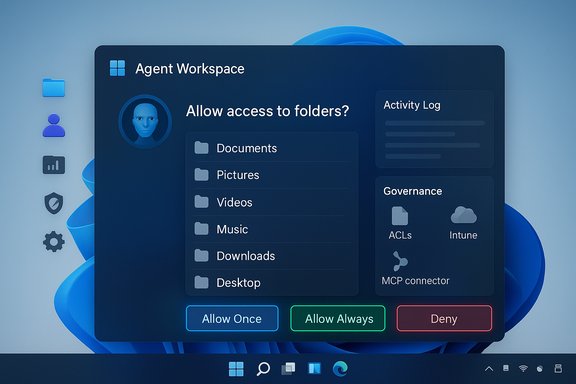
Microsoft’s latest pivot on Windows 11 AI — a new, system-level prompt that will ask for explicit consent before any AI-powered agent accesses your personal files — is a meaningful course correction that addresses the most visible privacy complaint about agentic features, but it is not a panacea. Microsoft has documented an opt‑in, administrator‑gated model for agent workspace and per‑agent file permissions in preview builds; this introduces useful guardrails while leaving important questions about granularity, telemetry, and enterprise integration unresolved.
Background / Overview
Windows 11’s recent AI roadmap shifts the platform from “suggest” to “do”: Microsoft is building agentic capabilities that can perform multi‑step tasks on behalf of users — opening apps, reading documents, clicking UI elements, and composing or summarizing content. To support those behaviors, Microsoft introduced the concept of an Agent Workspace and agent accounts where agents run with distinct identities and scoped permissions. The company’s support documentation and Insider previews now state that, by default, agents do not get blanket access to a user’s files; instead, Windows will prompt the user when an agent requests access to the six standard “known folders” (Documents, Downloads, Desktop, Pictures, Music, Videos). That change responds directly to a wave of public concern and media coverage that highlighted the risk of AI agents accessing personal files without clear, user‑visible controls. Microsoft’s new permission model is being rolled out through the Windows Insider previews (certain builds) and documented as an experimental — administrator‑gated — feature while the company collects feedback and hardens controls. The platform will also surface per‑agent settings allowing users to choose “Allow Always”, “Ask every time”, or “Never allow” for file access.What Microsoft announced (the mechanics)
Agent Workspace, agent accounts and scoped file access
- Agent Workspace: a contained runtime where agents execute tasks in a separate, visible desktop session. This workspace is intended to provide runtime isolation and a visible activity log so users can monitor or intervene.
- Agent accounts: agents run under per‑agent, low‑privilege Windows accounts. Treating agents as distinct principals enables standard OS controls (ACLs, Intune, Group Policy) to be applied and audited.
- Scoped file access: in preview, agents can request read and write access to the six known folders in a user profile. Windows will prompt for consent when an agent requests that access; the user can decide per agent whether to allow once, allow always, or deny. This behavior is off by default and must be enabled by an administrator.
Model Context Protocol (MCP) and Agent Connectors
Microsoft described a standardized bridge called the Model Context Protocol (MCP) and agent connectors that mediate how agents interact with apps, files, and services on a device. This creates a single enforcement point for capability declarations, authentication, and logging — a crucial place to implement policy and DLP integration. MCP servers (connectors) are discoverable via a Windows On‑Device Registry, and Windows will gate connector use behind the same agent consent surface.Why this matters: the user‑privacy and security context
The introduction of a consent prompt is a material improvement for user control. The most immediate privacy worry — that a background AI could crawl and index a user’s entire profile without explicit permission — is addressed directly by: (a) keeping agentic features off by default; (b) placing runtime controls in a visible workspace; and (c) prompting the user when file access is requested. Those are substantial design decisions that change how device automation is governed. However, the devil is in the details. The current preview model treats the six known folders as a single permission set: granting access means an agent can read/write all six. That coarse granularity is one of the largest practical limitations today. Users often store sensitive files in specific folders, and a single all‑or‑none switch sacrifices nuance for simplicity. Enterprise use cases, regulatory compliance, and advanced DLP scenarios will demand more granular controls (per‑folder, per‑path, content classification hooks) and robust integrations with endpoint protection stacks. Independent reporting and Microsoft’s own docs both highlight the gap between the initial UX and the needs of security teams.Cross‑checked claims and technical verifications
- Microsoft’s official guidance and preview notes describing the experimental agentic features, Agent Workspace behavior, and the per‑agent file permission UX are published on Microsoft Support and were updated through late 2025 to reflect rolling Insider releases and connector support. The support article explicitly documents the Settings path (System → AI Components → Experimental agentic features), the six known folders, and per‑agent permission choices.
- Independent technical coverage and hands‑on previews (reporters and Windows community outlets) confirm the same core behaviors: agents run in isolated sessions, permissions are admin‑gated, and known folders are the initial file scope. Those reports also surface concerns about folder granularity, persistent agent accounts raising long‑term risk, and new attack surfaces like cross‑prompt injection.
- Microsoft’s hardware tiering for higher‑privacy, low‑latency on‑device AI — the Copilot+ PC class — is documented on Microsoft’s device pages. Copilot+ PCs are specified to include an NPU with 40+ TOPS capability, which Microsoft cites as the minimum for many on‑device experiences that avoid cloud round‑trips. This hardware differentiation matters because some agent operations and privacy assurances may be realized differently on Copilot+ vs. non‑Copilot devices.
What Microsoft’s change does well (strengths)
- Restores a clear consent boundary. The modal permission flow empowers the user at the exact moment sensitive files are being requested, rather than relying on opaque background policies. This is a core privacy principle and a direct response to early backlash.
- Makes agents first‑class OS principals. By running agents in their own accounts and workspaces, Microsoft enables standard enterprise controls — auditing, ACLs, Intune policies, and SIEM ingestion — to apply to agent actions. That mapping to existing Windows governance is a pragmatic design win.
- Visibility and interruption controls. Agent Workspace provides a visible runtime with pause/stop/takeover affordances. That human‑in‑the‑loop capability reduces the risk of silent automation performing destructive actions.
- Standardized connector surface (MCP). The Model Context Protocol centralizes how agents discover and use system services. When implemented well, MCP can be the right place to inject DLP, auditing, and telemetry policies uniformly across third‑party agents.
Remaining risks and open questions
1) Granularity of file access
The current model treats the six known folders as a group. That all‑or‑none approach is convenient but increases exposure for users who keep sensitive items in any of those folders. Enterprises and privacy‑conscious users need per‑folder and per‑path controls, plus content‑aware filtering that can block agents from seeing documents with specific classifications or PII. Independent reporting flags this limitation as a top shortcoming.2) Cross‑prompt injection and content manipulation
Agents that interpret document contents are vulnerable to prompt‑style injection attacks embedded within files (e.g., hidden instructions in a document or image metadata). Microsoft acknowledges novel threat models where content can be crafted to change an agent’s behavior. Mitigations (sanitization, human approval workflows, signed agents, tamper‑evident logs) are being designed but need independent validation.3) Persistent principals and credential scope
An agent account that persists across sessions is functionally similar to a service account. If a compromised agent is able to act with persistent permissions, the attack surface and potential for lateral movement increase. Enterprises must treat agents like service accounts: rotate credentials, apply least privilege, and enforce conditional access.4) Cloud vs. local inference: telemetry and data egress
Microsoft’s hybrid model (on‑device Copilot+ NPUs vs. cloud models) means that actual data flows depend on device class and the specific agent. Organizations need transparent documentation on what data is sent to the cloud and what remains local, plus controls to lock agents to local inference if regulatory compliance demands it. Public docs and device pages indicate Copilot+ hardware can enable higher local processing, but policy details remain operationally complex.5) Third‑party developer obligations and ecosystem enforcement
Microsoft says the consent model will apply to third‑party agents and connectors, and developers will be required to follow API policies and register connectors in the On‑Device Registry. Ensuring compliance across an ecosystem requires robust signing, certificate revocation, app vetting, and runtime enforcement — all non‑trivial at scale. Observers have noted that enforcement and revocation mechanisms must be demonstrably effective to reduce supply‑chain risk.Practical guidance — what users and IT teams should do now
For home users and power users
- Keep Experimental Agentic Features off unless you need them. When enabled, understand that the setting applies to the device and creates agent accounts for everyone.
- When prompted, prefer Ask every time or Allow once for new agents until you trust a vendor and the workflow is routine. Use Allow Always sparingly.
- Store highly sensitive artifacts (private keys, credential stores, unencrypted backups) outside the known folders or in encrypted containers that agents cannot read without explicit keys.
For IT teams and security leaders
- Treat agents as service principals. Keep the master toggle off for production fleets; enable in pilot rings only. Apply ACLs, Intune/GPO, and SIEM monitoring to agent accounts.
- Integrate agent events with DLP and EDR tooling. Validate how agent actions show up in logs and whether your current toolchain can block unauthorized data flows.
- Require digitally signed agents and define certificate revocation and supplier governance. Add agent testing to supplier risk programs and red‑team exercises.
- Define procurement requirements for Copilot+ hardware only where local inference and lower egress risk matter; otherwise, have clear policies on which agents can handle regulated data.
Developer and vendor implications
- Developers building agent connectors must register their MCP servers in the Windows On‑Device Registry and be prepared to honor user consent flows. Microsoft’s MCP is the choke point for declaring capabilities, enforcing authentication, and triggering the OS consent UX. This makes security by design and minimal privilege critical for any vendor.
- Vendors will be required to sign agents and be subject to revocation policies. This increases the importance of secure CI/CD, reproducible builds, and supply‑chain hygiene. Products that attempt to sidestep the MCP or request broad permissions will face rejection on managed fleets.
- The user experience and permission model will shape adoption: if consent flows are overly intrusive or ambiguous, users will deny access and lose out on valuable automations. Conversely, too permissive a UX undermines trust. Developers and Microsoft must iterate to find the right balance. Independent reporting stresses this UX tradeoff as central to how widely agents will be adopted.
Timeline, rollout and what to watch
Microsoft’s public documentation frames the Agent Workspace and per‑agent consent as experimental and available in Windows Insider preview builds (the support article references builds in the 26100+ family for early previews). Insiders will see gradual rollouts and updates while Microsoft refines controls; the company has not committed to a firm GA date for broad availability in production channels. Claims that this will appear as part of a major Windows 11 feature release in 2026 are plausible but not formally confirmed by Microsoft’s documentation; treat specific GA year claims as provisional until Microsoft announces a schedule. Watch for these signposts in the coming months:- Broader availability of per‑folder or content‑aware permissions.
- Formal DLP/EDR integration documentation and APIs for real‑time policy enforcement.
- Public red‑team audits or third‑party technical reviews addressing cross‑prompt injection and agent tampering.
- Clarity on telemetry: what data leaves devices for cloud models vs. what remains local on Copilot+ hardware.
Balanced assessment — promise, but not a finished product
Microsoft’s decision to require explicit, per‑agent consent before AI agents access the six known folders is an essential, necessary correction to the privacy posture of Windows 11’s agentic ambitions. It demonstrates responsiveness to user concerns and a pragmatic approach: make agents auditable, visible, and revocable, and centralize connector enforcement through MCP. Those are concrete, measurable design wins. Yet the current model’s limitations — coarse folder granularity, unresolved details about telemetry and cloud egress, and the novelty of attack vectors like cross‑prompt injection — mean the protections are promising but not yet fully proven at scale. Enterprises must approach agentic features cautiously and treat agents as first‑class security principals until independent validation (audits, red teams) and tighter integrations with DLP/EDR are available. Users benefit from the new consent prompts, but the long road to operational maturity includes stronger policy hooks, per‑path controls, and transparent telemetry.Quick checklist — immediate actions for readers
- Confirm Experimental Agentic Features are off on sensitive machines (Settings → System → AI Components).
- When prompted by an agent, choose Ask every time or Allow once until trust is established.
- For organizations: pilot in a controlled ring, integrate agent logs with SIEM, and require signed agents from vetted suppliers.
- For procurement: evaluate whether Copilot+ hardware (40+ TOPS NPU) is necessary for local inference and compliance-sensitive workloads.
Microsoft’s UX correction matters. It brings consent back to the foreground where it belongs, and it shapes how AI will be allowed to touch personal data on the PC. But consent dialogs alone do not remove risk; they are part of a larger governance stack that must include per‑path controls, hardened connectors, robust signing and revocation, and enterprise integrations with DLP and EDR. The Agent Workspace model is a thoughtful architectural starting point — one that will require iteration, transparency, and independent validation before it can be considered enterprise‑grade. In short: the new prompt is a welcome and necessary move toward restoring user control, but the broader security and governance work has only just begun.
Source: livemint.com Microsoft responds to AI backlash: Windows 11 will ask before file access | Mint
