

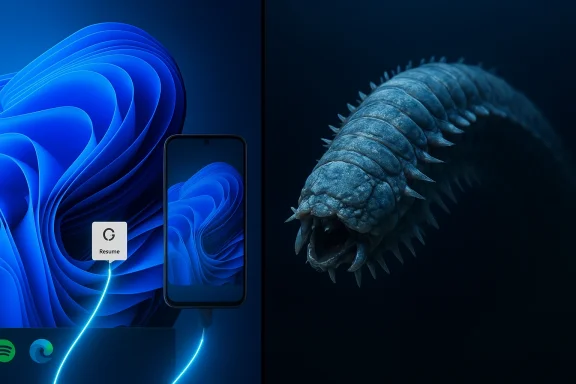
Windows 11, Android continuity, and an Antarctic “alien worm”: two very different headlines that landed in readers’ feeds over the past few months. One is a gradual — but meaningful — step toward making phones and PCs feel like parts of a single computing surface. The other is a vivid reminder that nature still produces forms so strange they look fictional, and that the internet’s instinct is often to turn “strange but real” into “monster news.”
This article unpacks both stories in plain language: what changed in Windows 11 (and why you might notice it soon), what the Antarctic “alien worm” actually is (and what the viral posts got wrong), and why both items matter beyond the headlines.
Summary in a paragraph
- Windows 11: On January 27, 2026 Microsoft pushed preview builds (listed as KB5074105; Release Preview channel builds 26100.7701 and 26200.7701) that expand the OS’s Cross‑Device Resume — the feature that lets activities begun on an Android phone be continued on a Windows PC. The update broadens supported scenarios (examples include Spotify playback, Copilot/Microsoft 365 mobile documents, and some browser sessions) and makes it easier for Android apps to trigger a resume on Windows by adding a push‑notification–based integration route. This is a move toward genuinely useful phone ↔ PC continuity, but rollout is gradual and depends on app/OEM adoption. (Key dates: Microsoft announced the Release Preview builds on January 27, 2026; preview packages appeared in update channels around January 29–30, 2026.)
- Antarctic “alien worm”: A striking animal, Eulagisca gigantea (the Antarctic scale worm), resurfaced in viral social media posts in late 2025. The worm is real, and its armored, bristled appearance and eversible jaw are dramatic, but it’s not a multi‑foot, ship‑eating monster. Known to science for decades and typically under 20 cm long, it’s an example of unusual deep‑sea adaptations rather than a newly discovered threat.
Why this is more than incremental polish
Microsoft has long tried to make Windows and phones cooperate better — from Phone Link to the Amazon Appstore experiment to early “resume” features that relied on cloud files. Until now, continuity from Android to Windows tended to be limited: timelines where a document saved in OneDrive could be reopened on a PC, or narrow partner demos where specific apps showed handoff. Those worked in controlled cases, but weren’t broadly useful for most people.
What changed with the January 2026 Release Preview update
- Official preview builds: On January 27, 2026 Microsoft released Windows 11 preview builds 26100.7701 and 26200.7701 to the Release Preview channel as part of KB5074105. These builds were described as “gradual rollout” — meaning Microsoft can enable new experiences for accounts and devices over time rather than turning them on for everyone at once.
- Broader scenario coverage: The release notes and early reporting show Cross‑Device Resume (sometimes shortened to “Resume” or called “XDR” internally) expanding beyond OneDrive‑based cloud file continuation to include real app activities: continuing Spotify playback started on a phone, opening Microsoft 365 documents you opened in Copilot mobile, and restoring browsing sessions handed off by certain Android browsers on specific OEM phones.
- Easier developer onboarding: Microsoft published additional integration paths that lower the barrier for Android apps to trigger a resume prompt on Windows. Notably, the Windows Push Notification Service (WNS) was documented as a supported route for servers to post a resume payload to Windows — offering an alternative to embedding a full Continuity SDK on every Android app. That makes it easier for apps that already use server‑side notifications to participate.
- Metadata‑first design: The handoff model favors small “AppContext” metadata payloads (a compact description of what’s happening: a title, a short preview, and a deep link or URL) rather than streaming a phone’s UI to the PC. The PC resolves the best desktop handler (native desktop app if installed, otherwise a browser fallback) and surfaces a one‑click “resume” affordance — typically a taskbar or shell prompt.
- The phone-side app or its server creates an AppContext: a short-lived metadata packet that describes the activity (e.g., “Spotify track X, position 2:30” or “Word doc X opened in Copilot mobile”).
- That AppContext is delivered to the paired PC via one of the supported channels: Link to Windows / Continuity SDK flows, or via WNS raw notifications using a server-side push.
- Windows receives the AppContext, picks the best handler (the local desktop app if present; otherwise the browser), and shows a small resume prompt to the user.
- The user clicks to continue; the desktop app opens to the corresponding context. If a native desktop app isn’t present, Windows can offer a one‑click install path from the Microsoft Store.
- Music: Start a song or podcast on your phone (Spotify). On your Windows PC you might get a small “Resume on PC” prompt that opens Spotify at the same timestamp — if the desktop client is installed (or offers to install it).
- Documents: Open a Word/Excel/PowerPoint file in Copilot mobile on a supported OEM phone; the PC may prompt you to continue editing in the desktop Office app (or in the browser if you don’t have the native app).
- Browsing: On some phones/browsers, an active tab could be handed off and opened in your PC’s default browser (Vivo Browser was highlighted as an early example in previews).
- It isn’t a remote stream of your phone’s screen. The design deliberately avoids streaming a full phone UI to the PC; instead it re‑opens content via native desktop handlers for better fidelity and less bandwidth.
- Offline‑only content that lives only on the phone is generally not eligible. The mechanism expects cloud‑resolvable resources, deep links, or server‑accessible contexts.
- Server gating: Even after you install the preview Windows update, Microsoft and its partners may enable the capability gradually per account or device (controlled feature rollout). Installing the update is necessary but not always sufficient to "see" the feature immediately.
- Install the preview (if you’re a Windows Insider) or wait for the public rollout. The preview builds were announced January 27, 2026 and preview packages circulated in late January; broad availability will follow when Microsoft moves the feature out of server‑gated preview.
- Pair your phone and PC: Settings → Bluetooth & devices → Mobile devices (or Phone Link/Link to Windows flows). On Android, ensure the companion OEM app or Microsoft Link is updated, notifications are allowed, and your phone/web accounts are signed in as required.
- Expect a staggered rollout and patchy support initially: early apps and OEMs will appear first; others will follow.
- For the smoothest experience, install the desktop versions of the apps you use most (e.g., Spotify, Office) so Windows can pick a native handler.
- Lower friction for adoption: the WNS route lets developers reuse existing server-side notification systems to trigger resume prompts, instead of bundling a mobile SDK in all apps. That can significantly broaden uptake.
- OEM partnerships still matter: phone vendors that configure and publish the right Link/continuity integrations will show up earlier. Expect a mixed landscape where some phones show seamless resume earlier than others.
- Desktop experience matters: because Windows prefers native handlers, the existence and quality of desktop apps (and installation flows) will determine how satisfying the handoff feels.
- Short-lived metadata: AppContext lifetimes are intentionally short to avoid stale resume prompts.
- Authentication and gating: the resume channels require authenticated channels and are subject to Microsoft’s enrollment and approval rules to avoid spoofing.
- Data minimization: metadata‑first handoff reduces the amount of actual content transferred; the PC opens cloud‑accessible items or deep links rather than raw private phone storage.
- Still, users should audit which apps are allowed to send cross-device resume events and be cautious about notification permissions.
If implemented and adopted widely, this makes Windows/Android feel much more integrated in everyday tasks — continuing a podcast on the PC, moving from a quick phone note into desktop editing, or picking up a browser session midstream. The value depends on three movers: Microsoft’s server gating and rollout, OEM collaboration, and app developer adoption (now easier thanks to WNS).
Part II — The Antarctic “Alien Worm”: real creature, not a Hollywood monster
The viral image and the reality
In late 2025 an image of an armored, bristled worm began traveling the social web carrying sensational captions: “alien worm,” “discovered in Antarctic waters,” “huge predator.” Those posts mixed accurate photos of a real animal with exaggerated claims.
The animal behind the hype is Eulagisca gigantea (a species commonly called an Antarctic scale worm). Important facts:
- It’s real and known to science. The species has been part of taxonomic literature for decades; it’s not a new discovery.
- Size: confirmed specimens are typically on the order of centimeters or a few tens of centimeters — commonly reported around 20 cm (about eight inches) in length. That’s large for a worm but far from the “yard‑long sea monster” narrative.
- Habitat: deep Southern Ocean waters — often hundreds of meters down (items like “around 500 meters” are representative of depths where such scale worms are encountered).
- Appearance: overlap of protective plates on the back (called elytra), prominent bristles (chaetae), and an eversible pharynx with jaws make the animal look dramatically “alien.” The throat mechanism can be protruded to capture or manipulate prey, which is what fuels the horror comparisons.
- Behavior: studied as a predator or scavenger of small animals and organic debris on the seafloor. There’s no evidence it attacks large animals or grows to monstrous sizes seen in social memes.
- Armor and bristles: overlapping scales plus shimmering bristles create a look that is sculpted for deep-sea life — protection, sensing, and locomotion under high pressure.
- Eversible jaws: many polychaetes (segmented marine worms) can evert their pharynx; to human eyes, this looks like “turning the throat inside out,” which is dramatic but an evolved feeding tool.
- Deep‑sea coloration and texture: preserved specimens and high‑contrast photography can make the colors and structure stand out in ways that trigger cinematic comparisons.
- Adaptation studies: animals like Eulagisca give researchers clues about how tissues, sensory organs, and feeding mechanics evolve under high pressure and cold.
- Biodiversity mapping: Antarctica’s seafloor is one of the planet’s least explored ecosystems; cataloging its species helps us understand global biogeography and resilience.
- Biomimicry potential: natural armor and flexible gripping structures could inspire materials and robotic mechanisms for cold‑temperature, high‑pressure environments (for example, deep‑sea robotics or specialized sealing and joint designs).
- Conservation context: deep-sea ecosystems are increasingly affected by climate-driven changes and by human activity (fishing, mining). Photogenic creatures help raise public interest in protecting these habitats — if coverage stays factual.
- Exaggeration: viral posts inflated size and predatory behavior without evidence. Sensational headlines get clicks; careful context does not.
- Old images resurfacing: many viral posts present museum shots or old field photos as new discoveries. That confuses the public about novelty and risk.
- Science communication gap: researchers and taxonomy archives document these species, but that work rarely makes it to social feeds in accessible, accurate ways — leaving a vacuum filled by speculation.
- Sensational headlines can obscure the real value
- Windows continuity: “Android apps now stream to Windows” would be a wrong headline; the real story — a metadata‑driven, native‑handler continuity model and a new push‑notification integration path — matters more than the hype. It’s useful, but adoption and rollout details shape real-world impact.
- Antarctic worm: “alien monster discovered” sells shares; “beautiful, well‑adapted deep‑sea worm that highlights Antarctica’s biodiversity” is the accurate takeaway — and the important one for conservation and science.
- Under the hood matters
- For technology: the difference between a streamed remote UI and a metadata-based resume is enormous for performance, privacy, and developer burden. Small technical choices shape user experience.
- For biology: an “eversible pharynx with jaws” is a precise description that explains observation; metaphors of monsters obscure mechanisms scientists want to study.
- The role of curated, careful explanation
- News consumers benefit when writers explain how a feature works and what practical steps or limits mean for ordinary users.
- Viral social images would be healthier if paired immediately with authoritative context — size, range, and scientific background.
- If you use Windows and an Android phone, the January 27, 2026 Release Preview builds (KB5074105) are a marker: Microsoft is delivering a more practical cross‑device continuity story, and the WNS integration path should make it simpler for developers to participate. Don’t expect universal magic overnight — expect a gradually expanding set of useful handoff experiences (music, documents, browsing) as the preview graduates to general rollout and more apps adopt the model.
- If you saw the Antarctic “alien worm” trending, you saw two things at once: the genuine weirdness of life in extreme environments and how the internet stretches fact into fiction. The real animal — Eulagisca gigantea — is both less threatening and more interesting: a compact example of evolutionary ingenuity that deserves interest without hyperbole.
- Practical checklist to try Cross‑Device Resume (if you’re an Insider): update Windows to the Release Preview build (install KB5074105 preview where available), pair your phone in Settings → Bluetooth & devices → Mobile devices, update the companion app on your phone, and install desktop apps you want to be available as handlers (Spotify, Office).
- Quick reading list for the worm: look for short, authoritative treatments in reputable popular science outlets or museum pages that explain Eulagisca’s anatomy and habitat instead of copy‑and‑paste social posts.
Source: Ubergizmo https://www.ubergizmo.com/2026/01/windows-11-android-continuity/?utm_source=mainrss/
