

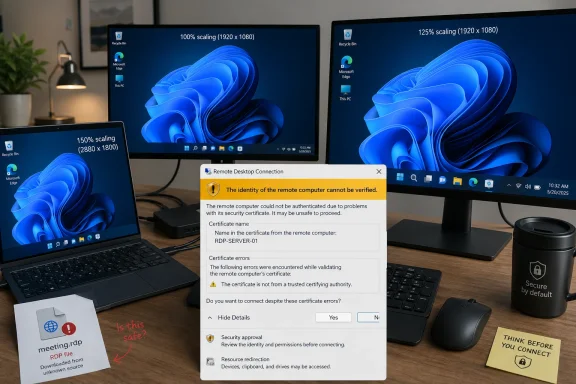
Microsoft has confirmed that its April 14, 2026 Windows 11 cumulative updates, including KB5083769 for versions 24H2 and 25H2, can make new Remote Desktop security warning dialogs render incorrectly on mixed-scaling multi-monitor systems before users open RDP file-based connections. The failure is narrow, but the timing is awkward: Microsoft just made that dialog a more important security checkpoint. A prompt designed to slow down phishing attacks is now, for some administrators, slowing down legitimate work instead. That does not make the protection wrong; it makes the rollout look unfinished.
The April Windows 11 update changed the behavior of Remote Desktop files in a way that is easy to defend on security grounds. RDP files can do more than point a user at a remote machine. They can request local resources, including clipboard, drives, printers, smart cards, cameras, microphones, ports, and other device redirections that become meaningful attack surfaces if a user is tricked into opening a malicious file.
That is why Microsoft’s new warning matters. Starting with the April 2026 security update, Remote Desktop Connection shows a security dialog before an RDP file-based session begins. The dialog is meant to expose the remote computer address, publisher status, and the local resources the file wants to redirect.
Just as important, those requested redirections are turned off by default. The user has to make an affirmative choice. In theory, that is the right nudge: make invisible risk visible, and make risky sharing opt-in rather than assumed.
The bug cuts into that exact design. Microsoft says the warning may show overlapping text or partially hidden buttons when more than one monitor is used with different scaling values, such as one display at 100 percent and another at 125 percent. Anyone who has worked from a laptop docked to an external monitor will recognize that configuration immediately.
This is not an exotic lab setup. It is a normal IT desk.
That convenience is why attackers like the format. A malicious RDP file does not need to exploit a buffer overflow to be useful. It can simply persuade the user to initiate a connection to attacker-controlled infrastructure while enabling resource sharing that makes local data, authentication material, or devices available to the remote side.
Microsoft’s April change is best understood as an anti-phishing measure rather than a pure Remote Desktop hardening feature. It does not ban RDP files. It tries to force the moment of recognition that phishing routinely bypasses: Where am I connecting, who published this, and what am I giving it access to?
That is why the display bug is more than a cosmetic defect. If the text overlaps or the buttons are obscured, Windows has not merely drawn a bad dialog. It has degraded the very moment when the user is supposed to make a security judgment.
Security UX lives or dies at that moment. A warning that users cannot comfortably read becomes either a roadblock or a ritual. Neither outcome is what Microsoft wanted.
Remote Desktop sits at the intersection of the old and new Windows UI stack. The inbox client has decades of compatibility expectations behind it, yet it is being asked to present a modern risk explanation in a desktop environment that might span multiple DPIs, display origins, and window placement rules.
That is fertile ground for layout bugs. It is also the kind of bug that often survives internal testing because the failure requires a specific combination of conditions: an RDP file, the new April warning, multiple monitors, differing scaling values, and a user path that exposes the broken layout.
But for administrators, “specific” does not mean “rare.” IT pros often use exactly this kind of setup. They have a laptop screen, one or two external displays, and a constant stream of RDP sessions. The people most likely to encounter the new security prompt repeatedly are also among the people most likely to run mixed-scaling multi-monitor desktops.
That is the irony. The bug lands hardest where the feature is most visible.
Those are acceptable emergency instructions. They are not acceptable as an operating model.
Matching display scaling is easy to say and annoying to live with. Users choose different scaling values because panels differ in size, resolution, distance, and readability. Flattening all of that into one value may make the RDP warning behave, but it can make the rest of the desktop worse.
Keyboard navigation is the better workaround from an accessibility perspective, and it is good that it exists. But a trust prompt should not require users to play focus-order roulette through a partially obscured UI. If the user cannot see which option is highlighted or cannot read the surrounding text, the keyboard path becomes a way through the dialog, not a way to understand it.
That distinction matters. Microsoft did not add this warning merely to create an additional click. It added the warning so the user could inspect connection details and make a deliberate decision. A workaround that preserves the click but weakens comprehension preserves the form of the control while damaging its purpose.
That specificity is the right design direction. Generic warnings train users to click through. Concrete warnings give users something to verify.
But concrete warnings require legible UI. If the publisher field is hidden, the list of redirections is hard to parse, or the buttons are partly covered, the warning stops being concrete. It becomes another obstacle between the user and the work they were already trying to do.
This is especially important in enterprise environments where workflows depend on muscle memory. Administrators may open dozens of RDP files in a day. Support technicians may connect under time pressure while a user is waiting. If the prompt becomes unpredictable, the incentive is not careful review; the incentive is to find the fastest bypass that restores the old rhythm.
That is how security improvements lose credibility. Not because users hate security, but because broken security UX teaches users that the warning is an implementation problem rather than a risk signal.
This matters because patch management is not just about whether Microsoft has a workaround. It is about how many workarounds an IT team has to absorb while still keeping machines secure. A BitLocker recovery surprise affects boot access. An RDP prompt rendering bug affects remote administration. Both land close to the operational center of managed Windows environments.
Microsoft’s release notes also show that the RDP known issue was added on April 23 and corrected on April 27. That timing is useful because it shows the issue moved from user pain to documented known issue within the same monthly servicing window. It also means administrators evaluating the April update line had to track evolving documentation after deployment had already started.
That is normal in the Windows servicing world, but it is not cost-free. Every known issue update becomes another decision point: pause, proceed, mitigate, communicate, or roll back. The more sensitive the affected component, the more expensive the ambiguity.
Remote Desktop is not a decorative subsystem. For many organizations, it is part of the nervous system.
That is a significant change in user experience, administrator expectation, and third-party tooling. RDP files generated by internal portals, remote access brokers, password vaults, help desk systems, and custom launchers may now create more visible warnings than users previously saw. Unsigned files may appear less trustworthy, even when they come from internal systems that were never built around signing workflows.
Microsoft provides administrative and developer paths for managing aspects of the new dialog, including a temporary registry-based way to revert to previous behavior. But Microsoft also warns that such compatibility paths may not last forever. The direction of travel is clear: the new warning model is meant to become the norm.
That is why the rendering bug is so poorly timed. Microsoft is asking organizations to adapt to a new trust model at the same time that part of that trust model can be visually unreliable. The security logic may be sound, but the rollout asks for patience from the very teams that must explain the change to everyone else.
This is the kind of Windows change that succeeds only if it is boring. The dialog should appear, be readable, show the right information, and let trained users make the right choice. Anything more dramatic becomes a ticket queue.
Turning redirections off by default is particularly defensible. Clipboard sharing is convenient, but it can expose secrets. Drive redirection is useful, but it can hand over local files. Smart card and Windows Hello for Business redirection can become identity risk. Camera, microphone, location, and device redirections all carry obvious privacy and security implications.
A user should know when a remote session wants those capabilities. More importantly, a user should have to approve them deliberately.
The industry has learned this lesson in browsers, mobile operating systems, and identity prompts. Permissions need to be visible, contextual, and revocable. Windows Remote Desktop is now moving closer to that model for RDP files, and that is overdue.
The problem is not the warning. The problem is that the warning is now part of the security boundary, and security boundaries have to be engineered with the same seriousness as the protocol changes behind them.
That means looking beyond the obvious saved shortcuts on desktops. RDP files may be generated dynamically by portals, launched from documentation, exported by management tools, or distributed by vendors. If those files are unsigned, users may now see unfamiliar warnings. If those users also work on mixed-scaling desks, the warning may be harder to interpret.
The immediate risk is not that the bug creates a remote code execution vulnerability. The risk is that it damages the reliability of a decision point. Users may approve the wrong redirections because they cannot read the prompt, or they may develop a habit of clicking through because the UI is irritating.
Administrators should also be careful about solving the annoyance by disabling the new behavior wholesale. Temporary reversions may be justified in narrow cases, especially where critical workflows break. But making the old behavior permanent would throw away the security improvement that April’s update is trying to deliver.
A more durable response is to sign RDP files where appropriate, rationalize redirection defaults, educate support teams on the new prompt, and document the mixed-scaling workaround until Microsoft ships a fix. That is less satisfying than “install update, problem solved,” but it matches the reality of this patch cycle.
That is the danger with security UX bugs. They do not merely annoy users while everyone waits for a patch. They create institutional habits. A help desk that tells users “just press Tab and Space” for long enough may find that users stop reading the warning entirely even after the rendering bug is fixed.
Microsoft also needs to keep the documentation precise. The company’s known issue language is useful because it names the trigger, describes the symptoms, and gives workarounds that do not require uninstalling the security update. That kind of specificity is essential in a servicing environment where administrators are balancing risk from vulnerabilities against risk from regressions.
Still, the episode underscores a larger quality challenge. Windows is increasingly adding security controls at the user-interaction layer: warnings, consent prompts, default-off permissions, stricter trust checks, and policy-driven exceptions. Those controls are only as strong as the interface that presents them.
If Microsoft wants administrators to defend these changes internally, it has to make the user experience dependable from day one.
Source: WinBuzzer Windows 11 April Patches Trigger Remote Desktop Bug
 Microsoft Tightened the Gate, Then Made the Gate Harder to Read
The April Windows 11 update changed the behavior of Remote Desktop files in a way that is easy to defend on security grounds. RDP files can do more than point a user at a remote machine. They can request local resources, including clipboard, drives, printers, smart cards, cameras, microphones, ports, and other device redirections that become meaningful attack surfaces if a user is tricked into opening a malicious file.That is why Microsoft’s new warning matters. Starting with the April 2026 security update, Remote Desktop Connection shows a security dialog before an RDP file-based session begins. The dialog is meant to expose the remote computer address, publisher status, and the local resources the file wants to redirect.
Just as important, those requested redirections are turned off by default. The user has to make an affirmative choice. In theory, that is the right nudge: make invisible risk visible, and make risky sharing opt-in rather than assumed.
The bug cuts into that exact design. Microsoft says the warning may show overlapping text or partially hidden buttons when more than one monitor is used with different scaling values, such as one display at 100 percent and another at 125 percent. Anyone who has worked from a laptop docked to an external monitor will recognize that configuration immediately.
This is not an exotic lab setup. It is a normal IT desk.
The RDP File Was Always More Powerful Than It Looked
For years, RDP files have occupied a strange place in Windows administration. They are convenient enough to feel like shortcuts, but powerful enough to encode session behavior that many users do not inspect. In managed environments, they are everywhere: help desk jump boxes, RemoteApp deployments, lab machines, vendor access workflows, and personal collections of saved administrative endpoints.That convenience is why attackers like the format. A malicious RDP file does not need to exploit a buffer overflow to be useful. It can simply persuade the user to initiate a connection to attacker-controlled infrastructure while enabling resource sharing that makes local data, authentication material, or devices available to the remote side.
Microsoft’s April change is best understood as an anti-phishing measure rather than a pure Remote Desktop hardening feature. It does not ban RDP files. It tries to force the moment of recognition that phishing routinely bypasses: Where am I connecting, who published this, and what am I giving it access to?
That is why the display bug is more than a cosmetic defect. If the text overlaps or the buttons are obscured, Windows has not merely drawn a bad dialog. It has degraded the very moment when the user is supposed to make a security judgment.
Security UX lives or dies at that moment. A warning that users cannot comfortably read becomes either a roadblock or a ritual. Neither outcome is what Microsoft wanted.
Mixed Scaling Is Not a Corner Case in the Windows World
The modern Windows desktop is a scaling negotiation. A 14-inch laptop panel may run at 150 percent, a 27-inch 1440p monitor at 100 percent or 125 percent, and a 4K panel somewhere else entirely. Windows has improved dramatically at per-monitor DPI awareness, but every new prompt, dialog, and legacy component still has to survive that reality.Remote Desktop sits at the intersection of the old and new Windows UI stack. The inbox client has decades of compatibility expectations behind it, yet it is being asked to present a modern risk explanation in a desktop environment that might span multiple DPIs, display origins, and window placement rules.
That is fertile ground for layout bugs. It is also the kind of bug that often survives internal testing because the failure requires a specific combination of conditions: an RDP file, the new April warning, multiple monitors, differing scaling values, and a user path that exposes the broken layout.
But for administrators, “specific” does not mean “rare.” IT pros often use exactly this kind of setup. They have a laptop screen, one or two external displays, and a constant stream of RDP sessions. The people most likely to encounter the new security prompt repeatedly are also among the people most likely to run mixed-scaling multi-monitor desktops.
That is the irony. The bug lands hardest where the feature is most visible.
The Workarounds Are Sensible, but They Reveal the Problem
Microsoft’s temporary mitigations are straightforward. Users can set the same display scaling value across all monitors, which should allow the dialog to render correctly. If the mouse cannot reliably reach the relevant controls, users can use Tab to move focus and Spacebar to select an option.Those are acceptable emergency instructions. They are not acceptable as an operating model.
Matching display scaling is easy to say and annoying to live with. Users choose different scaling values because panels differ in size, resolution, distance, and readability. Flattening all of that into one value may make the RDP warning behave, but it can make the rest of the desktop worse.
Keyboard navigation is the better workaround from an accessibility perspective, and it is good that it exists. But a trust prompt should not require users to play focus-order roulette through a partially obscured UI. If the user cannot see which option is highlighted or cannot read the surrounding text, the keyboard path becomes a way through the dialog, not a way to understand it.
That distinction matters. Microsoft did not add this warning merely to create an additional click. It added the warning so the user could inspect connection details and make a deliberate decision. A workaround that preserves the click but weakens comprehension preserves the form of the control while damaging its purpose.
The Security Model Depends on Human Attention
There is a recurring tension in Windows security: Microsoft adds prompts because invisible decisions are dangerous, and users learn to dismiss prompts because constant friction is exhausting. The April RDP change tries to escape that trap by making the prompt specific. It shows the remote address, publisher information, and requested local resource access.That specificity is the right design direction. Generic warnings train users to click through. Concrete warnings give users something to verify.
But concrete warnings require legible UI. If the publisher field is hidden, the list of redirections is hard to parse, or the buttons are partly covered, the warning stops being concrete. It becomes another obstacle between the user and the work they were already trying to do.
This is especially important in enterprise environments where workflows depend on muscle memory. Administrators may open dozens of RDP files in a day. Support technicians may connect under time pressure while a user is waiting. If the prompt becomes unpredictable, the incentive is not careful review; the incentive is to find the fastest bypass that restores the old rhythm.
That is how security improvements lose credibility. Not because users hate security, but because broken security UX teaches users that the warning is an implementation problem rather than a risk signal.
April’s Patch Cycle Is Carrying Too Much Operational Weight
The Remote Desktop warning bug did not arrive alone in administrators’ mental calendars. The same April 2026 patch cycle also brought a BitLocker recovery issue for a limited set of systems with an unrecommended Group Policy configuration involving TPM platform validation and PCR7. Microsoft says that BitLocker issue affects a small number of systems and is generally a one-time recovery event, but it is still exactly the kind of failure that makes patch teams cautious.This matters because patch management is not just about whether Microsoft has a workaround. It is about how many workarounds an IT team has to absorb while still keeping machines secure. A BitLocker recovery surprise affects boot access. An RDP prompt rendering bug affects remote administration. Both land close to the operational center of managed Windows environments.
Microsoft’s release notes also show that the RDP known issue was added on April 23 and corrected on April 27. That timing is useful because it shows the issue moved from user pain to documented known issue within the same monthly servicing window. It also means administrators evaluating the April update line had to track evolving documentation after deployment had already started.
That is normal in the Windows servicing world, but it is not cost-free. Every known issue update becomes another decision point: pause, proceed, mitigate, communicate, or roll back. The more sensitive the affected component, the more expensive the ambiguity.
Remote Desktop is not a decorative subsystem. For many organizations, it is part of the nervous system.
The New Dialog Is a Policy Change Wearing a UI
It would be a mistake to treat the April Remote Desktop warning as merely a new pop-up. It is a policy shift. Microsoft is changing the default assumption around RDP files from “open and connect using the file’s requested settings” to “show the requested settings and require explicit approval.”That is a significant change in user experience, administrator expectation, and third-party tooling. RDP files generated by internal portals, remote access brokers, password vaults, help desk systems, and custom launchers may now create more visible warnings than users previously saw. Unsigned files may appear less trustworthy, even when they come from internal systems that were never built around signing workflows.
Microsoft provides administrative and developer paths for managing aspects of the new dialog, including a temporary registry-based way to revert to previous behavior. But Microsoft also warns that such compatibility paths may not last forever. The direction of travel is clear: the new warning model is meant to become the norm.
That is why the rendering bug is so poorly timed. Microsoft is asking organizations to adapt to a new trust model at the same time that part of that trust model can be visually unreliable. The security logic may be sound, but the rollout asks for patience from the very teams that must explain the change to everyone else.
This is the kind of Windows change that succeeds only if it is boring. The dialog should appear, be readable, show the right information, and let trained users make the right choice. Anything more dramatic becomes a ticket queue.
The Phishing Threat Justifies the Friction
None of this means Microsoft should retreat from the RDP protections. The underlying threat is real. RDP files are a natural phishing vehicle because they combine familiarity, enterprise legitimacy, and the ability to redirect sensitive local resources into a remote session.Turning redirections off by default is particularly defensible. Clipboard sharing is convenient, but it can expose secrets. Drive redirection is useful, but it can hand over local files. Smart card and Windows Hello for Business redirection can become identity risk. Camera, microphone, location, and device redirections all carry obvious privacy and security implications.
A user should know when a remote session wants those capabilities. More importantly, a user should have to approve them deliberately.
The industry has learned this lesson in browsers, mobile operating systems, and identity prompts. Permissions need to be visible, contextual, and revocable. Windows Remote Desktop is now moving closer to that model for RDP files, and that is overdue.
The problem is not the warning. The problem is that the warning is now part of the security boundary, and security boundaries have to be engineered with the same seriousness as the protocol changes behind them.
Administrators Should Treat This as a Workflow Bug, Not Just a Display Bug
For home users, the workaround may be as simple as matching monitor scaling for a while or using the keyboard when the dialog looks wrong. For IT teams, the better response is to map where RDP files actually appear in daily workflows.That means looking beyond the obvious saved shortcuts on desktops. RDP files may be generated dynamically by portals, launched from documentation, exported by management tools, or distributed by vendors. If those files are unsigned, users may now see unfamiliar warnings. If those users also work on mixed-scaling desks, the warning may be harder to interpret.
The immediate risk is not that the bug creates a remote code execution vulnerability. The risk is that it damages the reliability of a decision point. Users may approve the wrong redirections because they cannot read the prompt, or they may develop a habit of clicking through because the UI is irritating.
Administrators should also be careful about solving the annoyance by disabling the new behavior wholesale. Temporary reversions may be justified in narrow cases, especially where critical workflows break. But making the old behavior permanent would throw away the security improvement that April’s update is trying to deliver.
A more durable response is to sign RDP files where appropriate, rationalize redirection defaults, educate support teams on the new prompt, and document the mixed-scaling workaround until Microsoft ships a fix. That is less satisfying than “install update, problem solved,” but it matches the reality of this patch cycle.
Microsoft Needs to Close the Loop Quickly
Microsoft says it will address the Remote Desktop warning display issue in a future Windows update. That is the right commitment, but the practical question is how quickly the fix reaches the affected April patch line. The longer this remains a known issue, the more likely organizations are to create their own local exceptions.That is the danger with security UX bugs. They do not merely annoy users while everyone waits for a patch. They create institutional habits. A help desk that tells users “just press Tab and Space” for long enough may find that users stop reading the warning entirely even after the rendering bug is fixed.
Microsoft also needs to keep the documentation precise. The company’s known issue language is useful because it names the trigger, describes the symptoms, and gives workarounds that do not require uninstalling the security update. That kind of specificity is essential in a servicing environment where administrators are balancing risk from vulnerabilities against risk from regressions.
Still, the episode underscores a larger quality challenge. Windows is increasingly adding security controls at the user-interaction layer: warnings, consent prompts, default-off permissions, stricter trust checks, and policy-driven exceptions. Those controls are only as strong as the interface that presents them.
If Microsoft wants administrators to defend these changes internally, it has to make the user experience dependable from day one.
The Bottom Line
Microsoft’s April RDP hardening is directionally right, but the mixed-scaling display bug turns a security checkpoint into an operational irritant at exactly the wrong moment.- The issue affects the new Remote Desktop warning shown when opening RDP files after April 2026 Windows 11 updates such as KB5083769 and KB5082052.
- The most visible trigger is a multi-monitor setup where displays use different scaling values, such as 100 percent on one screen and 125 percent on another.
- The warning may show overlapping text or partially hidden buttons, which can make publisher details and resource redirection choices harder to review.
- Microsoft’s temporary workarounds are to use matching display scaling across monitors or navigate the dialog with Tab and Spacebar.
- The underlying security change remains important because RDP files can request access to local resources that attackers may abuse in phishing scenarios.
- Administrators should avoid reflexively disabling the new warning model and instead treat the bug as a short-term workflow problem while preparing users for the new trust prompt.
Source: WinBuzzer Windows 11 April Patches Trigger Remote Desktop Bug
