

Microsoft’s quiet nudge to developers—“build agents that connect, automate, and act with confidence”—is both a call to arms and an admission: Copilot as a single assistant is not sufficient to realize Microsoft’s vision of an agentic Windows 11, and the company is reshaping the OS to host persistent, auditable AI agents as first‑class runtime entities.
Microsoft’s recent messaging makes two linked claims: first, Windows 11 now includes native support for the Model Context Protocol (MCP)—an open standard that lets language models discover and call tools and connectors—and second, Windows is shipping the platform plumbing for agents to run in the background in a contained, auditable workspace (the Experimental agentic features toggle that provisions agent accounts and an Agent Workspace). Both moves are intended to convert Windows from a passive host of applications into an agentic operating system where small software agents can perform multi‑step tasks on behalf of users and organizations. The technical pieces Microsoft has layered together are familiar in concept but novel in system integration:
But the sell is hard. Convincing enterprise customers to enable the Experimental toggle and to trust third‑party agents requires:
Conclusion
Microsoft’s push to make Windows 11 “agentic” by baking in MCP support, agent workspaces, and agent identities is a substantive platform shift that opens new opportunities for automation and developer innovation. The technical pieces are in motion and credible; the success criteria, however, are not purely technical. They require broad adoption of standards, disciplined enterprise governance, demonstrable UX reliability, and clear privacy guarantees. If those conditions are met, agents could finally fulfill the promise of delegated, auditable automation on the PC. If not, the feature set risks joining previous waves of overpromised AI features—visible, hyped, but ultimately underused.
Source: Windows Latest Microsoft is encouraging developers to build next-gen AI agents for Windows 11, as Copilot alone isn't enough
 Background / Overview
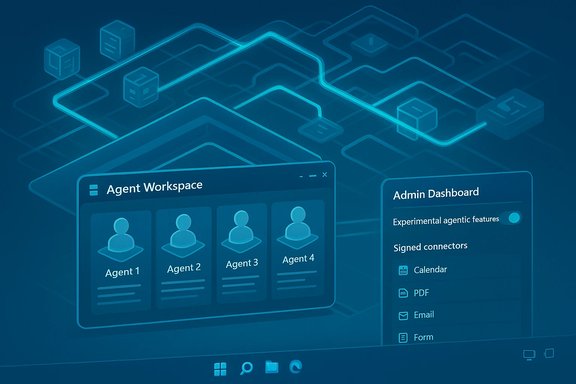
Microsoft’s recent messaging makes two linked claims: first, Windows 11 now includes native support for the Model Context Protocol (MCP)—an open standard that lets language models discover and call tools and connectors—and second, Windows is shipping the platform plumbing for agents to run in the background in a contained, auditable workspace (the Experimental agentic features toggle that provisions agent accounts and an Agent Workspace). Both moves are intended to convert Windows from a passive host of applications into an agentic operating system where small software agents can perform multi‑step tasks on behalf of users and organizations. The technical pieces Microsoft has layered together are familiar in concept but novel in system integration:- Model Context Protocol (MCP) — an open, cross‑vendor protocol for exposing tools and context to LLMs so agents can call functions, access files, or invoke app capabilities.
- Agent Workspace — a lightweight, sandboxed runtime in Windows where agents can operate in parallel with the user under distinct agent accounts.
- Copilot Actions — the visible consumer scenario: agents that translate natural language into multi‑step UI actions (click, type, open files, run flows).
- Windows AI Foundry / Copilot+ PCs — runtimes and hardware entitlements to run local or hybrid inference, with Copilot+ marking devices suitable for richer on‑device agent work.
What MCP is, and why it matters
MCP explained in plain terms
The Model Context Protocol (MCP) is an open protocol and collection of SDKs that standardize how models connect to tools, data sources, and capability servers. Think of MCP as a universal plumbing that lets agents ask a local or remote service, “What can you do?” and then invoke well‑defined functions (read a file, list calendar events, fill a form) with structured, auditable inputs and outputs. The MCP ecosystem already has official repositories and SDKs (TypeScript, Python, C#, Java, and more) and is being integrated into agent SDKs and tooling from multiple vendors.Cross‑industry adoption and governance signals
MCP did not emerge in isolation: it was introduced as an open standard and has quickly been recognized by major AI players as a pragmatic way to enable interoperable agent tooling. Industry initiatives to standardize agent protocols—and the transfer of foundational specifications to neutral foundations—signal broad interest in making agent connectors portable and auditable across clouds and desktops. Microsoft’s adoption of MCP in Windows ties desktop agent execution to this growing standards stack, which reduces vendor lock‑in for developers but increases the operational stakes for platform owners.The Agent Workspace and the Experimental toggle: how Windows will run agents
What the toggle does (and why Microsoft added it)
Microsoft placed an explicit control—Experimental agentic features—in Settings to gate the creation of agent accounts and the Agent Workspace. This toggle ensures the agent runtime remains dormant unless an administrator deliberately provisions it; when enabled the OS can create per‑agent, non‑interactive Windows accounts and launch contained sessions where agents can interact with apps and files within scoped permissions. The goal is to provide visibility, revocation, and standard OS-level governance for agent activity.Agent Workspace: a lightweight, auditable runtime
The Agent Workspace is presented as a middle ground between in‑process scripting and full virtual machines. It offers:- A separate desktop session where agent actions (clicking, typing, app automation) are visible to the user and logged for audit.
- Per‑agent accounts so actions are attributable and subject to ACLs, Intune policies, and other enterprise controls.
- Scoped default file access (Documents, Downloads, Desktop, Pictures, Music, Videos) that agents may request, with further access requiring explicit consent.
- Integration with an on‑device registry for MCP connectors, with proxies and mediation to reduce direct, unvetted tool access.
Practical implications for developers
Why Microsoft is courting third‑party developers
Microsoft recognizes that a single, Microsoft‑branded Copilot cannot make Windows “agentic” alone. The platform is useful only if third‑party apps expose meaningful capabilities via MCP and ship agent connectors that bring real-world value (CRM automation, vertical workflows, developer tools, design assistants). The invitation to developers is not just an API call—it’s a distribution play: agents that integrate well with Windows could become discoverable in taskbar surfaces, the Ask Copilot composer, and an Agent Store or catalog.What developers should do now (practical checklist)
- Understand MCP and run a local MCP server: build or test an MCP connector that exposes a limited set of safe, well‑documented tools.
- Design for least privilege: expose the smallest useful set of functions and support manifest signing and tool filtering.
- Instrument for observability: produce structured logs and step‑by‑step plans so user or admin auditors can see exactly what the agent intended to do.
- Fail safely: build clear failure modes, cancellation points, and trust escalation paths (user approval prompts for sensitive steps).
- Test security scenarios: include prompt‑injection and tool‑poisoning tests in CI to simulate adversarial inputs.
Benefits Microsoft is promising (and which are realistic)
- Lower friction for repetitive, multi‑step workflows. Agents that can open, extract, transform and mail results could save meaningful time for knowledge workers.
- Composability across apps. With MCP, an agent could orchestrate capabilities from a local accounting app, a cloud CRM, and a document repository with a single user intent.
- On‑device privacy and latency when Copilot+ devices and Windows AI Foundry run inference locally—important for sensitive data and high‑responsiveness use cases.
- Enterprise governance through agent identities, signing, and an auditable runtime that matches familiar OS concepts (accounts, ACLs, group policy).
The risks and real‑world drawbacks
1. Complexity and operational cost
Treat agents as production services. Agent identities, signing, revocation, telemetry, and the need to test multi‑agent interactions introduce a new surface area for IT operations. Enterprises will need AgentOps: lifecycle management, patching policies, and runtime quotas for long‑running agents. Microsoft documents and previews show an awareness of this, but the long tail of governance tools (enterprise registries, SIEM integration, automated revocation) still needs to be proven at scale.2. New threat models: prompt injection and tool poisoning
Agents that call external connectors create a bridge between natural‑language prompts and system‑level actions. Attackers could craft inputs that manipulate agent plans or abuse poorly filtered connectors. MCP reduces vendor‑specific chaos but does not remove the need for careful validation, signing, and mediation layers. Microsoft’s early guidance recommends mediation and curated registries—but those are operational commitments, not one‑time fixes.3. Privacy and always‑on concerns
Features like Copilot Vision and voice activation lower friction, but they also expand what the system can see and hear. Even when spotters run locally, the mere presence of on‑device vision and wake‑word detectors increases the need for transparent consent flows and provable constraints about telemetry and storage. Public pushback shows users demand clear, centralized controls—or a single, global off switch.4. Hardware stratification and feature fragmentation
Copilot+ hardware gating (NPUs and performance floors) creates a product differentiation that may leave many users dependent on cloud fallbacks. This risks a two‑tier Windows experience: premium, low‑latency local agents on Copilot+ devices, and slower cloud‑dependent behavior elsewhere. Developers must plan for hybrid behavior and test across device classes.5. User experience and reliability
Early reports from technical users show skepticism: Copilot’s performance in real creative tasks—PowerPoint design, layout accuracy, or precise developer actions—can be inconsistent. Not every workflow benefits from agentic automation; sometimes the assistant creates extra work. These UX tradeoffs matter because friction and inaccuracy will quickly erode trust in agents.What IT administrators should plan for now
- Treat the Experimental agentic features toggle as a policy decision. Only enable it in staged pilots with strong telemetry and rollback plans. Microsoft requires admin approval to enable the toggle—use it.
- Build an AgentOps function that covers signing verification, connector vetting, and revocation procedures.
- Integrate agent telemetry into SIEM and DLP pipelines to spot anomalous behavior and failed revocations.
- Prepare conditional access rules and enrollment policies for Copilot+ device classes and ensure you have inventory for NPU‑capable endpoints.
- Draft privacy and consent templates for users, describing what agents may access and how long agent‑generated artifacts are retained.
Where Microsoft, developers, and users need to be clearer
- Transparent consent flows. Microsoft’s preview documents emphasize opt‑in and user approvals, but consent dialogs need to be clear, actionable, and centralizable in policy storefronts.
- Deterministic agent revocation. Signing and revocation propagation must be immediate and verifiable; otherwise compromised agents become a persistent risk.
- Tooling parity for non‑Copilot ecosystems. MCP helps cross‑vendor discovery, but if popular apps don’t expose MCP connectors, Windows agents will remain stunted. Microsoft can encourage adoption, but developers need low‑friction SDKs and store visibility.
- Realistic UX expectations. Agents should first solve narrow, high‑value tasks reliably rather than broad, error‑prone jobs. Demonstrated wins will drive acceptance faster than sweeping claims about “agentic OS.”
The developer opportunity—and the hard sell
For software makers there is a practical opportunity: build discrete, testable MCP connectors that solve clear use cases—for example, a connector that extracts invoices from PDFs and populates ERP records, or one that performs account reconciliation and produces a signed report. These are tasks where automation yields measurable ROI and where audit trails are a must.But the sell is hard. Convincing enterprise customers to enable the Experimental toggle and to trust third‑party agents requires:
- Auditable runs (show me exactly what the agent did, step‑by‑step).
- Fine‑grained approval flows (I must approve sensitive steps).
- Zero false positives for automation that could, for instance, send incorrect invoices or post the wrong announcement.
Verdict: a technically coherent vision with operational strings attached
Microsoft’s platform changes are not fanciful—they are plausible, pragmatic engineering moves to make Windows a host for agentic computation. By integrating MCP, shipping agent workspaces, and framing agent identity and signing, Microsoft is assembling the building blocks needed for a credible agent platform. Those building blocks are visible in preview documentation and developer blog posts and are consistent with industry moves toward open, interoperable agent standards. That said, the work ahead is largely operational and social rather than purely technical. Achieving a safe, useful agentic Windows will require:- rigorous enterprise tooling and policies,
- broad developer adoption of MCP and connector best practices,
- clear consent and privacy guarantees,
- and a focus on real, reliable productivity wins rather than feature bloat.
Final recommendations for stakeholders
- For developers: start small, ship a provable MCP connector, and instrument every run for audit and rollback. Learn the failure modes before scaling.
- For IT leaders: pilot agent features with guarded policies and tight telemetry. Build revocation and incident playbooks now.
- For end users: insist on centralized controls for agent visibility and a single master toggle or enterprise policy that can disable agentic features at the device level.
- For Microsoft: prioritize reliability and UX for concrete tasks (mail merge, file reconciliation, meeting prep) before pushing broader “agentic OS” narratives.
Conclusion
Microsoft’s push to make Windows 11 “agentic” by baking in MCP support, agent workspaces, and agent identities is a substantive platform shift that opens new opportunities for automation and developer innovation. The technical pieces are in motion and credible; the success criteria, however, are not purely technical. They require broad adoption of standards, disciplined enterprise governance, demonstrable UX reliability, and clear privacy guarantees. If those conditions are met, agents could finally fulfill the promise of delegated, auditable automation on the PC. If not, the feature set risks joining previous waves of overpromised AI features—visible, hyped, but ultimately underused.
Source: Windows Latest Microsoft is encouraging developers to build next-gen AI agents for Windows 11, as Copilot alone isn't enough
