Microsoft’s Ignite 2025 update turns the Windows 11 taskbar into a front door for AI — introducing a one‑click “Ask Copilot” composer, taskbar‑visible AI agents, and deeper Copilot integration across File Explorer, search, voice, and local AI runtimes that shift Windows from a passive OS into an “agentic” workspace for productivity and automation.
Windows 11 has steadily absorbed Microsoft’s Copilot ambitions over the last two years, but Ignite 2025 marks a qualitative change: the company is no longer treating Copilot as a sidebar or an app feature — it’s being stitched into the shell, starting with the taskbar. The new Ask Copilot composer offers text and voice entry, semantic search across local and cloud documents, and a visible, manageable set of AI agents that can be invoked, monitored, and interrupted directly from the taskbar. Microsoft frames this as an opt‑in, permissioned experience that blends cloud reasoning with on‑device acceleration on Copilot+ hardware. This is both a user experience pivot and a platform play. By inserting Copilot into the taskbar’s most visible surface — the same place users already expect search and quick actions — Microsoft aims to reduce friction for AI‑assisted workflows while opening a path for third‑party agents and developer integrations through new protocols and local APIs. Independent reporting and Microsoft’s own announcements confirm the staged rollout and the preview/gated nature of many features.
This is a platform moment rather than a single feature release. Success will depend on how quickly Microsoft delivers robust administrative controls, how third‑party agent ecosystems mature, and whether independent testing confirms the latency, privacy, and security claims behind Copilot+ hardware and local AI runtimes. For users and IT teams, the responsible path is measured piloting, clear policy definitions, and attention to the new operational realities that agentic automation introduces.
Source: Petri IT Knowledgebase Microsoft Brings Copilot and AI Agents to Windows 11 Taskbar
 Background
Windows 11 has steadily absorbed Microsoft’s Copilot ambitions over the last two years, but Ignite 2025 marks a qualitative change: the company is no longer treating Copilot as a sidebar or an app feature — it’s being stitched into the shell, starting with the taskbar. The new Ask Copilot composer offers text and voice entry, semantic search across local and cloud documents, and a visible, manageable set of AI agents that can be invoked, monitored, and interrupted directly from the taskbar. Microsoft frames this as an opt‑in, permissioned experience that blends cloud reasoning with on‑device acceleration on Copilot+ hardware. This is both a user experience pivot and a platform play. By inserting Copilot into the taskbar’s most visible surface — the same place users already expect search and quick actions — Microsoft aims to reduce friction for AI‑assisted workflows while opening a path for third‑party agents and developer integrations through new protocols and local APIs. Independent reporting and Microsoft’s own announcements confirm the staged rollout and the preview/gated nature of many features. What changed at Ignite: the headline features
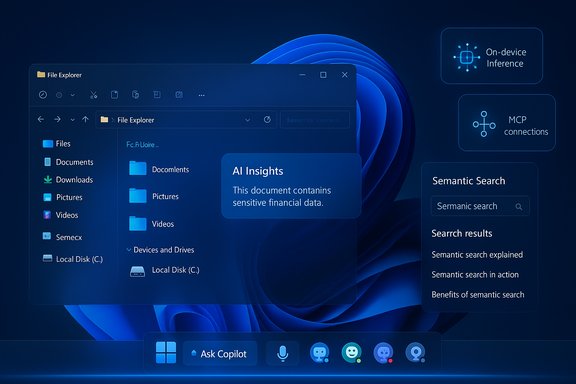
- Ask Copilot on the taskbar — a compact composer on the taskbar that accepts text, “Hey, Copilot” voice, and quick vision inputs; it mixes instant indexed search hits with Copilot conversation escalations.
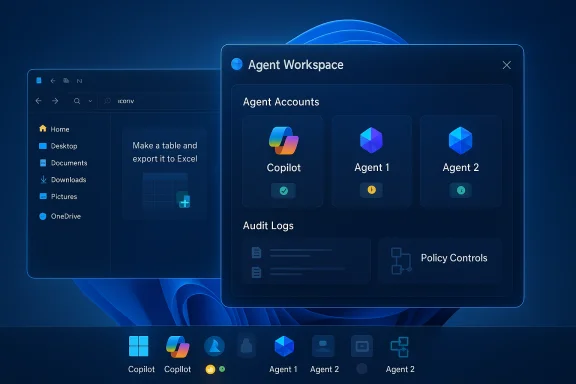
- Agents on the taskbar — long‑running AI agents (Microsoft 365 Copilot agents, troubleshooting assistants, third‑party bots) appear as icons with status indicators and progress hover cards for monitoring and control.
- File Explorer Copilot integrations — hover files for AI insights, request on‑demand summarization and transformations without leaving the explorer view.
- Semantic search and Microsoft 365 integration — natural‑language search across local and cloud files, with retrieval‑augmented Copilot responses for Microsoft 365 customers and Copilot+ PCs.
- System‑wide writing assistance — built‑in rewriting and proofreading available in any editable text box (with offline support on Copilot+ devices).
- Developer platform updates — preview of Model Context Protocol (MCP) for agent connectivity and new local AI APIs including Video Super Resolution, Stable Diffusion XL, and an NPU‑optimized Phi Silica model for local text generation and summarization.
How Ask Copilot and agents work — a closer look
The taskbar composer: one click, multiple inputs
Ask Copilot replaces or augments the taskbar search box with a small, conversational composer that accepts:- typed prompts (natural language search or Copilot queries),
- a glass or vision icon for Copilot Vision screen capture,
- and a microphone icon or wake‑word activation for voice interactions.
Agents on the taskbar: visible, interactive, and interruptible
When a user invokes an agent (from the Copilot app, Ask Copilot composer, or a Copilot‑integrated app), the agent appears as an icon on the taskbar. Hovering the icon surfaces a progress card showing what the agent is doing, what resources it’s accessing, and controls to pause, cancel, or take manual control. Agents operate in a sandboxed Agent Workspace, where multi‑step actions are executed step‑by‑step and are auditable and interruptible. This is intentionally designed to prevent silent, unchecked automation on user systems.Copilot Vision and voice
- Copilot Vision can analyze a selected window, region, or (with permission) a shared desktop. It performs OCR, identifies UI elements, extracts table data into structured formats, and can suggest visible highlights for troubleshooting or onboarding tasks. Vision is session‑bound and explicit: a user must grant per‑session access.
- Copilot Voice introduces an opt‑in wake‑word, “Hey, Copilot,” using a small on‑device spotter that listens only for the phrase and keeps a transient, in‑memory buffer (documents indicate a short buffer — roughly on the order of seconds — before full session escalation). After activation, heavier speech transcription and reasoning commonly route to cloud models unless the device supports local inference.
Local/offline capabilities: the Copilot+ distinction
Microsoft is differentiating baseline Copilot experiences (cloud‑backed) from a premium Copilot+ hardware tier. Copilot+ PCs include dedicated Neural Processing Units (NPUs) that allow more inference to run locally, reducing latency and improving privacy. Internal documentation referenced an NPU capability baseline of approximately 40+ TOPS (tera‑operations per second) as a practical threshold for richer on‑device workloads. Local APIs and NPU‑optimized models (Phi Silica for text generation and Video Super Resolution models) are part of this push.Developer and enterprise platform updates
Model Context Protocol (MCP) preview
Ignite introduced a preview of native MCP support to let agents connect more predictably with business apps and tools. MCP establishes a standard for how agents discover tools, request permissions, and perform scoped file operations — enabling connectors for File Explorer and Windows Settings that handle secure file moves, natural language device configuration, and audited automation with explicit user consent. This is a significant step toward making agents first‑class integration points for IT and ISVs.New local AI APIs
Microsoft announced developer APIs for:- Video Super Resolution — for clearer, upscaled streaming and local playback,
- Stable Diffusion XL API — for high‑quality text‑to‑image generation on device,
- Phi Silica — an NPU‑optimized language model for fast local text generation and summarization.
Copilot Studio and agent creation
Copilot Studio and Azure AI Foundry continue to be Microsoft’s primary developer surfaces for building, tuning, and deploying agents. The company is positioning these tools as the route for enterprises to create domain‑specific agents that respect governance, consent, and identity boundaries exposed through Entra ID and Microsoft 365 connectors.Accessibility, productivity, and user conveniences
Microsoft emphasized accessibility gains: Fluid Dictation for natural voice typing, high‑definition text‑to‑speech voices in Narrator and Magnifier powered by Azure generative models, and voice‑first tutoring modes. These features are framed as productivity and inclusion improvements for users with motor or visual impairments. The built‑in writing assistant for any text box, offline on Copilot+ PCs, promises proofreading and rewriting without context switching. From a practical standpoint, the taskbar composer reduces context switching: hover a slide in File Explorer, ask for a summary, or send it to the Copilot composer to create talking points — all without opening full Word or PowerPoint. That micro‑workflow shorthand is the product design intent behind the taskbar changes.Security, privacy, and governance: essential tradeoffs
Microsoft repeated that these agentic features are opt‑in, permissioned, and sandboxed. Key control points are:- explicit per‑session consent for Copilot Vision and agent scopes,
- visible agent workspaces and taskbar progress indicators to avoid silent automation,
- enterprise controls through Microsoft 365 Admin Center and Intune to gate deployments and manage tenant consent policies.
- accidental data exfiltration through poorly scoped connectors,
- supply‑chain risk if third‑party agents are insufficiently vetted,
- the need for audit trails to show exactly what an agent did — which Microsoft says will be visible but will require verification in real deployments,
- and the privacy model when voice spotters and screen captures are involved: local spotting reduces continuous streaming, but many complex tasks still require cloud processing.
- Explicit policy definitions for what agent connectors can access.
- Logging and retention policies for agent actions.
- Tenant‑level opt‑out mechanisms during pilots.
- Vendor assurances and code signing for third‑party agents.
Practical rollout and preview availability
Many of the announced features are public preview or limited to Windows Insider channels initially. Ask Copilot on the taskbar, the agents UI, File Explorer integrations, and writing assistance were demonstrated and are rolling into preview stages, with wider rollouts staged through late 2025 and into 2026. Microsoft has conditioned some capabilities on Copilot+ hardware and tenant licensing (Microsoft 365 Copilot add‑ons), so availability will vary by device, region, and licensing. Administrators should expect phased deployments and server‑side gating even after cumulative updates land on devices; having a preview build installed does not guarantee immediate feature visibility. Commercial tenants will also have options to control automatic installs of companion apps that contain Copilot integrations.Strengths and user benefits — why this matters
- Reduced friction: placing Copilot at the taskbar lowers the effort required to ask for help, extract information, or automate repetitive tasks.
- Multimodal productivity: voice, vision, and text inputs let users choose the fastest input method for the task.
- Agentic automation: agents that can complete multi‑step workflows can save substantial time for repetitive or compound tasks, especially in knowledge work.
- Local inference options: Copilot+ hardware and NPU‑optimized models offer latency and privacy advantages for organizations that need them.
Risks and unknowns — what to watch
- Privacy boundaries in practice: although Microsoft emphasizes opt‑in permissioning, complex workflows that combine local and cloud inference blur the boundary between local private data and cloud‑resident models. The operational privacy risk must be validated in real deployments.
- Third‑party agent vetting: opening the taskbar to third‑party agents creates innovation potential but also raises supply‑chain and trust questions. Signed agent binaries, code review, and marketplace vetting will be essential.
- Administrative burden: enterprises will need new governance policies, audit tooling, and testing matrices to manage agent‑enabled endpoints. Past experiences with feature rollouts suggest staged testing is necessary to avoid unexpected behavior at scale.
- Performance fragmentation: users on older hardware or outside Copilot+ tiers will see different behavior. This two‑tier model complicates support and user expectations.
- Regulatory and compliance headwinds: depending on data residency and sector regulations, some Copilot features (particularly ones involving cloud connectors) may be limited or require special contractual terms.
For IT teams: recommended immediate steps
- Inventory eligible devices and identify potential Copilot+ upgrade paths where local inference is required (review NPU capabilities and driver support).
- Pilot Ask Copilot and agent flows with a small set of users under a controlled preview to observe data flows and agent behavior.
- Define connector policies: map which agents may access SharePoint, OneDrive, Outlook, and third‑party storage, and establish approval workflows for new agent installs.
- Update security posture: require signed agents, enable logging and auditing, and test agent sandboxing and interruption mechanisms.
- Communicate change to end users: explain consent dialogues, how to revoke agent permissions, and how to disable wake‑word features if desired.
For developers: design and integration notes
- Treat agents as first‑class users of the OS surface: design connectors that are explicit about scope and permission requests, provide clear user consent language, and implement robust error handling for agent interruptions.
- Optimize for local/offline scenarios where possible: leverage local AI APIs and NPU acceleration for latency‑sensitive experiences.
- Log actions and support auditable step replay for transparency.
- Consider templated agent behaviors for common enterprise workflows to lower friction and demonstrate predictable behavior in audits.
Conclusion
Ignite 2025’s Windows 11 updates make a bold claim: transform the desktop into an “agentic” operating surface where AI moves from passive suggestion to active assistance. The Ask Copilot composer, agent‑aware taskbar, Copilot Vision, and new developer APIs together signal Microsoft’s strategy to make AI an intrinsic productivity layer in Windows. The potential gains — faster workflows, better accessibility, and localized AI performance on Copilot+ machines — are substantial. They are balanced, however, by real governance, privacy, and supply‑chain risks that enterprises must manage carefully.This is a platform moment rather than a single feature release. Success will depend on how quickly Microsoft delivers robust administrative controls, how third‑party agent ecosystems mature, and whether independent testing confirms the latency, privacy, and security claims behind Copilot+ hardware and local AI runtimes. For users and IT teams, the responsible path is measured piloting, clear policy definitions, and attention to the new operational realities that agentic automation introduces.
Source: Petri IT Knowledgebase Microsoft Brings Copilot and AI Agents to Windows 11 Taskbar