

Microsoft published a 14-page Windows 11 e-book in May 2026 arguing that the operating system has become the execution layer for enterprise AI, positioning Windows not as a place where Copilot is bolted on, but as the desktop surface where AI-assisted work should actually happen. The claim is less about one new feature than about control of the workflow. Microsoft is telling CIOs that the next AI platform decision is not merely which chatbot to buy, but which operating system will mediate employees, files, agents, identity, governance, and local hardware.
That is a bigger argument than the usual Windows marketing cycle. It also arrives at a delicate moment, because Microsoft has spent much of the past year trying to convince users that it has heard complaints about Windows 11 bloat, Copilot sprawl, inconsistent design, and quality regressions. The new e-book does not contradict that repair campaign so much as reveal its boundary: Microsoft may be willing to reduce obvious Copilot branding, but it is not backing away from the idea that Windows itself should become an AI substrate.
The most important line in Microsoft’s pitch is not that Windows 11 has AI features. Everyone already knows that. The sharper claim is that organizations supposedly get more value from AI when they stop treating it as another app to deploy and instead embed it directly into everyday work.
That framing matters because it moves the debate away from whether users like a Copilot button on the taskbar. Microsoft is arguing that the operating system is now strategic infrastructure, in the same way identity, endpoint management, browser policy, and device security already are. If AI is where work gets routed, summarized, searched, delegated, and governed, then the OS becomes the place where those AI experiences are normalized.
The e-book calls Windows 11 an “intelligent canvas,” which is exactly the kind of phrase that can make power users roll their eyes. But underneath the marketing gloss is a coherent enterprise strategy. Microsoft wants Windows to be the ambient layer that connects Microsoft 365 Copilot, local files, cloud storage, endpoint policy, on-device models, and agentic workflows.
That is why the document focuses less on futuristic demos and more on mundane office work: summarizing files, dictating notes, searching for documents by meaning, extracting tables from images, tracking agents from the taskbar, and asking Copilot questions without jumping between apps. Microsoft is not trying to sell magic. It is trying to sell reduced friction.
The uncomfortable question is whether Windows 11 has earned the right to make that promise. For many users, Windows is already the layer where too much happens: update prompts, account nudges, Edge promotions, OneDrive reminders, Teams integrations, widgets, ads, and unwanted entry points for services they never asked for. If Microsoft wants Windows to become the place where AI “just works,” it must first prove that “just works” will not mean “just appeared after Patch Tuesday.”
In that context, Microsoft’s critique of “more AI” is credible. Workers do not need six different assistants that each require a separate login, context window, prompt style, data boundary, and training session. Managers do not need another dashboard that claims to measure AI adoption without explaining whether work got better. Security teams do not need uncontrolled shadow AI tools ingesting sensitive documents because sanctioned tools are too slow, too limited, or too detached from daily work.
This is where Windows gives Microsoft a natural advantage. The operating system already knows where users spend time, how files are opened, where credentials are brokered, how policies are enforced, and which apps are running. Microsoft’s enterprise bet is that AI becomes more useful when it is attached to those surfaces instead of floating above them in a browser tab.
That does not mean the argument is automatically right. An OS-level assistant can reduce context switching, but it can also deepen lock-in. A taskbar agent can make AI feel native, but it can also make a subscription service feel unavoidable. A semantic search system can make documents easier to find, but it also expands the number of places where data classification, retention, indexing, and access control must be absolutely correct.
Microsoft knows this, which is why the e-book repeatedly ties AI integration to governance. It name-checks management tools such as Intune and Agent 365 as part of the administrative layer. The pitch to IT is not merely “your users will be more productive.” It is “you can decide how this shows up before it reaches the desktop.”
That is the enterprise version of a familiar Microsoft move. Windows becomes the integration point, Microsoft 365 becomes the data and productivity layer, Entra becomes identity, Intune becomes management, and Copilot becomes the user-facing intelligence. The package is tidy. The risk is that tidy architectures often become expensive ones.
That is a subtle but important evolution. The Windows taskbar has historically been a place for launching, switching, and monitoring applications. Microsoft’s AI plan turns it into a place where long-running agents, background research, document summaries, and enterprise knowledge retrieval can be surfaced while users continue working elsewhere.
The company’s “Agents on the taskbar” example pushes this further. An employee starts a research agent in Microsoft 365 Copilot, continues working in PowerPoint, and receives updates as the agent progresses. In theory, this is exactly the sort of integration that makes sense at the OS level. Long-running tasks need status, interruption management, and a persistent surface.
But the taskbar is also sacred territory for Windows users. It is where muscle memory lives. When Microsoft changes it, even slightly, users notice. Windows 11 already took heat for taskbar regressions at launch, and Microsoft spent years clawing back features and flexibility that users expected from Windows 10.
That history matters because AI features are not entering a neutral environment. They are arriving on a desktop where many users already suspect Microsoft of prioritizing service placement over user control. A taskbar-based Copilot experience will be judged not only by whether it works, but by whether it respects the user’s existing desktop.
If Ask Copilot is optional, policy-manageable, fast, and genuinely useful, IT departments may accept it as another enterprise productivity surface. If it is noisy, persistent, upsell-heavy, or difficult to disable, it will become the next Windows grievance before it becomes the next Windows advantage.
The Copilot brand became a lightning rod because it appeared everywhere before users were convinced it belonged anywhere. A button in the taskbar, a sidebar, a key on new PCs, writing tools in inbox apps, AI features in Paint and Photos, Recall on Copilot+ PCs, and cloud-connected assistants across Microsoft 365 all blurred together. To enthusiasts, “Copilot” started to mean not one product but a pattern: Microsoft inserting AI surfaces into workflows without always making the value obvious.
Pulling back some branding is therefore not a retreat from AI. It is a recognition that the label may have outrun the product. Microsoft’s current e-book sounds like a company trying to reframe the conversation from “Copilot everywhere” to “intelligence where it helps.”
That is a more defensible position. Few people object in principle to better search, cleaner dictation, faster summarization, or fewer manual copy-paste chores. The backlash tends to come when AI features feel imposed, unfinished, cloud-dependent, privacy-sensitive, or more useful to Microsoft’s subscription strategy than to the person at the keyboard.
Windows 11’s AI future may therefore be quieter than the first Copilot wave. Less purple sparkle, more contextual affordances. Less giant assistant panel, more background classification, local models, semantic retrieval, and task-specific actions. That could be good product design. It could also make AI harder to see, audit, and reject.
For sysadmins, that distinction is not academic. A visible Copilot button is easy to inventory. Embedded intelligence across search, File Explorer, Outlook summaries, taskbar agents, local models, and app actions is more complex. The deeper AI goes into Windows, the more enterprise IT will need crisp controls, clear licensing, logging, policy boundaries, and reliable documentation.
This is the kind of AI that feels native to the OS rather than pasted onto it. File Explorer is where users already make decisions about documents. If Windows can safely surface summaries, identify relevant files, and help people understand what is inside a document before opening it, that is a practical improvement.
The trap is trust. A file summary is only useful if users know what it read, where the processing occurred, which permissions were respected, and whether sensitive content left the device or tenant boundary. A wrong summary can be worse than no summary if it causes someone to miss a risk, cite an outdated policy, or send the wrong document.
Microsoft’s answer is partly technical and partly contractual. Some Windows AI experiences run locally on Copilot+ PCs. Others depend on Microsoft 365 Copilot subscriptions, cloud services, Entra identity, OneDrive, or enterprise management tools. The feature matrix will matter enormously, because the privacy and compliance posture of “local model summarizes a file on this PC” is not the same as “cloud-connected assistant reasons across tenant data.”
This is where Microsoft’s “AI OS” framing becomes both powerful and messy. Windows can make AI feel seamless precisely because it sits near the user’s files, apps, and identity. But that proximity raises the stakes. The closer AI gets to the operating system, the less tolerance there is for ambiguity.
A chatbot can be wrong and annoying. An OS-level AI feature that touches regulated files, privileged workflows, or endpoint policy can become a governance incident.
On-device models are central to the pitch because they offer a way around some of the complaints that have dogged cloud AI. Local processing can be faster, can work without a constant internet connection, and can reduce the amount of content sent to remote services. For enterprises, it also creates a cleaner argument for certain workflows where data sensitivity makes cloud AI politically or legally complicated.
But the hardware transition is uneven. Many Windows 11 PCs in the field do not have the neural processing units required for the full Copilot+ experience. Some AI features are limited by processor platform, geography, language, account type, subscription, or rollout stage. Microsoft can call Windows 11 the AI OS, but not every Windows 11 machine will experience that OS in the same way.
That fragmentation is familiar to anyone who has managed Windows fleets. Feature availability depends on edition, build, policy, hardware, licensing, region, and sometimes a server-side rollout flag that no local admin can accelerate. AI adds another layer to that matrix.
For consumers, this may be irritating. For enterprises, it becomes a planning problem. A CIO considering AI PCs must decide whether the productivity benefits justify hardware refresh timing, software licensing, user training, security review, and application compatibility testing.
Microsoft’s incentive is obvious. If AI makes the endpoint strategic again, it gives enterprises a reason to refresh PCs, standardize on Windows 11, buy Microsoft 365 Copilot, and keep identity and management inside the Microsoft cloud. That does not make the strategy illegitimate. It does mean customers should read every productivity claim alongside the commercial architecture that benefits from it.
The promise of Windows 11 as an AI layer is that IT can define how AI appears across the organization. Which features are enabled, where they run, which agents can operate, what data they can access, and how experiences evolve over time should be policy decisions rather than user-by-user improvisations.
That is exactly the language enterprise buyers want to hear. The uncontrolled version of AI adoption is a nightmare: employees pasting confidential material into consumer chatbots, teams using unsanctioned browser extensions, departments buying point tools without security review, and executives demanding productivity improvements without funding change management.
Microsoft’s answer is to make AI governable through the same enterprise stack many organizations already use. That is strategically smart. It turns Windows AI from a user feature into an IT architecture.
But governance is also where Microsoft must be most transparent. Admins will not accept vague assurances about “responsible AI” when they need to answer specific questions from legal, compliance, security, HR, procurement, and works councils. They will need to know which data is indexed, which prompts are logged, how retention works, what is processed locally, what leaves the device, what role-based access controls apply, and how to disable features cleanly.
If Microsoft gets that right, Windows 11 could become a safer AI environment than the sprawl it replaces. If it gets it wrong, the OS becomes one more place where AI capability outruns institutional trust.
AI can help with some of that. Summaries can reduce reading time. Semantic search can reduce file archaeology. Dictation can turn rough thoughts into structured text. Agents can handle background research or status gathering. Table extraction can eliminate tedious retyping. These are not science-fiction use cases; they are the everyday frictions that make office work feel heavier than it should.
The harder question is whether integrating those capabilities into Windows produces measurable returns. Microsoft says frontier firms are doing better when they embed AI into work rather than layering on more tools. That is plausible, but it is also exactly the conclusion Microsoft’s platform strategy needs customers to accept.
Vendor research is not useless. Microsoft has a huge view into workplace patterns, enterprise customers, and product telemetry. But its research naturally frames the problem in a way Microsoft is well positioned to solve. The cure just happens to be Windows 11, Microsoft 365 Copilot, Copilot+ PCs, Intune, Agent 365, and deeper reliance on Microsoft’s cloud and endpoint stack.
That does not mean the cure is wrong. It means buyers should demand proof in their own environment. Pilot programs should measure time saved, quality improved, tickets reduced, workflows shortened, and user satisfaction changed. They should also measure new burdens: training time, licensing cost, policy complexity, false summaries, security review, and help desk demand.
The AI industry has already learned that demo productivity is not the same as organizational productivity. A feature that saves five minutes for one worker can create review overhead for another. A summary that is 90 percent correct may still require full reading in regulated contexts. An agent that retrieves information may still need human validation before decisions are made.
Microsoft’s argument will become much stronger when enterprises can show not just adoption numbers, but durable workflow changes.
When Microsoft says AI will appear “where work happens,” users hear a second meaning: AI will appear where it is hard to ignore. The taskbar, Start menu, File Explorer, Settings, Search, and inbox apps are not neutral surfaces. They are core parts of the operating system. Putting AI there grants it privileged attention.
This is why opt-out design will matter as much as model quality. If Microsoft wants trust, it needs to make AI features easy to understand, easy to manage, and easy to disable. Not hidden behind registry edits, not split across multiple policy locations, not re-enabled by feature updates, and not different depending on whether the user has a local account, Microsoft account, Entra ID, or Copilot subscription.
There is also the performance question. Windows users have spent years complaining about background processes, telemetry, web-powered shell components, memory use, and UI inconsistency. AI features that add latency, network dependency, RAM pressure, or unexplained disk activity will be punished quickly by the same audience Microsoft says it wants to win back.
The company’s best path is not to lecture users about the future. It is to ship AI features that are boringly useful and boringly controllable. If semantic search finds the right file, if dictation works reliably, if local summaries are fast, if taskbar agents stay out of the way, people will use them. If Windows starts to feel like a billboard for Microsoft’s AI roadmap, users will fight the roadmap no matter how good the models become.
A request to “find the latest supplier report and turn the table into an estimate” may involve the screen, browser, local files, OneDrive, Excel, identity, permissions, an NPU, a cloud model, and an agent. Where does the application end and the operating system begin? Microsoft’s answer is that Windows should coordinate the moment of action.
That is strategically important because whoever controls that coordination layer controls a great deal of value. If users ask the OS to act on what they see, summarize what they are doing, retrieve what they need, and monitor agents that run in the background, the OS becomes the interface to work itself.
This helps explain why Microsoft is so intent on keeping Windows central in the AI era. The nightmare scenario for Microsoft is not that people use AI. It is that the most important AI workflows move into browser-based, cross-platform, vendor-neutral layers where Windows is merely a host. By making Windows the AI execution layer, Microsoft keeps the desktop relevant.
For IT pros, this raises procurement questions that are bigger than Windows 11 migration. Is the organization comfortable with Microsoft becoming the default broker for AI actions across the endpoint? Are there regulatory or competitive reasons to preserve AI provider choice? Can non-Microsoft agents integrate cleanly into the same surfaces? Will Windows AI be open enough to avoid becoming another walled garden?
Microsoft will likely argue that Windows remains a platform for developers and partners. But the gravitational pull of Microsoft 365 Copilot is obvious. The best-integrated experiences will probably be Microsoft experiences first. That is how ecosystems work, and it is why platform owners love native integration.
In reality, these are not separate stories. Microsoft cannot make Windows the AI OS unless it also makes Windows a better OS. AI integration increases the penalty for sloppiness. A sluggish shell is annoying; a sluggish shell with AI agents is worse. A confusing settings experience is frustrating; a confusing settings experience with privacy-sensitive AI controls is unacceptable. A buggy File Explorer is bad; a File Explorer that summarizes files incorrectly or inconsistently is a trust problem.
That is why the fundamentals campaign matters. If Microsoft wants users to accept deeper intelligence in the OS, it has to rebuild credibility in the boring places: update reliability, performance, battery life, UI consistency, settings clarity, app quality, and administrative control.
The history of Windows is full of ambitious platform shifts that succeeded only when they aligned with user needs. Windows 95 worked because it made PCs easier. Windows XP endured because it became familiar and stable. Windows 7 restored trust after Vista. Windows 10 became the enterprise default because it was good enough, broadly compatible, and manageable.
Windows 11 has not yet earned that kind of emotional permission from all users. It may be gaining share, and Windows 10’s support deadline has forced migrations, but adoption by necessity is not the same as affection. Microsoft’s AI strategy asks for more trust at the very moment many users are still negotiating whether Windows 11 deserves the trust Windows 10 accumulated.
The most concrete lessons are already visible:
Microsoft’s new Windows 11 e-book makes one thing clear: the company’s AI ambitions for Windows are not fading, they are becoming more architectural. That could make Windows more useful if Microsoft keeps the experience fast, optional, governed, and genuinely tied to user tasks. It could also make Windows more intrusive if the company confuses strategic placement with earned trust. The next phase of Windows 11 will be decided less by whether AI is present than by whether Microsoft can make it feel like part of the work rather than another demand on the worker.
That is a bigger argument than the usual Windows marketing cycle. It also arrives at a delicate moment, because Microsoft has spent much of the past year trying to convince users that it has heard complaints about Windows 11 bloat, Copilot sprawl, inconsistent design, and quality regressions. The new e-book does not contradict that repair campaign so much as reveal its boundary: Microsoft may be willing to reduce obvious Copilot branding, but it is not backing away from the idea that Windows itself should become an AI substrate.
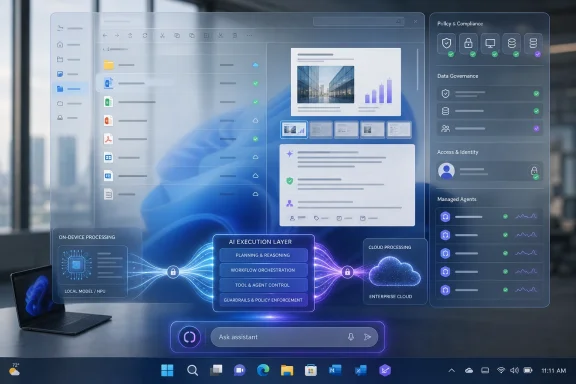 Microsoft Has Stopped Selling Copilot as an App and Started Selling Windows as the Layer Beneath It
The most important line in Microsoft’s pitch is not that Windows 11 has AI features. Everyone already knows that. The sharper claim is that organizations supposedly get more value from AI when they stop treating it as another app to deploy and instead embed it directly into everyday work.That framing matters because it moves the debate away from whether users like a Copilot button on the taskbar. Microsoft is arguing that the operating system is now strategic infrastructure, in the same way identity, endpoint management, browser policy, and device security already are. If AI is where work gets routed, summarized, searched, delegated, and governed, then the OS becomes the place where those AI experiences are normalized.
The e-book calls Windows 11 an “intelligent canvas,” which is exactly the kind of phrase that can make power users roll their eyes. But underneath the marketing gloss is a coherent enterprise strategy. Microsoft wants Windows to be the ambient layer that connects Microsoft 365 Copilot, local files, cloud storage, endpoint policy, on-device models, and agentic workflows.
That is why the document focuses less on futuristic demos and more on mundane office work: summarizing files, dictating notes, searching for documents by meaning, extracting tables from images, tracking agents from the taskbar, and asking Copilot questions without jumping between apps. Microsoft is not trying to sell magic. It is trying to sell reduced friction.
The uncomfortable question is whether Windows 11 has earned the right to make that promise. For many users, Windows is already the layer where too much happens: update prompts, account nudges, Edge promotions, OneDrive reminders, Teams integrations, widgets, ads, and unwanted entry points for services they never asked for. If Microsoft wants Windows to become the place where AI “just works,” it must first prove that “just works” will not mean “just appeared after Patch Tuesday.”
The Real Target Is Tool Sprawl, Not Chatbots
Microsoft’s core argument is that enterprises have entered the second phase of AI adoption. The first phase was about access: give employees tools, license copilots, encourage experimentation, and hope productivity follows. The second phase is about whether any of that actually survives contact with real workflows.In that context, Microsoft’s critique of “more AI” is credible. Workers do not need six different assistants that each require a separate login, context window, prompt style, data boundary, and training session. Managers do not need another dashboard that claims to measure AI adoption without explaining whether work got better. Security teams do not need uncontrolled shadow AI tools ingesting sensitive documents because sanctioned tools are too slow, too limited, or too detached from daily work.
This is where Windows gives Microsoft a natural advantage. The operating system already knows where users spend time, how files are opened, where credentials are brokered, how policies are enforced, and which apps are running. Microsoft’s enterprise bet is that AI becomes more useful when it is attached to those surfaces instead of floating above them in a browser tab.
That does not mean the argument is automatically right. An OS-level assistant can reduce context switching, but it can also deepen lock-in. A taskbar agent can make AI feel native, but it can also make a subscription service feel unavoidable. A semantic search system can make documents easier to find, but it also expands the number of places where data classification, retention, indexing, and access control must be absolutely correct.
Microsoft knows this, which is why the e-book repeatedly ties AI integration to governance. It name-checks management tools such as Intune and Agent 365 as part of the administrative layer. The pitch to IT is not merely “your users will be more productive.” It is “you can decide how this shows up before it reaches the desktop.”
That is the enterprise version of a familiar Microsoft move. Windows becomes the integration point, Microsoft 365 becomes the data and productivity layer, Entra becomes identity, Intune becomes management, and Copilot becomes the user-facing intelligence. The package is tidy. The risk is that tidy architectures often become expensive ones.
The Taskbar Is Becoming Microsoft’s AI Dock
The e-book’s most revealing example is “Ask Copilot” on the taskbar. In Microsoft’s scenario, a compliance lead reviews policies, open issues, and upcoming audits, then uses Copilot from the taskbar to surface relevant information without bouncing between documents and dashboards. The message is plain: the taskbar is no longer just an app launcher. It is becoming a control point for AI-mediated work.That is a subtle but important evolution. The Windows taskbar has historically been a place for launching, switching, and monitoring applications. Microsoft’s AI plan turns it into a place where long-running agents, background research, document summaries, and enterprise knowledge retrieval can be surfaced while users continue working elsewhere.
The company’s “Agents on the taskbar” example pushes this further. An employee starts a research agent in Microsoft 365 Copilot, continues working in PowerPoint, and receives updates as the agent progresses. In theory, this is exactly the sort of integration that makes sense at the OS level. Long-running tasks need status, interruption management, and a persistent surface.
But the taskbar is also sacred territory for Windows users. It is where muscle memory lives. When Microsoft changes it, even slightly, users notice. Windows 11 already took heat for taskbar regressions at launch, and Microsoft spent years clawing back features and flexibility that users expected from Windows 10.
That history matters because AI features are not entering a neutral environment. They are arriving on a desktop where many users already suspect Microsoft of prioritizing service placement over user control. A taskbar-based Copilot experience will be judged not only by whether it works, but by whether it respects the user’s existing desktop.
If Ask Copilot is optional, policy-manageable, fast, and genuinely useful, IT departments may accept it as another enterprise productivity surface. If it is noisy, persistent, upsell-heavy, or difficult to disable, it will become the next Windows grievance before it becomes the next Windows advantage.
“Less Copilot” Was Never the Same as “Less AI”
The apparent contradiction in Microsoft’s recent messaging is easier to understand once you separate branding from architecture. Microsoft can reduce visible Copilot entry points in some Windows apps while still expanding AI integration across the operating system. In fact, that may be the whole point.The Copilot brand became a lightning rod because it appeared everywhere before users were convinced it belonged anywhere. A button in the taskbar, a sidebar, a key on new PCs, writing tools in inbox apps, AI features in Paint and Photos, Recall on Copilot+ PCs, and cloud-connected assistants across Microsoft 365 all blurred together. To enthusiasts, “Copilot” started to mean not one product but a pattern: Microsoft inserting AI surfaces into workflows without always making the value obvious.
Pulling back some branding is therefore not a retreat from AI. It is a recognition that the label may have outrun the product. Microsoft’s current e-book sounds like a company trying to reframe the conversation from “Copilot everywhere” to “intelligence where it helps.”
That is a more defensible position. Few people object in principle to better search, cleaner dictation, faster summarization, or fewer manual copy-paste chores. The backlash tends to come when AI features feel imposed, unfinished, cloud-dependent, privacy-sensitive, or more useful to Microsoft’s subscription strategy than to the person at the keyboard.
Windows 11’s AI future may therefore be quieter than the first Copilot wave. Less purple sparkle, more contextual affordances. Less giant assistant panel, more background classification, local models, semantic retrieval, and task-specific actions. That could be good product design. It could also make AI harder to see, audit, and reject.
For sysadmins, that distinction is not academic. A visible Copilot button is easy to inventory. Embedded intelligence across search, File Explorer, Outlook summaries, taskbar agents, local models, and app actions is more complex. The deeper AI goes into Windows, the more enterprise IT will need crisp controls, clear licensing, logging, policy boundaries, and reliable documentation.
The File Explorer Example Shows Both the Promise and the Trap
Microsoft’s File Explorer scenario is one of the stronger parts of the pitch. A project manager hovers over files and gets useful summaries before opening them, avoiding the familiar loop of search, open, skim, close, repeat. Anyone who has inherited a chaotic SharePoint folder or a decade-old project directory can see the appeal.This is the kind of AI that feels native to the OS rather than pasted onto it. File Explorer is where users already make decisions about documents. If Windows can safely surface summaries, identify relevant files, and help people understand what is inside a document before opening it, that is a practical improvement.
The trap is trust. A file summary is only useful if users know what it read, where the processing occurred, which permissions were respected, and whether sensitive content left the device or tenant boundary. A wrong summary can be worse than no summary if it causes someone to miss a risk, cite an outdated policy, or send the wrong document.
Microsoft’s answer is partly technical and partly contractual. Some Windows AI experiences run locally on Copilot+ PCs. Others depend on Microsoft 365 Copilot subscriptions, cloud services, Entra identity, OneDrive, or enterprise management tools. The feature matrix will matter enormously, because the privacy and compliance posture of “local model summarizes a file on this PC” is not the same as “cloud-connected assistant reasons across tenant data.”
This is where Microsoft’s “AI OS” framing becomes both powerful and messy. Windows can make AI feel seamless precisely because it sits near the user’s files, apps, and identity. But that proximity raises the stakes. The closer AI gets to the operating system, the less tolerance there is for ambiguity.
A chatbot can be wrong and annoying. An OS-level AI feature that touches regulated files, privileged workflows, or endpoint policy can become a governance incident.
Copilot+ PCs Are the Hardware Bet Behind the Software Story
The e-book’s examples repeatedly lean on Copilot+ PCs, particularly for on-device AI experiences. That is not incidental. Microsoft’s Windows AI strategy needs new hardware to make the privacy, latency, and offline-use story credible.On-device models are central to the pitch because they offer a way around some of the complaints that have dogged cloud AI. Local processing can be faster, can work without a constant internet connection, and can reduce the amount of content sent to remote services. For enterprises, it also creates a cleaner argument for certain workflows where data sensitivity makes cloud AI politically or legally complicated.
But the hardware transition is uneven. Many Windows 11 PCs in the field do not have the neural processing units required for the full Copilot+ experience. Some AI features are limited by processor platform, geography, language, account type, subscription, or rollout stage. Microsoft can call Windows 11 the AI OS, but not every Windows 11 machine will experience that OS in the same way.
That fragmentation is familiar to anyone who has managed Windows fleets. Feature availability depends on edition, build, policy, hardware, licensing, region, and sometimes a server-side rollout flag that no local admin can accelerate. AI adds another layer to that matrix.
For consumers, this may be irritating. For enterprises, it becomes a planning problem. A CIO considering AI PCs must decide whether the productivity benefits justify hardware refresh timing, software licensing, user training, security review, and application compatibility testing.
Microsoft’s incentive is obvious. If AI makes the endpoint strategic again, it gives enterprises a reason to refresh PCs, standardize on Windows 11, buy Microsoft 365 Copilot, and keep identity and management inside the Microsoft cloud. That does not make the strategy illegitimate. It does mean customers should read every productivity claim alongside the commercial architecture that benefits from it.
Governance Is the Enterprise Sweetener, but Also the Admission
One of the more interesting parts of Microsoft’s e-book is its insistence that many organizations approach AI governance backward. Deploy first, govern later, then wonder why adoption stalls and shadow IT grows. That is a fair critique. It is also an admission that AI adoption has created real administrative chaos.The promise of Windows 11 as an AI layer is that IT can define how AI appears across the organization. Which features are enabled, where they run, which agents can operate, what data they can access, and how experiences evolve over time should be policy decisions rather than user-by-user improvisations.
That is exactly the language enterprise buyers want to hear. The uncontrolled version of AI adoption is a nightmare: employees pasting confidential material into consumer chatbots, teams using unsanctioned browser extensions, departments buying point tools without security review, and executives demanding productivity improvements without funding change management.
Microsoft’s answer is to make AI governable through the same enterprise stack many organizations already use. That is strategically smart. It turns Windows AI from a user feature into an IT architecture.
But governance is also where Microsoft must be most transparent. Admins will not accept vague assurances about “responsible AI” when they need to answer specific questions from legal, compliance, security, HR, procurement, and works councils. They will need to know which data is indexed, which prompts are logged, how retention works, what is processed locally, what leaves the device, what role-based access controls apply, and how to disable features cleanly.
If Microsoft gets that right, Windows 11 could become a safer AI environment than the sprawl it replaces. If it gets it wrong, the OS becomes one more place where AI capability outruns institutional trust.
The Productivity Case Is Plausible, but the Evidence Is Still Vendor-Shaped
Microsoft cites its Work Trend research to argue that workers are overloaded and leaders are looking to AI agents to create new capacity. The broad diagnosis rings true. Many employees are drowning in meetings, messages, documents, duplicated status updates, and software rituals that exist mostly because organizations have normalized bad workflows.AI can help with some of that. Summaries can reduce reading time. Semantic search can reduce file archaeology. Dictation can turn rough thoughts into structured text. Agents can handle background research or status gathering. Table extraction can eliminate tedious retyping. These are not science-fiction use cases; they are the everyday frictions that make office work feel heavier than it should.
The harder question is whether integrating those capabilities into Windows produces measurable returns. Microsoft says frontier firms are doing better when they embed AI into work rather than layering on more tools. That is plausible, but it is also exactly the conclusion Microsoft’s platform strategy needs customers to accept.
Vendor research is not useless. Microsoft has a huge view into workplace patterns, enterprise customers, and product telemetry. But its research naturally frames the problem in a way Microsoft is well positioned to solve. The cure just happens to be Windows 11, Microsoft 365 Copilot, Copilot+ PCs, Intune, Agent 365, and deeper reliance on Microsoft’s cloud and endpoint stack.
That does not mean the cure is wrong. It means buyers should demand proof in their own environment. Pilot programs should measure time saved, quality improved, tickets reduced, workflows shortened, and user satisfaction changed. They should also measure new burdens: training time, licensing cost, policy complexity, false summaries, security review, and help desk demand.
The AI industry has already learned that demo productivity is not the same as organizational productivity. A feature that saves five minutes for one worker can create review overhead for another. A summary that is 90 percent correct may still require full reading in regulated contexts. An agent that retrieves information may still need human validation before decisions are made.
Microsoft’s argument will become much stronger when enterprises can show not just adoption numbers, but durable workflow changes.
Windows Enthusiasts Are Right to Be Skeptical
The enthusiast backlash to Windows AI is not simply nostalgia or resistance to change. It reflects a long memory of Microsoft using Windows as a distribution channel for services users did not necessarily request. That memory shapes how every new AI feature is received.When Microsoft says AI will appear “where work happens,” users hear a second meaning: AI will appear where it is hard to ignore. The taskbar, Start menu, File Explorer, Settings, Search, and inbox apps are not neutral surfaces. They are core parts of the operating system. Putting AI there grants it privileged attention.
This is why opt-out design will matter as much as model quality. If Microsoft wants trust, it needs to make AI features easy to understand, easy to manage, and easy to disable. Not hidden behind registry edits, not split across multiple policy locations, not re-enabled by feature updates, and not different depending on whether the user has a local account, Microsoft account, Entra ID, or Copilot subscription.
There is also the performance question. Windows users have spent years complaining about background processes, telemetry, web-powered shell components, memory use, and UI inconsistency. AI features that add latency, network dependency, RAM pressure, or unexplained disk activity will be punished quickly by the same audience Microsoft says it wants to win back.
The company’s best path is not to lecture users about the future. It is to ship AI features that are boringly useful and boringly controllable. If semantic search finds the right file, if dictation works reliably, if local summaries are fast, if taskbar agents stay out of the way, people will use them. If Windows starts to feel like a billboard for Microsoft’s AI roadmap, users will fight the roadmap no matter how good the models become.
The OS Is Becoming the New AI Boundary
The deeper story is that the boundary between operating system and productivity platform is dissolving. Windows used to provide the shell, device support, app model, security primitives, and user interface. Office handled documents and communication. Cloud services handled collaboration and storage. AI blurs those separations.A request to “find the latest supplier report and turn the table into an estimate” may involve the screen, browser, local files, OneDrive, Excel, identity, permissions, an NPU, a cloud model, and an agent. Where does the application end and the operating system begin? Microsoft’s answer is that Windows should coordinate the moment of action.
That is strategically important because whoever controls that coordination layer controls a great deal of value. If users ask the OS to act on what they see, summarize what they are doing, retrieve what they need, and monitor agents that run in the background, the OS becomes the interface to work itself.
This helps explain why Microsoft is so intent on keeping Windows central in the AI era. The nightmare scenario for Microsoft is not that people use AI. It is that the most important AI workflows move into browser-based, cross-platform, vendor-neutral layers where Windows is merely a host. By making Windows the AI execution layer, Microsoft keeps the desktop relevant.
For IT pros, this raises procurement questions that are bigger than Windows 11 migration. Is the organization comfortable with Microsoft becoming the default broker for AI actions across the endpoint? Are there regulatory or competitive reasons to preserve AI provider choice? Can non-Microsoft agents integrate cleanly into the same surfaces? Will Windows AI be open enough to avoid becoming another walled garden?
Microsoft will likely argue that Windows remains a platform for developers and partners. But the gravitational pull of Microsoft 365 Copilot is obvious. The best-integrated experiences will probably be Microsoft experiences first. That is how ecosystems work, and it is why platform owners love native integration.
The 2026 Windows Repair Job and the AI Push Are the Same Story
At first glance, Microsoft’s renewed focus on Windows fundamentals and its continued AI push seem to be in tension. One message says Windows needs quality, performance, native coherence, and fewer irritants. The other says Windows should become an AI-native environment with agents, Copilot hooks, semantic search, and local models.In reality, these are not separate stories. Microsoft cannot make Windows the AI OS unless it also makes Windows a better OS. AI integration increases the penalty for sloppiness. A sluggish shell is annoying; a sluggish shell with AI agents is worse. A confusing settings experience is frustrating; a confusing settings experience with privacy-sensitive AI controls is unacceptable. A buggy File Explorer is bad; a File Explorer that summarizes files incorrectly or inconsistently is a trust problem.
That is why the fundamentals campaign matters. If Microsoft wants users to accept deeper intelligence in the OS, it has to rebuild credibility in the boring places: update reliability, performance, battery life, UI consistency, settings clarity, app quality, and administrative control.
The history of Windows is full of ambitious platform shifts that succeeded only when they aligned with user needs. Windows 95 worked because it made PCs easier. Windows XP endured because it became familiar and stable. Windows 7 restored trust after Vista. Windows 10 became the enterprise default because it was good enough, broadly compatible, and manageable.
Windows 11 has not yet earned that kind of emotional permission from all users. It may be gaining share, and Windows 10’s support deadline has forced migrations, but adoption by necessity is not the same as affection. Microsoft’s AI strategy asks for more trust at the very moment many users are still negotiating whether Windows 11 deserves the trust Windows 10 accumulated.
The Windows 11 AI Sales Pitch Leaves IT With a Short Checklist
Microsoft’s e-book is not just a marketing artifact; it is a preview of the conversations IT departments will have over the next year. The smart response is neither reflexive rejection nor blind adoption. It is to treat Windows AI as a platform change that needs the same rigor as any other endpoint, identity, or productivity shift.The most concrete lessons are already visible:
- Windows 11 AI features should be evaluated by workflow outcome, not by whether they look impressive in a demo.
- Copilot+ PC hardware may become important for local AI, but most fleets will need a transition plan because feature availability will vary across devices.
- Taskbar and File Explorer integrations deserve special scrutiny because they place AI inside high-trust operating system surfaces.
- Governance through Intune, Entra, Microsoft 365 Copilot controls, and agent management should be tested before broad user rollout.
- Organizations should demand clear answers about local processing, cloud processing, logging, data access, retention, and disablement.
- Microsoft’s reduction of some Copilot branding should not be mistaken for a retreat from AI in Windows.
Microsoft’s new Windows 11 e-book makes one thing clear: the company’s AI ambitions for Windows are not fading, they are becoming more architectural. That could make Windows more useful if Microsoft keeps the experience fast, optional, governed, and genuinely tied to user tasks. It could also make Windows more intrusive if the company confuses strategic placement with earned trust. The next phase of Windows 11 will be decided less by whether AI is present than by whether Microsoft can make it feel like part of the work rather than another demand on the worker.
References
- Primary source: Windows Latest
Published: Tue, 26 May 2026 01:50:34 GMT
Microsoft argues Windows 11 is the AI OS where work actually happens, not where AI is added on top in a new ebook
Microsoft's new e-book argues the OS is now the most strategic decision in enterprise AI, positioning Windows 11 as an AI OS. www.windowslatest.com
- Related coverage: windowscentral.com
The 13 biggest Windows 11 changes from early May — and why these updates matter for how the OS evolves through the rest of 2026 | Windows Central
Microsoft is reshaping Windows 11 with practical fixes users have wanted for years.www.windowscentral.com - Related coverage: techspot.com
Microsoft admits Windows 11 lost its way, Nadella pledges to "win back fans" | TechSpot
During Microsoft's fiscal Q3 2026 earnings call, Nadella put consumer Windows front and center. As part of Microsoft's broader push to reconnect with users across its platforms,...www.techspot.com - Official source: microsoft.com
Operating Systems (OS) Explained | Microsoft Windows
Learn how operating systems (OS) work, why they matter, and explore Windows 11 features.www.microsoft.com
- Related coverage: techradar.com
It's actually happening — Microsoft promises to fix the biggest issues in Windows 11, from AI slop to pushy Windows Updates | TechRadar
Taskbar positioning too!www.techradar.com - Related coverage: tomshardware.com
Microsoft's vision of "AI-native" Windows is becoming real, update introduces agents that pilfer through your files — Latest Windows 11 Insider build includes experimental AI agents toggle that can perform tasks for you in the background | Tom'
Microsoft states that agents read files in an isolated runtimewww.tomshardware.com
- Related coverage: pcgamer.com
Microsoft executive confirms Windows 11 is just as full of old code as you suspected
'We were thinking flying cars and moon stations by the year 2026, not Win32.'www.pcgamer.com
- Related coverage: tomsguide.com
Microsoft starts removing Copilot from Windows 11 — I’m saying that sarcastically because it's clearly just lip service | Tom's Guide
Is Microsoft finally fixing Windows 11 bloat? The new "Commitment to Windows Quality" update starts rolls back Copilot branding in favor of "Writing Tools," but the RAM-hungry AI might just be hiding in plain sight.www.tomsguide.com - Official source: adoption.microsoft.com
- Official source: download.microsoft.com
