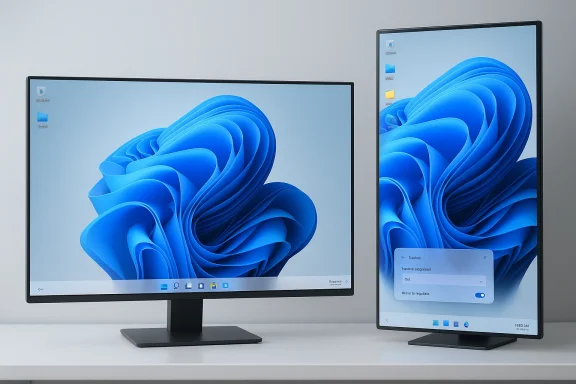
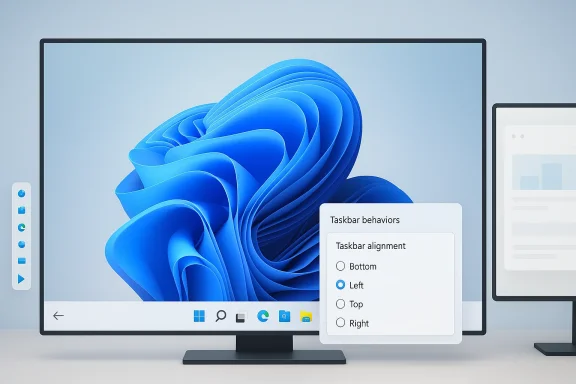
Windows 11 Brings Back Movable Taskbar to Top and Sides (Insider First)

  • Thread Author
It took almost five years, but Microsoft is finally preparing to give Windows 11 users back one of Windows’ most familiar desktop behaviors: the ability to move the taskbar to the top or sides of the screen. The timing matters because this is not just a cosmetic tweak; it is part of a broader course correction for an operating system that has drawn steady criticism for trimming away power-user features while failing to deliver a fully convincing replacement. Microsoft’s own Windows chief, Pavan Davuluri, framed the change as a direct response to a top user request, signaling that the company is now treating long-standing taskbar flexibility as a priority rather than an afterthought.

Overview​

Windows 11 launched in 2021 with a taskbar that looked modern but behaved more like a prototype than a mature desktop control strip. It centered Start and pinned icons, removed several configuration options, and locked the bar to the bottom edge of the display. For many users, that felt less like refinement and more like regression, especially because Windows had offered movable taskbars for decades.
Microsoft’s decision was not accidental. The Windows 11 taskbar was rebuilt on a new architecture associated with Windows 10X, the now-canceled effort that was originally intended for dual-screen hardware before its ideas were folded into Windows 11. That heritage explains a lot: the design was cleaner, but the feature set was thinner, and the taskbar lost capabilities that many people considered essential.
What makes the current reversal notable is that Microsoft is not merely restoring one setting. It is slowly rebuilding trust with users who felt the company had optimized for visual polish at the expense of workflow. Over the past year, Microsoft has also been reintroducing things like a bigger clock with seconds, small taskbar icon behavior, and agenda-style calendar features that recall Windows 10’s more flexible desktop experience.
This is also happening against a competitive backdrop that has changed materially. Windows 10 support ended in October 2025, which means many holdouts who preferred the older taskbar model have had to migrate whether they wanted to or not. That gives Microsoft more leverage, but it also raises the stakes: when users have fewer escape routes, every missing feature becomes more visible.

Why the Taskbar Became a Symbol​

The taskbar sounds mundane, but in Windows it is a daily-use control center. It anchors Start, app switching, system notifications, time, and window management. When Microsoft removes a familiar control from that layer, it changes the feel of the entire operating system more than many people expect.
That is why the missing movable taskbar became a lightning rod. For some, it was about ergonomics on ultrawide monitors. For others, it was about multi-display setups, vertical screen orientation, or simply muscle memory built over years of using Windows 10 and earlier versions. A “minor” preference in a settings menu can still be a major workflow dependency.
Microsoft’s broader challenge was that Windows 11 appeared to trade productivity flexibility for design consistency. The centered taskbar and simplified shell were easier to present as a consumer-friendly refresh, but they also made the platform feel less configurable than the Windows lineage users had come to expect. That tension has lingered ever since launch.

Why users cared so much​

A movable taskbar is not just about aesthetics. It can improve reachability, accommodate different display geometries, and fit specialized workflows in business, development, and creative environments. For users working in remote desktops, dense enterprise app layouts, or multiple monitor configurations, the feature is practical, not decorative.
  • It supports muscle memory built over decades.
  • It helps with ultrawide and multi-monitor setups.
  • It can improve accessibility and comfort.
  • It matters more to power users than casual users.
  • It reduces the sense of forced uniformity in the OS.

The Windows 10X Legacy​

Windows 11’s taskbar problems make more sense when viewed through the lens of Windows 10X. Microsoft had originally been building a simplified shell for dual-screen devices, and many of those ideas resurfaced in Windows 11 when the company reoriented its desktop strategy. That reorientation delivered a more modern appearance, but it also imported assumptions that did not fully fit traditional desktop use.
The result was a taskbar that felt designed around constrained form factors and touch-first thinking rather than the broad flexibility that defines classic Windows. The system could look polished on a presentation slide while still frustrating the users who spend eight or more hours a day inside the shell. That is the paradox Microsoft is now trying to unwind.
This matters because UI architecture is not just superficial skin. When a shell is rebuilt around different assumptions, restoring old behavior can become genuinely hard. Microsoft has previously hinted, indirectly through support responses and the evolution of the shell, that some Windows 10 taskbar behaviors were removed because the new framework was not built to support them cleanly.

Architecture over appearance​

A key lesson from Windows 11 is that visual modernity is not the same as functional completeness. Users do not evaluate the shell by abstract design principles; they evaluate it by how quickly and reliably it gets out of the way. If the new architecture cannot support familiar use cases, then the modernization feels incomplete, even if it looks better.
  • Windows 10X influenced the shell direction.
  • The initial taskbar removed long-established controls.
  • Restoring those controls requires engineering work, not just a checkbox.
  • Power users notice architecture trade-offs first.
  • Aesthetic simplification can hide functional loss until launch day.

Microsoft’s Slow Rebuild of the Taskbar​

The good news for Windows loyalists is that Microsoft has already been backpedaling in measured steps. The company has tested taskbar icon scaling, so the bar can show smaller icons when crowded. It has also brought back a larger clock display with seconds and resumed work on calendar and notification-center elements that resemble Windows 10’s behavior.
That pattern suggests a broader internal rethink. Microsoft is not simply restoring legacy features in a one-off fashion; it is testing which pieces of the old interaction model still make sense in the new shell. That is a safer rollout strategy, but it is also a tacit admission that the launch version of Windows 11 was too restrictive.
The newly discussed movable taskbar fits neatly into that story. According to the reporting, the setting will arrive first for Windows Insiders before making its way to the general Windows 11 audience later this year. Microsoft is also said to be working on a smaller taskbar option, which would further increase the density and flexibility of the desktop.

Why the Insider channel matters​

The Windows Insider program is where Microsoft now validates how much of Windows 10-era behavior users still want back. That is important because the company can test not just whether a feature works, but whether it survives modern shell constraints and display scenarios. It is a safer place to reintroduce old-new behavior before the company commits it to the full stable channel.
  • Insiders serve as a real-world compatibility lab.
  • Microsoft can catch edge cases before broad rollout.
  • Legacy features can be gated behind options instead of defaults.
  • The company can gauge actual user demand.
  • Rollout timing signals confidence, or lack of it.

What Changes for Everyday Users​

For consumers, the ability to move the taskbar is mostly about comfort and personal preference. If you have grown used to a bottom-docked centered taskbar, you may never touch it. But if you prefer a top-docked bar, or you like putting it vertically to free up horizontal space, this restores a bit of control that Windows 11 had taken away.
That sort of control is often underestimated. Small UI decisions can reduce friction in dozens of tiny daily moments, and those moments compound over time. Even people who never actively think about the taskbar notice when the desktop feels less adaptable than it used to.
There is also a psychological element. When an operating system removes familiar options, users often interpret it as a message that their habits no longer matter. Reversing that message can do more to soften Windows 11’s reputation than a flashy new AI feature ever will. Trust, in desktop computing, is often built from unglamorous concessions.

Consumer value in simple terms​

The consumer case is straightforward. This feature expands choice without forcing a new behavior on anyone who likes the current layout. In that sense, it is one of the best kinds of software change: visible, optional, and low-drama when implemented correctly.
  • More layout flexibility for home users.
  • Better fit for large or oddly shaped displays.
  • Easier adaptation to personal habits.
  • Less dependence on third-party tools.
  • A clearer sense that Microsoft is listening.

Why Power Users Still Matter​

It is easy to dismiss the taskbar debate as nostalgia, but that misses the scale of Windows’ professional user base. Developers, designers, analysts, admins, traders, and support teams live in the shell all day, and they often value precision over visual novelty. For them, the taskbar is not a decoration; it is an efficiency layer.
Microsoft’s partial retreat on taskbar restrictions may therefore be less about appeasing a loud minority and more about preserving the credibility of Windows as a professional desktop platform. The company cannot rely indefinitely on “newer” being a sufficient selling point if the older environment still feels more capable. That is especially true now that Windows 10’s end-of-support date has passed.
The power-user argument also reaches into enterprise deployment. Organizations that standardize desktops want predictability, but they also need support for a wide range of workflows, display types, and accessibility needs. A rigid shell can become a hidden productivity tax when scaled across thousands of employees.

Enterprise impact versus consumer impact​

The enterprise impact is more subtle than the consumer impact, but potentially more important. A company may not care whether the taskbar can sit at the top of the screen in the abstract, yet it may care a great deal when a group of analysts or engineers claims a measurable productivity gain from that configuration. The user-experience delta becomes an operational question.
  • Enterprises care about workflow consistency.
  • Consumer users care more about personal preference.
  • Accessibility requirements can justify nonstandard layouts.
  • Multi-monitor and vertical-monitor users benefit disproportionately.
  • Third-party shell tools complicate managed environments.

The Competitive Implications​

On the surface, this is a Windows housekeeping story. In practice, it is a competitive signal. Every feature Microsoft removes from Windows 11 creates an opening for alternative platforms to market themselves as more adaptable, and every feature it restores narrows that gap. Desktop operating systems compete as much on familiarity and trust as they do on raw technical merit.
The broader market implication is that Windows still has to earn loyalty. The company can no longer assume that its installed base will accept feature regressions simply because the platform is dominant. That is especially important in a post-Windows 10 world, where upgrading is less optional and users are more likely to notice when upgrades are accompanied by losses.
There is also a third-party ecosystem angle. When Microsoft leaves basic shell customization out of the box, users tend to turn to tools such as StartAllBack or ExplorerPatcher. That creates a shadow market for desktop repair and enhancement. Bringing more of that functionality back natively reduces user dependence on unsupported solutions and improves platform coherence.

The ecosystem ripple effect​

This kind of change can influence how independent utilities are perceived. If Microsoft restores enough of the old taskbar behavior, some shell-modification tools become less necessary for mainstream users, even if they remain useful for edge cases. That could reduce one small but meaningful pressure point around Windows stability and supportability.
  • Native support reduces reliance on hacks.
  • Third-party tools may lose some appeal.
  • Microsoft can present Windows 11 as maturing.
  • The platform becomes easier to explain to new users.
  • Feature parity with Windows 10 improves public perception.

The Risks of Reintroducing Old Flexibility​

Restoring a movable taskbar is not simply a matter of toggling a hidden option back on. It may have implications for touch behavior, scaling, multi-monitor interaction, auto-hide logic, Start menu placement, and notification positioning. If Microsoft ships the feature with rough edges, it could generate the same kind of frustration that removing it created in the first place.
There is also a danger in promising restoration while offering only partial support. Windows users have long memories, and they can tell the difference between a full return and a constrained imitation. A feature that exists in name but fails in edge cases becomes a fresh source of complaints. Incomplete restoration is often worse than a clean no.
Finally, Microsoft must manage the visual coherence of a redesigned shell. Windows 11’s centered design language was built around certain assumptions, and moving the taskbar may require UI adjustments elsewhere. The challenge is to reintroduce flexibility without making the entire desktop feel stitched together from incompatible eras.

Where Microsoft could stumble​

The most obvious failure mode is inconsistency across display configurations. If top-docked or side-docked taskbars behave differently on multiple monitors, high-DPI screens, or tablet-oriented devices, the feature could become more trouble than it is worth. That is the sort of bug that only appears after broad adoption.
  • Edge cases may break faster than mainstream ones.
  • Touch and pen workflows could need special handling.
  • Notifications may need repositioning logic.
  • Start menu behavior must stay predictable.
  • Auto-hide and snapping rules may require rework.

What Microsoft’s Timing Tells Us​

The timing of this change says almost as much as the change itself. Microsoft is not acting immediately after launch; it is moving after years of criticism, after Windows 10 support has ended, and after a series of smaller restorations that signal a deliberate reassessment. That is the cadence of a company responding to sustained pressure, not one acting from surprise.
That timing also suggests Microsoft now views the taskbar less as a branding statement and more as a user-experience platform. In other words, the company seems willing to retreat from rigid design if the benefit is stronger satisfaction and lower friction. That is a healthy shift, even if it arrives later than many users would have liked.
It is worth noting that Microsoft has repeatedly talked about feedback loops, and the taskbar story is a textbook example of feedback eventually winning. The lesson is not that every complaint becomes a product change, but that sustained, specific, high-signal feedback can move even a big platform roadmap.

Timeline perspective​

A clear timeline helps explain the reversal. Windows 11 arrived in 2021 with a simplified taskbar. Windows 10 support ended in October 2025. In 2026, Microsoft is now preparing to restore taskbar repositioning for Insiders and then for the broader audience later in the year. Those dates matter because they show just how long users have waited for a basic desktop option to return.
  • 2021: Windows 11 removes taskbar movement.
  • 2022-2025: Users keep requesting restoration.
  • October 2025: Windows 10 support ends.
  • Early 2026: Microsoft signals a rollback.
  • Later 2026: broad rollout is expected.

Strengths and Opportunities​

The strongest aspect of this change is that it restores choice without forcing change. That is rare in modern operating system design, where platform vendors often assume more control than users would like. If Microsoft executes well, the taskbar update could become a small but meaningful symbol of a more user-respectful Windows 11. That symbolism matters.
  • Restores a long-requested Windows 10-era capability.
  • Improves adaptability for multi-monitor and ultrawide setups.
  • Helps Microsoft rebuild goodwill with power users.
  • Reduces dependence on unsupported customization tools.
  • Fits a broader pattern of feature restoration.
  • Gives the Insider program a visibly useful role.
  • Improves Windows 11’s credibility as a mature desktop OS.

Risks and Concerns​

The main risk is that Microsoft reintroduces the feature only partially or inconsistently, creating a new class of bugs around the taskbar, Start, and notifications. Another concern is that the company may still prioritize surface-level modernity over deep configurability, leaving users with a compromise rather than a true return to form. A bad restoration can be as frustrating as a removal.
  • Edge cases could remain broken on certain displays.
  • Touch and tablet modes may need special treatment.
  • Third-party shell tools may still be required for niche needs.
  • Users may see the change as overdue rather than generous.
  • Microsoft could ship one option while withholding others.
  • Visual coherence might suffer if the shell is only partly reworked.
  • Enterprise admins may need to test the change carefully before broad deployment.

Looking Ahead​

The real question is not whether Microsoft can move the taskbar again. It is whether the company can prove that Windows 11 is evolving into a more flexible platform instead of a more rigid one wearing a modern coat of paint. The taskbar is a small test with outsized meaning, because it touches both daily convenience and long-term trust.
If Microsoft continues on this path, the next logical steps would be to revisit more of the Windows 10 desktop model where it still makes sense, while keeping the clean visual language that Windows 11 introduced. That means balancing restraint with configurability, which is difficult but not impossible. The company’s recent feature pattern suggests it understands that the old “simplify everything” era had real costs.
What happens next will likely depend on Insider feedback and on how cleanly the feature scales across hardware. If the implementation is solid, Microsoft can turn a years-long complaint into a case study in responsiveness. If it is messy, the company will have added one more reminder that Windows’ hardest problems are often the ones hidden in plain sight.
  • Watch for Insider build notes confirming the rollout scope.
  • Watch for whether the option works on all supported display positions.
  • Watch for related taskbar features, including compact sizing.
  • Watch for any changes to Start, notifications, or auto-hide behavior.
  • Watch for enterprise guidance if the feature becomes broadly available.
The larger story is encouraging even if the change itself is small. Microsoft appears to be learning that a desktop operating system earns loyalty not by removing every old habit, but by preserving the ones that still help people work better. If the movable taskbar lands cleanly, it will not just move icons around the screen; it will move Windows 11 a little closer to the kind of platform users wanted all along.

Source: The Verge Windows 11 is finally getting a movable taskbar
 

Microsoft is finally moving to restore one of Windows 11’s most controversial omissions: the ability to move the taskbar away from the bottom edge of the screen. According to Microsoft’s current Windows support documentation, Windows 11 still does not offer built-in controls for top, left, or right placement, which is exactly why the change matters so much now. The renewed focus on taskbar customization signals something bigger than a single feature fix: Microsoft is quietly admitting that Windows 11’s “simplified” taskbar was too restrictive for a large slice of its audience. (support.microsoft.com)

A digital visualization related to the article topic.Overview​

When Windows 11 launched in 2021, Microsoft didn’t just redesign the desktop shell; it also re-architected key parts of the taskbar experience. In that transition, several long-standing behaviors disappeared, including the ability to dock the taskbar on the top or sides of the screen. Microsoft’s own support page now states plainly that Windows 11 taskbar settings allow alignment within the taskbar, but not relocation of the taskbar itself. (support.microsoft.com)
That omission was never a minor complaint. For many users, especially developers, analysts, and multi-monitor professionals, vertical taskbars are not a cosmetic preference but a workflow decision. A left- or right-docked taskbar can free up horizontal space for timelines, code editors, spreadsheets, and browser tabs. In other words, the missing feature wasn’t about novelty; it was about screen geometry and how people actually work. (support.microsoft.com)
Microsoft has already shown a willingness to revisit taskbar design after public pressure. In recent Insider builds, it has rolled out taskbar icon scaling, letting buttons shrink automatically when the bar gets crowded, with options for “When taskbar is full,” “Never,” and “Always.” That feature is a useful clue because it shows the company is now treating the taskbar less as a frozen design object and more as a configurable workspace surface.
The timing also matters. Windows 10 reached end of support on October 14, 2025, pushing more users into Windows 11’s ecosystem and increasing pressure on Microsoft to close long-standing feature gaps. The company can no longer rely on nostalgia for Windows 10 to absorb dissatisfaction; it has to make Windows 11 feel complete. (support.microsoft.com)

Why the Taskbar Story Became a Big Deal​

The taskbar is one of the most visible parts of the Windows interface, but it is also one of the most psychologically important. Users interact with it constantly, often without consciously noticing. That means even a small loss of control can feel like a major regression, which is exactly what happened when Windows 11 removed taskbar repositioning. The reaction was amplified because the feature had existed for decades in prior versions of Windows. (support.microsoft.com)
This is why the backlash persisted longer than Microsoft may have expected. A desktop operating system is not just a product; it is a habit machine. When the OS breaks a habit that power users consider essential, they notice immediately, and they tend to remember the loss more than the rest of the redesign. That’s especially true when the change feels optional rather than necessary.

A small setting with outsized consequences​

The practical impact of taskbar positioning is easy to underestimate if you only use a single display and standard app layouts. But in real-world usage, vertical taskbars can reduce the need for constant window switching and preserve more working space for content. On wide monitors, that can be a meaningful productivity gain.
The feature also has accessibility implications. Some users prefer top-placed or side-placed bars because they reduce pointer travel or better fit their visual scanning patterns. Others rely on multi-monitor configurations where a specific taskbar location aligns better with a primary workflow. In that sense, repositioning is less a “power user” luxury than a custom fit feature.
Key reasons the feature matters:
  • It restores a long-standing Windows workflow.
  • It helps users reclaim horizontal screen space.
  • It supports different monitor shapes and sizes.
  • It can improve muscle-memory efficiency.
  • It reduces dependence on third-party hacks.

What Microsoft Is Restoring​

The most important part of this story is not that Microsoft is adding something brand new. It is that the company is working to restore a capability users assumed would survive the Windows 11 transition. Microsoft’s support documentation still says Windows 11 does not offer settings to move the taskbar to the top or side of the screen, which underscores how significant any Insider change would be once it arrives. (support.microsoft.com)
Microsoft has already demonstrated that it can revisit other taskbar behaviors incrementally. Taskbar icon scaling, for example, was introduced to help users keep more pinned and open apps visible without sacrificing usability. That kind of targeted change suggests Microsoft is now willing to balance modern design principles against old-school customization demands.

From simplification to personalization​

Windows 11 originally leaned into simplification. The taskbar was centered, the shell was polished, and several legacy affordances were removed. That philosophy made sense from a visual-design standpoint, but it did not satisfy users who wanted precision control over desktop layout. The new direction suggests a partial reversal: Microsoft is learning that simplification without flexibility can feel like a downgrade.
It’s also notable that the company is reportedly testing a smaller taskbar option in parallel. That points to a broader strategy: instead of just restoring one old feature, Microsoft appears to be building a more modular taskbar model. That is the right move if the goal is to keep both casual users and advanced users happy.
Possible additions in the same design lane include:
  • Smaller taskbar buttons
  • Alternative placement options
  • More compact spacing rules
  • Better behavior on multi-monitor setups
  • More granular personalization controls

Inside the Insider Pipeline​

Any return of taskbar repositioning is likely to appear first in Windows Insider builds before it reaches general availability. That is consistent with how Microsoft has shipped recent taskbar changes, including icon scaling in Insider channels. The company typically uses these early releases to collect feedback, monitor regressions, and tune interaction details before mainstream rollout.
That process is important because taskbar changes are deceptively risky. A single layout change can cascade into issues with touch behavior, app thumbnails, system tray alignment, auto-hide behavior, and multi-display consistency. Microsoft’s challenge is not simply to let users drag the bar around; it is to do so without breaking the dozens of assumptions surrounding the shell.

Why this feature is harder than it looks​

The Windows taskbar is not a standalone widget. It is deeply intertwined with Start, search, notifications, app launch behavior, and system tray logic. If Microsoft is reintroducing taskbar movement, it has to ensure each of those elements adapts correctly across placements.
That means testing needs to cover far more than a basic drag-and-drop scenario. Engineers must validate window snap behavior, tablet transitions, auto-hide edge cases, and third-party app interactions. The result is that a feature many users think of as “simple” may actually require extensive shell work behind the scenes.
Numbered rollout logic often looks like this:
  • Test in Insider channels.
  • Observe layout and interaction bugs.
  • Refine behavior across screen types.
  • Expand availability gradually.
  • Ship only after stability improves.

The Broader Rollback Pattern​

Taskbar repositioning would not be Microsoft’s first retreat from Windows 11’s early design ideology. The company has spent years restoring or refining features that were removed, hidden, or reshaped in the shift away from Windows 10. The return of taskbar flexibility would fit that pattern cleanly. It would also confirm that Microsoft now sees some Windows 11 changes as temporary simplifications rather than permanent principles.
This broader rollback pattern matters because it reveals a strategic reality: Microsoft listens most carefully when enough users either complain loudly or simply refuse to upgrade. The company has to maintain Windows’ reputation as a customizable platform, not just a visually coherent one. That balance has always been one of Windows’ strongest competitive advantages.

Why the company is changing course​

There are at least three reasons Microsoft may be softening its stance. First, Windows 11 is no longer a young product with room to impose a new philosophy without compromise. Second, Windows 10’s retirement has increased the importance of making Windows 11 feel mature and complete. Third, Microsoft knows that power users shape the perception of the platform far beyond their own numbers.
Restoring old controls also helps Microsoft reduce reliance on unofficial tweaks. A feature that users can access natively is a feature that generates fewer support headaches, fewer compatibility problems, and less frustration. That is a win for both user trust and platform stability.
Notable signs of this broader pattern include:
  • Taskbar icon scaling in Insider builds
  • Ongoing tweaks to system tray and notification behavior
  • Gradual restoration of convenience features
  • More configurable desktop shell behavior
  • A clearer focus on user feedback

Consumer vs Enterprise Impact​

For consumers, taskbar repositioning is mostly about comfort and preference. Many people will simply set it once and forget it. But for enterprise users, especially those deploying Windows across heterogeneous hardware, the feature has broader implications. IT teams often have to support users with different monitor sizes, docking setups, and accessibility needs, and a rigid taskbar can become a recurring complaint.
A more configurable taskbar may also reduce help desk friction. If employees can tailor the interface to their habits without workarounds, there is less need for documentation, third-party utilities, or manual support interventions. That may sound small, but at scale it can save time. Enterprise UI friction tends to compound faster than people expect.

Why admins should care​

On managed systems, shell behavior is rarely just a personal preference. It becomes part of the baseline experience that affects productivity, onboarding, and supportability. A restored repositioning feature could help organizations standardize setups for specialized roles such as data analysis, development, SOC monitoring, and customer support.
At the same time, admins will want to know whether the setting is user-controlled, policy-controlled, or both. Microsoft has not yet publicly outlined enterprise policy details in the material reviewed here, so that remains an important question. If the feature ships without clear management controls, enterprise adoption may be uneven.
Enterprise advantages and questions:
  • Better accommodation for multi-monitor stations
  • Easier support for ergonomic preferences
  • Less dependence on third-party shell tools
  • Potentially lower support ticket volume
  • Need for policy control and standardization
  • Possible compatibility testing with older workflows

Third-Party Tools and the Workaround Economy​

The absence of built-in taskbar movement created a workaround economy. Users who wanted the old Windows behavior often turned to third-party tools, registry tweaks, or shell replacements. That ecosystem helped fill the gap, but it also illustrated the downside of removing core features: users rarely stop looking for the capability, they just seek it elsewhere.
This is one reason Microsoft may benefit from restoring the feature directly. Workarounds can be effective, but they also introduce uncertainty, especially in corporate environments. Anything that alters the shell can create support risk, update fragility, or security concerns. A native option is usually cleaner, safer, and easier to maintain.

Why native support beats hacks​

A third-party tool can imitate a feature, but it cannot fully control the underlying shell. That means it may break after updates, behave inconsistently across builds, or conflict with security software. Native implementation is not just a convenience; it is a trust signal that Microsoft owns the experience again.
Users who depended on tools like Start replacements or taskbar modifiers were effectively telling Microsoft the same thing in a different way: “If you won’t provide it, we will build it ourselves.” The return of repositioning is a sign that Microsoft has finally heard that message.
The main drawbacks of workaround-based approaches are clear:
  • Higher breakage risk after updates
  • Possible security and compatibility issues
  • More difficult enterprise deployment
  • Inconsistent behavior across systems
  • Added maintenance for users
  • Less predictable long-term support

Competitive Implications for Windows​

At first glance, taskbar positioning may seem like a niche Windows-only issue. It isn’t. Interface flexibility is part of how operating systems differentiate themselves, especially when hardware, software, and cloud services are increasingly commoditized. If Windows is less customizable than users expect, it creates an opening for rival ecosystems to argue that they are more user-centric.
Microsoft does not want that narrative. Even if taskbar placement seems like a minor detail, it feeds into a larger perception of whether Windows respects expert users. The company’s decision to bring back controls therefore has competitive value beyond the feature itself. It helps reinforce Windows as the platform where flexibility still matters.

Why this matters in the long run​

Windows’ dominance has always been tied to its configurability. Power users, enterprises, and OEMs expect to shape the platform to their needs. When Microsoft removes old customization affordances, it chips away at that identity, even if only slightly. Restoring them is a way of saying that Windows 11 is not just prettier; it is still Windows in the classic sense.
That also has implications for product strategy. As Microsoft pushes deeper into AI, cloud integration, and service-driven experiences, it cannot afford to alienate the users who care most about local control. The more Microsoft automates, the more important it becomes to preserve manual options.
Competitive takeaways:
  • Customization remains a Windows brand strength
  • Reducing friction can improve loyalty among advanced users
  • Native flexibility helps offset criticism from rival platforms
  • Better UX can reduce the appeal of third-party shell tools
  • Microsoft can modernize without abandoning control

The Design Trade-Off Microsoft Has Been Wrestling With​

The Windows 11 taskbar saga is really a design philosophy debate. Microsoft appears to have prioritized cleaner visuals, simpler assumptions, and easier touch behavior. In doing so, it reduced the amount of user control that had previously been considered standard. That trade-off may have helped the OS feel more coherent, but it also made it feel less personal.
The taskbar is a perfect example of why that matters. A shell feature used all day has to do more than look modern; it has to vanish into the background while still serving every kind of user. When a feature becomes too opinionated, it stops feeling like an operating system utility and starts feeling like a design constraint.

Usability vs consistency​

The tension here is not unique to Microsoft. Modern UI design often prefers consistency because it lowers complexity and can be easier to teach. But consistency is only an advantage when it does not override meaningful choice. In Windows’ case, the absence of taskbar repositioning crossed that line for a vocal user base.
Restoring options such as top and side placement would be a clear signal that Microsoft has rebalanced the equation. It would show that the company is willing to preserve visual harmony without treating flexibility as a casualty.
Points in the design trade-off:
  • Simplicity can reduce clutter
  • Too much simplification can frustrate experts
  • Consistency helps onboarding
  • Flexibility helps retention
  • UI elegance should not erase core workflows

Strengths and Opportunities​

The biggest strength of this change is that it addresses a real, long-running pain point without reinventing the taskbar from scratch. Microsoft can use the update to rebuild goodwill, reduce reliance on workarounds, and demonstrate that Windows 11 is still evolving in response to actual user needs. That makes the feature both practical and symbolic.
  • Restores a familiar Windows workflow
  • Improves customization for power users
  • Supports multi-monitor and vertical-screen setups
  • Reduces the need for third-party tools
  • Reinforces Microsoft’s responsiveness to feedback
  • Helps Windows 11 feel more mature
  • Fits a broader pattern of feature restoration

Risks and Concerns​

The main risk is that Microsoft could reintroduce the feature in a limited or buggy form, turning a goodwill win into another round of frustration. Taskbar behavior touches many parts of the shell, so even a good feature can go wrong if it creates visual glitches, auto-hide issues, or touch inconsistencies. There is also the risk that Microsoft makes the setting available only in some scenarios, leaving users with partial functionality and unclear expectations.
  • Possible layout bugs across display sizes
  • Risk of inconsistent behavior with auto-hide
  • Potential touch and tablet-mode regressions
  • Unclear enterprise policy controls
  • Third-party tools may still be needed for edge cases
  • Partial rollout could confuse users
  • Feature could be limited to Insider channels for too long

Looking Ahead​

If Microsoft follows through, the taskbar change will likely land first in Insider builds and then roll out more broadly after testing. The most important question is not whether the feature appears, but how complete it is when it does. Users will be watching for top placement, side placement, and whether the experience feels native rather than bolted on.
The company’s broader taskbar roadmap will matter just as much. If repositioning arrives alongside smaller buttons, better layout handling, and improved multi-monitor behavior, Microsoft can frame the update as a real modernization of desktop control. If not, it risks looking like a partial fix to a problem that should never have existed in the first place.
What to watch next:
  • Insider build announcements for taskbar relocation
  • Whether top and side placement are both supported
  • Any new small-taskbar or compact-mode options
  • Enterprise policy and management controls
  • Reactions from power users and IT administrators
Microsoft’s taskbar course correction is overdue, but it is also instructive. Windows 11 is slowly proving that a modern interface does not have to be a rigid one, and that user control still matters in a platform that is increasingly trying to do more for us automatically. If the company gets this right, the return of movable taskbar placement will be remembered not as a gimmick, but as a sign that Windows is once again learning to listen.

Source: Republic World Windows 11 Will Soon Let You Move the Taskbar
 

Microsoft’s decision to revisit taskbar placement in Windows 11 is more than a small cosmetic tweak. It is a signal that the company is willing to unwind one of the operating system’s most controversial design choices, and it does so at a moment when user trust in Windows changes matters as much as raw feature count. The taskbar has long been one of the most personal parts of the Windows desktop, so restoring flexibility is likely to be welcomed by power users even if the implementation arrives with guardrails. Microsoft has been testing support for taskbar positions beyond the bottom edge in recent Insider builds, including top placement, while keeping the experience aligned with Windows 11’s modernized shell.

A digital visualization related to the article topic.Overview​

When Windows 11 launched in 2021, Microsoft made a deliberate break from the more configurable desktop habits of Windows 10 and earlier versions. The centered Start button, simplified system tray behavior, and new shell architecture were all framed as part of a cleaner, more modern desktop language. But the redesign also came with an unmistakable cost: some longstanding customization options disappeared, and taskbar repositioning became one of the most visible casualties.
For many users, this was not a minor inconvenience. Moving the taskbar to the left or right edge had been a workflow preference for years, especially among owners of ultrawide monitors, multi-display setups, and anyone who wanted to maximize vertical reading space. Microsoft’s own support guidance and community answers repeatedly acknowledged that Windows 11 did not natively support top, left, or right taskbar placement, which turned a once-standard adjustment into a recurring complaint.
The good news is that the company has now started to reverse course in at least a limited way. In recent Insider builds, Microsoft has tested taskbar support on different screen edges, with references to new positioning options in preview documentation. At the same time, the company appears to be avoiding a full return to the old drag-anywhere behavior, instead nudging users toward settings-based controls and a more constrained, intentional experience.
That distinction matters. Microsoft has spent the last few years trying to reconcile two competing priorities: preserving Windows’ legacy flexibility and pushing a more consistent design system that behaves better across touch, pen, and mouse input. The taskbar feature is therefore not just about moving icons; it is about whether Windows 11 can keep modernizing without alienating the people who depend on desktop control most.
The timing is also telling. Microsoft has faced increasing scrutiny over its pace of AI integration in Windows, and reports of user pushback against some AI-first ideas have sharpened the company’s sensitivity to feedback. In that context, restoring a long-requested desktop feature reads as both a product decision and a political one: a visible acknowledgment that not every Windows user wants the same defaults.

Why the Taskbar Mattered So Much​

The taskbar is not just a launcher strip. It is the control center for app switching, notifications, system status, and a surprising amount of muscle-memory behavior that people build over years. Because it is anchored to daily workflow, even subtle changes in taskbar behavior can create friction fast. That is why the removal of repositioning in Windows 11 felt larger than it looked on paper.
Users who preferred a vertical taskbar did so for practical reasons, not nostalgia. On wide monitors, a left-side taskbar can preserve more horizontal space for documents, spreadsheets, and browser tabs. On multi-monitor rigs, it can reduce pointer travel. And for some people, the top edge is simply a more natural place to keep the main command surface, especially if they come from other desktop environments or older Windows habits.

A Small Feature with Outsized Emotional Weight​

The taskbar debate became symbolic because it represented a broader tension in Windows 11. Users were not only losing one preference; they were watching Microsoft trim away several layers of custom behavior in the name of simplification. That made every removed option feel like evidence that the platform was becoming less their computer and more Microsoft’s curated appliance.
The backlash also showed how much legacy behavior still anchors Windows loyalty. Many users tolerate platform transitions because they expect old workflows to survive underneath the new skin. When a familiar control disappears, the emotional response can be disproportionate to the technical change, because it signals a shift in philosophy rather than just in UI. That is precisely what happened here. The feature was small; the message was not.
  • The taskbar is a daily-use interface, not a decorative element.
  • Vertical placement saves space on ultrawide and productivity-focused setups.
  • Removing familiar controls can create outsized frustration.
  • Restoring options can help repair trust after unpopular redesigns.
  • Workflow features often matter more to power users than flashy additions.

What Microsoft Changed in Windows 11​

Windows 11 was designed to look and feel more cohesive than Windows 10, but that cohesion came with tradeoffs. Microsoft moved toward a shell that was better suited to touch-friendly interaction, rounded visual language, and a more uniform set of system surfaces. In that process, some of the more deeply ingrained desktop behaviors were either hidden or removed entirely.
Taskbar positioning was one of the most obvious casualties. On Windows 10 and earlier, moving the taskbar was easy and familiar. On Windows 11, Microsoft effectively locked it to the bottom, and its public support channels repeatedly confirmed that side and top positions were not supported natively. That made third-party utilities like Start11 and ExplorerPatcher the fallback for users who refused to give up the feature.

Why Microsoft Removed Flexibility​

From Microsoft’s perspective, the removal likely reflected more than aesthetics. A simpler shell can be easier to maintain across multiple device classes, better for touch interaction, and less likely to break layout assumptions in modern components. The company has repeatedly emphasized consistency in Windows 11, and limiting taskbar behavior is one way to enforce that consistency.
But consistency always has a cost. The more the platform assumes one primary layout, the less room it leaves for specialist workflows. That tradeoff is especially visible on desktop PCs, where users expect to tailor the environment around the machine rather than the other way around. Microsoft learned that lesson once before, and the pressure to relearn it appears to be rising again. Desktop users still want options.
  • Windows 11 favored a more curated shell.
  • The taskbar became more constrained than in Windows 10.
  • Microsoft prioritized design consistency over familiar flexibility.
  • Many users moved to third-party customization tools.
  • Insider feedback became the likely path back to change.

The Insider Channel Is Doing the Heavy Lifting​

Microsoft rarely restores a controversial feature without first testing it with Windows Insiders. That is exactly what appears to be happening here. Recent Insider build notes show Microsoft experimenting with new screen-edge placements, and the company’s own preview documentation indicates that bottom, top left, and top center positions are being evaluated.
This pattern is familiar. Microsoft often uses Canary, Dev, and Beta channels to gauge whether a feature is technically stable and psychologically acceptable before it reaches retail Windows. The approach is especially important for system UI changes because a feature can be technically straightforward yet still create confusion if it conflicts with existing habits or accessibility expectations.

Feedback as a Product Signal​

Microsoft has also been unusually explicit about feedback loops in recent documentation. The company continues to direct users to the Feedback Hub, and its support pages make clear that Microsoft wants proposals and problem reports from Windows users. That matters because the taskbar change is not just a feature request; it is a measure of how much weight Microsoft is willing to give community pressure when the community asks for something old rather than something new.
There is a subtle but important strategic benefit here. By restoring a heavily requested feature through Insider testing, Microsoft can frame the move as iterative product improvement rather than apology. That is a classic platform strategy: acknowledge the request, test the implementation, and release it only when the company can claim it has been refined by usage data. That is softer than a reversal, but functionally very close.
  • Insider channels provide a controlled way to validate UI changes.
  • Feedback Hub remains Microsoft’s official user-signal pipeline.
  • Preview builds allow Microsoft to balance stability and flexibility.
  • The company can treat the change as refinement rather than retreat.
  • Public testing helps reduce the risk of broad rollout mistakes.

Enterprise vs Consumer Impact​

For consumers, the value of taskbar repositioning is immediate and intuitive. It restores a familiar freedom and allows users to customize the desktop around their habits rather than around Microsoft’s default layout. Even users who never change the taskbar may still appreciate the broader message: Windows 11 is starting to feel less rigid.
For enterprises, the story is more nuanced. Most IT departments care less about where the taskbar sits and more about predictability, training, support tickets, and application compatibility. A configurable taskbar can improve user satisfaction, but it can also create more variation across managed fleets if organizations do not standardize their desktop images and policies.

Why IT Departments Will Care Anyway​

Even if enterprises never enable the feature broadly, its return still matters because it signals Microsoft’s broader willingness to keep legacy workflows alive. Many business users still rely on long-established positioning habits, particularly in financial services, engineering, design, and data-heavy roles where screen real estate is at a premium. When those users are happier, help desks tend to hear fewer complaints.
There is also a compatibility story. Some enterprise setups use tools that assume standard UI behavior, and radical shell changes can ripple into documentation and training. A configurable taskbar does not solve those issues, but it does reduce the feeling that Windows updates are stripping away control from the people who use the OS all day. That trust dividend is real.
  • Consumers gain personal workflow freedom.
  • Enterprises gain a better chance at user satisfaction.
  • IT teams may prefer standardization but still value choice.
  • Training impacts are smaller when familiar options return.
  • Legacy desktop professionals benefit disproportionately.

The Competitive Angle​

Microsoft’s move also has competitive implications. macOS has long maintained a highly opinionated desktop model, while Linux desktops vary widely in configurability. Windows has historically occupied the middle ground, offering mainstream usability with enough customization to satisfy power users. When Microsoft removes a familiar option, it risks drifting toward the more rigid end of that spectrum.
Restoring taskbar placement helps Microsoft defend the one thing that still separates Windows from more locked-down consumer platforms: user agency. That matters not only for enthusiasts but also for IT decision-makers who view Windows as the flexible default for mixed hardware environments. A platform that looks modern but behaves like a tablet shell is much harder to sell to people who spend eight hours a day in front of multiple monitors.

Third-Party Customization Vendors Won’t Go Away​

The return of native flexibility does not eliminate the market for customization tools. Apps like Start11 and ExplorerPatcher have succeeded because they solve a deeper problem: users want Windows to feel familiar, fast, and controllable. Even if Microsoft restores taskbar movement, those tools still offer more extensive shell customization, and they may continue to attract users who want complete legacy behavior.
That said, a native Microsoft option is always more attractive for mainstream users than a workaround. Once the operating system itself supports a feature, the burden of maintenance and compatibility shifts back to Microsoft, which reduces the need for unsupported tweaks. That could slowly erode the appeal of third-party shell replacement utilities, at least at the margins.
  • Native support usually beats aftermarket customization for mainstream users.
  • Third-party tools will remain useful for deeper shell changes.
  • Microsoft can reclaim some enthusiast goodwill.
  • Competitive positioning depends on perceived desktop freedom.
  • Power users notice when the OS stops fighting them.

Why This Feels Different from a Typical Feature Update​

Plenty of Windows features arrive with relatively little fanfare. This one is different because it corrects a regression that users never really accepted. That gives the change a restorative quality, almost like Microsoft is paying back a debt owed since Windows 11’s launch.
There is also an important symbolic layer. Microsoft has spent the last several years pushing AI-centric experiences across Windows, with a visible emphasis on Copilot, recall-like experiences, and other modern additions. Returning to a classic desktop request sends a balancing message: the company is not only building forward-looking features, it is also willing to clean up the unfinished business left behind by the redesign era.

The Balance Between Novelty and Utility​

This is where Microsoft can strengthen Windows 11’s reputation. Users do not reject innovation; they reject innovation that arrives at the expense of basics they already depended on. If the company can pair AI-forward features with restored productivity flexibility, it may reduce the sense that Windows is being reimagined for someone else.
The taskbar change also fits a broader pattern in Windows 11’s evolution. Microsoft has already reintroduced taskbar overflow, improved taskbar icon scaling, and continued refining the shell in Insider builds. That suggests the OS is gradually moving from an early, restrictive phase to a more mature one where user choice is again being treated as a feature, not a liability.
  • Restorative features often generate stronger goodwill than new ones.
  • Users forgive change more easily than they forgive lost capability.
  • Windows 11 is gradually regaining some flexibility.
  • AI and classic desktop control can coexist.
  • The best updates are often the ones that fix yesterday’s omissions.

Strengths and Opportunities​

Microsoft has a genuine opportunity to turn a long-standing complaint into a trust-building moment. If the rollout is handled cleanly, the company can show that it listens, iterates, and is willing to restore meaningful control where it matters. That is especially valuable in a desktop market where many users judge Windows by how well it respects their habits.
  • Restores a highly requested customization option.
  • Improves productivity for ultrawide and multi-monitor users.
  • Helps Microsoft repair goodwill after unpopular Windows 11 decisions.
  • Strengthens the case for staying within the Microsoft ecosystem.
  • Reduces dependence on unsupported third-party tweaks.
  • Makes Windows 11 feel more mature and less rigid.
  • Reinforces the value of the Insider feedback loop.

Risks and Concerns​

The biggest risk is that Microsoft introduces the feature in a limited, inconsistent, or confusing way. If the new controls are buried in settings or only partially functional, users may feel teased rather than served. There is also a danger that changing the taskbar position could expose old shell assumptions or create quirks on specific display setups.
  • A half-finished rollout would frustrate users all over again.
  • Settings-only control may disappoint people expecting drag-and-drop freedom.
  • Some apps may still assume bottom-aligned taskbar behavior.
  • Enterprise admins may prefer consistency over optionality.
  • Accessibility behavior must remain stable across positions.
  • Multi-monitor edge cases could complicate the implementation.
  • Microsoft risks reigniting criticism if the feature arrives too slowly.

Looking Ahead​

The real question is not whether Microsoft can move the taskbar again; it is whether the company will treat this as the start of a broader recalibration. Users have repeatedly shown that they want Windows 11 to be modern without being overmanaged. Reintroducing taskbar flexibility suggests Microsoft understands that the OS cannot survive on aesthetics and AI alone.
The broader success of the move will depend on execution. If Microsoft keeps the experience simple, reliable, and discoverable, the feature could become one of those quiet but appreciated updates that makes Windows feel more confident. If it stumbles, the restoration may be remembered as another example of Microsoft giving with one hand and overdesigning with the other.
  • Watch for broader rollout timing beyond Insider channels.
  • Monitor whether bottom, top, left, and right positions all ship.
  • Pay attention to whether the control lives in settings, context menus, or both.
  • Look for enterprise policy options and support guidance.
  • Track whether other classic taskbar behaviors return next.
Microsoft has an opportunity here to do something more meaningful than merely add a toggle. It can show that Windows 11 is becoming a platform that learns from its own missteps, not just one that layers new ideas on top of old frustrations. If the taskbar finally becomes movable again, that will not just be a UI feature returning to life; it will be a reminder that in Windows, the little things still define the experience.

Source: digit.in Microsoft finally gives Windows 11 a long-requested feature
 

It took almost five years, but Windows 11’s most persistent desktop complaint may finally be getting a real answer: Microsoft is preparing to restore the ability to move the taskbar to the top or sides of the screen, rather than locking it to the bottom. That sounds like a small quality-of-life tweak, but in practice it is a symbolic reversal of one of Windows 11’s most controversial design decisions. The shift matters because the taskbar is not a decorative strip; it is the core of how millions of people launch apps, manage windows, and read system status every day. Recent WindowsForum reporting also suggests Microsoft may be treating this as part of a broader 2026 reset that gives users more control across the shell, not just one cosmetic setting ntself as the configurable desktop. Long before the modern language of “productivity ecosystems” and “AI-first workflows,” Microsoft’s appeal rested on the idea that users could bend the interface to their habits rather than the other way around. The taskbar was central to that promise. In older versions of Windows, it could be moved, resized, and aligned to match a user’s monitor, mouse reach, or accessibility needs, and that flexibility became part of the operating system’s identity.
Windows 11 broke that continuity at launch in 2021. Microsoft’s refreshed shell looked cleaner, but it also stripped away a set of controls that longtime users treated as basic rather than optional. The taskbar was centered, simplified, and fixed to the bottom edge of the display. For many people, that was not a minor cleanup; it was a workflow regression. WindowsForum’s internal draft material captures that frustration clearly, noting that users saw the fixed taskbar as a broader sign that Windows 11 was “simplified, opinionated, and more tightly controlled than its predecessors” .
The historical explanation matters. Much DNA traces back to Windows 10X, Microsoft’s now-canceled effort for dual-screen and more constrained devices. That design heritage made sense for a touch-forward, streamlined future, but it did not map neatly onto the realities of traditional desktop work. The result was a cleaner visual language paired with a thinner feature set, especially for power users who rely on precision, screen geometry, and muscle memory. In other words, Microsoft optimized for visual coherence while many users still valued control over appearance.
That tension has defined the Windows 11 era. Microsoft has spent years trying to reconcile two competing identities: a modern consumer interface and a serious productivity platform. The company has had to walk back or soften several decisions when user backlash became too loud to ignore. In that context, the return of a movable taskbar is less a one-off concession than a sign that Microsoft is listening to the part of the Windows audience that still thinks in terms of layout, density, and workflow. WindowsForum’s recent coverage frames this as a larger course correction, not simply a nostalgia move .

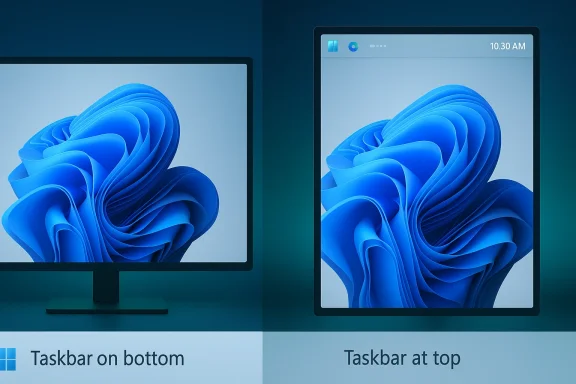
Side-by-side monitors show Windows 11 taskbar placement: bottom vs top over a blue swirl wallpaper.Why the Taskbar Became a Flashpoint​

The taskbar is o noticing only when it works exactly the way they want. When it changes, the difference is immediate. It anchors Start, pinned apps, notifications, clock behavior, and the daily choreography of switching between windows. Because it sits at the center of almost every desktop action, even a small restriction can feel disproportionately annoying.
That is why the inability to move it caused such a durable backlash. For ultrawide users, a vertical or top-aligned taskbar can improve ergonomics and reduce travel distance. For people with multiple monitors, the taskbar position can change how naturally the interface fits a workspace. For users on portrait displays, the argument is even more practical: vertical space is precious, and a side taskbar can preserve it. WindowsForum’s current drafts describe this as a “major workflow dependency,” not a cosmetic preference, and that framing is accurate .

What users actually lost​

The complaint was never only about aesthetics. Users lost a familiar modei adapted to the person, not the other way around. That loss mattered to developers, support professionals, remote-desktop users, and creative workers just as much as casual users, because the taskbar is a constant companion in every session.
  • It reduced ergonomic flexibility.
  • It made vertical and ultrawide workflows less comfortable.
  • It weakened the sense that Windows was configurable by default.
  • It pushed many users toward third-party shell tools.
  • It turned a basic preference into a point of friction.
There is also a psychological effect that is easy to underestimate. When users are told a long-available option is gone, they do not just lose a setting; they lose confidence that Microsoft understands what parts of Windows are core and what parts are merely style. That matters because Windows has historically won on breadth and adaptability, not just appearance.

Why this time feels different​

What makes the current change notable is that it appears to be entering the Insider pipeline as a real feature, not as a vague promise or a hidden registry trick. That matters. A prototype that reaches testers suggests Microsoft has moved past simply acknowledging feedback and is now investing engineering time in restoring a capability users can actually depend on.
WindowsForum’s internal coverage also places the taskbar change alongside other shell refinements, including smaller taskbar behavior and broader interface flexibility. That broader pattern suggests Microsoft is not just patching one sore point but reconsidering the overall balance between polish and power user control .

The Windows 10X Legacy​

The best way to understand Windows 11’s taskbar story is to look at its ancestry. Microsoft did not build the Windun direction came from the canceled Windows 10X project, which was intended for dual-screen devices and a more constrained interaction model. When those ideas were folded into Windows 11, they brought with them assumptions about simplification, touch friendliness, and reduced configuration.
That legacy helps explain why the taskbar looked modern but behaved less flexibly than before. Microsoft did not merely remove a feature by accident; it chose a cleaner shell architecture that assumed fewer edge cases and less customization. That trade-off may have made sense on a whiteboard, but it created a real disconnect on traditional desktop hardware. The desktop market still includes millions of people who use keyboards, mice, docks, ultrawides, and multi-monitor arrangements.
The problem is that modernization in interface design is not automatically synonymous with improvement. Windows 11 made the taskbar look tidier, but many users experienced the simplification as a loss of agency. That distinction is crucial. A cleaner interface can be a better interface only if it preserves the ability to fit diverse workflows. When it does not, the redesign starts to feel like a downgrade dressed up as progress.

Why simplification backfired​

Microsoft likely believed that reducing configuration options would produce a more coherent user experience. In practice, the company ran into a classic desktop computing truth: the more diverse the hardware and the more varied the user base, the more valuable configuration becomes. The Windows audience is not one audience.
  • Laptop users often want a different layout than desktop users.
  • Designers and developers often need denser, more efficient layouts.
  • Accessibility needs vary widely across users.
  • Multi-display setups reward flexibility, not uniformity.
  • Enterprise environments need consistency, but not at the expense of usability.
The backlash mattered because it exposed a limit in Microsoft’s design philosophy. Users did not reject modernization; they rejected modernization that treated long-standing control as expendable. That distinction is the difference between a tasteful redesign and a platform that feels like it has forgotten its own strengths.

Why the return matters symbolically​

If the taskbar comes back in movable form, it will signal more than a feature reversal. It will imply that Microsoft is willing to revisit assumptions inherited from the Windows 10X era and ask whether they still make sense for a mainstream desktop OS. That is a healthy question for any platform to ask, especially one with as much history and inertia as Windows.
It also tells the market something about Microsoft’s confidence. Companies do not usually restore highly visible, heavily criticized features unless they believe the benefit will outweigh the risk of admitting the original decision was unpopular. In that sense, the movable taskbar is a small test of a larger question: can Microsoft course-correct without losing momentum?

What Microsoft Appears to Be Changing​

The headline feature is straightforward: Microsoft is reportedly restoring support for placing the taskbar at the top, left, or right of the screen again, instead of forcing it to remain at the bottom. That is the core of the story, and it is the part that will matter most to users who have been waiting since Windows 11 launched.
But the broader pattern is more interesting than the single feature. WindowsForum’s current draft material suggests Microsoft is also reworking taskbar density, clock behavior, calendar features, File Explorer responsiveness, and Windows Update control. That combination matters because it shows the company is not simply indulging nostalgia. It appears to be trying to make Windows 11 feel less rigid and less disruptive in daily use .

Beyond one setting​

A movable taskbar may be the most visible change, but it is part of a broader usability correction. Users have also been asking for the return of familiar taskbar becclock display, and more predictable tray behavior. The signal here is clear: Microsoft is willing to restore a few of the things it removed when the modern shell proved too austere.
That has implications for how future Windows releases will be judged. If Microsoft continues restoring user-requested shell behaviors, then Windows 11 is no longer just the “new design” version of Windows. It becomes the version that slowly reassembled missing pieces after user pressure forced a rethink.

Why the Insider channel matters​

The Insider program is strategically important because it lets Microsoft test whether restored features actually survive contact with real-world setups. Taskbar position sounds simple until it meets DPI scaling, auto-hide logic, multiple monitors, touch input, and accessibility settings. A feature like this can be either a welcome recovery or a compatibility headache, depending on implementation quality.
That is why preview testing matters. It allows Microsoft to discover whether the new behavior is robust enough for the broad user base before declaring it finished. In some ways, that makes the restore more credible: Microsoft is not just announcing victory; it is proving the feature can work again in a modern shell.
  • It lets Microsoft validate edge cases.
  • It reduces the risk of a broad rollback.
  • It helps identify multi-monitor problems early.
  • It gives power users a real say in quality.
  • It protects Microsoft from promising too much too soon.

What this says about Microsoft’s priorities​

The strongest reading is that Microsoft has realized the desktop audience still cares deeply about control, even in an era dominated by AI features and cloud integration. That is important. Windows 11 can be visually streamlined and still remain configurable. The two goals are not mutually exclusive, but they do require restraint and humility.
WindowsForum’s latest material also hints that Microsoft is thinking more broadly about reducing friction elsewhere in the shell. If true, that would put the taskbar move inside a larger effort to rebuild trust with users who feel Windows has been too eager to innovate at the expense of everyday comfort .

Why Power Users Care So Much​

Power users are often the first group to complain when Microsoft removes a feature, but that does not mean they are being nostalgic for its own sake. They tend to notice interface limitations eardOS and because their workflows are more sensitive to details. A movable taskbar can influence cursor travel, monitor organization, and visual density in ways that casual users might never consciously observe.
For developers, analysts, traders, IT pros, and content creators, that matters. The taskbar is not merely a launcher; it is part of a broader arrangement that determines how efficiently the desktop supports work. If a vertical taskbar helps preserve code space or a top-aligned bar better fits a workflow on an ultrawide panel, that is real productivity, not tinkering.
The deeper point is that configuration is a form of respect. When Microsoft gives users the ability to tailor the shell, it says that different workflows are legitimate. When it removes that ability, the platform feels more prescriptive. That is why taskbar placement became such a visible proxy war over Windows 11’s identity.

Enterprise versus consumer expectations​

The enterprise case is not identical to the consumer case, but it is equally important. IT teams value predictability, supportability, and standardization, yet they also need Windows to function cleanly across different hardware profiles. A taskbar that cannot adapt well to docking stations, vertical monitors, or specialized workstations can become a real support burden.
Consumers, meanwhile, often just want the interface to feel familiar and comfortable. That is why the backlash crossed demographic lines. What looked like a small design simplification to Microsoft read as an unnecessary constraint to users across the board.

Why third-party tools filled the gap​

The fact that many users turned to shell modification tools is itself a sign of demand. When users install third-party utilities to get back a default behavior they believe should still exist, the platform has likely crossed from “refined” into “restricted.” Those tools are often clever, but they are also fragile, and they can break when Microsoft changes the shell.
That is exactly why a native return matters more than a workaround. A supported feature is stable, testable, and maintainable. A hack is none of those things.
  • Native support reduces maintenance risk.
  • IT departments can document and support it.
  • Users do not need fragile shell overlays.
  • Microsoft keeps control of the implementation.
  • Compatibility is easier to predict across updates.

Competitive Implications​

The movable taskbar story is not just about one feature in one operating system. It says something broader about how Microsoft sees the desktop market in 2026. Windows still dominates personal and business computing, but the company cannot assume users will tolerate arbitrary reductions in flexibility simply because they have fewer alternatives than they once did.
That is especially important now that Windows 10 support ended in October 2025, which has pushed many reluctant users into Windows 11 whether they were ready or not. That transition gives Microsoft more leverage, but it also raises expectations. If people are going to live with the newer system, they want the missing conveniences restored. WindowsForum’s internal draft material directly notes that the end of Windows 10 support makes every missing feature in Windows 11 more visible .

Windows versus the rest of the desktop market​

Windows has long competed on customization. macOS is polished, Linux is flexible, and Windows has traditionally occupied the middle ground by offering both broad app support and relatively deep configurability. When Windows 11gone of its classic advantages. Restoring taskbar mobility helps reclaim that identity.
This does not mean Microsoft is trying to out-Linux Linux or out-customize every niche desktop environment. It means the company recognizes that some degree of user control is part of the Windows brand itself. If that control fades too much, users start to compare Windows not only to rivals but to its own past.

Why the market cares​

The taskbar may seem trivial to outsiders, but interface decisions can shape public perception of a platform. When users feel locked into a design they did not choose, dissatisfaction spreads quickly through enthusiast communities, enterprise support channels, and social media. Those conversations influence upgrade willingness and trust.
Microsoft cannot afford to keep appearing indifferent to that kind of feedback. The company is trying to push AI features, cloud integration, and new shell concepts at the same time. If the core desktop still feels rigid, the newer ambitions can look like distractions rather than progress.

Strengths and Opportunities​

The best thing about the movable taskbar return is that it addresses a real complaint with a real remedy. It is not a marketing slogan or a vague “experience improvement.” It gives people back a control they lost and helps Windows 11 feel less like a locked-down appliance and more like a mature desktop platform.
  • Restores a long-standing Windows customization behavior.
  • Improves ergonomics on ultrawide and multi-monitor setups.
  • Supports specialized workflows on portrait and docked displays.
  • Reduces dependence on fragile third-party tools.
  • Signals that Microsoft is listening to user feedback.
  • Helps rebuild trust with power users.
  • Rebalances the product away from pure visual simplification.
There is also a broader opportunity here. If Microsoft restores the taskbar, then follows through with other sensible shell improvements, it can turn Windows 11’s reputation from “beautiful but restrictive” into “modern but still configurable.” That would be a meaningful repositioning for the platform.

Risks and Concerns​

The biggest risk is implementation. A feature can be right in principle and still fail in practice if it is unstable, inconsistent across displays, or incomplete in edge cases. Users who have waited years for this change will not be satisfied by a half-working restore.
  • Taskbar placement may behave unpredictably across monitor types.
  • Touch, pen, and accessibility interactions could introduce bugs.
  • Auto-hide behavior may complicate edge docking.
  • IT teams may need time to validate support scenarios.
  • Microsoft could limit the rollout to a narrow Insider subset.
  • A partial restore might frustrate users more than no restore.
  • The change could be overshadowed if paired with other regressions.
There is also a strategic concern. If Microsoft restores features only after years of visible pressure, users may conclude that the company needs to be pushed into every correction. That is not a fatal problem, but it is a reputation problem. Trust is easier to lose than to rebuild.

Looking Ahead​

The next stage is likely to be determined by Insider testing and by how broadly Microsoft is willing to expose the feature. If the movable taskbar survives preview builds with good compatibility, it could become a strong signal that Windows 11 is entering a more pragmatic phase. If not, the company will have to decide whether to keep iterating or trim its ambitions again.
There is also a larger question hidden inside this story: is Microsoft willing to treat desktop configurability as a first-class value again? If the answer is yes, the taskbar move could mark the beginning of a broader rehabilitation of Windows 11’s shell. If the answer is no, this could end up as an isolated concession to a very loud request.
  • Watch whether the feature reaches a broader Insider audience.
  • Watch for support across top, left, and right placements.
  • Watch whether smaller taskbar options return alongside it.
  • Watch for changes to clock, tray, and calendar behavior.
  • Watch whether Microsoft pairs this with other desktop flexibility wins.
For Windows users, the most important detail is not whether the change is elegant on day one. It is whether Microsoft treats it as a real commitment to restoring choice. That is what will separate a meaningful correction from a temporary headline.
The movable taskbar is a reminder that the best Windows updates are not always the flashiest ones. Sometimes the most important upgrade is simply giving users back the control they already knew how to use. If Microsoft follows this path consistently, Windows 11 may finally begin to feel less like a compromise and more like the desktop it was always supposed to be.

Source: Pune Mirror Windows 11 movable taskbar victory: powerful change users demanded
Source: Lapaas Voice Windows 11 brings back movable taskbar after years of backlash
 

Back
Top