

Do not join a Windows Insider channel solely to make File Explorer search faster. Windows 11 is receiving a useful indexing-efficiency fix and a broader Search overhaul, but neither is yet a universal cure: upgrade when the relevant improvements reach your normal servicing channel, and first identify whether your delay comes from duplicate indexing work, missing index coverage, secondary storage, OneDrive, an SMB share, or File Explorer itself.
Microsoft’s March 20, 2026 Windows quality roadmap promises substantially lower latency across File Explorer search, navigation, and context menus, along with faster file operations. The company has not published benchmarks or a general-availability date, so “dramatic speed improvements” remains a direction of travel rather than a measured result that administrators can plan around.
The distinction matters because Microsoft is working on two related but separate tracks. One changes how File Explorer performs indexing work; the other changes how the Windows Search Box finds and ranks local, connected, and cloud content.
The fastest way to make the right upgrade decision is to reproduce the problem by location. A search that is slow in one unindexed project folder but fast in a user profile is not the same problem as File Explorer freezing whenever any search begins.
Use a known filename and repeat the same search in four representative locations:
If local indexed folders are slow and file operations cause noticeable background activity, Microsoft’s duplicate-indexing fix is directly relevant. If only a secondary drive produces incomplete or inconsistent results, the storage-location reliability work may matter more than raw speed.
If local results are fast but cloud files are poorly ranked or hard to match, the July 2026 Search experiments are the closer fit. If SMB folders, external disks, or enormous source-code and media repositories remain slow, installing a newer Windows build may not remove the underlying cost of scanning a location that is not efficiently indexed.
This is also why replacing Windows Search with another tool can appear to deliver a miraculous improvement. A third-party utility may maintain a different database, focus on filenames rather than file contents, or avoid the same cloud and connected-file scope. That can be useful, but it does not prove that every Windows 11 search delay has the same cause.
That is a credible architectural improvement because it targets unnecessary work rather than merely changing an animation or rearranging the interface. A system repeatedly processing the same indexing operation can consume CPU, storage bandwidth, and power without making results more complete.
The likely benefit is therefore greatest on PCs where File Explorer searches and file operations compete for resources. Machines with slower storage, extensive indexed content, or frequent file creation and movement may feel the reduction more clearly than a lightly used PC with a small index.
There is still a critical evidence gap: Microsoft has published no benchmark for the change. It has not specified a percentage reduction in indexing activity, a target repository size, or an expected improvement in time-to-first-result. There is no basis for promising that a search taking 20 seconds today will take two seconds after the fix.
Build 26220.7523 also improved handling of system and secondary-drive locations. Microsoft described this as a search-reliability change intended to provide more accurate results across storage devices, which may address missing or inconsistent results even when it does not transform query speed.
Reliability and performance should not be conflated. Returning the correct file after a slightly longer wait may be an improvement for a workstation with several internal drives, while returning an incomplete list quickly is not.
These changes explain why the indexing work deserves attention, but not why ordinary production PCs should immediately enter an Insider channel. Insider builds introduce servicing and compatibility considerations of their own, and Microsoft has not provided a general-availability schedule for this particular optimization.
For production endpoints, the practical choice is to monitor Windows release notes and validate the fix when it reaches the organization’s supported update path. Enthusiasts with a noncritical test machine can evaluate Build 26220.7523 or later builds, but joining an Insider channel on a primary workstation solely for this fix is difficult to justify without measurements from the affected PC.
Those changes may eventually support Microsoft’s March promise of a more consistent search experience across Windows surfaces. They should not, however, be reported as a generally available File Explorer speed release.
The Search Box and File Explorer can draw on overlapping search infrastructure, but they are different user experiences. Improving whether a local document ranks ahead of a web suggestion does not establish that searching a huge folder from File Explorer is now faster. Better matching for a OneDrive document similarly does not demonstrate lower latency while enumerating files on an SMB share.
Availability is another complication. Microsoft says the July changes are rolling out gradually through its Experimental channel using Controlled Feature Rollout. Consequently, two PCs on an apparently suitable Insider configuration may not expose the same behavior, and installing a build does not necessarily activate every announced experiment.
This makes the Experimental channel unsuitable as a quick production workaround. Its value is in testing Microsoft’s search direction, including whether short queries return the expected file and whether connected content appears in a sensible position.
The WindowsForum discussion around Explorer performance has already reflected the broader frustration: launch delays, right-click latency, navigation behavior, flicker, and search can all be experienced as “Explorer is slow.” Microsoft’s 2026 roadmap finally treats these as core quality issues, but users still need to isolate the specific interaction before deciding whether an update solved anything.
For a workstation with several internal drives, the secondary-drive handling in Build 26220.7523 is particularly relevant. Test both result completeness and response time, because the visible improvement may be finding files that were previously omitted rather than returning results instantly.
For OneDrive and other connected-file workflows, watch the Experimental-channel Search changes, but do not assume they improve every File Explorer operation. Ranking and cloud matching address whether Windows presents the right result; synchronization state, connectivity, and local availability can still influence what the user experiences.
For SMB shares, external storage, and extremely large repositories, waiting for a Windows update is not a complete performance plan. These searches may involve remote latency, storage throughput, server-side behavior, or folders outside efficient local index coverage. Test them independently and retain specialist search tools where they provide a measurable operational advantage.
Administrators should also avoid index rebuilds as a reflex. Rebuilding creates additional work and can temporarily worsen search availability while the catalog is recreated. It is appropriate when there is evidence of corrupted or persistently incorrect results, not merely because one non-indexed network directory is slow.
A controlled pilot should measure the same queries before and after an update, using the same files and storage locations. Time to first useful result, total result completeness, Explorer responsiveness, and resource activity during file operations are more valuable than a user’s general impression after installing a new build.
Build 26220.7523 supplies one tangible mechanism by eliminating duplicate indexing operations. The July Experimental-channel changes supply another part of the strategy by improving query handling, ranking, connected files, and reliability across the Windows Search Box.
Until Microsoft publishes broader rollout details and reproducible performance data, the correct decision remains workload-specific. Keep stable PCs on supported releases, test Insider changes only on appropriate systems, and measure the location that is actually slow instead of treating every Windows search complaint as an indexing problem.
The real milestone will not be another promise that File Explorer is faster. It will be a production release that names the included fixes and demonstrates whether local indexed folders, secondary drives, cloud content, and large non-indexed locations each improve—or which of them still need a different solution.
Microsoft’s March 20, 2026 Windows quality roadmap promises substantially lower latency across File Explorer search, navigation, and context menus, along with faster file operations. The company has not published benchmarks or a general-availability date, so “dramatic speed improvements” remains a direction of travel rather than a measured result that administrators can plan around.
The distinction matters because Microsoft is working on two related but separate tracks. One changes how File Explorer performs indexing work; the other changes how the Windows Search Box finds and ranks local, connected, and cloud content.
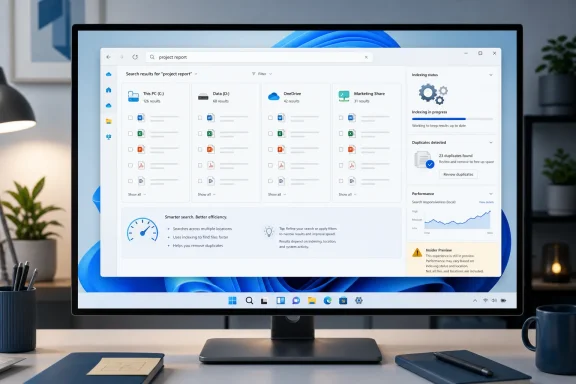 Diagnose the Search Path Before Changing Windows
The fastest way to make the right upgrade decision is to reproduce the problem by location. A search that is slow in one unindexed project folder but fast in a user profile is not the same problem as File Explorer freezing whenever any search begins.Use a known filename and repeat the same search in four representative locations:
- Search a local folder that Windows already handles quickly, such as a frequently used folder in the user profile.
- Search a large local repository or archive where performance is normally poor.
- Search a secondary internal drive or attached external disk, if one is part of the workload.
- Search a OneDrive-backed folder or SMB network location separately rather than mixing those results with local-storage testing.
If local indexed folders are slow and file operations cause noticeable background activity, Microsoft’s duplicate-indexing fix is directly relevant. If only a secondary drive produces incomplete or inconsistent results, the storage-location reliability work may matter more than raw speed.
If local results are fast but cloud files are poorly ranked or hard to match, the July 2026 Search experiments are the closer fit. If SMB folders, external disks, or enormous source-code and media repositories remain slow, installing a newer Windows build may not remove the underlying cost of scanning a location that is not efficiently indexed.
This is also why replacing Windows Search with another tool can appear to deliver a miraculous improvement. A third-party utility may maintain a different database, focus on filenames rather than file contents, or avoid the same cloud and connected-file scope. That can be useful, but it does not prove that every Windows 11 search delay has the same cause.
Build 26220.7523 Removes Work, Not Every Bottleneck
Windows 11 Insider Preview Build 26220.7523, released to the Dev and Beta channels on December 19, 2025, contains Microsoft’s most concrete File Explorer search optimization in this effort. In its Windows Insider blog announcement, Microsoft said it eliminated duplicate file-indexing operations, with the goal of producing faster searches and reducing resource use during file operations.That is a credible architectural improvement because it targets unnecessary work rather than merely changing an animation or rearranging the interface. A system repeatedly processing the same indexing operation can consume CPU, storage bandwidth, and power without making results more complete.
The likely benefit is therefore greatest on PCs where File Explorer searches and file operations compete for resources. Machines with slower storage, extensive indexed content, or frequent file creation and movement may feel the reduction more clearly than a lightly used PC with a small index.
There is still a critical evidence gap: Microsoft has published no benchmark for the change. It has not specified a percentage reduction in indexing activity, a target repository size, or an expected improvement in time-to-first-result. There is no basis for promising that a search taking 20 seconds today will take two seconds after the fix.
Build 26220.7523 also improved handling of system and secondary-drive locations. Microsoft described this as a search-reliability change intended to provide more accurate results across storage devices, which may address missing or inconsistent results even when it does not transform query speed.
Reliability and performance should not be conflated. Returning the correct file after a slightly longer wait may be an improvement for a workstation with several internal drives, while returning an incomplete list quickly is not.
These changes explain why the indexing work deserves attention, but not why ordinary production PCs should immediately enter an Insider channel. Insider builds introduce servicing and compatibility considerations of their own, and Microsoft has not provided a general-availability schedule for this particular optimization.
For production endpoints, the practical choice is to monitor Windows release notes and validate the fix when it reaches the organization’s supported update path. Enthusiasts with a noncritical test machine can evaluate Build 26220.7523 or later builds, but joining an Insider channel on a primary workstation solely for this fix is difficult to justify without measurements from the affected PC.
The July Search Overhaul Is Broader Than File Explorer
Microsoft’s July 13, 2026 Windows Insider announcement covers improvements to the Windows Search Box in the Experimental channel. It includes better two-character local-file searches, improved local-result ranking, stronger matching for cloud and connected files, and changes intended to reduce crashes and loading failures.Those changes may eventually support Microsoft’s March promise of a more consistent search experience across Windows surfaces. They should not, however, be reported as a generally available File Explorer speed release.
The Search Box and File Explorer can draw on overlapping search infrastructure, but they are different user experiences. Improving whether a local document ranks ahead of a web suggestion does not establish that searching a huge folder from File Explorer is now faster. Better matching for a OneDrive document similarly does not demonstrate lower latency while enumerating files on an SMB share.
Availability is another complication. Microsoft says the July changes are rolling out gradually through its Experimental channel using Controlled Feature Rollout. Consequently, two PCs on an apparently suitable Insider configuration may not expose the same behavior, and installing a build does not necessarily activate every announced experiment.
This makes the Experimental channel unsuitable as a quick production workaround. Its value is in testing Microsoft’s search direction, including whether short queries return the expected file and whether connected content appears in a sensible position.
The WindowsForum discussion around Explorer performance has already reflected the broader frustration: launch delays, right-click latency, navigation behavior, flicker, and search can all be experienced as “Explorer is slow.” Microsoft’s 2026 roadmap finally treats these as core quality issues, but users still need to isolate the specific interaction before deciding whether an update solved anything.
Match the Fix to the Workload
For a home PC with slow searches in ordinary local indexed folders, wait for the indexing improvements to reach a stable Windows release unless the machine is already used for Insider testing. Before rebuilding anything, compare search behavior across a small known folder and the location that feels slow.For a workstation with several internal drives, the secondary-drive handling in Build 26220.7523 is particularly relevant. Test both result completeness and response time, because the visible improvement may be finding files that were previously omitted rather than returning results instantly.
For OneDrive and other connected-file workflows, watch the Experimental-channel Search changes, but do not assume they improve every File Explorer operation. Ranking and cloud matching address whether Windows presents the right result; synchronization state, connectivity, and local availability can still influence what the user experiences.
For SMB shares, external storage, and extremely large repositories, waiting for a Windows update is not a complete performance plan. These searches may involve remote latency, storage throughput, server-side behavior, or folders outside efficient local index coverage. Test them independently and retain specialist search tools where they provide a measurable operational advantage.
Administrators should also avoid index rebuilds as a reflex. Rebuilding creates additional work and can temporarily worsen search availability while the catalog is recreated. It is appropriate when there is evidence of corrupted or persistently incorrect results, not merely because one non-indexed network directory is slow.
A controlled pilot should measure the same queries before and after an update, using the same files and storage locations. Time to first useful result, total result completeness, Explorer responsiveness, and resource activity during file operations are more valuable than a user’s general impression after installing a new build.
Microsoft Still Owes Windows Users Numbers
The March 20 roadmap is unusually direct about Microsoft’s ambitions: lower latency for File Explorer search, navigation, and context menus, plus faster and more reliable file operations. What it does not provide is the release sequence connecting those promises to supported Windows 11 production builds.Build 26220.7523 supplies one tangible mechanism by eliminating duplicate indexing operations. The July Experimental-channel changes supply another part of the strategy by improving query handling, ranking, connected files, and reliability across the Windows Search Box.
Until Microsoft publishes broader rollout details and reproducible performance data, the correct decision remains workload-specific. Keep stable PCs on supported releases, test Insider changes only on appropriate systems, and measure the location that is actually slow instead of treating every Windows search complaint as an indexing problem.
The real milestone will not be another promise that File Explorer is faster. It will be a production release that names the included fixes and demonstrates whether local indexed folders, secondary drives, cloud content, and large non-indexed locations each improve—or which of them still need a different solution.
References
- Primary source: blogs.windows.com
Improving Windows Search Box, with less clutter and more control
Hello Windows Insiders, You’ve been asking for search that is faster, more relevant, and easier to use—whether you’re opening an app, finding a file, or changing a setting. Because the Windows Search Box is where many people start, we focusedblogs.windows.com - Independent coverage: windowscentral.com
Microsoft announces major Windows 11 search overhaul that prioritizes clearer, local results, and removes ads: Huge effort to fix search on Windows is finally happening | Windows Central
Windows 11's search user experience is getting a big update, with Microsoft moving to prioritize local results, remove promotional content, and much more.www.windowscentral.com - Independent coverage: techradar.com
'We love this... except gradual rollouts': Windows 11 search is being improved in a big way, with users impatient to get these changes — and I don't blame them | TechRadar
Less clutter, more relevance — and an option to ditch web resultswww.techradar.com - Primary source: WindowsForum
Why Windows 11 Feels Slower Than Windows 10 for File Explorer and Right-Click | Windows Forum
Windows 11 continues to lag Windows 10 in several basic, day‑to‑day interactions—opening File Explorer and showing the right‑click context menu among...windowsforum.com
