

Windows 11 Insider Preview Build 26220.8925 adds three practical File Explorer refinements for Beta Channel testers: readable file-size units in Details view, additional middle-click tab shortcuts, and clearer screen-reader feedback during copy or move conflicts.
The update, released on July 20, 2026, is a Windows 11 version 25H2 Beta build delivered through an enablement package. It is not yet a feature update for retail Windows 11 PCs, and Microsoft can still alter or remove preview features before broader release.
File Explorer’s Details view no longer represents every file size in kilobytes. Instead, it automatically selects an appropriate unit—KB, MB, or GB—so large files and folders are easier to assess without mentally converting a long KB value.
The adjustment is minor, but it is useful in real-world cleanup, backup, and transfer work. A disk image, video archive, virtual machine disk, or ISO file is immediately recognizable as multi-gigabyte content rather than an unwieldy number expressed only in KB.
For example, while browsing
That matters because these dialogs can require a consequential decision: replace a destination file, skip it, or retain both versions. Better announcements reduce the risk of having to infer which file operation Windows is asking about or which outcome a selected option will produce.
Insiders who do not see every listed change immediately should not assume the update failed. Microsoft commonly uses controlled feature rollout in preview builds, so an installed build number and immediate availability of every feature are not always the same thing.
For Beta Channel users, these File Explorer changes are among the more straightforward quality-of-life additions in the build. They do not redesign the app or alter established workflows; they simply make size information clearer, tabbed navigation quicker, and file-conflict handling more accessible.
The update, released on July 20, 2026, is a Windows 11 version 25H2 Beta build delivered through an enablement package. It is not yet a feature update for retail Windows 11 PCs, and Microsoft can still alter or remove preview features before broader release.
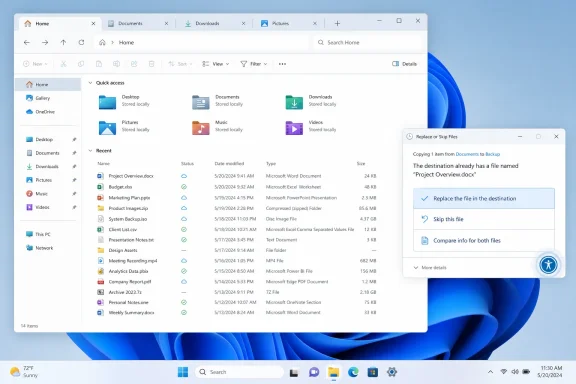 Details view now uses KB, MB, and GB
File Explorer’s Details view no longer represents every file size in kilobytes. Instead, it automatically selects an appropriate unit—KB, MB, or GB—so large files and folders are easier to assess without mentally converting a long KB value.The adjustment is minor, but it is useful in real-world cleanup, backup, and transfer work. A disk image, video archive, virtual machine disk, or ISO file is immediately recognizable as multi-gigabyte content rather than an unwieldy number expressed only in KB.
Middle-clicking folders gains two more tab entry points
Windows 11 already supports middle-clicking folders in several File Explorer locations to open them in a new tab. Build 26220.8925 extends that behavior to folders shown in:- The address bar
- The Home page
For example, while browsing
C:\Users\name\Documents\Projects\2026, middle-clicking Projects in the address bar can open that folder alongside the current 2026 folder instead of replacing it. The behavior is especially helpful when comparing files or moving content among adjacent directories.Copy and move conflicts should be clearer with a screen reader
Microsoft has also improved screen-reader announcements for file-conflict dialogs that appear when copying or moving files with matching names. The change is intended to make the conflict-resolution choices easier to understand for people using assistive technology.That matters because these dialogs can require a consequential decision: replace a destination file, skip it, or retain both versions. Better announcements reduce the risk of having to infer which file operation Windows is asking about or which outcome a selected option will produce.
Available only to Windows Insiders for now
Build 26220.8925 is available in the Windows Insider Beta Channel for Windows 11 version 25H2. Users can check their installed build by opening Settings > System > About and looking under Windows specifications.Insiders who do not see every listed change immediately should not assume the update failed. Microsoft commonly uses controlled feature rollout in preview builds, so an installed build number and immediate availability of every feature are not always the same thing.
For Beta Channel users, these File Explorer changes are among the more straightforward quality-of-life additions in the build. They do not redesign the app or alter established workflows; they simply make size information clearer, tabbed navigation quicker, and file-conflict handling more accessible.
References
- Primary source: thewincentral.com
Published: 2026-07-22T12:23:37+00:00
Loading…
thewincentral.com