

Windows 11’s coordinated-update concept is an experimental Insider capability, not a generally available enterprise servicing policy. Enterprises should prepare to coordinate routine, validated Windows, .NET, and driver updates where management controls permit, while keeping firmware on a separate, model-specific approval path.
WindowsForum user reports have consistently focused on the practical appeal: fewer maintenance interruptions if compatible updates can share an installation window and restart. Those reports also produced a more important operational conclusion—coordinating timing should not erase the different testing and recovery requirements for operating-system updates, application frameworks, drivers, and firmware.
Some early WindowsForum coverage associated this concept with an unverified “Build 26300.8687.” That build number and the feature details attributed to it are not substantiated by the supplied Microsoft material and should not be used for deployment planning. Microsoft has documented Experimental 26H1 Preview Build 28020.2134, but that fact alone does not establish the proposed unified Windows, .NET, driver, and firmware servicing model or its eventual enterprise controls.
Reducing restart prompts is a worthwhile objective. A device that restarts for the monthly Windows update and then requests another restart for a separately installed component creates avoidable disruption, especially for shared workstations, kiosks, laboratories, call centers, and remote employees who regularly miss maintenance windows.
The benefit is operational rather than evidentiary. Current Insider material does not establish a final governance model under which Windows quality updates, .NET packages, drivers, and firmware can all be approved, scheduled, excluded, and reported through one commercial workflow.
WindowsForum contributors discussing the test repeatedly arrived at a selective approach: use a common maintenance window for low-risk, validated work, but do not interpret a common restart as permission to approve every package together. That is WindowsForum’s recommended enterprise policy, not a policy Microsoft has announced.
A practical division of responsibility would be:
This table should also set the boundary for interpreting the WindowsForum reports. They are useful evidence of administrator priorities—less disruption, clearer scheduling, and concern about firmware risk—but they do not substitute for Microsoft release notes or commercial management documentation.
It is reasonable to ask whether administrators will be able to exclude an update class, identify every package participating in a maintenance event, preserve endpoint approval boundaries, or determine which component caused a failure. It is not reasonable to claim that Microsoft has already specified those behaviors.
Likewise, organizations should not assume that a coordinated experience would guarantee exactly one restart every month. Prerequisites, urgent security work, installation failures, recovery operations, OEM requirements, and packages outside the coordination mechanism could still require separate action. The supplied material does not provide a complete eligibility or exception matrix.
That validation cannot be inferred from the Windows quality-update ring. Driver behavior depends on hardware identifiers, component revisions, BIOS or UEFI state, attached peripherals, security tools, and business applications. The same package may be uneventful on one laptop generation while disrupting wireless connectivity, external displays, sleep behavior, or docking on another.
WindowsForum administrators discussing the coordinated-update concept emphasized this model-specific risk. Their recommended workflow is to retain separate driver rings even if installation and restart timing can eventually be aligned:
That makes firmware governance dependent on more than installation timing. Before broad deployment, IT must understand:
WindowsForum reports were especially consistent on this point: the convenience of sharing a maintenance window does not outweigh uncertainty about power, boot recovery, OEM tooling, or physical access. Firmware can still be deployed promptly when security or reliability requires it, but through a dedicated model-specific pilot and support plan.
The appropriate firmware owner may also differ from the owner of Windows quality updates. In many organizations, endpoint engineering manages Windows rings while a hardware lifecycle or OEM-management team validates firmware. A coordinated user experience should not silently transfer that accountability.
Administrators should therefore avoid using Insider behavior as the basis for service-level agreements, maintenance-window promises, or compliance deadlines. Production planning requires documentation covering supported versions, package eligibility, management interfaces, policy precedence, reporting, rollback, and known exceptions.
Windows release health should remain a required checkpoint before broad Windows deployment. It provides Microsoft’s status information for known and resolved issues, safeguards, and servicing milestones. Release health does not replace internal testing or OEM guidance, but it helps deployment owners determine whether a known issue affects their environment before expanding a ring.
Organizations should also resist setting a “one monthly restart” metric in isolation. A reduction in prompts can look successful while concealing longer maintenance windows, increased installation failures, more BitLocker calls, or harder root-cause analysis. Useful baseline measures include restart frequency, deployment completion time, failed installations, rollback volume, help-desk contacts, and devices that repeatedly miss maintenance windows.
WindowsForum user reports have consistently focused on the practical appeal: fewer maintenance interruptions if compatible updates can share an installation window and restart. Those reports also produced a more important operational conclusion—coordinating timing should not erase the different testing and recovery requirements for operating-system updates, application frameworks, drivers, and firmware.
Some early WindowsForum coverage associated this concept with an unverified “Build 26300.8687.” That build number and the feature details attributed to it are not substantiated by the supplied Microsoft material and should not be used for deployment planning. Microsoft has documented Experimental 26H1 Preview Build 28020.2134, but that fact alone does not establish the proposed unified Windows, .NET, driver, and firmware servicing model or its eventual enterprise controls.
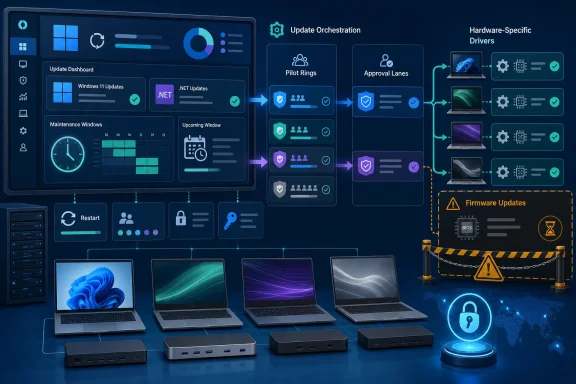 Coordinated Timing Does Not Require Coordinated Approval
Reducing restart prompts is a worthwhile objective. A device that restarts for the monthly Windows update and then requests another restart for a separately installed component creates avoidable disruption, especially for shared workstations, kiosks, laboratories, call centers, and remote employees who regularly miss maintenance windows.The benefit is operational rather than evidentiary. Current Insider material does not establish a final governance model under which Windows quality updates, .NET packages, drivers, and firmware can all be approved, scheduled, excluded, and reported through one commercial workflow.
WindowsForum contributors discussing the test repeatedly arrived at a selective approach: use a common maintenance window for low-risk, validated work, but do not interpret a common restart as permission to approve every package together. That is WindowsForum’s recommended enterprise policy, not a policy Microsoft has announced.
A practical division of responsibility would be:
- Windows and .NET: Coordinate after application testing in representative pilot groups.
- Routine drivers: Coordinate only after validating the exact package against the affected hardware models and peripherals.
- Firmware: Keep a separate approval path, narrow pilot population, and documented recovery procedure.
- Emergency updates: Handle according to severity and exposure rather than waiting merely to preserve a monthly restart target.
What Is Documented—and What Is Not
The distinction between Microsoft documentation, unresolved questions, and WindowsForum analysis is essential at this stage.| Category | Current status |
|---|---|
| Documented today | Microsoft has identified Experimental 26H1 Preview Build 28020.2134. Its experimental status means features and behavior can change and should not be treated as a commitment to general availability. |
| Not documented today in the supplied material | A final enterprise servicing policy that combines Windows, .NET, drivers, and firmware; package eligibility rules; supported retail Windows versions; hardware coverage; a general-availability date; or guaranteed restart behavior. |
| Also not documented today | How any coordinated experience would interact with Microsoft Intune, Windows Server Update Services, deployment deadlines, grace periods, active hours, approval boundaries, exclusions, notifications, or failure reporting. |
| Recommended enterprise policy | Coordinate routine Windows, .NET, and validated driver servicing where existing controls support it, but retain separate test rings and approvals. Keep firmware in a model-specific path until commercial management and recovery behavior are documented. |
It is reasonable to ask whether administrators will be able to exclude an update class, identify every package participating in a maintenance event, preserve endpoint approval boundaries, or determine which component caused a failure. It is not reasonable to claim that Microsoft has already specified those behaviors.
Likewise, organizations should not assume that a coordinated experience would guarantee exactly one restart every month. Prerequisites, urgent security work, installation failures, recovery operations, OEM requirements, and packages outside the coordination mechanism could still require separate action. The supplied material does not provide a complete eligibility or exception matrix.
Drivers Require Hardware-Specific Validation
Drivers are plausible candidates for coordinated maintenance because many enterprises already test them through hardware-based deployment rings. A routine network, audio, display, storage, battery, or docking driver may fit into the same maintenance window as Windows and .NET after it has passed representative testing.That validation cannot be inferred from the Windows quality-update ring. Driver behavior depends on hardware identifiers, component revisions, BIOS or UEFI state, attached peripherals, security tools, and business applications. The same package may be uneventful on one laptop generation while disrupting wireless connectivity, external displays, sleep behavior, or docking on another.
WindowsForum administrators discussing the coordinated-update concept emphasized this model-specific risk. Their recommended workflow is to retain separate driver rings even if installation and restart timing can eventually be aligned:
- Identify the exact driver package and target devices.
- Test it on representative models and common peripheral combinations.
- Monitor installation, rollback, connectivity, power, and application behavior.
- Expand to a model-specific production ring only after the pilot remains stable.
- Coordinate its maintenance window with Windows and .NET only when existing controls preserve that targeting.
Firmware Needs a Separate Recovery Decision
Firmware affects a different recovery layer from an ordinary operating-system update. A failed Windows component can often be removed, repaired, or rolled back from within Windows recovery tools. A failed firmware operation can prevent normal startup and may require OEM-specific recovery, physical access, depot repair, or motherboard replacement.That makes firmware governance dependent on more than installation timing. Before broad deployment, IT must understand:
- The exact eligible models, revisions, and prerequisites.
- AC-power, battery-level, and user-presence requirements.
- The OEM’s interruption and recovery behavior.
- Whether the device can recover remotely or requires hands-on support.
- How BitLocker recovery keys will be retrieved by authorized support staff.
- Who owns escalation when a device does not return after the maintenance event.
WindowsForum reports were especially consistent on this point: the convenience of sharing a maintenance window does not outweigh uncertainty about power, boot recovery, OEM tooling, or physical access. Firmware can still be deployed promptly when security or reliability requires it, but through a dedicated model-specific pilot and support plan.
The appropriate firmware owner may also differ from the owner of Windows quality updates. In many organizations, endpoint engineering manages Windows rings while a hardware lifecycle or OEM-management team validates firmware. A coordinated user experience should not silently transfer that accountability.
Experimental Builds Are Not Production Commitments
Microsoft’s identification of Experimental 26H1 Preview Build 28020.2134 confirms an experimental branch, but it does not provide a release date or commercial commitment for the coordinated servicing model discussed by WindowsForum users. Experimental features may be changed, withdrawn, or delivered differently before reaching broadly supported Windows releases.Administrators should therefore avoid using Insider behavior as the basis for service-level agreements, maintenance-window promises, or compliance deadlines. Production planning requires documentation covering supported versions, package eligibility, management interfaces, policy precedence, reporting, rollback, and known exceptions.
Windows release health should remain a required checkpoint before broad Windows deployment. It provides Microsoft’s status information for known and resolved issues, safeguards, and servicing milestones. Release health does not replace internal testing or OEM guidance, but it helps deployment owners determine whether a known issue affects their environment before expanding a ring.
Organizations should also resist setting a “one monthly restart” metric in isolation. A reduction in prompts can look successful while concealing longer maintenance windows, increased installation failures, more BitLocker calls, or harder root-cause analysis. Useful baseline measures include restart frequency, deployment completion time, failed installations, rollback volume, help-desk contacts, and devices that repeatedly miss maintenance windows.
Pre-GA Checklist for IT
Until Microsoft publishes commercial management documentation, the goal is preparation rather than production policy change.- [ ] Endpoint engineering: Inventory every current restart source, including Windows quality updates, .NET servicing, drivers, firmware, security tools, and business applications.
- [ ] Windows servicing owner: Maintain a Windows/.NET pilot ring with representative applications, security agents, network configurations, and user workflows.
- [ ] Hardware engineering: Maintain separate, model-specific driver rings covering major OEM families, generations, docks, graphics configurations, and specialized peripherals.
- [ ] Firmware or OEM-management owner: Maintain a narrower firmware ring with documented prerequisites, power requirements, recovery methods, and support coverage.
- [ ] Security and service desk: Test BitLocker recovery-key retrieval, user verification, after-hours escalation, and handling for devices that fail to boot.
- [ ] Vendor management: Record OEM support contacts and escalation procedures for interrupted or unsuccessful firmware installations.
- [ ] Deployment owner: Review Windows release health and applicable OEM advisories before each broad deployment.
- [ ] Operations analytics: Capture baseline restart, failure, rollback, completion, and support-contact data so future coordination can be evaluated objectively.
- [ ] Policy owner: Do not alter production approvals, exclusions, or restart policy until Microsoft publishes commercial management documentation applicable to the organization’s tools and supported Windows versions.
Frequently Asked Questions
Is Microsoft’s coordinated-update concept generally available?
No. The supplied facts establish an experimental Insider build, not a generally available enterprise servicing policy. They do not establish a production release date, supported retail versions, or final commercial controls.Does Experimental 26H1 Preview Build 28020.2134 prove that Windows, .NET, drivers, and firmware will use one enterprise workflow?
No. The build’s documented existence does not establish that governance model. Any proposal to coordinate those update classes should be identified as WindowsForum analysis until Microsoft publishes applicable documentation.Should enterprises combine Windows and .NET maintenance?
They can coordinate routine Windows and .NET deployment where current tools preserve testing, approval, and rollback requirements. Application compatibility should be validated in a representative pilot before broad deployment.Can validated drivers share the same maintenance window?
Potentially, yes. The exact driver must first pass testing on the relevant device models and peripheral combinations. Model-specific targeting and monitoring should remain in place even if restart timing is coordinated.Why keep firmware separate?
Firmware has different power, boot, OEM, BitLocker, physical-access, and recovery implications. It should remain in a dedicated approval and pilot path until each hardware family has a tested recovery procedure and Microsoft documents any relevant commercial controls.Should IT configure Intune or WSUS now for this experimental model?
No production change should be based on assumptions. Questions about Intune, WSUS, deadlines, grace periods, active hours, approvals, exclusions, and reporting remain questions unless Microsoft documents the behavior for commercial customers.What should organizations do now?
Inventory restart sources, maintain separate pilot rings, establish BitLocker and OEM escalation procedures, review Windows release health, and collect baseline operational data. Coordinate routine validated work only where current controls already permit it, and leave production policy unchanged until commercial management documentation is available.References
- Primary source: learn.microsoft.com
Experimental (26H1) Preview Build 28020.2134 - Windows Insider Program | Microsoft Learn
Release notes for Experimental (26H1) Preview Build 28020.2134learn.microsoft.com - Independent coverage: blogs.windows.com
Announcing new builds for 12 June 2026
Hello Windows Insiders, We have a number of releases today with new builds across Beta, Experimental and Release Preview. Release notes for inbox Windows 11 apps Windows 11 inbox apps are now getting their own release notes sectioblogs.windows.com - Primary source: WindowsForum
