

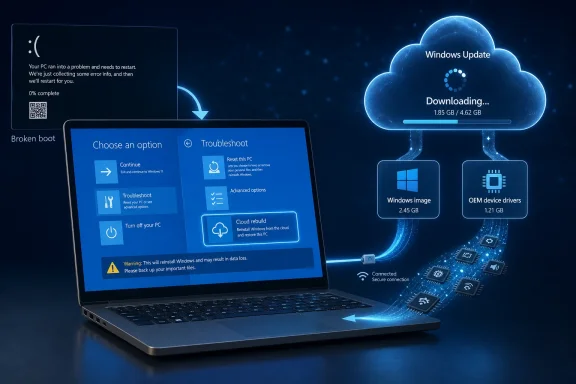
Microsoft is previewing Cloud rebuild in Windows 11 Insider Experimental Preview Build 26300.8772, released July 6, 2026, as a Windows Recovery Environment option that reinstalls the operating system from Windows Update even when the installed copy of Windows cannot boot. As ZDNET’s Lance Whitney reported, the pitch is simple: if Windows is too broken to rescue itself, Microsoft wants WinRE to fetch a clean Windows image and the device’s drivers without asking users to hunt for USB media. The bigger story is not merely another reset button; it is Microsoft moving disaster recovery into the same cloud-serviced model that already governs updates, drivers, identity, and device provisioning. That is promising, but it also shifts the last-resort repair path onto networking, Windows Update, OEM driver availability, and Microsoft’s increasingly managed recovery stack.
For decades, the worst Windows failures have had a ritual quality. The machine loops, WinRE appears, and the user moves through a familiar hierarchy of hopes: Startup Repair, System Restore, Command Prompt, recovery drive, reinstall media, and finally the grim calculation of what was not backed up. Cloud rebuild changes that ritual by treating a dead Windows installation less like a local repair project and more like a bare-metal deployment target.
Microsoft’s own documentation for the preview says Cloud rebuild restores a Windows 11 PC to a clean, known-good state by performing a full operating system reinstall. The crucial distinction is that it does not depend on the installed OS being healthy enough to supply local recovery files. Instead, WinRE connects to Windows Update, identifies the target Windows build, downloads the image, and pulls device drivers from Microsoft’s update infrastructure.
That matters because “Reset this PC” has always lived in an awkward middle ground. It can be tremendously useful when Windows still has enough internal coherence to reset itself, but it is less reassuring when the recovery files are damaged, the driver stack is suspect, or the machine cannot boot reliably. Cloud rebuild is Microsoft’s answer to that fragility: stop trusting the patient to perform its own surgery.
The move also reflects a broader post-CrowdStrike-era mood in enterprise computing, even if Microsoft is not framing it that bluntly. When a bad driver, update, configuration, or security product can knock fleets of machines offline, recovery can no longer be treated as an artisanal process performed one laptop at a time. The operating system needs a recovery plane that works below the broken installation.
Cloud rebuild lives in WinRE and is designed for the nastier class of failure: the PC that cannot boot into Windows in the first place. According to Microsoft’s preview notes, users start it from the recovery environment by selecting Troubleshoot and then Cloud rebuild. The device then needs internet access through Ethernet or supported Wi-Fi, after which the user reviews the target build, edition, and language before accepting a data-loss warning.
That last warning is not decorative. Cloud rebuild reformats the system disk and removes locally stored files, accounts, apps, and settings. It is a clean reinstall, not a time machine and not a nondestructive repair install. OneDrive files and other cloud-stored data may survive because they are not local to the disk, but anything not synced, backed up, or otherwise protected should be assumed gone.
This is why Microsoft’s recovery story now has two competing emotional registers. On one hand, Cloud rebuild could make a terrifying failure feel recoverable. On the other, it formalizes the idea that the cleanest way to get a PC back is sometimes to wipe it and let cloud services restore what they can.
Windows Update has become the default driver clearinghouse for much of the PC ecosystem. That does not make it perfect, and many IT pros still prefer vendor-controlled driver packages for known-good fleets. But for consumer recovery and many small-business scenarios, a rebuild that emerges with networking and core hardware intact is vastly more useful than one that drops the user into setup with no Wi-Fi driver and a support article open on another device.
The catch is that Cloud rebuild depends on the quality and completeness of that driver supply chain. Microsoft’s documentation already hints at this reality in its troubleshooting guidance, noting that certain failures may indicate either unsupported hardware or a required driver missing from Windows Update. In other words, the feature is only as universal as the OEM and driver ecosystem behind it.
That caveat is especially relevant for older systems, boutique desktops, niche storage controllers, and machines that barely satisfy Windows 11’s hardware requirements. Cloud rebuild may reduce the need for USB recovery media, but it does not repeal the laws of firmware, networking, and driver support. If WinRE cannot get online or Windows Update cannot supply what the device needs, the old recovery playbook returns.
That aligns with Quick Machine Recovery, another recent Windows recovery feature Microsoft describes as a way to help devices recover from widespread boot issues by applying remediations through WinRE. Quick Machine Recovery is not the same as Cloud rebuild. It is closer to a cloud-assisted repair path for known boot problems, while Cloud rebuild is the scorched-earth reinstall option when repair is not enough.
The distinction matters for administrators. A cloud remediation that applies a targeted fix is preferable when the problem is known, narrow, and reversible. A full rebuild is preferable when the machine’s local state is no longer trustworthy, but it carries more operational cost: user disruption, app reinstallations, data restoration, compliance checks, and post-rebuild validation.
Microsoft is building a ladder of recovery options rather than a single magic button. Startup Repair, System Restore, Reset this PC, Quick Machine Recovery, Point-in-Time restore, recovery media, and now Cloud rebuild all occupy different rungs. The challenge for Microsoft will be explaining those rungs clearly enough that users do not choose the nuclear option when a targeted repair would have worked.
For enterprise IT, the feature is more interesting because it sits near Autopilot, Intune, OneDrive, and Microsoft’s broader device-resilience story. Microsoft’s Cloud rebuild documentation says managed devices can proceed through the out-of-box experience after rebuild and can be reprovisioned through services such as Windows Autopilot, Microsoft Intune, Backup for Organizations, and OneDrive. That turns a catastrophic local failure into something closer to a re-enrollment workflow.
The administrative dream is obvious. A remote employee’s laptop fails to boot, but the user can enter WinRE, select Cloud rebuild, connect to a network, and return the device to a known Windows state. From there, organizational policy, app deployment, identity, and user data restoration can do the rest.
The administrative nightmare is also obvious. A destructive recovery option in the hands of users creates support and governance questions. Who is allowed to initiate it, how is authorization handled, what happens to forensic evidence after a suspected compromise, and how does an organization distinguish a necessary rebuild from a user accidentally wiping a managed laptop before help desk can intervene?
Microsoft says the preview can be initiated from WinRE by a user with physical access or from an elevated command prompt by a local administrator, with remote initiation from enterprise endpoint management such as Intune planned for a later release. That future remote-initiation path will be powerful, but it will also demand careful policy design. A cloud rebuild button is useful; a poorly governed remote wipe-and-reinstall mechanism is a risk.
But disaster recovery features must be judged by their worst day, not their demo day. What happens when hotel Wi-Fi uses captive portals WinRE cannot navigate? What happens when the only available wireless network uses an unsupported authentication method? What happens when a laptop’s network driver is precisely the missing component? What happens when Windows Update is reachable for some regions and not others during a broader service incident?
Microsoft’s preview prerequisites are plain about some of this. The device needs a healthy Windows Recovery Environment. The manufacturer must have included a compatible networking driver in WinRE. The device must be able to reach the internet from WinRE over wired Ethernet or personal Wi-Fi. The machine must still meet Windows 11 minimum hardware requirements.
Those are reasonable requirements, but they are not trivial. They mean Cloud rebuild is not a universal resurrection mechanism for every dead PC. It is a strong recovery path for machines whose firmware, recovery partition, networking, Microsoft service access, and driver publication status are all in good enough shape to support it.
This is where Windows’ modern backup story has to carry more weight. OneDrive Known Folder Move, Windows Backup, Microsoft account sync, Enterprise State Roaming’s successors, Backup for Organizations, and app reinstallation policies all become more important when rebuilds are easier to trigger. A fast reinstall is only comforting if the user’s working life can be reconstructed afterward.
Microsoft appears to understand this. The same Insider build notes that introduce Cloud rebuild also mention that, starting in Windows 11 version 26H2, the backup policy for Windows settings backup and restore will be enabled by default on eligible Microsoft Entra joined or hybrid joined devices. That is not a coincidence. If the recovery path is becoming more cloud-native, the user state has to become more cloud-restorable.
Still, there is a cultural gap between “Windows can be rebuilt” and “your PC is recoverable.” Many Windows users keep critical files in Downloads, on the desktop outside sync scope, in local app databases, in browser profiles, in PST files, in game folders, or in line-of-business software that was never designed for seamless cloud restoration. Cloud rebuild solves the operating system problem; it does not solve every data hygiene problem that Windows users have accumulated over three decades.
ZDNET’s article appropriately frames Cloud rebuild as something to try on a test PC or virtual environment, not a daily driver. That cannot be overstated. A preview recovery feature is still software under test, and a recovery feature that fails midstream can leave a system in a worse position than before.
Microsoft’s documentation includes troubleshooting paths for failures, including log collection from WinRE and fallback recommendations such as recovery drives, installation media, or OEM recovery media. That is the responsible posture. It is also a reminder that Cloud rebuild is not yet a replacement for every recovery method administrators already maintain.
For enthusiasts, this is the sort of feature that invites experimentation. For sysadmins, it invites lab validation. The right move is to test it against representative hardware, network environments, firmware configurations, BitLocker states, Autopilot flows, and driver baselines before assuming it will behave predictably across a fleet.
Offline media still has advantages. It works without Microsoft’s cloud services. It can include known-good enterprise images, validated drivers, scripts, diagnostics, and offline tools. It can be used in environments where network access is restricted, monitored, or unavailable. It can also be controlled by IT rather than exposed as a user-facing option in a panic moment.
Cloud rebuild’s advantage is convenience and freshness. It can pull a current Windows image and drivers from Windows Update, avoiding stale recovery partitions and old USB installers that require hours of patching after installation. For consumers and many small offices, that trade-off will be compelling.
For regulated environments, air-gapped networks, incident-response scenarios, and organizations with strict image control, Cloud rebuild will be another tool rather than the tool. Microsoft is right to modernize recovery, but Windows’ diversity of deployment contexts means the humble recovery drive will remain part of the kit for a long time.
That model is coherent. It is also less forgiving of users and organizations that have not bought into the ecosystem. If your files are not backed up, if your drivers are not in Windows Update, if your network is hostile to WinRE, if your apps require manual archaeology, Cloud rebuild will expose those weaknesses quickly.
The upside is that Windows may finally be catching up to the recovery expectations set by phones, Chromebooks, and managed Apple devices. Users increasingly expect that hardware can be wiped and restored without a weekend of driver hunting and application spelunking. Microsoft’s challenge is harder because Windows supports a much messier hardware and software universe, but Cloud rebuild is a credible step toward that expectation.
The risk is that Microsoft oversells simplicity. A clean OS reinstall is not the same as a restored working environment. Recovery is a chain, and Cloud rebuild strengthens one link. The rest of the chain still includes backup discipline, app deployment, identity recovery, encryption key management, firmware sanity, and user education.
 Microsoft Turns the Panic Screen Into a Deployment Surface
For decades, the worst Windows failures have had a ritual quality. The machine loops, WinRE appears, and the user moves through a familiar hierarchy of hopes: Startup Repair, System Restore, Command Prompt, recovery drive, reinstall media, and finally the grim calculation of what was not backed up. Cloud rebuild changes that ritual by treating a dead Windows installation less like a local repair project and more like a bare-metal deployment target.Microsoft’s own documentation for the preview says Cloud rebuild restores a Windows 11 PC to a clean, known-good state by performing a full operating system reinstall. The crucial distinction is that it does not depend on the installed OS being healthy enough to supply local recovery files. Instead, WinRE connects to Windows Update, identifies the target Windows build, downloads the image, and pulls device drivers from Microsoft’s update infrastructure.
That matters because “Reset this PC” has always lived in an awkward middle ground. It can be tremendously useful when Windows still has enough internal coherence to reset itself, but it is less reassuring when the recovery files are damaged, the driver stack is suspect, or the machine cannot boot reliably. Cloud rebuild is Microsoft’s answer to that fragility: stop trusting the patient to perform its own surgery.
The move also reflects a broader post-CrowdStrike-era mood in enterprise computing, even if Microsoft is not framing it that bluntly. When a bad driver, update, configuration, or security product can knock fleets of machines offline, recovery can no longer be treated as an artisanal process performed one laptop at a time. The operating system needs a recovery plane that works below the broken installation.
This Is Not Reset This PC With Better Branding
The temptation is to see Cloud rebuild as a renamed version of Windows’ existing cloud download reset. That would be a mistake. Reset this PC already offers a cloud download path, but it is still part of the reset experience tied to a running or semi-running Windows installation and its local recovery assumptions.Cloud rebuild lives in WinRE and is designed for the nastier class of failure: the PC that cannot boot into Windows in the first place. According to Microsoft’s preview notes, users start it from the recovery environment by selecting Troubleshoot and then Cloud rebuild. The device then needs internet access through Ethernet or supported Wi-Fi, after which the user reviews the target build, edition, and language before accepting a data-loss warning.
That last warning is not decorative. Cloud rebuild reformats the system disk and removes locally stored files, accounts, apps, and settings. It is a clean reinstall, not a time machine and not a nondestructive repair install. OneDrive files and other cloud-stored data may survive because they are not local to the disk, but anything not synced, backed up, or otherwise protected should be assumed gone.
This is why Microsoft’s recovery story now has two competing emotional registers. On one hand, Cloud rebuild could make a terrifying failure feel recoverable. On the other, it formalizes the idea that the cleanest way to get a PC back is sometimes to wipe it and let cloud services restore what they can.
The Driver Piece Is the Quiet Breakthrough
The least glamorous line in Microsoft’s Cloud rebuild description may be the most important: the feature downloads both the target Windows image and the device’s drivers from Windows Update. Anyone who has rebuilt a Windows laptop from generic installation media knows why this matters. A clean install is only clean in theory if Wi-Fi, storage, touchpad, display, audio, and chipset drivers are missing or half-functional afterward.Windows Update has become the default driver clearinghouse for much of the PC ecosystem. That does not make it perfect, and many IT pros still prefer vendor-controlled driver packages for known-good fleets. But for consumer recovery and many small-business scenarios, a rebuild that emerges with networking and core hardware intact is vastly more useful than one that drops the user into setup with no Wi-Fi driver and a support article open on another device.
The catch is that Cloud rebuild depends on the quality and completeness of that driver supply chain. Microsoft’s documentation already hints at this reality in its troubleshooting guidance, noting that certain failures may indicate either unsupported hardware or a required driver missing from Windows Update. In other words, the feature is only as universal as the OEM and driver ecosystem behind it.
That caveat is especially relevant for older systems, boutique desktops, niche storage controllers, and machines that barely satisfy Windows 11’s hardware requirements. Cloud rebuild may reduce the need for USB recovery media, but it does not repeal the laws of firmware, networking, and driver support. If WinRE cannot get online or Windows Update cannot supply what the device needs, the old recovery playbook returns.
WinRE Becomes the Place Where Windows Saves Itself
The Windows Recovery Environment has historically been a utility closet: useful, underappreciated, and mostly visited during emergencies. Cloud rebuild makes it more strategic. Microsoft is turning WinRE into a connected recovery operating environment that can participate in cloud remediation, driver acquisition, and potentially enterprise reprovisioning.That aligns with Quick Machine Recovery, another recent Windows recovery feature Microsoft describes as a way to help devices recover from widespread boot issues by applying remediations through WinRE. Quick Machine Recovery is not the same as Cloud rebuild. It is closer to a cloud-assisted repair path for known boot problems, while Cloud rebuild is the scorched-earth reinstall option when repair is not enough.
The distinction matters for administrators. A cloud remediation that applies a targeted fix is preferable when the problem is known, narrow, and reversible. A full rebuild is preferable when the machine’s local state is no longer trustworthy, but it carries more operational cost: user disruption, app reinstallations, data restoration, compliance checks, and post-rebuild validation.
Microsoft is building a ladder of recovery options rather than a single magic button. Startup Repair, System Restore, Reset this PC, Quick Machine Recovery, Point-in-Time restore, recovery media, and now Cloud rebuild all occupy different rungs. The challenge for Microsoft will be explaining those rungs clearly enough that users do not choose the nuclear option when a targeted repair would have worked.
The Cloud Recovery Model Helps Consumers but Really Speaks Enterprise
For home users, Cloud rebuild is easy to understand. If Windows will not boot and nothing else works, connect to the internet from WinRE and reinstall Windows without making a USB stick. The price is data loss, which is painful but at least legible.For enterprise IT, the feature is more interesting because it sits near Autopilot, Intune, OneDrive, and Microsoft’s broader device-resilience story. Microsoft’s Cloud rebuild documentation says managed devices can proceed through the out-of-box experience after rebuild and can be reprovisioned through services such as Windows Autopilot, Microsoft Intune, Backup for Organizations, and OneDrive. That turns a catastrophic local failure into something closer to a re-enrollment workflow.
The administrative dream is obvious. A remote employee’s laptop fails to boot, but the user can enter WinRE, select Cloud rebuild, connect to a network, and return the device to a known Windows state. From there, organizational policy, app deployment, identity, and user data restoration can do the rest.
The administrative nightmare is also obvious. A destructive recovery option in the hands of users creates support and governance questions. Who is allowed to initiate it, how is authorization handled, what happens to forensic evidence after a suspected compromise, and how does an organization distinguish a necessary rebuild from a user accidentally wiping a managed laptop before help desk can intervene?
Microsoft says the preview can be initiated from WinRE by a user with physical access or from an elevated command prompt by a local administrator, with remote initiation from enterprise endpoint management such as Intune planned for a later release. That future remote-initiation path will be powerful, but it will also demand careful policy design. A cloud rebuild button is useful; a poorly governed remote wipe-and-reinstall mechanism is a risk.
The Feature’s Best Day Is Also Its Worst Day
Cloud rebuild will look best during exactly the kind of incident where traditional recovery looks worst. A bad driver lands, a boot-critical component breaks, or a configuration change bricks enough machines that manual media-based reinstall becomes absurd. If WinRE can get online and retrieve a clean image and drivers, Microsoft has shortened the distance between failure and productivity.But disaster recovery features must be judged by their worst day, not their demo day. What happens when hotel Wi-Fi uses captive portals WinRE cannot navigate? What happens when the only available wireless network uses an unsupported authentication method? What happens when a laptop’s network driver is precisely the missing component? What happens when Windows Update is reachable for some regions and not others during a broader service incident?
Microsoft’s preview prerequisites are plain about some of this. The device needs a healthy Windows Recovery Environment. The manufacturer must have included a compatible networking driver in WinRE. The device must be able to reach the internet from WinRE over wired Ethernet or personal Wi-Fi. The machine must still meet Windows 11 minimum hardware requirements.
Those are reasonable requirements, but they are not trivial. They mean Cloud rebuild is not a universal resurrection mechanism for every dead PC. It is a strong recovery path for machines whose firmware, recovery partition, networking, Microsoft service access, and driver publication status are all in good enough shape to support it.
Data Loss Is the Line Microsoft Cannot Blur
The most important sentence in any Cloud rebuild article is the least exciting one: it removes local files, accounts, apps, programs, and customized settings. That makes it a last-resort recovery path, not a convenience feature. Microsoft can improve the interface, automate the downloads, and restore settings more gracefully, but it cannot make an unbacked-up local file survive a disk reformat through optimism.This is where Windows’ modern backup story has to carry more weight. OneDrive Known Folder Move, Windows Backup, Microsoft account sync, Enterprise State Roaming’s successors, Backup for Organizations, and app reinstallation policies all become more important when rebuilds are easier to trigger. A fast reinstall is only comforting if the user’s working life can be reconstructed afterward.
Microsoft appears to understand this. The same Insider build notes that introduce Cloud rebuild also mention that, starting in Windows 11 version 26H2, the backup policy for Windows settings backup and restore will be enabled by default on eligible Microsoft Entra joined or hybrid joined devices. That is not a coincidence. If the recovery path is becoming more cloud-native, the user state has to become more cloud-restorable.
Still, there is a cultural gap between “Windows can be rebuilt” and “your PC is recoverable.” Many Windows users keep critical files in Downloads, on the desktop outside sync scope, in local app databases, in browser profiles, in PST files, in game folders, or in line-of-business software that was never designed for seamless cloud restoration. Cloud rebuild solves the operating system problem; it does not solve every data hygiene problem that Windows users have accumulated over three decades.
Preview Means Preview, Especially for a Tool That Reformats Disks
Microsoft is exposing Cloud rebuild first through the Windows Insider Experimental channel, which is exactly where a feature like this belongs. The company’s Insider notes repeatedly caution that experimental features may change, disappear, or never ship broadly. That warning matters more when the feature’s job is to reformat a system disk than when it is changing a spinner animation.ZDNET’s article appropriately frames Cloud rebuild as something to try on a test PC or virtual environment, not a daily driver. That cannot be overstated. A preview recovery feature is still software under test, and a recovery feature that fails midstream can leave a system in a worse position than before.
Microsoft’s documentation includes troubleshooting paths for failures, including log collection from WinRE and fallback recommendations such as recovery drives, installation media, or OEM recovery media. That is the responsible posture. It is also a reminder that Cloud rebuild is not yet a replacement for every recovery method administrators already maintain.
For enthusiasts, this is the sort of feature that invites experimentation. For sysadmins, it invites lab validation. The right move is to test it against representative hardware, network environments, firmware configurations, BitLocker states, Autopilot flows, and driver baselines before assuming it will behave predictably across a fleet.
The Old USB Stick Is Not Dead Yet
The obvious headline is that Cloud rebuild reduces the need for USB recovery media. The more accurate version is that it reduces the number of situations where USB recovery media is the fastest path. Those are not the same thing.Offline media still has advantages. It works without Microsoft’s cloud services. It can include known-good enterprise images, validated drivers, scripts, diagnostics, and offline tools. It can be used in environments where network access is restricted, monitored, or unavailable. It can also be controlled by IT rather than exposed as a user-facing option in a panic moment.
Cloud rebuild’s advantage is convenience and freshness. It can pull a current Windows image and drivers from Windows Update, avoiding stale recovery partitions and old USB installers that require hours of patching after installation. For consumers and many small offices, that trade-off will be compelling.
For regulated environments, air-gapped networks, incident-response scenarios, and organizations with strict image control, Cloud rebuild will be another tool rather than the tool. Microsoft is right to modernize recovery, but Windows’ diversity of deployment contexts means the humble recovery drive will remain part of the kit for a long time.
Microsoft Is Rewriting the Windows Failure Contract
The deeper shift is philosophical. Windows used to assume that a PC was primarily a local object: local installation, local files, local recovery partition, local repair tools. Modern Windows increasingly assumes that the PC is an endpoint in a service fabric: identity in Entra or Microsoft accounts, files in OneDrive, drivers in Windows Update, apps from managed deployment, policies from Intune, fixes from cloud remediation, and now full OS recovery from the network.That model is coherent. It is also less forgiving of users and organizations that have not bought into the ecosystem. If your files are not backed up, if your drivers are not in Windows Update, if your network is hostile to WinRE, if your apps require manual archaeology, Cloud rebuild will expose those weaknesses quickly.
The upside is that Windows may finally be catching up to the recovery expectations set by phones, Chromebooks, and managed Apple devices. Users increasingly expect that hardware can be wiped and restored without a weekend of driver hunting and application spelunking. Microsoft’s challenge is harder because Windows supports a much messier hardware and software universe, but Cloud rebuild is a credible step toward that expectation.
The risk is that Microsoft oversells simplicity. A clean OS reinstall is not the same as a restored working environment. Recovery is a chain, and Cloud rebuild strengthens one link. The rest of the chain still includes backup discipline, app deployment, identity recovery, encryption key management, firmware sanity, and user education.
The Rebuild Button Changes the Checklist
Cloud rebuild is not generally available yet, and Microsoft has not promised a final release date. But the preview is mature enough to change how Windows users and administrators should think about preparedness. If Microsoft ships it broadly, recovery planning becomes less about whether a reinstall can be initiated and more about whether the machine can be made useful afterward.- Cloud rebuild is currently a Windows 11 preview feature in Insider Experimental Preview Build 26300.8772, not a production feature for primary PCs.
- The feature performs a full reinstall from WinRE using Windows Update, and it is meant to work even when the installed copy of Windows will not boot.
- The rebuild removes local files, accounts, apps, and settings, so backups and sync are prerequisites for using it safely.
- The feature depends on WinRE networking, compatible drivers, Windows Update availability, and the device meeting Windows 11 hardware requirements.
- Enterprises should test Cloud rebuild against Autopilot, Intune, BitLocker, network authentication, and OEM driver coverage before treating it as a fleet recovery path.
- USB recovery media, OEM recovery tools, and custom images remain relevant for offline, regulated, or tightly controlled environments.
References
- Primary source: ZDNET
Published: Tue, 07 Jul 2026 17:43:00 GMT
Loading…
www.zdnet.com - Official source: learn.microsoft.com
Quick Machine Recovery | Microsoft Learn
Learn about quick machine recovery and how to configure it with the RemoteRemediation configuration service provider (CSP).learn.microsoft.com - Official source: support.microsoft.com
Loading…
support.microsoft.com - Related coverage: windowsforum.com
Loading…
windowsforum.com - Related coverage: lecrabeinfo.net
Loading…
lecrabeinfo.net - Related coverage: profesionalreview.com
Loading…
www.profesionalreview.com
- Related coverage: windowscentral.com
How to fix Windows 11 problems without the Recovery Assistant | Windows Central
If you previously used SaRA for automated troubleshooting, we show you how to start using Microsoft's "Get Help" command-line toolwww.windowscentral.com - Related coverage: petri.com
Loading…
petri.com - Related coverage: blazetrends.com
Loading…
blazetrends.com - Related coverage: allthings.how
Loading…
allthings.how