

Microsoft’s current Windows 11 Copilot+ PC pitch is a sponsored buying guide arguing that shoppers should choose a new AI-capable Windows laptop now because Copilot, Click to Do, local NPU acceleration, gaming breadth, personalization, and built-in security make the platform a safer long-term upgrade. The advertisement is not subtle, and it is not trying to be. But beneath the retail gloss is a real shift in how Microsoft wants buyers to think about the PC replacement cycle: not as a processor-speed upgrade, but as a platform eligibility decision.
That matters because the Windows laptop market has always been a messy democracy of price points, vendors, silicon, screens, and compromises. Copilot+ is Microsoft’s attempt to impose a new organizing principle on that chaos. The company is telling consumers and IT departments that the next Windows machine should not merely run Windows 11; it should qualify for the Windows experiences Microsoft is building next.
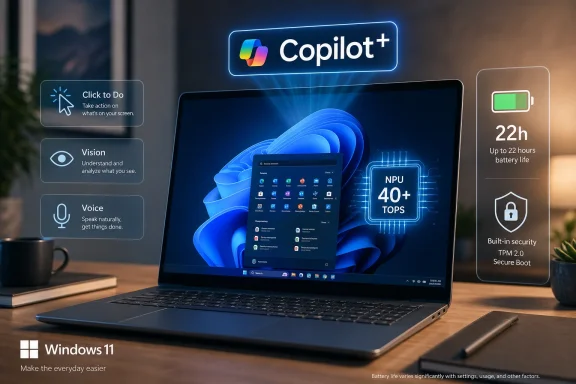
The most important claim in the Trusted Reviews advertorial is not that Copilot can draft an email or summarize a page. Those are now table-stakes AI demos, and users have grown appropriately skeptical of them. The more consequential claim is that a Copilot+ PC is a different class of Windows machine because it includes a neural processing unit rated above 40 TOPS.
That number has become the dividing line in Microsoft’s hardware story. A standard Windows 11 PC can run Copilot as a cloud-connected assistant. A Copilot+ PC is meant to run a growing set of AI-assisted experiences locally, or at least locally enough to feel more immediate, more power-efficient, and more integrated into the operating system.
This is not just branding. Microsoft’s Copilot+ requirements have generally centered on a compatible processor or system-on-chip with a 40-plus TOPS NPU, along with modern memory and storage baselines. In practical terms, that means many perfectly good Windows 11 PCs sold only a few years ago sit outside the fence for the newest AI-branded features.
That is the awkward tension in the pitch. Microsoft is selling Copilot+ as a consumer benefit, but it is also a cutoff. Buying the wrong Windows 11 laptop in 2026 could mean buying into an operating system whose most heavily marketed features are already aimed somewhere else.
That is why Copilot Vision and Voice are important to the story. They imply a future in which the user does not need to know which menu contains the next step, which application owns the relevant command, or which bit of documentation explains the thing on screen. Instead, the assistant observes context, interprets content, and guides the user through the next action.
There is obvious utility here. Anyone who has supported a relative over the phone, onboarded a new employee, or watched a user hunt through Windows settings can see the promise of a conversational layer that understands what is visible and can explain what to do next. If Microsoft can make that reliable, it changes the nature of help inside Windows.
But there is also a governance problem. The closer Copilot gets to the screen, the more it becomes part of the trust boundary of the PC. A search box can be ignored; a contextual assistant that interprets documents, reads pages, and suggests actions becomes something users and administrators must evaluate as a system component.
That is where the marketing runs faster than deployment reality. “AI built into Windows” sounds simple on a product page. In a household, school, enterprise, or regulated workplace, it raises immediate questions about data flow, policy control, logging, retention, user consent, and whether an assistant’s confident suggestion is actually correct.
For decades, Windows productivity has depended on a familiar loop: select, copy, switch app, paste, format, search, save. Click to Do is Microsoft’s attempt to compress that loop. If it works well, it becomes the kind of feature users stop describing as “AI” and start describing as “how Windows works now.”
That is the threshold Microsoft needs to cross. The consumer market is saturated with AI labels, many of which describe features that are either unreliable, redundant, or hidden behind interfaces users do not remember to open. A system-level shortcut that acts on whatever is on screen has a better chance of becoming muscle memory.
There is still a large caveat. Contextual actions are only useful when they are predictable, reversible, and restrained. If Click to Do becomes another pop-up layer offering vaguely relevant suggestions, users will bury it the way they have buried many previous Windows affordances. If it consistently removes five steps from common workflows, it becomes one of the first Copilot+ features with a case beyond novelty.
That is why the advertorial’s battery-life claim is more than a throwaway line. Microsoft has advertised supported Copilot+ PCs with battery-life figures reaching up to 22 hours in specific scenarios, while noting that real-world results vary. The hedging is necessary, because laptop battery life always depends on display brightness, workload, wireless conditions, battery size, silicon, and vendor tuning.
Still, the direction of travel is clear. Copilot+ is not only about making Windows smarter; it is about making Windows laptops feel less compromised against the machines that have embarrassed them in standby drain, fan noise, and unplugged endurance. Qualcomm’s Snapdragon X systems forced that conversation into the mainstream, while Intel and AMD have since pushed their own NPU-equipped platforms into the same category.
The interesting thing is that the NPU may prove valuable even when individual AI features underwhelm. A laptop that runs cooler, wakes reliably, lasts longer away from the charger, and keeps background intelligence off the main compute engines is simply a better portable computer. The AI story gets the sticker on the box; the power-management story may be what users actually notice.
But gaming also exposes the limits of a one-size-fits-all Copilot+ pitch. The best AI laptop for battery life is not necessarily the best gaming laptop. A thin Copilot+ ultraportable may be a wonderful productivity machine and a mediocre gaming device, while a powerful gaming laptop may deliver superb frame rates but uneven battery life and uncertain access to specific Copilot+ experiences if it lacks qualifying NPU hardware.
That distinction matters because “Windows PC” has never meant one thing. A £600 student laptop, a Snapdragon ultraportable, an AMD creator notebook, an Intel business fleet machine, and a desktop replacement with an Nvidia GPU all live under the same broad Windows umbrella. Copilot+ adds another axis to a buying decision that was already full of trade-offs.
For WindowsForum readers, the sane advice is to resist the marketing collapse of categories. If gaming is the primary workload, GPU, cooling, display refresh rate, storage, and driver support still dominate the purchase. If mobility and productivity are primary, a Copilot+ laptop with strong battery life and mature drivers may make more sense than a louder machine with unused graphics muscle.
Microsoft’s task is to make Copilot+ additive rather than confusing. The badge should help buyers identify machines that will receive the next wave of Windows experiences. It should not become a substitute for understanding what the device is actually built to do.
That advantage remains real. macOS offers polish and consistency; ChromeOS offers simplicity; Windows offers range. It is the platform where a user can build a workstation, carry a convertible, dock a laptop into three monitors, run accounting software from 2009, customize peripherals, join a domain, play a new release, and still change the taskbar to suit a personal habit.
AI gives Microsoft a way to repackage that flexibility as adaptation. The company wants Windows to be seen not merely as configurable, but as context-aware. The system should understand what the user is trying to do and surface the right action at the right time.
That is an ambitious evolution, but it is also where Windows can get in its own way. Personalization becomes clutter when every layer wants attention. Widgets, notifications, recommendations, Copilot prompts, app suggestions, cloud nudges, and OEM utilities can easily turn an adaptive system into a noisy one.
The Copilot+ opportunity is to make personalization quieter. The best version of this future is not a desktop full of AI badges; it is a PC that anticipates enough routine friction to disappear into the work.
For ordinary households, Windows Hello can be a meaningful upgrade. Removing passwords from daily sign-in reduces a common point of weakness, especially on shared family machines used for banking, school portals, medical forms, and email. Security that users actually use is better than security that exists only in a settings panel.
For businesses, however, the security story is more complicated. Windows 11’s hardware-backed posture is a step forward, but every new AI feature becomes another surface to assess. If the system can interpret screen content, index activity, or offer action suggestions, administrators need clear controls over what is enabled, what is stored, what leaves the device, and how features behave across managed accounts.
Microsoft learned this the hard way with Recall. The original reaction to the feature was a warning that users and security professionals would not accept a sweeping local activity history on trust alone. Microsoft later adjusted the feature’s security and opt-in posture, but the episode still hangs over every claim that AI will simply be “built in” to Windows.
That does not mean Copilot+ is inherently unsafe. It means the security argument has to be precise. Local AI processing can be more privacy-preserving than sending everything to the cloud, but “local” is not a magic word. The implementation, defaults, encryption model, administrative controls, and user transparency are what determine whether the feature earns trust.
The strongest practical case is future-proofing. If someone is replacing a laptop in 2026 and expects to keep it for four or five years, buying a machine that qualifies for Microsoft’s newest Windows feature tier is sensible. The cost difference may be justified simply by avoiding the frustration of seeing OS features advertised but unavailable.
The weakest case is inevitability. Not every user needs a Copilot+ PC today. Some need a cheaper Windows 11 laptop for browser work and Office. Some need a gaming rig where the graphics card matters more than the NPU. Some enterprises will deliberately wait until AI features mature, policies stabilize, and support teams understand the failure modes.
The middle ground is where most buyers live. Copilot+ should be treated as a strong preference when the price, form factor, keyboard, screen, repairability, ports, warranty, and performance already make sense. It should not be treated as a magic badge that turns a mediocre laptop into a good one.
The conservative answer is to pilot before standardizing. Copilot+ PCs may prove useful for executives, analysts, developers, accessibility scenarios, communications-heavy roles, and mobile employees who benefit from local transcription, translation, summarization, and longer battery life. They may be less urgent for kiosk devices, fixed workstations, warehouse systems, or tightly controlled environments where AI features are disabled by policy.
The procurement risk is not only buying too early. It is buying too cheaply. Organizations refreshing large numbers of Windows 10-era machines after the end of support pressure may be tempted to select the lowest-cost Windows 11-compatible hardware that satisfies today’s baseline. That could create a fleet that is technically modern but strategically stale.
The counter-risk is overpaying for a promise. AI PC roadmaps are still moving, and Microsoft’s feature availability has varied by region, device class, silicon, Windows version, and rollout channel. IT leaders should demand clear documentation from OEMs and Microsoft before assuming that a Copilot+ badge delivers every advertised capability on day one.
This is where enthusiasts can help their organizations. The Windows community has always been good at discovering the gap between marketing slides and actual builds. Copilot+ needs that scrutiny, because the distinction between “supported,” “rolling out,” “available in preview,” and “works reliably for my users” is where real deployments succeed or fail.
That is not the same as saying everyone should rush out and replace a working machine. Windows users should be allergic to upgrade pressure disguised as destiny. A reliable laptop that still performs well, receives security updates, and meets the user’s workload does not become obsolete because a retailer has a new badge to promote.
But when the replacement decision is already on the table, the calculus changes. The choice is no longer simply Windows 11 versus macOS, or Intel versus AMD, or thin-and-light versus gaming laptop. It is whether the next PC should be part of the class Microsoft is optimizing for.
For most buyers, that answer will increasingly be yes. The exception is not skepticism about AI; skepticism is healthy. The exception is when another requirement is more important than Copilot+ eligibility, such as price, graphics performance, Linux compatibility, serviceability, or a specific enterprise support matrix.
That matters because the Windows laptop market has always been a messy democracy of price points, vendors, silicon, screens, and compromises. Copilot+ is Microsoft’s attempt to impose a new organizing principle on that chaos. The company is telling consumers and IT departments that the next Windows machine should not merely run Windows 11; it should qualify for the Windows experiences Microsoft is building next.
 Microsoft Has Turned The Laptop Refresh Into An AI Eligibility Test
The most important claim in the Trusted Reviews advertorial is not that Copilot can draft an email or summarize a page. Those are now table-stakes AI demos, and users have grown appropriately skeptical of them. The more consequential claim is that a Copilot+ PC is a different class of Windows machine because it includes a neural processing unit rated above 40 TOPS.That number has become the dividing line in Microsoft’s hardware story. A standard Windows 11 PC can run Copilot as a cloud-connected assistant. A Copilot+ PC is meant to run a growing set of AI-assisted experiences locally, or at least locally enough to feel more immediate, more power-efficient, and more integrated into the operating system.
This is not just branding. Microsoft’s Copilot+ requirements have generally centered on a compatible processor or system-on-chip with a 40-plus TOPS NPU, along with modern memory and storage baselines. In practical terms, that means many perfectly good Windows 11 PCs sold only a few years ago sit outside the fence for the newest AI-branded features.
That is the awkward tension in the pitch. Microsoft is selling Copilot+ as a consumer benefit, but it is also a cutoff. Buying the wrong Windows 11 laptop in 2026 could mean buying into an operating system whose most heavily marketed features are already aimed somewhere else.
Copilot Is No Longer A Button, It Is Microsoft’s Operating System Argument
The advertorial describes Copilot as being built directly into Windows 11 and available on every Windows 11 device. That phrasing is doing a lot of work. Microsoft does not want Copilot understood as a chatbot app that happens to ship with Windows; it wants Copilot understood as a layer of interaction that sits across the Windows experience.That is why Copilot Vision and Voice are important to the story. They imply a future in which the user does not need to know which menu contains the next step, which application owns the relevant command, or which bit of documentation explains the thing on screen. Instead, the assistant observes context, interprets content, and guides the user through the next action.
There is obvious utility here. Anyone who has supported a relative over the phone, onboarded a new employee, or watched a user hunt through Windows settings can see the promise of a conversational layer that understands what is visible and can explain what to do next. If Microsoft can make that reliable, it changes the nature of help inside Windows.
But there is also a governance problem. The closer Copilot gets to the screen, the more it becomes part of the trust boundary of the PC. A search box can be ignored; a contextual assistant that interprets documents, reads pages, and suggests actions becomes something users and administrators must evaluate as a system component.
That is where the marketing runs faster than deployment reality. “AI built into Windows” sounds simple on a product page. In a household, school, enterprise, or regulated workplace, it raises immediate questions about data flow, policy control, logging, retention, user consent, and whether an assistant’s confident suggestion is actually correct.
Click To Do Is The First Copilot+ Feature That Sounds Like Windows
Click to Do is the most interesting feature in the pitch because it is not framed as a separate destination. The user invokes it with the Windows key and a click, and Windows attempts to understand the text or image under the pointer before offering relevant actions. That is far closer to how operating-system features become habits.For decades, Windows productivity has depended on a familiar loop: select, copy, switch app, paste, format, search, save. Click to Do is Microsoft’s attempt to compress that loop. If it works well, it becomes the kind of feature users stop describing as “AI” and start describing as “how Windows works now.”
That is the threshold Microsoft needs to cross. The consumer market is saturated with AI labels, many of which describe features that are either unreliable, redundant, or hidden behind interfaces users do not remember to open. A system-level shortcut that acts on whatever is on screen has a better chance of becoming muscle memory.
There is still a large caveat. Contextual actions are only useful when they are predictable, reversible, and restrained. If Click to Do becomes another pop-up layer offering vaguely relevant suggestions, users will bury it the way they have buried many previous Windows affordances. If it consistently removes five steps from common workflows, it becomes one of the first Copilot+ features with a case beyond novelty.
The NPU Is Really A Battery-Life Argument In Disguise
Microsoft and its partners talk about NPUs in terms of TOPS because the industry needed a number to sell. But the consumer case for an NPU is not that users wake up craving trillions of operations per second. It is that AI workloads can be handled without lighting up the CPU or GPU every time the system needs to blur a background, transcribe speech, enhance a call, translate audio, or analyze an image.That is why the advertorial’s battery-life claim is more than a throwaway line. Microsoft has advertised supported Copilot+ PCs with battery-life figures reaching up to 22 hours in specific scenarios, while noting that real-world results vary. The hedging is necessary, because laptop battery life always depends on display brightness, workload, wireless conditions, battery size, silicon, and vendor tuning.
Still, the direction of travel is clear. Copilot+ is not only about making Windows smarter; it is about making Windows laptops feel less compromised against the machines that have embarrassed them in standby drain, fan noise, and unplugged endurance. Qualcomm’s Snapdragon X systems forced that conversation into the mainstream, while Intel and AMD have since pushed their own NPU-equipped platforms into the same category.
The interesting thing is that the NPU may prove valuable even when individual AI features underwhelm. A laptop that runs cooler, wakes reliably, lasts longer away from the charger, and keeps background intelligence off the main compute engines is simply a better portable computer. The AI story gets the sticker on the box; the power-management story may be what users actually notice.
Windows Still Owns Gaming, But Copilot+ Complicates The Buying Advice
The advertorial leans heavily on Windows as the home of PC gaming, and that remains one of Microsoft’s strongest consumer arguments. If the buyer wants the widest game library, the broadest peripheral support, the most configurable hardware market, and access to everything from indie storefronts to high-end GPUs, Windows is still the default answer.But gaming also exposes the limits of a one-size-fits-all Copilot+ pitch. The best AI laptop for battery life is not necessarily the best gaming laptop. A thin Copilot+ ultraportable may be a wonderful productivity machine and a mediocre gaming device, while a powerful gaming laptop may deliver superb frame rates but uneven battery life and uncertain access to specific Copilot+ experiences if it lacks qualifying NPU hardware.
That distinction matters because “Windows PC” has never meant one thing. A £600 student laptop, a Snapdragon ultraportable, an AMD creator notebook, an Intel business fleet machine, and a desktop replacement with an Nvidia GPU all live under the same broad Windows umbrella. Copilot+ adds another axis to a buying decision that was already full of trade-offs.
For WindowsForum readers, the sane advice is to resist the marketing collapse of categories. If gaming is the primary workload, GPU, cooling, display refresh rate, storage, and driver support still dominate the purchase. If mobility and productivity are primary, a Copilot+ laptop with strong battery life and mature drivers may make more sense than a louder machine with unused graphics muscle.
Microsoft’s task is to make Copilot+ additive rather than confusing. The badge should help buyers identify machines that will receive the next wave of Windows experiences. It should not become a substitute for understanding what the device is actually built to do.
Personalization Is The Old Windows Pitch Wearing New Clothes
The advertorial’s section on personalization sounds familiar because it is familiar. Windows has long sold itself as the operating system that bends to the user: different form factors, different workflows, different vendors, different levels of tinkering. Widgets, layouts, notifications, taskbar behavior, themes, and desktop arrangements are modern expressions of an old Windows advantage.That advantage remains real. macOS offers polish and consistency; ChromeOS offers simplicity; Windows offers range. It is the platform where a user can build a workstation, carry a convertible, dock a laptop into three monitors, run accounting software from 2009, customize peripherals, join a domain, play a new release, and still change the taskbar to suit a personal habit.
AI gives Microsoft a way to repackage that flexibility as adaptation. The company wants Windows to be seen not merely as configurable, but as context-aware. The system should understand what the user is trying to do and surface the right action at the right time.
That is an ambitious evolution, but it is also where Windows can get in its own way. Personalization becomes clutter when every layer wants attention. Widgets, notifications, recommendations, Copilot prompts, app suggestions, cloud nudges, and OEM utilities can easily turn an adaptive system into a noisy one.
The Copilot+ opportunity is to make personalization quieter. The best version of this future is not a desktop full of AI badges; it is a PC that anticipates enough routine friction to disappear into the work.
Security Is The Part Of The Pitch Microsoft Cannot Afford To Oversell
The advertorial points to Windows Hello and built-in protection as reasons to trust Windows 11. That is fair as far as it goes. Biometric sign-in, TPM-backed security, Secure Boot, virtualization-based protections, and modern device baselines have made today’s Windows PCs much stronger than the anything-goes machines many enthusiasts remember from earlier eras.For ordinary households, Windows Hello can be a meaningful upgrade. Removing passwords from daily sign-in reduces a common point of weakness, especially on shared family machines used for banking, school portals, medical forms, and email. Security that users actually use is better than security that exists only in a settings panel.
For businesses, however, the security story is more complicated. Windows 11’s hardware-backed posture is a step forward, but every new AI feature becomes another surface to assess. If the system can interpret screen content, index activity, or offer action suggestions, administrators need clear controls over what is enabled, what is stored, what leaves the device, and how features behave across managed accounts.
Microsoft learned this the hard way with Recall. The original reaction to the feature was a warning that users and security professionals would not accept a sweeping local activity history on trust alone. Microsoft later adjusted the feature’s security and opt-in posture, but the episode still hangs over every claim that AI will simply be “built in” to Windows.
That does not mean Copilot+ is inherently unsafe. It means the security argument has to be precise. Local AI processing can be more privacy-preserving than sending everything to the cloud, but “local” is not a magic word. The implementation, defaults, encryption model, administrative controls, and user transparency are what determine whether the feature earns trust.
Sponsored Certainty Meets Real-World Ambiguity
The Trusted Reviews piece is an advertorial, and it reads like one. It presents Windows 11 and Copilot+ as the obvious next upgrade path, with the usual retail confidence: more intelligence, better productivity, stronger security, more games, broader choice. That does not make the claims meaningless, but it does mean readers should separate vendor positioning from practical buying advice.The strongest practical case is future-proofing. If someone is replacing a laptop in 2026 and expects to keep it for four or five years, buying a machine that qualifies for Microsoft’s newest Windows feature tier is sensible. The cost difference may be justified simply by avoiding the frustration of seeing OS features advertised but unavailable.
The weakest case is inevitability. Not every user needs a Copilot+ PC today. Some need a cheaper Windows 11 laptop for browser work and Office. Some need a gaming rig where the graphics card matters more than the NPU. Some enterprises will deliberately wait until AI features mature, policies stabilize, and support teams understand the failure modes.
The middle ground is where most buyers live. Copilot+ should be treated as a strong preference when the price, form factor, keyboard, screen, repairability, ports, warranty, and performance already make sense. It should not be treated as a magic badge that turns a mediocre laptop into a good one.
IT Departments Will Read This As A Procurement Warning
For sysadmins, the rise of Copilot+ changes the refresh conversation. The old checklist was already long: Windows 11 compatibility, TPM 2.0, CPU generation, RAM, storage, manageability, firmware updates, vendor support, dock compatibility, and endpoint security tooling. Now there is another question: should the fleet standard include an NPU capable of running Microsoft’s emerging AI features?The conservative answer is to pilot before standardizing. Copilot+ PCs may prove useful for executives, analysts, developers, accessibility scenarios, communications-heavy roles, and mobile employees who benefit from local transcription, translation, summarization, and longer battery life. They may be less urgent for kiosk devices, fixed workstations, warehouse systems, or tightly controlled environments where AI features are disabled by policy.
The procurement risk is not only buying too early. It is buying too cheaply. Organizations refreshing large numbers of Windows 10-era machines after the end of support pressure may be tempted to select the lowest-cost Windows 11-compatible hardware that satisfies today’s baseline. That could create a fleet that is technically modern but strategically stale.
The counter-risk is overpaying for a promise. AI PC roadmaps are still moving, and Microsoft’s feature availability has varied by region, device class, silicon, Windows version, and rollout channel. IT leaders should demand clear documentation from OEMs and Microsoft before assuming that a Copilot+ badge delivers every advertised capability on day one.
This is where enthusiasts can help their organizations. The Windows community has always been good at discovering the gap between marketing slides and actual builds. Copilot+ needs that scrutiny, because the distinction between “supported,” “rolling out,” “available in preview,” and “works reliably for my users” is where real deployments succeed or fail.
The Upgrade Advice Is Simple, But Not As Simple As The Ad Says
A good Copilot+ PC is probably the right next laptop for many Windows users, but not because every AI demo is irresistible. It is the right choice because Microsoft is clearly aligning Windows development, OEM design, and silicon roadmaps around local AI acceleration. Buying into that tier now is a bet that the next several years of Windows features will increasingly assume the hardware is present.That is not the same as saying everyone should rush out and replace a working machine. Windows users should be allergic to upgrade pressure disguised as destiny. A reliable laptop that still performs well, receives security updates, and meets the user’s workload does not become obsolete because a retailer has a new badge to promote.
But when the replacement decision is already on the table, the calculus changes. The choice is no longer simply Windows 11 versus macOS, or Intel versus AMD, or thin-and-light versus gaming laptop. It is whether the next PC should be part of the class Microsoft is optimizing for.
For most buyers, that answer will increasingly be yes. The exception is not skepticism about AI; skepticism is healthy. The exception is when another requirement is more important than Copilot+ eligibility, such as price, graphics performance, Linux compatibility, serviceability, or a specific enterprise support matrix.
The Fine Print Is Where The Smart Buyer Wins
The practical version of the Copilot+ buying decision is less glamorous than the advertisement, but more useful. Ignore the AI halo for a moment and look at the machine as a machine. Then put the Copilot+ badge back into the equation as a future-facing requirement, not a substitute for due diligence.- A Windows 11 laptop can run Copilot without being a Copilot+ PC, but the most advanced local AI experiences generally require qualifying NPU hardware.
- A Copilot+ PC should be treated as a new Windows feature tier, not merely as a faster version of an ordinary laptop.
- The 40-plus TOPS NPU requirement matters because it separates machines likely to receive Microsoft’s newest AI experiences from machines that may only get cloud-based or limited features.
- Battery life claims should be read as scenario-specific marketing numbers, not promises about mixed real-world workloads.
- Gamers should still prioritize GPU performance, thermals, display quality, and driver support before treating Copilot+ as decisive.
- Businesses should pilot Copilot+ features under management policies before making them the default assumption for an entire fleet.
References
- Primary source: Trusted Reviews
Published: Mon, 15 Jun 2026 11:16:42 GMT
Here's why you should pick a Windows 11 PC as your next upgrade
Choosing a new laptop is one of those decisions that follows you around for years, and Windows 11 makes that decision straightforward.www.trustedreviews.com - Related coverage: techradar.com
Microsoft is bringing AI features to more Windows 11 PCs — just in case you were under the impression that AI was being cut back | TechRadar
There's no need for an NPU for certain AI features now, as an Nvidia GPU will do the jobwww.techradar.com - Official source: microsoft.com
Shop High-Performance Laptops, Computers, PCs, and Tablets | Microsoft Windows
Shop high-performance laptops, PCs, and tablets built for multitasking, advanced AI capabilities, powerful graphics, and all-day performance. Explore premium, high-spec Windows devices.www.microsoft.com - Official source: learn.microsoft.com
- Related coverage: windowscentral.com
Microsoft Copilot+ PC guide: What it is, features, how to access it, and PC requirements, and everything you need to know | Windows Central
Microsoft Copilot+ has been announced for upcoming AI PCs, but what exactly is it? Here's everything you need to know.www.windowscentral.com - Related coverage: tomshardware.com
Copilot+ PCs: All we know about the AI-ready laptops and exclusive Windows features | Tom's Hardware
Microsoft's shiny new AI innovations for the laptop spacewww.tomshardware.com
- Related coverage: windowsnews.ai
Copilot+ AI Locked to New PCs: Why Your Windows 11 Device Misses Out - Windows News
Microsoft’s Copilot+ PC features require a 40 TOPS NPU and Windows 11 24H2, locking out most existing PCs. Learn why AI tools like Recall need this hardware...windowsnews.ai - Related coverage: makeuseof.com
Microsoft's Copilot+ Laptops Are Here, but What Does That Actually Mean?
They look sublime and have excellent battery life, but what does Microsoft's new AI-focused branding actually mean? www.makeuseof.com
- Related coverage: windowslatest.com
What are Windows 11 Copilot Plus PCs: features, release date explained
What are Copilot Plus PCs? All you need to know about the Windows 11 AI features, hardware requirements, pricing, and other quirks.www.windowslatest.com - Related coverage: qualcomm.com
What on Earth is a Copilot+ PC? | Qualcomm
Everything you need to know about this new class of Windows PCs powered by Snapdragon X Series processorswww.qualcomm.com - Related coverage: itdaily.com
Windows 11 Copilot+ PCs Require 16 GB RAM and AI Chip with 40+ TOPS - ITdaily
The system requirements for Copilot+ PCs have been quietly increased by Microsoft and now require an NPU capable of 40 TOPS. itdaily.com
- Related coverage: pcworld.com
Should you buy a Copilot+ PC? What you need to know about AI computers | PCWorld
AI computer, Copilot PC, or just a Windows PC? If you're shopping for a new Windows device, these terms will keep popping up. This guide will help you make sense of it all.www.pcworld.com - Official source: news.microsoft.com
- Related coverage: pcgamer.com
Microsoft's AI PC beginner's guide demonstrates how convoluted its branding has become, but hey, at least 'AI is not here to replace you' | PC Gamer
It's very simple, let me just break out this whiteboard.www.pcgamer.com - Official source: cdn-dynmedia-1.microsoft.com
!! SpecificProject Only -MSSurface_Logo_horizontal_C-CoPilot Gray_RGB
PDF documentcdn-dynmedia-1.microsoft.com
- Related coverage: amd.com
